
The Excel inventory template is a great starting point for sellers who want quick visibility into quantities, sales, and stock movement without complex software. It also helps businesses organize products and prevent costly mistakes easily.
In this guide, we showcase 11 ready-to-use Excel inventory templates for tracking inventory, along with smart setup to optimize your workflow. Additionally, we highlight common mistakes to avoid, ensuring your tracking remains accurate.
Let’s dive in!
Tracking Your Stock Easily with LitCommerce
Go beyond basic file management. LitCommerce’s multichannel selling tool helps you keep your inventory and price synced across every sales channel, alerts you when items run low, and lets you bulk-edit prices or quantities in a few steps.

11 Free Excel Inventory Templates for Tracking
Once you see how effective Excel inventory management can be, templates make it even easier. Explore these 11 stock inventory Excel template free download options designed to organize your products and maintain precise inventory records.
Inventory management template
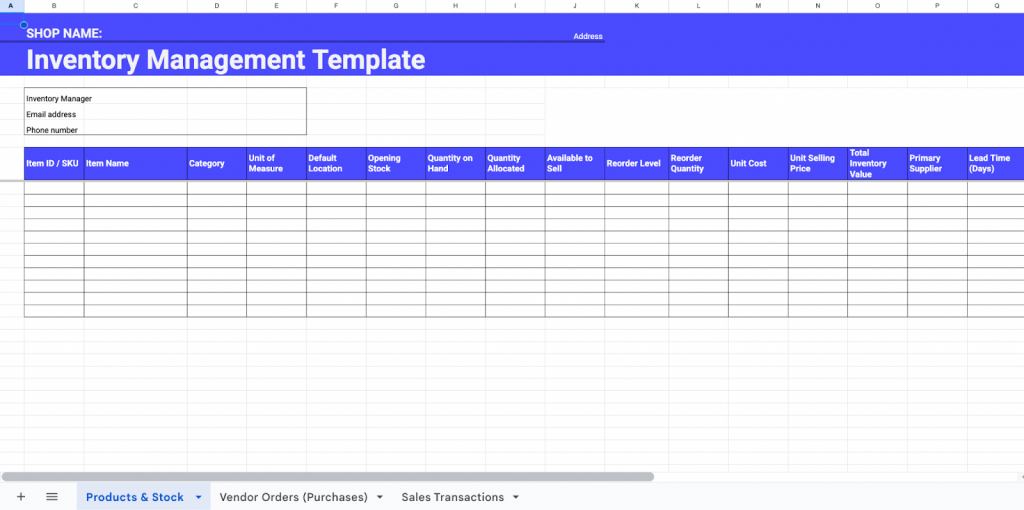
This inventory Excel template helps you organize products, track stock levels, and monitor purchases and sales in one streamlined Excel file. It’s about giving you a clear view of what you have, what you need, and what’s running low, all without complex software.
With built-in logic and clean structure, you can easily prevent stockouts, calculate inventory value, and manage supplier activity. It’s a flexible system that improves accuracy, reduces manual errors, and supports smarter stock decisions.
What’s inside the template:
- Products & Stock sheet, which has the main database where you track every SKU, quantity, cost, and reorder level.
- Vendor Orders (Purchases) sheet to record purchase orders, incoming quantities, and supplier delivery details.
- Sales Transactions sheet to log outgoing stock, sales amounts, and margins.
Best for small businesses, retail shops, warehouse teams, or beginner sellers who want a complete yet simple Excel-based inventory system.
Download the free template now!
Inventory list with reorder highlighting template
This Microsoft-built template provides a fast, simple way to track your inventory and instantly spot low-stock items using automatic color-coded reorder alerts. It’s about maintaining a clear list of items, quantities, and reorder levels without extra sheets or complex formulas.
Because it uses Microsoft’s built-in conditional formatting, you save time, reduce stockout risk, and get a clean interface that’s already optimized for real-world use, no setup required, and no Excel expertise needed.
What’s inside the template:
- Inventory List sheet includes item name, description, unit price, quantity, reorder level, and automatic reorder highlighting.
- Built-in Conditional Formatting highlights any item that falls below its reorder threshold.
- Auto-Calculated Values calculates the inventory value without needing extra formulas.
Best for perfect for beginners, small shops, or anyone who wants a quick, plug-and-play inventory list with reorder alerts.
Download the free template now!
Warehouse inventory template
This warehouse inventory template helps you keep track of storage locations, quantities, and item movement inside your warehouse. It’s about giving you clear visibility across bins, aisles, shelves, and stock levels so you can reduce misplacements and improve picking accuracy.
With built-in Microsoft formatting, you get reorder alerts, well-organized fields, and a structured layout that’s ready to use. This warehouse Excel inventory template helps streamline workflows, reduce counting errors, and maintain consistent and accurate warehouse operations.
What’s inside the template
- Warehouse Inventory sheet to track SKU, item name, description, bin location, stock quantity, and reorder alerts.
- Built-in Microsoft Formatting includes conditional highlights for low stock.
- Clean Layout sheet, which is optimized for quick scanning and physical stock counting.
Best for warehouse teams, fulfillment centers, storage facilities, or any business managing physical shelves and bins.
Download the free template now!
Stock inventory template
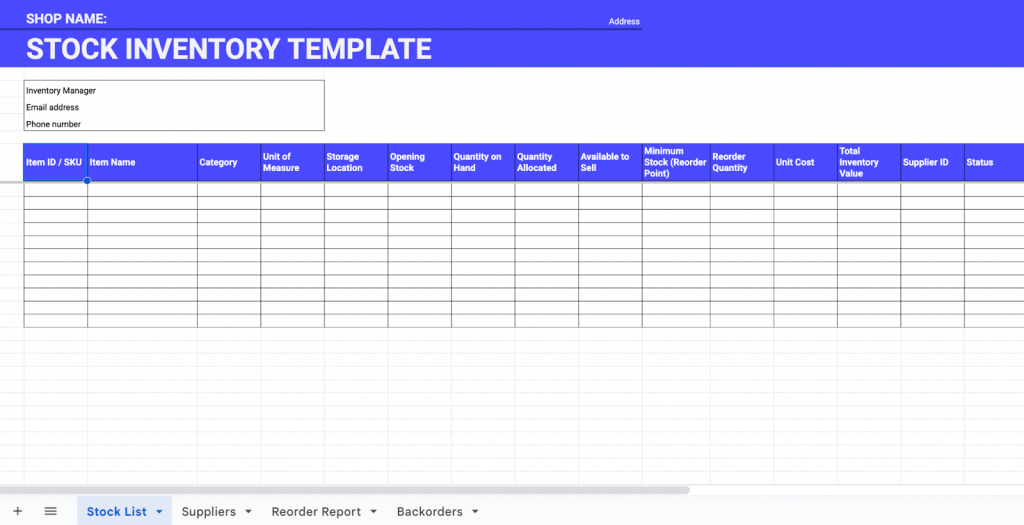
This stock inventory template helps you track daily stock quantities, monitor inventory value, and identify when it’s time to reorder. It’s about organizing your product list with clear fields for quantity, cost, reorder level, and supplier details so you reduce shortages and avoid overstocking.
This Excel inventory template gives you the accuracy you need for smooth inventory flow. This template benefits small businesses by improving visibility, reducing manual work, and ensuring stock stays balanced.
What’s inside the template
- Stock List sheet, which includes the primary inventory database with SKUs, quantities, locations, and cost details.
- Suppliers sheet that has the store vendor contact information, lead times, and purchase terms.
- Reorder Report automatically generates items needing replenishment.
- Backorders track orders that cannot be fulfilled immediately.
Best for retail stores, small warehouses, or business owners who need a detailed but manageable stock tracking system.
Download the free template now!
Office supplies inventory list template
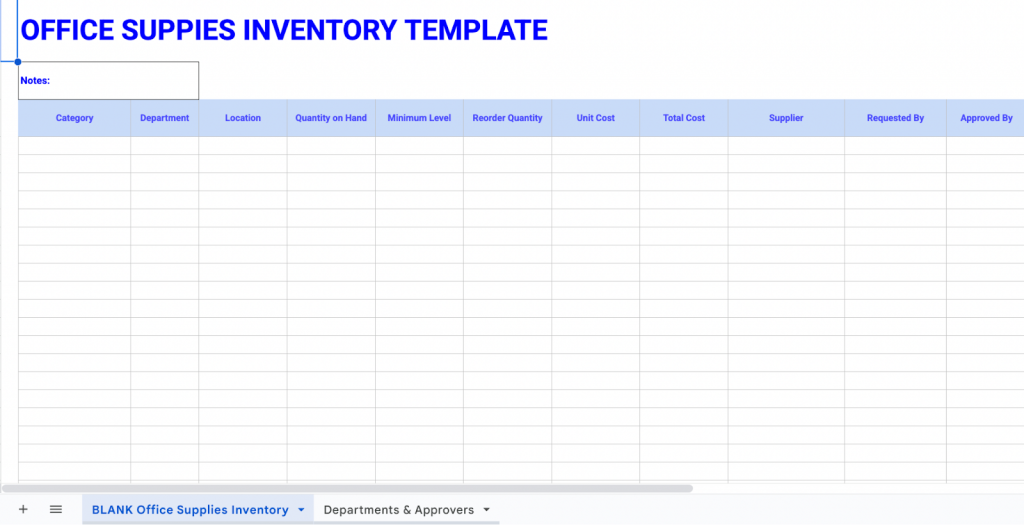
This office supplies inventory list template helps you monitor office materials, track consumption, and ensure essential items never run out. It’s about keeping your workplace organized by logging supplies, locations, quantities, and reorder details in one clean Excel sheet.
With clear categories and approval fields, this inventory tracking Excel template improves purchasing efficiency and prevents delays caused by missing supplies.
What’s inside the template:
- Office Supplies Inventory sheet to track all items, quantities, departments, and reorder thresholds.
- Departments & Approvers sheet maps each department to its designated approver and budget details.
Best for individuals and organizations with shared supplies, or workplaces aiming to reduce overspending and maintain well-organized supply rooms.
Download the free template now!
Personal asset inventory template
This personal asset inventory template helps you list and track the value of your belongings and financial assets in one organized Microsoft Excel sheet. It allows you to document property, savings, bonds, vehicles, and other valuables to clearly understand your total net worth.
With Microsoft’s built-in charts and clean structure, you can quickly visualize asset distribution. This Excel inventory template offers major benefits, including financial clarity, easier insurance documentation, and better long-term planning.
What’s inside the template
- Personal Assets Sheet lists categories like home, car, savings, stocks, bonds, and other valuables.
- Built-in charts automatically visualize asset allocation.
- Microsoft formatting uses ready-made formulas and layouts.
Best for individuals or professionals who want to track their net worth, organize valuables, or prepare financial information.
Download the free template now!
Food inventory template
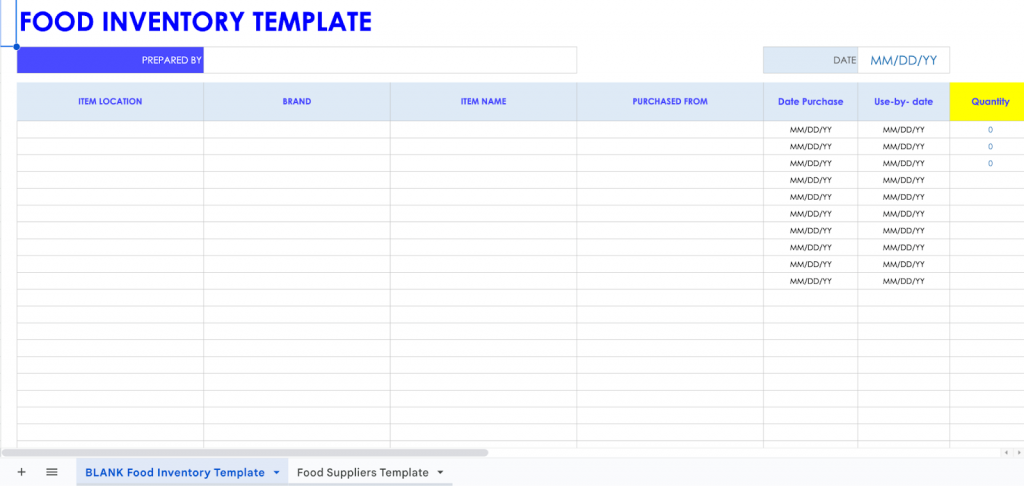
This food inventory template helps you keep track of food items, storage locations, expiration dates, and reorder needs. It’s about organizing pantry or kitchen inventory to reduce waste, avoid expired products, and maintain consistent supply levels.
With categorized fields for food type, current stock, and suppliers, this Excel inventory template supports efficient planning and cost control. It benefits kitchens, chefs, and household managers by improving visibility, reducing spoilage, and making meal preparation more predictable.
What’s inside the template:
- Food Inventory sheet to track food categories, storage types, quantities, expiry dates, and costs.
- Food Suppliers sheet to stores vendor details, delivery schedules, and pricing information.
Best for restaurant owners and food-service sellers who need structured food inventory control and better expiration management.
Download the free template now!
Restaurant inventory template
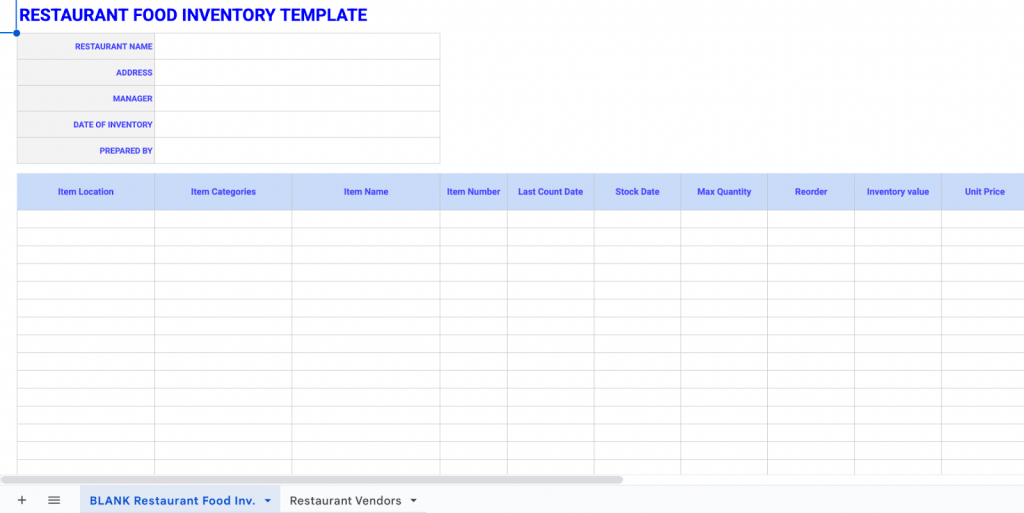
This Excel inventory template helps you keep daily control over food ingredients, storage locations, preparation items, and menu-critical stock. It focuses on giving restaurants clear visibility into par levels, expiration dates, and ordering needs, helping kitchens operate more efficiently and avoid service disruptions.
It’s about creating a structured system that allows chefs and managers to track exactly what is in the walk-in, fridge, freezer, and dry storage. With organized categories, supplier details, and cost information, this template reduces waste, supports accurate forecasting, and improves cost management throughout your kitchen operations.
What’s inside the template:
- Restaurant Inventory sheet to track food types, storage areas, quantities, par levels, cost, and expiry information.
- Restaurant Vendors sheet to track stores’ supplier information, delivery frequency, contact details, and ordering terms.
Best for restaurant owners and food-service sellers who need tight control over ingredients, stock rotation, and menu-critical items.
Download the free template now!
Bar inventory template
This bar inventory on the list of Excel inventory template helps you track all bar products, including liquor, wine, beer, mixers, and specialty beverages, with clear visibility into usage and cost. It focuses on giving your bar team a reliable method to monitor pouring accuracy, shrinkage, and restocking needs, ensuring your best-selling items never run out.
It’s about maintaining a structured record of bottle sizes, stock counts, sales activity, and reorder points. With cost, retail price, and margin calculations built directly into the sheet, this template supports better profit control and helps bar managers understand product performance and ordering cycles.
What’s inside the template
Bar Inventory sheet that captures product category, bottle size, starting/ending counts, usage amounts, cost, pricing, and margins.
Best for bar owners, sellers who want accurate liquor counts, stronger cost control, and better visibility into top-moving product.
Download the free template now!
IT inventory template
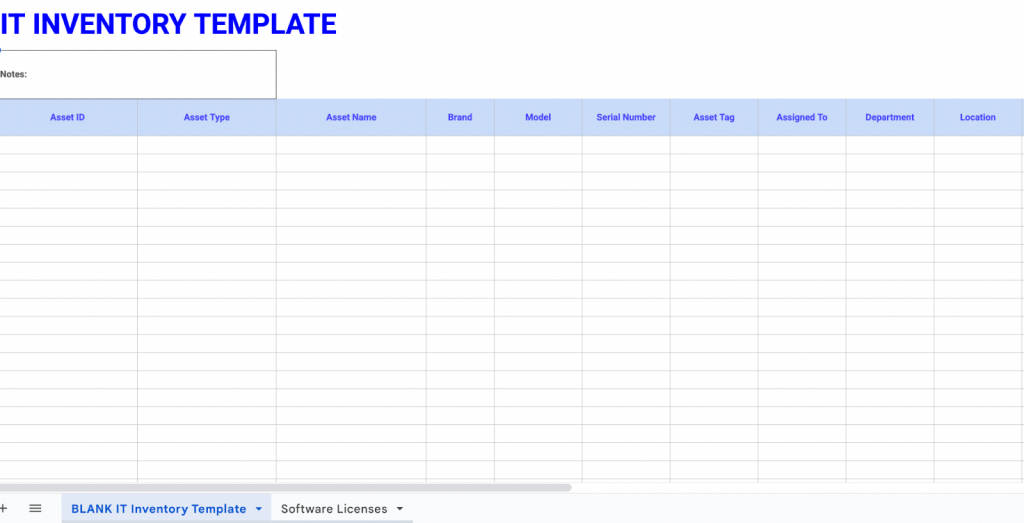
This IT inventory template helps you track hardware, software, licenses, and digital assets across your organization. It provides IT teams with complete visibility into device assignments, warranty dates, models, serial numbers, and locations, reducing equipment loss and improving accountability.
It’s about creating a centralized system that supports better lifecycle management and smoother audits. With fields for asset status, renewal dates, and seat usage, this template helps IT departments manage costs, optimize upgrades, stay compliant, and avoid last-minute renewals or system interruptions.
What’s inside the template
- IT Assets (Hardware & Devices) sheet to log equipment details such as model, serial number, assigned user, location, warranty, and purchase dates.
- Software Licenses sheet to track license keys, seat counts, renewal periods, and software ownership information.
Best for IT departments and organizations with multiple devices or software tools.
Download the free template now!
Retail clothing inventory template
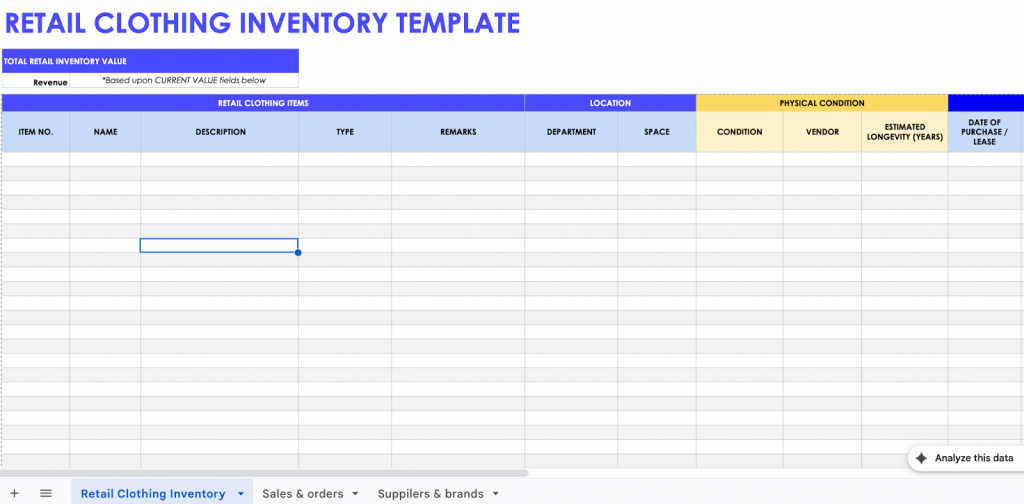
This retail clothing inventory template Excel helps you manage apparel products across sizes, colors, styles, and seasons. It offers a clear way to track variants, stock levels, pricing, and inventory value, ensuring you always know which items are selling and which need replenishment.
It’s about creating a detailed product matrix that supports faster ordering and prevents stockouts. With structured fields for style codes, sizes, colors, sales activity, and supplier information, this template helps fashion businesses optimize inventory, reduce dead stock, and understand customer purchasing patterns more effectively.
What’s inside the template
• Product Variants sheet to track each unique product combination, including style, size, color, stock, and value.
• Sales & Orders sheet to record sales activity, channel information, quantities sold, and revenue.
• Suppliers & Brands sheet to stores vendor information, brand associations, lead times, and payment terms.
Best for boutique owners, apparel retailers, marketplace sellers, and fashion brands managing multiple variants like size, color, and style.
Download the free template now!
Besides tracking inventory with an Excel file, you can explore a variety of inventory management apps for more efficient stock tracking at:
5 Steps to Set Up a Smart Excel Inventory Template Tracking
Setting up your inventory template the right way helps you track stock accurately, reduce errors, and quickly spot issues. Here are the five essential steps to turn a simple spreadsheet into a smart, reliable inventory system.
Use filters and sorting
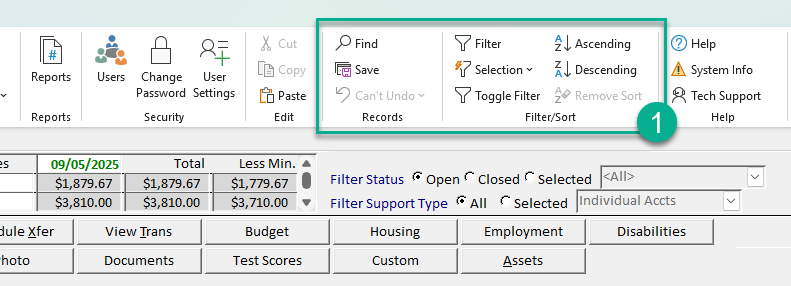
The first step you should take when setting up your inventory template is to enable filters and sorting on your header row.
This lets you instantly sort or filter items by category, supplier, location, or stock level. You can quickly spot low-stock products or find specific items without scrolling through hundreds of rows.
Follow this guide to set up filters on your Excel inventory template:
- Click and drag to highlight the entire range you want to filter
- Go to Data > Filter
- Click the dropdown arrow in the column you want to filter
- Check or uncheck boxes next to values to display only the rows you want.
Don’t forget to freeze your header row to keep labels visible, and always sort using structured fields to avoid breaking your data. Filters keep your inventory clean, searchable, and easy to manage as it grows.
Apply data validation
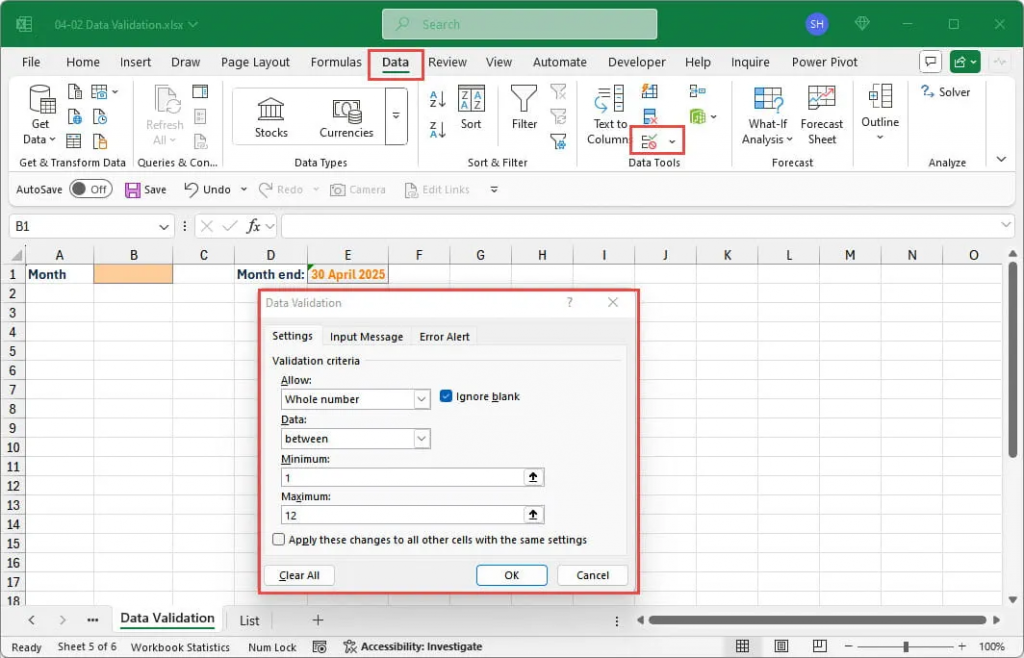
Next, set up dropdown lists to keep your data consistent. Go to Data, then choose Data Validation, choose List and create dropdowns for Category, Supplier, Location, and Status.
Store all your list options on a separate “Settings” sheet so you can update them whenever your business changes. This step helps you avoid typos or mismatched entries, so you won’t end up with “warehouse,” “Warehouse,” and “Ware House” appearing as three different locations. With validation, your reports and filters stay accurate and reliable.
Implement conditional formatting
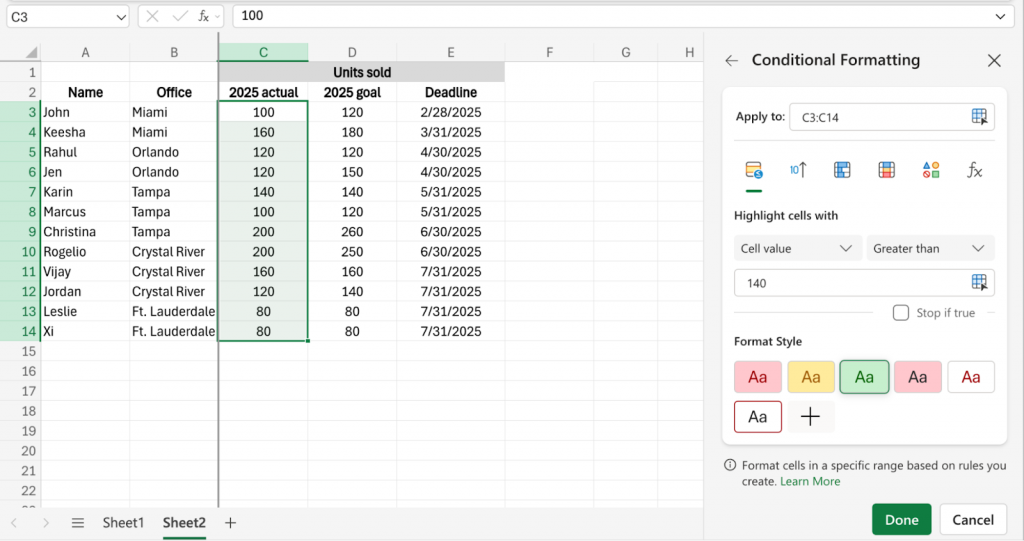
You can also use conditional formatting to highlight important inventory changes automatically. For example, set rules that mark products in red when Quantity < Reorder Level, or highlight items past their expiry date using TODAY().
Go to Home, click Conditional Formatting, choose a rule type, and use formulas like =B2<C2,then click OK to apply.
These color-coded signals help you instantly spot issues, so you can reorder products before running out or remove expired items before they affect customer satisfaction.
Utilize Excel formulas
This is one of the most powerful tips to make your Excel inventory template smarter. Instead of calculating everything manually, you can automate key processes using these formulas on your spreadsheet:
- Total Value: =Quantity * Unit Cost
- Reorder Alert: =IF(E3 <= 20, “REORDER”, “”)
- Category Totals: =SUMIFS(QuantityRange, CategoryRange, SelectedCategory)
- Product Lookup: =XLOOKUP(ItemID, Items!A:A, Items!B:B)
These formulas help you track inventory value, get instant low-stock warnings, and pull product data across sheets. Before you start using them daily, run a few tests with sample items to make sure every calculation works the way you expect.
Create basic charts
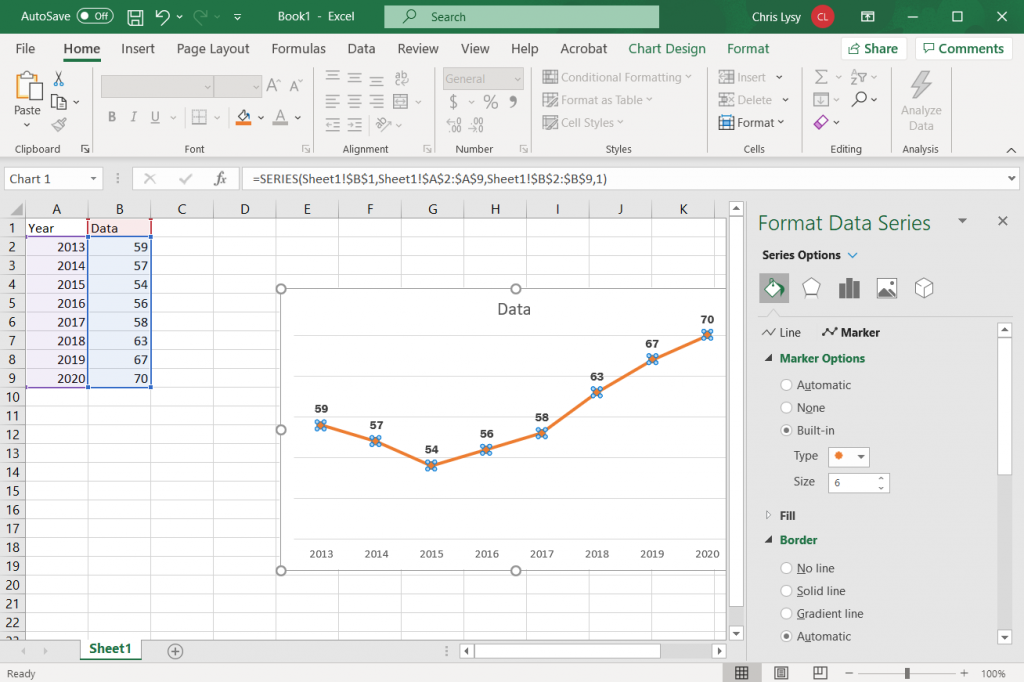
Finally, you can turn your data into visual insights. Now, go to Insert on the Excel Ribbon, choose the chart type you want from the Charts group to generate graphs that show stock levels by category, total inventory value, or the number of items running low. Then, use the Chart Tools to customize charts’ colors, style, and so on.
If you format your data as a table, your charts will refresh automatically whenever you add or update products. You can even add slicers for categories or suppliers to create a simple dashboard.
Common Mistakes People Make with Excel Inventory (and How to Avoid Them)
Even though an Excel inventory template is a great starting point for managing your stock, many sellers encounter avoidable issues. Here are the most common mistakes and how you can prevent them to create the best Excel inventory template with formulas:
- Skipping validation and filters: Without dropdowns and filters, your data becomes inconsistent, full of typos, and difficult to sort or analyze. The seller should always set these up first.
- Creating overly complex formulas or macros: Advanced formulas are tempting, but they can be hard to maintain. You should keep formulas simple and scalable to avoid broken logic as your inventory grows.
- Ignoring backups and version control: Spreadsheets can be overwritten, lost, or corrupted. Always save a master file and create regular backups, preferably in the cloud.
- Having multiple “master” copies: Storing different versions across desktops, shared drives, or email leads to fragmented and outdated data. So, it’s better to stick to one master file.
- Do not test with sample data: Before going live, test filters, formulas, and formatting with a few sample entries to ensure everything works as expected.
- Leaving blank or irrelevant columns: Unused columns clutter your sheet and make it harder to manage. So, remove or hide any fields you don’t need for a cleaner template.
By avoiding these common mistakes, you can keep your Excel inventory template accurate, organized, and easy to manage.
Why Choose the LitCommerce Tool Over an Excel Inventory Template
If you want a simple, centralized way to manage inventory without juggling multiple spreadsheets or doing constant manual updates, LitCommerce’s multichannel selling tool is the solution. This tool helps you easily list products, manage inventory on multiple platforms at once.
With LitCommerce, you can:
- Map your file headers to LitCommerce default fields automatically with AI, ensuring your products meet the platform’s requirements.
- Identify missing or mismatched data instantly before your products go live on any sales channels.
- Set automatic syncs daily, weekly, or hourly to keep listings fresh & accurate.
- Edit listing information in bulk for thousands of SKUs in a single click.
- Sort and group items using advanced filters before publishing so you control what gets listed and where.
- Set up your entire workflow quickly using just a file, no technical skills needed.
Automate Your Inventory Management Using LitCommerce
Our file integration feature helps you sell and manage your inventory effectively on multiple channels. Giving you time to focus on growth, not spreadsheets!
Inventory List Template Excel: FAQs
How do I make an inventory in Excel?
Follow these steps to make an inventory in Excel using a template:
1. Open Excel and go to File > New.
2. Search for “inventory” in the search bar and press Enter.
3. Browse and select a template that fits your needs and click Create.
4. Edit the template by changing column headers, adjusting formatting, and entering your specific inventory data.
Or you can make a template from scratch:
1. Create a new sheet and add headers like Item Name, SKU, Category, Unit Cost,
2. Quantity, Reorder Point, and Total Value.
3. Fill in your products and stock details.
4. Use a formula (Quantity × Unit Cost) and format as currency.
5. Bold headers, adjust columns, freeze top row, and convert to an Excel Table.
Is there a free inventory sheet template?
Yes, numerous free inventory sheet templates are available for download from various websites in formats like Excel and Google Sheets. These templates range from simple lists for small businesses to more complex ones that can track costs, reorder points, and even include dashboards. You can find the 11 best free Excel inventory templates on this blog.
What Excel formula is used for inventory?
Common Excel formulas for inventory include COUNTIF/COUNTIFS to count items based on one or multiple criteria, SUMIF/SUMIFS to total quantities or values by condition, and VLOOKUP/HLOOKUP to quickly find product details within large tables. These formulas help track stock efficiently and reduce errors.
How to track inventory for free?
You can track inventory for free using digital spreadsheets like Excel or a Google Sheets inventory template to manage your inventory at no cost. The best method depends on your specific needs, such as the number of items, the need for mobile access, or the integration with other business tools.
And if you outgrow spreadsheets, the LitCommerce multichannel selling tool offers an easier, automated way to manage inventory across multiple channels.
Simplify Your Stock Tracking with an Inventory Excel Template!
An Excel inventory template makes inventory management simple, flexible, and accessible for sellers of all sizes. By organizing your stock, tracking key details, and using built-in formulas or pre-designed templates, you can save time, reduce errors, and make smarter restocking decisions.
Whether you customize a template or use one of the 11 well-structured Excel Inventory Templates featured in this blog, they will help you manage inventory smoothly and keep your business running efficiently.
For more tips and resources, check out our Blog or Contact Us anytime. We’re always here to support you.