

Mobile apps are one of the most powerful ecommerce retention tools. They put your brand on your best customers’ home screen, and unlock a new, high-ROI direct marketing channel with push notifications.
But building an app can be expensive. Worse, it can be complicated, with operational overhead that drags your team’s productivity down.
The good news? If you’re like any successful Shopify brand, you’ve already invested a lot into building a fast, mobile-friendly storefront. And you can cut the investment required to launch your own mobile app significantly by simply converting your existing Shopify site into an app.
That’s what we’re going to explore in this article. Keep reading to learn the best way to turn your Shopify website into a high-quality native mobile app.
What Does It Actually Mean to “Convert” a Shopify Store Into an App?
Often, launching a mobile app means building something new from scratch.
Whether you hire a development team to code custom native apps, or use a no-code Shopify mobile app builder, the result is a separate codebase, a separate platform… essentially a separate storefront.
This is inefficient, considering the work you’ve already put into building the perfect website.
Converting your Shopify site into an app means just that – converting what you’ve already built, instead of building it all over again.
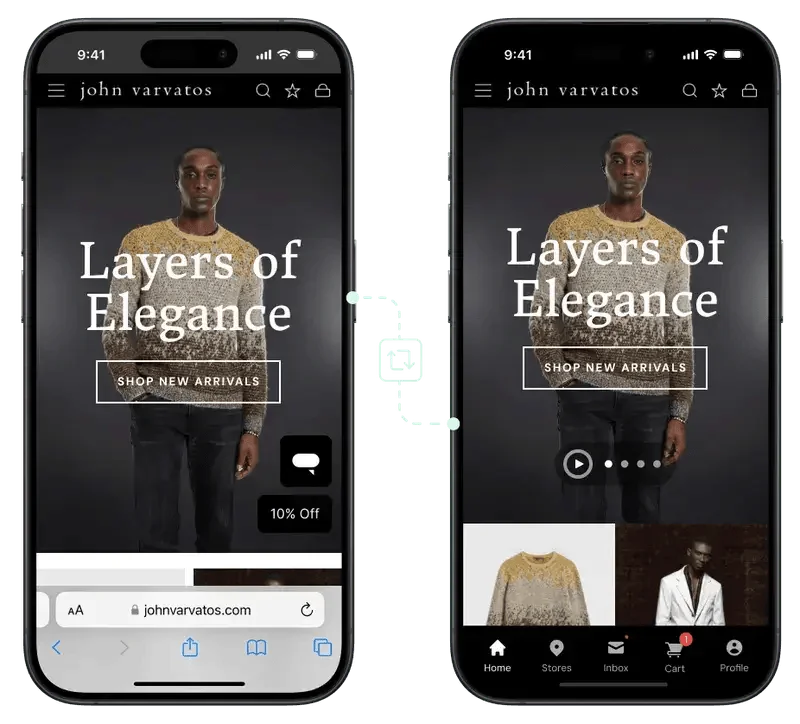
Example of a true “website to app conversion”.
In other words:
- Same layout
- Same design & branding
- Same features, integrations & engagement tools
You retain all the best parts of your website, adding native elements (tab bar, navigation, push notifications) on top.
It’s about extending your website; not rebuilding it.
How to Turn a Shopify Store Into an App
Broadly speaking, there are three ways to create a mobile app for your Shopify store. All three could loosely be described as “turning your Shopify store into an app”. But there are big differences in how direct and efficient each option is, as well as the investment (money and time) each requires.
Let’s break down the options now.
Option 1: DIY Shopify App Builders
There are dozens (by the time you’re reading this, possibly hundreds) of apps in the Shopify App Store that can build a mobile app for your store.
You install it from the App Store, and use their drag-and-drop builder to compile your app’s layout, and publish it to Apple/Google Play.
The app builder syncs your products and collections, and carries over some of your other third-party apps and integrations. But there are likely to be feature gaps between your app and website.
The case for DIY builders
- Fast time to launch
- Relatively low upfront cost
- Extensive control over your mobile app’s UI
The tradeoffs
- Template constraints – the pre-built layouts and blocks of these builders make it hard to fully replicate your site’s design and layout
- Not all the apps you use on your site will be compatible with your mobile app
- You may spend a lot of time building and maintaining your app
- There can be sync issues, leading to app users seeing an outdated version of your storefront
DIY Shopify mobile app builders allow you to build a solid mobile app, for much less than it costs to build a fully custom native app.
You can go live in just a few weeks, for a cost of around $500-$1000 (with the same as an ongoing monthly cost).
The key is to understand the tradeoff. On the plus side, you have more freedom to customize your app separately from your website. If you want to build a unique, differentiated UX in your mobile app, this option is the way to go.
But the cost is more work to maintain your app – you’re now managing two separate storefronts. There are also going to be inconsistencies between your mobile website and mobile app, and a feature gap which can lead to app users getting a worse experience than website visitors (which is not a good omen for app adoption).
Option 2: Custom Mobile App Development
This is the traditional agency route. You hire a team to build apps for iOS and Android from the ground up, using fully native code (Swift, Kotlin, Java) or cross-platform frameworks like React Native.
Developers build a completely new frontend that connects to your backend via Shopify’s API, to pass data like products, pricing, and collections to your mobile app.
The case for custom development
- Control over every pixel of your mobile app
- Highest level of speed and performance
The tradeoffs
- High cost: custom builds typically fall in the $150K-$450K range
- A long development timeline (generally a bare minimum of six months before you see a first version of your app)
- Significant ongoing maintenance (which can end up costing six figures per year, just to keep your app bug-free and up to date)
The common perception is that, if you want your own mobile app, you need a custom-coded native app. This is probably the reason why so few brands (only 4.5% of Shopify brands doing $1M+ per year) have a mobile app.
But today, with the no-code tools and managed website to app services that exist, there’s very little reason for an ecommerce store to build a custom app.
The initial investment and ongoing cost of ownership are both far too high, just for performance gains that your customers are unlikely to notice.
Option 3: Website-to-App Conversion Services
The third option is using a tech-enabled service like MobiLoud that converts your store into a mobile app.
The idea is as we discussed – instead of building a brand new mobile app that lives separately from your website, you launch an app that’s an extension of your website.
Your website is the foundation of the app. You manage the UI, layout, functionality through your website, and the app updates automatically whenever your website does.
The app has the look and feel of a real mobile app, but you’re essentially only managing one codebase.
The case for website-to-app services
- Much faster, more efficient path to market
- Low cost (more or less the same as a DIY builder)
- Much easier to manage (you only have to maintain one platform)
- Full consistency between your website and mobile app, by default
The tradeoffs
- Less flexibility to differentiate your app and web UX (it is possible, but not ideal if you want a completely separate layout)
- Minor drop in performance and native capabilities vs custom development (but unlikely to be noticeable)
The choice comes down to how unique and “custom” you want your app to be.
If you have a completely different vision for your app compared to your website, you’ll want to turn your Shopify store into an app with a tool that gives you more control (at the cost of efficiency).
Most brands will find they don’t need this, though. They just want the same tested and optimized layouts from their website, carried over to the app.
If your brand is in this bucket, a website to app conversion service (like MobiLoud) is the best way to convert your Shopify store into an app.
How Long Does It Take to Turn Your Website Into an App?
Time-to-market is a key piece to consider – the sooner you see the impact of your app, the better.
Here’s how it breaks down for each option:
- App Builders: Typically 2-4 weeks. The launch time can vary, though, depending on how long it takes to get your app “perfect”.
- Custom Builds: Minimum 6 months. Custom app development takes a long time, and that’s if everything goes to plan. It can easily be a year or longer before you go live.
- Website-to-App: ~4 weeks. The process is managed for you, and it’s a much more predictable path to launch, because you’re not building anything new; just converting what already works.
How Much Does It Cost?
Of course, cost is a major factor as well. The more affordable the app, the easier it is to make a profit from your new channel.
Keep in mind that the launch cost isn’t the only thing to consider. Any app takes regular work to maintain and update, so it’s never a “one and done” project that you pay for upfront and don’t have to worry about again.
- App Builders: $500-$1K (monthly). Costs vary depending on the tool, the kind of features you need. This isn’t including labor costs, however – you should factor in the cost of you or your team’s time as well.
- Custom Builds: Minimum $50K upfront. The cost can vary wildly though, sometimes as much as $500K. You should budget a minimum 15-20% of the original cost as a yearly cost for maintenance as well.
- Website-to-App: $500-$1K (monthly). This depends again on the specific features you need, but the subscription cost is generally the same range as a DIY app builder. The difference? Less time (and thus money) spent on maintaining the app.
What You Need Before Turning Your Shopify Store Into an App
Whichever way you turn your Shopify store into an app, you should ensure that your website is fast, optimized and responsive before jumping into a new platform, and that your brand is a good fit and at the right stage to launch an app.
Think of this like a checklist to cover before you invest in a mobile app.
- Fast, mobile-responsive website: the majority of your mobile traffic will still come via your website. Perfect this first before moving on (as a bonus, the better your mobile site is, the easier it will be to turn it into an app).
- Mobile traffic: it goes without saying, but mobile apps are best suited if you get a lot of traffic and sales on mobile. Most ecommerce sites get 60%+ of their traffic via mobile, but if your audience is desktop-first, an app may not have much of an impact.
- Regular customers & repeat purchase potential: apps are best suited for brands with medium to high purchase frequency. Apps rarely drive first purchases, but they’re great for driving the third, fourth and tenth purchases. If your brand is the type where most customers only buy once, it may not be the best fit.
- Relatively mature brand: if you’re a new brand, with a small customer base, there are likely better growth opportunities out there. Focus on scaling acquisition until you’re doing around $1M+ in annual revenue.
The key is to look at a mobile app as the next step for your brand. Focus on making your mobile website as good as it can be first. Grow repeat sales with email and SMS, and expand to TikTok, Google Shopping, Amazon, and more to grow your reach.
Ready to Scale Beyond Your Shopify App?
Turning your Shopify store into an app improves mobile experience, but sales growth needs more. LitCommerce helps you list, manage, and advertise on Amazon, Etsy, TikTok Shop, and more, all in one dashboard!

Once you start to see momentum, particularly in terms of repeat customers coming back and buying regularly, it’s time to launch a mobile app to make the repeat buying experience easier and more convenient.
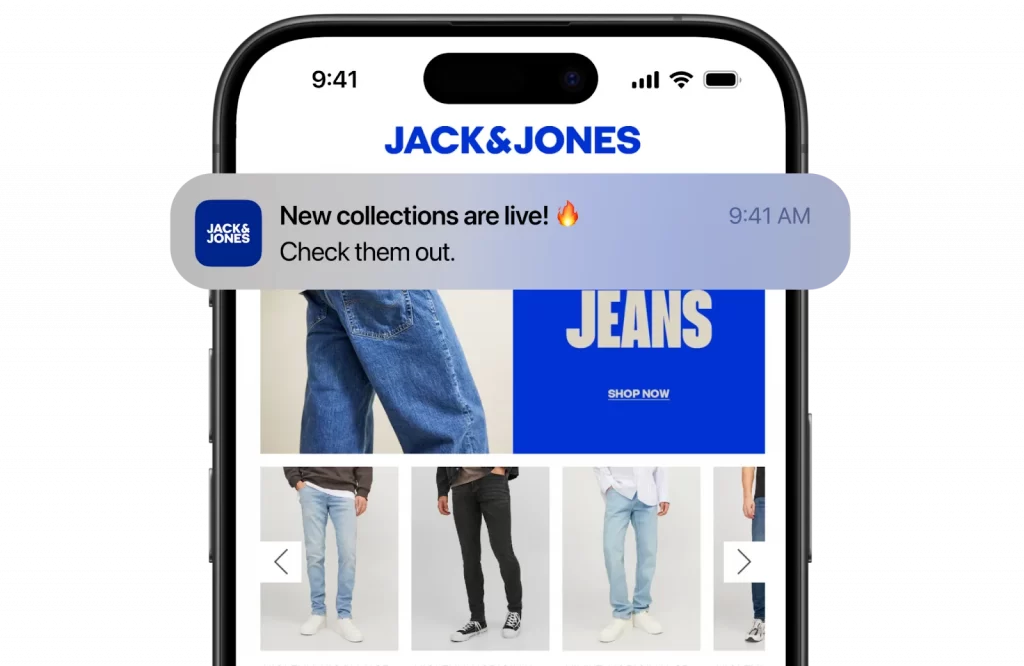
Native push notifications are one of the key reasons why launching your own app makes sense.
Turning your Shopify store into a mobile app is especially effective when paired with social commerce channels like TikTok. If you’re planning to drive app installs or product discovery through short-form video, this beginner guide on selling on TikTok with Shopify shows how to set up TikTok as a high-converting traffic source.
Final Thoughts
Launching a mobile app can be a big project. Big enough that it scares off a lot of brands, who know the value that a mobile app could have for their business, yet feel like it’s out of reach.
The good news? If you’re a moderately successful Shopify brand, launching your own mobile app is not out of reach at all.
Converting your Shopify store into an app doesn’t have to be a six-month headache. You can go live in just a few weeks, for a cost that any growing store can afford.
We’ve laid out the options available to you, and broken them down in detail. Now it’s up to you to decide how you want to go about turning your dream of a branded native mobile app into a reality.
Also, more useful eCommerce pieces are coming out on LitCommerce Retail Blog, and feel free to contact us anytime!