
Performance Max has largely replaced Smart Shopping campaigns and now plays a major role in how Google Shopping Ads are delivered. While this automation helps scale reach and conversions, it also reduces manual control, especially when it comes to search queries. That’s where Performance Max negative keywords become essential.
Negative keywords help you exclude irrelevant searches that drain budget, lower traffic quality, and hurt performance. In this guide, you’ll learn what negative keywords are, why they matter, and how to add negative keywords to Performance Max effectively to improve campaign results.
Turn Performance Max Improvements into Real Results
Use LitCommerce’s product feed management to optimize product data across ad platforms and scale campaigns without wasting budget..

What Are Performance Max Negative Keywords?
Negative keywords are words or phrases that prevent your ads from showing when users search for those terms. Instead of telling Google who to target, negative keywords tell Google who not to target.
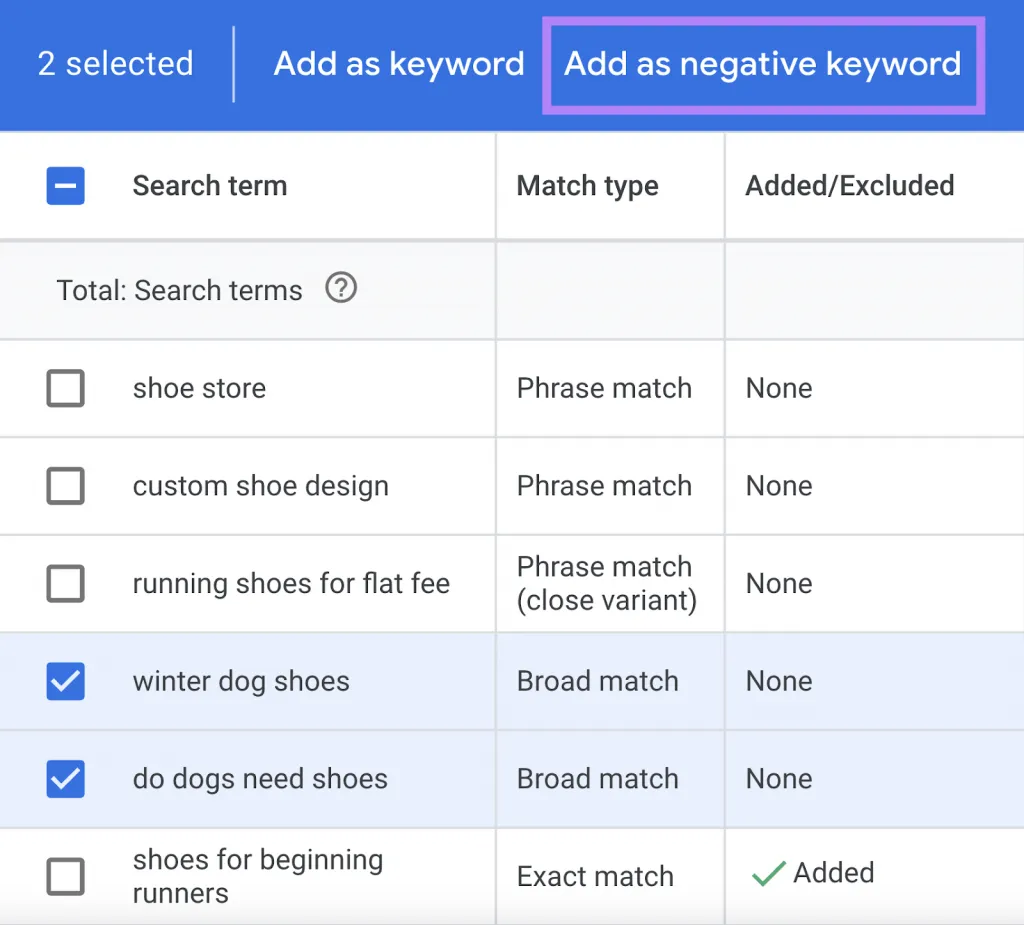
In traditional Search campaigns, advertisers have always relied on negative keywords to filter out low-intent or irrelevant traffic. For example, if you sell premium furniture, you might exclude terms like “cheap” or “free” to avoid clicks that are unlikely to convert.
The same problem exists in Performance Max, sometimes at an even larger scale.
Because Performance Max relies on automation and machine learning, Google determines which search queries trigger your ads based on signals like:
- Your product feed
- Ad assets
- Landing pages
- Audience signals
- Historical performance
While this system is powerful, it’s not perfect. Without negative keywords, your ads may appear for:
- Research-only searches
- Irrelevant product variations
- Low-intent queries
- Searches unrelated to your actual offer
Negative keywords act as guardrails. They don’t replace automation, but they help refine it by blocking clearly unqualified traffic.
It’s also important to understand their scope in Performance Max:
- Negative keywords only affect Search and Shopping placements
- They do not apply to Display, YouTube, Discover, or Gmail
- Other exclusions are required to control non-search inventory
In short, negative keywords are one of the few levers advertisers have to maintain relevance and efficiency inside a highly automated Performance Max campaign.
Check our guide on Google Shopping Ads vs Search Ads: Features, ROI & When to Use.
Benefits of Using Performance Max Negative Keywords
Using negative keywords in Performance Max campaigns is not just about blocking bad traffic. When applied strategically, they directly improve campaign efficiency, budget allocation, and conversion quality. Below are the key benefits advertisers see when negative keywords are used correctly.
Reaching a more relevant audience
The ultimate goal of any Performance Max campaign is conversions, not just impressions or clicks. Even high traffic volumes mean nothing if the users are not genuinely interested in what you sell.
Negative keywords help narrow your reach to people with clear purchase intent. By excluding searches that don’t match your products or services, you reduce exposure to users who are browsing, researching, or looking for something entirely different.
As a result, the users who do see your ads are:
- More aligned with your offer
- Closer to making a buying decision
- More likely to engage and convert
While total impressions and clicks may decrease, the overall quality of traffic improves, which is what truly drives performance.
Reducing wasted ad spend and cost-per-click
Performance Max still operates on a pay-per-click model for Search and Shopping inventory. That means every irrelevant click costs money, even if it has zero chance of converting.
Without negative keywords, your budget can be spent on:
- Informational searches
- Low-value keywords
- Unrelated product categories
- Users outside your target market
By excluding these searches, you reduce unnecessary clicks and allow your budget to focus on high-intent users. Over time, this leads to:
- Fewer wasted clicks
- More efficient budget usage
- Lower average cost-per-click
Even a small list of well-chosen negative keywords can make a noticeable difference in how far your ad spend goes.
Lowering cost per conversion
Cost per conversion is directly affected by traffic quality. When irrelevant users click your ads and fail to convert, your conversion costs increase.
Negative keywords help filter out those low-quality clicks before they happen. By limiting ad exposure to users actively searching for what you offer, you:
- Increase the likelihood of conversions
- Reduce spend on unqualified traffic
- Improve conversion efficiency
Over time, this allows Performance Max’s smart bidding algorithms to learn faster and optimize toward users who are more likely to complete valuable actions.
Improving conversion rate and traffic quality
Conversion rate is one of the strongest indicators of campaign health. Negative keywords support higher conversion rates by ensuring your ads appear only for relevant search queries.
When ads align closely with user intent:
- Users are more engaged
- Bounce rates decrease
- Conversion rates improve
- Smart bidding receives stronger performance signals
This creates a positive feedback loop. Better traffic leads to better performance data, which helps Google’s automation make smarter decisions across your campaign.
How to Add Negative Keywords to Performance Max Campaigns
Currently, the only self-managed way to add negative keywords to Performance Max campaigns is by using account-level negative keywords. These exclusions apply automatically to all Search and Shopping traffic, including Performance Max.
Account-level negative keywords apply across all campaigns that serve Search or Shopping ads, including Performance Max.
This option is ideal for:
- Universal exclusions (e.g. “free,” “jobs,” “manual,” “used”)
- Brand safety terms
- Irrelevant categories you never want to target
Step 1: Accessing account settings
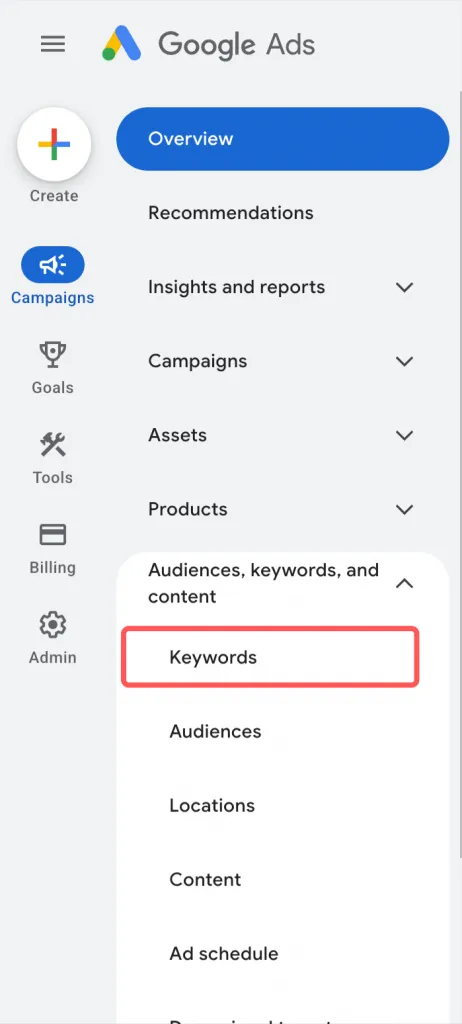
In your Google Ads account, navigate to the account dashboard and select Audiences, keywords, and content. Then choose Keywords. This area allows you to manage exclusions that apply globally.
Step 2: Creating or editing negative keyword lists
Open the Negative keywords tab.
Then, click the “+” button to add new negative keywords.
You can:
- Add keywords individually (one per line)
- You can select an existing negative keyword list
- Group them into reusable negative keyword lists
- Apply lists to a specific campaign or ad group.
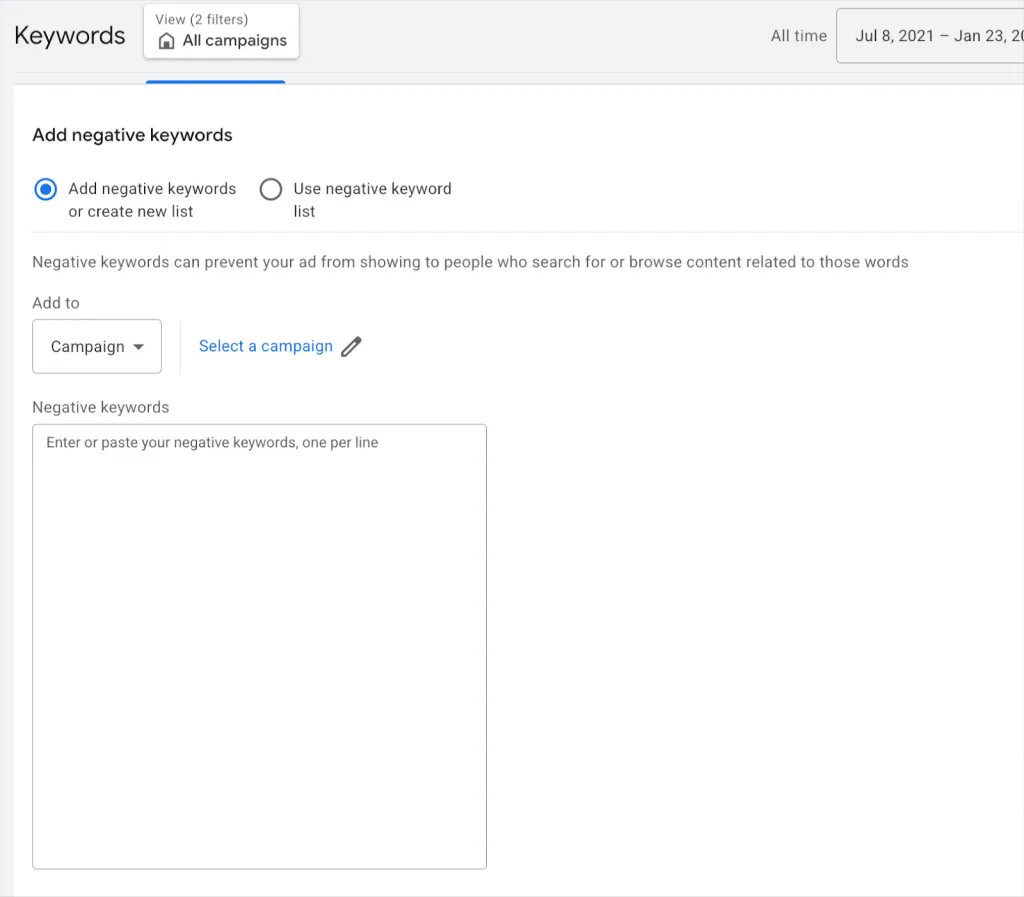
Note: You should choose match types carefully to avoid blocking relevant searches. When adding Performance Max negative keywords, the match type you choose matters just as much as the keyword itself. Using the wrong match type can accidentally block valuable traffic and limit Performance Max’s ability to find converting users.
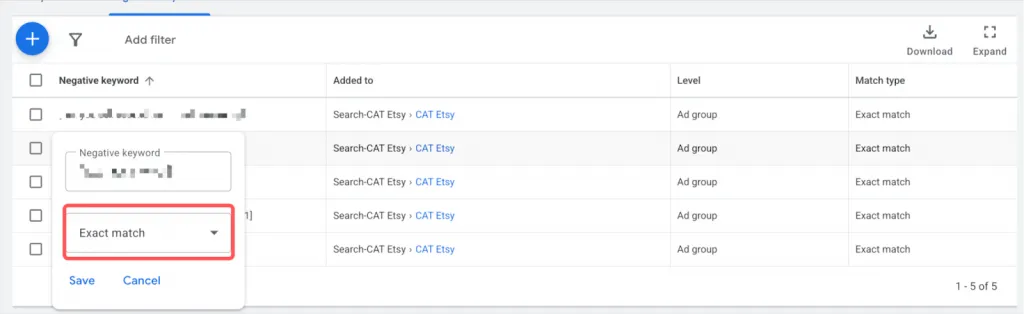
To change the negative’s keyword match types, choose Edit.
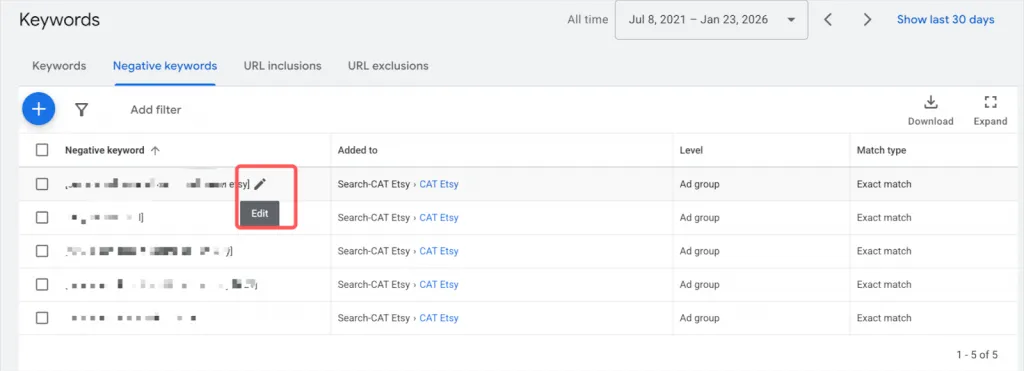
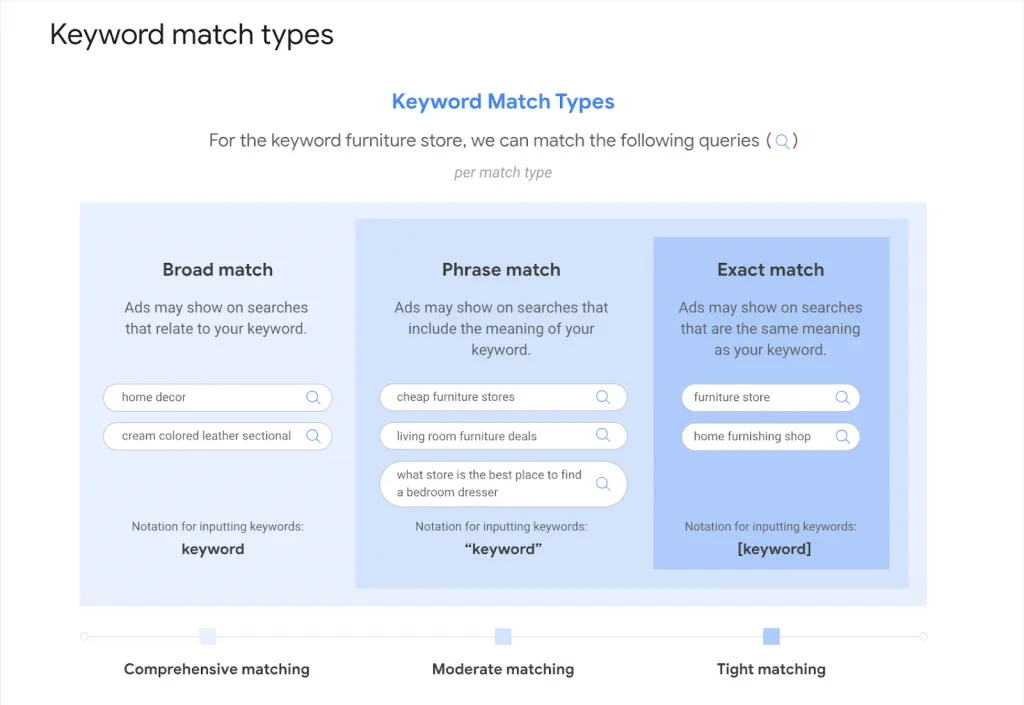
Then choose between three types of keyword match types.
1. Broad match negative keywords
Broad match negative keywords prevent your ads from showing when a search query contains all the words in your negative keyword, in any order.
Example:
- Negative keyword: free trial
- Ads will NOT show for:
- “free trial software”
- “trial free version”
- Ads may still show for:
- “trial version”
- “free software”
When to use it: Use broad match negatives for common low-intent terms that consistently bring irrelevant traffic.
2. Phrase match negative keywords
Phrase match negative keywords block searches that include the exact phrase in the same order.
Example:
- Negative keyword: “free software”
- Ads will NOT show for:
- “free software download”
- “best free software tools”
- Ads may still show for:
- “software free trial”
- “free tools for software testing”
When to use it: Use phrase match when you want more control and need to avoid blocking valuable variations.
3. Exact Match negative keywords
Exact match negative keywords block ads only when the search query matches the keyword exactly.
Example:
- Negative keyword: [free software]
- Ads will NOT show only for:
- “free software”
When to use it: Use exact match for precise exclusions, especially when a term is sometimes relevant but often low quality.
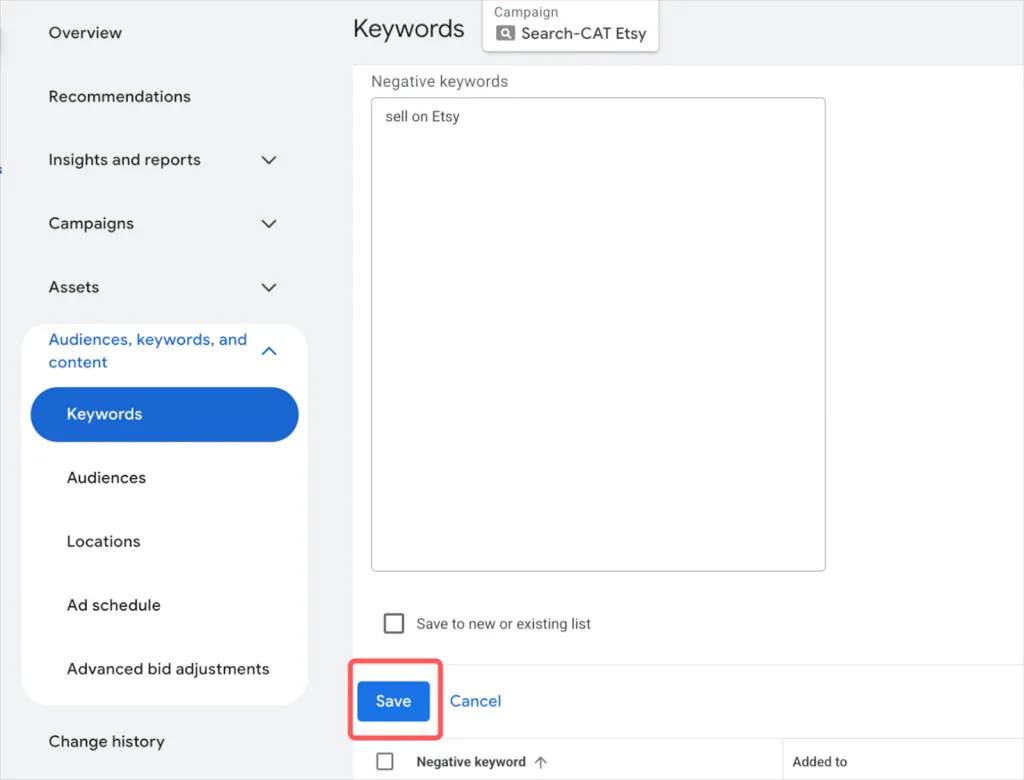
Step 3: Saving and managing your exclusions
After adding your negative keywords, save your changes. From this point on, these exclusions will apply automatically to Performance Max and other applicable campaigns.
Review account-level negatives regularly to ensure they still align with your business goals and product offerings.
Negative keywords are only one part of the equation. To fully optimize Shopping performance, you should also understand how Product Listing Ads are structured and triggered.
Best Practices For Using Performance Max Negative Keywords
Adding negative keywords to Performance Max can significantly improve Performance Max performance, but only when they are used thoughtfully. Poorly managed exclusions can block valuable traffic and slow down campaign learning. The best results come from a structured, ongoing approach.
Tip #1: Building a strong negative keyword list
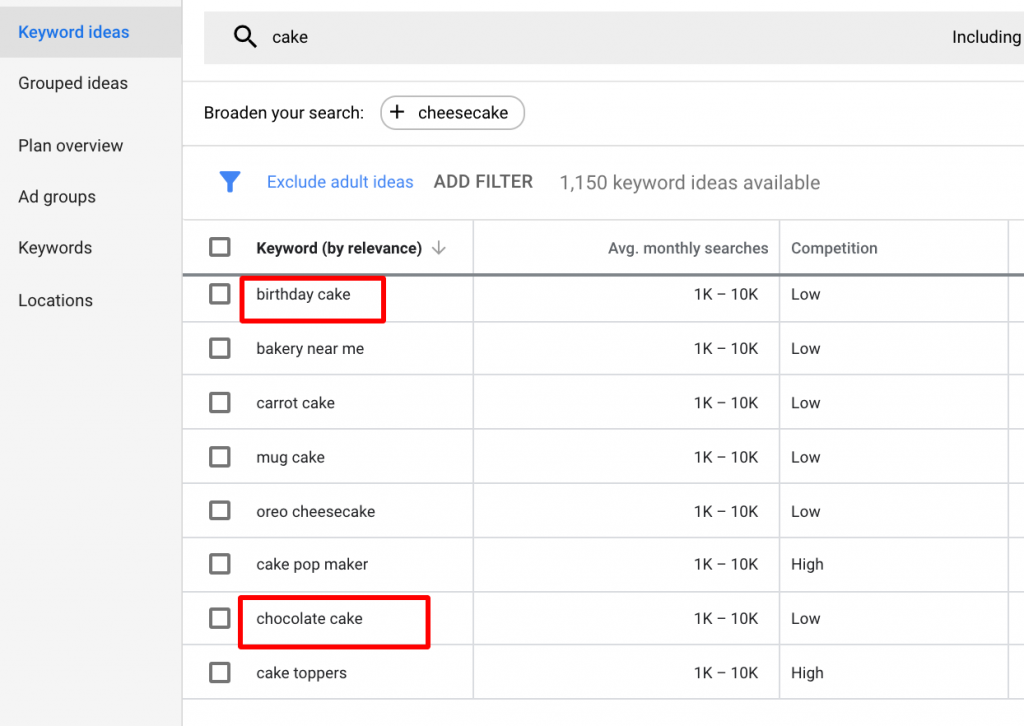
A strong negative keyword list is built over time, not all at once. Start by identifying searches that are clearly irrelevant to your business. These usually fall into a few common categories.
Products or services you do not offer
If users are searching for items outside your catalog, those clicks are unlikely to convert. For example:
- A brand selling new electronics may exclude terms like “used,” “refurbished,” “second hand”
- An online clothing store may add “tailoring,” “repair,” “alteration”
- A SaaS company may exclude “open source,” “crack,” “破解版”
Low-intent or research-focused terms
These searches often come from users who are not ready to buy:
- “free,” “cheap,” “DIY,” “manual,” “template,” “example”
- “how to make,” “how to fix,” “what is”
- “comparison,” “review,” “vs” (depending on your funnel stage)
If your campaign is focused on conversions, these terms can generate clicks without sales.
Unrelated industries or use cases
Some keywords may look relevant but attract the wrong audience:
- A company selling commercial software may exclude “student,” “homework,” “school project”
- A B2B supplier may add negatives like “personal use,” “hobby,” “small DIY”
- A furniture brand selling office desks may exclude “school desk,” “kids desk,” “classroom”
Job seekers and non-buyers
Employment-related searches are a common source of wasted spend:
- “jobs,” “career,” “salary,” “hiring,” “internship”
- “training,” “course,” “certification”
Tip #2: Adding negative keywords as soon as issues appear
When you spot irrelevant traffic, act quickly. The longer Performance Max runs without proper exclusions, the more budget is wasted and the more mixed signals the algorithm receives.
Add negative keywords as soon as you identify:
- High spend with no conversions
- Repeated low-quality search themes
- Queries that consistently lead to poor engagement
Early intervention helps steer the campaign in the right direction and protects future performance.
Tip #3: Reviewing search terms regularly
Performance Max offers limited visibility compared to Search campaigns, but available search term insights are still valuable.
Make it a habit to:
- Review search term insights weekly or biweekly
- Look for patterns rather than one-off queries
- Prioritize exclusions based on cost and lack of conversions
Regular reviews ensure your negative keyword strategy evolves alongside changing search behavior.
Tip #4: Using Broad Match for Negative Keywords
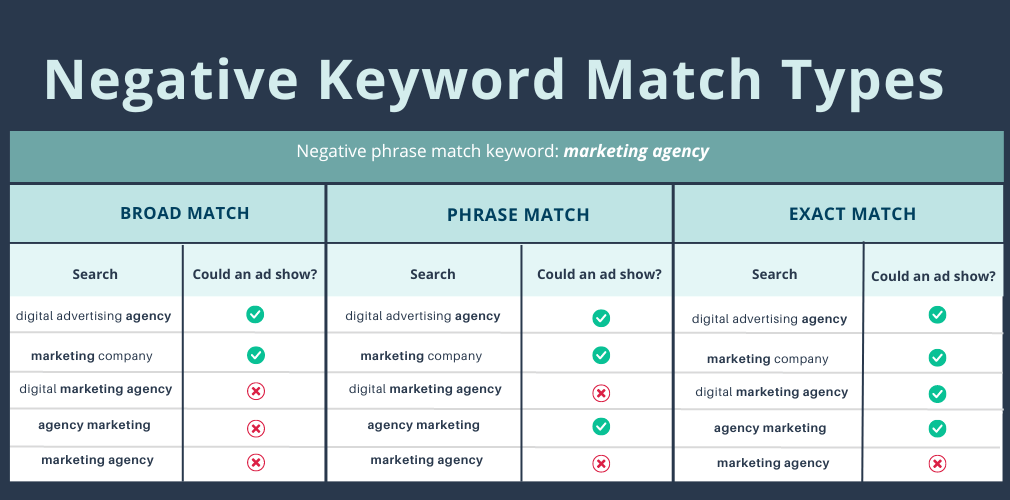
When possible, use broad match negative keywords. Broad match negatives block searches that contain all the specified words, regardless of order.
This approach:
- Covers more variations of irrelevant searches
- Reduces the need for long keyword lists
- Helps prevent similar unwanted queries from slipping through
However, use Broad Match carefully. Overly generic terms can accidentally block valuable traffic if they overlap with legitimate searches.
Tip #5: Real-world example of negative keyword usage
Imagine you run a Performance Max campaign selling gaming desks only. If your ads begin showing for searches like “school desks” or “office desks,” those users are unlikely to convert.
Adding negative keywords such as:
- “school desk”
- “office desk”
helps prevent irrelevant impressions and ensures your ads focus on users actively looking for gaming-related products.
Negative keywords are not a one-time setup. They are an ongoing optimization tool that helps refine Performance Max automation and maintain long-term campaign efficiency.
Negative keywords help prevent irrelevant traffic, but ongoing success also depends on monitoring your Google Shopping ads to catch issues early and adjust performance.
Performance Max Negative Keywords: Frequently Asked Questions
1. Can you add Performance Max negative keywords to my ad campaigns?
Yes, you can add negative keywords to Performance Max campaigns, but not in the same way as traditional Search campaigns.
Performance Max does not support full keyword-level management. Instead, negative keywords can be applied through account-level negative keywords, which affect all Search and Shopping inventory, including Performance Max. These exclusions help prevent ads from showing for clearly irrelevant search terms.
2. How do you add negative keywords to Performance Max campaigns?
The most reliable self-managed method is adding negative keywords at the account level.
To do this:
1. Sign in to your Google Ads account
2. Choose Keyword under the “Audiences, keywords, and content section”
3. Open the Negative keywords section
4. Click the “+” button to add new negative keywords
5. Choose the appropriate match type and save
Once added, these negative keywords will automatically apply to Performance Max and other eligible campaigns.
3. Do negative keywords apply to all Performance Max channels?
No. Negative keywords only affect Search and Shopping placements within Performance Max. They do not apply to Display, YouTube, Discover, or Gmail. To control those channels, you need to use placement exclusions, content exclusions, and audience signals.
4. Should I use broad, phrase, or exact match for negative keywords?
It depends on the level of control you need. Broad match negatives offer wider coverage but carry more risk. Phrase and exact match negatives provide more precision and help avoid blocking relevant traffic. Many advertisers start with phrase or exact match and expand carefully.
Performance Max Negative Keywords: Conclusion
Negative keywords play a critical role in improving the effectiveness of Performance Max campaigns. While Performance Max relies heavily on automation, it still benefits from clear boundaries that help guide Google’s algorithms toward the right audience.
By excluding irrelevant search terms, you can reduce wasted ad spend, improve traffic quality, and achieve more consistent conversion performance. Whether you add negative keywords through Google Support or at the account level, the key is to approach them strategically and review them regularly.
When used correctly, negative keywords do not limit Performance Max. Instead, they strengthen it by ensuring your ads appear only when there is genuine intent. Combined with strong feeds, accurate assets, and ongoing optimization, negative keywords help turn Performance Max into a more predictable and profitable campaign type.