

Performance Max can feel confusing until you see it in action. That is why looking at real PMax ad examples matters more than reading feature lists or theory. These ads have no fixed format, as Google automatically builds and adapts them across Search, Shopping, and other placements based on user intent.
In this guide, you will explore 7 real Pmax Performance Max ad examples across Google, so you can clearly see how they appear, why they work, and how you can apply the same ideas to your own campaigns.
What Are Performance Max Ad (PMax Ad)?
Performance Max Ad (PMax Ad) is an automated Google Ads campaign type that lets you run ads across all Google channels from one single campaign, including Search, Shopping, YouTube, Display, Gmail, Discover, and even Google Maps.
Instead of choosing individual networks like Search or Display, you provide Google with creative assets, audience signals, and conversion goals. From there, Google’s automation handles ad delivery and optimization.
In other words, Google uses machine learning to decide where and when your ads appear, as well as which combination of headlines, images, videos, and descriptions performs best.
Performance Max ads do not exist as one fixed ad format. Instead, they are dynamically assembled in real time. That means what you see as an advertiser is not always what a user sees.
Benefits of Performance Max Ads
Before diving into real Performance Max (PMax) ad examples, it is important to understand why so many advertisers are switching to Performance Max. These campaigns are designed to simplify management while expanding reach and improving results.
Here are the key benefits of Performance Max ads:
- Reach customers across all Google platforms. It’s because, with one campaign, your ads can appear on Search, Shopping, YouTube, and more. According to Google, advertisers that add Performance Max on top of existing campaigns see an average 8–27% more conversions or conversion value at a similar CPA/ROAS.
- Save time with centralized campaign management. Instead of managing multiple campaigns, you control everything from one dashboard, which makes scaling easier and more efficient.
- Use Google AI to maximize conversions. Google automatically optimizes bidding, placements, and asset combinations to drive the best results based on your goals, such as sales or leads. 12% increase in conversion value when upgrading from Smart Shopping to Performance Max at the same or better ROAS.
- Adapt ads to real user intent. Performance Max responds to search behavior, browsing patterns, and signals in real time. Shopping campaigns using PMax improved ROAS by 4% year‑over‑year while cutting CPA by 15%.
- Unlock insights you cannot get from standard campaigns. Asset-level reporting helps you understand which headlines, images, or videos perform best, allowing you to refine your strategy over time.
Performance Max ads are ideal for advertisers who want broader exposure with less manual effort. When you combine strong creative assets with clear goals, the results shown in successful Performance Max ad examples become much easier to achieve.
PMax Ad Examples by Google Placement
Because Google automatically assembles ads using your assets, the format and appearance can change depending on where users see them. Below is a clear breakdown of how PMax ad examples typically show up on each channel.
Google Search ads
On Google Search, Performance Max ads often look similar to responsive search ads. They appear at the top of search results and include dynamic headlines, descriptions, and URLs pulled from your asset group.
For an online clothing brand, a PMax ad may trigger on searches like “hotels in hawaii” or “hotels hawaii.” Google combines product-focused headlines with a clear CTA to capture shoppers with purchase intent.
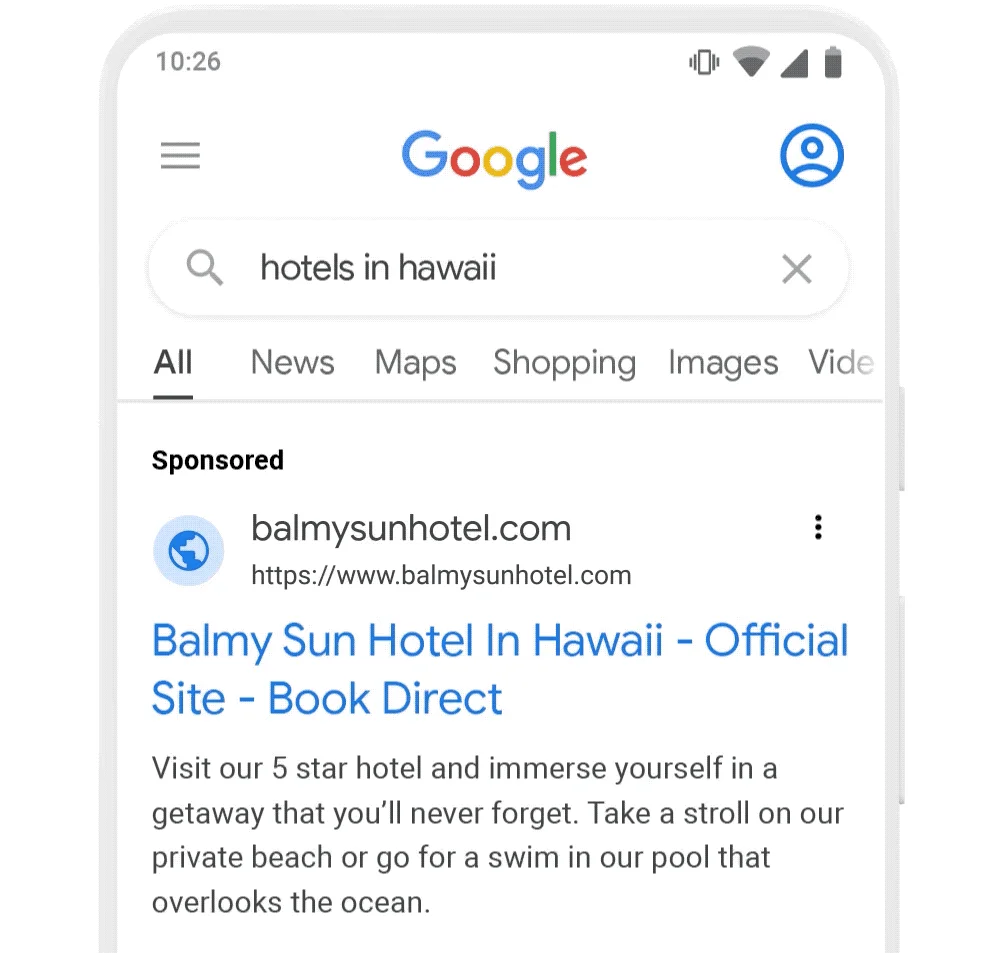
However, unlike traditional search campaigns, PMax decides when to show based on intent signals rather than fixed keywords. These placements often capture high-intent users who are actively looking for a product or service.
What to optimize for best results:
- Clear conversion-focused headlines, not generic branding
- Landing pages that closely match search intent
- Strong historical conversion data to guide automation
- Well-structured asset groups aligned to specific offers or categories
For sellers, this placement often sees stable conversions here because users already know what they want when they search.
You might be interested in: Google Shopping Ads vs Search Ads: Features, ROI & When to Use
Google Shopping ads
Shopping placements are one of the strongest parts of Performance Max for eCommerce sellers, and many proven pmax ad examples highlight this channel first. These ads pull directly from your product feed and show images, prices, promotions, and store names at the top of search results or in the Shopping tab.
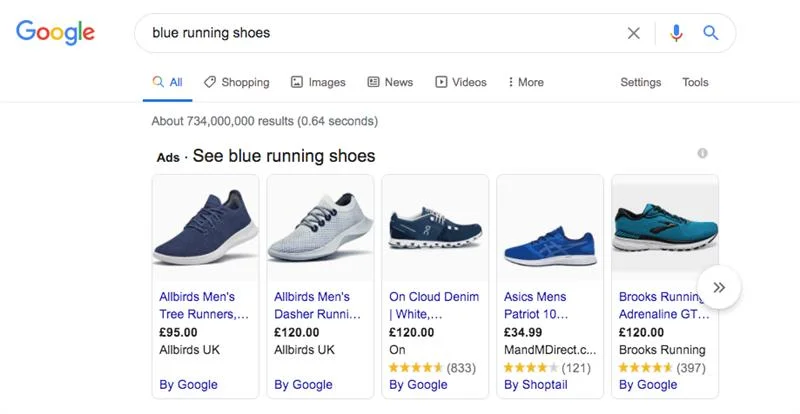
This placement is highly visual and product-focused. Across most industries, Search and Shopping placements usually deliver the highest direct conversion rates. It works best for sellers with optimized product titles, images, and pricing. For sellers, Google Shopping ads often deliver the highest conversion rate and ROAS.
What to optimize for best results:
- Optimized Google Shopping feed with clear titles and accurate attributes
- High-quality product images that stand out on mobile
- Competitive pricing and active promotions
- Clean product categorization to help Google match intent
Turn your Google Product Feed into high-converting Shopping ads
LitCommerce’s product feed management tool uses AI-powered categorization and mapping, smart rules, and data verification to optimize titles, images, and attributes, then syncs feeds across channels to x2 your Shopping performance.

YouTube ads
On YouTube, Performance Max ads can appear as in-stream ads, in-feed video ads, or Shorts placements. Google selects video assets when available, or automatically creates video-like formats from images and text if videos are missing.
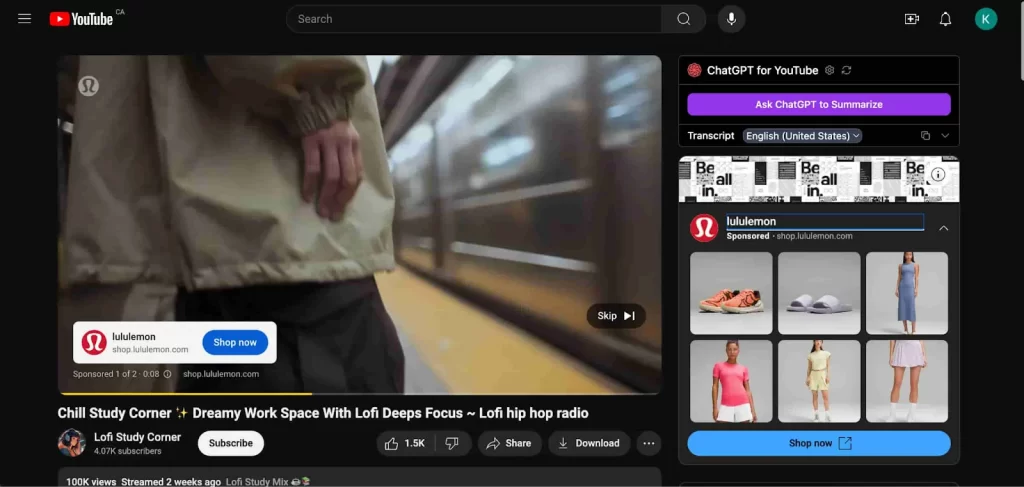
YouTube placements usually perform best for brand awareness and demand generation, rather than immediate conversions. However, for brands with strong creative, YouTube-based pmax ad examples often assist conversions later in the customer journey by building familiarity and trust.
What to optimize for best results:
- Custom videos instead of auto-generated ones
- Strong hook in the first 3 seconds
- Clear brand or product visibility early in the video
- Multiple formats, including vertical for Shorts
Display Network ads
Display placements include banner-style ads shown across millions of websites and apps in Google’s Display Network. These ads use combinations of images, headlines, descriptions, and logos.
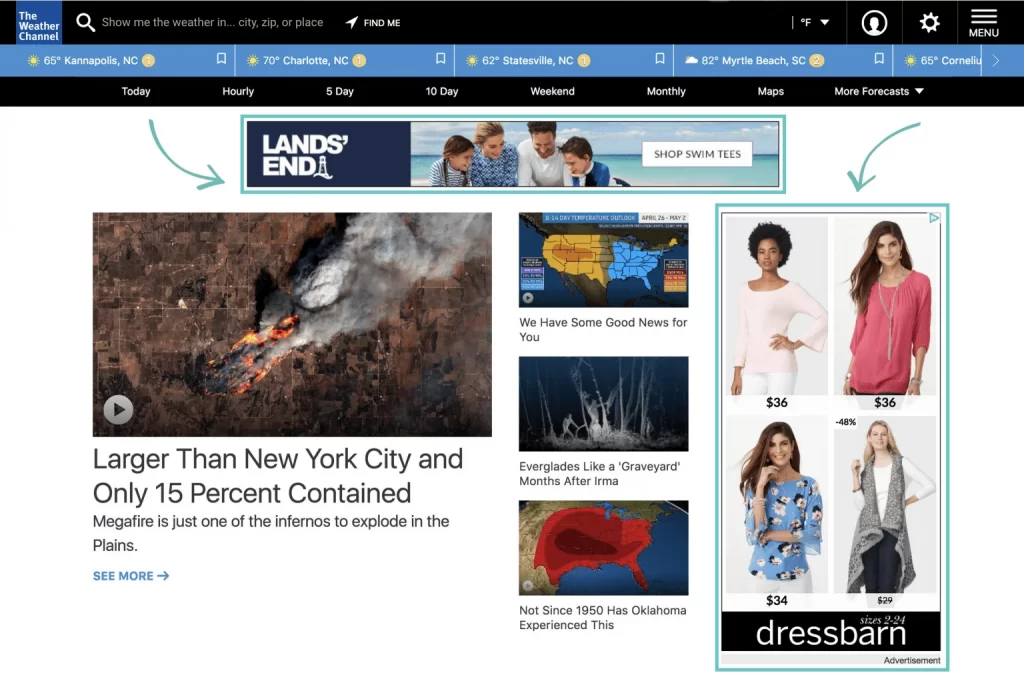
Display ads typically convert lower than Search or Shopping, but they play an important supporting role. They are effective for retargeting and upper funnel exposure, helping users remember your brand before returning to convert. Many advertisers notice that display placements assist conversions rather than close them directly.
What to optimize for best results:
- Multiple image formats to avoid awkward cropping
- Simple, readable messaging for small screens
- Strong brand visuals to reinforce recall
- Retargeting signals from past visitors or cart viewers
Many advertisers see Display placements assist conversions by keeping the brand top of mind before users return to convert.
Gmail ads
Gmail placements show inside the Promotions or Social tabs of Gmail. These ads often appear like expandable email cards that open into a larger creative experience once clicked.
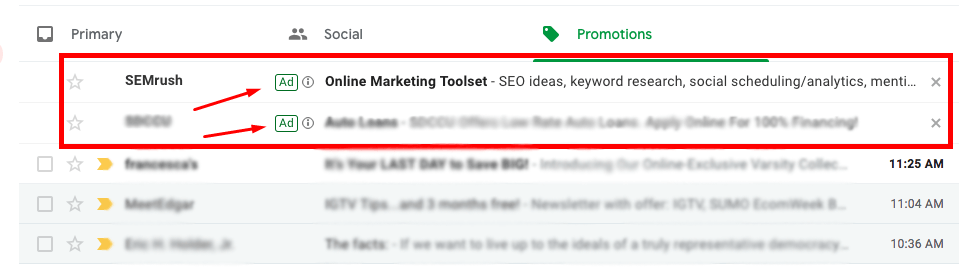
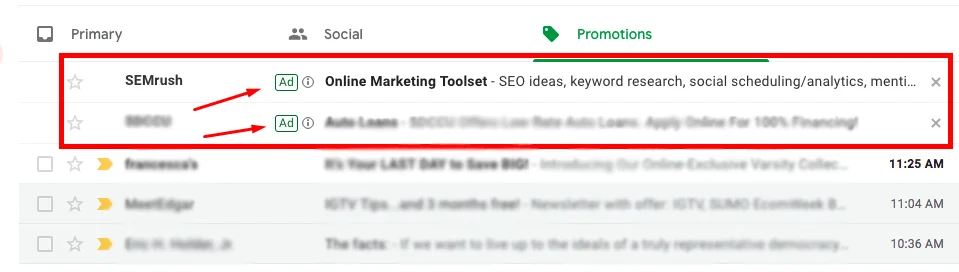
For sellers, Gmail placements work well for offers, promotions, and brand storytelling. While conversion rates may be lower than Search, Gmail placements often drive high engagement when messaging is clear and relevant.
What to optimize for best results:
- Offer-driven subject-style headlines
- Clear value upfront, such as discounts or limited deals
- Landing pages that match the offer exactly
- Clean visuals that resemble real email content
Discovery ads
Discovery placements appear in visually rich environments such as the Google Discover feed, YouTube Home feed, and Gmail Social tab. These ads rely heavily on strong images and short, compelling copy, which is why many pmax ad examples use Discovery to introduce products rather than close sales.
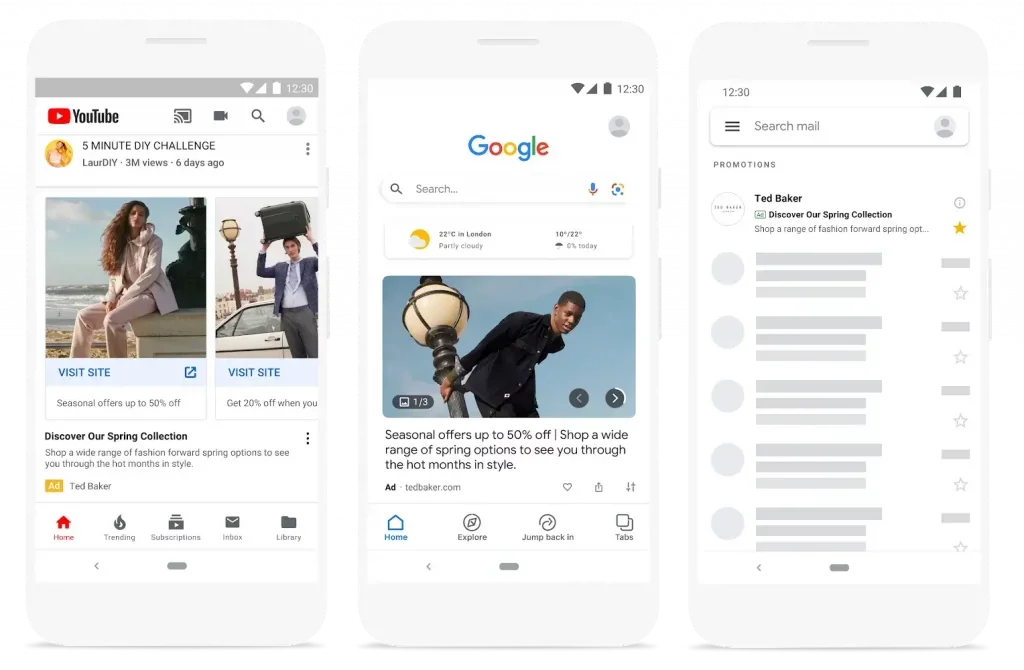
Discovery ads perform best when targeting users earlier in the buying journey. They are ideal for introducing products to new audiences and sparking interest. Conversion rates vary, but many advertisers see strong assisted conversion performance from these placements.
What to optimize for best results:
- Short, curiosity-driven headlines
- Broad audience signals to help Google explore
- Landing pages designed for mobile users
Google Maps ads
Google Maps placements are especially valuable for local businesses. Performance Max ads can appear when users search for nearby locations, services, or directions.
Example: When someone searches “Dentists,” your ad appears with a location pin, ratings, and a direct link to directions.
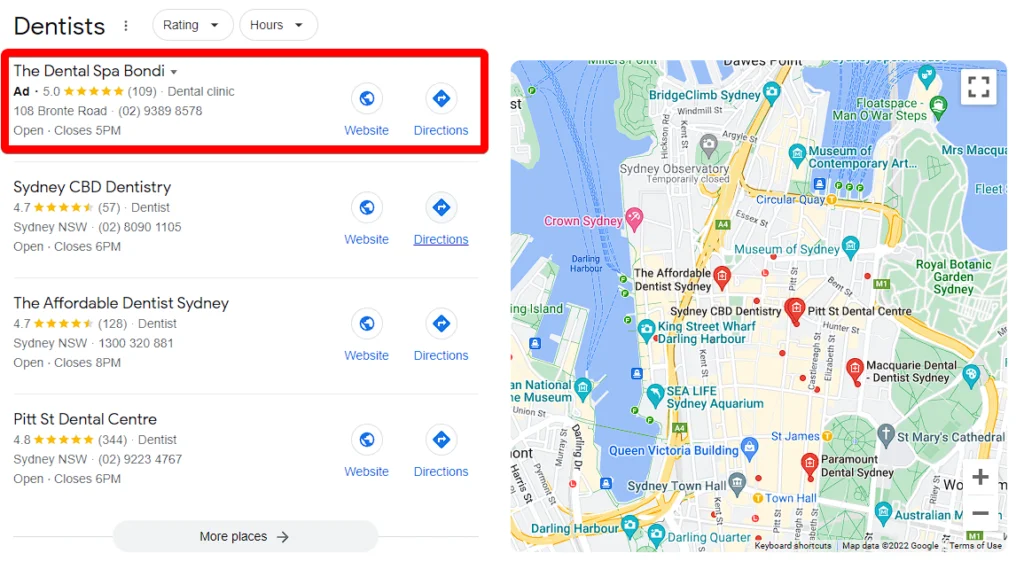
For brick-and-mortar sellers, Maps placements often convert very well because users already show location-based intent. These ads help drive store visits, calls, and directions, making them one of the most valuable placements for local advertisers.
What to optimize for best results:
- A complete and verified Google Business Profile
- Properly synced location extensions
- Accurate business hours and contact details
- Mobile-optimized landing pages for local intent
Top 7 Successful Google Performance Max Ad Examples
Here are seven real-world Google PMax ad examples that show how top brands use strong creative assets and smart setup to drive better results across Google’s placements.
Joybird
Joybird is in the eCommerce furniture space, selling customizable products with higher price points. The goal was clear: maximize ROI from paid advertising and prove that Performance Max could beat their existing Smart Shopping style setup.
What they fed into the campaign mattered. They kept the same products and bidding approach for a fair test, but added more creative variety that Performance Max can use, including more headlines, descriptions, images, and videos, giving Performance Max more options across placements. Google reports that reaching an “Excellent” Ad Strength correlates with about 6% more conversions on average.
Why it worked comes down to discipline and testing. With a controlled framework and frequent monitoring, Joybird saw 95% lift in revenue, 40% ROAS improvement, and 52% increase in clicks.
That is the kind of result that turns pmax ad examples into competitive benchmarks, not just inspiration.
Turn Winning PMax Examples Into Your Own Results
LitCommerce product feed management tool helps you optimize and sync your Google Shopping feed with clean titles, images, and attributes, so Performance Max can scale like Joybird.
PBR Nashville
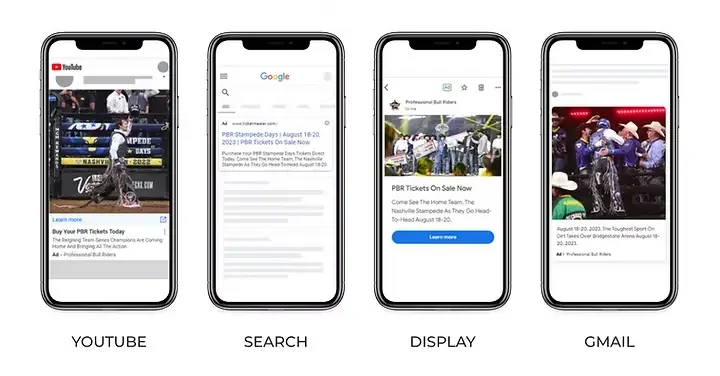
PBR Nashville is a local entertainment venue and bar, and the campaign goal was to drive ticket sales and revenue for a specific Nashville Teams push.
They ran Performance Max for two weeks, which is important because it shows you can still get impact without a long runway when the offer is tight and time-bound.
The key assets were built for reach and fast action. Their examples show the campaign appearing across YouTube, Search, Display, and Gmail, which means they likely used a mix of video or video-like creatives, strong images, and short conversion-focused copy that can adapt across formats.
The campaign drove $26.5K revenue, 183.77 conversions, and a reported $15.19 ROAS, which is strong competitive proof for venue-style advertisers looking at pmax ad examples to justify testing.
Deezer
Deezer competes in music streaming subscriptions, where growth is often limited by creative fatigue and high competition. Their goal was to tighten acquisition by using Performance Max automation to scale web subscriptions, and published results highlight a measurable lift in subscriptions when using Performance Max within a unified approach.
The reason it worked is that Deezer treated creative as a performance lever. They used a mix of strong visual storytelling, consistent messaging, and experimentation, and then let Performance Max distribute and learn across channels.
Deezer reported 28% more subscriptions while also reducing cost per subscription by 15%. This is one of those pmax ad examples where the competitive insight is clear.
Michigan State
Michigan State is another college athletics and events advertiser, and the goal was scaling performance for football seasons and single-game campaigns, again using Performance Max to cover the full network mix.
The asset needs are similar to those of other athletics campaigns, but the scale is different. They had to support repeated promos, different ticket intents, and multiple creative refreshes, which makes having plenty of images, video, and flexible copy even more important for automation.
The case reports $44 to $68 ROAS, 33.52% CTR, and over $300K revenue since June 2023. This is the kind of durable outcome that turns these pmax ad examples into a competitive reference point for any advertiser with recurring events.
MoneyMe
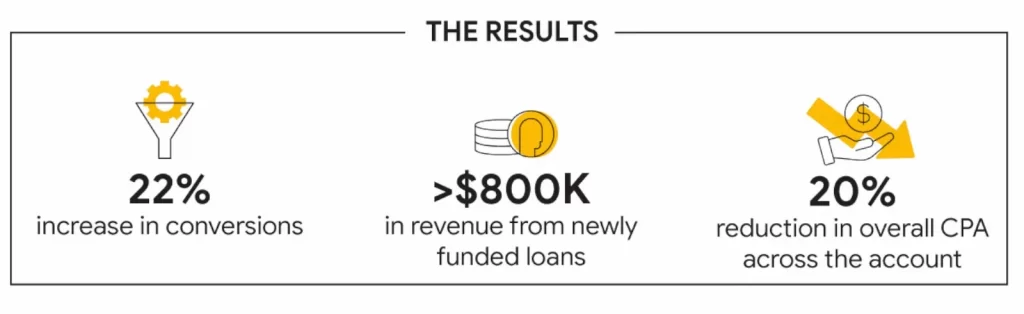
MoneyMe is in financial services, and the goal was to profitably grow funded loans at a target CPA. After running Performance Max for six weeks, MoneyMe reported a 22% increase in conversions, more than $800K revenue from newly funded loans, and a 20% reduction in overall CPA.
The brand focuses on lead quality by aligning conversion goals with approved applications rather than form submissions alone. In addition, MoneyMe supplies clear landing pages and compliant creatives, which allow Google automation to work within strict industry rules.
This approach shows that strong conversion signals and clear funnel structure are essential elements in high performing pmax ad examples.
Neo4j
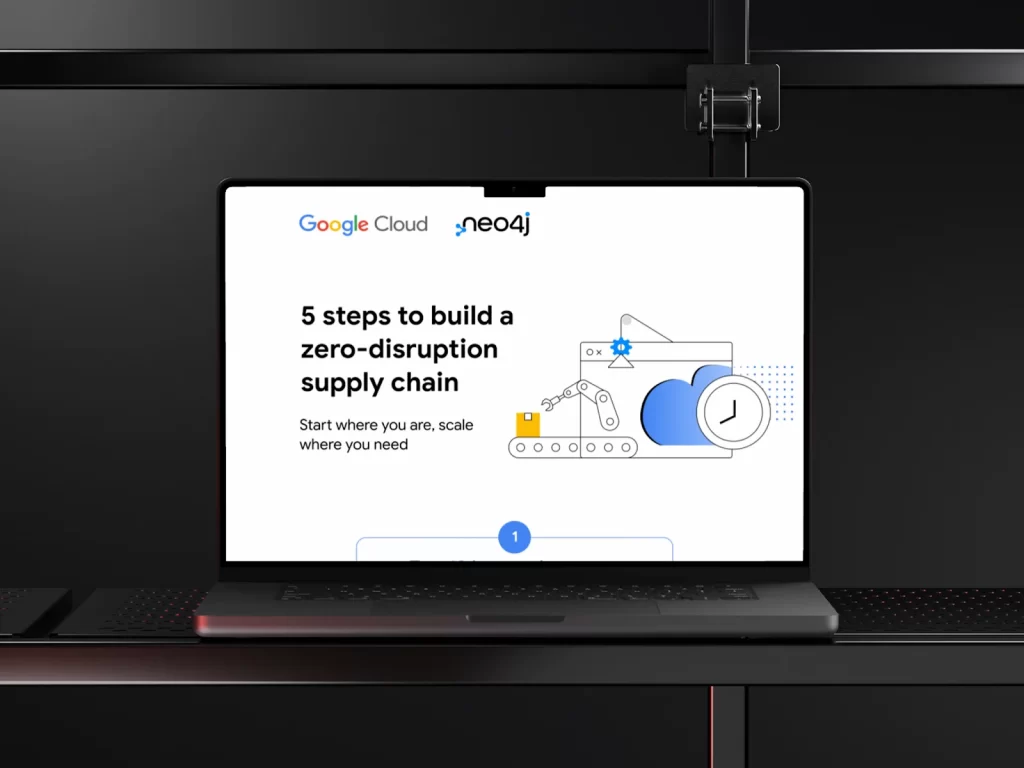
Neo4j is a B2B software and enterprise technology brand, so the stakes are higher and the sales cycle is longer. After integrating Performance Max, Neo4j saw a 157% increase in new enterprise leads while achieving a 54% lower CPA.
Neo4j uses Performance Max for B2B growth, proving the format is not limited to consumer brands. The company promotes whitepapers, demos, and developer resources using content-focused creatives and audience signals based on professional interests.
By letting Google test combinations across Search and YouTube, Neo4j improves reach while maintaining message relevance. The takeaway for B2B sellers is that Performance Max can work very well if you feed it quality signals. Among these pmax ad examples, Neo4j proves automation does not mean sacrificing lead quality.
SAIC-MG
SAIC-MG, an automotive brand, used Performance Max to promote new car models across regions. The campaign combined video, image, and dealership location data to reach users researching vehicles.
By using Performance Max with strong audience signals, they achieved a 39% increase in leads and an 83% lower cost per lead. The brand integrates vehicle data, dealership locations, and video assets to support both awareness and lead generation.
What makes this effective is the use of full funnel optimization, from discovery to test drive signups. This reinforces how clear goals, strong feeds, and diversified creatives define successful Performance Max campaigns across industries.
Best Performance Max Ad Assets Used in Top Campaigns
Google’s own guidance is clear that more assets create more possible ad combinations, and that you should replace weak assets instead of deleting without a backup.
Below is what top performers typically include, plus how to build each asset so it works everywhere Performance Max shows.
Headline
In Performance Max, you should add both short headlines and long headlines because they serve different placements and formats.
Short headlines (up to 30 characters) are used in tighter placements, like Search or smaller Display formats, while long headlines (up to 90 characters) appear in larger placements, such as YouTube, Gmail, and Display.
Providing both gives Google more flexibility to mix and match assets, which helps your ads perform better across different channels and screen sizes.
You can follow this checklist for high-performing headlines:
- Write 3 types of headlines: product or offer, benefit, trust proof
- Make each headline stand alone, because it may appear without your other text
- Use one clear idea per headline, so Google can mix and match cleanly
- Include variety, because repeating the same angle limits what the system can test
This matters because Search style placements may show multiple headlines, while other placements may show only one. You cannot pin assets in Performance Max, like you can in Responsive Search Ads, so every headline must work in any order.
Description
Descriptions do the heavy lifting when your visuals are not front and center. In Performance Max, descriptions are also mixed and matched, so clarity beats cleverness.
You can add up to 5 descriptions, with 2 required, and each can be up to 90 characters. Google recommends having 4 or more, so it has enough combinations to test.
Here’s the checklist for better descriptions:
- Add one detail your headline did not say, such as shipping, warranty, pricing, or availability
- Include one trust element, such as reviews, certifications, or a guarantee
- Write at least one description that works without context, because some layouts show only one text line
- Avoid stuffing keywords, because it reduces clarity and can weaken performance
Image
Images win attention on Display, Discover, Gmail, and parts of YouTube, so the best campaigns treat images as a conversion asset, not decoration. Performance Max ads can appear in various formats and crops, so image choices must be versatile and work effectively in multiple formats and crops.
Checklist for strong images:
- Include clean product shots and lifestyle images, because different placements reward different styles
- Use multiple orientations, because cropping can hurt performance if you only upload one format
- Keep images readable without tiny text, because images often show small on mobile
- Add enough volume to test, and Google suggests:
- Horizontal (1.91:1) – 1200×628 recommended, 600×314 minimum – Add at least 4
- Square (1:1) – 1200×1200 recommended, 300×300 minimum – Add at least 4
- Vertical (4:5) – 960×1200 recommended, 480×600 minimum – Optional but helpful
- Square logo (1:1) – 1200×1200 recommended, 128×128 minimum – Required: add 1
- Horizontal logo (4:1) – 1200×300 recommended, 512×128 minimum – Optional
You can design PMax image assets in Canva using ready-made templates and publish them directly to Google Ads, making campaign setup faster and easier.
Video
Video is where many Performance Max campaigns quietly lose performance. If you do not upload a video, Google can auto-generate one from your images. Several guides warn that these auto videos are rarely great, which is why many successful pmax ad examples rely on custom videos instead.
Keep in mind this practical video checklist for maximum placement coverage:
- Make videos at least 10 seconds long, because that is the minimum requirement for eligibility.
- Produce at least 3 distinct videos, not just resized duplicates, because different hooks work in different contexts.
- Keep the first 3 seconds direct, because many placements are scroll-first environments.
- Aim for at least one video in each orientation, so you can cover more placements, including Shorts.
Notes: If you only have a horizontal video, remember Google may automatically transform it to square or vertical for Shorts placements, but a custom-made vertical usually looks better.
URLs
URLs in Performance Max are more strategic than they look. They decide where the user lands, but they also influence how consistent your message feels after the click. Google notes that text assets include a final URL and display URLs as part of the assembled variation.
Top Pmax examples typically align URLs with intent. If the asset group is about a category, they use a category page. If the asset group is about a promotion, they use a dedicated landing page.
Sellers often improve conversion rate just by tightening this match, because the system can drive great traffic, but mismatched landing pages can waste it.
CTAs
Every asset group in your PMax campaign needs at least one Final URL. This is the main landing page where users will land after clicking your ad.
Google explicitly recommends choosing a call to action that aligns with your goal, such as “Sign up” or “Subscribe,” and it also highlights that Performance Max can use additional assets like sitelinks, callouts, lead forms, and price assets depending on your objective
You can also add up to two Display URL paths, each with a 15-character limit, to help clarify where the link leads
- On Search-like placements, the CTA is usually part of the description or a short, action‑oriented headline.
- On YouTube and some Display placements, PMax can render your CTA as a clickable button overlay under or beside the creative (mirroring standard YouTube CTA overlays).
PMax Ad Examples: FAQs
What is PMax advertising?
Performance Max Ad (PMax Ad) is an automated Google Ads campaign type that lets you run ads across all Google channels from one single campaign, including Search, Shopping, YouTube, Display, Gmail, Discover, and even Google Maps.
What is an example of a PMax asset?
A PMax asset is any creative element you upload that Google uses to build ads.
For example, a single asset group may include one short headline, one longer description, a product or lifestyle image, a short video, and a landing page URL. Google then mixes these assets into different ad formats depending on where the ad appears, such as Search, YouTube, or Display.
How soon will I see results from Performance Max?
Most Performance Max campaigns need 1 to 2 weeks to exit the learning phase. During this time, Google tests different asset combinations, placements, and audiences. You may see early activity within a few days, but stable and reliable results usually appear after enough conversion data is collected.
Do I need to include video in my Performance Max campaigns?
You are not required to include video, but it is strongly recommended. If you do not upload video assets, Google will automatically create videos for you, and these often perform worse. Uploading your own videos gives you better control, stronger branding, and access to more placements, especially YouTube and Shorts.
Turn PMax Ad Examples Into Real Results Today!
Seeing real PMax ad examples makes one thing clear: Performance Max works best when you focus on strong inputs, not manual control. By setting clear goals, uploading diverse assets, and letting Google’s automation learn, you give your campaigns room to scale.
Start by improving your headlines, images, and videos, then review performance insights regularly. If you want more practical guides about eCommerce, check Our blog or Contact us for further support. out. We’re always happy to help.