
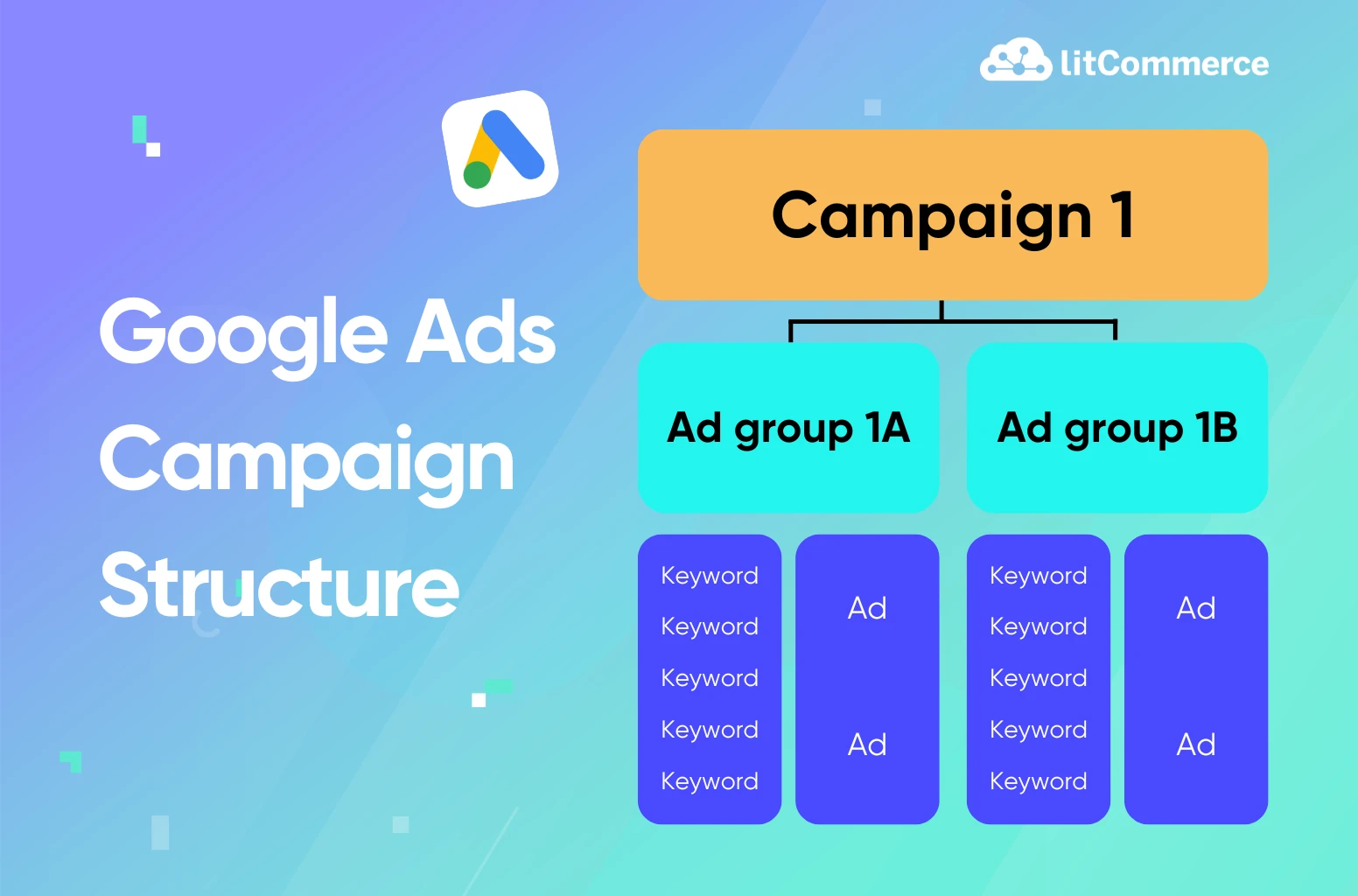
Many advertisers start a Google Ads campaign without really starting it on purpose. They launch something simple, then add a few keywords, then a new campaign, and another ad group…And before they know it, the account turns into a messy pile of campaigns that kind of work.
Google Ads campaign structure is one of the most overlooked parts of advertising. They only focus on keywords, budgets, or ad copy. But without a clear structure, even the smartest algorithms struggle to perform.
So that in this guide, we’ll break down how to build Google Ads campaign structure step by step, and find out which structures work best depending on your goals. No theory overload. No outdated tactics. Just practical guidance you can actually apply.
What Is a Google Ads Campaign Structure?
At its core, a Google Ads campaign structure is simply how everything in your account is organized. It’s like a filing system.
When it’s clean and logical, Google understands your ads better, and you understand your performance better too. When it’s messy, things quickly get hard to manage, and of course expensive.
Google Ads is built in layers, and each layer has a very specific role.
- Account: This is the outer shell. Your account contains your business information, billing details, and access settings. Everything else lives inside it. You usually only need one account per business.
- Campaigns: Campaigns sit inside the account and set the big-picture rules. This is where you choose the campaign type, like Search or Display. Each campaign has its own budget, bidding strategy, location targeting, and goals. You can, and should, have multiple campaigns in one account to separate different intents, products, or objectives.
- Ad groups: Ad groups live inside campaigns. Each ad group contains a set of closely related keywords and ads, grouped by a clear theme. The tighter the theme, the more relevant your ads can be.
- Keywords: Keywords are the search terms you want your ads to appear for on the search engine results page. They tell Google when your ads should be eligible to show. How you group and match keywords directly affects relevance, cost, and performance.
- Ads: Ads are the actual messages people see on the results page. They include headlines, descriptions, and extensions. Ads should closely match the keywords and intent of their ad group, not the entire campaign.
- Landing pages: These’re the pages users land on after clicking your ad. Each ad group should point to one highly relevant landing page. Because landing pages need to be specific to the offer and message, they often determine how tightly your ad groups should be structured in the first place.
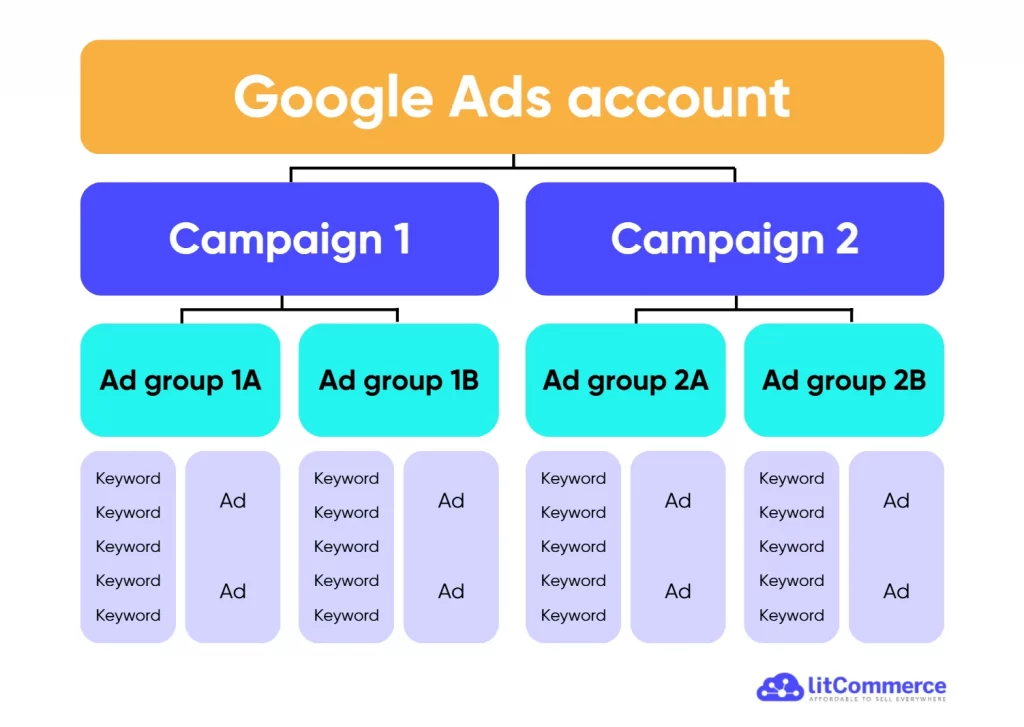
When all these pieces line up, you get higher relevance, better Quality Scores, and stronger results. And that’s exactly why Adwords campaign structure isn’t just a setup task.
How to Structure Google Ads Campaigns
So now, let’s walk through how to structure a high-performing Google Ads campaign. Everything in this guide comes from our hands-on experience running and fixing Google Ads campaigns across different budgets. We’ve seen what works, what breaks accounts, and what quietly wastes money without anyone noticing.
Step 1: Define your campaign goal
A clear campaign goal will shape everything that follows. Try to answer these questions:
- Are you trying to generate leads?
- Drive online sales?
- Increase brand awareness?
- Promote a specific product or service?
Each of these goals requires a different structure, different bidding strategy, and different expectations.
For example, a lead generation campaign should usually focus on high-intent searches and clean conversion tracking. An eCommerce campaign, on the other hand, may need product-level segmentation, Google Shopping or Performance Max, and stronger feed data. Another often-ignored part of this step is budget reality.
Look honestly at your budget and see:
- Do you have enough daily spend to support multiple campaigns?
- Can you generate enough conversions for Smart Bidding to learn?
- Should you start with fewer campaigns and scale later?
A small budget spread across too many campaigns will slow learning and hurt performance. In many cases, a simpler structure with a clear goal beats a complex setup every time.
Step 2: Segment campaigns by intent
Once your campaign goal is clear, the next step is deciding how to split your campaigns.
A key rule to keep in mind is that: more campaigns do not automatically mean more control or better performance. In fact, over-segmentation often does the opposite.
Google has shared that most campaign types need at least 15 conversions in the past 30 days to perform well, especially when using Smart Bidding. That means conversions matter more than ever. Google needs enough signals to understand who to show your ads, and spreading your data across too many campaigns slows that learning down.
So that, instead of splitting by tiny details, focus on user intent, like “What is the searcher actually trying to do right now?”
You should only split campaigns into separate ones when it truly matters, for example:
- Different goals (sales vs. leads vs. brand awareness)
- Very different product lines
- Different countries or languages
- Significantly different budgets or ROAS targets
- Different landing page experiences
So how many campaigns should you have?
It depends on your business size, business model, budget, conversion volume, and how much time you can realistically manage your account. Remember, less structure, when done intentionally, can actually lead to better performance. Fewer campaigns with more data usually beat many small campaigns with limited signals.
In most cases, you’ll get stronger results by starting with one or two well-structured campaigns, letting them gather data, and expanding only when the numbers support it.
Step 3: Choose the right bidding strategy
Choosing the right bidding strategy has a huge impact on how your Google Ads campaign structure should look.
When we talk about “bidding” in Google Ads, we’re really talking about how much control you give Google over who sees your ads, when they see them, and how aggressively your budget is spent.
Here’s how to think about it in a practical way.
Bidding method | Goal | When to use | Pros & cons |
Maximize conversion value (with optional target ROAS) | Increase sales, profit, or qualified leads (value-focused) | eCommerce or revenue-driven campaigns (e.g., online sales, high-value leads). Prioritizes higher-value conversions over sheer volume. Use tROAS when you have reliable revenue tracking and want profitability control. | - Pros: Maximizes ROI/revenue; AI bids higher for valuable actions. - Cons: Can be aggressive on spend if no ROAS target; needs accurate conversion values; may underperform with low data. |
Maximize conversions (with optional target CPA) | Increase transactions or leads (volume-focused) | Lead gen, sign-ups, or growth-phase campaigns where volume matters more than exact cost. Add tCPA for cost predictability. Great for scaling once you have data. | - Pros: Drives high conversion volume within budget; flexible for testing. - Cons: May attract lower-quality conversions without tCPA; can overspend early in learning phase |
Maximize clicks | Increase website visitors / traffic | Brand awareness, top-of-funnel, or traffic-driven campaigns (e.g., content sites, new product launches). Set optional max CPC limit to control costs. | - Pros: Simple, budget-efficient for volume; good for low-data scenarios. - Cons: No focus on conversions (risk of low-quality traffic); less intelligent than Smart Bidding. |
Target impression share | Increase or stabilize awareness / visibility | Branding, competitor defense, or launch campaigns. Set targets like "Absolute top of page" or "Anywhere on page" with location preference. | - Pros: Guarantees visibility/position; controls where ads appear. - Cons: Can drive high CPCs in competitive auctions; ignores conversions (pair with conversion tracking for monitoring). |
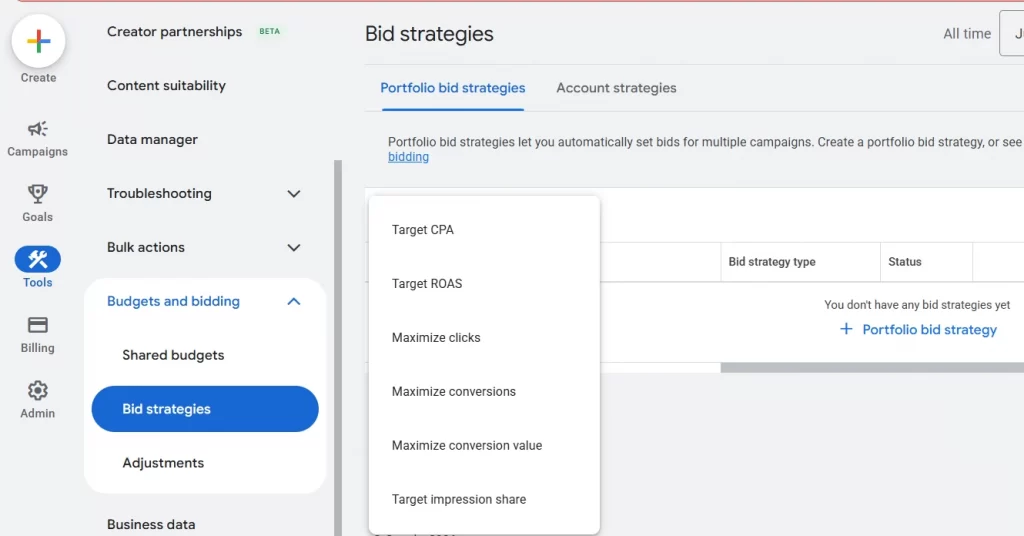
Your bidding strategy should match your campaign goal, and your Google Ads campaign structure should support that bidding strategy.
Power Smart Bidding with Cleaner Product Data
Smart Bidding works best when Google can read and learn from clean, well-structured product data. With LitCommerce feed management tool, you can keep your feed optimized and up-to-date, giving Google the high-quality signals it needs to drive better results.

Step 4: Choose your keywords
Keywords sit at the center of your Google Ads campaign structure. They tell Google when your ads should appear and what kind of searches you want to show up for. Picking keywords might sound simple but this is one area where strategy really matters.
Here are the main keyword groups you should think about.
1. High-intent commercial keywords: These are the bread and butter of Google Ads. They show strong buying intent and usually drive the fastest results. Searches like “pricing for multichannel listing software”, or “best Google Shopping feed management tool” signal that the user is actively choosing a product or service.
They’re often more competitive and more expensive, but the quality of traffic is usually worth it. To control costs, use long-tail, specific variations that increase relevance and reduce competition.
2. Informational keywords: Informational searches are about learning, not buying. Examples include “how to start a Shopify store” or “what is dynamic search ads.” These keywords rarely convert directly, but they can work well for top-of-funnel campaigns or lead magnets.
For most performance-focused campaigns, you’ll want to limit spend here, or exclude them entirely.
3. Branded keywords: These include your brand name and product names. Bidding on your own brand may feel unnecessary, but it helps protect your traffic and keeps competitors from showing up above you. Branded campaigns are usually low cost and high return.
4. Competitor keywords: You can also bid on your competitors’ brand names. This is usually best saved for later, once your account is stable and profitable. When done well, competitor keywords can capture high-intent traffic, but they need careful messaging and budget control.
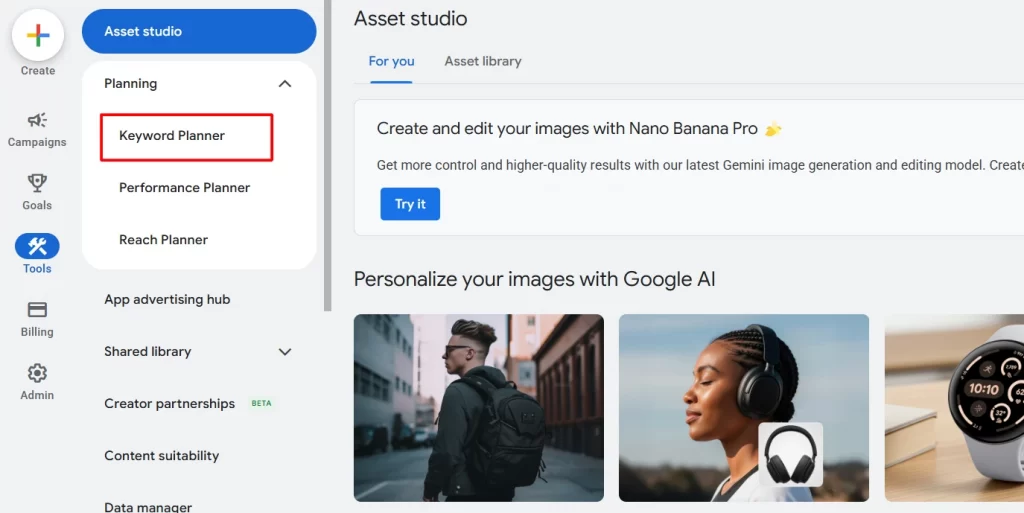
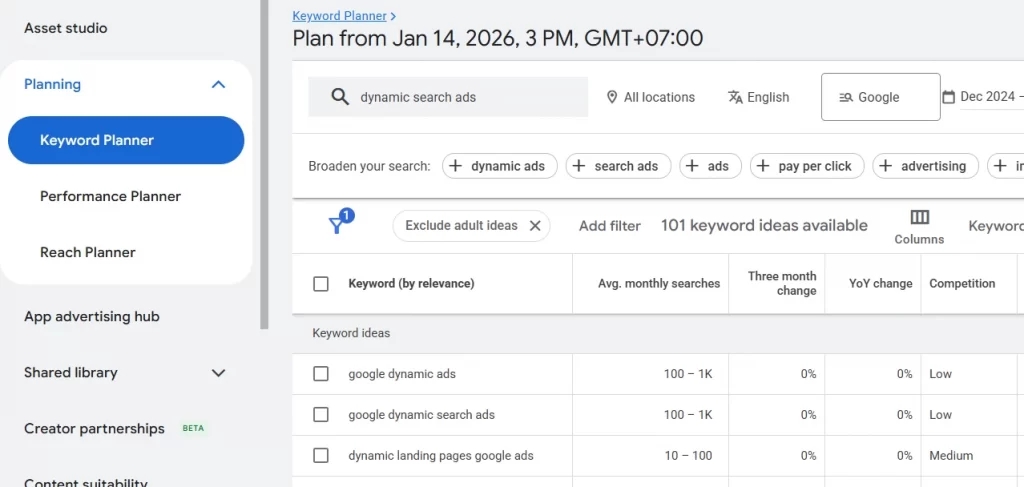
To find and refine keywords, you can use a free tool. Google Keyword Planner. Begin with a few seed keywords related to your core products or services, then expand from there.
To find this tool, go to “Tools” on the left side bar. Under Planning, choose “Keyword Planner.”
For example, you enter “dynamic search ads”, and Google Keyword Planner immediately starts showing you related keyword ideas, average monthly searches, competition levels, and estimated costs.
From there, you can:
- See how people actually search for that topic
- Discover long-tail, more specific variations
- Identify high-intent keywords versus purely informational ones
- Decide which keywords belong in the same ad group and which don’t
Step 5: Build Ad Groups
To create an ad group, go to Campaigns → Ad groups inside your Google Ads account. From there, you’ll add your keywords and ads under a single, clear theme.
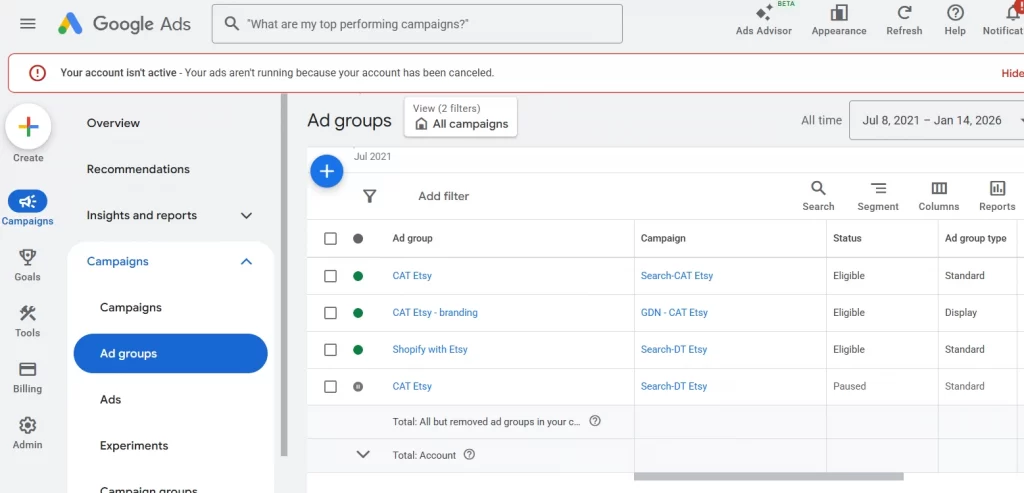
The rule here is that each ad group should represent one intent, one product, or one service.
Google uses ad groups to decide which ads to show for which searches. When your keywords and ads are tightly aligned, Google can serve more relevant ads, and relevance directly impacts performance and cost.
What’s more, if keywords are grouped correctly, a search for “budget iPhone repair in Sydney” will trigger ads written specifically for that service and location. But if all keywords are placed into one ad group, Google might display an ad for “MacBook screen replacement” instead, leading to irrelevant clicks and wasted ad spend.
It’s also recommended to include the same keyword in different match types within one ad group. This won’t increase your costs or hurt performance. Google will automatically choose the best-matching keyword based on its ranking system.
Ad groups also act as a blueprint for your ad copy. Without them, writing strong ads becomes guesswork. When your ad group is focused, it clearly tells you:
- Which headlines to write
- Which descriptions to highlight
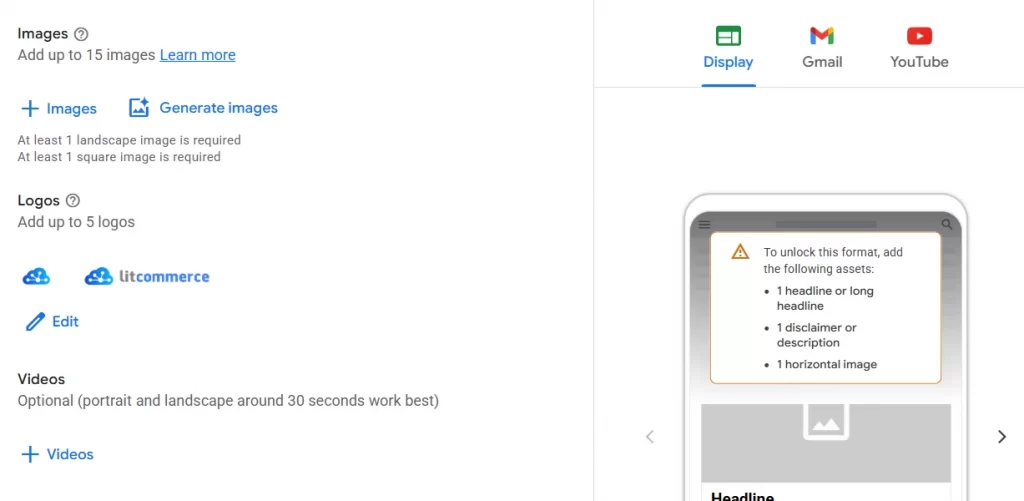
- What images, logos, or videos to use (for applicable formats)
Step 6: Validate structure
Before you hit launch, take a moment to step back and validate your Google Ads structure. This final check can save you a lot of wasted spend and frustration later.
Review your campaigns from the top down:
- Does each campaign have one clear goal?
- Are campaigns segmented by intent, not just by keywords?
- Is the budget realistic for the number of campaigns you’re running?
Next, look at your ad groups:
- Does each ad group focus on one product, service, or search intent?
- Do the keywords, ads, and landing page clearly match each other?
- Would a user feel like the ad perfectly matches what they searched for?
Then, double-check the technical details:
- Conversion tracking is working correctly
- No duplicate or competing keywords across campaigns
- Negative keywords are in place to prevent overlap
- Bidding strategy matches the campaign goal
Most Popular Google Ads Campaign Structures
Another big mistake advertisers often make is using outdated Google Ads campaign structures.
What worked three, five, or even ten years ago doesn’t always work today. Google Ads has changed. Smart Bidding is more advanced, broad match behaves differently, and automation now plays a much bigger role in performance.
Below are the most up-to-date, widely used structures that top advertisers rely on today, along with some Google Ads campaign structure best practices.
1. Single-intent, Multi-match type campaign structure
Best for: Small to mid-sized accounts, lead generation, eCommerce categories, and advertisers who want clean structure without overcomplicating things.
This Google Ads structure is built around one clear search intent per campaign, while allowing multiple match types, like exact, phrase, and sometimes broad, inside the same campaign or ad group.
Instead of splitting campaigns by match type, you let Google decide which match type performs best, while you keep control through intent-focused keywords and negative keywords.
Here’s an example: You create a Google search campaign structure for “CRM software for small businesses.”
One campaign targets that intent, with ad groups containing:
- Exact: [small business CRM software]
- Phrase: “CRM for small businesses”
- Broad: CRM software small business
All keywords point to the same type of landing page and support the same goal.
Pros:
- Simple and easy to manage
- Works well with Smart Bidding
- Faster learning due to consolidated data
- Scales better than match-type-split structures
Cons:
- Less manual control over individual match types
- Requires a solid negative keyword strategy
- Not ideal for advertisers who want very granular bidding control
2. Alpha – Beta campaign structure
Best for: Advertisers who want more control over performance keywords while still discovering new search terms, especially in growing or maturing accounts.
Alpha – Beta Google Ads campaign structure is designed to separate proven, high-performing keywords from exploration and discovery keywords. You typically run two campaigns side by side:
- Alpha campaign: contains your best-performing, high-intent keywords (usually exact or phrase match)
- Beta campaign: contains broader keywords used to discover new converting search terms
The key rule is that the Alpha campaign always has priority. Any keyword that proves itself in Beta gets promoted into Alpha, while Alpha keywords are excluded from Beta using negative keywords.
Look at the below Google Ads campaign structure example:
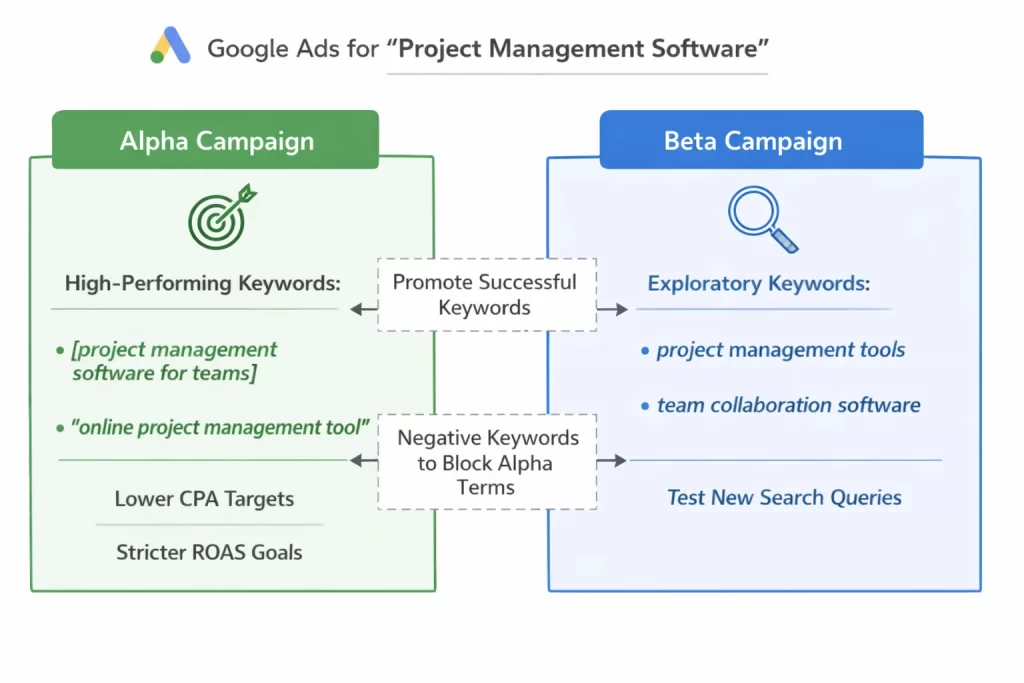
When a keyword in Beta consistently converts well, you move it into Alpha and block it from Beta.
Pros:
- Strong control over top-performing keywords
- Continuous keyword discovery without hurting core performance
- Clear performance separation between proven and test keywords
Cons:
- Requires more setup and ongoing maintenance
- Can become complex for small budgets
- Not ideal if you don’t have enough conversion volume
3. Broad match campaign structure with Smart Bidding
Best for: Accounts with consistent conversion volume, mature tracking setup, and advertisers who want to scale efficiently with fewer campaigns.
In this Google Ads campaign structure, you build around using broad match keywords combined with Smart Bidding strategies like Maximize Conversions, Target CPA, or Target ROAS. Instead of tightly controlling every keyword variation, you allow Google’s algorithm to match ads to relevant searches based on intent, signals, and historical performance.
The campaign structure is usually simple: fewer campaigns, fewer ad groups, broader keywords, and strong conversion data guiding the system.
Here’s an example: You run a campaign targeting:
- Broad match keywords like project management software or team collaboration tools
- Smart Bidding optimized toward conversions or conversion value
- Strong negative keywords to filter out irrelevant traffic
Google then uses signals like user behavior, device, location, time, and past conversion patterns to decide which searches are most likely to convert.
Pros:
- Very scalable with minimal structure
- Faster expansion into new, relevant search terms
- Works well with Smart Bidding and automation
- Easier to manage at scale
Cons:
- Less transparency into why ads show for certain queries
- Requires strong conversion tracking and clean data
- Poor negatives can lead to wasted spend
However, we do not recommend this structure for new accounts with little or no conversion data, or businesses working with small budgets that can’t support sufficient learning and testing.
4. Theme-based campaign structure
Best for: Service businesses, lead generation campaigns, and advertisers who want strong message-to-search alignment without over-segmenting their account.
Rather than organizing campaigns by match types or individual keywords, a theme-based campaign structure groups keywords around shared themes. Each campaign or ad group focuses on a specific problem, solution, or service category that users are actively searching for.
For example, if you offer digital marketing services, you might create themes like:
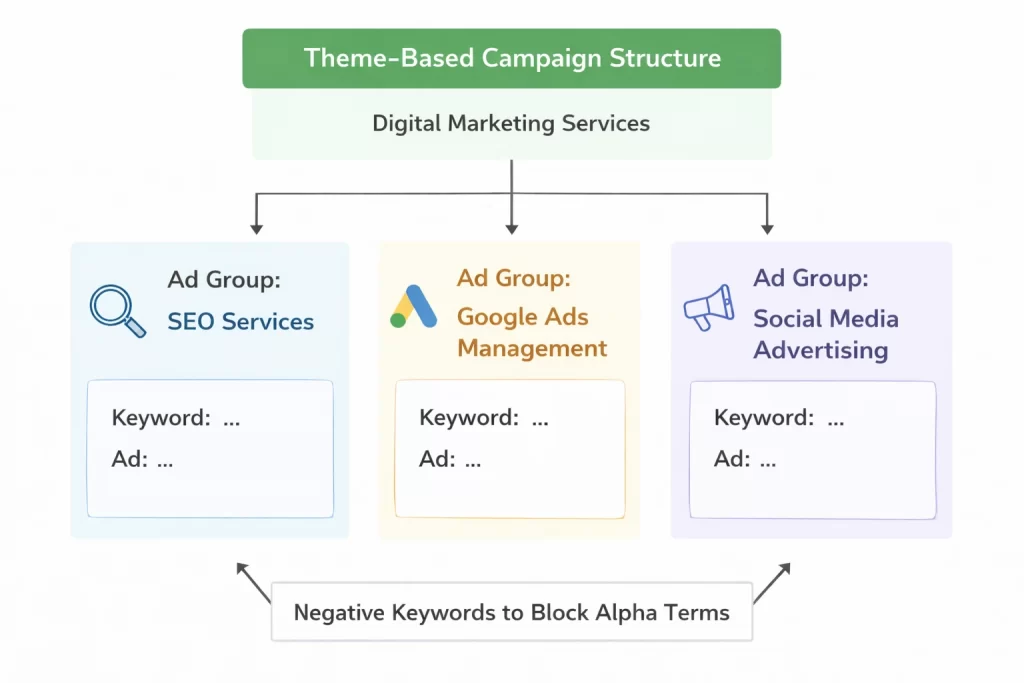
Each theme has its own campaign or ad groups, with keywords, ads, and landing pages all aligned to that specific service.
Pros:
- Strong relevance between keywords, ads, and landing pages
- Easier ad copy creation and testing
- Works well with Smart Bidding
- Scales cleanly as you add new services or themes
Cons:
- Requires clear understanding of user intent
- Can underperform if themes are too broad
- Needs consistent landing page quality
5. Performance-tier campaign structure
Best for: Accounts with steady conversion data, eCommerce businesses, and advertisers who want to scale while controlling risk.
This structure is based on splitting campaigns by performance level, not by keywords or match types. Instead of treating all keywords equally, you prioritize what already works and isolate what needs testing.
Campaigns are typically divided into tiers such as:
- Top performers (high ROAS or low CPA)
- Average performers
- Testing or experimental keywords
Each tier gets its own budget, bidding targets, and level of attention.
If you run Google Ads for an online store, here is your performance-tier campaign structure might look like:
- High-performance campaign
- Best-selling products
- Lower Target CPA or higher Target ROAS
- Majority of the budget
- Testing campaign
- New products or keywords
- Looser bidding targets
- Controlled budget for learning
Pros:
- Clear budget and performance control
- Protects top-performing campaigns
- Makes scaling more predictable
Cons:
- Requires consistent monitoring and movement
- Needs reliable conversion data
- Can become complex if over-segmented
6. Dynamic Search Ads (DSA) – led campaign structure
Best for: Large websites, eCommerce stores, content-rich sites, and advertisers who want efficient keyword discovery.
Dynamic Search Ads work by letting Google match your ads to relevant searches based on your website content, rather than relying entirely on manual keyword lists.
Instead of building and maintaining extensive keyword sets, you guide Google by:
- Using page feeds or URL targeting
- Applying strong negative keywords to control relevance
- Maintaining a clear, well-structured website with quality content
Because of this, DSA campaigns are most often used as a discovery layer alongside standard Search campaigns, helping uncover new converting search terms you may not have targeted yet.
This Google Ads campaign structure is especially useful if you run a site with hundreds of product or service pages, as:
- DSA campaign targets relevant URLs or categories
- Google generates headlines dynamically
- High-performing search terms are later added to standard campaigns
Pros:
- Excellent for finding new converting queries
- Saves time on keyword research
- Scales well for large sites
Cons:
- Less control over headlines and targeting
- Requires a well-structured website
- Poor site content leads to poor matches
You may also like: The Best Dynamic Search Ads Example: How DSAs Works & What to Learn From
Common Google Ads Campaign Structure Mistakes to Avoid
Even with the right tools and intentions, many Google Ads accounts underperform because of a few structural mistakes that are easy to overlook.
1. Advertising your entire product catalog at once
This is one of the most common mistakes, especially for eCommerce businesses. Just because you can advertise every product doesn’t mean you should. Spreading budget across your full catalog often leads to low data volume per product, slow learning, and weak performance. It’s usually better to start with your best sellers or highest-margin products and expand once you have reliable data.
2. Over-segmenting campaigns too early
Creating too many campaigns, ad groups, or match-type splits may feel organized, but it often starves campaigns of data. Without enough conversions, Smart Bidding struggles to learn. Simpler structures usually perform better, especially in the early stages.
3. Mixing different intents in one campaign
Combining brand, non-brand, informational, and high-intent keywords in the same campaign makes optimization difficult. Each intent behaves differently and should be handled intentionally, not bundled together.
How to Optimize and Scale Your Google Ads Campaign Structure
Now your campaign is live, and you need to give it enough time to collect data before making structural changes. Constant restructuring resets learning and often does more harm than good.
When the data is ready, start by identifying what’s working:
- Which campaigns consistently hit your CPA or ROAS targets?
- Which ad groups drive the most conversions?
- Which search terms show strong intent?
For winners, the goal is to protect and scale. Increase budgets gradually, loosen bidding targets carefully, and avoid unnecessary changes that could disrupt performance.
For underperforming areas, look for patterns before making changes. Instead of creating new campaigns, consider:
- Consolidating low-volume ad groups
- Removing or pausing non-converting keywords
- Tightening intent with negatives
- Improving ad relevance or landing pages
Negative keywords, in particular, are one of the most effective optimization tools. They help eliminate wasted spend and prevent overlap between campaigns, without changing your structure.
Only restructure when the data clearly justifies it. Split campaigns when there’s a strong reason, such as very different performance levels, goals, or budget needs.
FAQs about Google Ads Campaign Structure
How to choose the right structure for your Google Ads campaign?
Start with your goal and budget, not with keywords.
If your budget is limited or your account is new, choose a simpler structure that allows data to accumulate quickly. Fewer campaigns and ad groups usually perform better early on.
As your account grows and you collect consistent conversion data, you can move toward more advanced structures, such as performance-tier or Alpha–Beta setups, when the data supports it.
The best structure is the one that:
– Matches your business goal
– Gives Google enough data to learn
– Is easy for you to manage and optimize
How many campaigns should I have in Google Ads?
There’s no universal number.
Most accounts perform better with fewer, well-structured campaigns than with many small ones. Google typically needs around 15 conversions in the last 30 days per campaign to optimize effectively. If your campaigns aren’t hitting that threshold, consolidation is usually the better choice.
Should I change my Google Ads structure often?
No. Structure should be stable, not constantly changing.
Frequent restructuring resets learning and can slow performance. Instead, optimize within your existing structure using bids, budgets, ads, and negative keywords. Only change your structure when data clearly shows a reason, such as major performance differences, new goals, or significant budget changes.
Conclusion
As we’ve covered in this guide, there’s no single “perfect” Google Ads campaign structure that works for everyone. The right setup depends on your business model, budget, conversion data, and growth stage.
If you want to go deeper into Google Ads optimization, automation, and product feed best practices, explore more insights on the LitCommerce blog, where we share practical strategies used by real advertisers every day.
And if you need help structuring, optimizing, or scaling your Google Ads campaigns, simply contact us. Our team is happy to help you build a feed management setup that works with Google’s algorithm and drives real results.