
Performance Max is not a traditional Google Ads campaign where you create one ad for one placement. Instead, it is an asset-based, AI-driven campaign that automatically builds and serves ads across all Google channels. Because of this, understanding Performance Max specs, including ad formats, asset types, and size requirements, is essential if you want consistent results.
This guide explains Performance Max ad formats and size requirements in plain terms. You will learn how different asset types work together, what specifications Google expects, and why each format matters for delivery across Search, Display, YouTube, Discover, Gmail, and Maps.
Optimize Your Product Feed for Performance Max
With LitCommerce, Use LitCommerce to manage, optimize, and sync your product feeds across Google and other ad channels, without manual errors.

Overview Of Performance Max Campaign Asset
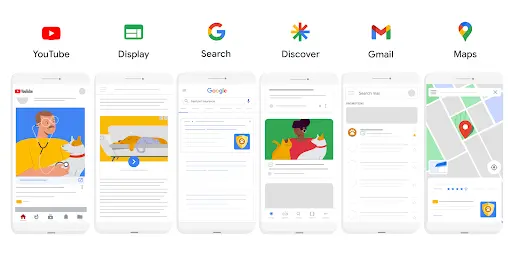
Performance Max campaigns are built entirely around assets, not individual ads. Instead of manually creating separate ads for Search, Display, or YouTube, you provide Google with a collection of assets that its system automatically combines and serves across all available placements.
These assets live inside asset groups, which function similarly to ad groups but with a broader role. Each asset group contains text, images, videos, logos, and landing page signals that share a common theme. Google’s AI then mixes and matches these elements to generate ads that fit different formats, sizes, and user contexts.
Performance Max supports ad delivery across:
- Google Search
- Google Display Network
- YouTube (including Shorts)
- Discover feed
- Gmail
- Google Maps
Because each placement has different layout and size requirements, Google dynamically adapts your assets rather than asking you to design ads for each channel. This is why asset quality, variety, and compliance with specs are critical. Missing or weak assets reduce the system’s ability to test combinations and limit reach.
Another important point is that no single asset equals a single ad. One headline might appear in Search, while the same headline could be paired with an image on Discover or a video on YouTube. This cross-channel reuse is what makes Performance Max efficient—but only when assets are structured correctly.
At a minimum, every asset group requires:
- Text assets (headlines, descriptions, business name)
- Final URL or landing page signal
However, campaigns perform best when you also include multiple images, logos, and at least one custom video. The more complete your asset group is, the more flexibility Google has to optimize performance. Therefore, it is better to understand all Performance Max specs for all types of assets.
Note: If you’re running Performance Max with Google Shopping or Merchant Center, understanding Google product feed specifications is essential. Feed attributes such as product titles, images, prices, availability, and custom labels directly influence how Google builds and serves dynamic ads across Shopping, Display, and YouTube.
Performance Max Text Asset Specifications
Text assets are the foundation of every Performance Max campaign. Even though images and videos drive visual impact, text assets control messaging, relevance, and intent, especially on Search, Gmail, and Discover placements. If your text does not meet Google’s specifications, your ads may be limited or fail to serve effectively.
Performance Max uses several types of text assets, each with strict character limits. Google automatically combines these assets to fit different formats, so every line should stand on its own.
PMAX asset type | Specifications | Min | Max |
Headline | Max 30 characters Must include at least one headline with 15 characters or fewer | 3 | 5 |
Long Headline | Max 90 characters | 1 | 5 |
Description | Max 90 characters Must include at least one description with 60 characters or fewer | 2 | 5 |
Business Name | Max 25 characters | 1 | 1 |
CTA | Automated by default or selected from a list | 0 | 1 |
Display URL | Max 15 characters per path | 0 | 2 |
Headline specifications
Headlines are required and are the most frequently used text assets.
- Maximum length: 30 characters
- Recommended quantity: 5–15 headlines
- Best practice: Include at least one short headline (15 characters or fewer)
Short headlines are especially important for mobile placements and compact layouts. Each headline should communicate a clear benefit or value without relying on context from other text.
Long headline specifications
Long headlines give Google more room to explain your offer, particularly for Display and Discover placements.
- Maximum length: 90 characters
- Recommended quantity: 1–5 long headlines
Long headlines should expand on your main message rather than repeat shorter headlines. Avoid keyword stuffing, as Google prioritizes clarity and relevance over repetition.
Description specifications
Descriptions support headlines by adding detail or reinforcing trust.
- Maximum length: 90 characters
- Recommended quantity: 3–5 descriptions
Descriptions often appear in lower-visibility placements, so they should be concise, readable, and focused on one message per line.
Business name requirements
Your business name helps maintain brand consistency across placements.
- Required asset
- Character limit: typically up to 25 characters
The business name should match your official brand name. Promotional language or keywords are not allowed here.
Call-to-action behavior
Performance Max uses automated call-to-action buttons such as “Learn more” or “Shop now.”
- Manual CTA selection is optional
- Google may override CTAs based on placement and user intent
This automation allows Google to match CTAs with the context of each platform.
Display URL and final URL rules
Every asset group must include a final URL. Display URL paths are optional and automatically generated if not provided. If Final URL expansion is enabled, Google may send users to the most relevant page on your site based on intent.
Performance Max Image Asset Specifications
Image assets play a critical role in Performance Max campaigns because they power visual placements across the Display Network, Discover, Gmail, YouTube, and Maps. Since Google automatically adapts images to different formats and screen sizes, meeting the correct image specs and ratios is essential for maximum reach and consistent ad quality.
Performance Max supports multiple image formats. Supplying a variety of sizes allows Google’s system to choose the best combination for each placement.
PMAX asset type | Specifications | Min | Max |
Lanscape image | Aspect ratio: 1.91:1 Recommended size: 1200 × 628 Minimum size: 600 × 314 Max file size: 5120 KB | 1 | 20 |
Square Image | Aspect ratio: 1:1 Recommended size: 1200 × 1200 Minimum size: 300 × 300 Max file size: 5120 KB | 1 | 20 |
Portrait Image | Aspect ratio: 4:5 Recommended size: 960 × 1200 Minimum size: 480 × 600 Max file size: 5120 KB | 0 | 20 |
Landscape Logo | Aspect ratio: 4:1 Recommended size: 1200 × 300 Minimum size: 512 × 128 Max file size: 5120 KB | 0 | 5 |
General image requirements
All image assets must follow these baseline rules:
- File formats: JPG or PNG
- Maximum file size: 5 MB
- No excessive text overlays
- No blurred, stretched, or pixelated visuals
- No borders, collages, or watermarks
Images that fail quality checks may be approved but will receive limited delivery.
Landscape image specifications
Landscape images are the most commonly used format across Display and Discover.
- Aspect ratio: 1.91:1
- Recommended size: 1200 × 628 pixels
- Minimum size: 600 × 314 pixels
These images should clearly show the product, service, or value proposition without relying on text.
Square image specifications
Square images are essential for mobile-heavy placements and flexible layouts.
- Aspect ratio: 1:1
- Recommended size: 1200 × 1200 pixels
- Minimum size: 300 × 300 pixels
Square images often perform well in Discover and Gmail placements.
Portrait image specifications
Portrait images improve eligibility for mobile-first placements and vertical feeds.
- Aspect ratio: 4:5
- Recommended size: 960 × 1200 pixels
- Optional but strongly recommended
Including portrait images helps Performance Max adapt to modern mobile formats.
Logo asset requirements
Logos support brand recognition and are used across multiple placements.
- Square logo (required):
- Aspect ratio: 1:1
- Recommended size: 1200 × 1200 pixels
- Aspect ratio: 1:1
- Landscape logo (optional):
- Aspect ratio: 4:1
- Recommended size: 1200 × 300 pixels
- Aspect ratio: 4:1
Logos must be clean, centered, and placed on a transparent or solid background.
Supplying multiple high-quality images in each format gives Google more freedom to test combinations and improve performance. Incomplete image coverage often leads to reduced reach or over-reliance on a single creative.
Performance Max Video Asset Specifications
Video assets unlock some of the most valuable inventory in Performance Max, especially on YouTube, Discover, and the Display Network. While videos are technically optional, campaigns without video assets often rely on auto-generated videos, which usually deliver weaker branding and lower engagement.
Providing your own videos gives you more control and significantly improves creative quality. Here is the Performance Max specs for videos.
PMAX asset type | Aspect Ratio | Required | Recommended | Max |
Horizontal Video | 16:9 | x | 1 video, 10 seconds or longer | 5 horizontal videos |
Vertical Video | 9:16 | x | 1 video, 10 seconds or longer | 5 vertical videos |
Square Video | 1:1 | x | 1 video, 10 seconds or longer | 5 square videos |
General video requirements
All video assets used in Performance Max must meet these baseline rules:
- Hosted on YouTube (public or unlisted)
- Minimum length: 10 seconds
- Supported formats: MPEG-2 or MPEG-4
- Audio-only files are not supported
- Clear visuals and readable branding throughout
Videos that do not meet these requirements will not be eligible for delivery.
Supported video aspect ratios
Performance Max supports multiple video orientations to fit different placements:
- Horizontal (16:9) – Standard YouTube and Display placements
- Square (1:1) – Discover and mixed-feed placements
- Vertical (9:16) – YouTube Shorts and mobile-first inventory
Uploading videos in more than one aspect ratio increases reach and improves performance across devices.
Video quantity limits
- Recommended: 1–5 videos per asset group
- Multiple videos allow Google to test different hooks, formats, and messages
Each video should communicate a clear message independently. Avoid relying on text overlays that only make sense when paired with audio.
What happens if you don’t upload a video
If no video is provided, Google may automatically generate one using:
- Your existing images
- Text assets
- Basic transitions and music
While this keeps campaigns eligible, auto-generated videos usually lack strong branding and storytelling. For best results, uploading at least one custom video is strongly recommended.
Best bractices for performance max videos
- Show branding in the first 3–5 seconds
- Design for sound-on and sound-off viewing
- Keep messaging simple and visual
- Avoid repurposing long-form ads without editing
Video assets help Google understand your offer faster and improve learning during the early stages of a campaign.
Note: Read our in-depth guide on Google Shopping Ads to learn how Shopping campaigns have evolved, how Performance Max fits in, and what you need to optimize for better visibility and conversions.
HTML5 and Advanced Creative Assets in Performance Max
Performance Max simplifies ad creation by focusing on responsive, asset-based creatives, which means advanced formats like traditional HTML5 display ads work differently than they do in standard Display campaigns. Understanding these limitations helps set the right expectations when planning creative assets.
Are HTML5 ads supported in Performance Max?
Performance Max does not support direct uploads of custom HTML5 ads in the same way as Google Display campaigns. You cannot upload zip files or fully designed HTML5 creatives to control exact layouts or animations.
Instead, Performance Max uses:
- Responsive image and video assets
- Automatically generated layouts
- AI-driven resizing and placement logic
This approach prioritizes scalability over manual creative control.
How advanced creatives are handled
While custom HTML5 ads are not supported, Performance Max can still deliver dynamic and adaptive experiences by:
- Combining images, videos, and text in real time
- Adjusting layouts based on screen size and placement
- Selecting the best-performing asset combinations automatically
For ecommerce advertisers, Performance Max can also pull product images, prices, and titles directly from Google Merchant Center feeds, creating dynamic shopping-style creatives without HTML5 files.
Key limitations to be aware of
- No control over exact ad layout or animation timing
- No custom interactive elements or scripts
- Limited ability to enforce strict brand design systems
Because of these constraints, brands should focus on providing high-quality raw assets rather than trying to recreate fully designed display ads.
How to adapt your creative strategy
To succeed without HTML5:
- Use strong, well-framed images that work in multiple crops
- Create short, flexible videos that communicate value quickly
- Keep text assets clear and modular
- Let Google’s system test combinations instead of forcing designs
Performance Max rewards clarity and adaptability, not complexity.
Turn Performance Max specs into real results
Clean, structured product feeds help Google build better ads. LitCommerce makes it easy to optimize feeds for Performance Max and Google Shopping.
Page Feeds and Custom Labels in Performance Max
Page feeds and custom labels give advertisers more control in Performance Max, especially when managing large websites, ecommerce stores, or multiple landing pages. While Performance Max relies heavily on automation, these tools help guide Google’s system toward the most relevant URLs and messaging.
What is a page feed in Performance Max?
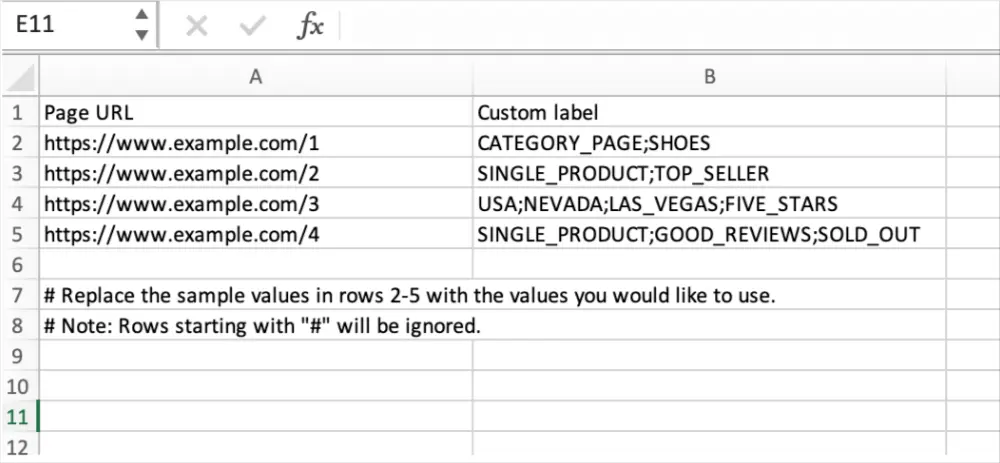
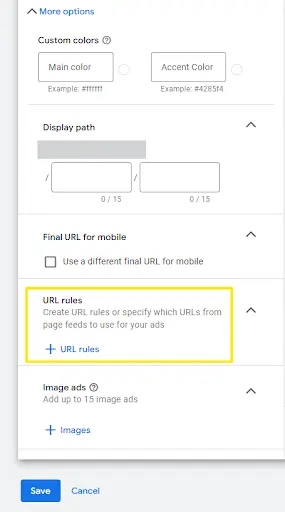
A page feed is a structured list of URLs that you provide to Google. Instead of letting Performance Max choose landing pages freely, a page feed helps prioritize or restrict which pages are eligible for ad delivery.
Page feeds are commonly used when:
- You want to promote specific product or category pages
- Your website has many URLs with similar intent
- You need tighter control over landing page selection
Page feed requirements
To use a page feed, you must upload a spreadsheet with:
- Final URL (required)
- Custom labels (optional but recommended)
URLs must be valid, crawlable, and match the domain of your campaign’s final URL.
Using custom labels effectively
Custom labels allow you to group URLs inside your page feed based on strategy, not site structure. For example:
- Product category
- Seasonal promotions
- High-margin items
- Geographic relevance
You can then associate asset groups with specific labels, ensuring the right assets are shown for the right pages.
Page feeds vs final URL expansion
Page feeds can work in two ways:
- With Final URL expansion enabled: Google prioritizes page feed URLs but may still explore others
- With Final URL expansion disabled: Only URLs from the page feed are used
This flexibility allows you to balance automation with control, depending on your campaign goals.
Best practices for page feeds
- Keep labels simple and consistent
- Avoid overlapping labels across unrelated URLs
- Align asset group themes with page feed labels
- Update feeds when promotions or inventory changes
Page feeds are especially powerful for ecommerce and content-heavy sites, where relevance directly impacts conversion rates.
Knowing the technical specs is only the first step. To get real results from Performance Max, you also need to apply those specs strategically, from asset selection and structure to optimization and ongoing testing.
If you want a practical, step-by-step framework that goes beyond requirements and focuses on performance, we’ve put together a detailed checklist covering what actually works in real campaigns.
Explore the full guide: Performance Max Best Practices Exposed – A Practical Checklist to learn how to turn compliant assets into high-performing Performance Max campaigns.
Performance Max Ad Spec: Frequently Asked Questions
1. What ad formats are supported in Performance Max?
Performance Max supports ads across all major Google channels, including Search, Display, YouTube, Discover, Gmail, and Maps. Instead of fixed ad formats, Google dynamically assembles ads using your text, image, and video assets to fit each placement.
2. Are Performance Max ads responsive by default?
Yes. All Performance Max ads are responsive. Google automatically adjusts layout, size, and format based on available inventory, device type, and user context.
3. How many assets should I include in each asset group?
Google recommends providing the maximum number of assets where possible. More assets give the system greater flexibility to test combinations and improve performance. At a minimum, each asset group should include multiple headlines, descriptions, images, and at least one video.
4. Is video required for Performance Max campaigns?
Video is not strictly required, but it is strongly recommended. If no video is uploaded, Google may auto-generate one using your images and text, which often results in lower-quality creatives.
5. Can I control where my Performance Max ads appear?
You cannot manually select placements. Performance Max automatically distributes ads across Google channels based on conversion goals. However, asset quality, page feeds, and audience signals influence where ads are shown.
6. Do image and video sizes affect performance?
Yes. Providing assets in multiple sizes and aspect ratios increases eligibility across placements and helps Google deliver ads more efficiently.
7. How often should I update Performance Max assets?
Assets should be reviewed regularly, especially when performance plateaus, offers change, or seasonality shifts. Updating assets helps refresh learning signals and improve results.
Final Takeaways: Using Specs to Win With Performance Max
Performance Max specs are not just technical requirements. They are performance levers that directly influence how well Google’s automation can learn, test, and scale your campaigns. The more complete and high-quality your assets are, the more opportunities Google has to find winning combinations.
The most important takeaway is that Performance Max is system-driven, not placement-driven. You are no longer designing ads for one channel at a time. Instead, you are supplying building blocks that Google assembles across Search, Display, YouTube, Discover, Gmail, and Maps. Weak or missing assets limit this process and reduce reach.
To succeed with Performance Max:
- Treat asset groups like themed campaigns, not storage folders
- Provide variety across text, image, and video formats
- Follow size and format specs closely to avoid delivery limitations
- Upload your own videos instead of relying on auto-generated creatives
- Use page feeds and custom labels when you need tighter control
Finally, remember that optimization in Performance Max starts with inputs, not just bidding strategies. When your assets are structured, compliant, and strategically aligned with your goals, Google’s automation becomes a competitive advantage instead of a black box.