

Responsive Search Ads (RSAs) became the default search ad format in Google Ads on June 30, 2022, officially replacing Expanded Text Ads (ETAs). Since then, advertisers can no longer create new ETAs and Responsive Search Ads are now the standard for search campaigns.
The move from fixed ads to asset-based, AI-driven ads changed how search advertising works, and it can feel confusing at first. If you haven’t kept up with this shift, or you’re still figuring out how to get the most out of RSAs, this guide is for you.
We’ll break down what Responsive Search Ads are, how they work, how they differ from other ad types, and the best practices you can use to improve performance without overcomplicating things.
What are Responsive Search Ads?
Google’s Responsive Search Ads (RSAs) are an ad format that lets you deliver more relevant messages to users based on their search queries.
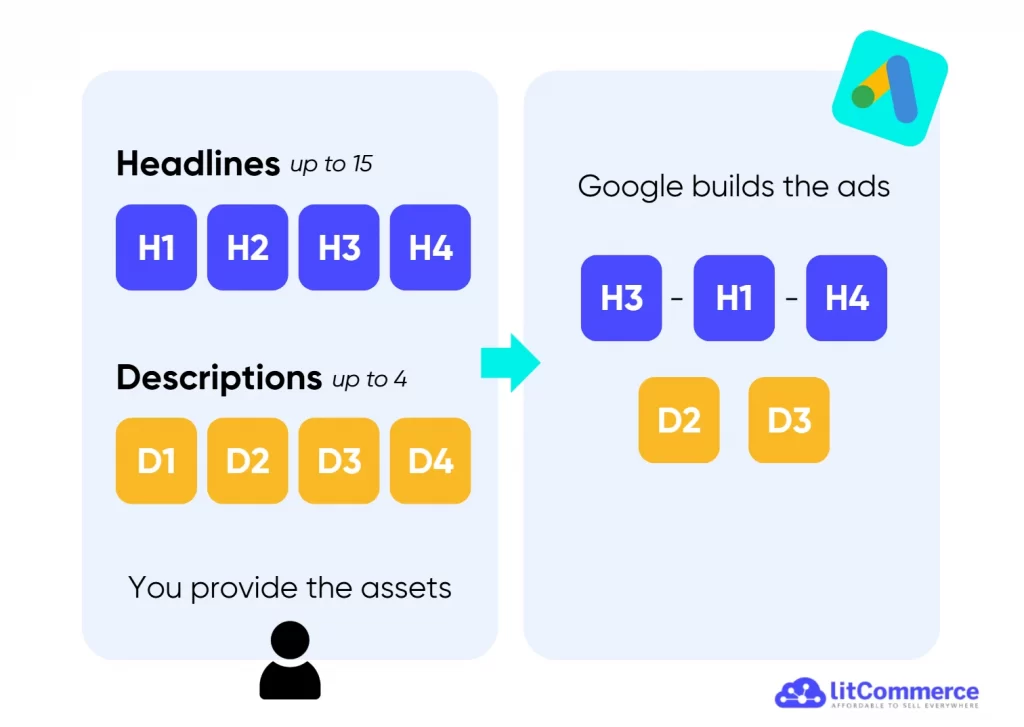
Instead of writing one fixed ad, you give Google several headlines and descriptions. From there, Google mixes and matches them to figure out which combinations get the best results. Over time, your ad automatically shows the message that’s most likely to connect with each searcher.
Because you provide multiple headlines and descriptions, your ads can show in more auctions and match more search terms. This gives you more opportunities to earn clicks and conversions that static ads often miss.
Responsive Search Ads also adapt to different screen sizes. For example, an ad shown on a mobile phone may display fewer headlines but highlight the most important message, while the same ad on a desktop can show more details. RSAs ensure your message stays clear and effective, no matter how or where someone searches.
Your ads did the hard work, don’t let bad product data waste it
Poor Google Merchant Center feeds can lead to disapproved products, incorrect prices, missing attributes, and lost shopper trust. That’s why you need a clean, well-maintained data feed. And LitCommerce can help, with $0.

How Do Responsive Search Ads Work?
Responsive Search Ads work by using Google’s AI to test and learn from the headlines and descriptions you provide. Google then automatically selects the highest-performing ad versions by combining various assets instead of displaying a static ad each time.
So, how does Google Ads generate RSAs in practice?
When someone searches on Google, the system looks at real-time signals such as the search query, device type, location, and past behavior. Based on this context, Google selects the headline and description combination that is most likely to get a click or conversion.
Over time, Google Ads learns which messages perform best for different types of searches. Strong combinations are shown more often, while weaker ones appear less frequently. This ongoing testing helps your ads stay relevant as search behavior changes.
Responsive Search Ads vs Dynamic Search Ads
At first glance, Responsive Search Ads and Dynamic Search Ads may seem similar. Both use Google’s automation to help advertisers reach more relevant searches.
However, while Google RSAs are built using headlines and descriptions you write, Dynamic Search Ads rely on your website content rather than keywords.
With Dynamic Search Ads, Google crawls your site, such as product pages, service pages, or blog posts, and automatically matches user searches to the most relevant pages. The headlines are generated dynamically from page content, while you usually provide the description text.
Even so, you still have strategic control. You can choose which pages Google is allowed to use by setting targeting rules based on URLs or page titles, and you can exclude pages that are outdated, low-performing, or not intended for advertising.
Responsive Search Ads (RSAs) | Dynamic Search Ads (DSAs) | |
Ad copy source | Headlines and descriptions you provide | Website content Google crawls |
Keyword usage | Uses keywords in your ad groups | No keywords required |
Headline creation | Written by advertiser | Generated automatically by Google |
Level of messaging control | High | Limited |
Best use case | Scaling tested ad messaging | Covering gaps and finding new queries |
Want to learn more about Dynamic Search Ads, check out our The Best Dynamic Search Ads Example: How DSAs Works & What to Learn From
When to Use Responsive Search Ads
If Dynamic Search Ads work best for businesses with large or frequently changing websites, Responsive Search Ads are ideal when you already know what you want to say, but you want Google to help you find the best way to say it.
You should use Google RSAs when:
- You want to test multiple headlines and messages without creating dozens of ads
- You need your ads to align closely with specific keywords and landing pages
- You want ads that adapt to different devices, locations, and search intent
For many advertisers, Responsive Search Ads become the foundation of their search campaigns. They handle your most important keywords and traffic, while Dynamic Search Ads fill in the gaps by discovering new opportunities.
Responsive Search Ads Examples
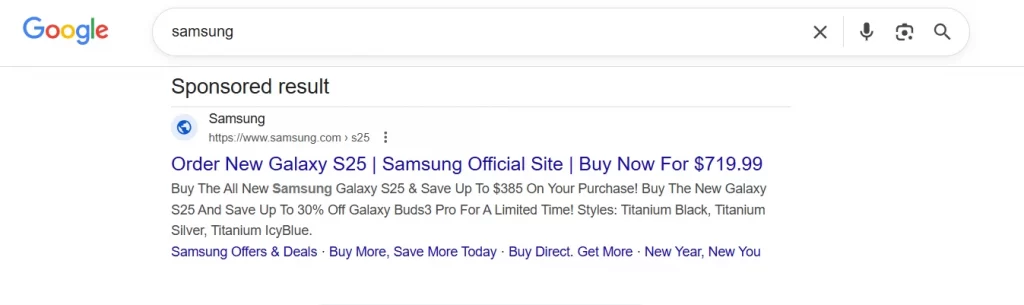
Here’s a simple example of a Responsive Search Ad in action. When a user searches for “Samsung”, a sponsored result appears with two headlines and a short product-focused description.
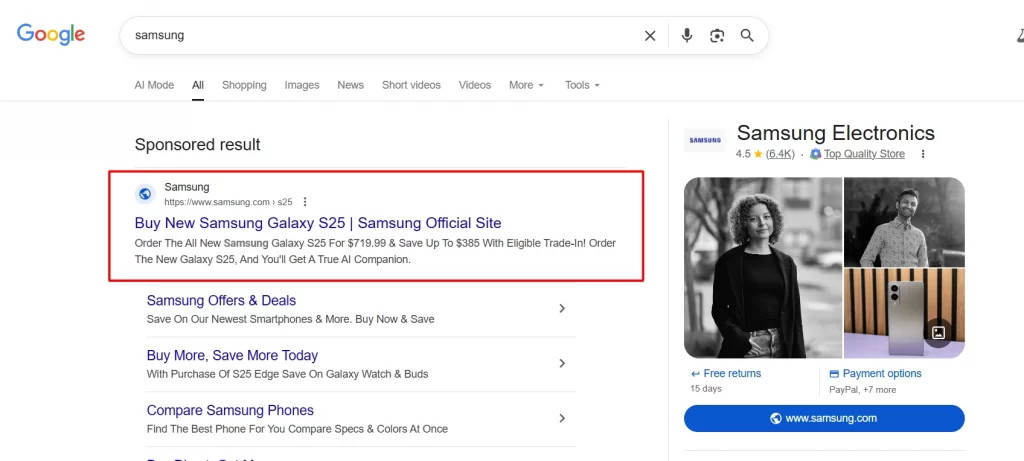
The exact headlines shown may vary from one search to another, depending on what Google believes is most relevant at that moment.
What Are Character Limits for Responsive Search Ads
Each part of a Responsive Search Ad has its own maximum length, and staying within these limits is essential for performance and approval.
- Headline: Up to 30 characters
- Description: Up to 90 characters per description
- Display URL: Automatically pulled from your final URL
- Display URL path fields: Up to 2 optional fields, each with a 15-character limit
Note that every character in double-width languages, such as Korean, Japanese, or Chinese, counts as two characters toward the limit.
In total, Responsive Search Ads allow up to 300 characters across all components. To deal with this limits, we recommend you to choose words that highlight your value and relevance without unnecessary filler.
How to Create Responsive Search Ads in Google Ads
Follow these steps to create Responsive Search Ads quickly in Google Ads.
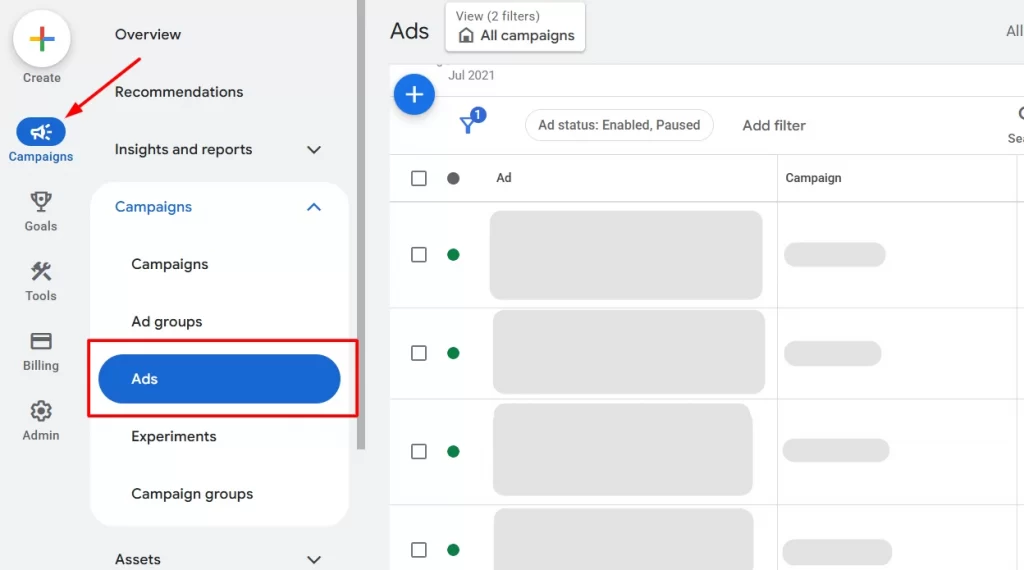
1. On the left-hand menu, click the Campaigns icon, which looks like a megaphone. From the Campaigns drop-down, select Ads to view your existing ads.
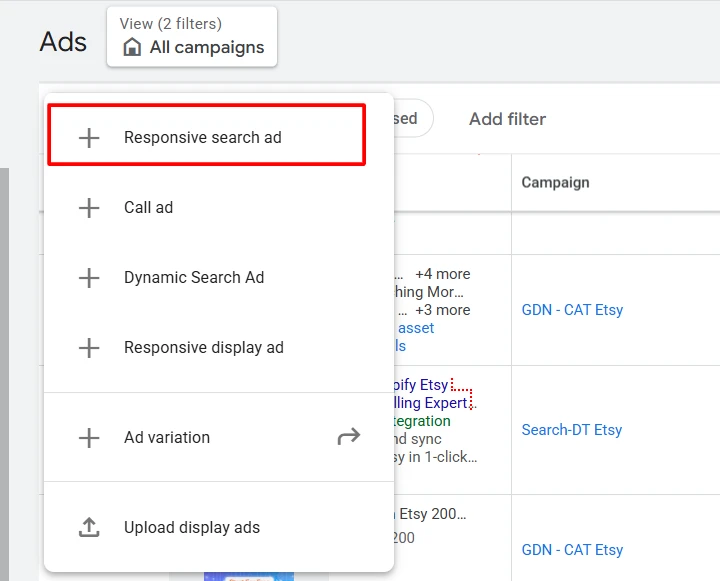
2. Click the “+” button above the Ads table to create a new ad. From the menu, choose Responsive search ad.
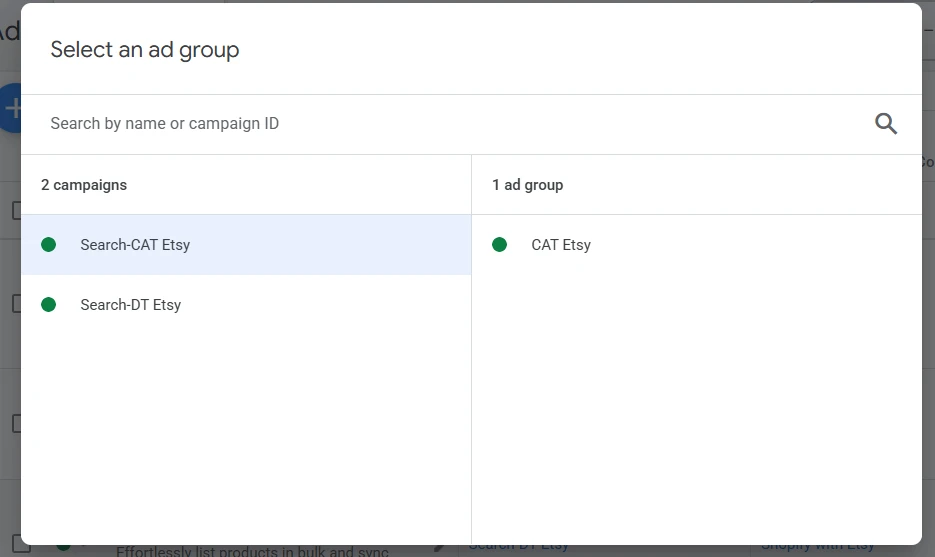
You’ll then be asked to select the campaign and ad group where your ad should run. Make sure the ad group matches the keywords and landing page you plan to use.
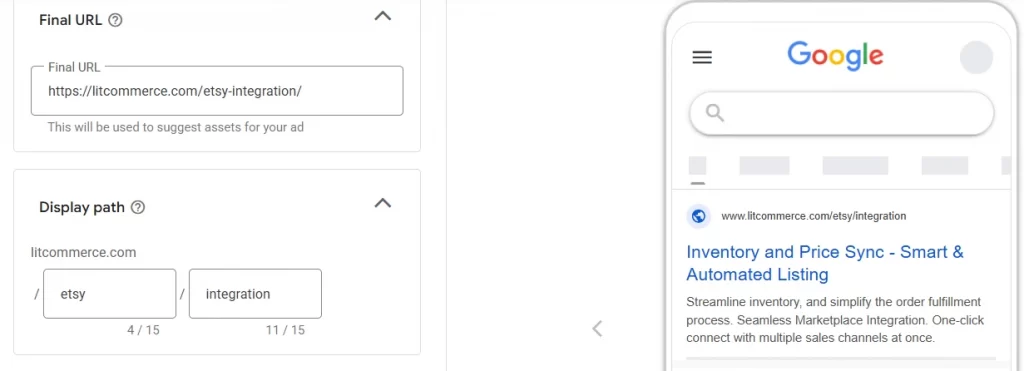
3. Enter your final URL and display path.
- The final URL is the exact page you want users to land on, such as a product or service page.
- The display path helps set expectations by showing a clean, readable version of the URL.
4. Add your headlines:
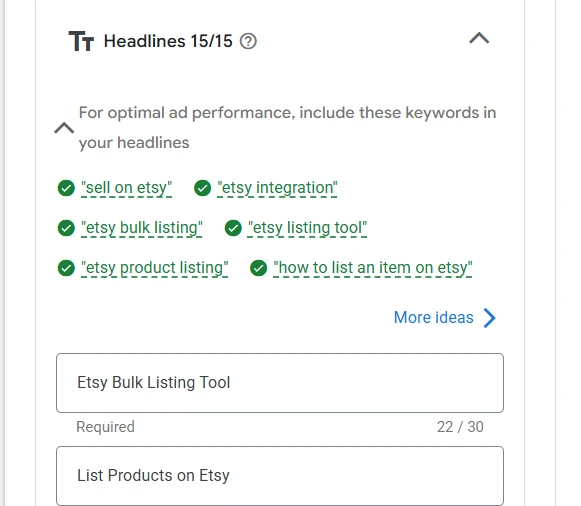
and description:
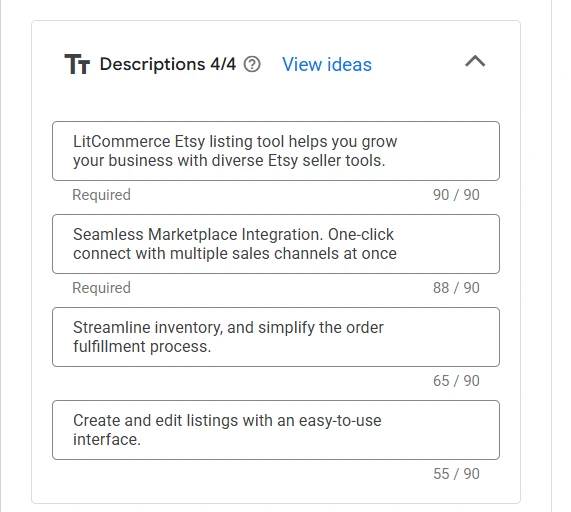
You can include 3 to 15 headlines and 2 to 4 descriptions.
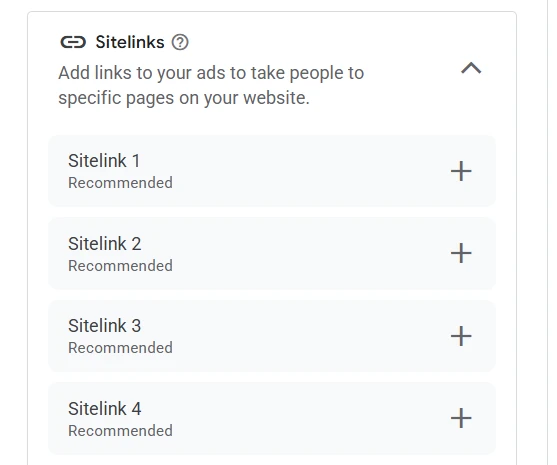
5. (Optional) Add sitelinks to direct people to specific pages on your site
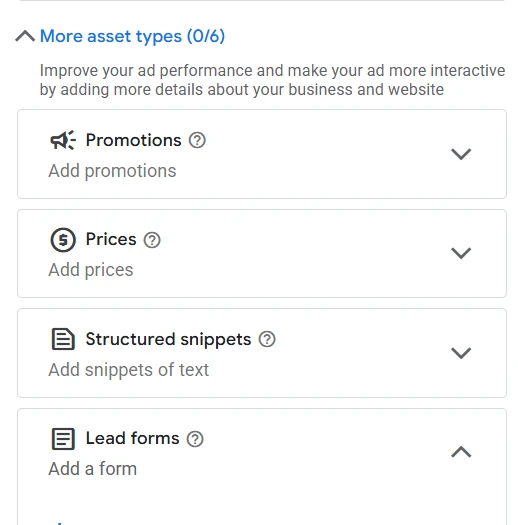
6. (Optional) Add ad assets like promotions, prices, lead forms to make your ad more visible and give users more reasons to click.
Before saving, check the Ad strength score and Google’s recommendations. These tips can help improve relevance and performance before your ad goes live.

Once everything looks good, click Save ad, and your Responsive Search Ad will be ready to run.
How to Measure Responsive Search Ads Performance
To understand how well your Responsive Search Ads are performing, start with the campaign report in Google Ads. Here, you’ll see high-level metrics such as impressions, clicks, cost, conversions, and conversion value.
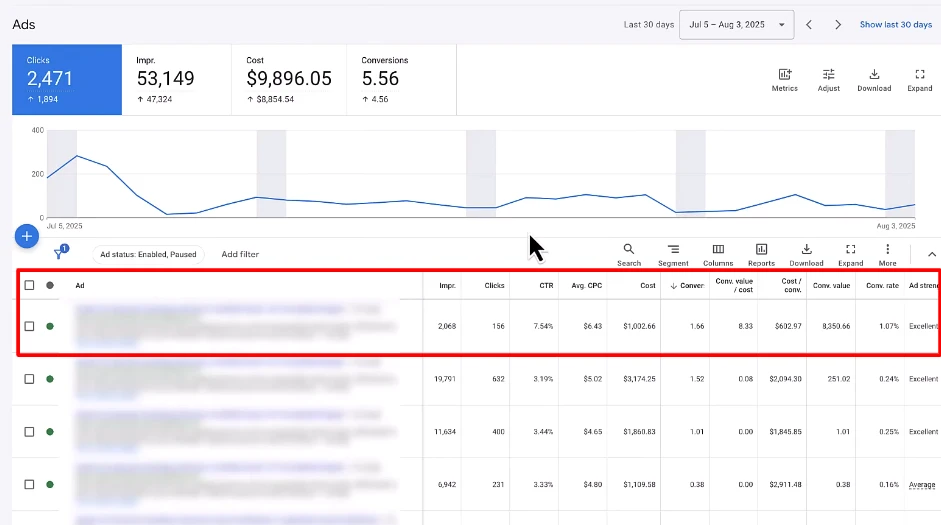
Within the Ads view, each row represents a different ad combination. You can see how your Responsive Search Ads perform compared to other ads in the same campaign or ad group.
Then, click on a specific ad to open the asset performance report.
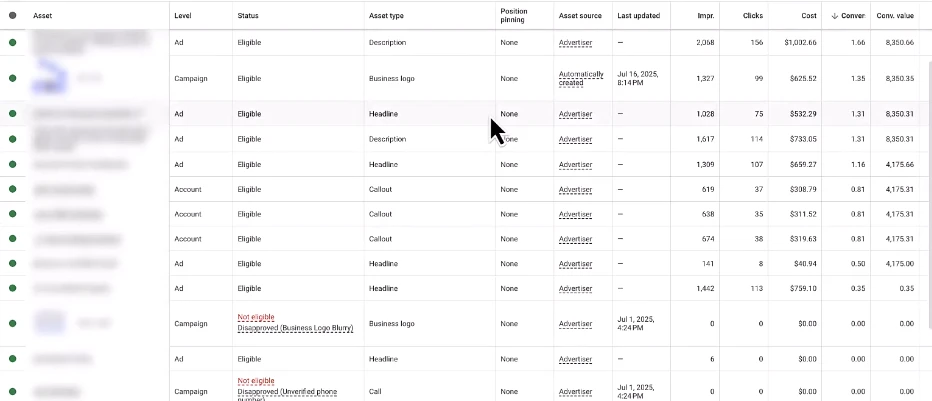
Here, you can review how each headline and description asset performs based on:
- Impressions
- Clicks
- Cost
- Conversions
- Conversion value
These insights help you identify which messages resonate with users and which ones may need to be replaced or rewritten.
In fact, here are some additional industry-average performance statistics for search ads:
- The average click-through rate (CTR) is 3.17%
- The average cost per click (CPC) is $2.69
- The average conversion rate is 3.75% (source)
Turn your RSA clicks into sales with product feeds that actually perform
LitCommerce product feed management helps you create and optimize GMC feeds at $0, so your ads lead to accurate conversion-ready listings, and up to date, without manual work.
6 Responsive Search Ads Best Practices
To help you get the most out of your Responsive Search Ads, we’ve pulled together 6 proven best practices based on our own campaign experience and insights from other successful advertisers.
1. Use multiple relevant headlines and descriptions
Give Google plenty of options to work with. The more relevant headlines and descriptions you provide, the more combinations Google can test to find what performs best.
You can add up to 15 headlines and 4 descriptions, but you don’t need to use the maximum every time. A good rule of thumb is to include at least 7-10 headlines and 3 descriptions. This gives Google enough variety without overwhelming the system with repetitive messaging.
2. Write headlines & description with different angles
When writing assets for Google Ads’ Responsive Search Ads, variety matters more than volume. Each headline and description should communicate a different angle, not just a slight variation of the same message.
Try mixing:
- Keywords that reflect search intent
- Benefits that solve a user’s problem
- Value propositions that explain why you’re different
- Calls to action that encourage the next step
- Trust signals like reviews, experience, or guarantees
Avoid repetitive or boring variations of the same headline. If multiple headlines say essentially the same thing, Google has fewer meaningful combinations to test.
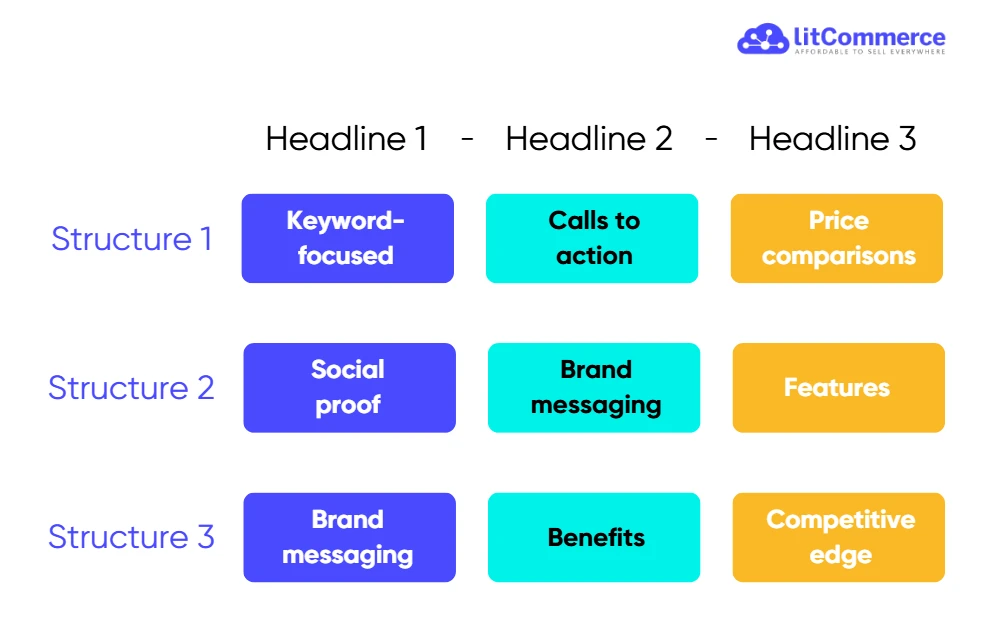
Here is an example of good structured headlines:
3. Include your main keyword naturally
Your main keyword still plays an important role in Responsive Search Ads, but it should feel natural, not forced.
Aim to place your primary keyword in 2 to 3 headlines, rather than repeating it across every asset.
Avoid keyword stuffing or awkward phrasing. Headlines that sound robotic often perform worse and reduce trust. Instead, blend keywords into clear, user-focused messages that highlight benefits or intent.
4. Pin headlines & descriptions to specific positions (avoid over-pinning)
Pinning allows you to control where certain headlines or descriptions appear in your Responsive Search Ads. This is useful when you must always show important information, such as legal disclaimers, pricing claims, or a key brand message.
For example, if you run a software company offering a free trial, you might use a headline like “14-Day Free Trial – No Credit Card” and pin it to Headline 1.
Pinning is helpful, but it should be used carefully. When you pin too many assets, you limit Google’s ability to test different combinations.
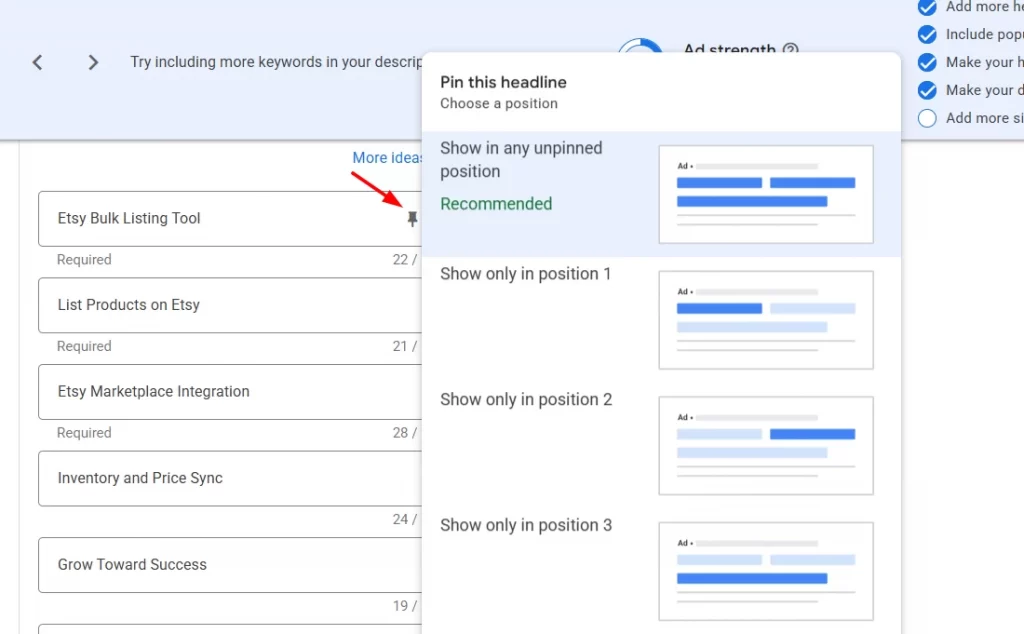
To pin headlines or descriptions in RSA:
- While creating or editing your ad, locate the headline or description field
- Click the pin icon next to the text
- Choose the position where you want it to appear (for example, Headline 1 or Description 1)
5. Build RSA assets from your best-performing Ads
As discussed in the performance measurement section, Google Ads gives you clear data on which ads drive the most clicks, conversions, and value. Use this data to your advantage. Review your existing search ads and identify the headlines and descriptions that consistently perform well.
Once you’ve found your top-performing ads, reuse those elements as building blocks for your Responsive Search Ads.
6. Pair Responsive Search Ads with Smart Bidding and Broad Match
Responsive Search Ads can perform best when they’re supported by automation on both the bidding and keyword side. Pairing Google RSAs with Smart Bidding and broad match helps Google match the right message to the right search at scale.
- Smart Bidding uses machine learning to automatically set bids based on the likelihood of a conversion or conversion value. It evaluates real-time signals such as device, location, language, time of day, and operating system to decide how aggressively to bid for each search.
- Broad match complements this by expanding your reach. As the default match type, it captures variations like misspellings, synonyms, and related phrases. This allows your ads to show for a wider range of relevant searches, including queries you may not have thought to target.
When combined, these three elements work together:
- Broad match finds more relevant searches
- Responsive Search Ads adjust messaging to match intent
- Smart Bidding optimizes bids based on performance signals
FAQs about Google Responsive Search Ads
How many Responsive Search Ads does Google Ads allow?
Google Ads allows you to create multiple RSAs per ad group. There is no strict maximum limit, but best practice is to keep the number manageable so data isn’t spread too thin. Having too many RSAs in one ad group can slow down learning and make optimization harder.
Do Responsive Search Ads always display all 3 headlines and 2 descriptions?
No. Responsive Search Ads do not always show all 3 headlines and 2 descriptions. The number shown depends on factors like device, available ad space, and search context. On mobile devices, for example, Google may show fewer headlines or only one description if space is limited.
How many RSAs should you run in each ad group?
Most advertisers should run 1 to 2 Responsive Search Ads per ad group. This gives Google enough variation to test without splitting performance data too much. Focus on improving asset quality rather than adding more ads.
Are Responsive Search Ads more effective than Expanded Text Ads?
In most cases, yes. Responsive Search Ads often outperform Expanded Text Ads because they can adapt messaging to different searches and user signals. Google also prioritizes RSAs in auctions and uses machine learning to optimize combinations continuously. That said, performance still depends on the quality of your headlines, descriptions, and landing pages.
Conclusion
Hopefully, this guide has given you a clear understanding of how Responsive Search Ads work and how to use them effectively in your Google Ads campaigns. While RSAs rely heavily on automation, strong results still depend on the quality of the headlines, descriptions, and strategies you put in.
If you want to go deeper into something like scaling your campaigns, we’ve shared more practical guides on our blog to help you move forward. And if you ever need extra support or have questions along the way, feel free to reach out. We’re always happy to help.