Choosing the right Shopify payment gateway in 2026 isn’t just about fees. It affects your conversion rate, checkout trust, payout speed, and even which countries you can sell to.
In this guide, we compare the 10 best Shopify payment gateways, breaking down fees, supported countries, payout times, and best use cases to help you choose the right option for your store size, target audience, and growth goals.
What Are Shopify Payment Gateways?
Shopify payment gateways are the services that securely process your customers’ payments when they buy from your Shopify store. You can think of it as a digital bridge between your Shopify checkout, your customer’s bank, and your own business account.
It works by securely handling payments from start to finish. When a customer enters their payment details on your Shopify store, the payment gateway encrypts the information and sends it to the payment processor.
The processor then contacts the customer’s bank to approve or decline the transaction. Finally, the gateway relays the result back to your store, completing the payment process.
With over 100 Shopify payment gateways globally, Shopify gives merchants plenty of flexibility.
Shopify vs Third-party Shopify payment gateways
- Shopify Payments is Shopify’s own built-in gateway, integrated directly into your admin, with no need for a separate merchant account, and no extra Shopify transaction fees when it’s your primary gateway.
- Third-party Shopify payment gateways are external providers like PayPal, Stripe, Authorize.net, etc. that you connect to your store via Settings → Payments. They still process payments through Shopify’s checkout, but the external provider handles billing, fees, and risk rules.
You might want to know:
What are the Criteria to Choose the Right Shopify Payment Gateways?
Choosing the right Shopify supported payment gateways is crucial because it directly affects how smoothly you can process payments, keep your customers happy, and protect your profits.
Before you decide, here are the key criteria you should consider:
- Supported countries & currencies: You need a gateway that operates in your country and supports your customers’ currencies. This avoids failed payments and reduces costly conversion fees.
- Transaction fees & extra charges: Each gateway has different processing, cross-border, and currency conversion fees. Understanding them helps you protect margins, especially if you sell internationally.
- Accepted payment methods: Customers expect multiple options like cards, wallets, or BNPL. The more methods you support, the higher your conversion rate.
- Payout schedule: Some gateways pay out in 1–3 days, while others hold funds longer. Fast payouts improve cash flow and help you reinvest quickly.
- Security: A secure payment gateway is vital to protect your business and customers. Look for features like SSL certificates, fraud detection, and PCI compliance.
- Compatibility with Shopify: A gateway that integrates smoothly with Shopify ensures a faster setup, fewer errors, and a better checkout flow.
These criteria help you choose a gateway that balances cost, reliability, and customer experience, setting your store up for long-term success.
10 Best Shopify Payment Gateways for Your Store
With so many payment options available, finding the best one for your Shopify store that provides reliable performance, secure transactions, and a seamless checkout experience can feel overwhelming.
To make the choice easier, here are the 10 best Shopify payment gateways for Shopify sellers:
Payment Gateway | Best for | Supported Countries | Fees | Payout Speed | Extra Shopify Fees |
Shopify Payments | Most merchants wanting simple setup and no extra Shopify transaction fees | 20+ | 2.5%–2.9% + $0.30 per online transaction; 1.5%–2% currency conversion fees | 2-5 business days; first payout up to 7 days | ❌ No |
PayPal Express Checkout | Stores wanting higher customer trust and better conversion rates | 200+ | 2.6%–3.4% + a fixed fee; additional charges for cross-border and currency conversion | Minutes to 24+ hours for payouts | ✅ Yes |
Stripe | Sellers needing global flexibility or operating in regions where Shopify Payments is not available | 45+ | 2.9% + $0.30 per online card transaction; additional 0.5% for international cards; 1% for currency conversion | 2-7 days | ✅ Yes |
Authorize.net | Larger or enterprise businesses wanting stability and advanced reporting | United States, Canada, United Kingdom, and Australia | $25 monthly fee + $0.10 per transaction + $0.10 daily batch fee | 2-4 business days | ❌ No |
Amazon Pay | Stores wanting Amazon-level trust and faster mobile checkout | United States, United Kingdom, Germany, France, Italy, Spain, Netherlands, Sweden, Luxembourg | 2.9% + $0.30 per domestic transaction; 3.9% + $0.30 for cross-border transactions | 1-2 business days | ❌ No |
Klarna | Stores selling mid- to high-priced products want to increase average order value and reduce cart abandonment | 20+ | 5.99% + $0.30 per transaction; high-volume merchants: 3.29% + $0.30; “Pay Now/SOFORT” options: 2.99% + $0.30 | 2-3 business days | ✅ Yes |
Afterpay | Stores targeting Generation Z and Millennial shoppers who prefer installment payments | United States, Canada, United Kingdom (as Clearpay), Australia, and New Zealand | 4%–6% + $0.30 per transaction | Every 14 days; 7 days post-delivery +2-5 days to bank | ❌ No |
Sezzle | United States and Canada stores wanting to increase cart sizes with installment payments | United States and Canada | Approximately 6% + $0.30 per transaction; $15 monthly fee if merchant volume is below $300 per month | 1-7 business days | ❌ No |
Worldpay | International and enterprise-level ecommerce stores | 100+ | 1.3%–3.5% + a fixed fee (varies by region and contract) | 3-6 working days | ✅ Yes |
2Checkout | Stores that need a fully international gateway with flexible payout options and global tax support. | 200+ | 3.5% + $0.35 per successful transaction | Weekly/bi-weekly/monthly; 2-5 business days transfer | ❌ No |
⭐ Quick pick: Best Shopify payment gateways in 2026
Shopify payments
⭐ Best for Shopify merchants who want the simplest setup, lower total fees, and a fully native checkout experience.
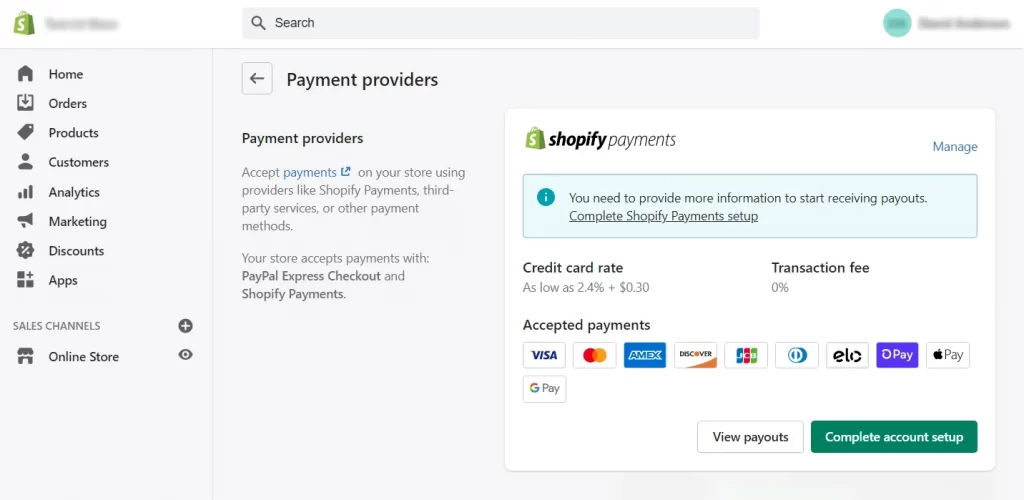
Shopify Payments is Shopify’s built-in payment gateway, designed to work seamlessly inside your Shopify admin. You don’t need a separate merchant account or third-party provider, which makes setup fast and beginner-friendly.
With Shopify Payments, you can accept major credit cards, Shop Pay, Apple Pay, Google Pay, and Buy Now, Pay Later options. Because it’s fully integrated, Shopify removes additional transaction fees when this is your primary gateway.
This method is fast, secure, and optimised for Shopify checkout, which is why it consistently ranks as the top choice for merchants.
Fees:
- Online transactions: 2.5%–2.9% + $0.30 (plan-dependent)
- Currency conversion fee: 1.5% (US) and 2% (all other supported countries and regions)
- No extra Shopify transaction fee when Shopify Payments is your primary gateway.
Pros:
- Fully integrated with Shopify admin
- No extra Shopify transaction fees
- Fast payouts and simple onboarding
- Create unified reporting and payouts inside Shopify
Cons:
- Not available in all countries
- Restricted for high-risk industries
PayPal Express Checkout
⭐ Best for stores of all sizes that want to instantly increase trust at checkout and capture additional orders from customers.

PayPal is a top global wallet solution supporting PayPal balance, linked bank accounts, and cards (Visa, Mastercard, Amex) in 200+ countries, making it one of the best gateways for international Shopify stores that rely on high buyer trust.
Because many shoppers already trust PayPal, adding it to your Shopify checkout can reduce hesitation and increase conversion rates, especially for first-time buyers and international customers.
It also features One Touch, a convenient option that speeds up checkout while keeping shoppers’ financial information secure.
Fees: 2.6%–3.4% + fixed fee, extra charges for currency conversion and cross-border payments
Pros:
- Widely trusted and familiar to customers
- Quick to connect to Shopify and easy to set up as a payment option.
- Offer good buyer protection
- Supports many currencies and cross‑border payments
Cons:
- Higher and complex fees
- Funds in PayPal usually need to be transferred to your bank manually
Stripe
⭐ Best for international Shopify stores or merchants needing flexible payment methods and global reach.
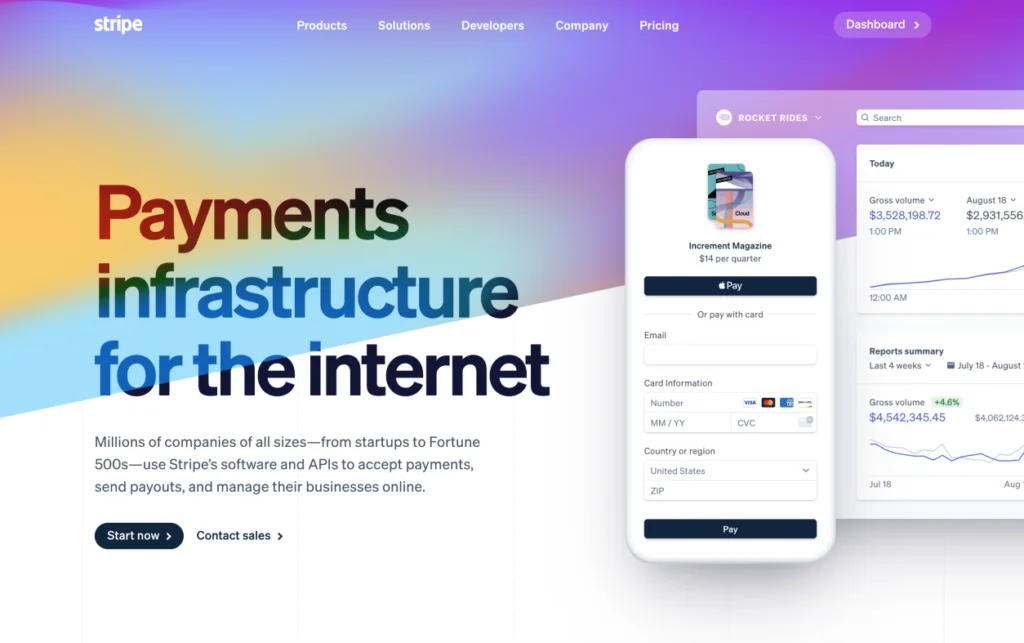
Stripe is one of the best global alternatives to Shopify payment gateways, offering broad country support, advanced features, and a wide range of payment methods. It supports 45+ countries and a wide range of payment methods, including cards, bank transfers, digital wallets, and local payment options.
Furthermore, Stripe is known for reliable processing, excellent fraud protection, and detailed reporting. While Shopify Payments uses Stripe infrastructure in many regions, standalone Stripe can support businesses selling restricted products.
Fees
- 2.9% + 30¢ per online card transaction in many regions
- 0.5% extra fees for international cards, 1% currency conversion fees
Pros
- Supports many global/local payment methods
- Excellent developer tools
- Broad international availability
Cons
- Extra Shopify transaction fees apply
- More technical setup compared to Shopify Payments
Authorize.net
⭐ Best for larger businesses that prefer a traditional gateway with deep reporting and strong fraud tools.
Authorize.net is a long-standing credit card gateway under Visa that supports online payments through major cards and eChecks, offering stable performance and strong fraud protection. It supports Visa, Mastercard, Discover, Amex, JCB, and eCheck (ACH).
This payment gateway for Shopify is available in the US, Canada, the UK, and Australia. This gateway is often chosen by merchants who already have a merchant account and prefer long-term reliability over modern UI features.
Fees: From 10¢ + daily batch fee 10¢ + $25 per month subcription fee
Pros
- Reliable and long-established processor
- Advanced fraud detection tools
- Supports eCheck/ACH
Cons
- US/Canada-centric
- Requires a US/Canadian merchant account (in many setups)
Amazon pay
⭐ Best for stores with many mobile shoppers or brands wanting Amazon-level trust at checkout.
Amazon Pay is considered one of the best Shopify payment gateways because it brings Amazon’s strong brand trust directly into your checkout.
It allows customers to pay using the cards already stored in their Amazon accounts, including Visa, Mastercard, Amex, and Discover, so they don’t need to re-enter any information. This familiar, secure experience reduces friction and significantly boosts purchase confidence, especially for first-time buyers.
It is supported in 9 countries, including the US, UK, Germany, France, Italy, Spain, the Netherlands, Sweden, and Luxembourg. Additionally, Amazon pay one-click convenience makes it excellent for speeding up mobile checkout.
Fees:
- 2.9% processing fee plus a 0.30 USD authorization fee
- 3.9% processing fee plus the same 0.30 USD for cross-border transaction
Pros
- Fast, easy checkout
- Benefits from Amazon brand trust
- Great for mobile buyers
Cons
- Not available globally
- Higher fees for some merchants
Maximize Sales With Multichannel Selling on Shopify
Choosing the right Shopify payment gateway is just the first step. Take your store further by selling across multiple platforms while managing inventory, prices, and orders from a single dashboard using LitCommerce!

Klarna
⭐ Best for selling mid-to-high-ticket products, fashion, home, lifestyle, and stores wanting to increase AOV and reduce cart abandonment.
Klarna is a market-leading Buy Now, Pay Later (BNPL) provider that offers flexible installments such as Pay-in-4 and Pay Later options. It’s extremely popular with younger shoppers and increases conversion rates for higher-priced items.
The service is available in 20+ countries, including key markets like the US, UK, Germany, Sweden, Finland, Norway, the Netherlands, Australia, and New Zealand.
Klarna’s financing features, such as pay in 3 or pay in 4, pay in 30 days. This payment gateway Shopify is especially effective for increasing average order value and reducing cart abandonment.
Fees:
- Standard Merchant (5.99% + $0.30)
- High-volume merchant (3.29% + $0.30) – $5M+ annually
- Pay Now / SOFORT (2.99% + $0.30) – EU only
Pros
- Increases AOV
- Widely adopted in the EU & the US
- Flexible payment schedules
Cons
- Higher merchant fees
- Limited global availability
Afterpay
⭐ Best for brands targeting Gen Z and Millennials who prefer budget-friendly installment options.
Afterpay is another leading buy now pay later provider that works through major platforms like Adyen and Stripe, enabling customers to split purchases into four interest-free payments. This is one of the best installment Shopify payment gateways for merchants targeting younger consumers, offering zero-interest payments backed by cards.
By offering Afterpay, merchants give customers an option to split their purchase value into interest-free (or low-interest) installments, which can improve affordability and reduce cart abandonment.
Fees: 4–6% + $0.30 per transaction
Pros
- Popular with Gen Z consumers
- BNPL service helps reduce cart abandonment
- Easy installment structure
Cons
- Higher fees for merchants
- Limited global reach
Sezzle
⭐ Best for stores in the US/Canada looking to increase cart size for mid-priced consumer goods.
Sezzle offers flexible BNPL financing and is especially popular in North America. It integrates easily with Shopify and provides shoppers with interest-free installment plans. With Sezzle, your customers can split their purchases into 4 interest-free payments over 6 weeks, making checkout feel lighter and more accessible.
This Shopify US payment gateways also supports multiple payment methods, including debit cards, credit cards, and bank transfers. It’s also known for fast approvals, responsible spending tools, and smooth integration with Shopify.
Fees: around 6% + $0.30 per transaction, $15 monthly fee if the merchant’s order volume is under $300 in a 30-day period.
Pros
- Strong adoption in North America
- Credit-building features encourage repeat use
- Quick customer approvals
- Easy Shopify integration
Cons
- Narrower global reach
- Higher fees than credit card processors
WorldPay
⭐ Best for enterprises and high-volume international sellers.
Worldpay is one of the best payment gateway for Shopify enterprises and global brands, offering 120+ payment methods, multi-currency support, and advanced omnichannel capabilities across 100+ countries.
It offers powerful features commonly expected from Shopify payment gateways, including strong fraud-protection tools, tokenization, recurring payment support, and detailed transaction reporting.
With its enterprise-grade infrastructure, it’s a preferred choice for merchants planning to scale, handle high-volume sales, or support international transactions.
Fees: 1.3% to 3.5% + fixed fee
Pros
- Extensive global reach across 100+ countries
- Wide selection of payment methods, including major cards and local options
- Strong fraud prevention and enterprise-level security
- Reliable processing for high-volume merchants
Cons
- More complex setup compared to modern lightweight gateways
- Approval time can be slower for new or small businesses
- Fees vary heavily by region and contract
2Checkout / Verifone
⭐ Best for stores that need a fully international gateway with flexible payout options and global tax support.

2Checkout, now rebranded as Verifone, is a popular global payment gateway for digital sellers, SaaS businesses, and ecommerce brands that need full international coverage. It’s known for supporting 200+ countries, 45+ payment methods, 30+ languages, and 100+ currencies, making it a strong choice for Shopify merchants selling worldwide.
On the list of Shopify payment gateways, it’s an all-in-one platform that provides subscription billing, tax handling, automated compliance, and localized checkout pages.
Fees: 3.5% + $0.35 per successful sale, no monthly or setup fee
Pros:
- Supports global customers in 200+ countries and territories
- Accepts 45+ payment methods and 100+ currencies
- Easy Shopify integration with built-in localization tools
- Strong subscription and SaaS billing features
- Handles tax, compliance, and invoicing automatically
Cons:
- Higher fees than traditional gateways
- Payout delays can occur depending on the region
Step-by-Step: How to Set Up a Payment Gateway on Shopify
After choosing the right Shopify payment gateways, the setup process is simple. Follow the steps below to start accepting payments smoothly and boost your store’s conversions.
- Log in to your Shopify admin dashboard
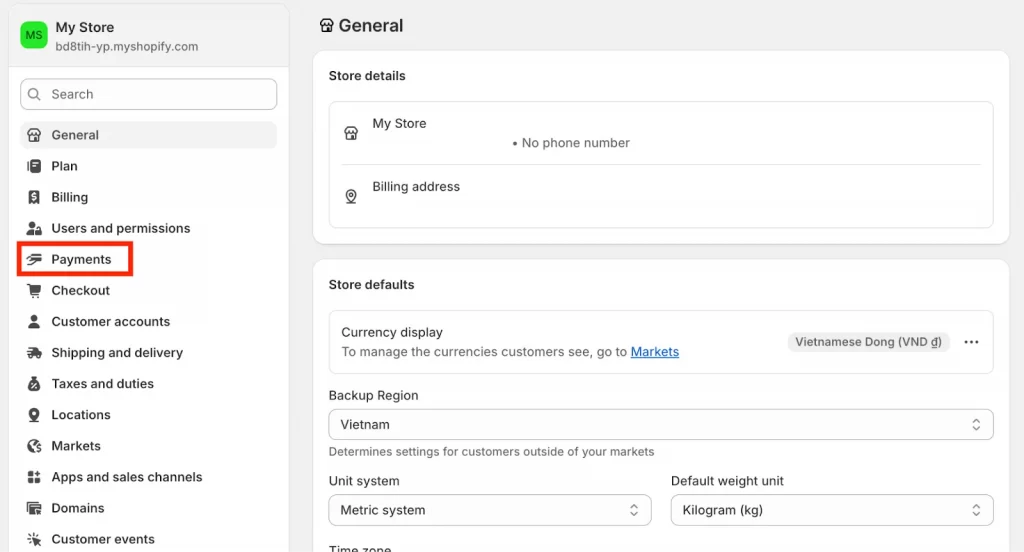
- Go to Settings and then Payments in your Shopify admin.
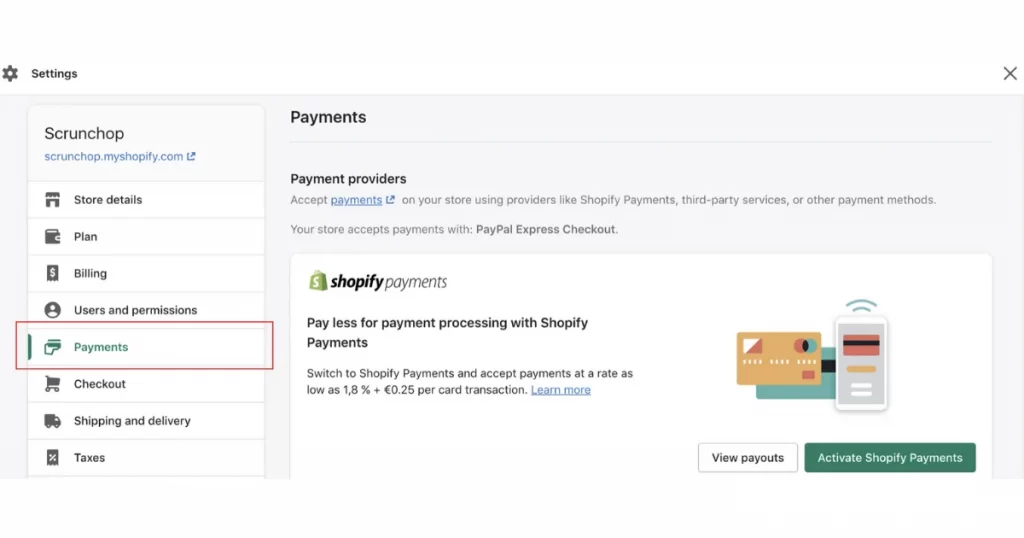
- In the “Shopify Payments” section, click Activate Shopify Payments. If it is already enabled by default, click Complete account setup instead.
Notes: For third-party providers, in the Additional payment methods section:
- Click Add payment methods or Choose another provider.
- Search for the provider you want to use (e.g., PayPal, Stripe) and click Install.
- Follow the on-screen instructions to connect your external account.
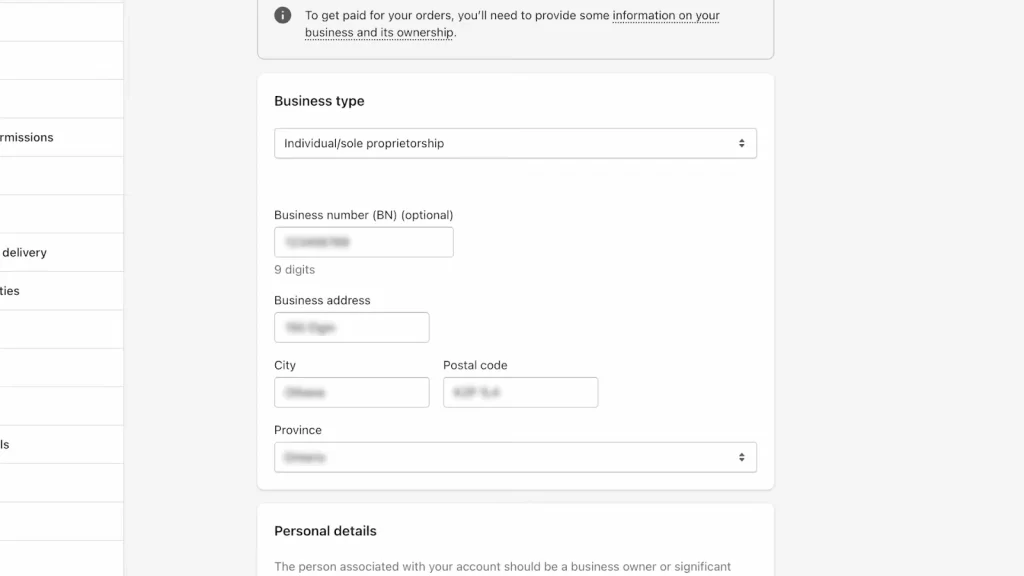
- Enter business details such as business type, legal business name, and contact information.
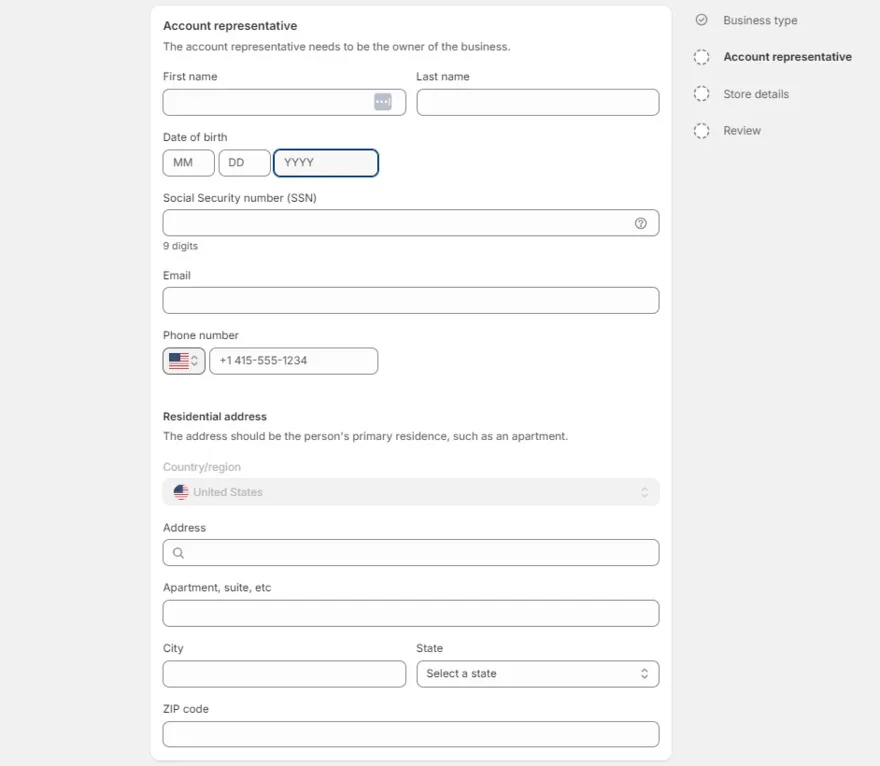
- Add personal verification information such as full name, date of birth, personal address, and more.
- Click Save to confirm your setting.
Important notes
Merchants have the ability to use one payment gateway that accepts credit cards, you can have a PayPal payment gateway set up, and you can have an alternative payment gateway and a manual payment gateway set up.
To set up that: On your Shopify Admin> Settings> Payment Providers section. Check out which payment gateways are available for you to use
Besides offering a trusted payment experience, adding product reviews can boost customer confidence and reduce cart abandonment. Let’s learn how to Add reviews to your Shopify!
Common Issues With Shopify Payment Gateways (and How to Fix Them)
Shopify merchants often run into payment gateway errors that can block checkout, delay payouts, or stop customers from completing orders. Here are the most common Shopify payment gateways issues, what they mean, and how to fix them:
1. Payment gateway not responding
Message customer might see: “Your payment gateway is unavailable.”
It means your Shopify Payments or a third-party processor is temporarily down or restricted in your region.
Solution: Check Shopify Status, ensure your gateway supports your country, and re-enable the provider under Settings → Payments.
2. Card declined during checkout
Message customer might see: “Payment couldn’t be processed”
It means the customer’s card was declined due to incorrect details, insufficient funds, or fraud protection rules.
Solution: Ask the customer to retry with accurate information or another card, and verify your store isn’t in Test Mode.
3. Payout delayed or frozen
Message customer might see: “Payout on hold, additional information required.”
It means Shopify needs identity or business verification to comply with banking regulations.
Solution: Upload any missing documents in Settings → Payments → Shopify Payments → Manage
4. Incorrect payment gateway configuration
Message customer might see: “Invalid API key” or “Payment authorization failed.”
It means Shopify cannot connect to your payment provider because your API keys or settings are incorrect.
Solution:
- Check your payment provider credentials (API keys, webhook URLs) In Shopify Admin→ Settings→ Payments → Manage → Re-entercorrect credentials.
- Double-check currency settings and account activation status.
5. Shopify payments account under review
Message customer might see: “Your payouts are temporarily on hold.”
It means Shopify is reviewing your business information to verify legitimacy or check for compliance issues.
Solution:
- Provide required business documents (bank statements, ID proofs) ASAP.
- Maintain clear refund/return policies on your store (Shopify checks them!).
- Avoid selling restricted products (check Shopify’s prohibited items list).
Shopify Payment Gateways List: FAQs
What is a Shopify payment gateway?
Shopify payment gateways are the services that securely process your customers’ payments when they buy from your Shopify store. You can think of it as a digital bridge between your Shopify checkout, your customer’s bank, and your own business account.
Which payment gateway is best for Shopify?
The best payment gateway for Shopify depends on your needs, but Shopify Payments is an excellent default for its seamless integration and no transaction fees. For international sales, consider WorldPay or Stripe, while PayPal is a trusted and widely recognized option, especially for those new to eCommerce.
How do I choose the right gateway?
You choose the right Shopify payment gateway by considering factors like supported countries and currencies, transaction fees, accepted payment methods, payout schedules, fraud protection, and seamless compatibility with Shopify. These ensure smooth payments, secure transactions, and a better customer experience.
What is the most used payment method on Shopify?
Credit and debit cards are the most used payment methods on Shopify, with mobile wallets and services like PayPal also being highly popular.
Can I use multiple payment gateways on Shopify?
Yes. Shopify allows you to use one credit card payment gateway, PayPal, alternative payment methods, and manual payment options at the same time.
Which Shopify payment gateway has the lowest fees?
Shopify Payments usually has the lowest total cost because it removes extra Shopify transaction fees. However, fees vary by country, plan, and payment method.
Smooth Payments with the Best Shopify Payment Gateways
Choosing the right Shopify Payment Gateways is one of the most important decisions you’ll make when building or scaling your eCommerce store. The gateway you select doesn’t just process payments. It shapes your checkout experience, impacts your conversion rate, affects your profit margins, and determines how easily you can scale into new markets.
With so many strong options available in 2026, the real advantage comes from understanding which solution fits your customers, your product type, and your growth stage.
If you need more tips for selling online, check out our Retailer blog or Contact us anytime with your questions.