

If your goal with Google Ads isn’t just getting more clicks, but making every dollar count, then conversion value and Target ROAS should be part of your strategy. When ad spend increases, you need to know exactly what you’re getting back and how to scale without sacrificing profitability.
Target ROAS is Google Ads’ Smart Bidding strategy built for this purpose. It uses automation and real-time signals to optimize bids toward revenue, not volume. This guide breaks down how Target ROAS works, who should use it, how to set it up correctly, and how to optimize it for long-term, profitable growth.
Key takeaways:
- Target ROAS focuses on revenue and value, not just conversions
- Accurate conversion value tracking is required for success
- eCommerce and value-based lead generation benefit the most from Target ROAS bidding
- A good ROAS is between 200% and 400%
- Clean product data and feed optimization improve ROAS performance
- Target ROAS works best as part of a long-term optimization strategy
What is Target ROAS Bidding?
Target ROAS (or, tROAS, or Target Return on Ad Spend) is an automated Smart Bidding strategy in Google Ads designed to help you optimize campaigns toward a specific revenue goal, not just more clicks or conversions.
Instead of focusing on how many conversions you get, Target ROAS focuses on how much value those conversions generate compared to your ad spend.
In Google Ads, Target ROAS in Google Ads can be applied as a bid strategy.
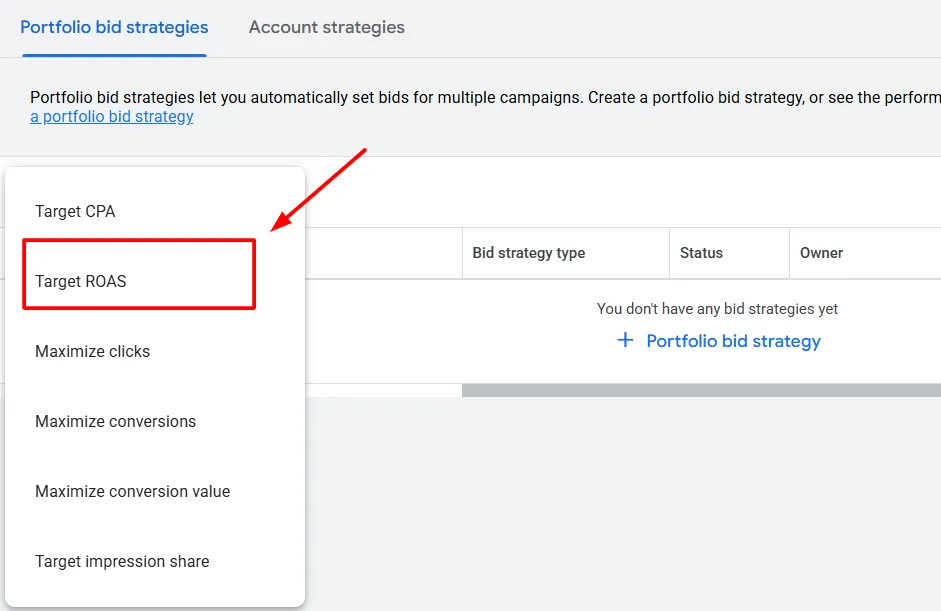
or enabled under Maximize Conversion Value bidding as “Set a target return on ad spend.” When a Target ROAS is applied, Maximize Conversion Value behaves similarly to a Target ROAS bidding strategy.
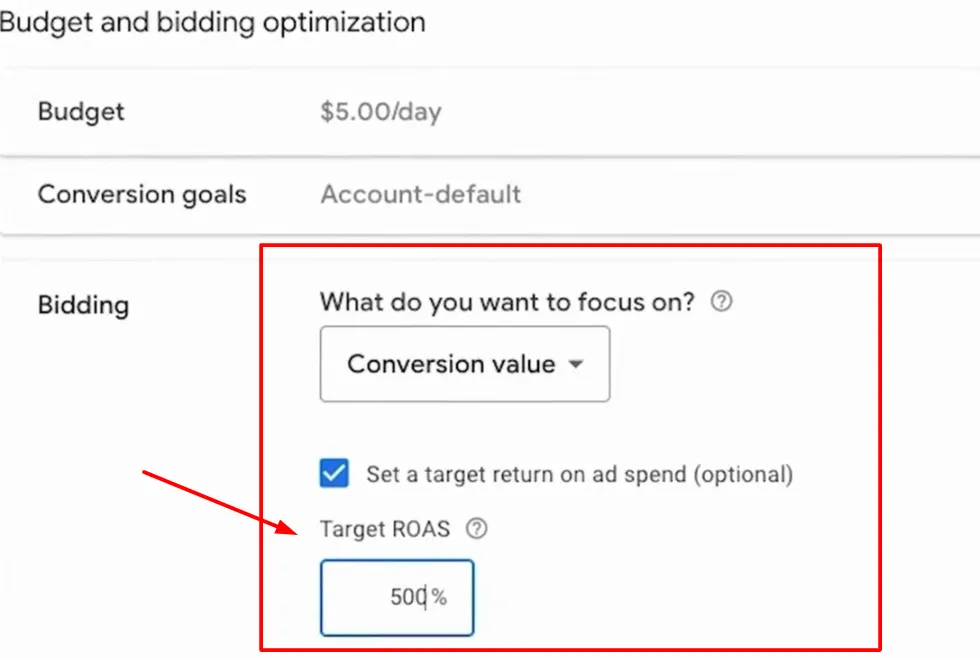
This is where you tell Google the return you want from your advertising budget.
For example:
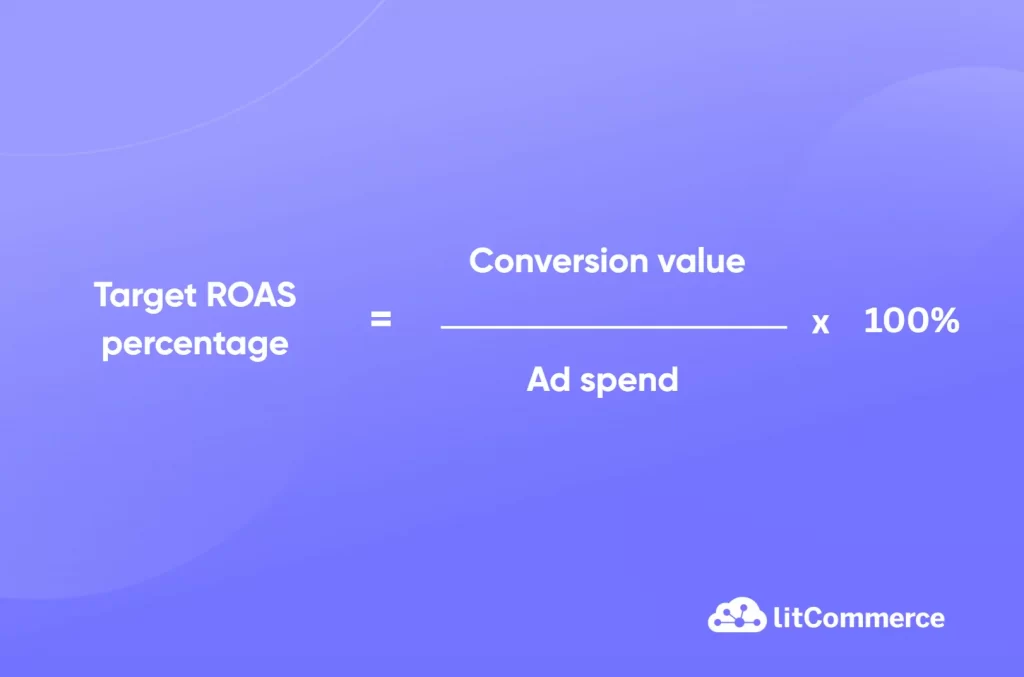
- If you want to earn $3 for every $1 you spend on ads, your Target ROAS would be 300%.
- If your goal is $5 back for every $1 spent, that becomes a 500% Target ROAS.
In simple terms, the percentage represents the ratio between revenue earned and ad spend invested.
How Target ROAS Works
Target ROAS works by adjusting your bids in real time based on the expected value of each search or interaction, not just the likelihood of a conversion. In simple terms, Google bids more when higher revenue is likely and bids less when the potential value is lower.
Here’s how the process works in practice:
- If Google predicts a search could lead to a high-value conversion, it will bid higher in that auction.
- If the search is unlikely to bring strong revenue, Google will bid lower or limit spend.
- Bids are set in real time for every auction, not as a fixed amount.
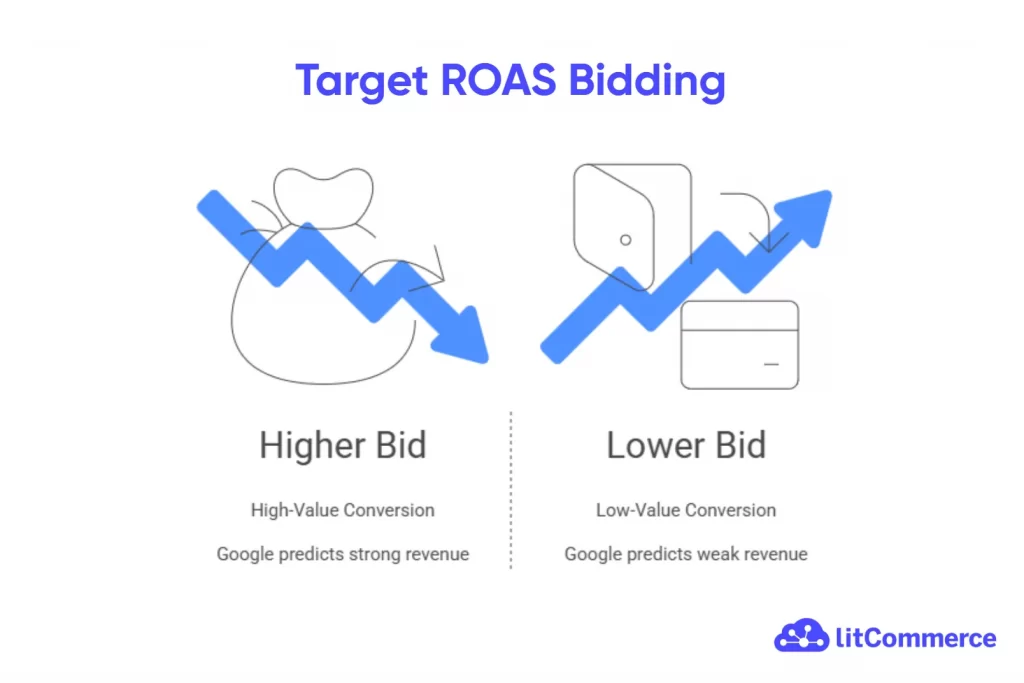
Google makes these decisions using your conversion value data from tracking. It estimates how likely someone is to convert, how much they might spend, and how much it will cost to acquire them. Based on that, Google automatically sets bids to maximize conversion value while aiming to hit your Target ROAS.
To improve bidding accuracy, Google also uses real-time signals such as:
- Device type
- Browser
- Location
- Time of day
- User behavior and intent
- Membership in remarketing or audience lists
Once enabled, the system keeps learning and adjusting bids to stay aligned with your revenue goal while responding to changes in user behavior and competition.
Target ROAS performs best when your product data is clean
LitCommerce’s AI-assisted feed management keeps your listings optimized automatically, handling attribute mapping, updates, so Google can focus on bidding toward the products that drive the most value.

When to Use Target ROAS Bidding Strategy
Target ROAS bidding only works if Google can actually see conversion value. If you are not tracking revenue or assigning values to conversions, this bidding strategy simply won’t function as intended.
Who should use Target ROAS?
That’s why Target ROAS is a natural fit for:
- eCommerce businesses that track purchase revenue with Google Shopping ROAS
- Online businesses that accept payments, subscriptions, or bookings
- Brands focused on profitability, not just traffic or conversion volume
- Accounts with stable conversion data, where Google has enough history to learn from
When revenue is passed into Google Ads, the system can optimize bids toward return, not just more clicks or conversions.
That said, Target ROAS isn’t limited to eCommerce. Lead generation businesses can also use it effectively, even if no payment happens at the time of conversion.
The key is recognizing that not all leads have the same value. A booked call, a contact form submission, a brochure download, or a phone call may all matter, but they don’t contribute equally to revenue.
Treating all leads as identical conversions makes it harder for Google to prioritize high-quality opportunities. Instead of marking weaker actions as “secondary” and excluding them from bidding, a better approach is to assign different values to each conversion based on its business impact. For example:
- A booked meeting may be worth far more than a brochure download
- A phone call may convert better than a generic form submission
Who shouldn’t use Target ROAS?
Target ROAS is not a good choice if:
- You are not tracking revenue or conversion values
- Your account has very little conversion data
- All conversions are treated as equal, with no value differences
- You need tight manual control over individual bids
Target ROAS vs Target CPA
In simple terms:
- Target CPA is about efficiency per conversion
- Target ROAS is about efficiency per dollar spent
Target ROAS and Target CPA are both Smart Bidding strategies in Google Ads, and they work in very similar ways. Both use machine learning, real-time signals, and historical data to adjust bids automatically at auction time. They are also both best suited for conversion-focused accounts.
The key difference comes down to what you want to optimize for.
Target CPA (Cost Per Action) focuses on getting as many conversions as possible while keeping the cost of each conversion close to a target you set. Google prioritizes volume and tries to deliver more actions, such as sales, leads, or sign-ups, at a predictable cost.
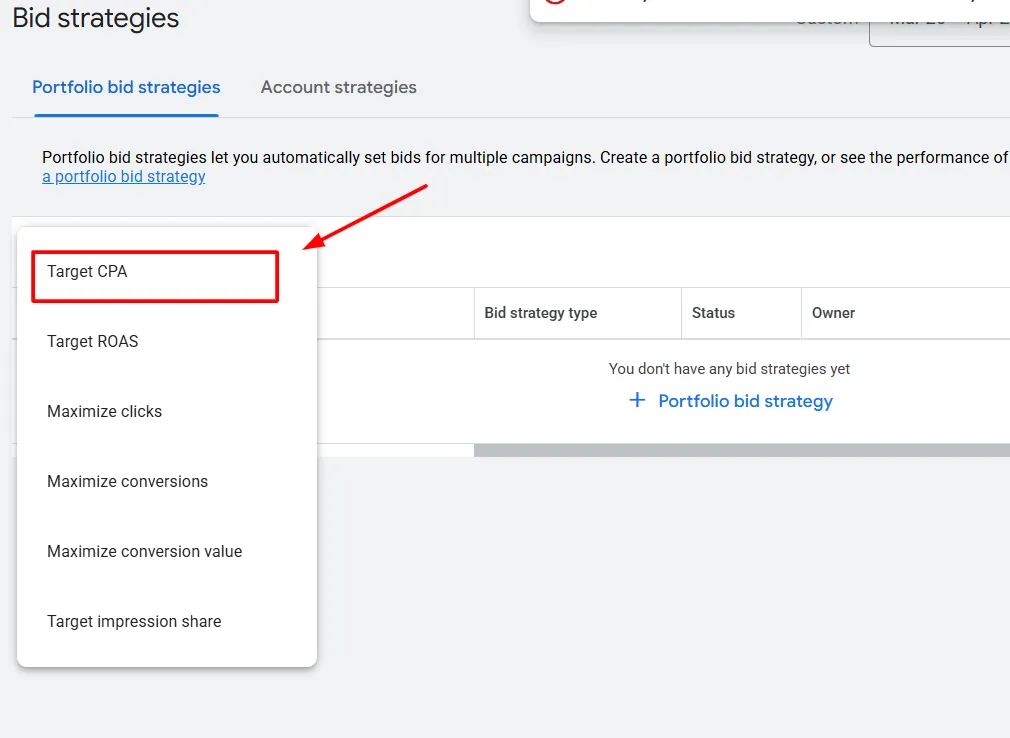
Target ROAS, on the other hand, focuses on the value of conversions, not just the number.
This is why Target CPA is often used for lead generation or accounts where all conversions are roughly equal, while Target ROAS is better for eCommerce or businesses where conversion values vary.
Key differences between Target CPA and Target ROAS
Target CPA | Target ROAS | |
Primary goal | Maximize conversions | Maximize conversion value |
Optimization focus | Cost per action | Return on ad spend |
Requires conversion values | No | Yes |
Best for | Lead generation, simple funnels | eCommerce, revenue-focused campaigns |
Handles different conversion values | Limited | Strong |
Profit-focused | No | Yes |
What Is A Good Target ROAS to Aim For?
There is no single “perfect” Target ROAS that works for every business.
In general, a ROAS between 200% and 400% is considered healthy, but the ideal target ultimately depends on your profit margins, costs, and overall business goals.
Your Target ROAS calculator should never be a random number or something copied from another business. If you set a target without understanding your margins, you risk spending money unprofitably, even if your ads look like they are performing well.
As a general reference, Google states that the average ROAS across Google Ads is around 2:1 (200%). This means:
- A ROAS above 200% is already better than average
- ROAS levels like 4x, 7x, or even 10x are considered strong, depending on the business
For B2C and eCommerce businesses, a 300% ROAS (3x) is often used as a reasonable starting point. Many established eCommerce brands aim higher, commonly landing in the 4x – 6x range, especially when campaigns and product margins are well optimized.
Note: Your ideal Target ROAS should be based on your own data. Start by understanding your current ROAS, your true costs, and your growth goals. From there, set a realistic target and adjust over time as Google’s bidding system learns and your business evolves.
How to Set Up Target ROAS in Google Ads
Prerequisites before setting Target ROAS
Before you can use Target ROAS, you must assign values to the conversions you are tracking. Target ROAS optimizes for conversion value, not just conversion volume, so value tracking is a required step.
Conversion values help you understand the real business impact of your ads. Instead of only seeing how many conversions occurred, you can see how much total value Google Ads generated.
- In your Google Ads account, click the Goals icon.
- Open the Conversions menu and select Summary.
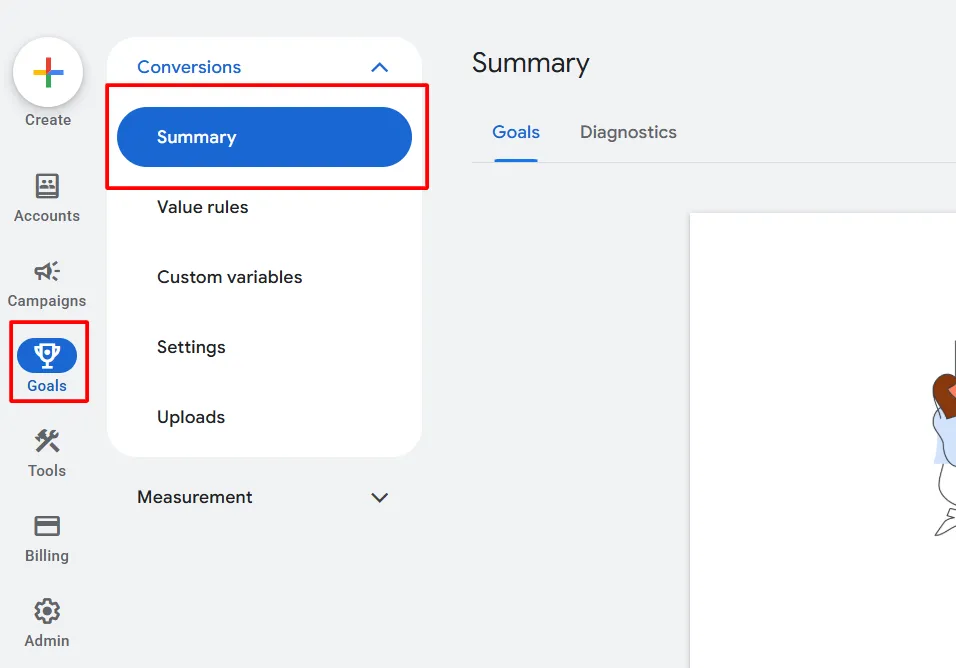
- Click the conversion action you want to edit, or create a new one.
- In the Details tab, click Edit settings and scroll to the Value section.
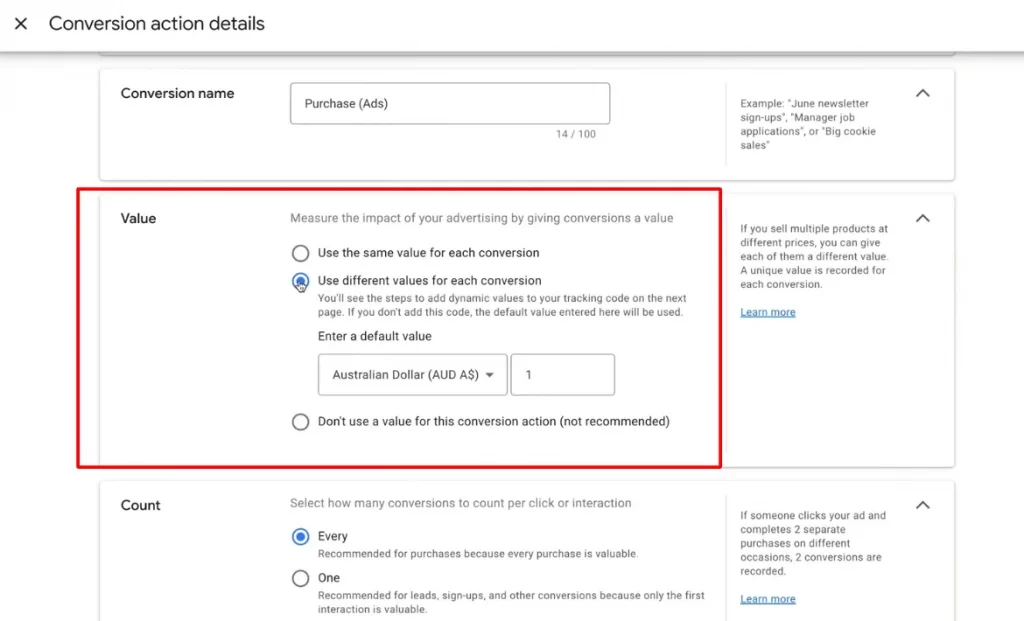
Here, you’ll choose how values are assigned:
- Use the same value for every conversion: Best if all conversions are equal in value, such as a single product or a fixed lead value.
- Use different values for each conversion: Best if you sell products at different prices or track revenue dynamically. This requires passing transaction values through your Google tag.
Once conversion values are properly tracked, your account becomes eligible for Target ROAS bidding. For most campaign types, Google recommends having at least 15 conversions in the past 30 days so the bidding system has enough data to optimize effectively.
Set up Target ROAS bidding
To set up Target ROAS in Google Ads, you need to create a bid strategy, not a campaign. This allows you to apply Target ROAS cleanly and consistently across campaigns later.
1. Log in to your Google Ads account.
2. Go to Tools, then under Budgets and bidding, select Bid strategies.
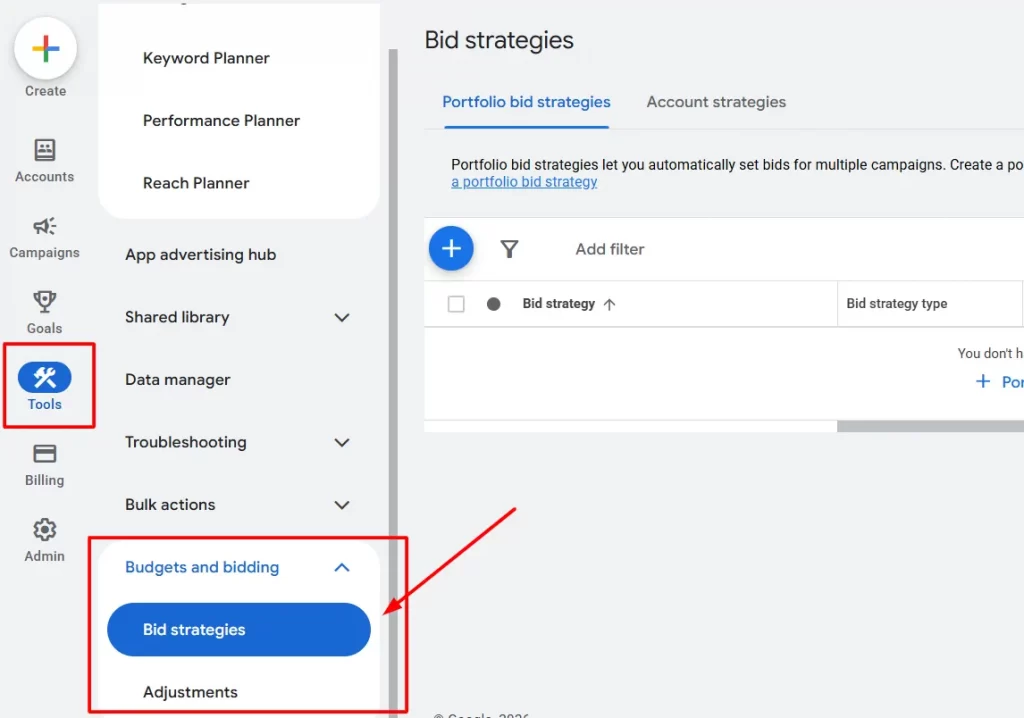
3. Click the plus (+) button to create a new bid strategy and choose Target ROAS.
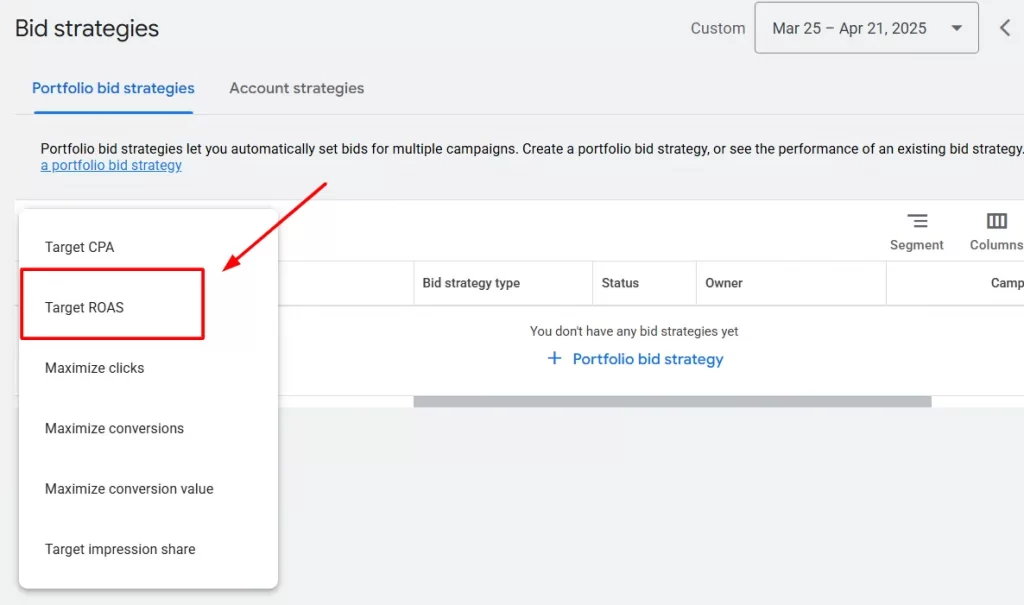
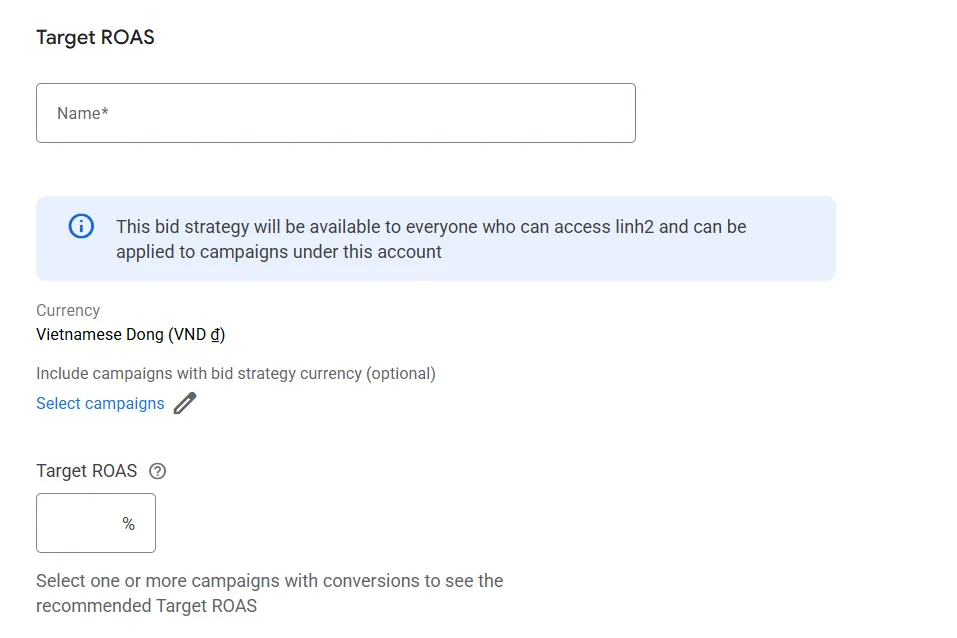
4. Give your bid strategy a clear name.
At this stage, you can choose to:
- Assign the bid strategy to campaigns immediately, or
- Skip assignment and apply it later
For most advertisers, it’s fine to create the strategy first and assign it afterward.
Make sure you do not create a shared budget. Now, enable Set a target return on ad spend and enter your Target ROAS as a percentage.
5. Enter your desired Target ROAS.
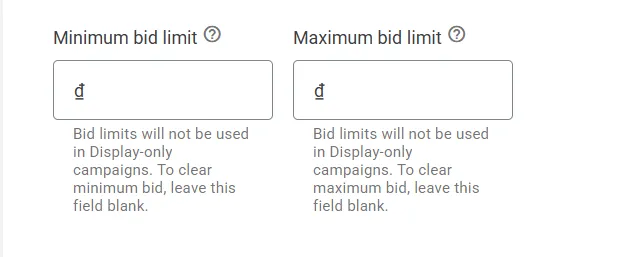
You may also see an option to set a maximum CPC cap, but in most cases, this is not recommended. Target ROAS performs best when Google has the freedom to adjust bids dynamically to hit your return goal.
Once saved, your Target ROAS bid strategy is ready. You can now apply it to eligible campaigns when needed, allowing Google to optimize bids in real time toward your revenue goal rather than pure volume.
Set up Target ROAS using Maximize Conversion Value bidding
When you start tracking conversion value for the first time, it’s recommended by experts to not apply Target ROAS immediately. Instead, apply the conversion action to your campaign and run Maximize Conversion Value for a few weeks. This gives Google time to learn and gives you a clear baseline for performance.
After enough data is collected (typically 4-6 weeks), go to your campaign settings. Under Bidding, select Maximize Conversion Value.
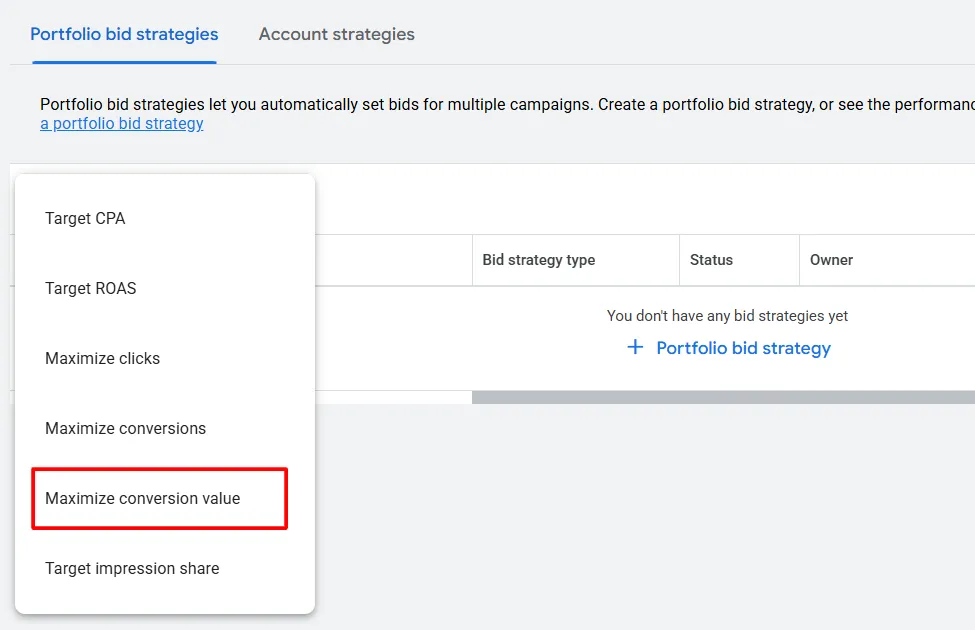
Scroll down and enable Set a target return on ad spend.
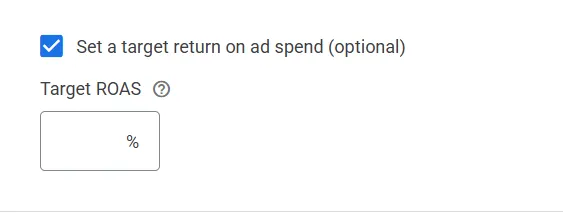
Google may suggest a Target ROAS based on recent performance. You can use this recommendation or enter your own target based on business goals.
This gradual approach, starting with Maximize Conversion Value, then adding Target ROAS allows the system to stabilize before adding efficiency constraints.
7 Best Practices to Optimize and Scale Campaigns Using Target ROAS
Target ROAS works best when it’s treated as a long-term optimization system, not a switch you constantly tweak. Once your campaigns are live, the goal is to give Google clean signals, enough time to learn, and room to scale without hurting profitability.
Using bid adjustments and audience signals wisely
With Smart Bidding, manual bid adjustments are limited, but audience signals still matter. Use remarketing lists, customer lists, and in-market audiences to guide Google’s learning.
For example, Remarketing Lists for Search Ads (RLSA), allows you to tailor your search campaigns based on whether someone has already visited your website or app, and even which pages they viewed.
You can use RLSA to adjust bids for users on your remarketing lists who are searching using your existing keywords
These signals help the system prioritize users more likely to generate higher-value conversions.
Segmenting campaigns to improve ROAS accuracy
Target ROAS performs better when campaigns are grouped by similar value patterns. Segment campaigns by:
- Product categories
- Price ranges
- Margins or profitability
- Brand vs non-brand traffic
This prevents high-value and low-value traffic from competing against each other and improves bid accuracy.
Scaling spend without killing profitability
To scale safely, avoid lowering your Target ROAS too aggressively. Instead:
- Increase budgets gradually
- Let Google find more volume at the same ROAS first
- Lower Target ROAS in small steps only if you want faster growth
Scaling works best when volume increases before efficiency is sacrificed.
Using multiple conversion actions with value weighting
If your business has multiple conversion types, assign different values to each one. A purchase, booked call, or qualified lead should not carry the same weight. Value weighting allows Target ROAS to focus spend on actions that drive the most business impact.
Layering Target ROAS with first-party data
First-party data strengthens Target ROAS because it comes directly from your own customers and prospects. It reflects real behavior and real intent, not assumptions. When this data is fed into Google Ads, it gives the bidding system clearer signals about which users are more likely to generate high value.
Common sources of first-party data include:
- Website behavior, such as page views, product interest, form submissions, and browsing patterns
- Call tracking data, including phone conversions, call duration, and outcomes that point to stronger leads
- CRM data, like past purchases, customer lifetime value, and lifecycle stages
Managing Target ROAS across multiple markets
If you advertise in multiple regions or countries, avoid using one Target ROAS for everything. Different markets have different costs, demand, and conversion behavior. Use separate campaigns or bid strategies with market-specific ROAS targets.
Combining automation tools with Target ROAS
While often overlooked, Target ROAS is widely used by successful sellers alongside automation tools, such as:
- Feed optimization tools for eCommerce
- Rules for budget pacing
- Scripts for performance monitoring
Automation helps maintain consistency while Target ROAS focuses on revenue efficiency.
When optimized correctly, Target ROAS becomes a scalable system that balances growth and profitability, allowing you to increase spend while keeping returns aligned with your business goals.
Maximize your Target ROAS with a smart feed management tool
Automated feed management keeps your product data accurate and optimized, while Target ROAS focuses on revenue efficiency. Start for $0 and spend less time fixing feeds, and more time improving performance.
Common Target ROAS Mistakes and How to Avoid Them
Target ROAS is powerful, but small setup or strategy mistakes can quickly limit performance. Below are the most common issues advertisers run into and how to fix them.
❌ Setting an unrealistically high Target ROAS
One of the biggest mistakes is setting a Target ROAS far above your historical performance. When the target is too aggressive, Google becomes overly restrictive with bids, which can reduce impressions, clicks, and conversions.
✅ How to avoid it: Start close to your current average ROAS and increase gradually once performance stabilizes.
❌ Changing the Target ROAS too often
Frequent adjustments reset the learning phase and prevent the system from stabilizing. This often leads to volatile results.
✅ How to avoid it: Allow at least 2 – 3 weeks between changes and make small adjustments instead of big jumps.
❌ Mixing very different products or margins in one campaign
When low-margin and high-margin products compete in the same campaign, Target ROAS struggles to bid efficiently.
✅ How to avoid it: Segment campaigns by product type, price range, or margin where possible.
Avoiding these mistakes helps Target ROAS do what it’s designed for, optimizing your ad spend toward sustainable revenue and profitability.
How to Troubleshoot Target ROAS Campaigns That Miss Their Goals
When a Target ROAS campaign underperforms, the issue is usually not the bidding strategy itself but the signals and constraints around it. The first thing to check is your Target ROAS setting.
If it is set too high compared to historical performance, Google may limit bidding too aggressively, resulting in low spend or missed opportunities. In this case, lowering the target slightly can help the campaign regain volume.
You should also look at campaign structure. Mixing products, services, or leads with very different values in the same campaign can reduce bidding accuracy. Segmenting by product category, margin, or intent often improves performance.
Finally, give the system enough time. Short-term fluctuations are normal, especially after changes. Avoid reacting to daily swings and evaluate performance over a longer period. With realistic targets, clean data, and patience, most Target ROAS bidding campaigns can be brought back on track.
FAQs about Target ROAS
1. How long does Target ROAS take to work?
Most campaigns need 2–3 weeks to complete the learning phase. Performance may fluctuate during this time, so avoid frequent changes and evaluate results over longer periods.
2. Can small budgets use Target ROAS?
Yes, but only if there is enough conversion value data. With very low volume, Google may struggle to optimize effectively. In those cases, building data first with simpler strategies can help.
3. Why is my Target ROAS campaign not spending?
This often happens when the Target ROAS is set too high, conversion data is limited, or campaign settings are too restrictive. Lowering the target or improving data quality usually helps.
4. Is Target ROAS better than Target CPA?
Target ROAS is better when conversion values vary and profitability matters. Target CPA is better when all conversions are similar and volume is the main goal.
Final Thoughts
Target ROAS is a powerful Google Ads bidding strategy when it’s set up and managed properly, but it doesn’t work in isolation. Its performance depends heavily on clean, accurate, and well-optimized product data, especially for eCommerce and Google Shopping campaigns.
So, using a product feed management tool like LitCommerce will help you automate feed updates, attribute mapping, and handle errors. LitCommerce helps keep your data consistent across channels, giving Target ROAS better signals to optimize toward higher-value products and users.
When smart bidding is paired with reliable feed management, you get a system that’s easier to scale, easier to control, and built for sustainable, profitable growth.