

TikTok is no longer just a platform for entertainment. For many Etsy sellers, it has become one of the most powerful traffic sources to drive real sales. However, one common question beginners ask is: How to add Etsy link to TikTok?
In this guide, you’ll learn all possible ways to add an Etsy link to TikTok, depending on your account type, region, and follower count. We’ll also share best practices to turn TikTok views into Etsy orders.
Link Your Etsy Shop to TikTok Shop
With LitCommerce, you can list products from your web store to Etsy and TikTok Shop while keeping your inventory synced automatically.

Why You Should Add Etsy Link to TikTok
TikTok content is designed to go viral, but without a clickable link, that traffic can easily be wasted. Adding your Etsy link to TikTok bio allows you to:
- Turn viewers into buyers
- Send traffic directly to your Etsy shop
- Build a sales funnel from short-form videos
- Promote product launches and seasonal campaigns
For small businesses and handmade sellers, this is one of the simplest ways to grow without paid ads.
Method 1: Add Etsy Link to TikTok Bio Directly (Best Option)
This is the cleanest and most effective way because the link is clickable.
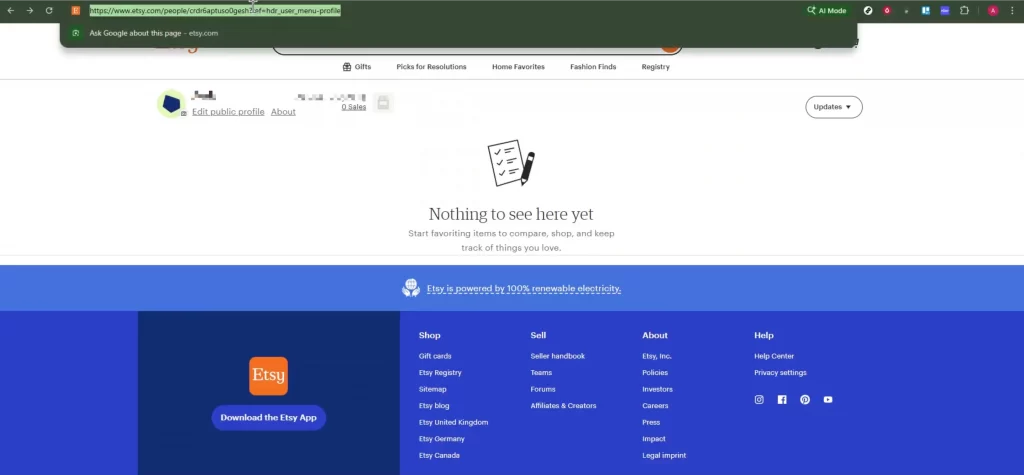
Step 1: Copy your Etsy shop link
- Open your Etsy shop in a browser
- Go to your shop homepage
- Copy the full URL
Step 2: Set up a Business or Creator account
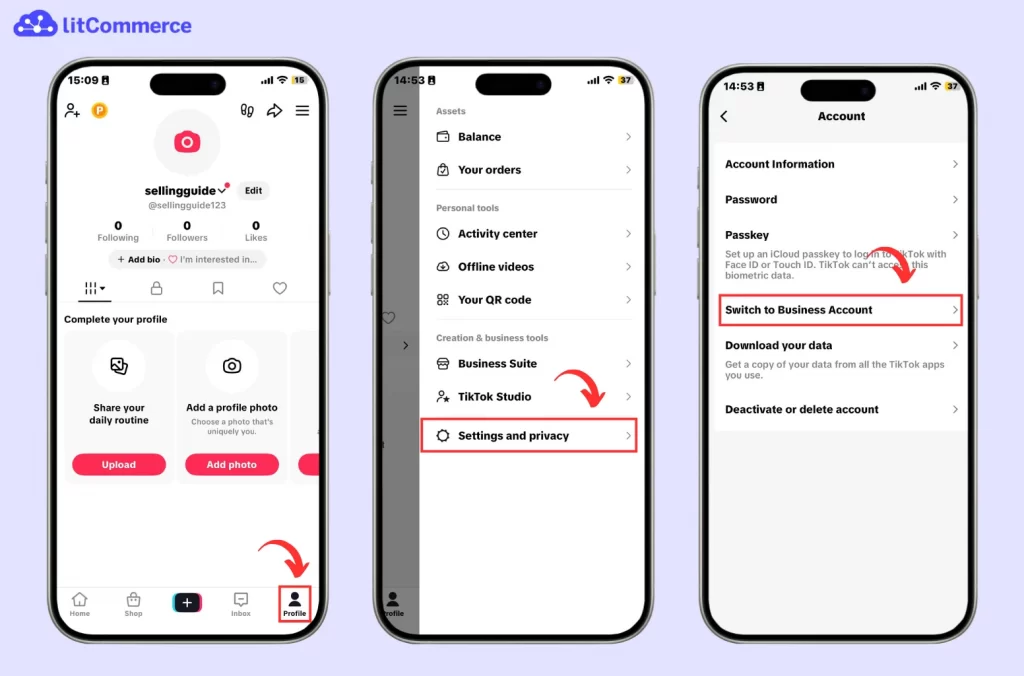
To add a link to TikTok bio, your account typically needs to meet certain requirements (such as having at least 1,000 followers) and your profile should be set up as a Business (or sometimes Creator) account. If you haven’t done this yet, you’ll need to switch your account type first.
Here’s how to set up a Business or Creator account so you can add your storefront link:
- Open TikTok and go to your Profile
- Tap the ☰ (three-line) menu, then choose Settings and privacy
- Select Account, then tap Switch to Business account
Step 3: Add your Etsy link
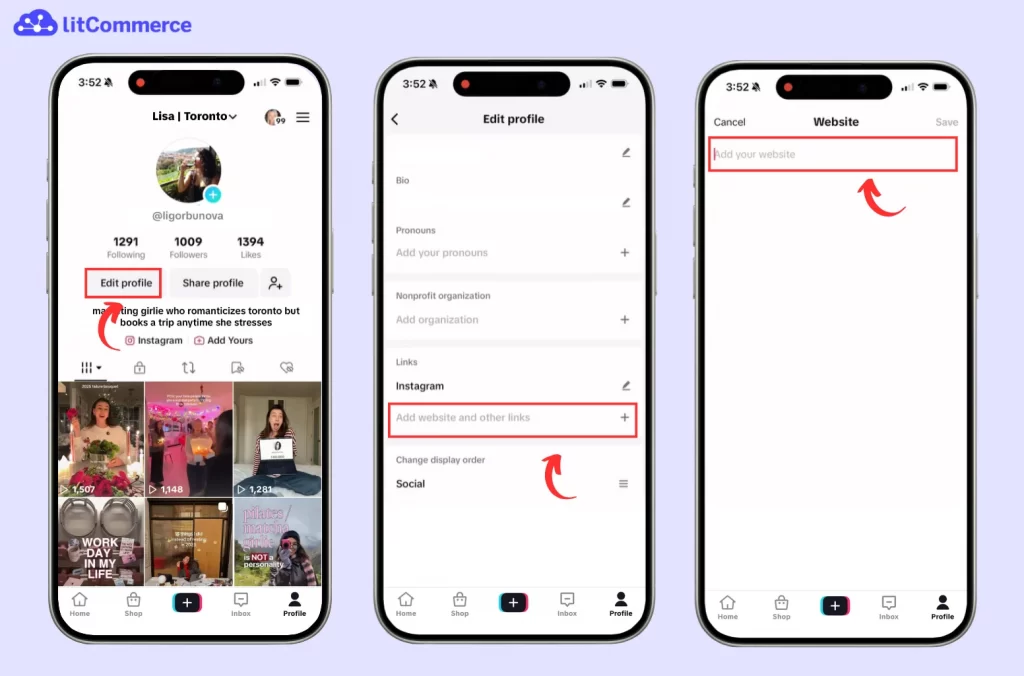
- Go back to Edit profile
- Tap Website
- Paste your Etsy shop URL
- Tap Save
Method 2: Use a Link-in-Bio Tool (If Website Field Is Not Available)
If TikTok doesn’t allow a direct website link yet, this is the most common workaround to add an Etsy link to TikTok.
Step 1: Create a link-in-bio page
Use tools like:
- Linktree
- Beacons
- Pushbio
Here is a how-to guide:
- Sign up for the tool
- Add your Etsy shop link
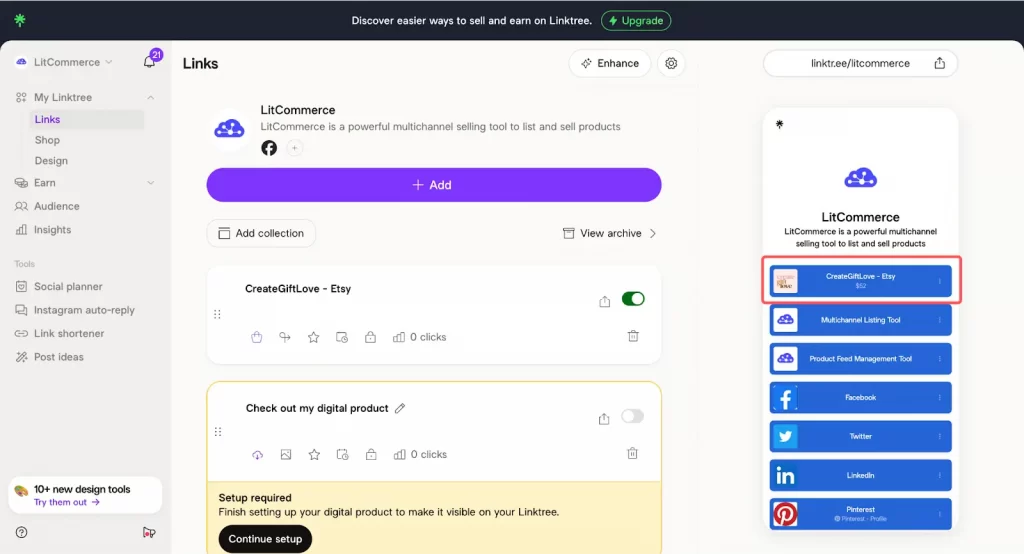
- (Optional) Add other links like Instagram, Shopify, Wix, etc.
- Publish your link page
- Copy the generated URL
Step 2: Add the link-in-bio URL to TikTok
- Open TikTok → Profile
- Tap Edit profile
- Paste the link-in-bio URL into:
- Website (if available), or
- Bio (if Website field is locked)
- Save changes
In your bio, add a CTA like this: 👉 Shop handmade items here ⬇️
Check our guide on How to Add Product to TikTok Shop in 3 Simple Ways.
Best Practices to Drive Traffic from TikTok to Etsy
Adding your Etsy link to TikTok bio is a great first step, but it won’t magically bring sales on its own. What the videos repeatedly highlight is simple: visibility + repetition. People need to notice your link, understand what they’ll get if they click, and be reminded often enough to take action.
Here are the most effective practices to turn TikTok views into Etsy visits (and visits into orders).
1. Mention “Link in bio” everywhere (not just once)
Many sellers assume people will automatically check their bio after watching a video. In reality, most viewers won’t. Unless you tell them exactly what to do.
Make “link in bio” part of your content structure:
In video captions, add a short CTA at the end of your caption. Keep it simple and direct.
Examples:
- “Shop the full collection → link in bio”
- “Grab yours on Etsy → link in bio”
In on-screen text. This is one of the highest-converting placements because viewers can’t miss it. Add a quick line near the end of the video like:
- “Full listing in bio”
- “Shop Etsy via link in bio”
In pinned comments. Pinned comments are perfect for repeating the CTA without making the caption too long. Pin a comment like:
- “Etsy shop link is in my bio”
- “All items are here → link in bio”
2. Pin a “shop intro” video to the top of your profile
When someone clicks your profile, they’re deciding within seconds whether to trust your shop. A pinned video helps you control that first impression.
Create a short pinned video that answers: What do you sell and why should people care?
Good pinned video ideas:
- “Here’s what I sell on Etsy”
- “Small business behind the scenes”
- “How to order from my shop”
What to include in the video (quick checklist):
- What your product is + who it’s for
- A few bestsellers or quick product shots
- Shipping info or production time (briefly)
- A clear CTA: “Link in bio to shop on Etsy”
Then pin it so every new visitor sees it first.
3. Use TikTok-friendly formats that naturally convert
Hard selling often performs worse on TikTok. Instead, the formats that convert best are the ones that feel organic and satisfying to watch. These styles build trust and create buying intent without being pushy.
High-converting content formats:
- Product packing videos (fast, satisfying, shows real orders)
- Order preparation (label printing, wrapping, gift notes)
- Before/after (customization, transformations, results)
- Customer reviews (screenshots, video reactions, UGC)
- ASMR packaging (sound + visuals = strong retention)
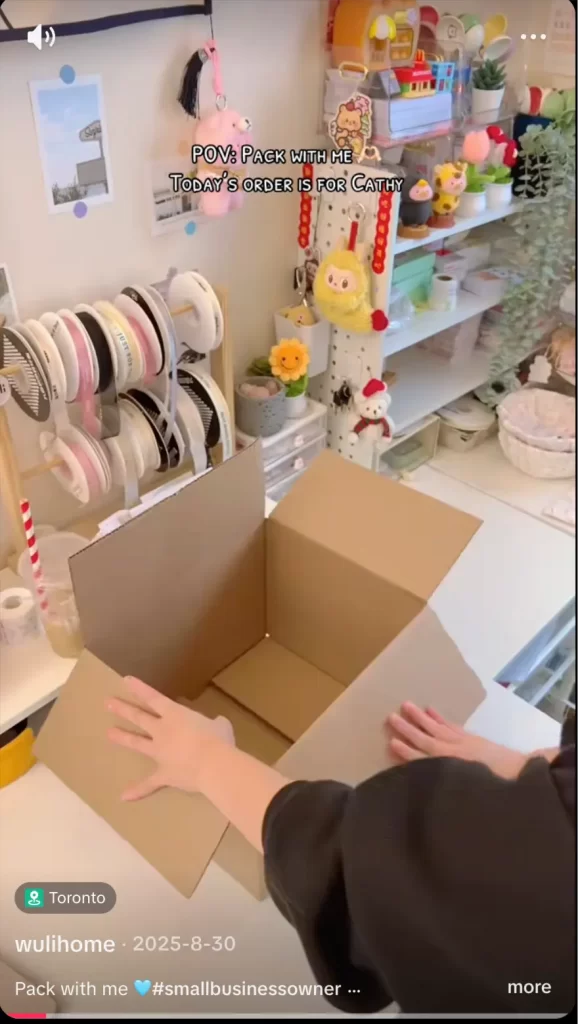
These formats typically convert better than direct “buy now” ads because viewers feel like they’re watching something real—then they click because they’re curious.
4. Track performance so you know what actually drives clicks
Beside learning how to add an Etsy link to TikTok, you need to learn how to track its performance. If you don’t track, you’ll keep guessing. Even simple tracking helps you identify which videos bring real traffic to Etsy.
Here are the best options:
1. Use TikTok Business analytics to track:
- Profile views
- Video views
- Follower growth trends
- Click behavior (depending on your account setup)
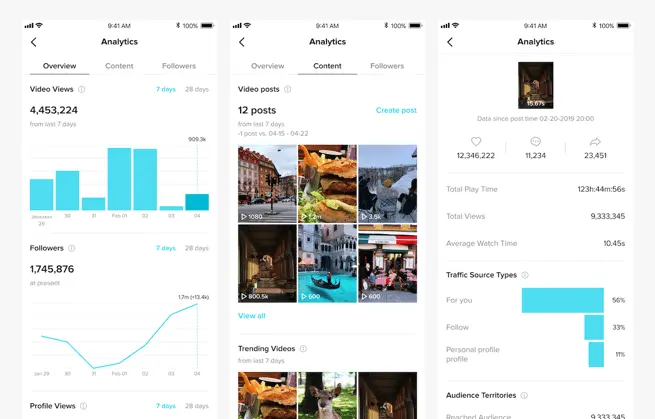
2. Add UTM parameters to your Etsy link. This helps you see where traffic comes from (TikTok bio vs. other sources). For example, you can tag:
- Campaigns (product launch, holiday sale)
- Video themes (packing, review, ASMR)
3. Use link-in-bio analytics (if you use Linktree/Beacons, etc.) You’ll be able to see:
- Total clicks
- Which link gets the most taps
- Click trends over time
Once you know what drives clicks, you can double down on the formats and CTAs that actually convert.
Read more: How to add Amazon storefront to TikTok.
1. Why can’t I add a clickable Etsy link to my TikTok bio?
In many cases, TikTok only unlocks the Website field for accounts that meet certain requirements. If you don’t see it, try switching to a Business (or Creator) account first. If the Website option is still missing, use a link-in-bio tool (like Linktree or Beacons) as a workaround.
2. Do I need 1,000 followers to add a website link?
Sometimes, yes. In some regions, TikTok requires a minimum follower count (often around 1,000) before enabling a clickable website link. The exact requirement can vary by country and account type, so if your Website field isn’t available yet, a link-in-bio tool is the fastest alternative.
3. Where should I paste my Etsy link on TikTok?
If the Website field is available:
Go to Profile → Edit profile → Website
Paste your Etsy shop URL and tap Save
If it’s not available:
Put your link-in-bio URL in your Bio, then add a clear CTA like “Shop on Etsy ↓”.
4. Should I link to my Etsy shop homepage or a specific product?
For most sellers, linking to the shop homepage works best because it lets people browse. However, if you’re promoting one product (like a viral item), linking to a single listing can convert better. A smart approach is to use a link-in-bio page with:
One button for your shop
One button for the featured product.
5. Can I add more than one link (Etsy + Instagram + Wix/Shopify)?
TikTok typically allows only one website link. If you want multiple links, use a link-in-bio tool so you can share Etsy, Instagram, and other platforms all from one landing page.
How To Add Etsy Link To TikTok: Conclusion
Adding your Etsy link to TikTok is one of the simplest ways to turn views into real shop traffic, but the link alone won’t do the work for you. The key is to make your link easy to find and give viewers a clear reason to click.
Start by adding your Etsy shop URL directly in the Website field if it’s available. If TikTok doesn’t allow a clickable link yet, use a link-in-bio tool so your audience can still reach your store in one tap. Then, boost clicks by repeating “link in bio” across your captions, on-screen text, and pinned comments, and pin a short intro video so new visitors instantly understand what you sell.
With consistent posting, TikTok-friendly content formats, and basic tracking, you’ll be able to grow Etsy traffic steadily, and identify which videos actually drive shoppers to your listings.