
Both boosted posts and Facebook ads show up as “Sponsored” in the feed; they can feel like the same thing at first glance. However, they work very differently, and choosing the wrong one can waste your budget.
In this guide, we’ll break down Facebook ads vs boosted posts in a clear, practical way so you can choose the right Facebook advertising strategy for your goals. We will cover:
- The key differences between Facebook ads and boosted posts
- The pros and cons of boosted posts
- The pros and cons of Facebook ads
- When to use Facebook ads vs boosted posts
Let’s dive in!
Show Products in Facebook Ads
LitCommerce helps you quickly create Facebook product feeds and sync items from Shopify, Wix, BigCommerce, or files – so your products are ready to advertise on Facebook.

Facebook Ads vs Boosted Posts: What’s The Difference?
First, let’s break down the definitions of boosted posts and Facebook Ads so you can easily see the difference between them.
Boosted Posts | Facebook Ads (Meta Ads) | |
Setup | Boost an existing post | Create ads from scratch in Ads Manager |
Main goal | Engagement, traffic, or sales | Awareness, traffic, engagement, leads, app promotion, or sales. |
Targeting | Basic (age, location, interests) | Advanced (custom, lookalike, exclusions) |
Placements | Facebook, Messenger, Instagram, and Meta Audience Network | Feeds, Stories, Reels, Messenger, Audience Network |
Ad formats | Same as original post (image, text, or video) | Carousels, videos, Reels, catalog ads |
Budget control | Simple budget & duration | Full control (daily/lifetime, bids, schedules) |
What’s a boosted post?
A boosted post is an existing post on your Facebook Page that you pay to expand its reach and increase engagement. Instead of creating an ad from scratch, you simply click the “Boost Post” button under your post to advertise on Facebook, whether it’s an image, text, or video, choose a budget, pick basic targeting, and publish.
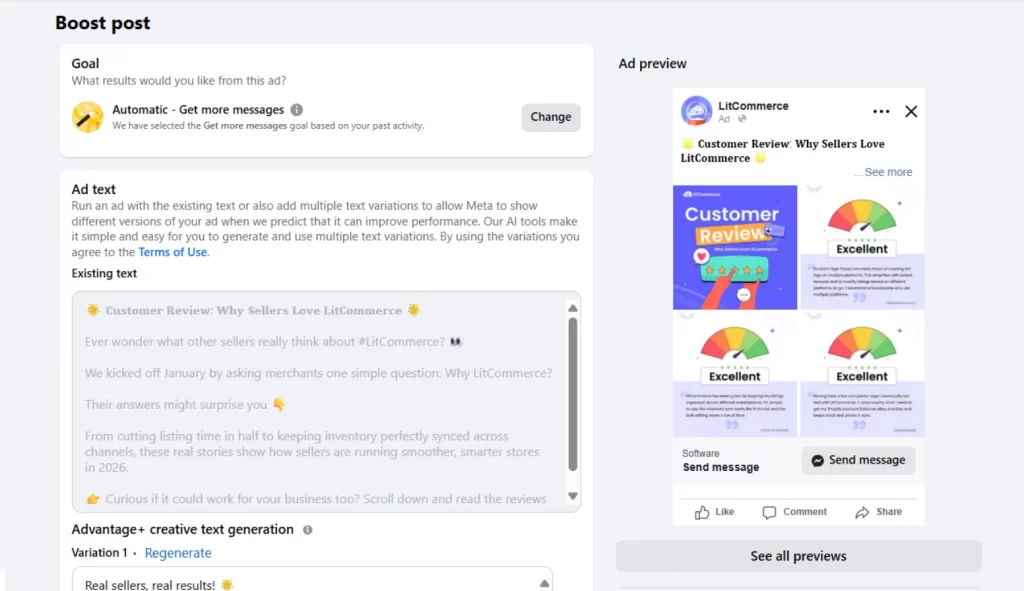
Because boosted posts start as organic content, they often feel more natural in the viewer’s feed. People see them as regular posts, just with the “sponsored” label at the head or a simple CTA button. This makes boosted posts especially useful for visibility and engagement.
While boosted posts are still ads, they offer less control and customization. Here is how boosted posts work in detail:
- Ad objectives: Boosted posts are meant for simple goals like getting more likes, comments, messages, or website clicks. You pick one goal, and Facebook focuses on delivering that result.
- Targeting: You can target people by age, location, gender, and interests. These options are easy to use but not very detailed.
- Placements: Boosted posts can appear across Facebook, Instagram, Messenger, and the Meta Audience Network. However, placement control is still limited compared to full Facebook ads, as Meta handles most delivery automatically.
- Ad formats: The ad uses the same content as your original post. You can’t change the images, videos, or layout after boosting.
- Budgeting: You choose how much to spend a day and how long the boost will run. Facebook automatically spreads your budget over that time.
If you’re building your overall strategy for Facebook, this guide on how to use Facebook for business covers the basics beyond ads.
What are Facebook Ads (Meta Ads)?
Facebook ads, also known as Meta ads, are paid campaigns created through Meta Ads Manager. Unlike boosted posts, they give you more advanced control over how your ads are built, targeted, and optimized.
For example, for Valentine’s Day, Tiffany & Co. uses Facebook carousel ads to showcase products from the Knot by Tiffany collection and direct shoppers to their website.
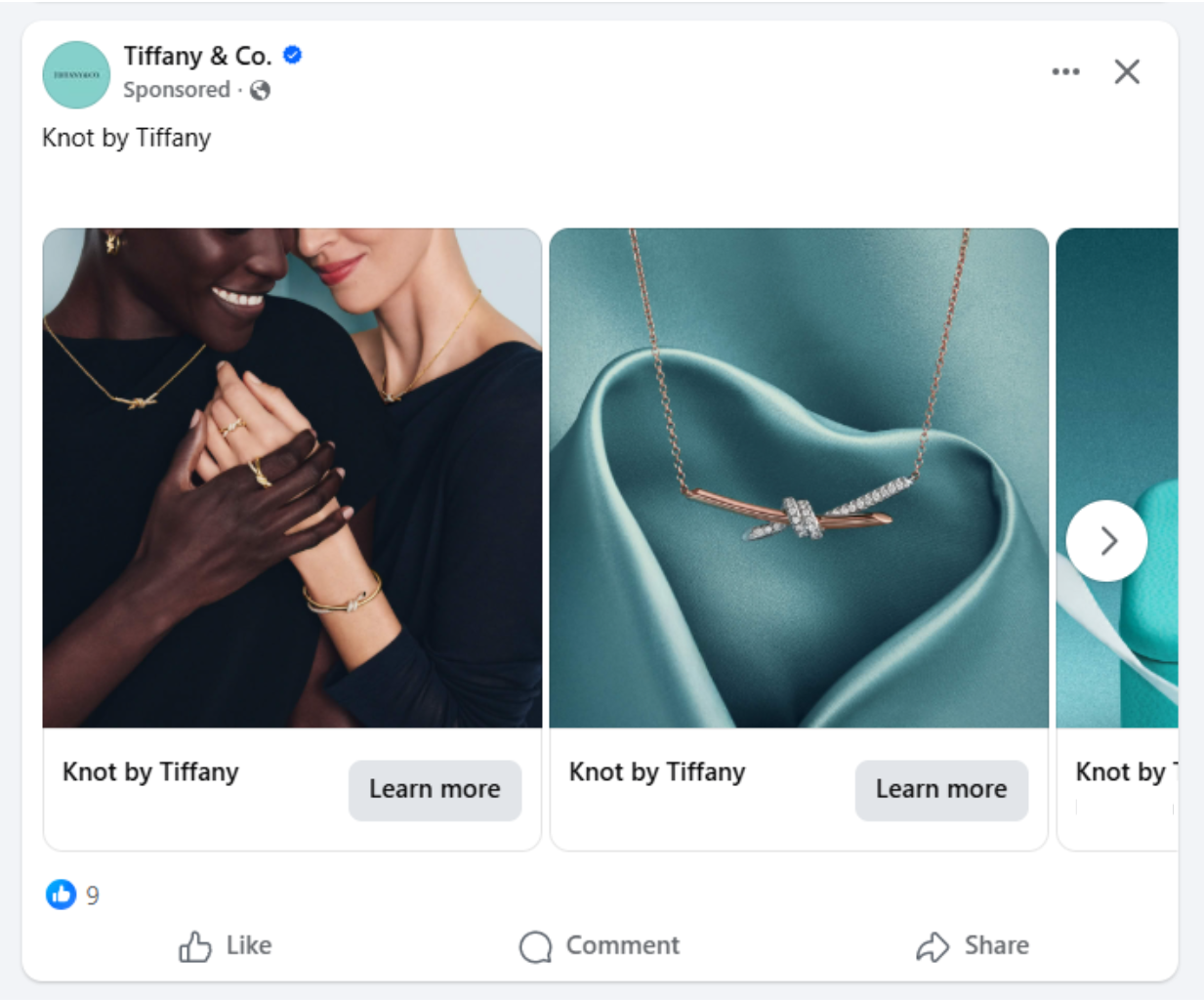
To understand the difference between a Facebook boosted post vs ad, let’s look at how goals, targeting options, and control differ in Facebook Ads:
- Ad objectives: Facebook ads support many goals, including awareness, traffic, leads, app installs, sales, and conversions. You choose the goal first, and Facebook optimizes the ad to achieve it.
- Targeting: You can target people based on interests and behaviors, or use custom and lookalike audiences. Retargeting lets you reach people who have already visited your website or interacted with your brand.
- Placements: Facebook ads can appear across Facebook, Instagram, Messenger, WhatsApp, and the Meta Audience Network. For both boosted posts and Facebook ads, Meta offers Advantage+ placements, which automatically show your ads across feeds, Stories, and Reels to help maximize reach and performance.
- Ad formats: Using Facebook ads, you can also set your ads under different formats, giving you more flexibility to test what works best, such as Facebook carousel ads. If you sell products online, you can also use Advantage+ catalog ads, which automatically show relevant products from your catalog after syncing items from your existing platform or uploaded feed.
- Budgeting: You can set daily or lifetime budgets, control bids, and schedule ads to run at specific times. This gives you more control over how your money is spent.
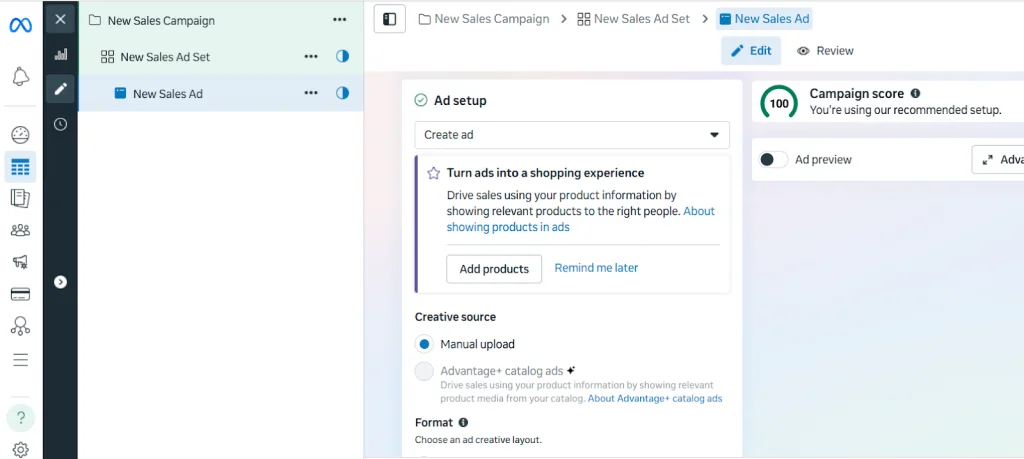
If you want to run Facebook product ads, you need a reliable product feed. LitCommerce makes it easy to create and manage Facebook product feeds in just a few clicks. You can sync products from Shopify, Wix, BigCommerce, or an imported file and start promoting items faster, with less setup and fewer errors.
Run Facebook Catalog Ads FASTER
LitCommerce helps you easily create Facebook product feeds from Shopify, Wix, BigCommerce, or files, so your catalog ads are easier to set up.
In a nutshell, in the Facebook boosted posts vs ads debate, boosted posts are easy and best for getting more likes and visibility, while Facebook ads give you more control over your target audience and ad formats, and they work better for driving traffic, leads, and sales.
Pros and Cons of Boosted Posts on Facebook
Now that you understand the key differences between boosted post vs ad, let’s take a closer look at boosted posts specifically. Boosted posts are often seen as the “easy option” in Facebook marketing, but that simplicity comes with both advantages and limitations.
Pros of a boosted post
Boosted posts are popular because they’re quick to set up and easy to manage, even for beginners. You can boost a post directly from your Facebook Page without opening Ads Manager, making them ideal for simple promotions.
Boosted posts are especially effective for keeping your audience engaged and strengthening your brand presence.
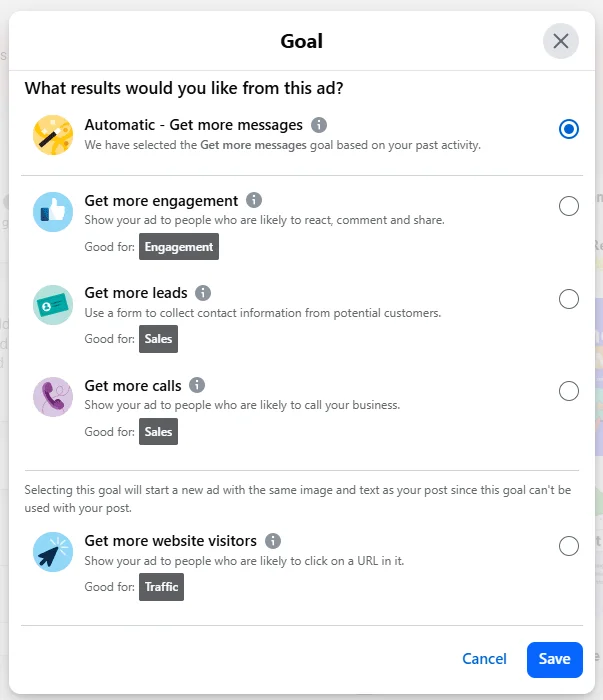
Key benefits of boosted posts include:
- Easy setup directly from your Facebook Page
- Increased reach for posts that already perform well
- Engagement-focused goals like likes, comments, shares, and messages
- Ability to add a basic CTA, such as Learn More or Send Message
- Simple budgeting with automatic daily spend
Boosted posts also help brands stay connected with existing customers. By showing up more often in their feeds, you reinforce brand recognition and encourage loyalty—something traditional ads don’t always achieve as naturally.
Cons of a boosted post
While boosted posts are convenient, they offer limited control compared to full Facebook ads. This is where the gap between Facebook Ads vs boosted posts becomes more noticeable.
Here are some main drawbacks of boosted posts:
- Limited audience control, often reaching people who already know your brand
- Fewer optimization options and campaign objectives
- No creative flexibility beyond the original post
- Limited ad formats compared to Ads Manager
- Not ideal for aggressive growth campaigns
Boosted posts are not designed for advanced targeting; that’s why they work best for engagement and awareness, not for driving consistent leads or sales.
Pros and Cons of Facebook Ads
After looking at boosted posts, it’s time to explore the other side of the Facebook ads vs boosted posts comparison. Facebook ads, created through Meta Ads Manager, are built for performance and growth. They offer far more control and flexibility, but they also require more setup and experience.
Pros of Facebook ads
Facebook ads are designed to support every stage of the customer journey, from awareness to conversion. They allow businesses to reach new audiences, drive action, and measure results with precision.
Key benefits of Facebook ads include:
- Wide range of campaign objectives, from brand awareness to sales and leads
- Advanced targeting, including custom, lookalike, and excluded audiences
- Full control over budgets, schedules, and bidding strategies
- Flexible ad formats such as carousels, videos, Reels, or catalog ads
- Detailed reporting and performance tracking through Ads Manager
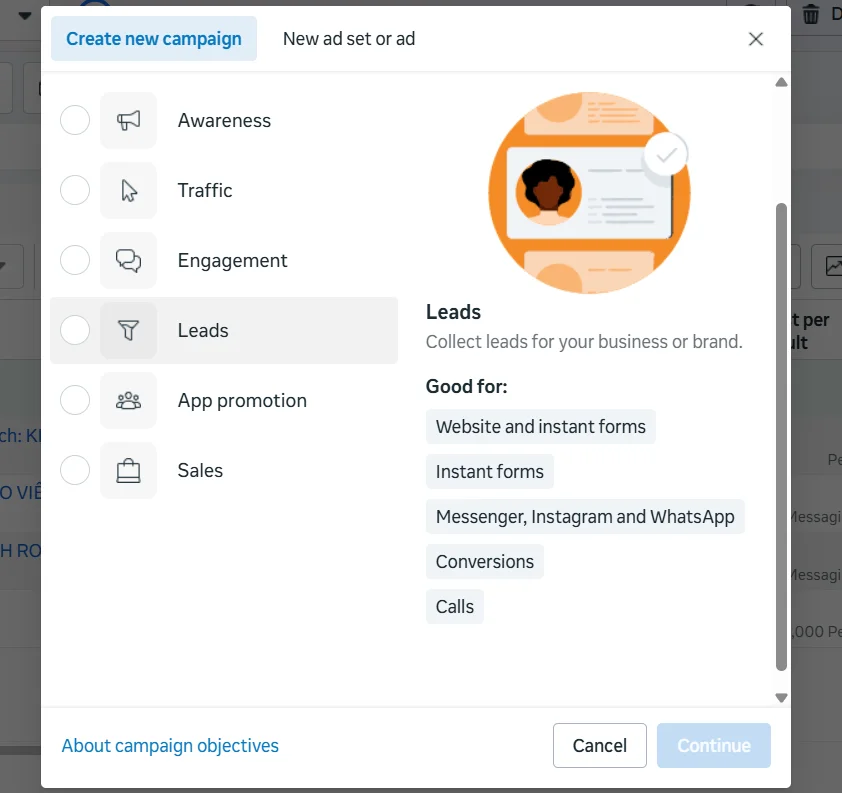
Compared to a Facebook ad vs boosted post, Facebook ads are thus especially powerful for businesses that want to scale. You can test creatives, refine audiences, and optimize campaigns over time to improve ROI and reach the people most likely to convert.
Cons of Facebook ads
While Facebook ads are powerful, they’re not always the easiest option – especially for beginners.
Here are some main challenges when setting up Facebook ads:
- A steeper learning curve compared to boosted posts
- More time required to set up and manage campaigns
- Higher costs in competitive markets
- Strong competition for attention in crowded feeds
To get the most out of Facebook ads, advertisers need a clear strategy, strong creatives, and ongoing optimization. Without these, campaigns can become expensive or underperform.
When to Use Facebook Ads vs Boosted Posts?
Choosing between boosted posts vs ads Facebook depends on what you want to achieve.
Boosted posts are best for increasing visibility and engagement, while Facebook ads are designed to drive specific actions like traffic, leads, or sales, or when you want to customize and show your ads under more advanced formats, such as carousel ads. Understanding your goal first will help you pick the right option and avoid wasting your budget.
You can use boosted posts when you want to:
- Increase likes, comments, and shares
- Promote a post that already performs well
- Build brand awareness or stay visible to your audience
Otherwise, use Facebook ads when you want to:
- Drive website visits, leads, or sales
- Reach new or highly targeted audiences
- Track results and optimize for ROI
This approach keeps your strategy simple: use boosted posts to build attention, then use Facebook ads to turn that attention into results.
Facebook Ads vs Boosted Posts – FAQs
What’s the difference between boosted posts and ads?
The main difference between Facebook ads and boosted posts is the level of control you have when setting up a campaign. Boosted posts are quick promotions of existing posts to a larger audience, with limited targeting and objectives. Facebook ads, created in Ads Manager, offer deeper customization, advanced targeting, and more specific campaign objectives.
Do boosted posts appear as ads?
Yes. Boosted posts do appear as ads in users’ feeds, labeled as “Sponsored.” However, they use the original post content and don’t allow the same level of customization or optimization as full Facebook ads.
Are Facebook ads worth it anymore?
Yes, Facebook ads are still worth it in 2026, even with the rise of TikTok. Meta continues to offer strong targeting, and its AI now handles much of the optimization – testing creatives, adjusting budgets, and improving delivery automatically.
Short-form video ads like Reels perform especially well, and built-in features such as lead forms, bookings, and Shops let people take action without leaving the app, reducing friction and driving more conversions.
What are the main benefits of using Ads Manager instead of boosting a page post?
Using Ads Manager instead of boosting a page post gives you more control and customization. Here are the key benefits of Ads Manager over boosting a post:
– Advanced targeting: You can set your targeted audience based on interests, behaviors, custom audiences, and lookalike audiences – not just basic details.
– More ad options: Ads Manager allows you to create ads with multiple images, different video formats, catalog ads, and clear call-to-action buttons, not just existing posts.
– Specific objectives: Set your goals with the specific ones, like App Promotions or Leads, instead of only engagements.
Facebook Ads vs Boosted Posts: Which One Is Right for You?
Choosing between Facebook ads vs boosted posts ultimately depends on what you want to achieve. Boosted posts are ideal for increasing visibility and engagement with minimal setup, while Facebook ads offer advanced targeting, flexible formats, and better performance when your goal is driving traffic, leads, or sales.
If you plan to run Facebook ads – especially product or catalog ads – having a clean and accurate product feed is essential. LitCommerce helps sellers easily create and manage product feeds for advertising platforms like Facebook, Google Shopping, etc by connecting directly with their online store. With features like easy categorization, smart rules, quality checks, and automatic feed syncs, LitCommerce ensures your product data stays optimized and ready for ads.
Whether you’re just getting started or scaling your campaigns, LitCommerce can be a reliable partner to help you turn your ads into real results.