
Selling on Etsy or eBay is great. But selling on both these marketplaces gives you more visibility and more chances to grow your sales. The problem is that managing products, inventory, and orders separately can quickly become messy and time-consuming. That’s why Etsy eBay integration matters.
It allows you to connect both stores, sync product data, and import eBay listings to Etsy instead of creating listings from scratch. You can also move products the other way around and keep everything updated automatically. In this article, we’ll show you:
Let’s explore how Etsy eBay integration can simplify multichannel selling and help you grow faster.
Effortlessly Connect eBay to Etsy
With LitCommerce, you can easily connect Etsy to eBay, seamlessly transfer and bulk upload all your eBay listings to Etsy, making multichannel selling a breeze.

Etsy eBay Integration: How to Import eBay Listings to Etsy?
Before getting started on our Etsy eBay integration, it’s important to know that Etsy and eBay don’t offer a built-in way to integrate with each other.
That’s why most sellers rely on a third-party tool to connect the two marketplaces. These tools act as a bridge, allowing you to manage products, inventory, and orders of the 2 marketplaces more efficiently.
Among multiple tools, LitCommerce stands out as a powerful multichannel selling tool that helps you connect Etsy to eBay with ease. It lets you import eBay listings to Etsy and vice versa, and even more, sync inventory automatically. As a result, you can save hours of manual work and scale your multi-channel business smoothly.
Here we would like to walk you through 5 steps to integrating Etsy with eBay, including:
- #Step 1: Set up a main store
- #Step 2: Connect eBay and Etsy as sales channels
- #Step 3: Import eBay listings
- #Step 4: List eBay products on Etsy
- #Step 5: Sync inventory and orders from eBay and Etsy
Step 1: Set up a main store
In this first step to integrate eBay to Etsy, an eCommerce platform needs to be prepared, which will be utilized as the main source of information. On LitCommerce, your eCommerce platform is called the main store.
- After having your eCommerce platform, log in or sign up for a LitCommerce account.
- The source store setup page will appear on the screen. Simply click Connect under your eCommerce platform from our platform-supported list. From here, you can choose among the supported eCommerce platforms such as Shopify, Wix, WooCommerce, Squarespace, BigCommerce, Square, and PrestaShop.
- Then LitCommerce will direct you to another window and ask you to log in to your eCommerce platform account.
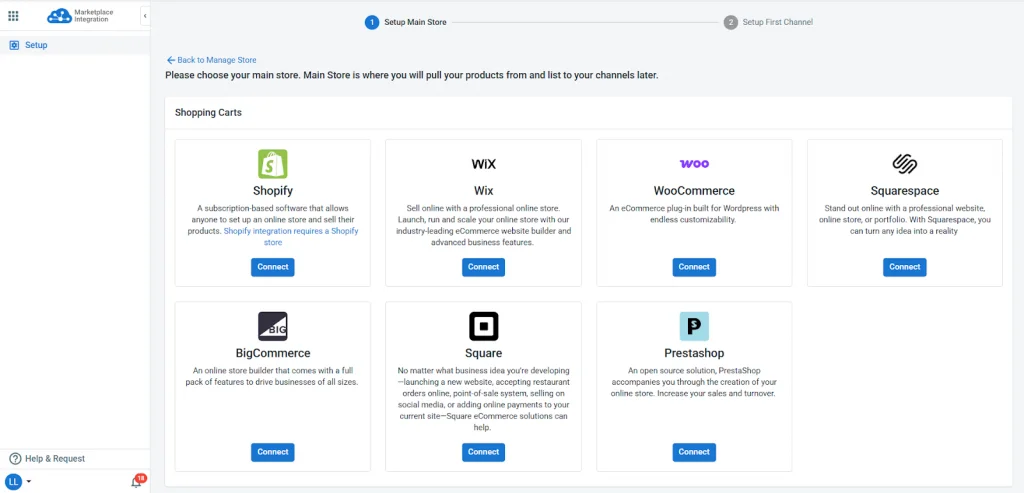
Note: For Shopify, WooCommerce, Wix, BigCommerce, and Squarespace, you can directly install the LitCommerce plugin or extension to your website via the corresponding plugins.
For example, if you are selling on the Shopify platform, you can log in first and then navigate to the Shopify App Store. From there, look up LitCommerce Amazon eBay Etsy + and click Install to use our LitCommerce tool.
In addition to Etsy eBay integration, LitCommerce offers Etsy integration with other eCommerce platforms such as BigCommerce, Squarespace, Shopify, etc. Let’s check them out at:
Step 2: Connect eBay and Etsy as sales channels
After connecting the eCommerce platform as the main store, eBay and Etsy need to be connected as the sales channels.
During the initial setup, you need to connect one sales channel first, whether it’s eBay or Etsy. Once that’s done, you can easily continue adding and connecting the other sales channels.
So, let’s set up eBay as your first sales channel on LitCommerce.
- Click Connect under the eBay logo.
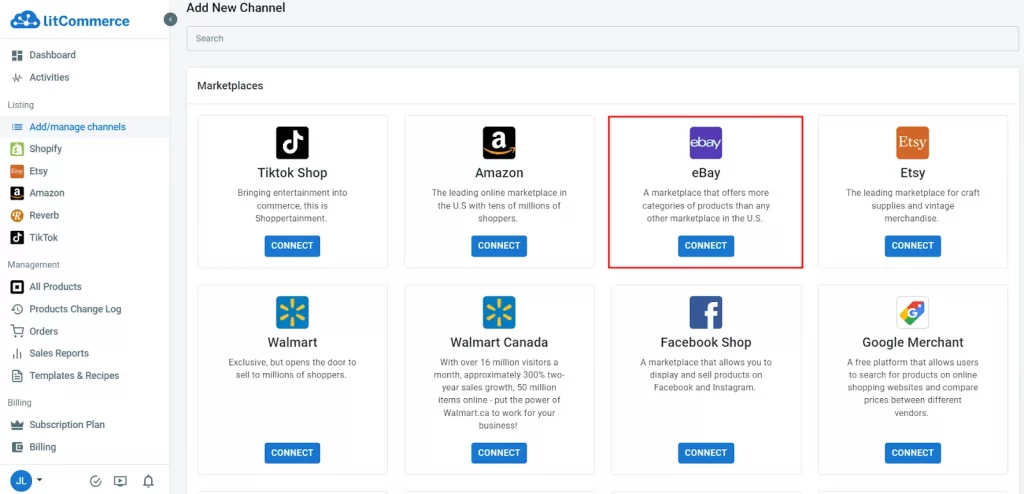
- Then give your eBay sales channel a name before clicking the Connect your account button, and choose your store’s region. A pop-up window will appear and allow you to log in eBay account.
Once eBay is connected as an eBay sales channel on LitCommerce, you will be redirected to the LitCommerce dashboard. Let’s move on to the next step, connect the next sales channel–Etsy:
- On the left sidebar, choose Add/manage channels
- Then click Add New Channel on the right corner and click on the Connect button under the Etsy channel.
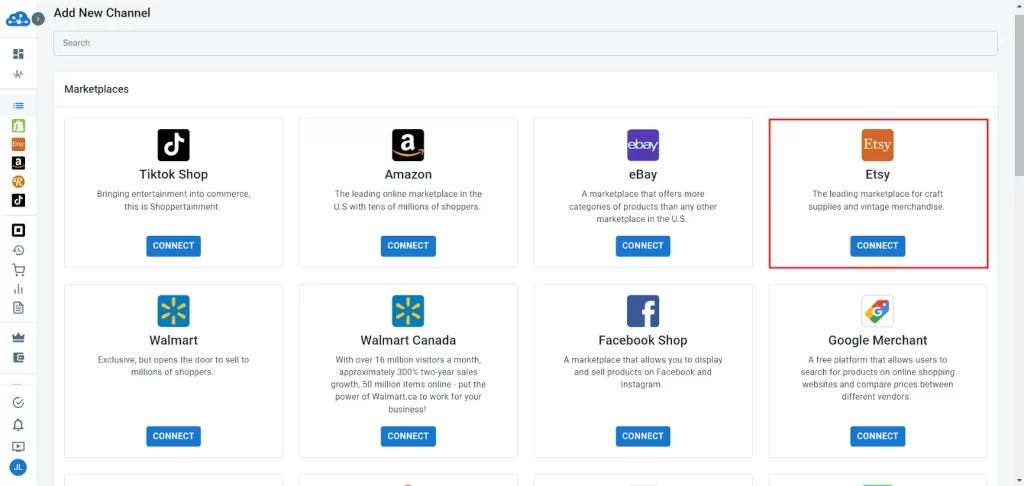
- After that, give your Etsy channel a nickname, then choose Connect your account, and a window will pop up for you to log in to your Etsy account.
Once finished, you have successfully connected Etsy to eBay and are ready to import listings across these 2 channels.
Step 3: Import eBay listings
Now, in this guide on Etsy eBay integration, let’s import products from your eBay store to the main store.
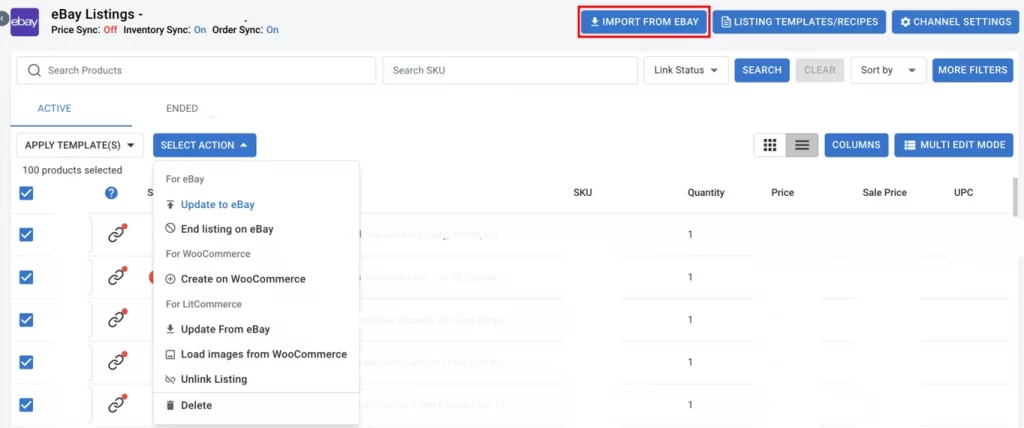
- From the left-sidebar menu, choose your eBay sales channel. From here, click on Import from eBay.
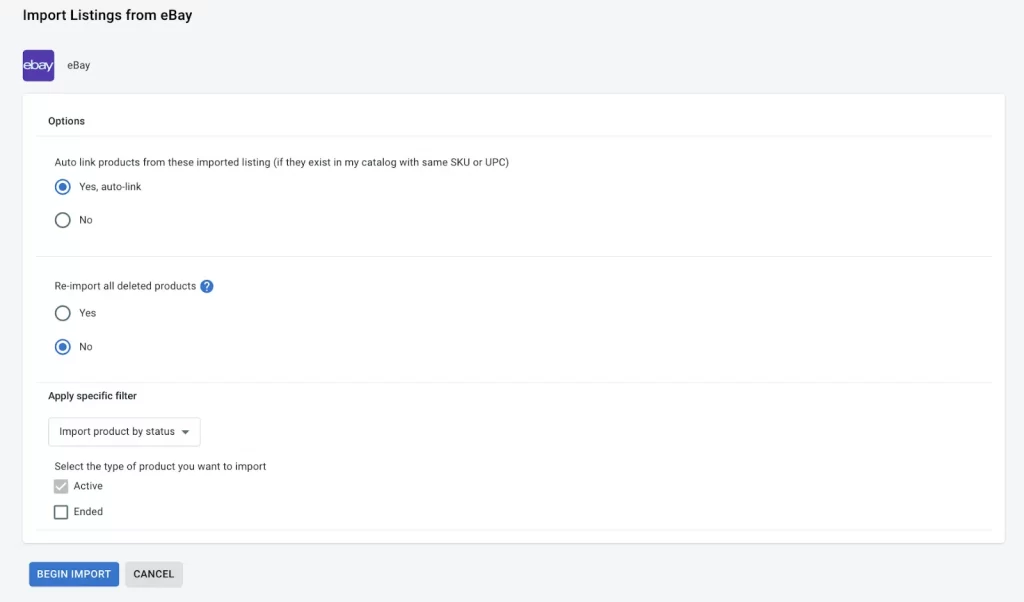
- After clicking the button, there are a few more questions to answer before the import begins. You can re-import your eBay listings, auto-link products, or apply any specific filters. Once you’re done, click Begin Import.
- Then, a notification will appear allowing you to know the import process is being implemented.
After the import finishes, to import eBay listings to Etsy, you need to create products from the eBay sales channel to the main store (for example, WooCommerce).
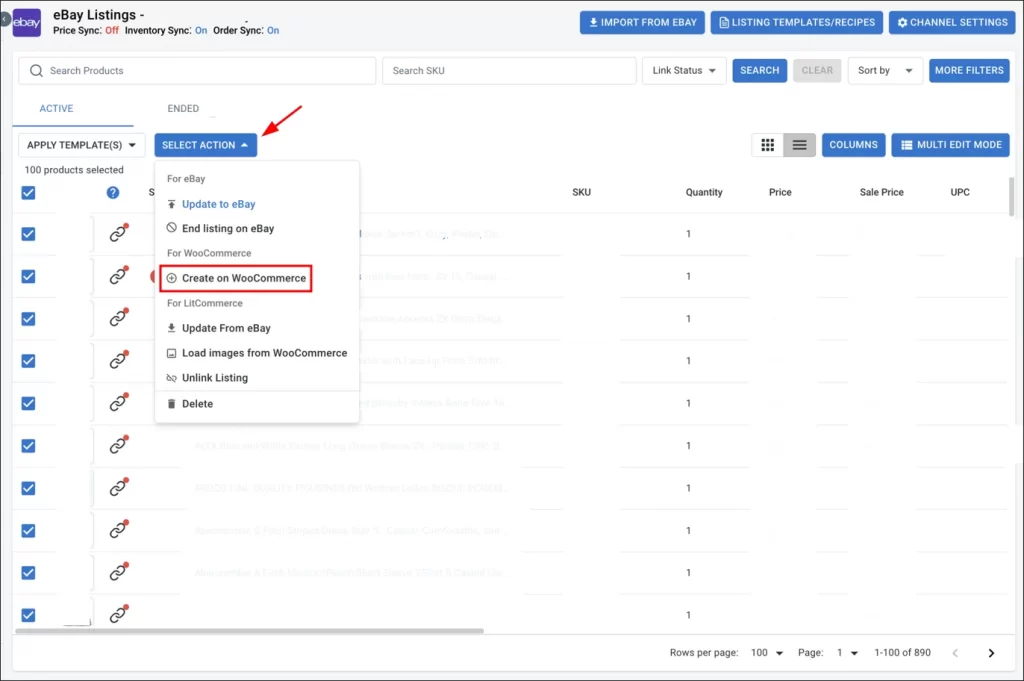
- Now, on LitCommerce’s dashboard, select the products you want to list on Etsy.
- Then, click Select Action, and choose Create on WooCommerce. The new product listing will be created immediately on your main store.
Step 4: List eBay listings on Etsy
After having products listed on the main store, listing them on Etsy is your next step to import eBay listing to Etsy.
- From LitCommerce’s dashboard, on the left sidebar menu, navigate to All products.
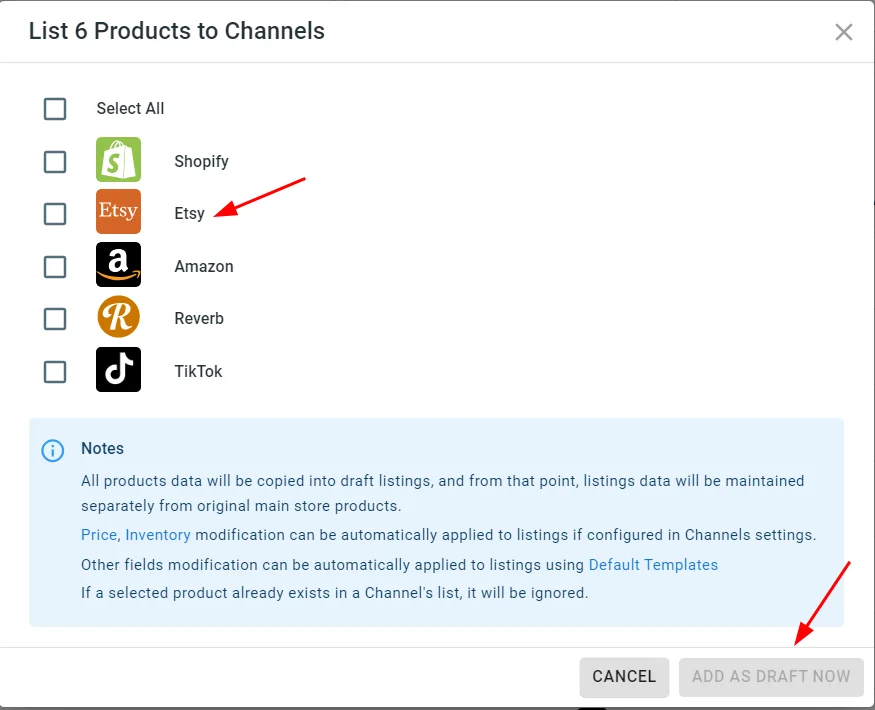
- Choose products you want to list on Etsy, then choose Select Action and click Add to Channel Draft.
- A pop-up window appears, allowing you to select the channel that you would like to list products. In this case, tick Etsy, then click Add as draft now.
- After that, go to the Etsy tab. Here, you can click on the title to edit and optimize your listing drafts, such as Categories or Shipping, before publishing them to Etsy. Moreover, LitCommerce offers AI-powered description optimization to meet Etsy’s rules and improve ranking.
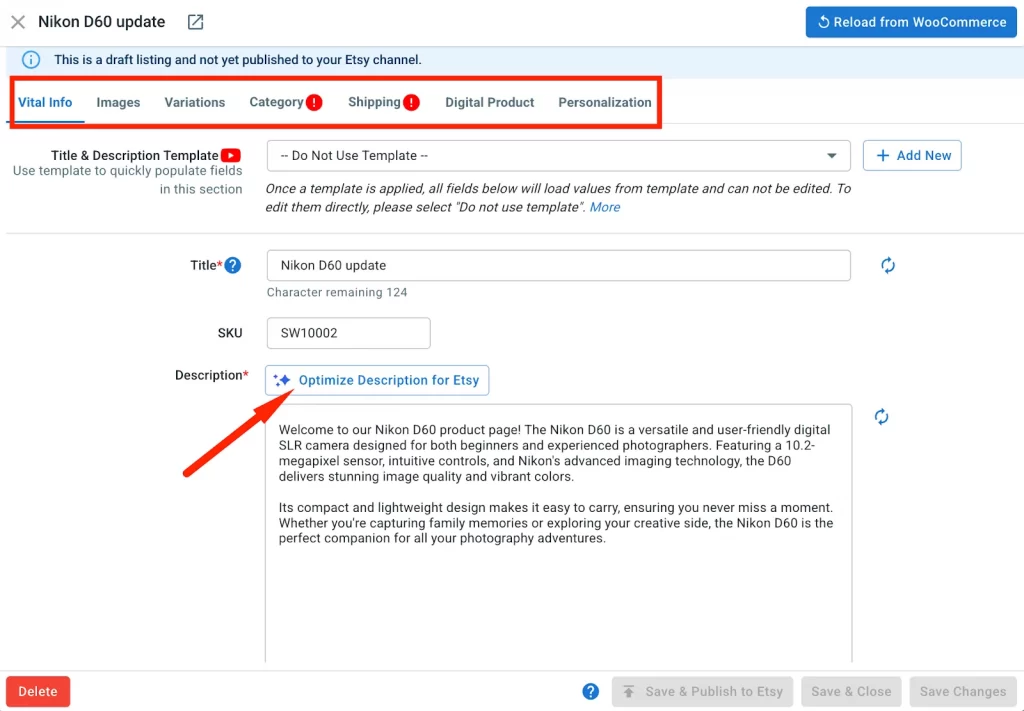
- After updating all the needed information, click Save & Publish to Etsy to immediately publish your products on Etsy and finish importing eBay Listings to Etsy.
Besides editing and listing products one by one, LitCommerce also offers a Quick/Auto Listing feature that lets you transfer multiple eBay listings to Etsy at once. Here’s how to do it:
- Select eBay listings: Choose the eBay listings you want to publish on Etsy. Products are selected from your Main Store, so you can use product tags to identify eBay items. You can also filter products by status, type, vendor, collections, or tags.

- Fill in any missing information for Etsy: Configure categories and shipping settings, such as shipping profiles, processing time, and return policies. You can save these settings as templates for future use and adjust prices, titles, or descriptions if needed.
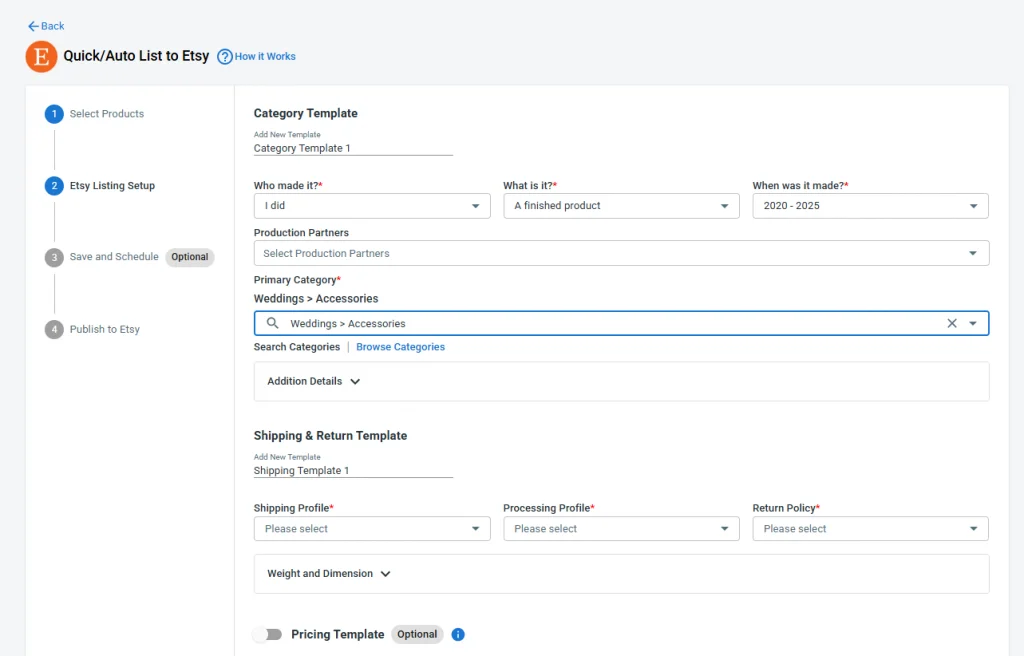
- Save and schedule listings: Save your setup to reuse later. Also, you can turn on automatic publishing or schedule listings to go live at a specific time, which is helpful if you upload products regularly.
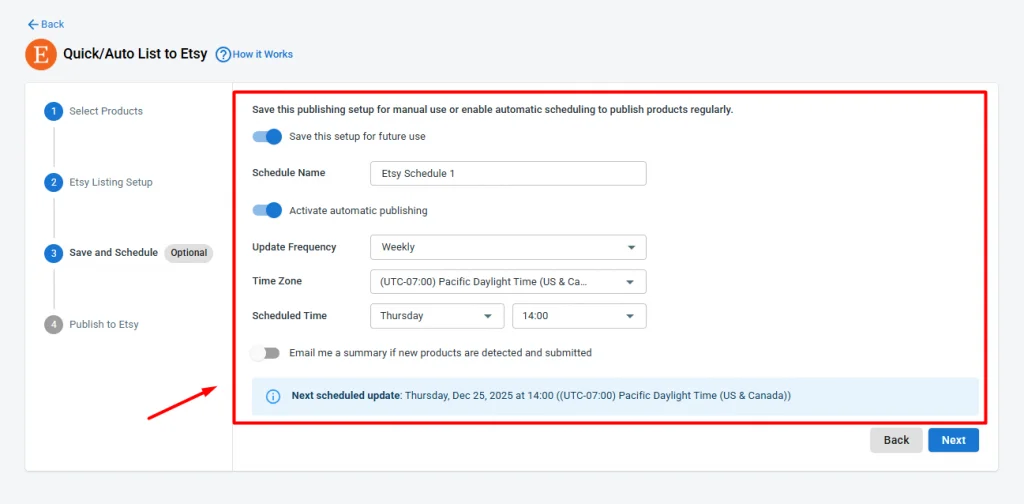
- Publish to Etsy: Choose whether to publish listings as Active or Draft, then click Publish to Etsy to list your eBay products to Etsy in bulk.
Likewise, you can transfer Etsy listings to eBay by following the same process. This helps your Etsy eBay integration work more smoothly, covering all the cases you need.
Step 5: Sync inventory and orders from Etsy and eBay
After importing your listings from eBay to Etsy, LitCommerce offers a seamless way to manage your stores across multiple platforms, including syncing inventory and centralizing orders in one place.
To set it up, click Channel Settings in the top-right corner of both your Etsy and eBay channels in LitCommerce.
- Enable eBay Etsy inventory sync: Turn on Inventory Sync for both channels. When stock levels change on Etsy, the update is sent to your main store, then reflected on eBay as well. This helps keep quantities accurate and prevents overselling.
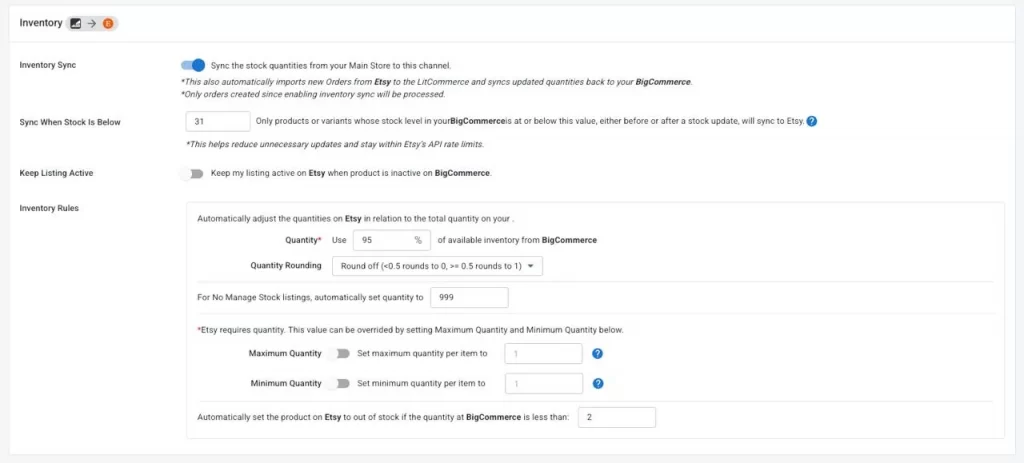
- Centralize orders in one dashboard: Enable Import Orders to Main Store on both channels. All eBay and Etsy orders will be automatically pulled into your main store, allowing you to track and manage orders from a single dashboard.
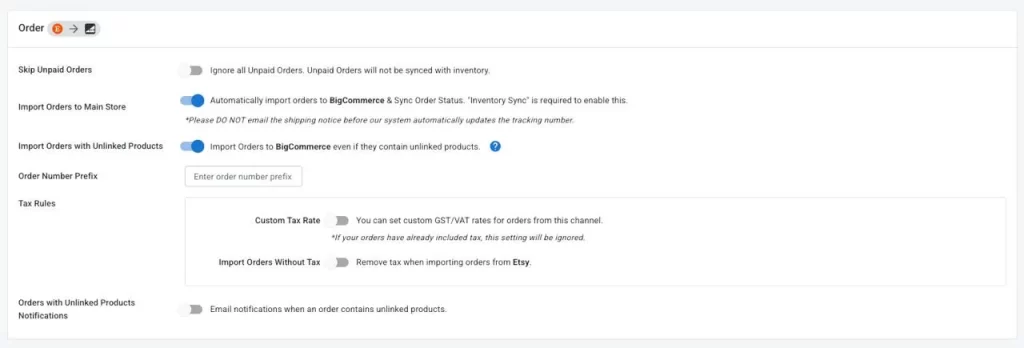
You can also turn on additional sync options, such as price, SKU, and title sync, to keep product data consistent across both platforms.
And that’s it. With LitCommerce, you can complete your Etsy eBay integration, quickly import and cross-list products, and keep inventory and orders perfectly in sync across both channels.
Easily Bulk Upload eBay Products to Etsy
LitCommerce simplifies your multichannel management by allowing you to easily import and bulk upload all your eBay listings to Etsy.
Why Should You Sell on Etsy Besides eBay?
Do you wonder why you should import eBay listings to Etsy? Is selling on Etsy worth it? Below, we have outlined some of the compelling reasons for this Etsy integration.
1. Trusted and best-selling platform
No double that, with approximately 18.3 million active sellers, Etsy became one of the top marketplaces for selling products. If you are a crafter or artist looking for a trusted place to sell your items, Etsy will be at the top of your list. Plus, this platform uses SSL technology to keep buyers’ personal and payment information safe. So, you can rest assured when running a business on Etsy.
2. Large customer base
The most challenging aspect of launching an eCommerce brand from the ground up is constructing a customer following. Undoubtedly, it’s a struggle for new online stores to gain attention. Etsy goes the extra mile to assist new and novice sellers, simplifying the entry process. When you begin a store on Etsy, you enjoy the benefit of millions of visitors exploring the marketplace and discovering your products. Achieving such traffic individually on standalone websites often takes years, if it’s even achieved at all.

3. Low up-front cost
Etsy is particularly well-suited for small businesses because you won’t be burdened with expenses like hosting, domain fees, or membership charges. Various eBay sellers import products to Etsy for this reason.
Listing an item on Etsy costs just $0.20, and it stays listed for up to four months or until it’s sold. Additionally, Etsy charges a 6.5% fee based on the selling price. While costs may accumulate as your business expands, the initial investment for establishing a fully operational business is exceptionally low.
4. Easy to start selling on Etsy
If your aim is to kickstart your product sales immediately, Etsy might be the ideal choice. That’s why many sellers choose to import eBay listings to Etsy.
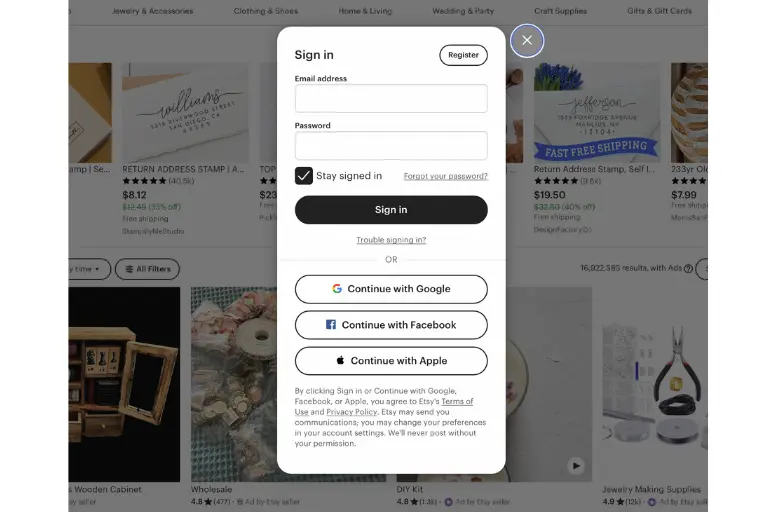
Etsy has a remarkably straightforward and speedy registration procedure, including a convenient ‘Sign Up Using Facebook’ option. With your account in place, you could start selling on Etsy within a matter of hours, provided your product photos and descriptions are prepared. This is especially advantageous if you’re looking to start selling during peak shopping seasons.
5. Easy to use
Etsy is made to be user-friendly for everyone. Unlike other eCommerce platforms that might demand coding skills or design expertise, Etsy allows you to create a shop in minutes.
Numerous Etsy sellers appreciate the simplicity of setting up new shops and adding product listings. While customization options may be somewhat limited, the site features template-style editing that simplifies every management step for its users.
Sell Everywhere, Not Just eBay & Etsy!
With LitCommerce, you can perform your Etsy eBay integration in minutes – then grow further by selling on Amazon, TikTok, Shopify, and more.
Etsy eBay Integration- FAQs
Can you connect Etsy to eBay?
Yes, you can connect Etsy to eBay using a third-party tool like LitCommerce. It handles Etsy eBay integration, allowing you to import products from one platform to the other and sync inventory accurately between them.
How to cross list from eBay to Etsy?
To cross list from eBay to Etsy, you can first import your eBay listings into LitCommerce, adjust product details if needed, and then publish those listings to Etsy. This saves time compared to creating Etsy listings from scratch.
Can I import listings from eBay to Etsy?
Sure, you can totally import listings from eBay to Etsy using third-party tools like LitCommerce’s multichannel selling tool. LitCommerce makes it easy to import products from eBay, then list them on Etsy.
How can I export listings from eBay?
The first method to transfer eBay listings to another account like Etsy involves manual steps. You will export eBay listings on your own and contact LitCommerce for assistance in importing these listings to Etsy. The second method is to utilize the LitCommerce multichannel selling tool right from the beginning. You just need to connect your eBay account with this tool. Then, you can easily import products to Etsy with just a couple of clicks.
How can I upload eBay CSV to Etsy?
Unfortunately, you cannot manually import Etsy export listings from eBay without using a third-party service. Therefore, if you require assistance, you can reach out to LitCommerce for support.
Can you copy the Etsy listing?
No, copying an existing Etsy listing created by another seller is not permissible. Each seller on Etsy is expected to create unique listings for their products. Copying someone else’s listing, including their product images, descriptions, and other content, would likely infringe on copyright and lead to account suspension on Etsy.
Conclusion
You can expose your items to more potential customers after your Etsy eBay integration. But don’t forget to research the Etsy platform to see whether your items align with their policy.
Should you require further assistance with importing eBay listings to Etsy, contact us anytime. Furthermore, if you’re interested in a multichannel selling guide or eCommerce strategy best practices, you can find more information via our Retailer Blogs.