

Today’s buyers don’t just land on one platform and hit “Buy.” They might discover a product on TikTok, Google it later, compare prices on a marketplace, then finally buy somewhere else entirely. If you’re selling online, that behavior probably sounds very familiar.
That’s exactly why multichannel selling is considered as a core strategy for any sellers. And if you’re here, you’re likely looking for the best multichannel listing tool to help you keep up without losing your sanity.
So we did the heavy lifting for you. We’ve researched and tested over 25 multichannel listing tools, comparing things that actually matter to sellers: platform support, listing and sync features, pricing, ease of use, and customer support. Based on that, we narrowed everything down to the top 10 tools worth your time.
Our best multichannel listing tool picks:
- Best for small to mid-sized sellers and dropshippers who need access to a wide range of eCommerce platforms and marketplaces: LitCommerce
- Best for Amazon- and Shopify-focused sellers on a budget: Sellbrite
- Best for sellers who want to manage and list products from Shopify to a single marketplace: CedCommerce
- Best for niche marketplace distribution without an eCommerce store: Rithum – ChannelAdvisor
- Best native Shopify marketplace integration: Shopify Marketplace Connect
- Best for high-volume inventory and order management: Linnworks
- Best for resellers and cross-listing single-quantity items: Vendoo
- Best for multichannel sellers who want to manage shipping directly within the tool: EasyChannel
- Best for Southeast Asian marketplaces: OneCart
- Best for managing multiple stores and accounts: Nembol
Key Features to Look For in a Multichannel Listing Tool
Before choosing the best multichannel listing tool, it’s important to know which features actually matter. These are the key capabilities a tool should have to work well for your business and truly be worth the money you invest. We also used these same criteria when comparing and evaluating each tool in this guide.
- Wide channel support: The first thing to check is whether the tool supports the marketplaces and platforms you sell on, or plan to sell on. A good multichannel listing tool should cover your core channels without forcing you to use multiple apps or workarounds.
- Bulk listing and editing: Manually updating products one by one doesn’t scale. Look for tools that let you import products in bulk, edit listings in groups, and publish to multiple channels from a single screen. This is one of the biggest time-savers for growing sellers.
- Reliable inventory and price syncing: Inventory sync is critical if the same product is listed on multiple channels. Real-time or near real-time syncing helps prevent overselling, stockouts, and pricing errors that can hurt your seller performance.
- Centralized order management: The best tools pull orders from all marketplaces into one place. This makes fulfillment easier, reduces mistakes, and saves time, especially when order volume starts to grow.
- Automation and scheduling: Automation features like scheduled listings, auto-publishing new products, and automatic delisting of sold items reduce repetitive work. The more your tool can run in the background, the more time you get back.
- Ease of use and onboarding: A powerful tool isn’t helpful if it’s hard to use. Clear workflows, simple dashboards, and good onboarding resources make a big difference, especially for small teams or solo sellers.
Best Multichannel Listing Tool You Should Try
Here is an at-a-glance comparison of the best multichannel listing tools.
Tool | Supported channels | eCommerce platform support | Bulk listing & editing | Inventory sync | Order management | Starting price |
LitCommerce | 20+ marketplaces (Amazon, Etsy, eBay, TikTok Shop, Walmart, Temu, Reverb, etc.) | Shopify, Wix, WooCommerce, BigCommerce, etc. | ✓ | ✓ | ✓ | - $29/month - Free trial with full access to premium features |
Sellbrite | 7 marketplaces (Amazon, Etsy, eBay, etc.) | Shopify, Shopify Plus, etc. | ✓ | ✓ | ✓ | - $29/month - Free (up to 30 orders/month) |
CedCommerce | Amazon, eBay, Walmart, TikTok Shop, SHEIN, etc. | Shopify only (via separate apps) | ✓ | ✓ | ✓ | - $19/month - Free (up to 50 orders/month) |
Rithum (ChannelAdvisor) | 420+ global & niche marketplaces | Shopify, Wix, WooCommerce | ✓ | ✓ | ✓ | Enterprise pricing |
Shopify Marketplace Connect | Amazon, eBay, Walmart, Target Plus | Shopify | ✓ | ✓ | ✓ | Free + 1% per order |
Linnworks | Amazon, eBay, Etsy, Temu, B&Q, etc. | Shopify, BigCommerce, Shopline, Magento, etc. | ✓ | ✓ | ✓ | Custom / higher-tier |
Vendoo | 11 resale marketplaces (eBay, Poshmark, Mercari, Depop, Etsy, etc.) | Shopify | ✓ | ✓ | ✓ | $14.99/month |
EasyChannel | Amazon, Walmart, Etsy, eBay + Facebook, Instagram, TikTok | Shopify, Wix, WooCommerce | ✓ | ✓ | ✓ | $49/month |
OneCart | Shopee, Lazada, TikTok Shop, Amazon | Shopify, Wix, WooCommerce | ✓ | ✕ (lower plans) | ✕ (lower plans) | $48 - $199/month |
Nembol | 14 channels (Amazon, Etsy, eBay, Shopify, WooCommerce, TikTok) | Shopify, WooCommerce | ✓ | ✓ | ✓ | $39/month |
1. LitCommerce
Best for: Small to mid-sized sellers, dropshippers, who want access to a wide range of supported platforms, ease to use, along with dedicated customer support.
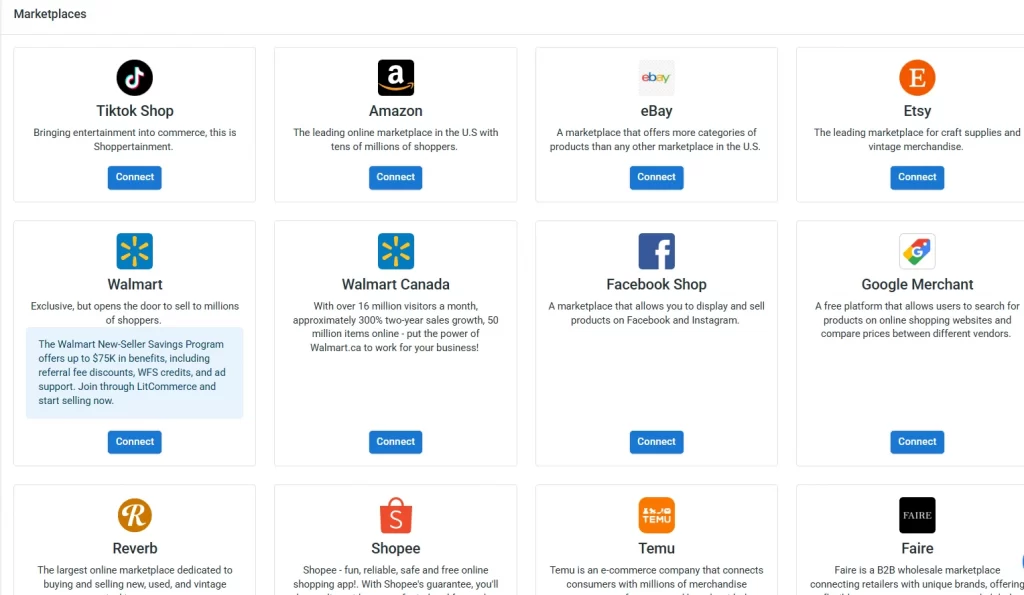
LitCommerce is one of the best multichannel listing tools that stands out by connecting with more than 20 trending marketplaces and eCommerce platforms. You can sell on Amazon, Etsy, eBay, TikTok Shop, Walmart, Temu, Reverb, Google Shopping and more, while also syncing with platforms like Shopify, Wix, and WooCommerce.
Key features:
With LitCommerce, you can choose your eCommerce store (Shopify, Wix, WooCommerce, etc.) as your centralized source of truth. From there, you can easily list products to marketplaces or pull existing marketplace listings back into your store for unified management.
Alternatively, you can use LitCommerce itself as your central product hub. You can upload products directly into LitCommerce one by one or via a product file, then distribute them to your connected marketplaces. This setup works especially well for sellers who focus purely on cross-listing to marketplaces and don’t operate a standalone ecommerce website.
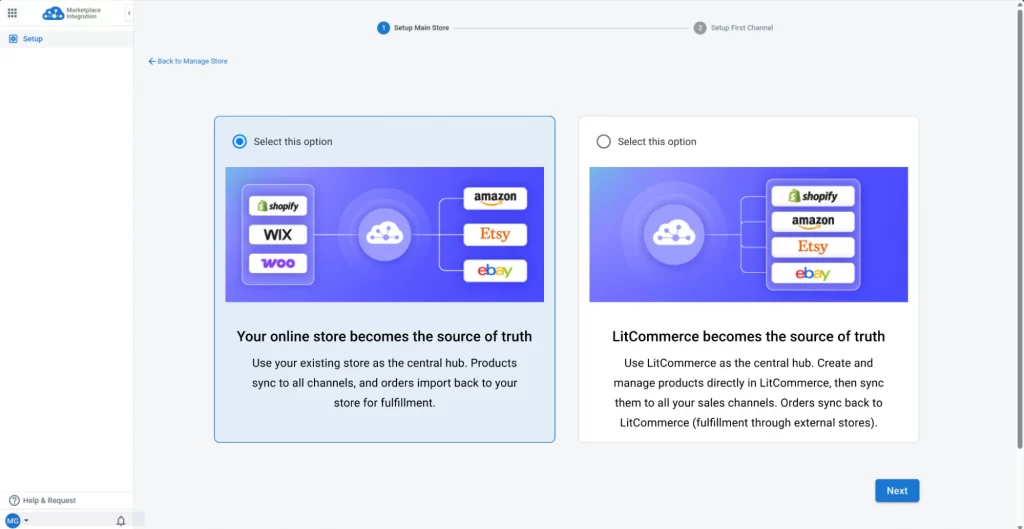
No matter which approach you choose, listing products across multiple channels takes just a few clicks.
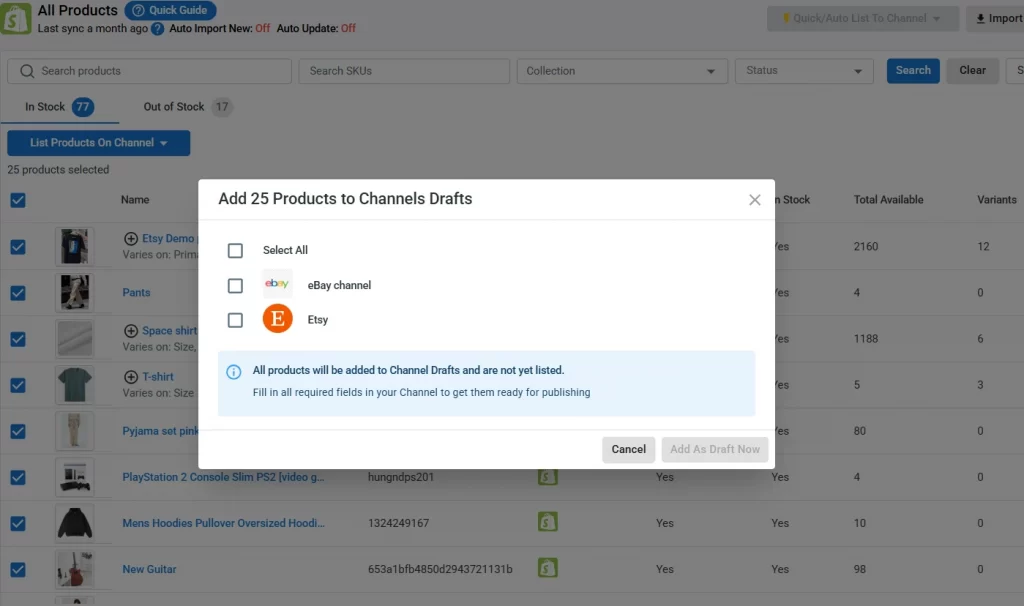
To help you edit listings quickly and consistently before publishing to other channels, LitCommerce offers a free and powerful listing editor. You can group products using filters and apply templates for titles, descriptions, prices, shipping, and more to update items in bulk automatically.
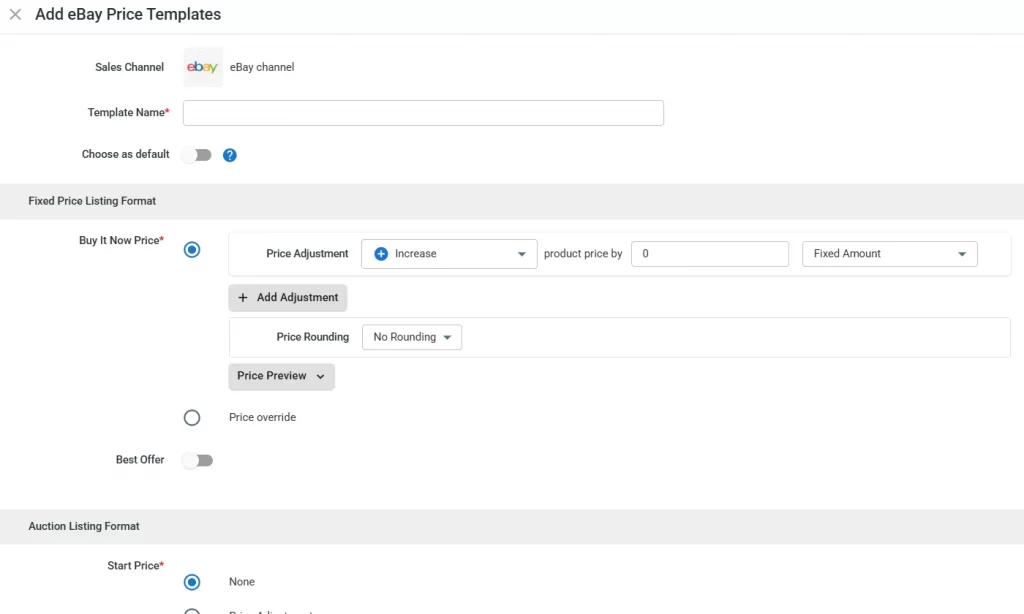
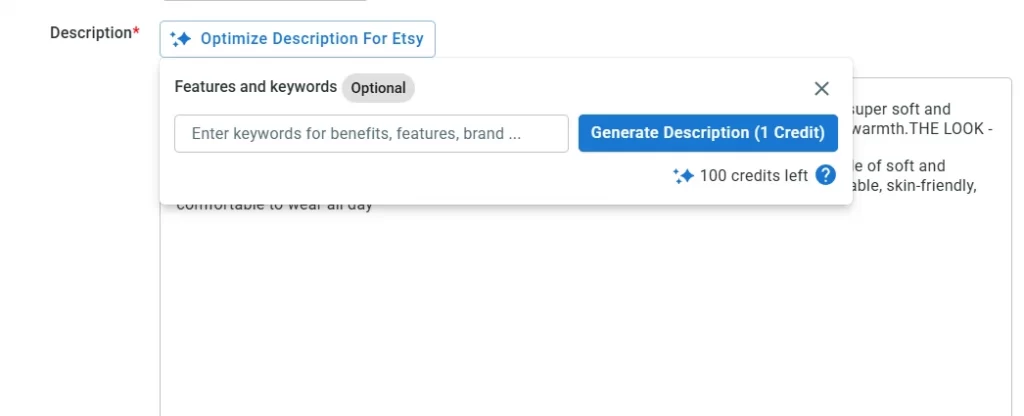
LitCommerce also provides AI-powered product descriptions that automatically optimize your listings to align with platforms’ SEO guidelines and buyer intent.
You can also use Quick Publish to publish multiple products to multiple channels from one simple screen.
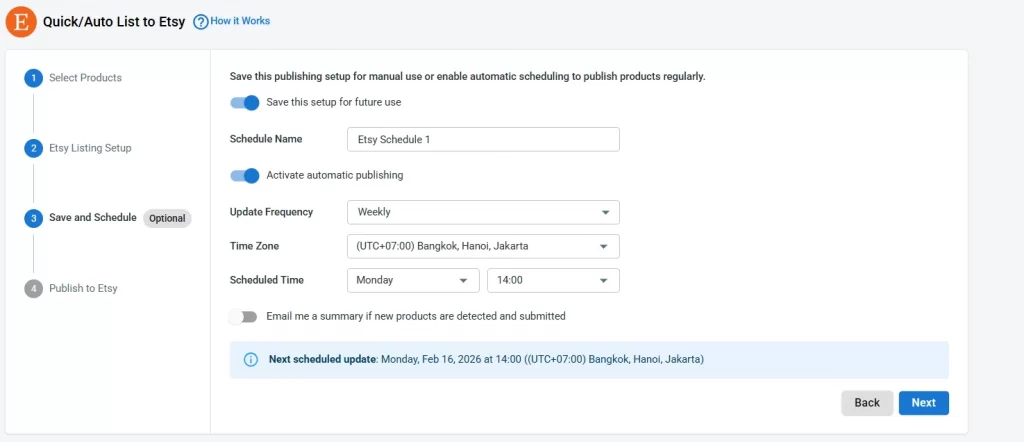
If you want to automate the listing process, you can schedule listing publications and decide how often they run. Based on your setup, new products can be automatically published to selected channels without extra steps.
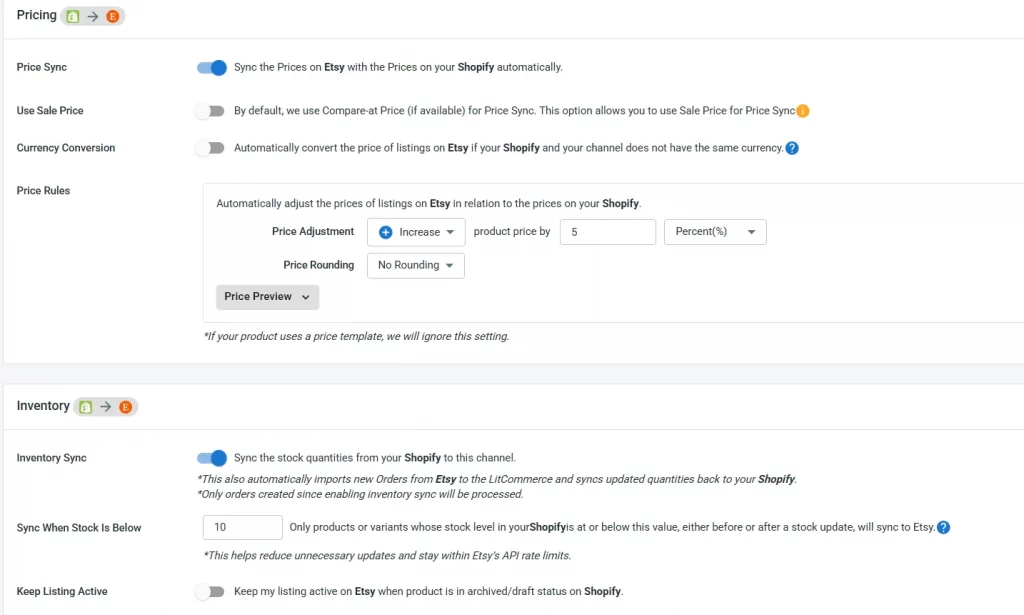
What’s more, LitCommerce keeps everything synced in real time. Prices, listings, and orders are updated based on your rules for each sales channel, so you only need to make a change once and it reflects everywhere you sell. Inventory sync also helps prevent overselling, stockouts, and costly listing mistakes.
Orders from different channels are also pulled directly into your order page, so you can manage fulfillment in one place.
Pros:
- 7-day FREE trial
- A wide range of platforms supported
- File integration support
- Customized pricing plan
- Dedicated customer support
Cons:
- Limited orders processing
Rating:
Shopify app store: 4.8⭐️ (723 reviews)
Trustpilot: 4.7⭐️ (443 reviews)
Pricing:
7-day free trial | $0/ month - Full access to premium features. |
Pay as you go | Start from $29/month. Pricing varies based on the number of channels and listings. Ideal for growing businesses. |
Custom plan | Tailored pricing based on your specific business needs. Ideal for businesses with unique requirements. |
2. Sellbrite
Best for: Sellers with a relatively simple channel mix who prioritize Amazon and Shopify and don’t need broad platform coverage.
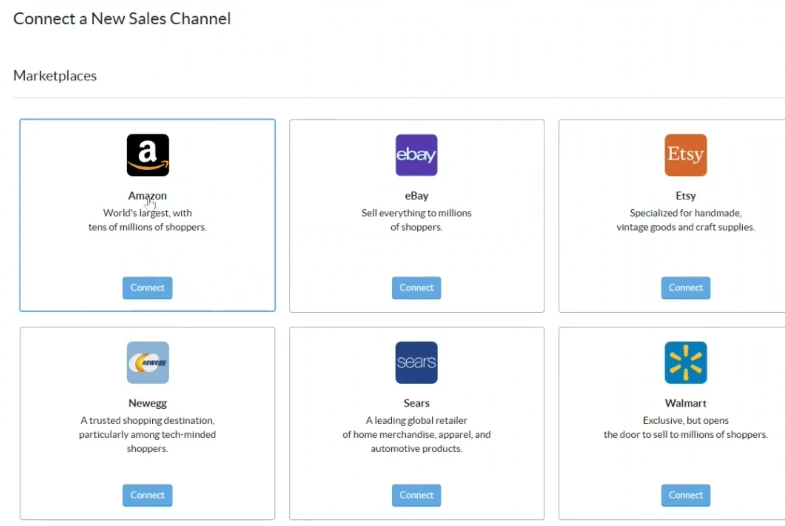
Sellbrite is another best multichannel listing tool designed mainly for sellers who focus on major marketplaces and use Shopify as their core store. It currently supports 7 marketplaces, including popular ones like Amazon, Etsy, and eBay, along with 5 eCommerce platforms such as Shopify and Shopify Plus.
However, if you’re using platforms like Wix or Squarespace, or if social selling channels are part of your strategy, Sellbrite may feel limited.
Key features:
Just like LitCommerce, you can import products from your eCommerce store to marketplaces and bring existing marketplace listings back into your store. With Sellbrite for Shopify, your Shopify store stays the central hub (or “source of truth”), managing products and inventory in Sellbrite, while marketplace orders are synced back to Shopify for fulfillment.
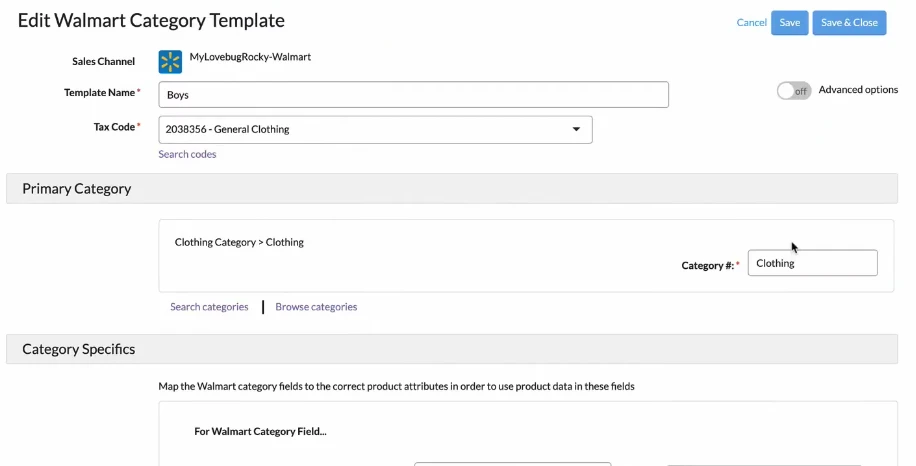
Product management is also streamlined with bulk editing tools that allow you to group items using filters and update titles, descriptions, prices, shipping settings, and other attributes in one go.
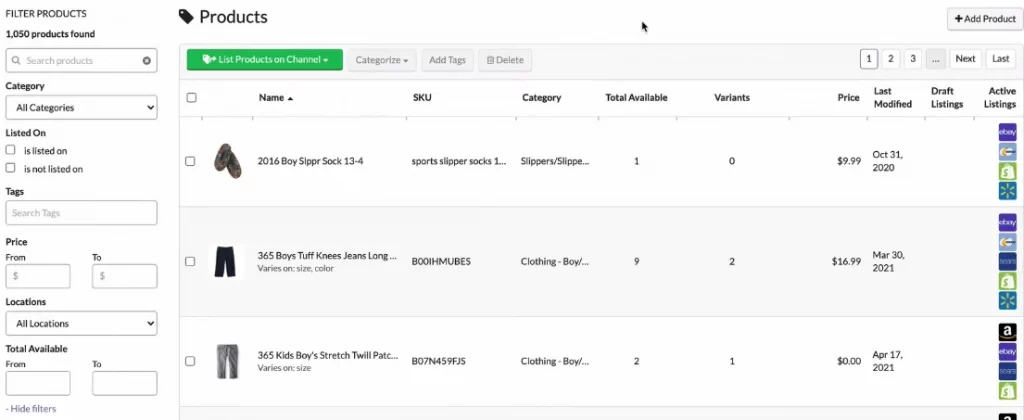
Sellbrite also offers inventory and order syncing across supported channels, helping sellers keep stock levels aligned and manage orders from a single interface. That said, some users report occasional sync delays, especially when handling higher order volumes or frequent catalog changes.
Pros:
- Free-forever plan available for up to 30 orders per month
- Amazon FBA and Flexport integration
Cons:
- Limited marketplace and eCommerce platform support
- No support for social commerce channels
- Limited onboarding tutorials and documentation
- Some reported syncing reliability issues
Rating:
Shopify app store: 3.7⭐️ (118 reviews)
Trustpilot: 4.4⭐️ (11 reviews)
Pricing:
Forever free | $0/month | Up to 30 orders |
Pro 100 | $29/month | Up to 100 orders |
Pro 500 | $79/month | Up to 500 orders |
Pro 2K | $179/month | Up to 2,000 orders |
You can read more about LitCommerce vs Sellbrite Comparison in this dedicated blog.
3. CedCommerce
Best for: Sellers who want to manage and list products from Shopify to a single marketplace.
CedCommerce is also a strong multichannel listing tool, known for its wide marketplace coverage across the US, Europe, and Southeast Asia, including Amazon, Etsy, eBay, Walmart, TikTok Shop, and SHEIN.
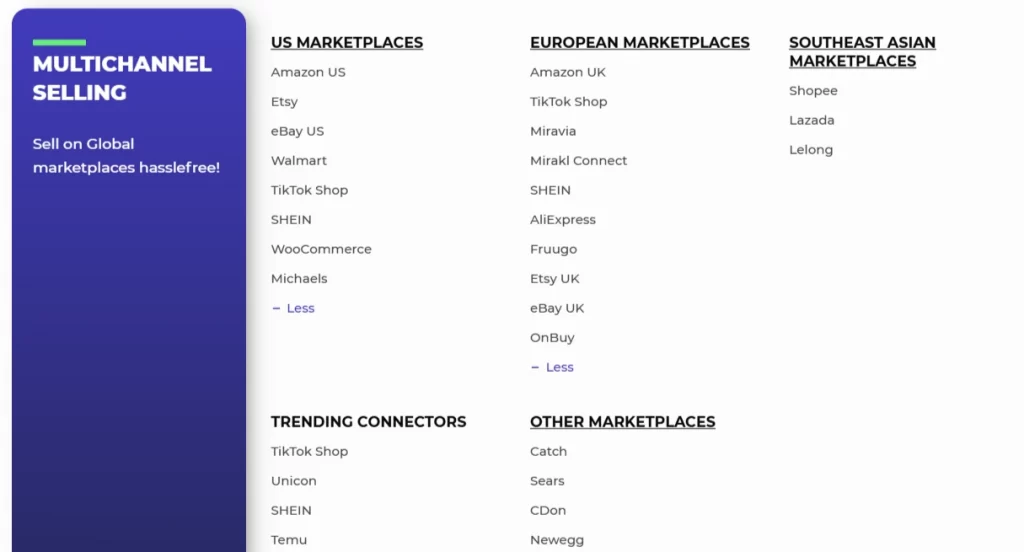
If you install CedCommerce from Shopify app store, it works through separate Shopify apps for each marketplace. For example, you would install CedCommerce Amazon Channel specifically for Amazon–Shopify integration. This modular setup gives you flexibility, but it can also feel fragmented if you manage many channels at once.
Key features:
When it comes to listing products, CedCommerce offers solid bulk listing tools. You can select products, edit key listing details, and publish them to your chosen marketplaces in batches.
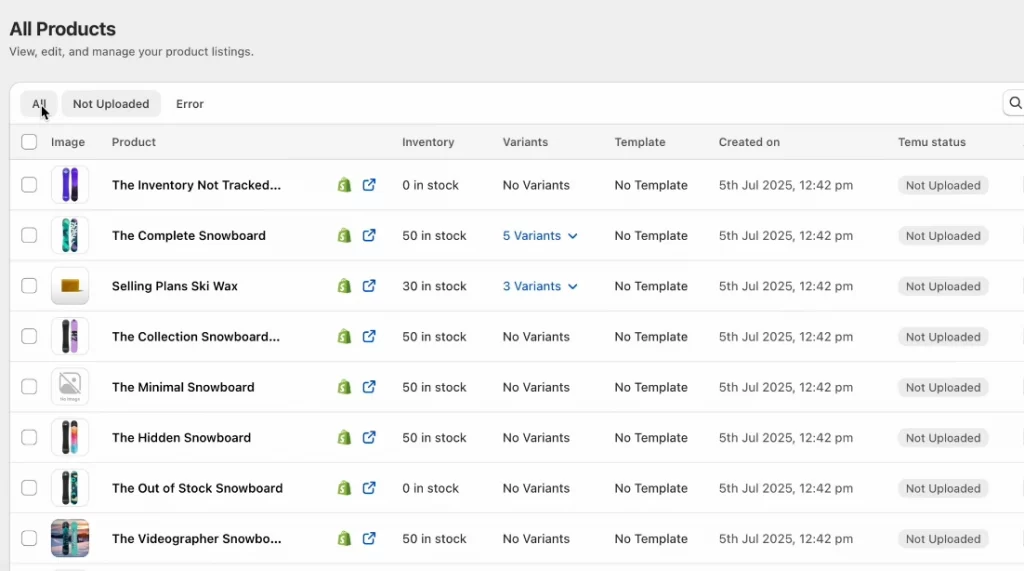
Inventory syncing is available as well, with updates running either immediately or on a scheduled basis, typically within 20-minute intervals.
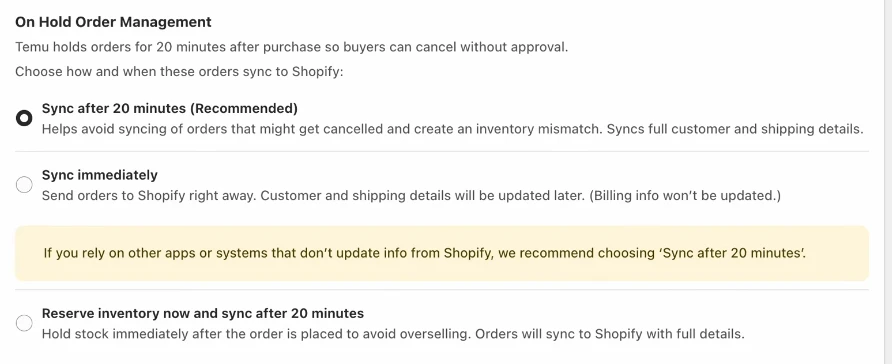
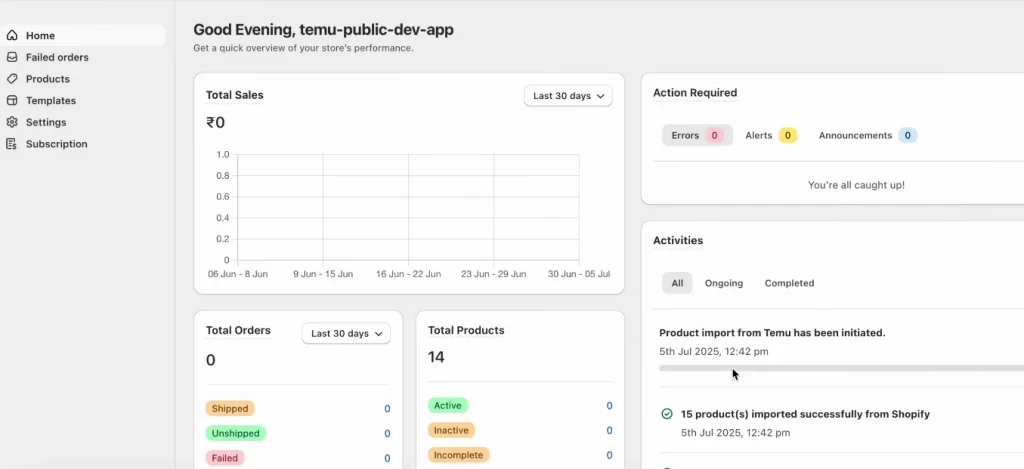
CedCommerce also provides a reporting dashboard where you can track total sales, orders, and product performance. You’ll also see activity logs that show recent actions and sync events, which can be helpful for troubleshooting and tracking changes.
Pros:
- Supports a wide range of global marketplaces
- Strong presence in emerging platforms like TikTok Shop and SHEIN
- Flexible bulk listing and inventory sync options
Cons:
- Separate app required for each marketplace connection
- Steeper learning curve compared to all-in-one tools
- Limited guided onboarding and tutorials
Rating:
Shopify app store:
- CedCommerce Amazon Channel: 4.6⭐️ (1,036 reviews)
- CedCommerce eBay Integration: 4.8⭐️ (866 reviews)
- CedCommerce TikTok Shop: 4.8⭐️ (218 reviews)
- CedCommerce Walmart Connector: 4.7⭐️ (531 reviews)
- Etsy Integration ‑ CedCommerce: 4.6⭐️ (1,178 reviews)
Trustpilot: 4.0⭐️ (2,981 reviews)
Pricing:
Free | Free to install | 50 orders/month; $0.2/order |
Beginner | $19/month | Sync up to 100 orders/month |
Growth | $99/month | Sync up to 1000 orders/month |
4. Rithum – ChannelAdvisor
Best for: Large sellers expanding into niche marketplaces who don’t rely on an eCommerce website as their main product source.
ChannelAdvisor, now Rithum, supports over 420 global, regional, and niche marketplaces, allowing sellers to list products almost anywhere their customers already shop. If reach is your top priority, that number alone is impressive.
However, instead of pulling product data directly from an eCommerce store, you’ll need to upload a product file.
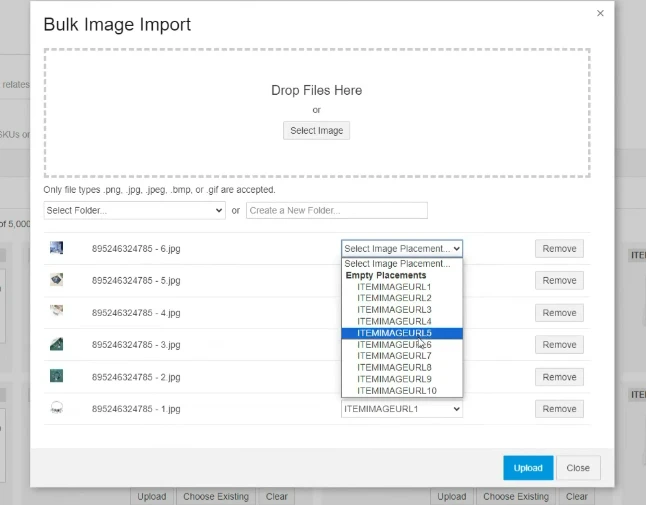
or, manually enter product information into the system.
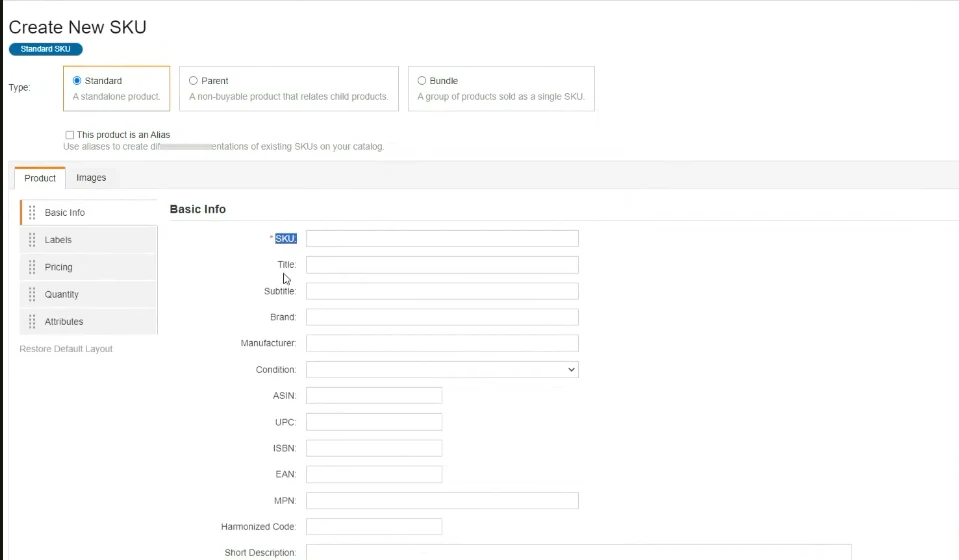
This can be time-consuming, especially for sellers with large or frequently changing catalogs.
Key features:
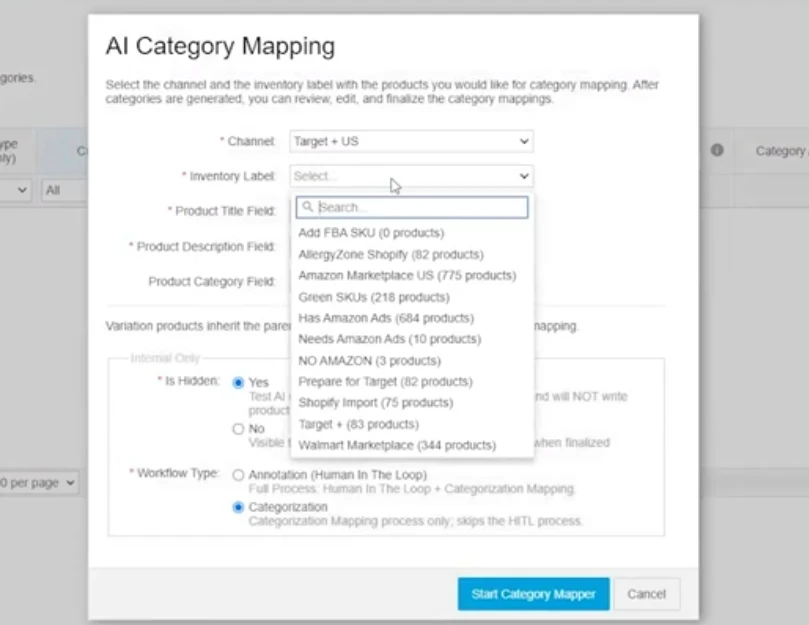
Rithum includes AI-powered category mapping to help match your products to the right categories on third-party marketplaces. However, in practice, some users report that this auto-detection still needs improvement. Category suggestions can lack detail, and valid values for subcategories are not always clearly provided.
One area where Rithum performs well is error detection. The platform actively flags inaccurate, broken, or non-compliant listings and suggests fixes before those issues affect sales or account health. It also supports complex catalog structures, including parent–child SKU relationships, which is helpful for large inventories.
Pros:
- Massive marketplace coverage across global and niche channels
- Strong error detection and compliance tools
- Handles complex catalogs and parent–child SKU structures well
- Useful back-end order and refund management
Cons:
- No direct eCommerce store integration for product data
- Steep learning curve and complex setup process
- Limited onboarding resources and tutorials
- Customer support can be hard to reach
- High cost, often unsuitable for SMEs
Rating:
Capterra: 3.8⭐️ (61 reviews)
G2: 3.9⭐️ (112 reviews)
Trustpilot: 2.4⭐️ (12 reviews)
Pricing: Custom
5. Shopify Marketplace Connect
Best for: Shopify sellers who only need to sell on a few major marketplaces and want a native integration.
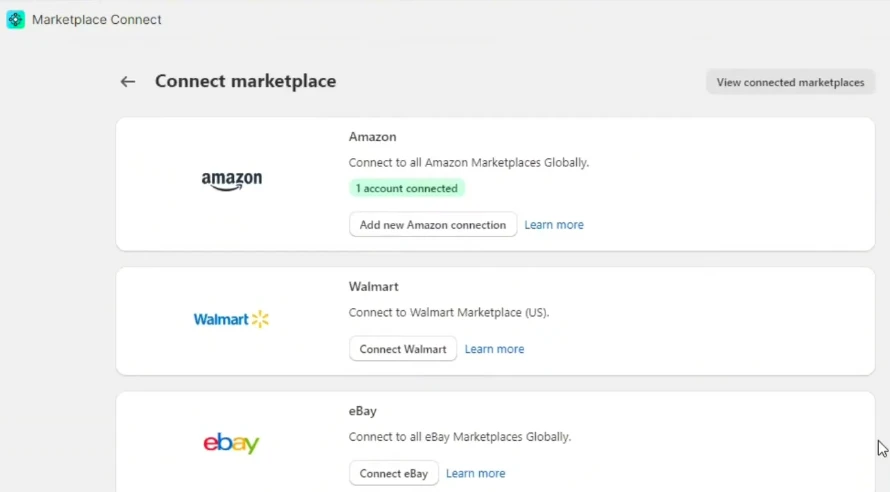
Shopify Marketplace Connect is a native Shopify app built to help sellers list products from their Shopify store to major global marketplaces. It currently supports well-known platforms such as Amazon, Walmart, eBay, and Target Plus.
Key features:
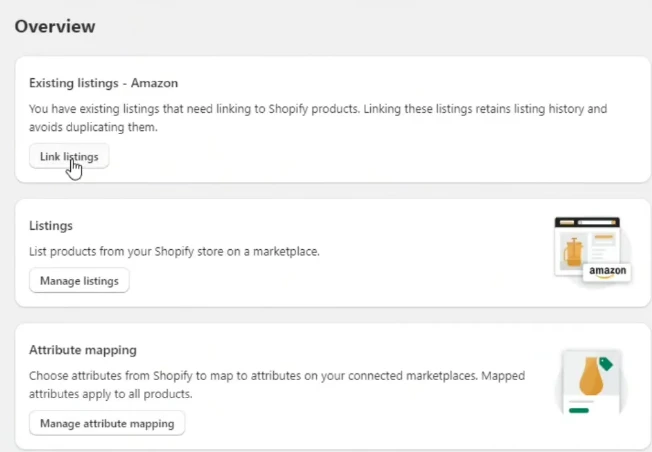
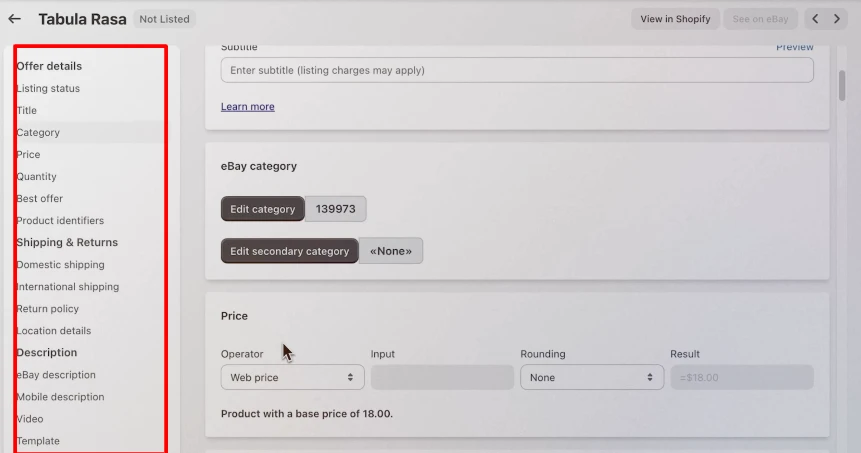
Because it’s designed specifically for Shopify, the tool works entirely inside your Shopify admin. To list products, you simply choose “Manage listings,” then review and edit items one-by-one before publishing it to your connected marketplaces.
Once orders come in, marketplace purchases are automatically pulled into your Shopify Orders page.
Then, orders from marketplaces will pulled directly to your Shopify orders for easily manage.
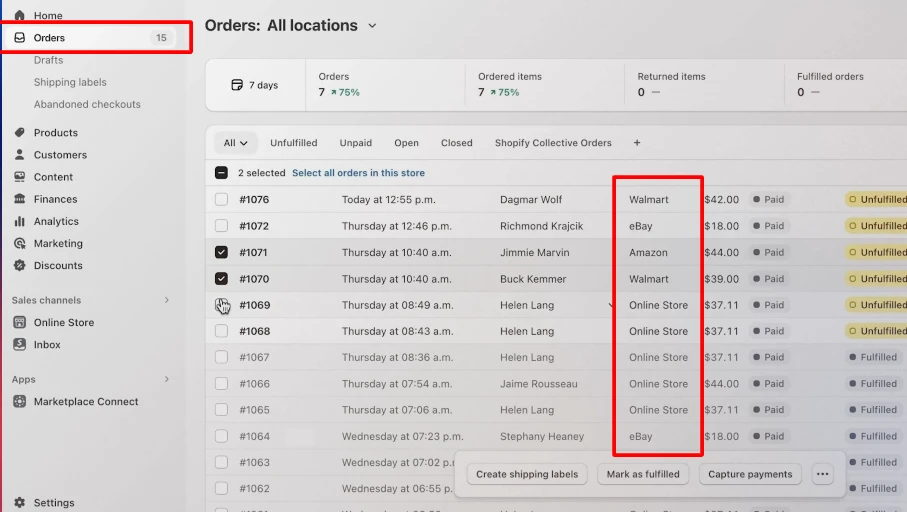
In terms of pricing, Shopify Marketplace Connect is free to install. The first 50 marketplace-synced orders per month are free, and after that, the app charges a 1% fee per additional synced order, capped at $99 per month.
While this can work well for small sellers, costs may increase as order volume grows.
Pros
- Native Shopify app with no external dashboard
- Marketplace orders sync directly into Shopify
Cons
- Only works for Shopify-based stores
- Limited marketplace coverage with no support for platforms like Temu, SHEIN, etc.
- Listing process can be time-consuming for large catalogs
- Pricing scales with order volume and may become costly over time
- Interface and navigation can feel unintuitive
Rating:
Shopify app store: 4.2⭐️ (1,911 reviews)
Pricing: Free to install. First 50 marketplace-synced orders per month are free, then 1% per additional synced order, capped at $99/month.
6. Linnworks
Best for: High-volume sellers and dropshippers managing complex inventory across multiple major marketplaces.
When considering the best multichannel listing tool that features excellent inventory and order management capabilities, particularly suited for high-volume sellers, Linnworks is a platform worth discussing.
Key features:
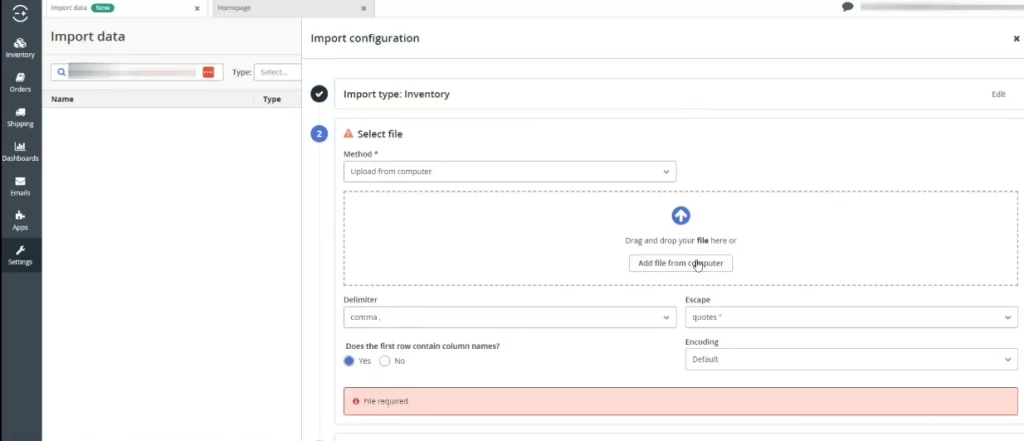
Like Rithum, it doesn’t pull product data directly from an eCommerce store by default. Instead, you import products using CSV files or add items manually.
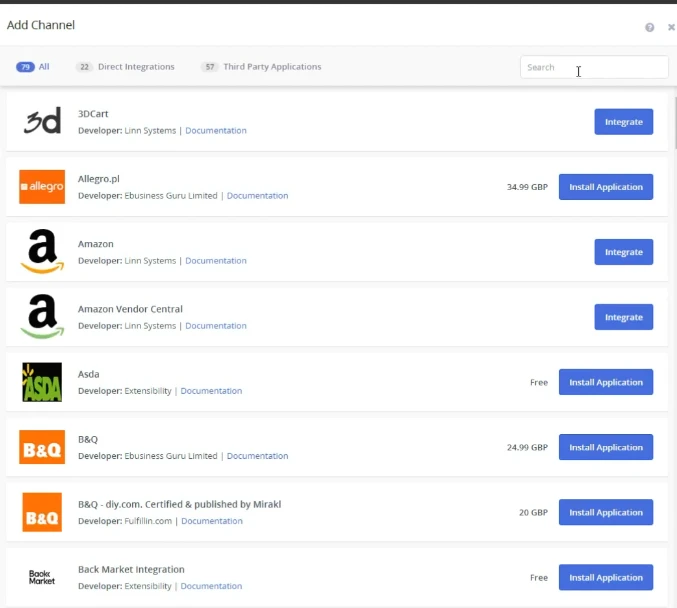
When an order is placed on any connected channel, inventory updates automatically across all others.
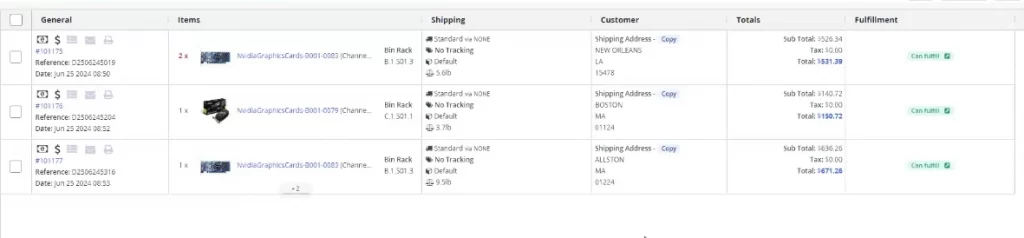
Linnworks also provides advanced tools for order processing and fulfillment. You can manage orders, print shipping labels, invoices, and packing slips, and track shipments directly from the platform.
Pros:
- Strong centralized inventory and order management
- Real-time stock visibility across channels
- Powerful automation for fulfillment and operations
Cons:
- No simple plug-and-play eCommerce store import
- Steep learning curve and complex setup
- Overkill for small or early-stage sellers
- Pricing and implementation can be costly
Rating:
Shopify app store: 3.5⭐️ (3 reviews)
Capterra: 4.1⭐️ (47 reviews)
Pricing: custom
7. Vendoo
Best for: Resellers selling one-of-a-kind or low-quantity items across multiple marketplaces.
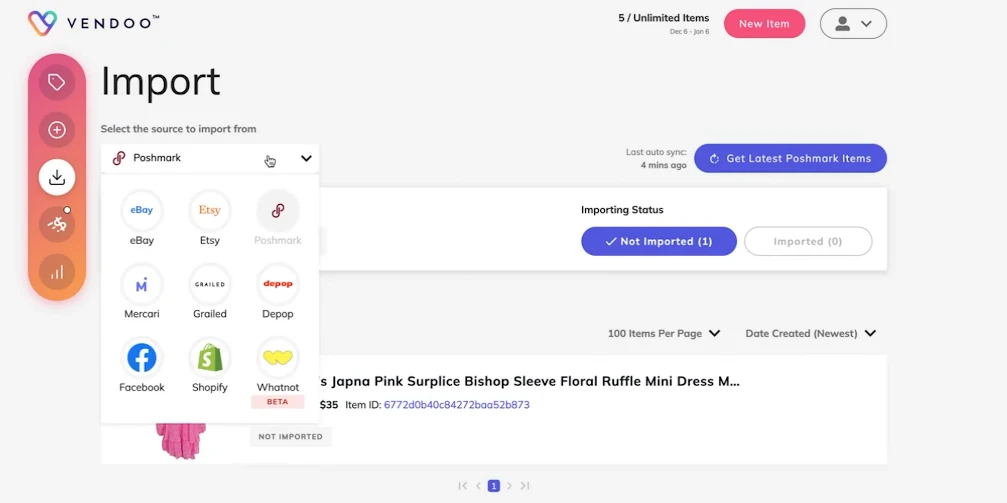
Vendoo is a cross-listing tool built specifically for resellers who sell the same items across multiple marketplaces. It currently supports around 11 platforms, including eBay, Depop, Facebook Marketplace, Poshmark, Mercari, Etsy, Shopify, and more.
Key features
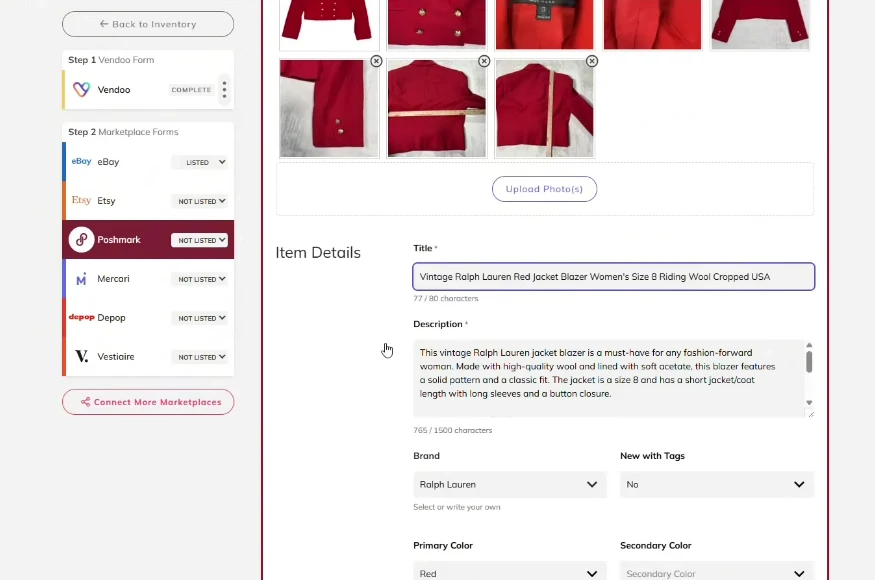
To get started, you import products from your existing marketplaces into Vendoo, where it becomes your source of truth. You then edit product details inside Vendoo’s listing form or create new products from scratch.
On higher-tier plans, Vendoo includes AI-powered listing enhancements that help generate stronger product descriptions and automatically remove backgrounds from product photos.
After that, you fine-tune listings again for each target marketplace before publishing.
One of Vendoo’s biggest strengths is inventory control for single-quantity items. Its automatic delisting and sales detection prevents double-selling by instantly removing sold items from other marketplaces.
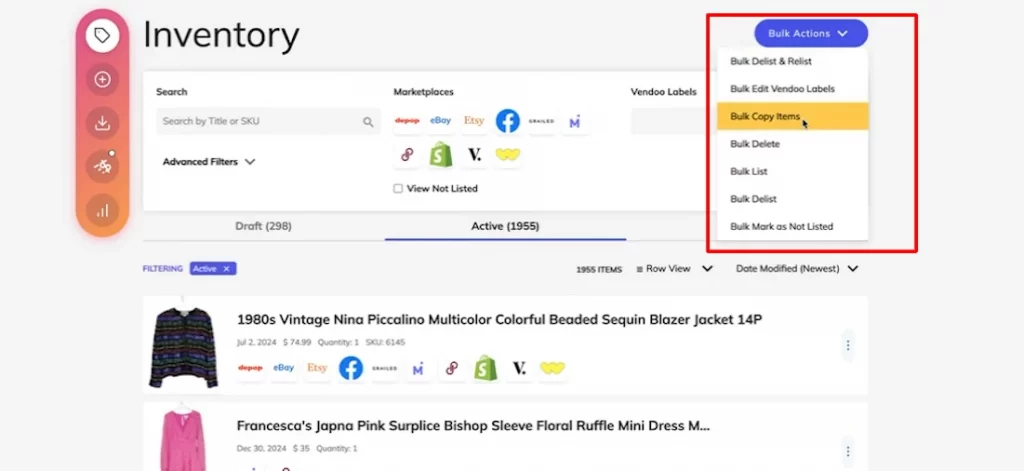
Vendoo also offers helpful bulk actions like bulk delist, relist, copy, and delete, making it easy to refresh old listings and increase visibility without recreating products.
Pros:
- Designed specifically for reselling workflows
- Supports many resale-focused marketplaces
- Easy bulk actions for relisting and cleanup
Cons:
- Not ideal for high-quantity or SKU-based catalogs
- Requires multiple editing steps per product
- Limits supported channels
Rating:
Trustpilot: 4.3⭐️ (147 reviews)
Pricing:
Starter | $14.99/month | - Unlimited Items - All marketplaces |
Growth | $29.99/month | - AI listing enhancement - Up to 300 PhotoRoom background removals |
Pro | $59.99/month | - Auto send offers on 6+ marketplaces - Marketplace sharing: Poshmark, Depop & Grailed. |
8. EasyChannel
Best for: High-volume sellers who want marketplace, social commerce, and shipping management in one platform.
EasyChannel supports 4 major marketplaces, which are Amazon, Walmart, Etsy, and eBay, along with 3 shopping cart platforms, Shopify, Wix, WooCommerce, and 3 social selling platforms including Facebook, Instagram, and TikTok.
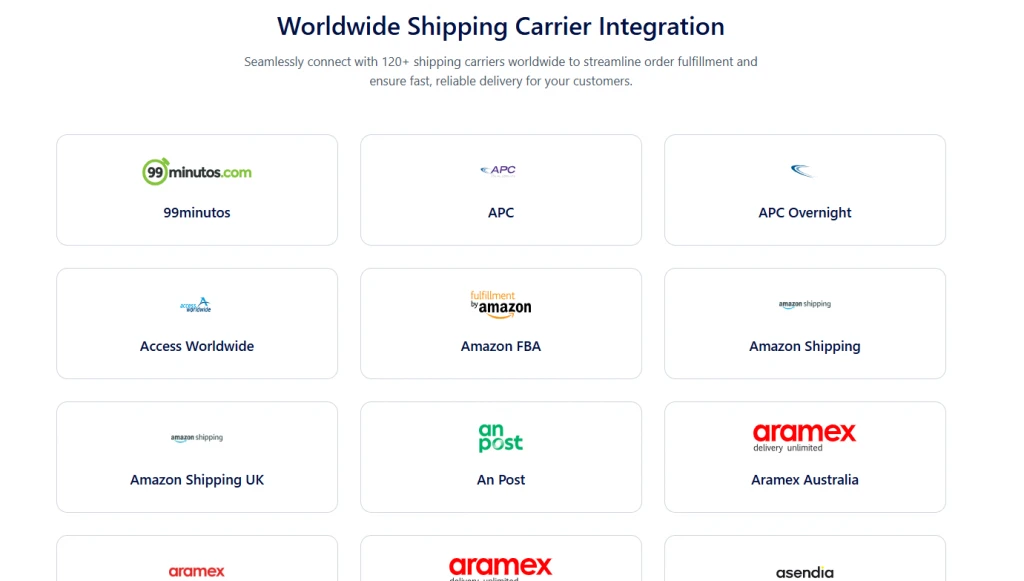
Beyond listings, EasyChannel integrates with 120+ global shipping carriers, helping sellers streamline order fulfillment and manage shipping workflows from one system.
Key features:
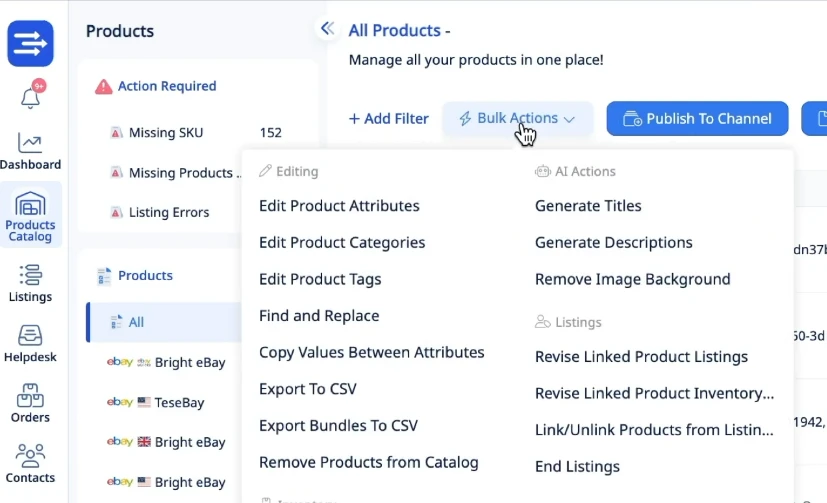
For product listing automation, EasyChannel offers bulk editing tools that let you update product attributes, categories, tags, and other listing details across channels. It also includes AI-powered features to automatically generate product titles and descriptions, as well as remove image backgrounds, which can speed up listing creation.
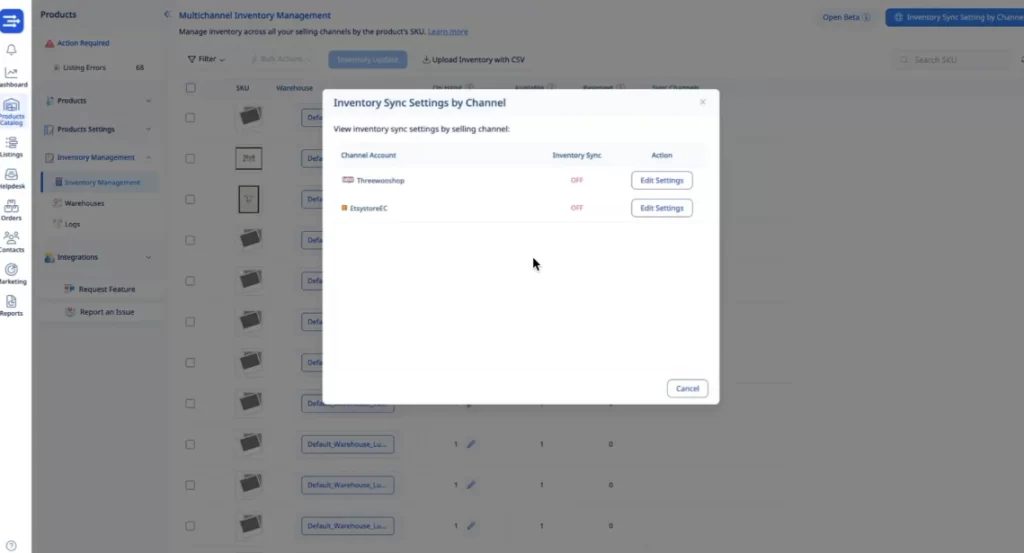
Inventory and pricing syncing run continuously in the background. Once set up, EasyChannel keeps stock levels and prices aligned across all connected channels, helping reduce overselling and manual updates.
Pros:
- Built-in shipping integrations with 120+ carriers
- Useful AI tools for listing creation and image editing
Cons:
- Pricing is relatively high, starting at $49/month
- More complex than needed for small sellers
Rating:
Trustpilot: 4.0⭐️ (4 reviews)
Pricing:
Starter | $49/month | 1,500 listings |
Business plan | $99/month | 5,000 listings |
Professional plan | $199/month | 20,000 listings |
Enterprise plan | Custom | 20,000 - 1 million+ listings |
9. OneCart
Best for: Sellers focused on Shopee, Lazada, and TikTok Shop who want strong regional marketplace support.
OneCart stands out for its strong focus on Southeast Asian marketplaces, making it a popular choice for sellers targeting platforms like Shopee and Lazada. It also supports global channels such as Amazon and TikTok Shop.
Key features:
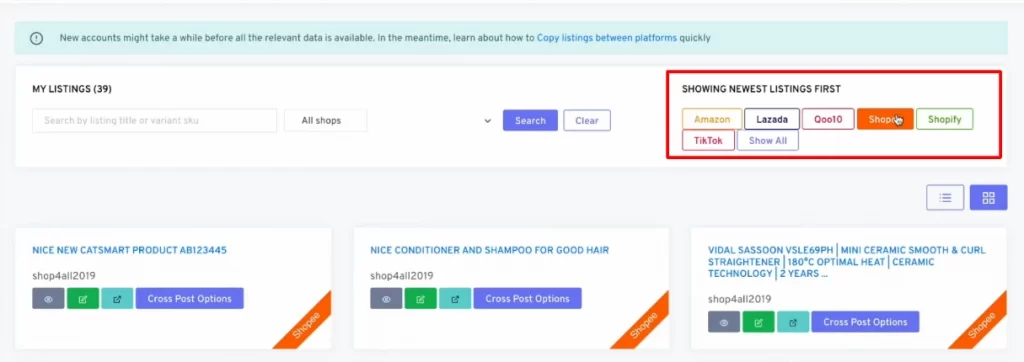
In OneCart, the platform acts as your central source of truth for product data. You add products into OneCart first, then cross-post those listings to connected marketplaces.
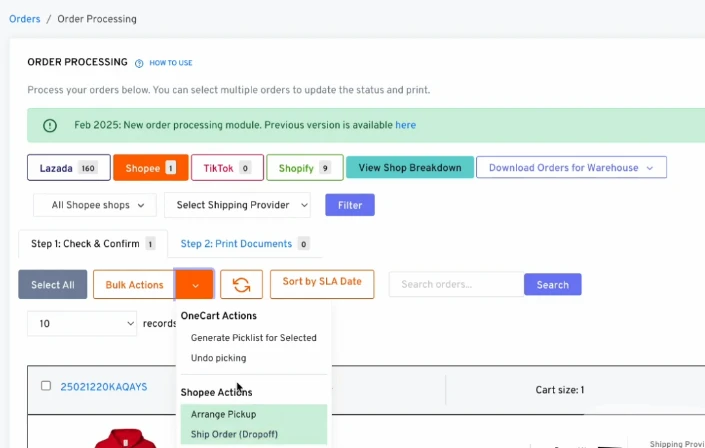
For order management, OneCart offers practical fulfillment tools. You can generate picklists, packing slips, and shipping documents in just a few clicks, keeping orders from Shopee, Lazada, and TikTok Shop organized in one place.
That said, many advanced features are locked behind higher pricing tiers. Automated inventory syncing, consolidated order processing, and advanced analytics are not available on the Hobbyist plan, which starts at $48/month. To access these core multichannel features, sellers must upgrade to the Trader plan at $199/month, which may be a barrier for smaller businesses.
Pros:
- Excellent support for Shopee, Lazada, and TikTok Shop
- Centralized listing and order management
- AI agent for quick inventory and sales insights
Cons:
- Key automation features locked behind high-tier plans
- Limited support for Western marketplaces like Etsy or eBay
- Pricing may be too high for small sellers just starting out
Rating:
Shopify app store: 5.0⭐️ (5 reviews)
Pricing:
Hobbyist | $48/month | Best for new sellers getting started on a couple of channels. |
Trader | $199/month | Perfect for growing businesses that need to automate inventory and orders. |
Business | $688/month | Built for established brands that require advanced analytics and priority support. |
10. Nembol
Best for: Sellers managing multiple stores or accounts across mainstream marketplaces and ecommerce platforms.
Nembol is the last on the list of best multichannel listing tools that supports around 14 sales channels, including Shopify, Amazon, Etsy, eBay, WooCommerce, and TikTok.
Key features:
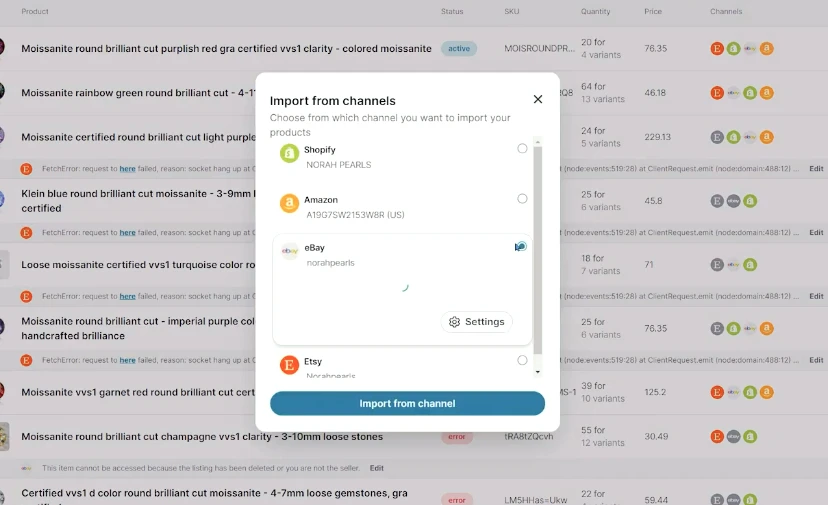
One of its standout features is the ability to connect multiple stores and accounts at the same time, such as several Shopify stores, multiple eBay accounts, or multiple Etsy shops, all under one dashboard.
You can bring products into Nembol in several ways: import them from marketplaces, sync them from your ecommerce store, upload them via CSV, or create listings directly inside Nembol. Once products are in the system, Nembol lets you mass-edit product content across channels.
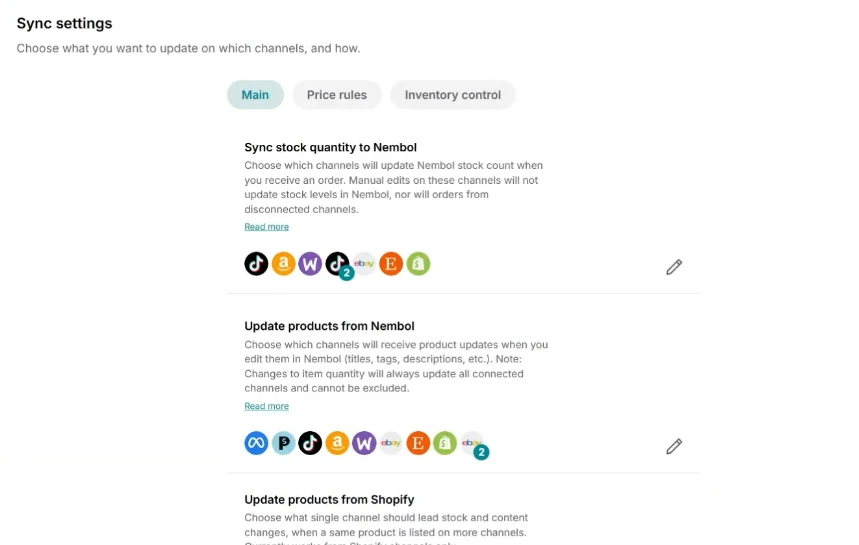
Nembol also offers helpful pricing tools that allow you to sync prices and inventory across channels or apply custom pricing, inventory rules.
Pros:
- Supports multiple stores and accounts per channel
- Flexible product import options, including CSV
Cons:
- No integration with Temu, Poshmark, Mercari, or Depop
- Limited coverage of resale-focused marketplaces
- Order management is not powerful
Rating:
Shopify app store: 4.0⭐️ (55 reviews)
Trustpilot: 3.2⭐️ (45 reviews)
Pricing:
Basic | $39/month | 500 products |
Pro | $49/month | 2,000 products |
Enterprise | $79/month | 5,000 products |
Enterprise + | $129/month | 15,000 products |
Learn more: 15+ Best Channel Integration Software
How to Choose the Right Multichannel Listing Tool
With so many options available, choosing the best multichannel listing tool for your business can feel overwhelming. The key is to focus on how you sell today, and how you plan to grow tomorrow.
Think about how you manage products and inventory.
If you sell the same SKU across multiple channels, real-time inventory sync is essential to avoid overselling. If you’re a reseller with one-of-a-kind items, features like automatic delisting matter more than bulk inventory syncing. Choose a tool that matches your product type.
Look closely at pricing and hidden limits.
A lower starting price doesn’t always mean better value. Some tools lock essential features, like inventory sync, consolidated orders, or analytics, behind higher plans. Always compare what’s included at the price you’ll realistically need.
Match the tool to your experience level.
If you’re just getting started, a simple interface and good onboarding can make a huge difference. More advanced or enterprise tools may offer powerful features, but they often come with a steep learning curve.
FAQs about Best Multichannel Listing Tool
1. What is a multichannel listing tool?
A multichannel listing tool lets you create, manage, and sync product listings across multiple marketplaces and ecommerce platforms from one dashboard. Instead of updating products manually on each channel, the tool helps you save time, reduce errors, and keep inventory and prices consistent.
2. Why do I need a multichannel listing tool?
If you sell on more than one platform, managing listings manually quickly becomes time-consuming and risky. A multichannel listing tool helps prevent overselling, keeps product information accurate, and makes it easier to scale your business without adding more manual work.
3. Are multichannel listing tools suitable for small businesses?
Yes. Many multichannel listing tools are designed specifically for small and mid-sized sellers. Some even offer free plans or low-cost entry tiers, making it easier to test multichannel selling without a large upfront investment.
Verdict
At the end of the day, the best multichannel listing tool is the one that fits your selling model, reduces manual work, and helps you scale without chaos. There’s no universal winner, only the tool that works best for how and where you sell.
For sellers looking for a balanced, easy-to-use solution, the LitCommerce multichannel listing tool stands out by combining wide marketplace support, bulk listing and editing, real-time syncing, and simple automation, all without overwhelming complexity or enterprise-level pricing.
If you’re still weighing your options, check out LitCommerce’s blog for more resources to help you make smarter multichannel decisions.
Whichever tool you choose, the goal is the same: spend less time fixing listings and more time growing your business. When your tools work quietly in the background, multichannel selling finally feels manageable.