LitCommerce vs Sellbrite are two popular multichannel selling tools, offering a range of features to help businesses sell on multiple platforms. In this comparison, we will thoroughly examine 7 factors to find their strengths and weaknesses.
- #1. Pricing
- #2. Channel supported
- #3. Ease of use
- #4. Listing Features
- #5. Inventory, Price & Order feature
- #6. Support system
- #7. Security and policy
Let’s dive in!

How We Compared LitCommerce and Sellbrite
To give you a fair and useful comparison, we followed a structured review process:
- Hands-on testing. We tried both tools to see how they work in real scenarios, focusing on listing products, syncing inventory, and managing multichannel sales.
- Feature evaluation. We assessed key features like ease of setup, integration options, automation, and pricing flexibility.
- User experience. We considered interface design, learning curve, and overall usability for small to medium-sized businesses.
- Support & resources. We reviewed available documentation, support channels, and customer feedback to understand reliability.
- Value for money. We compared pricing plans relative to features, scalability, and potential ROI.
This approach helps ensure our review is practical, unbiased, and relevant to online sellers looking for the right multichannel solution. Learn more about our methodology.
LitCommerce vs Sellbrite – Overview
What is LitCommerce?
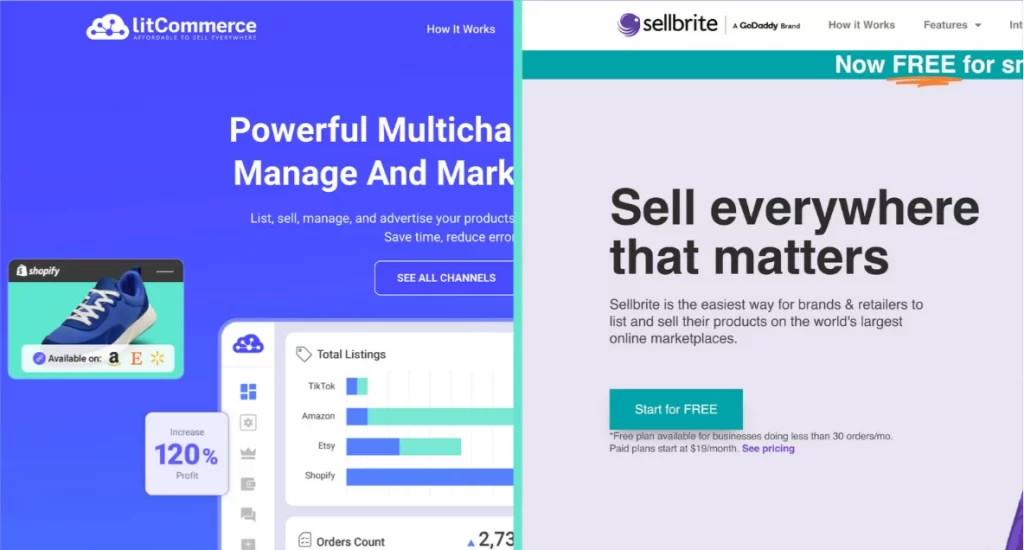
LitCommerce multichannel listing tool is probably an app you’ve heard of. Founded in 2020, it is a highly-rated multichannel selling tool (see their reviews on Trustpilot). They focus on powerful features while maintaining an intuitive and easy-to-use interface. The estimated monthly active users of LitCommerce are around 15,000.
On top of its multichannel listing capabilities, LitCommerce also offers a Product Feed Management Tool that helps sellers sync product data to top advertising channels like Google Shopping, Facebook, Pinterest, TikTok, and Bing.
Key features include smart category mapping, bulk feed rules, automated syncing, and built-in quality checks to ensure feeds meet each platform’s requirements. It’s designed for both beginners and advanced users who want to boost product visibility through paid and organic campaigns.
What is Sellbrite?
Sellbrite is a cloud-based multichannel eCommerce management platform that helps online sellers streamline their operations by centralizing product listings, inventory control, order processing, and fulfillment across multiple sales channels. Sellbrite reviews on Trustpilot get 4.4.
With Sellbrite, you can easily connect and manage your store on marketplaces like Amazon, eBay, Walmart, Etsy, and more—plus integrate with your own web store on platforms such as Shopify or WooCommerce.
The platform is designed to save time and reduce errors by keeping your inventory in sync across all channels in real-time. Any change you make, whether it’s updating stock levels, adjusting prices, or editing product details, is automatically updated everywhere you sell. It helps you avoid overselling and ensures your product data remains consistent across all channels.
Sellbrite consolidates all incoming orders into a single dashboard, allowing you to fulfill them from your own warehouse, through Amazon FBA, or using a third-party logistics provider, without needing to switch between accounts.
LitCommerce vs Sellbrite Comparison – 7 Factors to Consider
Here’s a quick comparison between LitCommerce vs Sellbrite:
Criteria | LitCommerce | Sellbrite |
Reviews | 4.7⭐(on Truspilot) | 4.4⭐(on Truspilot) |
Starting price | $29/month (Basic), no setup cost | Free plan (up to 30 orders/mo); paid from $29/month (Standalone) or $19/month (Sellbrite for Shopify) |
Pricing model | Based on listings, unlimited order & inventory sync on all plans | Tiered by monthly order volume; +$19/mo for FBA integration |
Free trial | 7-day free trial, full feature access | 14-day trial; forever-free plan available |
Marketplaces | 10+ (Etsy, eBay, Amazon, TikTok Shop, Walmart, Temu, Reverb, Shopee, Faire, Google Merchant, Facebook Shop) | 7 (Amazon, eBay, Etsy, Walmart, Google Shopping, Sears, Newegg) |
eCommerce platforms | Shopify, WooCommerce, Wix, BigCommerce, Squarespace, PrestaShop, Square, File (CSV/Google Sheet) | Shopify, Shopify Plus, WooCommerce, BigCommerce |
Shipping/fulfillment integrations | ShipStation (when set up LitCommerce as the Main Store) | Extensive: USPS, ShipStation, FBA, ShipEngine, Flexport, SkuVault, Easyship, SalesPad Cloud, Inventory Source, Algopix |
Listing features | Per-channel customization: eBay template designer, Amazon ASIN lookup, Etsy personalization & digital products, AI writing tools, Quick/Auto List, scheduling | Bulk editing, templates, recipes, category mapping |
Inventory sync | Yes | Yes |
Price sync | Yes | Yes |
Order management | From your eCommerce store or within LitCommerce | From your store (Sellbrite for Shopify) or within Sellbrite (Standalone); routing to FBA, dropshippers, etc. |
Sync frequency | 15 min on all paid plans | 15 min on paid plans; 2 hours on free plan |
Ease of use | Clean UI, marketplace-familiar terms, to-do list, guide videos | User-friendly UI, in-app guides, sample products |
Support | Live chat, email, Helpdesk, Academy; near 24/7 | Ticket + text; Mon–Fri 7 AM–4 PM PST |
Security | Privacy Policy, GDPR page, Data Security Policy (encryption, access controls, incident response) | Data Processing Addendum, Privacy Policy (encryption, access controls, incident response) |
#1. Pricing
Let’s admit it. Pricing is one of the most important factors to consider for a multichannel selling tool. In the first part, we will help you find out whether these tools are worth paying for or not.
LitCommerce
About LitCommerce – one of the best Sellbrite alternatives, they offer a range of pricing plans to cater to various business needs, starting at $29 per month for the Basic plan. They also provide a custom plan for businesses with unique requirements. And all these come with no setup costs.
- Monthly plans with 3 integrated channels:
LitCommerce's popular plans | Monthly | Annually (Save 20%) |
Up to 1,000 listings, unlimited order sync | $29 | $24.00/month |
Up to 2,000 listings, unlimited order sync | $44 | $36.00/month |
Up to 5,000 listings, unlimited order sync | $59 | $48.00/month |
Up to 10,000 listings, unlimited order sync | $84 | $68.00/month |
If you’re considering adding more channels, you can refer to the LitCommerce pricing page for detailed information.
Wondering if LitCommerce has a free trial? Yes, they do offer a 7-day FREE trial with full access to all features for new sellers.
Sellbrite
Meanwhile, Sellbrite offers 4 plans based on the number of orders:
Sellbrite's pricing plans | Monthly | Annually (Save 20%) |
Forever free (Up to 30 orders/month) | $0 | $0 |
PRO 100 (Up to 100 orders/month) | $29 | $24/month |
PRO 500 (Up to 500 orders/month) | $79 | $66/month |
PRO 2K (Up to 2,000 orders/month) | $179 | $149/month |
Note: An additional $19 will be added to the base monthly price ($16/month for the annual plan) if you choose to include Amazon FBA Integration.
Sellbrite for Shopify Pricing
Sellbrite also provides several pricing tiers for Shopify users, with no setup fees and a 14‑day trial:
- Forever Free Plan – $0/month, limited to 30 orders per month.
- Pro 100 – $19/month, up to 100 orders per month.
- Pro 500 – $59/month, up to 500 orders per month.
- Pro 2K – $99/month, up to 2,000 orders per month.
For sellers with over 2,000 monthly orders, Sellbrite offers custom high‑volume plans. Both LitCommerce and Sellbrite offer scalable pricing options, but with different approaches. Sellbrite’s pricing starts at $29/month for up to 100 orders and goes up to $399/month for unlimited orders and advanced features like phone support and priority assistance.
In contrast, LitCommerce offers a more flexible structure with unlimited orders & inventory sync included in all plans, starting from a comparable base price. Additionally, it provides priority support for all merchants with any paid subscription plans.
→ Verdict: While Sellbrite’s tiered model may suit merchants who prefer predictable pricing tied to order volume, LitCommerce’s pay-as-you-go design offers more adaptability—ideal for sellers with seasonal spikes or varying sales patterns.
#2. Channel supported
This is another of the most basic criteria to evaluate a multichannel selling app. If you are looking to sell on multiple channels, LitCommerce is a better choice.
LitCommerce
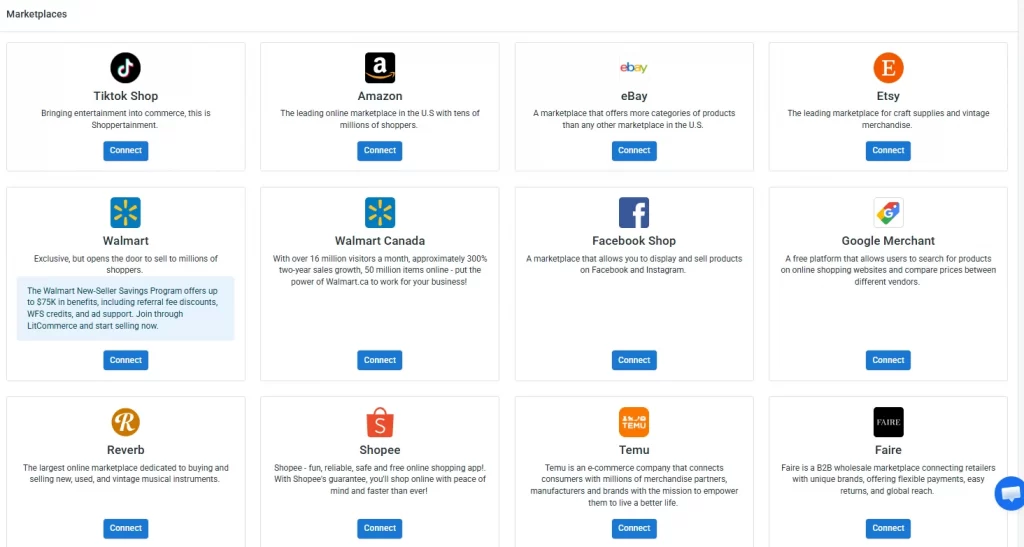
Their integrated pool includes 10+ leading online marketplaces and 5+ most popular eCommerce platforms.
LitCommerce’s supported marketplaces:
- Etsy
- eBay
- Amazon
- TikTok Shop
- Walmart
- Temu
- Reverb
- Shopee
- Faire
- Google Merchant
- Facebook Shop
LitCommerce’s supported eCommerce platforms:
- Shopify
- WooCommerce
- Wix
- BigCommerce
- Squarespace
- Prestashop
- Square
- File (CSV or Google Sheet)
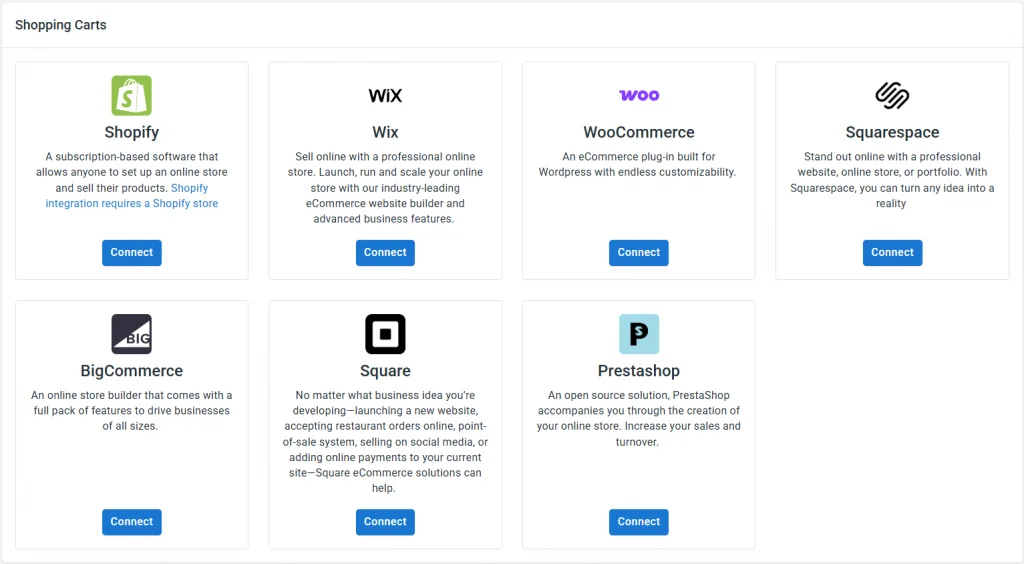
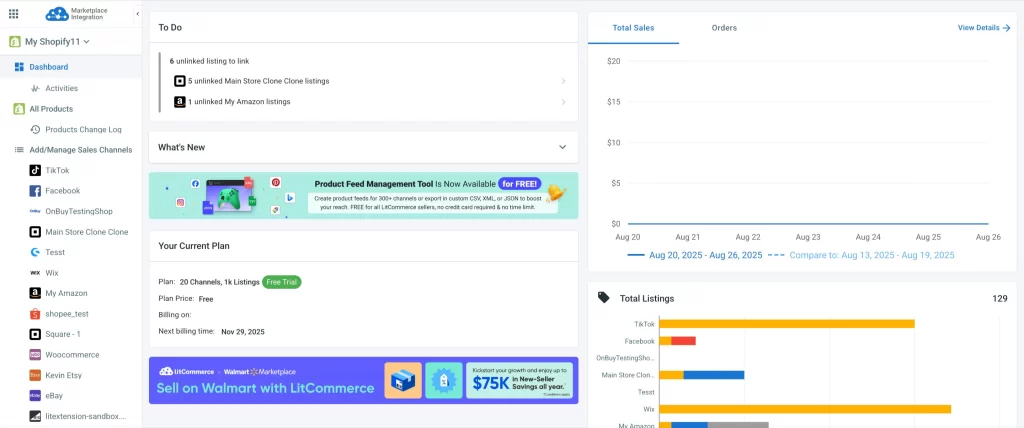
Another point that sets LitCommerce apart is its ability to integrate multiple channels simultaneously. Their users can sell on Etsy, Shopify, Amazon, and eBay with all inventory and orders synced to a single place.
Sellbrite
In terms of Sellbrite, it allows connecting to the following marketplaces:
- Amazon
- eBay
- Etsy
- Walmart
- Google Shopping
- Sears
- Newegg
And Shopping Carts:
- Shopify
- Shopify Plus
- WooCommerce
- BigCommerce
Also, various integrations with shipping providers.
- USPS
- ShipStation
- Fulfillment by Amazon
- ShipEngine
- Flexport
- Skuvault
- Easyship
- SalesPad Cloud
- Inventory Source
- Algopix
What makes Sellbrite stand out is its integration with many shipping providers, which allows its users to print postage and fulfill multichannel orders right in its dashboard.
→ Verdict: We call it a tie this time. Each app has its own advantages. While LitCommerce provides wider channel integration and the ability to connect many platforms at once, Sellbrite has integrations with many shipping services, which is convenient for fulfillment.
#3. Ease of use
Well, this is a close one! LitCommerce and Sellbrite both do a pretty good job with their usability. Both have a modern, clean, and intuitive interface with minimal complications.
LitCommerce
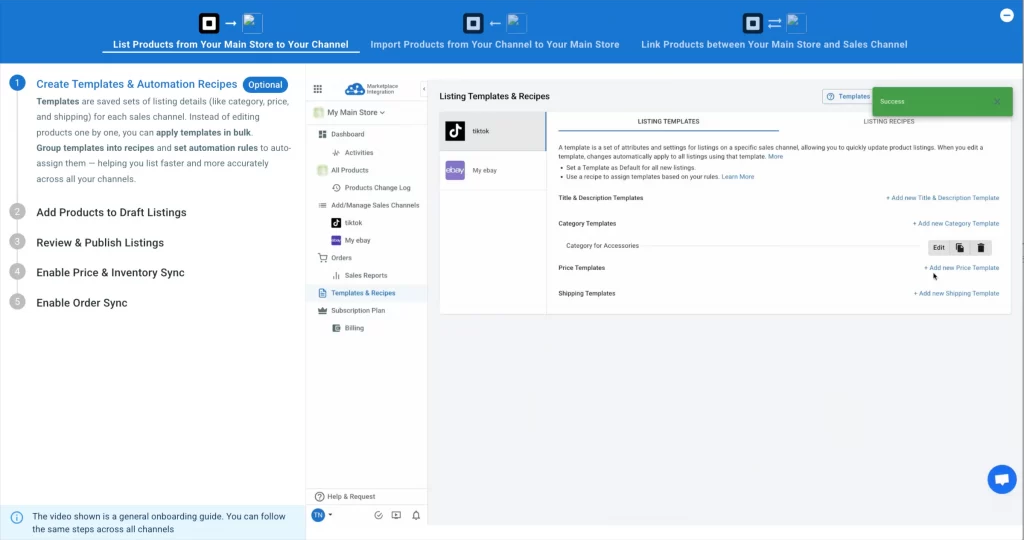
From the LitCommerce dashboard, you can follow the starter guide, find suitable cases, and take action right away. Besides, LitCommerce always shows a quick guide video when you don’t know where or how to start.
Even better, LitCommerce uses simple language and marketplace-customized terms, so if you’re already familiar with selling on marketplaces, you don’t need to learn new app terminology. This clean, informative, and familiar interface makes the experience smooth for both newbies and seasoned sellers.
On the main dashboard, a clear to-do list guides you through the next steps, so you always know what to work on. This clean, informative, and well-structured interface makes the experience smooth for both newbies and seasoned sellers.
Sellbrite
At first glance, Sellbrite’s interface is quite user-friendly. It also comes with in-app guides (which appear on the bottom right corner when you jump into the main dashboard), and sample products for you to try listing. All items are neatly organized and easy to navigate.
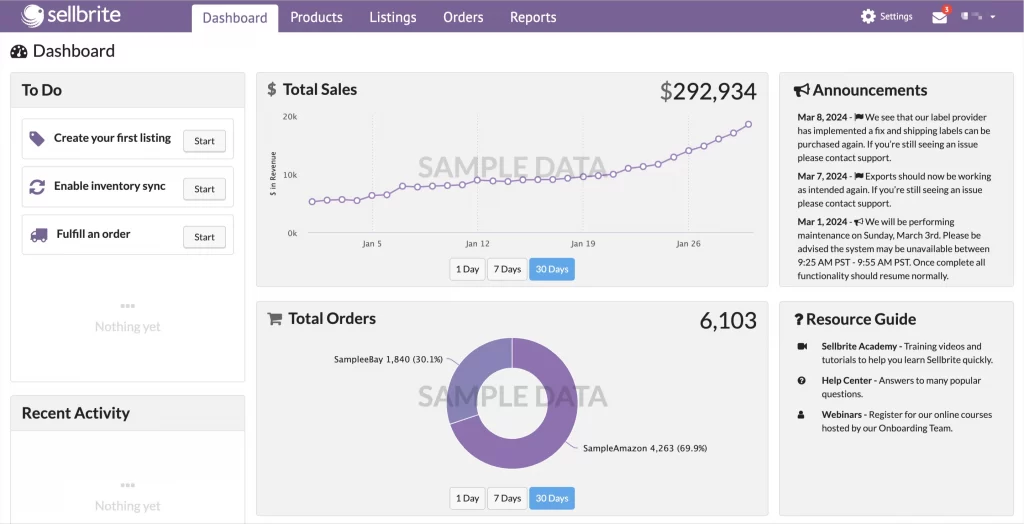
→ Verdict: Both LitCommerce and Sellbrite are very easy to use, offering modern UI/UX, clear navigation, and helpful guides to get you started. Each tool provides a well-structured dashboard and step-by-step instructions so that you can set things up without confusion.
#4. Listing Features
When it comes to listing products on multiple marketplaces, both Sellbrite and LitCommerce make the process smooth and stress-free.
LitCommerce
For listing, LitCommerce offers the same bulk power as Sellbrite. Like Sellbrite, LitCommerce helps you bulk-list and publish products from one platform to another. You can also start from wherever you already sell:
- From a store to a marketplace, like connecting WooCommerce to Amazon.
- From one marketplace to another marketplace, like eBay to Etsy,
- Or, straight from a product file.
Both tools also auto-map categories, so your products land in the right place on each channel without manual sorting.
But what really makes LitCommerce stand out is its tailored features, specifically built for each marketplace. This allows you to easily edit your listings to meet the marketplace’s requirements. Here are some of them:
- Design templates for eBay: As eBay allows you to add an HTML description. LitCommerce then offers you an eBay template designer that not only provides the eBay template but also lets you easily edit and customize your listing.
- Buyer personalization and digital products for Etsy: Add buyer personalization options and sell digital products – something many tools skip.
- ASIN lookup for Amazon: Amazon’s strict listing rules mean every product needs to match an existing ASIN or generate a new one. LitCommerce’s ASIN Lookup tool lets you find the matching ASIN in Amazon’s catalog using a GTIN, UPC, SKU, or keyword, then assign it to your listing and fill in the remaining required fields before publishing. And if you don’t have an ASIN at all, you can still list by obtaining a GTIN exemption, which LitCommerce walks you through.
- AI tools for eBay and Etsy help write titles and descriptions that match how buyers search.
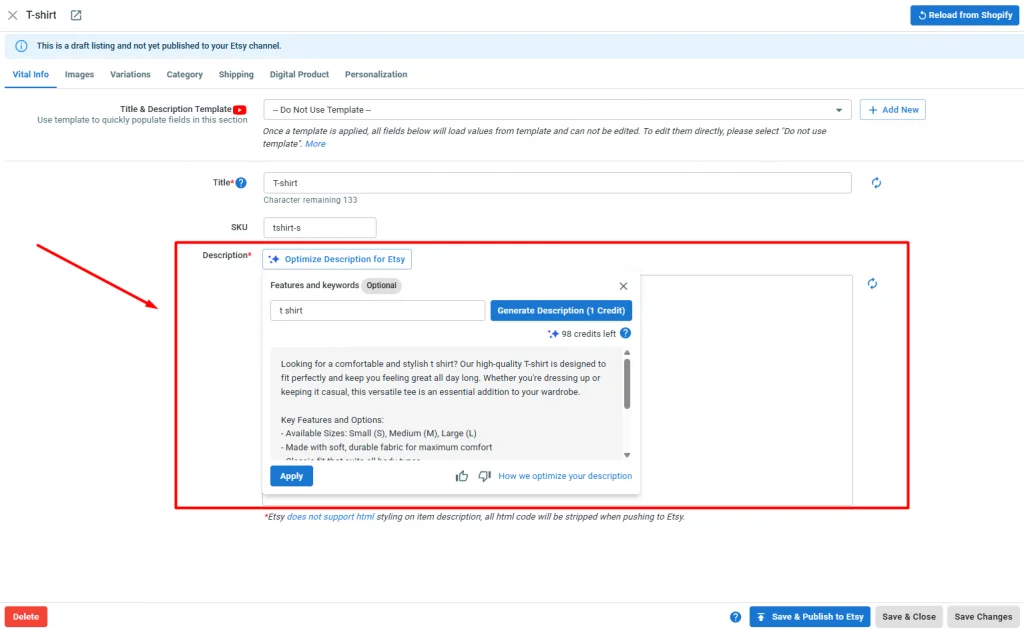
On top of that, LitCommerce offers Quick/Auto List. This feature allows you to select multiple products at once, then create the templates to apply the same details to them, and publish them in bulk. This helps edit product listings much more quickly. You can also schedule listings to go live on their own – great for batching work overnight.
Sellbrite
Listing management is one of Sellbrite’s key strengths. Instead of logging into each marketplace separately, you can create and update listings for Amazon, eBay, Walmart, Etsy, and Shopify all from one dashboard.
Sellbrite also supports bulk editing, templates, and category mapping, making it easy to meet marketplace requirements and keep listings consistent. Since listings are tied to your inventory, stock levels update automatically across every channel, helping you avoid overselling.
Best of all, any change you make, like updating a price or description syncs everywhere instantly, saving time and reducing errors.
→ Verdict: In short, Sellbrite focuses on fast, straightforward listing at scale, while LitCommerce offers more per-channel customization – an eBay template designer, Amazon ASIN lookup, Etsy personalization, and AI writing tools – for sellers who want a bit more control over every detail.
#5. Inventory, price & order feature
Both LitCommerce and Sellbrite make it easy to keep your inventory, prices, and orders in sync across multiple sales channels, reducing the risk of overselling and saving you hours of manual updates.
LitCommerce
The Inventory, Price & Order Sync feature in LitCommerce keeps your products, prices, and orders consistent across every sales channel. LitCommerce has confirmed that the sync frequency is 15 minutes.
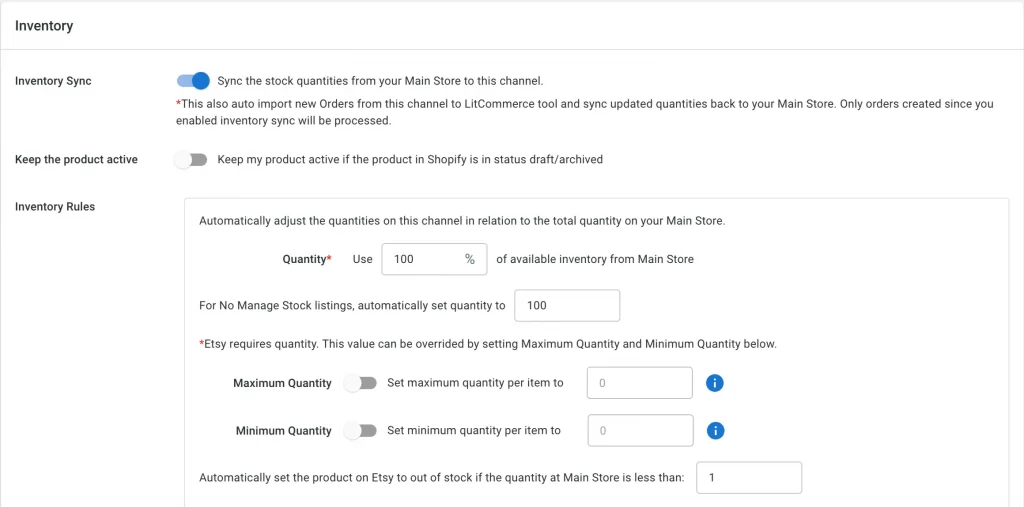
#1. Inventory sync
The tool keeps your stock levels updated in real time across all connected marketplaces. You can set advanced but simple rules — such as showing only a percentage of total stock, fixing quantities, or applying min/max thresholds. Each marketplace can have its own settings, using terms familiar to sellers, so you can fine-tune inventory without confusion.
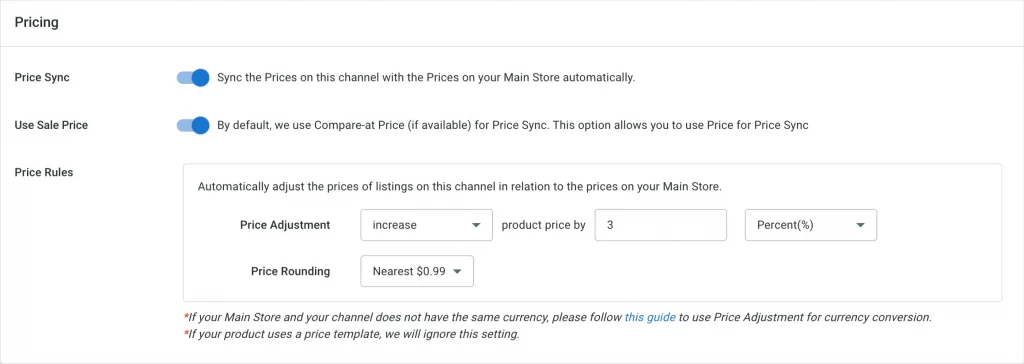
#2. Price sync
Its Price Sync lets you automatically adjust prices per channel based on your main store catalog. You can increase or decrease prices by a fixed amount or percentage and even round prices up or down — perfect for handling different fee structures on platforms like eBay, Amazon, or Etsy.
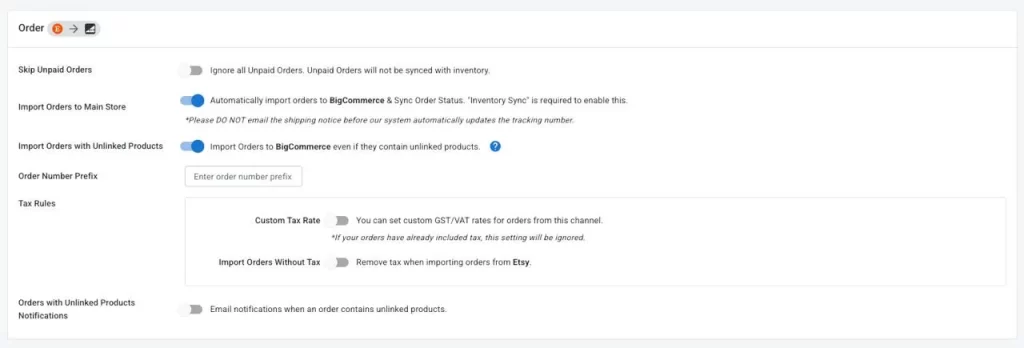
#3. Order sync
With LitCommerce, order sync keeps every sale in one place, so you never have to log in to each marketplace separately. All your marketplace orders are pulled into your Main Store for centralized management, and inventory adjusts automatically on each sale to keep stock accurate across channels.
How orders flow depends on your setup:
- eCommerce platform (Shopify, WooCommerce, etc.) as Main Store: Marketplace orders (like eBay and TikTok Shop) land straight on your store’s order page, so you fulfill them right where you work.
- LitCommerce as Main Store: You manage orders across all channels in LitCommerce, with a clear overview of which channels perform best. LitCommerce now also supports connecting to your shipping service, like ShipStation, so you can send orders from every channel straight to your account – making fulfillment more centralized and easier to manage.
Sellbrite
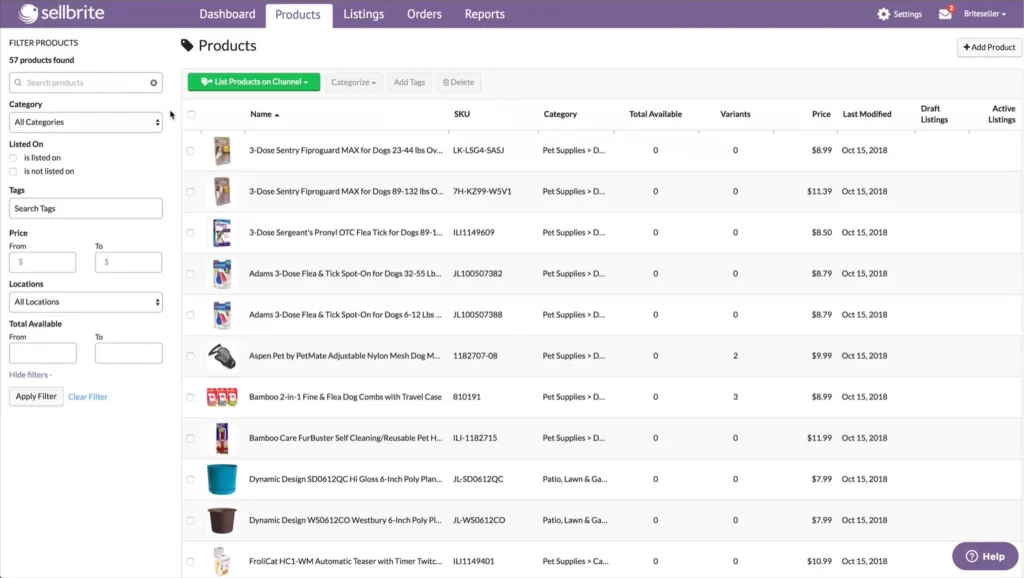
In contrast, Sellbrite also offers centralized inventory management with easy monitoring of available, reserved, and on-hand stock across warehouses.
#1. Inventory sync
Sellbrite centralizes inventory management by showing available, reserved, and in-hand stock levels for every marketplace in one place. Any change from a sale, restock, or manual update is synced in real time across all channels, preventing overselling and stock-outs. With bulk editing, you can also update inventory for multiple products at once.
#2. Price sync
You can set and manage prices from a single system, and Sellbrite automatically pushes those updates to every connected marketplace like Amazon, eBay, or Walmart. This near real-time sync makes it easier to stay competitive, letting you adjust pricing quickly without logging into each platform individually.
#3. Order sync
All orders from every sales channel flow into Sellbrite’s unified order dashboard, where you can process them from one interface.
With Sellbrite (standalone), orders can be automatically routed to Amazon FBA, dropshippers, or other fulfillment locations, with efficient processing tools that speed up shipping and reduce errors. Customers also receive timely status updates, while sellers can track progress with ease.
With Sellbrite for Shopify, similar to LitCommerce, marketplace orders are routed back to your Shopify store, so you fulfill them right on your Shopify orders page rather than in Sellbrite.
When it comes to sync speed, both tools offer a 15-minute frequency for inventory and price updates on paid plans. Sellbrite’s free plan syncs every 2 hours, while LitCommerce keeps the 15-minute interval for all paid tiers. Keep in mind that while both publish updates instantly, marketplaces like Amazon or Etsy may take extra time to process them on their end.
→ Verdict: Both LitCommerce and Sellbrite sync inventory, prices, and orders reliably at the same 15-minute pace on paid plans. Both also let you manage orders either from your eCommerce store or directly within their platforms. However, Sellbrite stands out for its standalone dashboard with stronger fulfillment routing to FBA, dropshippers, and more.
#6. Support system
Both LitCommerce and Sellbrite provides dedicated customer support.
LitCommerce
LitCommerce supports its users via 4 ways:
- Usage Doc
- LitCommerce Academy
- Live chat
LitCommerce Customer Support team is available at the following time: (Monday) from 04:00 AM to 24:00 (GMT +7), (Tuesday – Saturday) 24/7 GMT+7, Sunday from 08:00 – 24:00 GMT+7.
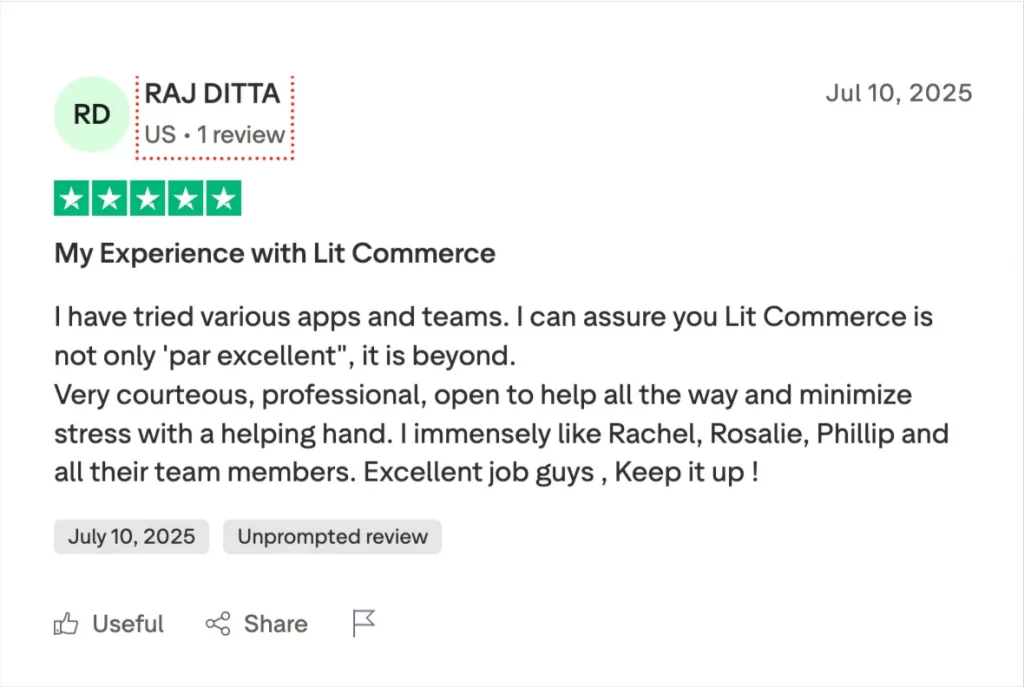
Overall, LitCommerce’s customer services are highly rated on review platforms and eCommerce App Stores and markets.
Sellbrite
Sellbrite’s customer service is available from Monday to Friday, 7 AM to 4 PM PST. You can contact their support team by submitting a ticket inquiry using the purple question mark icon while logged in.
Additionally, you can seek support by texting Sellbrite at 1(844) 977-0717. The support team observes specific holidays when the office is closed. , The companyand responses to messages received during these holidays will be addressed on the next business day after the holiday. The observed holidays include New Year’s Day, MLK Jr. Day, Memorial Day, Juneteenth, Independence Day, Labor Day, Thanksgiving Day, Day After Thanksgiving, and Christmas Day.
While Sellbrite receives decent support ratings, some users on platforms like G2 and Shopify App Store have mentioned delays in response time and challenges in resolving issues that involve third-party integrations.
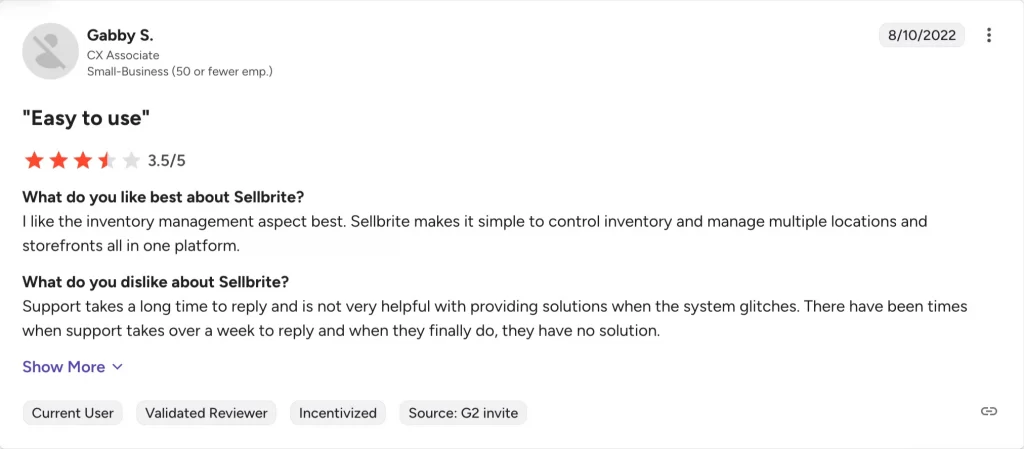
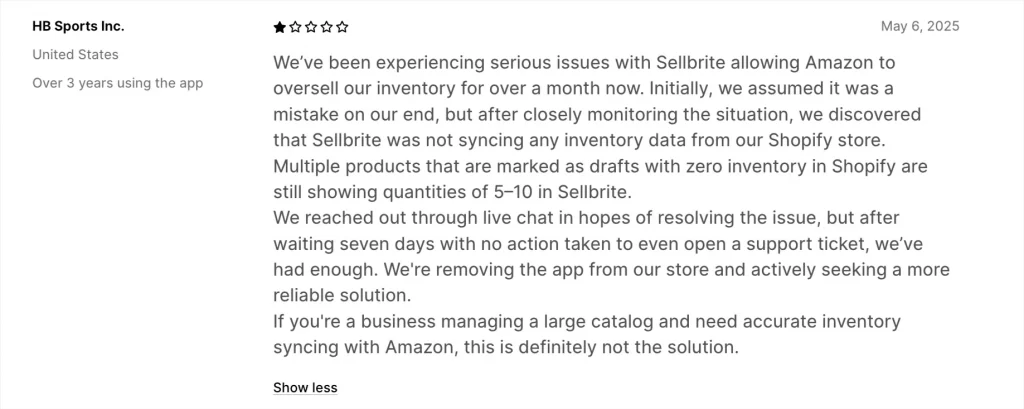
→ Verdict: LitCommerce provides broader support with multiple channels, near 24/7 availability, and strong customer feedback, making it more accessible. Sellbrite’s support is reliable but limited to weekdays and has occasional delays, giving LitCommerce the edge.
#7. Security and policy
Based on the provided references, both LitCommerce and Sellbrite appear to take data security seriously. Here’s a breakdown of their security practices:
LitCommerce:
- Privacy Policy: Clearly outlines the types of data collected, how it’s used, and with whom it’s shared.
- GDPR Compliance: Dedicated page outlining their compliance with the General Data Protection Regulation (GDPR) for users in the European Economic Area (EEA).
- Data Security Policy: Details their security measures, including data encryption, access controls, and incident response procedures.
Sellbrite:
- Data Processing Addendum: A legal document outlining data processing practices and responsibilities, often required under GDPR compliance.
- Privacy Policy: Similar to LitCommerce’s policy, it details data collection, use, and sharing practices.
→ Verdict: Both LitCommerce and Selbrite employ data encryption at rest and in transit, a standard security practice for protecting sensitive information. They also established access controls to restrict unauthorized access to user data and provide incident response procedures for handling data breaches or security incidents.
LitCommerce vs Sellbrite – FAQs
1. What are the main differences between LitCommerce and Sellbrite?
Both keep your inventory, prices, and orders in sync and can run from either your eCommerce store or their own platform.
The key difference is focus: LitCommerce offers more channel-specific customization (an eBay template designer, Amazon ASIN lookup, Etsy personalization, AI writing tools) and broader marketplace coverage, while Sellbrite leans into fulfillment, working with more shipping and fulfillment services like FBA, dropshippers, and ShipStation.
2. Can LitCommerce and Sellbrite be integrated with other eCommerce platforms?
Yes, both LitCommerce and Sellbrite offer integrations with popular eCommerce platforms like Shopify, BigCommerce, WooCommerce, and many marketplaces such as Amazon and eBay. However, LitCommerce supports integration with additional eCommerce platforms, such as Wix, Squarespace, Square, and PrestaShop.
3. Do LitCommerce and Sellbrite offer customizable pricing plans?
LitCommerce offers pay-as-you-go pricing plans based on the exact number of channels and listings that you need. Meanwhile, Sellbrite’s pricing is based on the tier of orders (100/200/5000 orders). Businesses can choose a plan that best fits their needs and budget.
So, LitCommerce vs Sellbrite? The Decision Depends on You!
After extensively testing LitCommerce and Sellbrite, it’s clear that both tools offer powerful multichannel listing solutions. LitCommerce excels in multichannel connectivity, making it a great choice for online retailers who want to sell on multiple channels directly from their web store dashboard. On the other hand, Sellbrite specializes in inventory and order management capabilities right in its own dashboard.
Ultimately, the choice between LitCommerce and Sellbrite depends on your specific business needs, budget, and platforms. Consider factors such as the size of your inventory, the number of sales channels you operate on, and the level of integration you require.
Both LitCommerce and Sellbrite have proven to be reliable tools that can help streamline your eCommerce operations and boost your business success — but if you want more flexibility, marketplace-specific features, and the ability to manage everything from your eCommerce platform, LitCommerce might just be the smarter pick.
Want to learn more tips on selling across multiple channels? Check out our multichannel selling hub to get the latest guide, reviews, and tips for multichannel sellers.