
A 10-second TikTok clip can send thousands of viewers searching for the product you just shared. So if you’re an Amazon influencer showcasing finds or an Amazon seller promoting your brand without linking your Amazon Storefront to TikTok, you’re leaving clicks and sales on the table.
Connecting your Storefront to TikTok gives viewers a direct path from your video to your products, making it easier for them to shop and easier for you to earn. In this guide, we’ll show you how to add Amazon Storefront to TikTok in just a few minutes and walk you through:
- Why linking your Amazon Storefront to TikTok matters
- How to link Amazon Storefront link to TikTok?
- Best tips to promote Amazon products on TikTok
Without further ado, let’s get started!
Link Your Amazon Store to TikTok Shop
With LitCommerce, you can list products from Amazon to TikTok Shop while keeping your inventory synced automatically.

Why Link Amazon Storefront to TikTok?
TikTok’s fast-moving, highly visual style makes it perfect for showing how your products work in real life, and that can drive people straight to your Storefront link and shop instantly. Here’s why connecting your Amazon Storefront to your TikTok profile matters:
- Reach a wider audience: TikTok has over 1.59 billion users, which means your products have the chance to show up in front of people you’d never reach on Amazon alone. This will surely increase your brand awareness.
- Turn your videos into sales: TikTok rewards creative, engaging content – so a well-made video not only can go viral on TikTok but also quickly boost your sales. Whether you post demos, unboxings, “Amazon finds,” or trend-based videos – on your own or with creators or influencers – linking your Storefront gives viewers an easy way to click through and shop your Amazon products.
- Connect with a younger, highly active audience: TikTok is especially popular with Gen Z and young millennials. These users love quick recommendations and are comfortable clicking through creators’ bios to shop. Linking your Storefront helps you reach this group where they already spend most of their time.
- Promote products without high ad costs: You don’t need a big ad budget to succeed on TikTok. The platform’s organic reach can put your videos in front of thousands of viewers without paying for ads. Adding your Storefront link then helps turn that free visibility into real income.
How to Add Amazon Storefront to TikTok in 3 Simple Steps?
Here are the 3 simple steps to add your Amazon Storefront to TikTok:
- Step 1: Copy your Amazon Storefront link
- Step 2: Set up TikTok business or Creator account
- Step 3: Add your Amazon Storefront link to TikTok
Step 1: Copy your Amazon Storefront link
To add Amazon Storefront to TikTok bio, you first need your Amazon Storefront link:
To get your Amazon Storefront link, follow these steps:
- Open Seller Central.
- Go to the Settings gear icon > Account Info.
- Then click Business Information,
- Look for the Your Seller profile section and click on it to see and copy your Amazon storefront link.
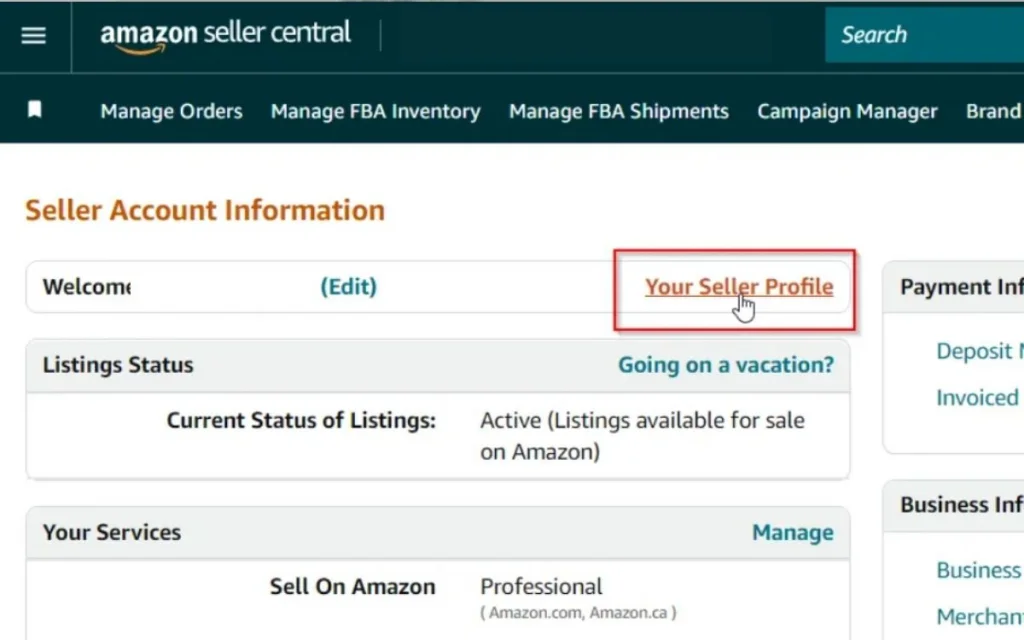
If you’re an Influencer or Associate, log into CreatorHub or Associates Central, open My Storefront or My Page, and copy the URL from your browser. The link typically looks like: amazon.com/shops/yourshopname.
Step 2: Set up a TikTok Business or Creator account
To add a clickable website link in your TikTok bio, you also need to have at least 1000 followers, and your profile needs to be a registered Business account. If you haven’t already, let’s set up your TikTok business account.
To set up a Business or Creator account to add your Amazon storefront, follow these steps:
- Open TikTok and go to Profile.
- Tap the ☰ (three lines) icon, then select Settings and privacy.
- Go to Account and tap Switch to Business account.
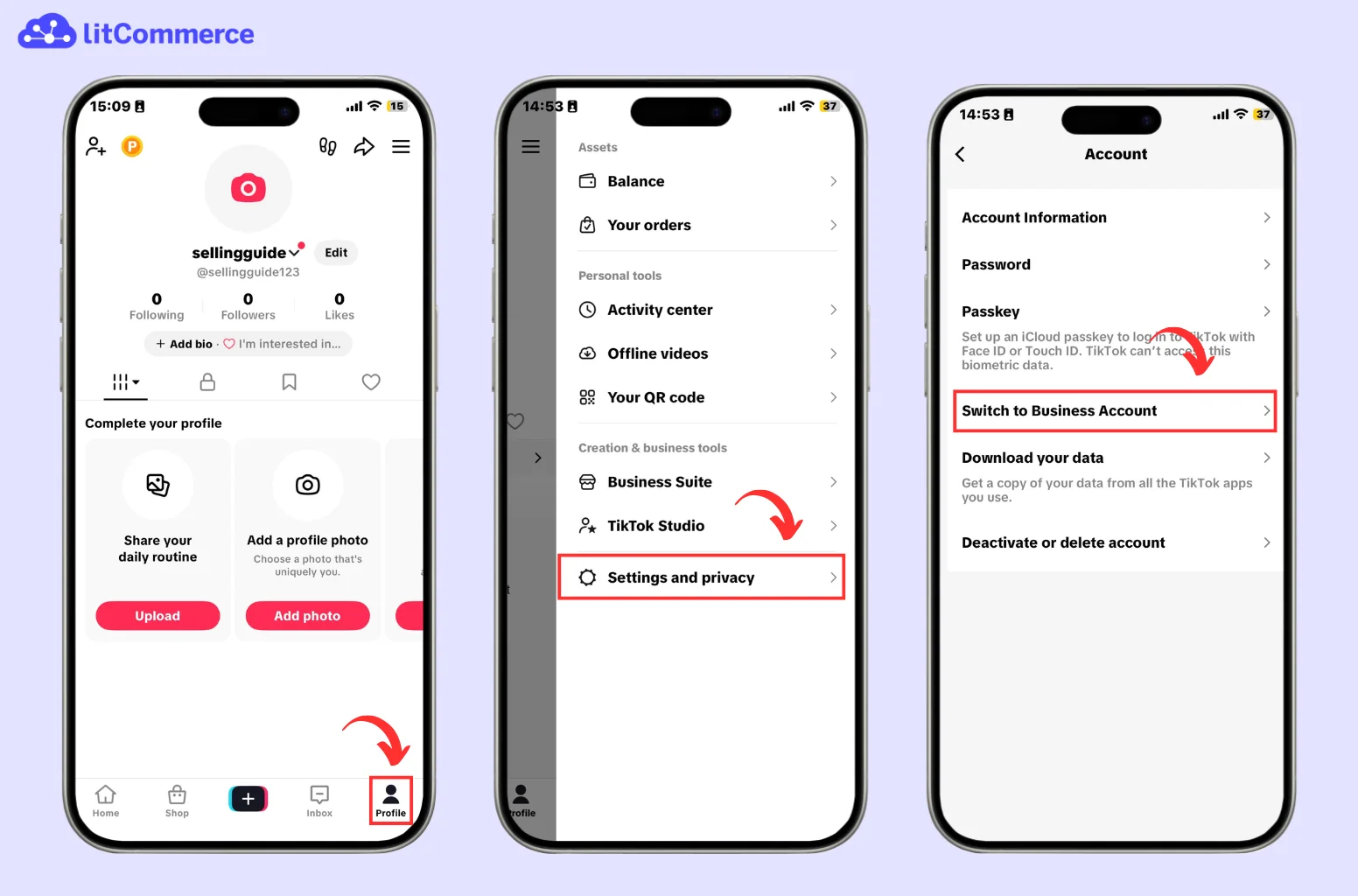
After that, just keep hitting Next until you see the category page and the email section. Once that’s done, your TikTok account is ready for the next step: actually adding your Amazon Storefront link to your TikTok profile.
Step 3: Add your Amazon storefront
So now that you get your Amazon Storefront and your TikTok account ready, let’s find out how to add Amazon Storefront to TikTok. It takes just a few minutes to set up.
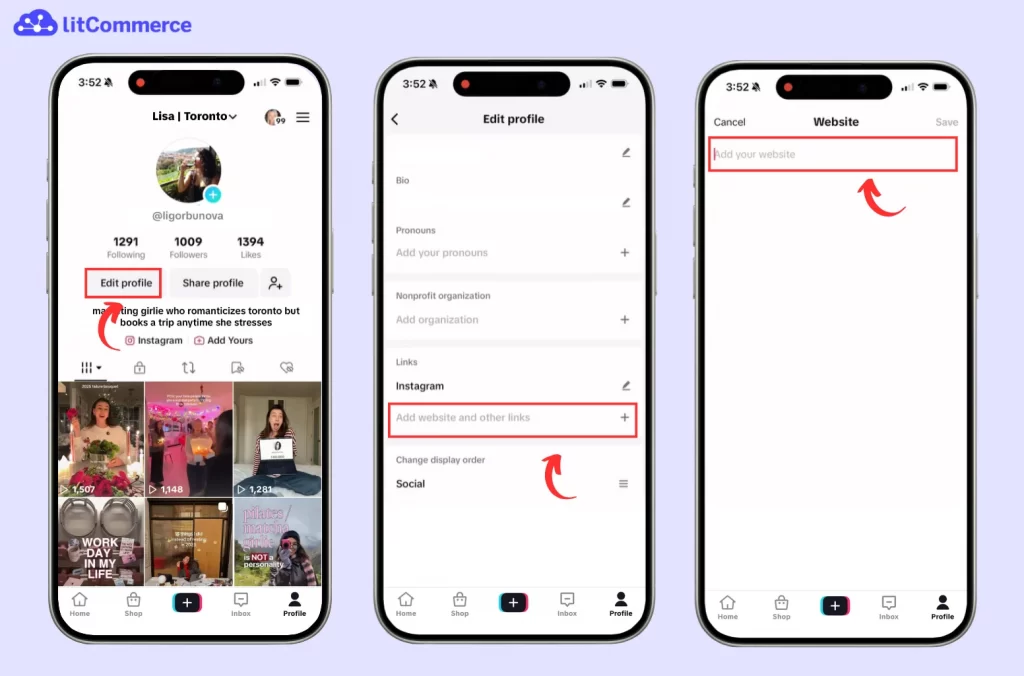
Here is how to add your Amazon Storefront to TikTok:
- Copy your Amazon Storefront link.
- Go to your TikTok profile and tap Edit profile.
- Tap on Add website and other links and choose Add website address.
- Then, paste your Amazon Storefront link into the field.
- Finally, tap Save at the top right of the screen.
And with that, your Amazon Storefront link is now added to TikTok. You can also go back to your TikTok bio to check if your link works properly.
Moreover, if you need to share more than one link or want a cleaner layout, consider using a link-in-bio tool like Linktree. This lets you add multiple links to your TikTok profile while reducing the risk of TikTok limiting or suspending external platforms.
Social commerce is booming, and TikTok Shop is one of the fastest-growing places to sell online. Besides adding your Amazon storefront to TikTok, you can take things further by setting up a TikTok Shop and adding Amazon products to your TikTok Shop. This makes the buying process faster and can help you get more sales.
A simple way to do this is by using LitCommerce. It’s a multichannel tool that lets you connect Amazon to TikTok, move your products over, and sync inventory across these 2 channels automatically.
6 Tips for Promoting Amazon Products on TikTok Effectively
Adding your Amazon Storefront link to TikTok is just the first step. Success depends on promoting your products naturally through helpful, trend-driven content that builds trust. The tips below will help you increase visibility, clicks, and conversions from TikTok to your Amazon Storefront.
1. Make your Amazon link impossible to miss
Most TikTok viewers won’t click your bio unless they’re clearly told what to do. Even if they enjoy your video, they’ll scroll past unless you repeat the call to action across multiple touchpoints.
Effective places to mention your Amazon storefront include:
- Video captions: End captions with a clear CTA like
“Shop my Amazon finds → link in bio” - On-screen text: Add a short reminder near the end of the video such as
“Full product list in bio” - Pinned comments: Reinforce the CTA without cluttering the caption:
“All items are linked in my Amazon storefront (bio)”
The more frequently viewers see the CTA, the more likely they are to take action.
2. Introduce products naturally within your content
Hard-selling rarely works on TikTok. Instead of jumping straight to “buy this,” you can show the product in use. Natural product integration builds trust and reduces viewer resistance.
Here are some content formats in which you can introduce Amazon products naturally. This approach makes clicking your Amazon link feel like the next logical step, not a sales push.
- Product demos and real-life use
- Before-and-after transformations
- “Amazon finds I didn’t expect to love”
- Problem/solution videos
- Short reviews with pros and cons
3. Leverage trending challenges and formats
TikTok trends change rapidly, but they also offer powerful opportunities to go viral and get discovered. Incorporating trending sounds, challenges, hashtags, or video formats – while subtly featuring your Amazon product – can significantly boost reach.
Don’t forget to identify which trends resonate with your audience, then adapt them to fit your niche. This strategy increases discoverability and attracts new viewers more likely to explore your storefront.
4. Engage with your audience through comments and DMs
Community engagement plays a huge role in conversion. Responding to comments, answering product questions, and replying to DMs builds credibility and trust.
When viewers see you actively engaging, they’re more likely to:
- Trust your recommendations
- Ask follow-up questions
- Become repeat buyers
A responsive creator often outperforms one who simply posts and disappears.
5. Run paid TikTok ad campaigns strategically
Paid TikTok ads can accelerate results when used correctly. Promote top-performing organic videos or create short ad-friendly clips that highlight a product benefit.
Choose the right ad format, optimize for clicks or conversions, and ensure your Amazon storefront link is easy to access. Even a small ad budget can significantly increase visibility when targeted properly.
6. Analyze TikTok analytics to refine your strategy
Regularly reviewing TikTok analytics helps you understand what content drives profile visits and link clicks. Pay attention to:
- Watch time and retention
- Traffic spikes after certain videos
- Engagement patterns by content type
Use this data to refine your content strategy and focus on formats that consistently drive traffic to your Amazon Storefront.
How to Link Amazon Storefront to TikTok? – FAQs
How do I add my Amazon storefront to TikTok?
To add your Amazon storefront link to TikTok, follow these steps:
1. Find your Amazon storefront URL and copy it.
2. Switch your account to TikTok Business or Creator Account.
3. Go to your TikTok profile, tap Edit profile, and paste the URL into the Website field.
However, please note that you need to have at least 1000 followers to be able to add a link to your shop.
How do I get my Amazon storefront link?
To get your Amazon storefront link, go to your Seller Central > Settings > Account Info > Your Seller Profile. You will find your storefront link listed under the Storefront link section. Otherwise, for influencer storefronts, log into Amazon Associates, click the Influencer tab, go to My Page, and copy the URL from the browser bar or share icon, or check the Amazon Creator Hub.
How to integrate Amazon with TikTok?
You can set up Amazon TikTok Shop integration easily using LitCommerce. Here are the steps:
– Step 1: Connect your eCommerce platform (Shopify, WooCommerce, Wix, etc.) to LitCommerce as a Main Store.
– Step 2: Add Amazon and TikTok Shop as sales channels.
– Step 3: Import your Amazon products into your Main Store through LitCommerce.
– Step 4: List Amazon products from Main Store to TikTok Shop.
– Step 5: Enable inventory sync across both channels.
Add Amazon Storefront to TikTok Today to Drive More Traffic
Learning how to add Amazon storefront to TikTok is a simple way to reach more shoppers and turn your TikTok views into real sales. By connecting these two huge eCommerce channels, your audience can find your products faster and buy with fewer steps.
If you want an easier way to sell on TikTok with your Amazon store, LitCommerce can help. With LitCommerce, you can list products from Amazon to TikTok Shop, keep your inventory synced on both channels, and sell on more major marketplaces like Etsy, eBay, etc. Try the LitCommerce TikTok integration today to save time and boost your sales.