BigCommerce Etsy Integration
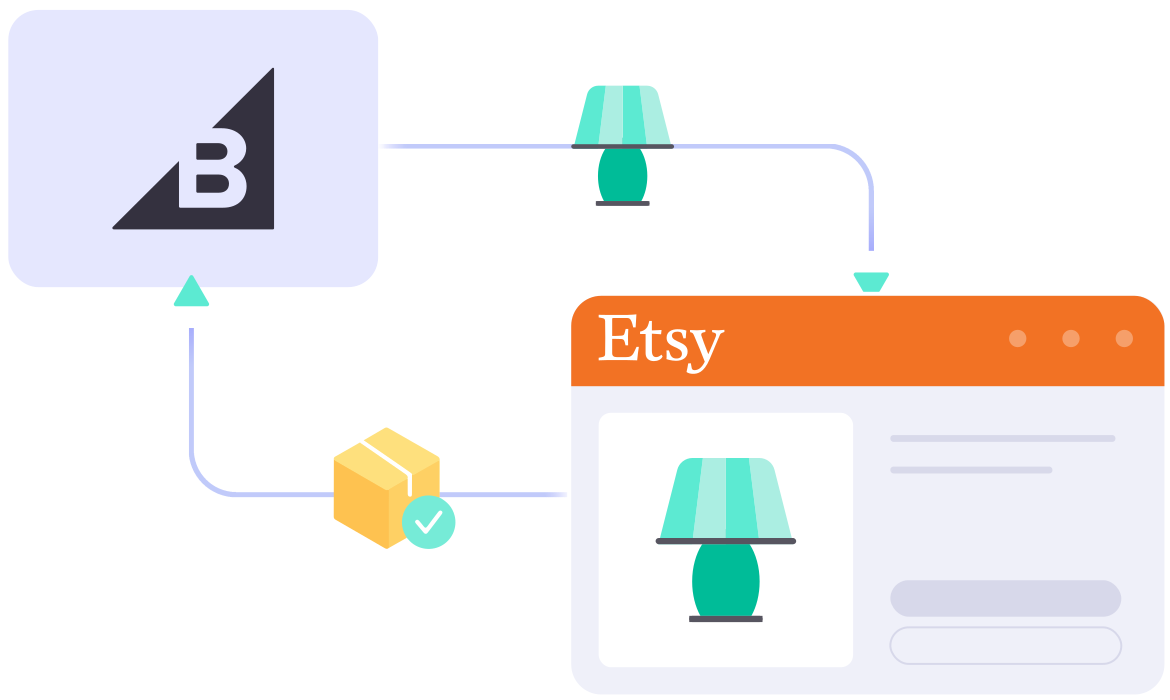
Integrate your BigCommerce store with Etsy using LitCommerce for accurate inventory sync, easy setup, and secure data management. You can also use our AI tool to create optimized Etsy descriptions, helping you streamline your multichannel workflow.

bigcommerce-etsy-integration

What Data Can Be Synced & Imported with
BigCommerce Etsy Integration?

icon-integration

Price

Implements correct pricing and channel-specific rules, with the option for currency conversion.

icon-time

Inventory

Ensures error-free updates of stock levels across channels and lets you set display quantities.

1 04 4 2

Order

Streamlines Etsy orders by importing them into BigCommerce for centralized fulfillment and timely shipping.

1 04 4 3

Title

Automatically updates titles from the BigCommerce store, maintaining consistency across all channels.

1 04 4 4

Description

Saves effort by updating product descriptions automatically on both BigCommerce and Etsy.

LitCommerce Guide on BigCommerce Etsy Integration

Step 1: Link BigCommerce to Etsy

Set up your BigCommerce store through the app menu or install our app directly from the app store. Your BigCommerce store will act as the source for listing products on Etsy.

Once you connect your Etsy shop, LitCommerce enables integration with other channels including Amazon, eBay, TikTok Shop, and over 20 additional platforms.

Step 2: List or import products on Etsy

We support listing items in three major scenarios:

  • Case 1: You have products on your BigCommerce store and want to list them on Etsy.
  • Case 2: You have products on Etsy and want to import these listings to your BigCommerce store.
  • Case 3: You have products on both Etsy and BigCommerce and want to link them together.

Products listed on Etsy will be stored in the Draft tab, where you can edit them before publishing, including using our AI tool to generate optimized Etsy descriptions.

Step 3: Enable sync between BigComerce and Etsy

Our BigCommerce Etsy integration offers real-time synchronization, ensuring that product details such as names, images, inventory, prices, and orders are updated between your BigCommerce and Etsy channels every 15 minutes.

Step 4: Manage order flow from Etsy

Once you enable the Order Sync feature, your BigCommerce store will automatically receive all order details from Etsy. You can review and fulfill these orders alongside your BigCommerce orders, all conveniently managed in one place.

Detailed Guide on BigCommerce Etsy Integration

Selling on BigCommerce and want to reach Etsy’s community of shoppers looking for handmade, vintage, personalized, and one-of-a-kind products?

The good news? Connecting BigCommerce to Etsy is easier than you may think. With LitCommerce, you can set up your BigCommerce Etsy integration in four simple steps, with no technical skills needed.

Here’s the step-by-step guide:

  • Step 1: Connect BigCommerce to Etsy
  • Step 2: List & import products on Etsy
  • Step 3: Enable BigCommerce Etsy sync
  • Step 4: Manage your order flow

Step 1: Link BigCommerce to Etsy

The first step is to connect your BigCommerce store as your Main Store inside LitCommerce. Your Main Store works as the central hub where your product catalog, inventory, and order data are managed.

You can set this up by installing LitCommerce from the BigCommerce App Marketplace, or by connecting BigCommerce directly from inside the LitCommerce app.

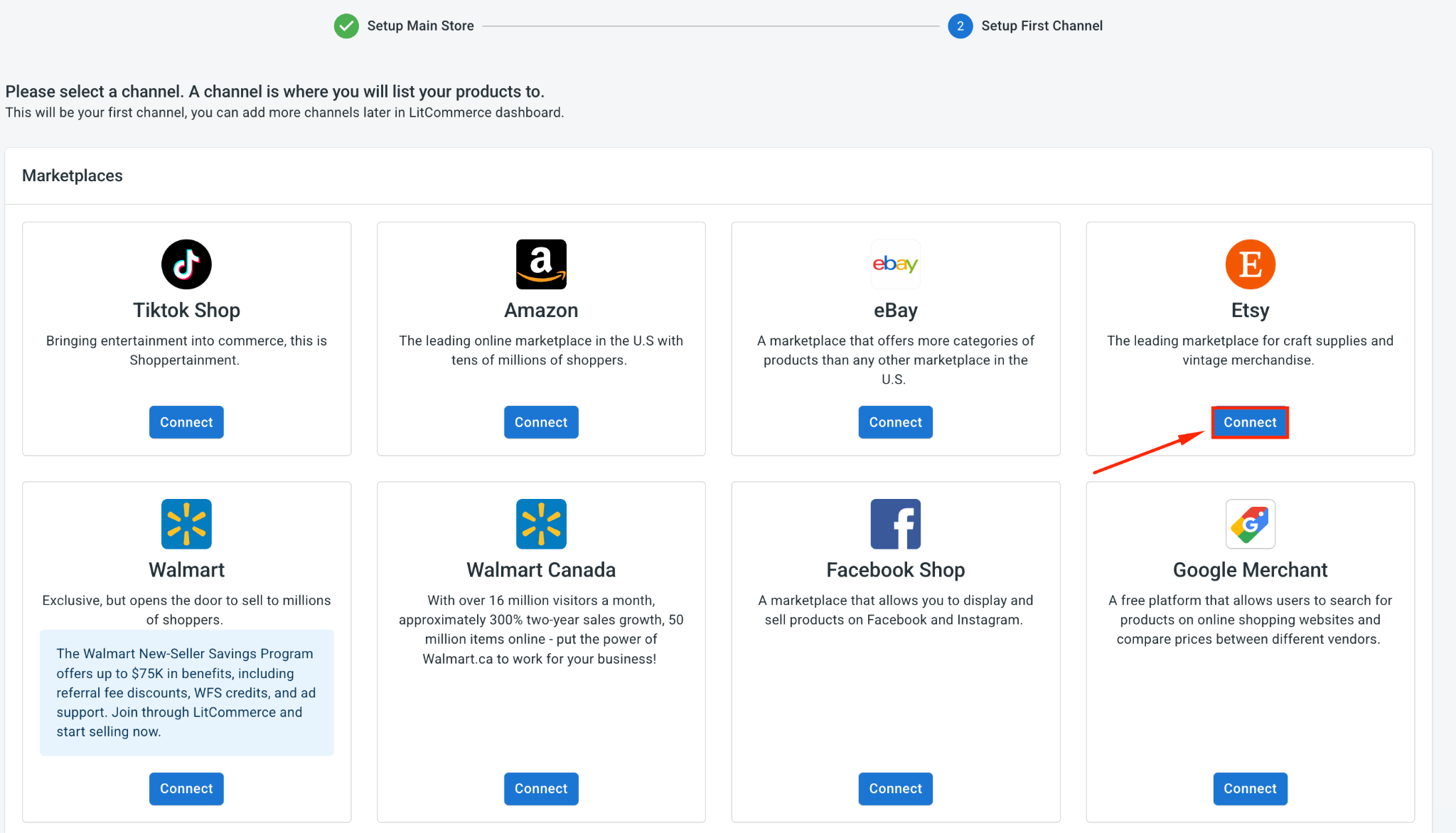
Once BigCommerce is set as your Main Store, find Etsy and click Connect under the Etsy logo.

word image 91595 1 8

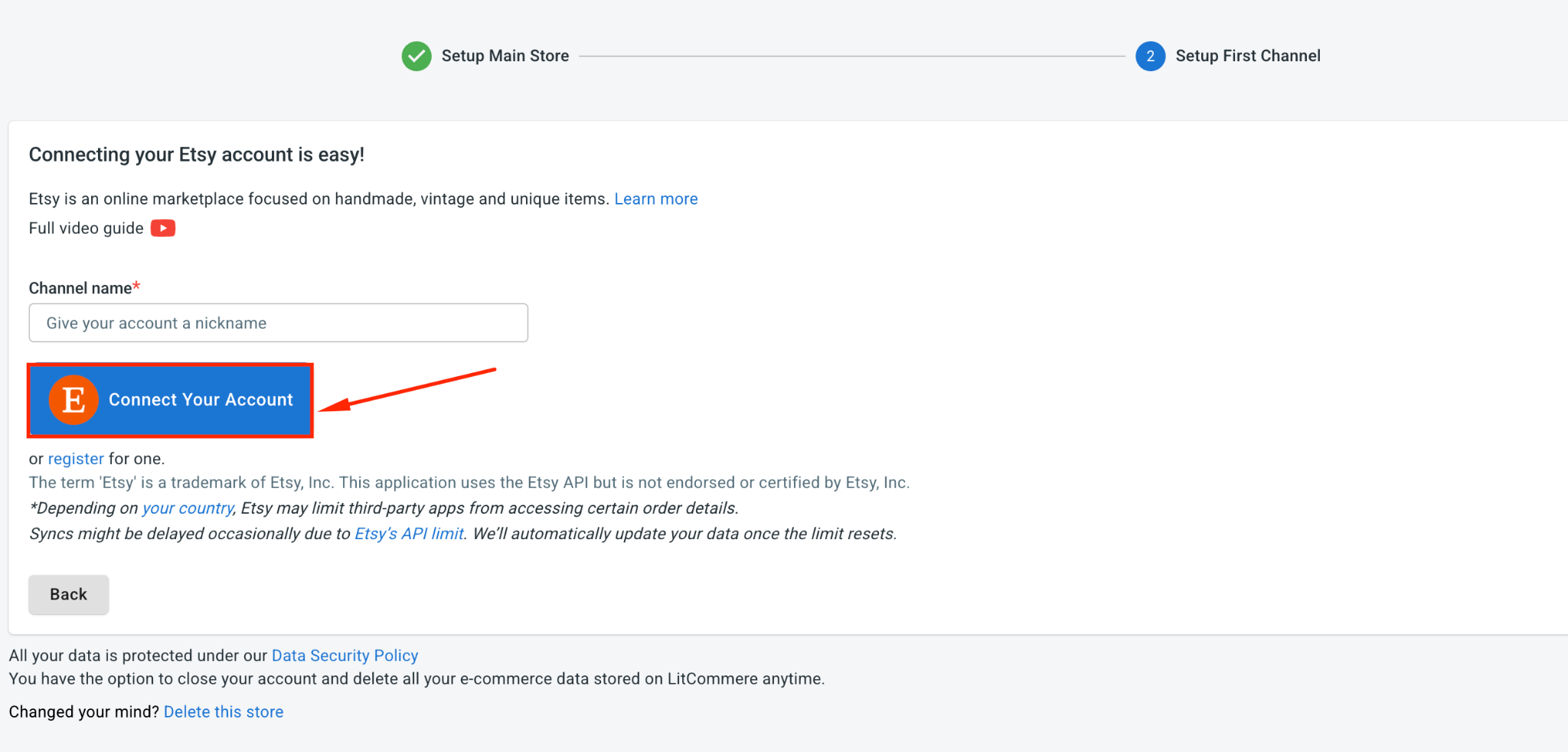
Then, enter your Etsy shop name, click Connect Your Account, and grant LitCommerce permission to access your Etsy seller account.

word image 91595 2 8

As soon as that wraps up, BigCommerce and Etsy are connected, and Etsy shows up as a channel on your dashboard, ready for what comes next.

Step 2: List and Import Products on Etsy

With the connection in place, LitCommerce automatically imports your BigCommerce products so they’re set to list. Your path forward depends on where your listings currently sit, so pick the case that matches you.

Case 1: List your BigCommerce products on Etsy

If your products live on BigCommerce and you’re branching out to Etsy, do this:

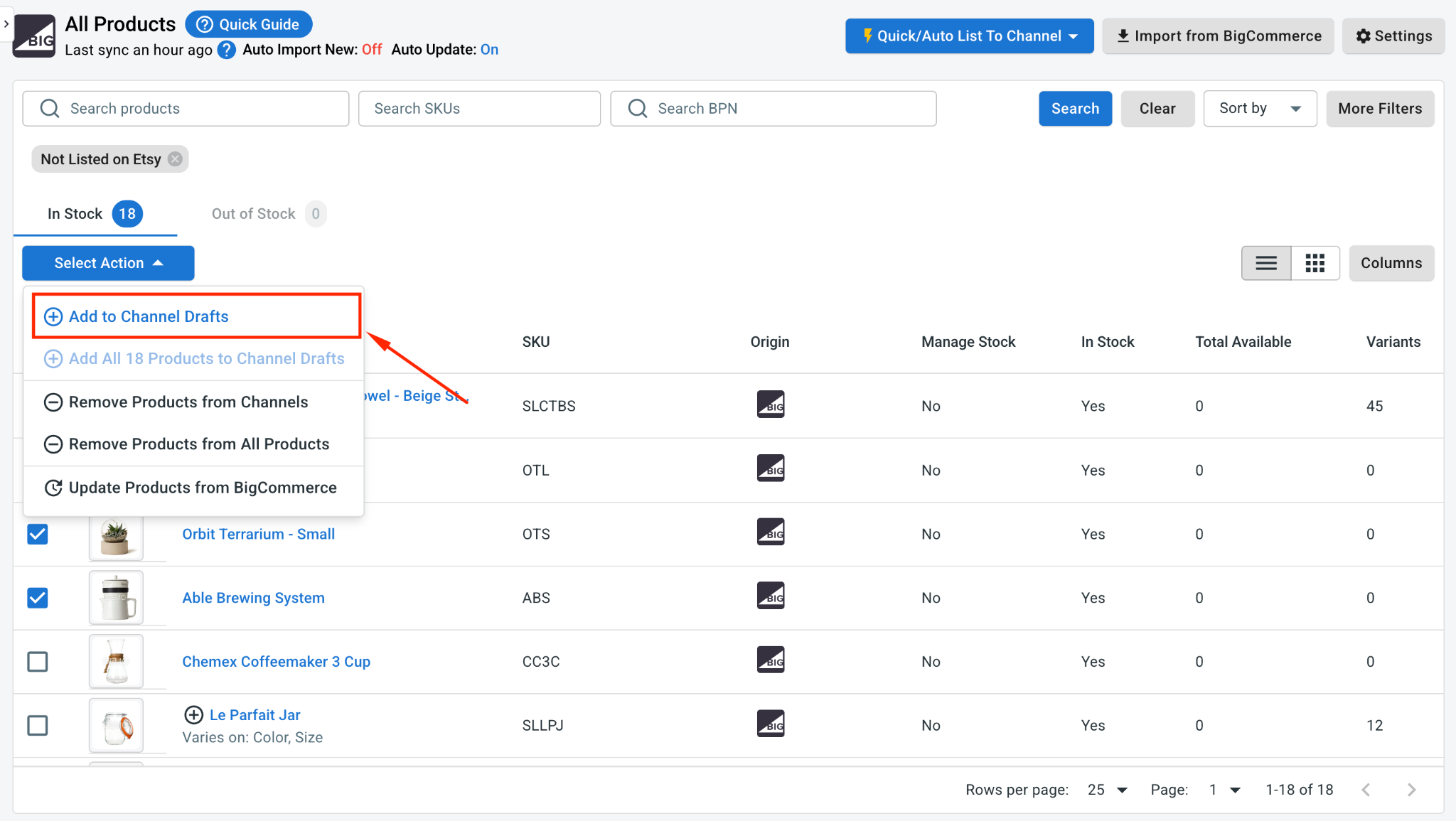
1. Open All Products and select the BigCommerce items you’d like to list.

2. Click Select Action, then Add to Channels Drafts.

word image 91595 3 8

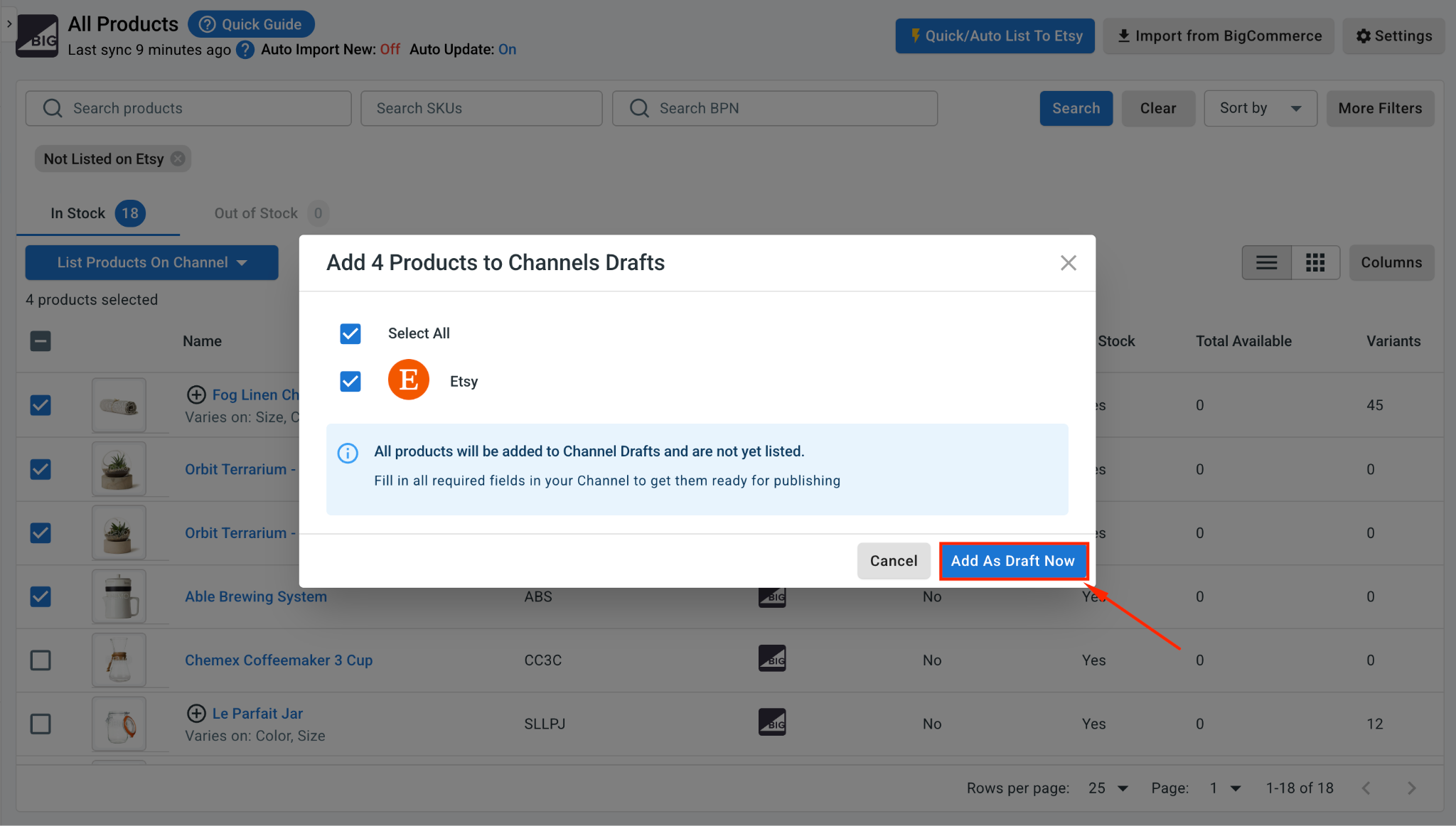
3. Tick the box beside your Etsy store, then click Add As Draft Now.

word image 91595 4 8

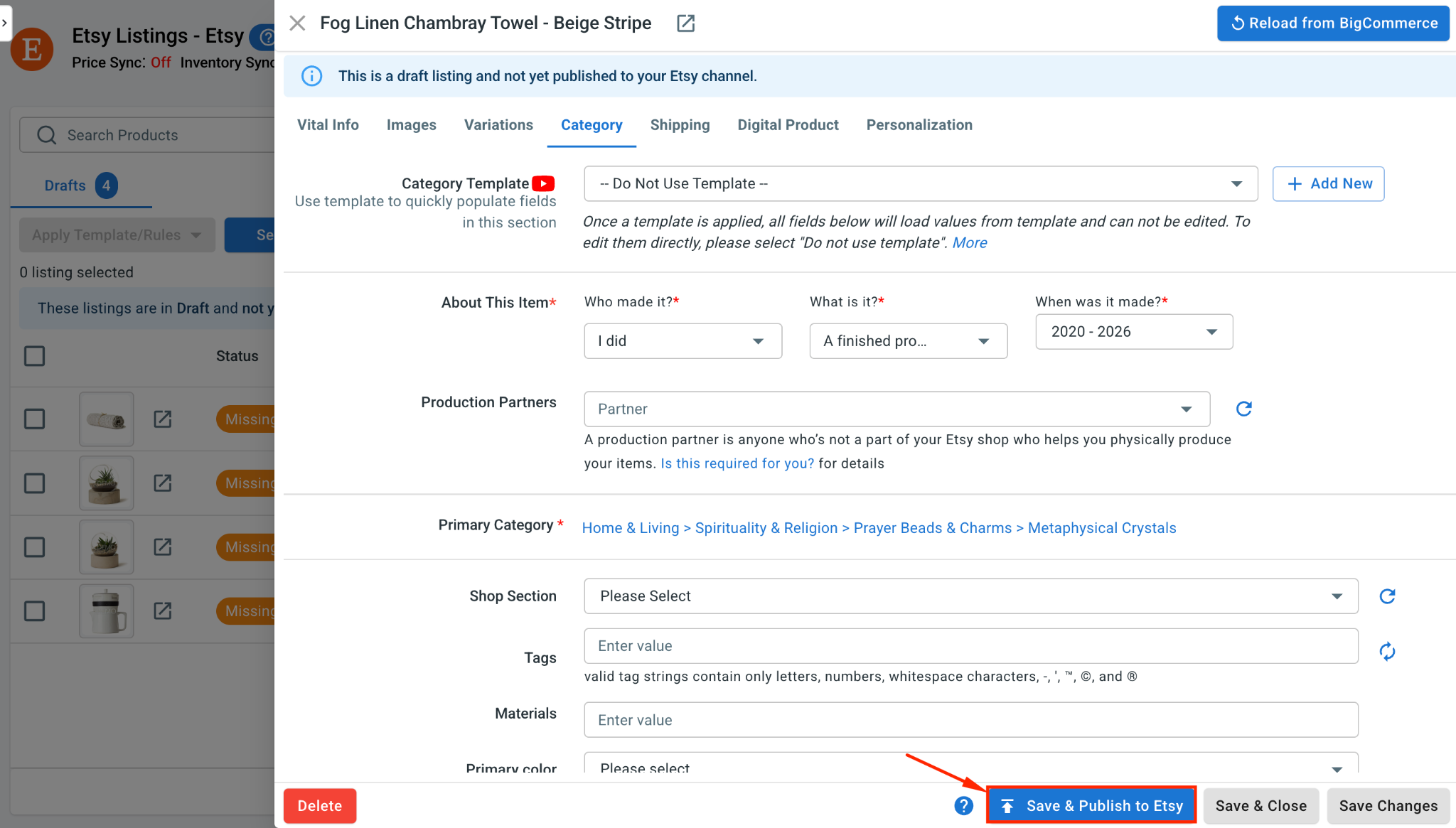
4. Head to the Etsy tab and review each draft. Etsy expects its own set of details, including category, and shipping profiles, so add those before publishing.

5. Once a listing looks good, click Save and Publish to Etsy.

word image 91595 5 8

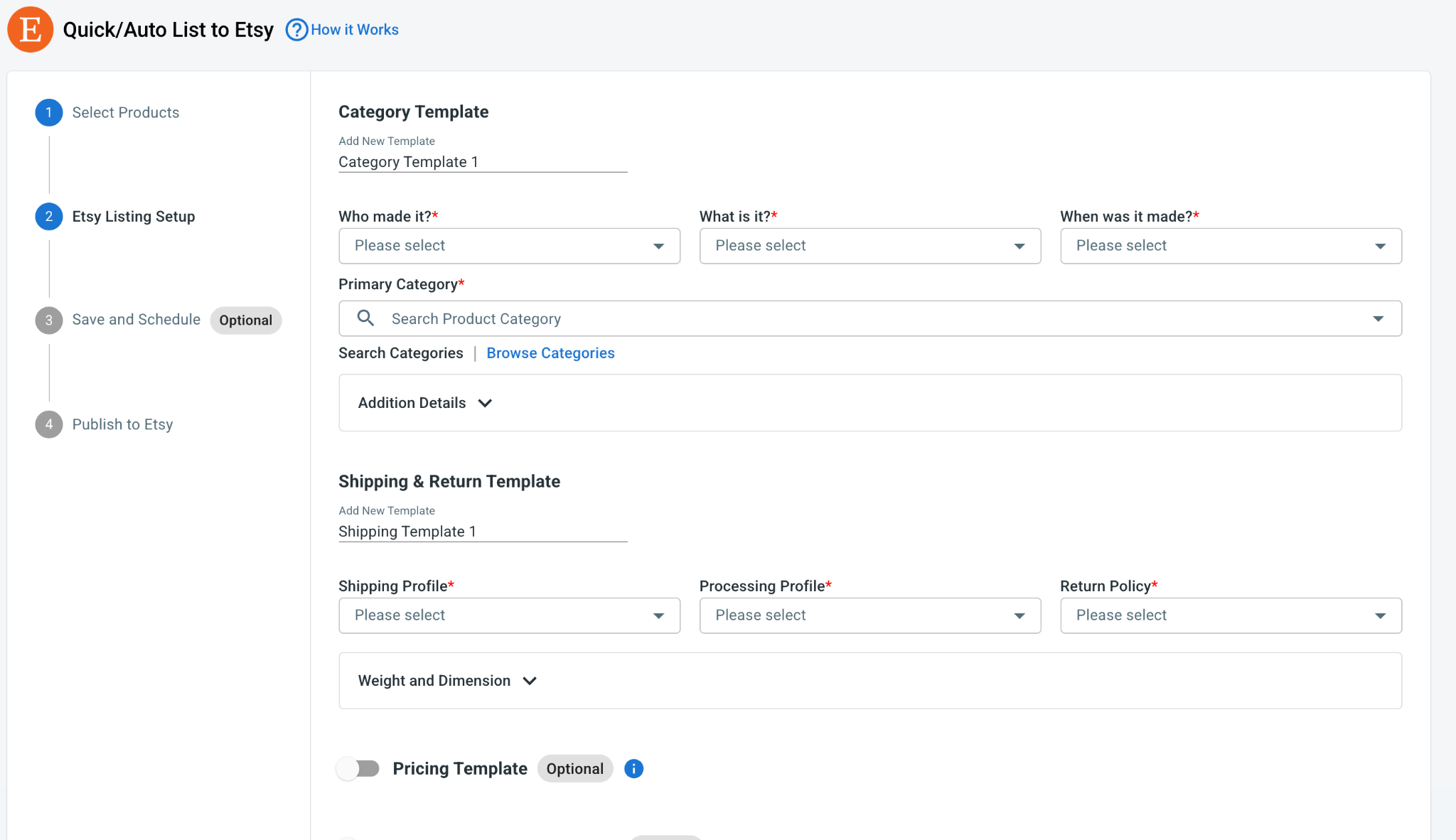
Pro tip: There’s no reason to handle products one at a time. Turn to Quick/Auto List to Etsy to edit and upload in bulk. Create templates for category, shipping, and pricing, then roll them out across many Etsy listings together, which trims hours off the work when your catalog is large.

word image 91595 6 8

Case 2: Import your Etsy products to BigCommerce

Already established on Etsy and want those listings in BigCommerce? LitCommerce brings them across:

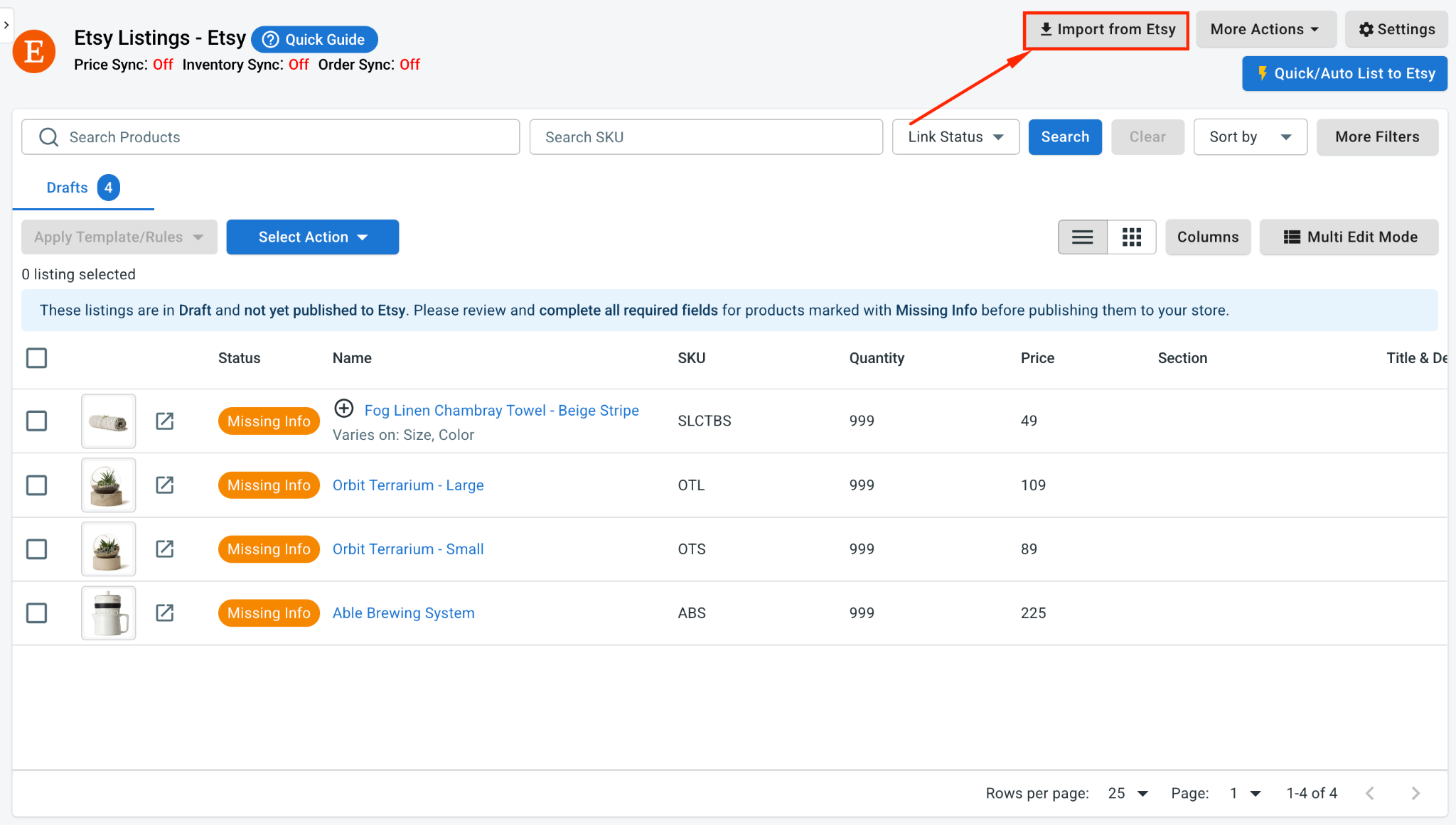
1. On the Etsy channel tab, click Import from Etsy.

word image 91595 7 8

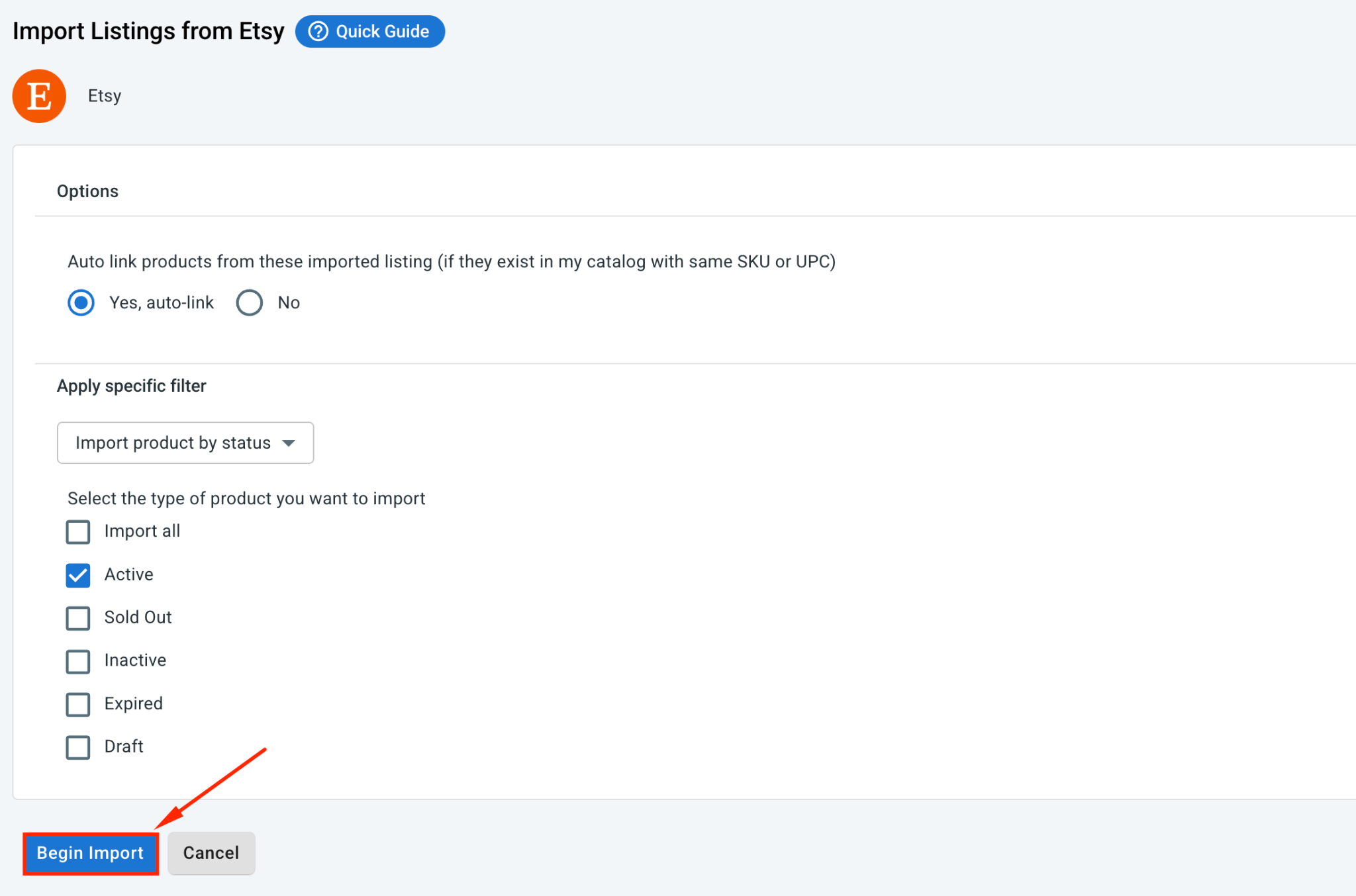
2. Choose which products to bring in, and let LitCommerce auto link your items across both stores wherever possible.

3. Click Begin Import.

word image 91595 8 8

4. Your Etsy listings load into LitCommerce. Select them next, click Select Action, then pick Create on BigCommerce.

With that, your Etsy listings now sit in BigCommerce as well, linked across both platforms and ready to sync.

Case 3: Linking products across both stores

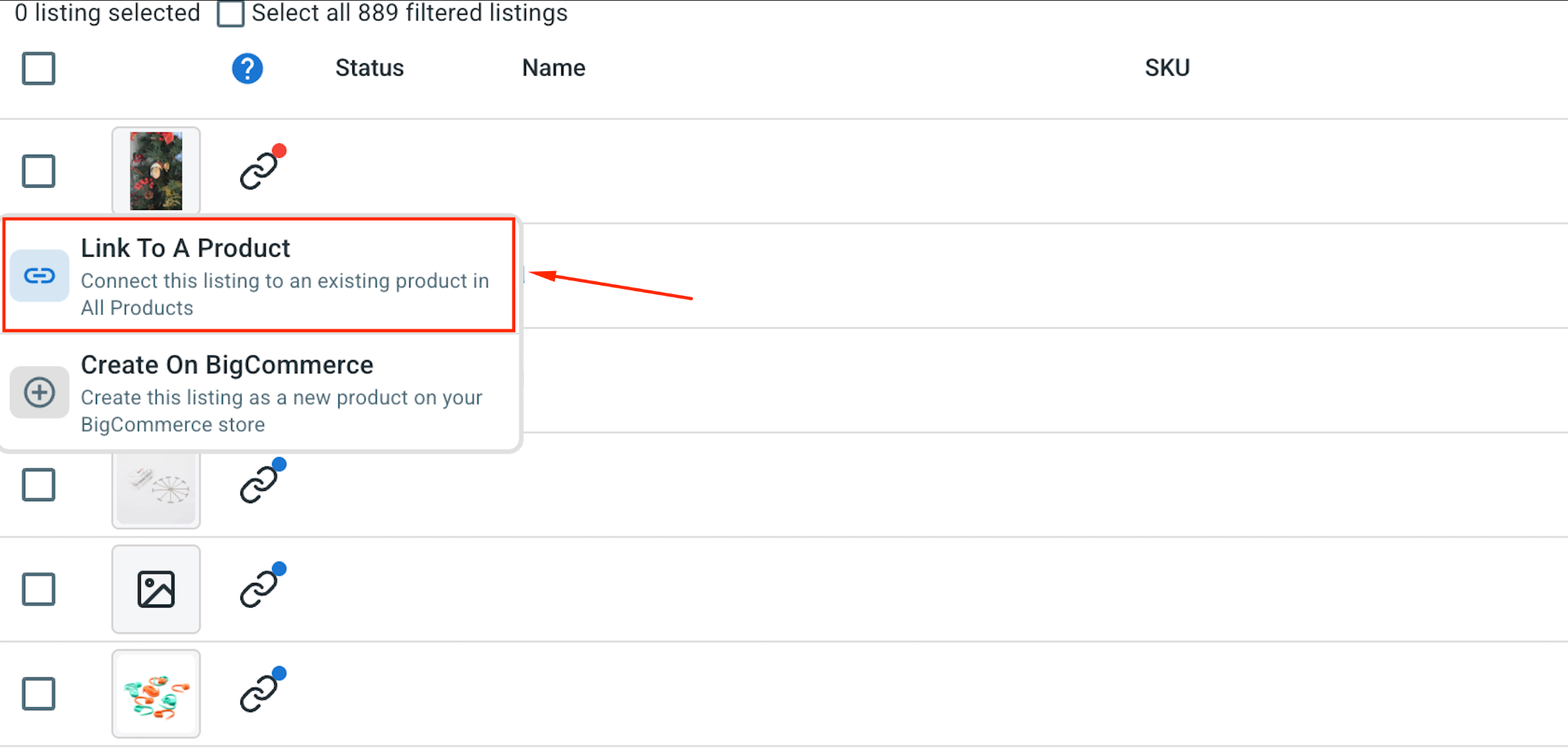
During the import process, LitCommerce can automatically link matching products between BigCommerce and Etsy. Linked products carry a blue dot, while unlinked ones carry a red dot.

1. To manually link a product, hover over the red dot, choose Link To A Product.

word image 91595 9 8

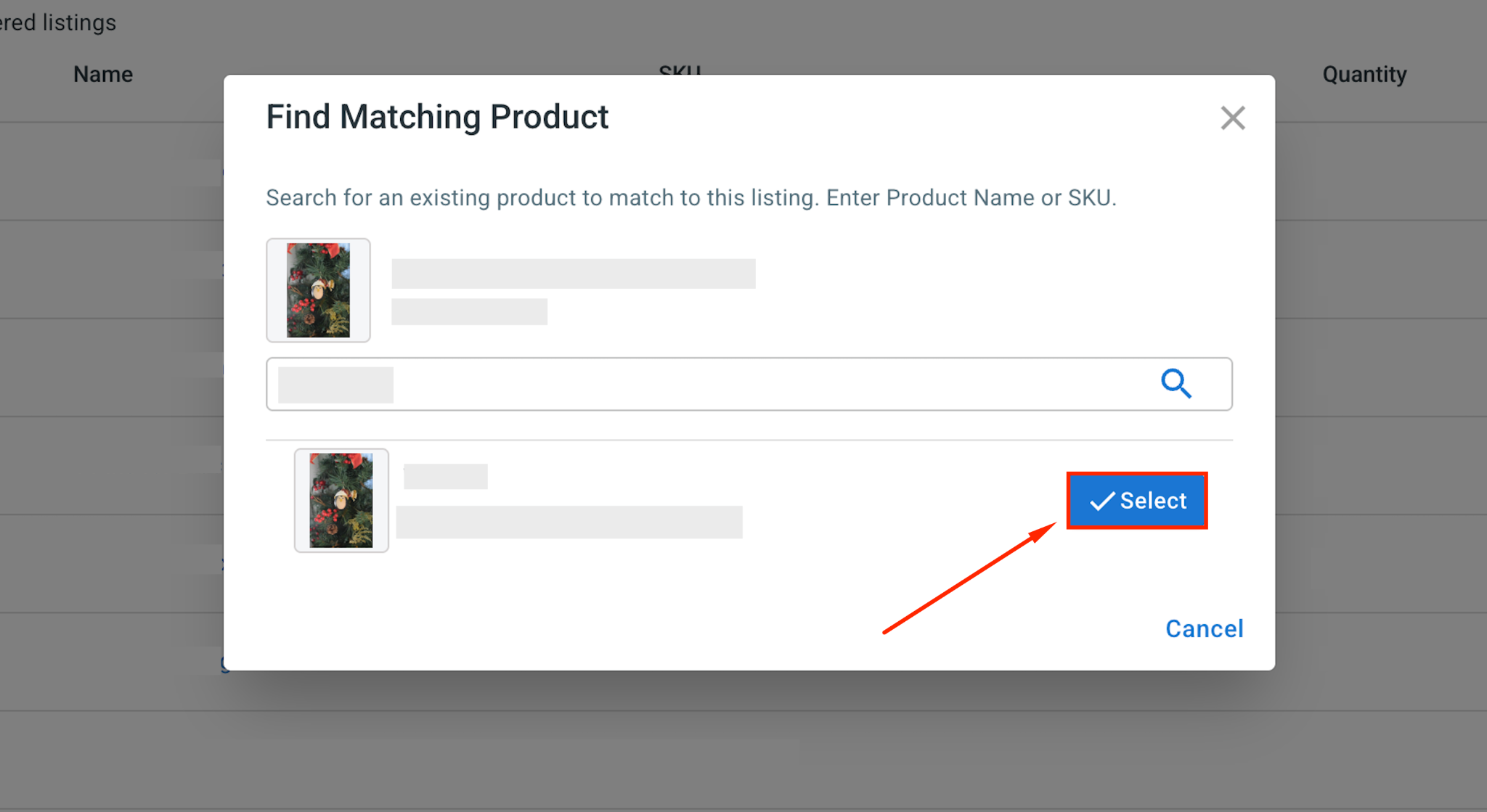
2. Next, find the item that matches, and click Select beside it.

word image 91595 10 8

Only linked products stay in sync, so this short step keeps both stores tidy.

Step 3: Enable BigCommerce Etsy Sync

The real value of connecting BigCommerce to Etsy is keeping both stores aligned automatically. Instead of updating prices, inventory, and orders by hand, you can let LitCommerce handle the sync for you.

To set this up, open your Etsy store inside LitCommerce and go to Channel Settings.

These are the three main sync settings for your bigcommerce etsy setup:

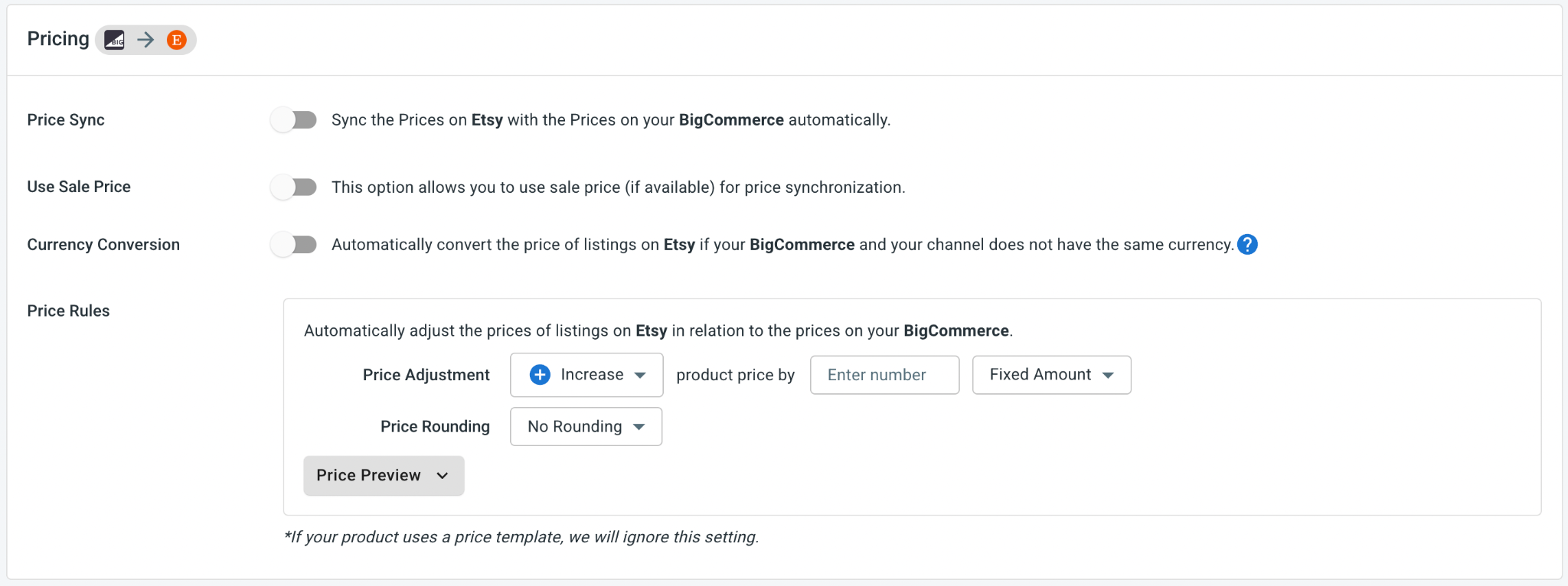
  • Price sync: Keep Etsy prices aligned with your BigCommerce prices whenever changes happen. You can also set price rules to increase or decrease Etsy prices by a fixed amount or percentage. This is helpful because Etsy has its own listing fees, transaction fees, and marketplace costs.

word image 91595 11 8

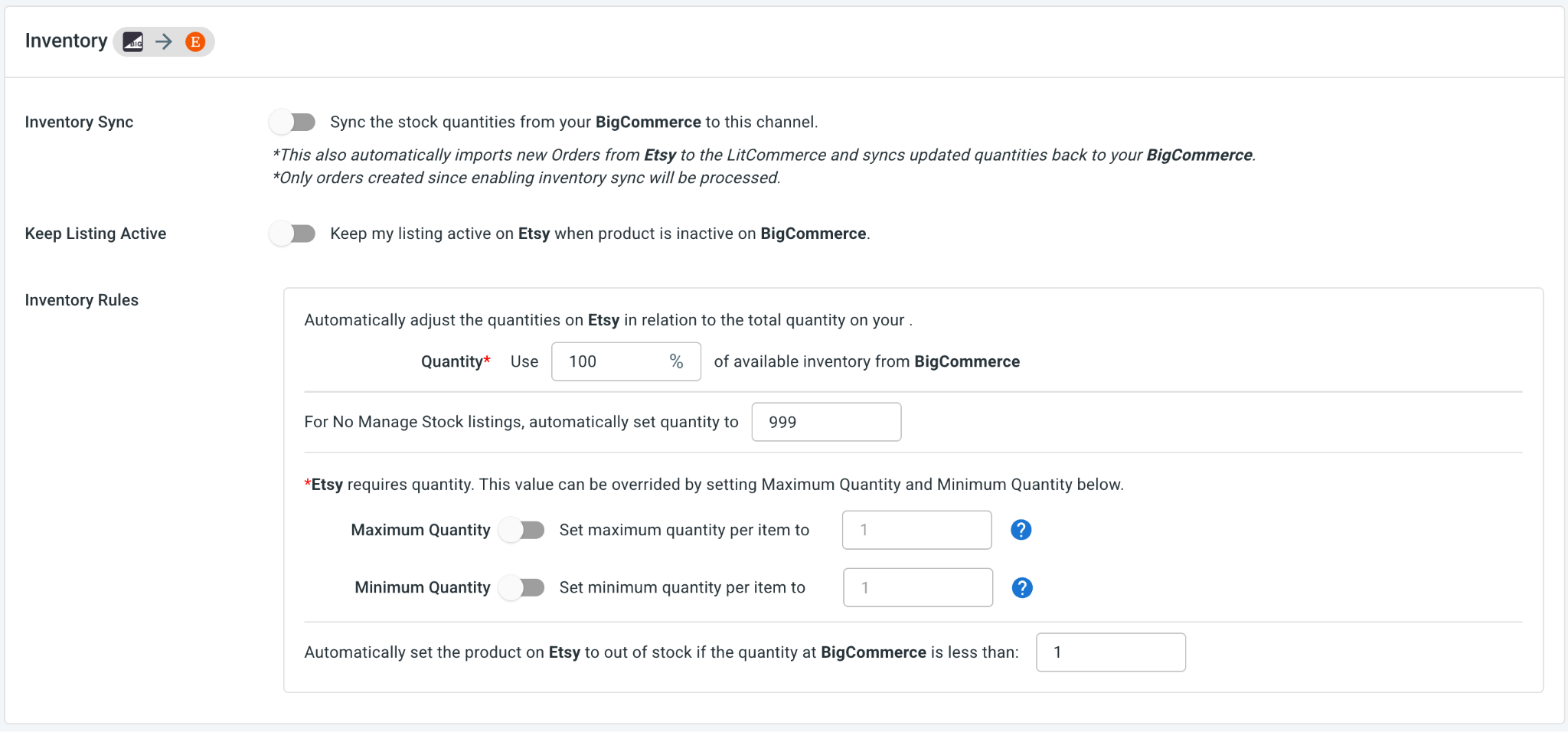
  • Inventory sync: Keep stock levels updated between BigCommerce and Etsy, so you can reduce the risk of overselling. You can set inventory rules, minimum and maximum thresholds, and choose how much BigCommerce stock you want to send to Etsy.

word image 91595 12 5

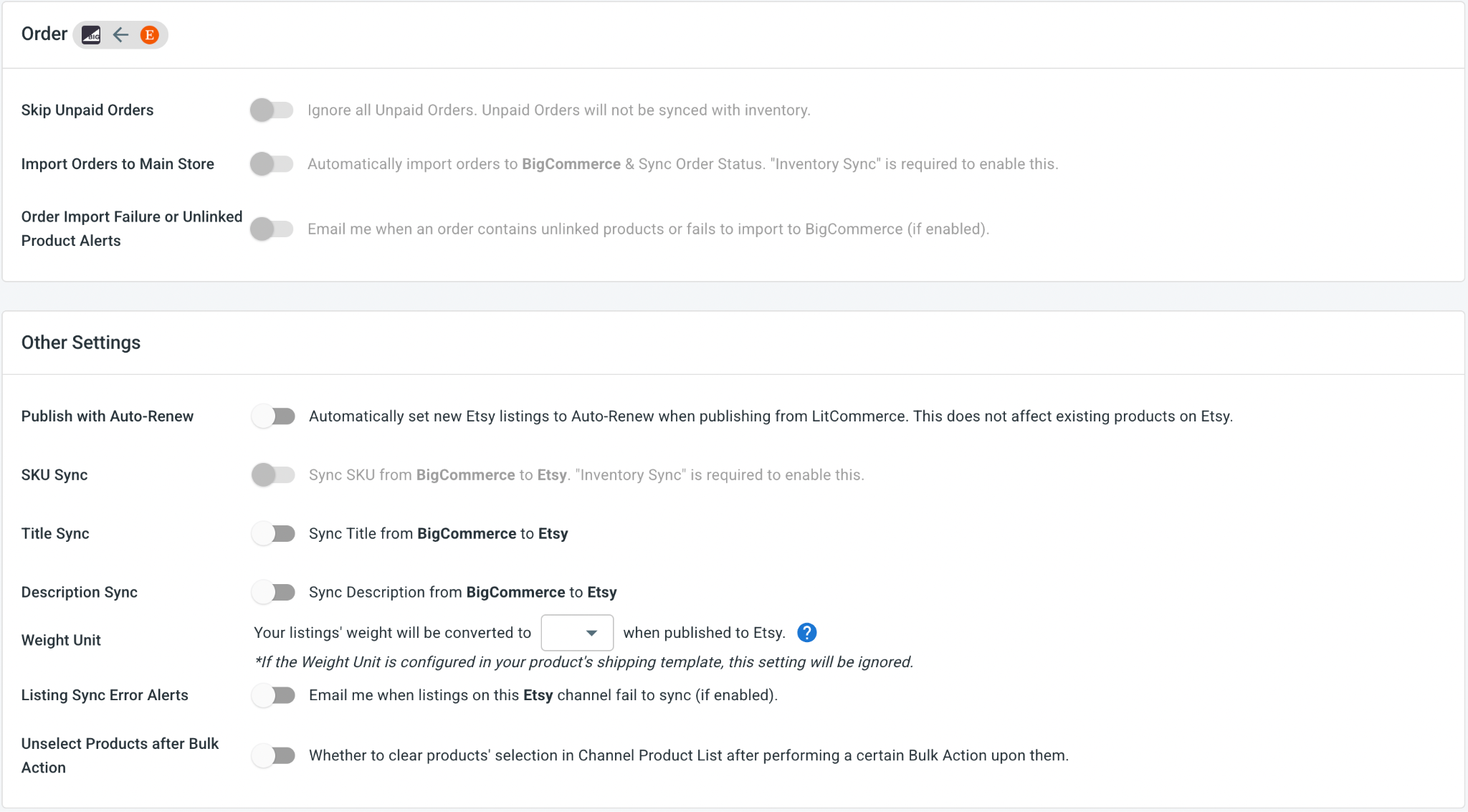
  • Order sync: Turn on Import Orders to Main Store to send Etsy orders into your BigCommerce dashboard. This helps you manage orders from both platforms in one place.

word image 91595 13 3

When the settings look right, click Save Settings at the bottom of the page to lock them in.

Step 4: Manage Your Order Flow

With Import Orders to Main Store turned on, Etsy orders will appear inside your BigCommerce dashboard, together with your BigCommerce orders.

This means you do not have to jump between platforms just to check new sales, fulfill orders, or update tracking information.

From the order dashboard, you can:

  • Review your BigCommerce and Etsy orders side by side.
  • Track shipments and update tracking numbers on both channels at once.

With LitCommerce, your BigCommerce store and Etsy shop can work together from one central system. You can reach Etsy’s audience of creative shoppers, list products faster, keep inventory accurate, and manage orders without switching between platforms all day.

Our Integration Pricing

(*) Number of Product Listings count towards the total number of listings on all connected sale channels, not on products you have on your mainstore.

Need a Custom Plan? Please contact us.

Popular Questions About BigCommerce Etsy Integration

Not seeing your question listed here? Contact us for the quickest answer.
Does BigCommerce integrate with Etsy?

Both BigCommerce vs Etsy allow connecting manually or using LitCommerce – a multichannel selling software to help you to add an Etsy store to the BigCommerce website.

With LitCommerce, BigCommerce and Etsy are integrated with only 6 steps:

     #Step 1: Add LitCommerce app on BigCommerce
     #Step 2: Connect to Etsy
     #Step 3: List BigCommerce products on Etsy
     #Step 4: Edit Etsy listings
     #Step 5: Enable BigCommerce Etsy synchronization
     #Step 6: Make use of BigCommerce Etsy integrated order flow

To read more information about BigCommerce Etsy integration, please check out this article to read the detailed guide.

Why should I use BigCommerce?

BigCommerce is a prominent hosted eCommerce platform that provides everything you need to create an online store. The only thing you need to do is sign up. Then, you can start personalizing your eCommerce store and monetizing it right away.

In its most general sense, BigCommerce is made-to-measure for big sellers with a variety of rich built-in features. Also, it would be an ideal place for those who are having an international plan as BigCommerce excels with multi-channel selling. And more importantly, this hosted cart gives you the flexibility to customize and scale up your business effortlessly.

Who is BigCommerce best for?

BigCommerce defines itself to be an all-in-one solution to all sizes of businesses. However, with a focus on various out-of-the-box features, BigCommerce is more well-tailored for enterprise-level companies or those who want to scale up their store.

How much does it cost to integrate BigCommerce with Etsy?

LitCommerce offers a 7-day free trial with full feature access, including: 15-minute sync for price, inventory and product information, also advanced order management across all channels. You can cancel at any time if you want.

You can also get a 20% discount for yearly payments. Don’t forget to check out as soon as possible to get this opportunity right now.

Why Our Customer Trust Us

“LitCommerce allows us to set up and install quickly with just a couple of clicks…”

Very minimal configuration. LitCommerce allowed us to import our Etsy listings into LitCommerce and the freedom to modify and sync all those listings to multiple marketplaces, including BigCommerce, Shopify, Amazon, eBay, and Etsy…

Mr. Rodrigo, CEO of Bien Hecho


  • Courtdale CrossingsUnited States

    Litcommerce is GREAT!

    Excellent platform to use for my new business and it just so happens to come with amazing customer service! A+++++++

    Review Source

  • AnthonyUnited Kingdom

    LitCommerce is a very powerful tool

    LitCommerce is a very powerful tool. There are a lot of moving parts, but support is extremely helpful. As I was working on some drafts I was contacted by Evelyn and she was extremely helpful in making sure I was using all the tools that LitCommerce offers. She showed me how I could apply certain templates to all my drafts at once instead of one by one. Saving me a bunch of time! Highly recommend LitCommerce!

    Review Source

  • Lovely ThinkingsPortugal

    Friendly and helpful

    Friendly, quick and helpful customer service. Wide enough range of connection options to meet my needs.

    Review Source

  • Adam RogersUnited States

    I am really impressed with the level of support.

    Both times I had several questions and a small issue and both times two different people responded instantly....

    Review Source


Choose BigCommerce Etsy Integration to Grow

Supercharge your sales with LitCommerce BigCommerce Etsy integration. Expand, dominate, and conquer multiple channels effortlessly. Maximize your business potential now!