

Every product sold on eBay needs a way to stand out in search results. That is where eBay product identifiers come in.
eBay product identifiers are unique codes or numbers assigned to specific products to help categorize and identify them accurately within eBay’s marketplace. These identifiers include:
- MPN (Manufacturer Part Number)
- UPC (Universal Product Code)
- EAN (European Article Number)
- GTIN (Global Trade Item Number)
- ISBN (International Standard Book Number)
Since you’ll use these codes a lot when listing on eBay, it’s best to understand them well. And that’s why I’ve written this piece. Below, I’ll explain how these eBay product identifiers differ from one another and from product specifiers, how to find them, and the benefits they offer.
No need to wait any longer; let’s jump right in!
What Are eBay Product Identifiers?
eBay product identifiers are standardized codes that help eBay recognize what you are selling. Each code connects your listing to a specific product in eBay’s global catalog.
These identifiers serve three main purposes:
- Search matching. eBay uses identifiers to return accurate search results when buyers type in product names, model numbers, or barcodes.
- Catalog linking. Identifiers connect your listing to the correct eBay product page, which groups similar items together and pulls in product details automatically.
- Trust and compliance. Accurate identifiers help buyers verify they are purchasing the right product. They also support eBay’s policies on counterfeit prevention and category requirements.
eBay recognizes six main types of product identifiers. The table below explains each one, which products use it, its format, and the regions where it applies.
How Do eBay Product Identifiers Differentiate from Each Other?
As mentioned, there are up to 5 types of eBay product identifiers: MPN, UPC, EAN, GTIN, and ISBN. But you just need to take these highlights:
- MPN (Manufacturer Part Number): A unique identifier assigned by the manufacturer to a specific product to distinguish it from others in the catalog.
- UPC (Universal Product Code): A standardized barcode used to identify products, primarily in North America.
- EAN (European Article Number): Similar to UPC, but used predominantly in Europe and other regions outside North America.
- GTIN (Global Trade Item Number): An umbrella term covering UPC, EAN, and other barcode formats used to uniquely identify trade items globally
- ISBN (International Standard Book Number): A unique numeric commercial book identifier used for books and related products.
eBay also uses a catalog reference called ePID (eBay Product ID). Unlike the identifiers above, ePID is not an industry-standard code. It is an internal number that eBay assigns to products in its own catalog.

The table below shows what each one is, which products use it, the format, and the regions where it applies:
| Identifier | Full Name | Best For | Format | Primary Region |
|---|---|---|---|---|
| MPN | Manufacturer Part Number | Electronics, auto parts, industrial goods | Alphanumeric (varies by manufacturer) | Global |
| UPC | Universal Product Code | Retail products sold in North America | 12 digits | US, Canada |
| EAN | European Article Number | Retail products sold in Europe and worldwide | 13 digits | Europe, Asia, global |
| GTIN | Global Trade Item Number | Any barcoded product (umbrella term for UPC, EAN, ISBN) | 8, 12, 13, or 14 digits | Global |
| ISBN | International Standard Book Number | Books, textbooks, published media | 10 or 13 digits | Global |
| ePID | eBay Product ID | Any product already cataloged by eBay | Numeric (assigned by eBay) | Global (eBay platform only) |
Let’s dive into the details of each product code available on eBay!
What is MPN on eBay?
MPN stands for Manufacturer Part Number, a unique code that a manufacturer assigns to identify a specific product within their catalog.
On eBay, the MPN helps buyers search for exact parts and models. It is especially important for categories like electronics, automotive parts, appliances, and industrial equipment.
Here is an example. If you sell a Samsung phone screen replacement, the MPN might be “GH97-25804A.” A buyer searching for that exact part number will find your listing directly.
Let’s say you search it on eBay, you can type the MPN in the search bar.

You will then get a variety of search results displaying only items that exactly match the MPN you provide.
However, the MPN is unlike other eBay product identifiers. So MPN vs UPC? While UPC and EAN are printed on retail packaging and scanned at checkout, the MPN is the manufacturer’s own internal reference code. Some products have both an MPN and a UPC. Others only have an MPN.
For sellers who deal in replacement parts or wholesale components, the MPN is often the most important identifier. Buyers in these categories search by MPN more than by product name.
What is UPC on eBay?
UPC stands for Universal Product Code. It is the 12-digit barcode number printed on most retail products sold in the United States and Canada.
On eBay, the UPC helps match your listing to a product in eBay’s catalog. When you enter a valid UPC, eBay can auto-fill product details like title, description, and images. This saves time and keeps your listing consistent with other sellers offering the same product.
People use UPCs to scan trade items at the point of sale and to track in-store items in terms of stock and their features (i.e., brand name, size, or color).
Many people mistakenly think UPC and GTIN are interchangeable. However, a UPC is a series of black bars, while a GTIN is a line of identification numbers (we’ll discuss GTIN in detail later).
You can find the UPC in these places:
- Product packaging. Look for the barcode on the back or bottom of the box. The 12-digit number printed below the barcode is the UPC.
- Manufacturer’s website. Many brands list UPCs on their product pages or spec sheets.
- Barcode lookup tools. Sites like Barcodelookup.com or UPCitemdb.com let you search by product name to find the UPC.

What is UPC on eBay then? The eBay UPC code is ePID or eBay Product Identification, and it works as a searchable term for products listed on the marketplace.
It’s a strict requirement that you include ePID in your product listings. If you are also an Amazon seller, product identifiers like UPCs are also a must.
What is EAN on eBay?
EAN stands for European Article Number. It is a 13-digit barcode number used to identify retail products worldwide, with the strongest adoption in Europe, Asia, and Australia.
EAN and UPC serve the same purpose. The main difference is the number of digits. A UPC has 12 digits and is used primarily in North America. An EAN has 13 digits and is used almost everywhere else.

Here is something many sellers overlook. Every UPC is actually a subset of the EAN system. If you add a leading zero to a 12-digit UPC, you get the 13-digit EAN equivalent. For example, UPC 012345678905 becomes EAN 0012345678905.
eBay accepts both formats. If you have a UPC and need to enter an EAN, simply add the leading zero. For sellers who ship internationally, having the correct EAN makes your listings visible to buyers searching on eBay sites in other regions.
What is GTIN on eBay?
A GTIN, or Global Trade Item Number, is a line of numbers and characters that appears beneath the black-and-white lines of a barcode. They represent unique global data structures issued by the Uniform Code Council (GS1), a nonprofit organization that provides a business standard for companies worldwide.
It’s common to get confused about EAN vs. GTIN. So GTIN data structures include PC (in the US), EAN (in Europe), JAN (in Japan), and ISBN. A GTIN has 12 digits in North America, 13 digits for the rest of the world, and occasionally 8 digits (for very small products).
Here is a breakdown of the family of data structures (not symbologies) within a GTIN:
- GTIN-8: 8-digit code used for small products with limited packaging space
- GTIN-12: Same as UPC (12 digits, used in North America)
- GTIN-13: Same as EAN (13 digits, used globally)
- GTIN-14: 14-digit code used for bulk or case-level packaging
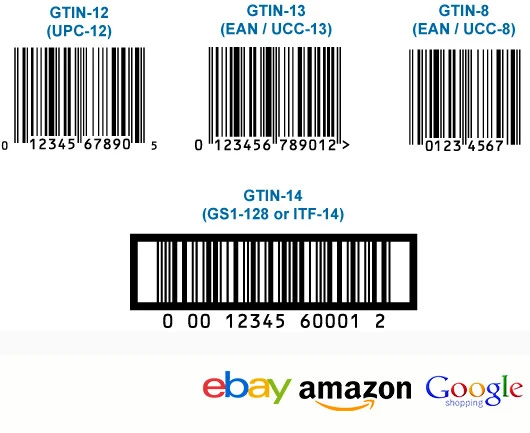
When eBay asks for a GTIN in a listing, you can enter your product’s UPC, EAN, or ISBN. These are all valid GTIN formats.
The special thing about eBay GTIN is its universal popularity. A GTIN can help you sync products and match products in one database with another across regions and countries.
GTINs are managed by GS1, a global standards organization.If your product does not have a barcode yet, you can register with your local GS1 office to get one.
The cost depends on your country and the number of barcodes you need. In the US, GS1 charges an initial registration fee starting at around $250, plus an annual renewal fee starting at $50. This gives you a company prefix and lets you create GTINs for your products. Check gs1.org for the latest pricing in your region.
To streamline this process, an efficient eBay listing tool can automatically map your identifiers and save you countless hours.
On eBay, sellers must provide GTINs for all new, relisted, revised, and Good ‘Til Canceled products, whether they upload them one by one or list multiple items on eBay. However, some exceptions still apply to the clothing, footwear, and accessories category.
What is ISBN on eBay?
ISBN stands for International Standard Book Number. It is a unique identifier assigned to every published book, textbook, and some other media formats.
ISBNs come in two formats:
- ISBN-10: The older format with 10 digits, used for books published before 2007.
- ISBN-13: The current standard with 13 digits. All new books receive an ISBN-13.
On eBay, the ISBN is the primary product identifier for the Books & Magazines category. When you enter an ISBN, eBay pulls in the book’s title, author, publisher, cover image, and other details from its catalog.
You can find the ISBN on the back cover of most books, usually above the barcode. It is also printed on the copyright page inside the book. For older books without a visible ISBN, you can search by title and author on ISBNsearch.org.

Pro tips: If you sell books on eBay, always use the ISBN-13 format when available. This gives your listing the best chance of being matched to the correct catalog entry.
For rare or antique books printed before the ISBN system was introduced in 1970, you can use “Does Not Apply” in the ISBN field. eBay recognizes that these items genuinely lack an ISBN.
You must use ISBNs for your book listings on eBay, regardless of their origin, publisher, language, etc. However, you should pay attention to the book format (i.e., paperback, epub, pdf, etc.), as different book formats have different ISBNs.
What Is ePID on eBay?
ePID stands for eBay Product ID. It is not a product identifier in the traditional sense. Instead, ePID is an internal catalog reference number that eBay creates and assigns to products within its own system.
Every product that eBay has cataloged receives an ePID. When you create a listing and enter a UPC, EAN, or ISBN, eBay matches your product to an existing ePID behind the scenes. Think of ePID as a shortcut to eBay’s catalog, while identifiers like UPC and MPN are the industry-standard codes that you provide.
You can find the ePID on any eBay product page. Scroll to the bottom of the listing and look for “eBay Product ID (ePID)” in the item specifics. You can also find ePIDs through eBay’s catalog API if you manage listings programmatically.
Keep in mind that not every product has an ePID. If the product has never been cataloged on eBay, no ePID exists for it yet. In that case, you should enter the standard identifiers (MPN, UPC, or EAN) so eBay can create a catalog entry.
Make eBay Listing Easier with LitCommerce
LitCommerce eBay listing tool helps you find matching products in eBay’s catalog using its eBay Product ID (ePID) Lookup feature. Reduce manual data entry and streamline your listing process to save time and effort.
Are Item Specifics and Product Identifiers on eBay the Same?
It’s easy to mess up between the two terms “Item Specifics” and “Product Identifiers” when listing products on eBay. So what’s the difference?
- Product identifiers (MPN, UPC, EAN, GTIN, ISBN) are unique codes that identify a specific product. They are standardized, meaning the same code always points to the same product regardless of who sells it. ePID is different because it is an internal eBay reference, not an industry-standard code.

- Item specifics are descriptive attributes that provide additional details about your listing. These include fields like brand, size, color, material, style, and model. Item specifics help buyers filter search results and compare products.
When to enter “Does Not Apply” in product identifier fields.
eBay gives sellers the option to enter “Does Not Apply” in eBay product identifier fields. But using it incorrectly can reduce your listing’s visibility and sales potential.
Some products genuinely do not have standardized product identifiers. In these cases, “Does Not Apply” is the correct entry:
- Handmade items. If you craft products yourself, they will not have a UPC, EAN, or MPN. Enter “Does Not Apply” and describe your product thoroughly in the title and item specifics.
- Vintage items (20+ years old). Many vintage products were made before barcode systems became standard. eBay recognizes this for items listed in vintage categories.
- Unbranded products. Generic or no-brand products sold in bulk often lack manufacturer identifiers. “Does Not Apply” is acceptable if no MPN, UPC, or EAN exists.
- Custom or one-of-a-kind items. Art, custom jewelry, and personalized goods typically do not carry standard product codes.
- Antique books. Books published before 1970 may not have an ISBN.
However, many sellers get this wrong. Using “Does Not Apply” as a shortcut when your product actually has an identifier can seriously damage your listing performance.
eBay’s search engine gives preference to listings with complete and accurate product data. When you enter “Does Not Apply” for a product that has a known UPC or MPN, your listing may:
- Perform worse in eBay search results.
- Lose eligibility for Google Shopping placements.
- Fail to connect to eBay’s product catalog, which means fewer product review displays.
- Appear less trustworthy to buyers who compare multiple listings.
How to Find eBay Product Identifiers?
Finding the right eBay product identifiers can seem confusing at first. But once you know where to look, the process is straightforward.
Check the Product Packaging
The fastest way to find a UPC or EAN is to look at the product’s barcode. The number printed below the barcode lines is your identifier. A 12-digit code is a UPC. A 13-digit code is an EAN.
For the MPN, check the product label, spec sheet, or the manufacturer’s website. The MPN is usually printed near the model name or serial number.

If you do not have the physical product in hand, try these tools:
- Barcodelookup.com: Search by product name to find UPC and EAN codes.
- Google Shopping: Search the product name and check the listing details for GTIN or UPC.
- Manufacturer’s website: Most brands list MPN and barcode information on their product pages.
- ISBNsearch.org: Look up books by title or author.
When you can’t find compatible eBay product identifiers, you can leave N/A for the section as the safest choice.
Contact the Manufacturer or Supplier
If you source products from a wholesaler or manufacturer, ask them for the MPN, UPC, or EAN. Most suppliers include this information on invoices, product catalogs, or data feeds.
Register Your Own Barcodes
If you manufacture or private-label your own products, you will need to register with GS1 to get your own barcodes. Visit gs1.org to apply for a company prefix and create GTINs for your products.
Do not buy cheap barcodes from third-party resellers. These barcodes may cause conflicts on eBay and other marketplaces because they are often recycled or not properly registered.
Benefits of Product Identifiers on eBay
Adding eBay product identifiers to your listings has been a requirement from eBay for quite a while. If filling in compatible product identifiers to your trade items, your listings can benefit from a great number of eBay perks, such as:
- Increased visibility on search result pages: Sellers adding correct product identifiers in their listings have better product visibility on search result pages. This is because you have the most informational and matching listing with what users are looking for. It’s incredibly helpful when buyers use certain eBay product identifiers to directly search for an item.
- Higher trust from your potential buyers: Including eBay product identifiers in listings can enhance buyer trust and confidence in the seller. Buyers are more likely to trust listings that include detailed product information, including identifiers such as UPC or ISBN, as it demonstrates that the seller is knowledgeable about the product and is providing accurate information.
- Access to eBay’s Product catalog: Sellers who include product identifiers in their listings can leverage eBay’s product catalog, which contains pre-filled product information for a wide range of items. By linking your listings to eBay’s catalog entries, you can save time on creating listings and provide buyers with more detailed and accurate product information.
- Promoted listings. Including UPC, EAN, GTIN, or MPN in your listings can get your products promoted on external websites like Google Shopping Search. eBay product identifiers also make your listings eligible for the marketplace’s exclusive promotions.
Properly identified products sell faster, which can eventually help you increase your eBay selling limits as your seller performance improves.
eBay Product Identifiers – FAQs
Product identifiers are unique codes and barcodes provided by the product manufacturer to identify a specific product. They may include Universal Product Codes (UPCs), Manufacturer Part Number (MPN), International Standard Book Numbers (ISBNs), and Stock Keeping Units (SKUs). To find your eBay product id or eBay UPC Code: First, check out the requirements on product identifiers in the listings. Then you should look for ISBNs, UPCs, EANs, or JANs above or below the barcode on the cover of your product. You can also ask your manufacturers and wholesalers about this information. Common eBay product identifiers include Universal Product Codes (UPCs), Global Trade Item Numbers (GTINs), Manufacturer Part Numbers (MPNs), and ISBN (International Standard Book Numbers). You can find the listing field for the product ID on the eBay product listing. It’s a dropdown where you select the type of eBay product ID you have and then fill in the numbers. For trade items that you don’t have information about their product ID, you can also leave N/A for that listing field. On eBay, MPN stands for Manufacturer Part Number. It is a unique identifier assigned by the manufacturer to a specific product to distinguish it from others in their catalog. The MPN helps buyers and sellers on eBay accurately identify and describe products, facilitating smoother transactions. The eBay UPC code is ePID or eBay Product Identification, and it works as a searchable term for products listed on the marketplace. Normally, the UPC is a 12-digit numeric code that is represented by a barcode that can be scanned at checkout. More about UPC on eBay, it’s a strict requirement that you include ePID in your product listings. If you are also an Amazon seller, product identifiers like UPCs are also a must. EAN on eBay stands for European Article Number. It is a barcode symbology used globally to uniquely identify products, primarily in Europe and other regions outside North America. The EAN is a 13-digit numeric code represented by a barcode that can be scanned at checkout. GTIN on eBay stands for Global Trade Item Number. It is a broader term that encompasses various types of product identifiers, including UPC (Universal Product Code) and EAN (European Article Number). GTINs are unique codes assigned to products to facilitate their identification and tracking throughout the global supply chain. Sellers on eBay often include GTINs, such as UPCs or EANs, in their listings to improve search visibility, enhance product categorization, and provide buyers with accurate product information On eBay, ISBN stands for International Standard Book Number. It is a unique numeric commercial book identifier used primarily for books and related products like e-books. The ISBN is typically a 13-digit numeric code (since 2007) assigned to each edition of a book published by a specific publisher.
Final Word
eBay product identifiers have been a critical requirement for any product listing on eBay. You have to not only include it in your listing but also make sure it’s the correct type of product identifier.
We hope this guide has helped you understand different eBay product identifiers, their applicability, and their difference from one another for a better product listing.
Contact us for more information about using LitCommerce. Last but not least, follow our Retailers Blog for more exciting eCommerce hacks and news. Happy selling!