Keywords for eBay are the words and values eBay’s search engine matches against what a buyer types. Sellers often call that engine Cassini, and it reads your title, Item Specifics, product identifiers, category, and description. So if a listing has sharp photos and a fair price but flat impressions, your keywords are usually the first thing to check.
This best keywords for eBay guide is written for sellers with live listings who want more impressions from the inventory they already have.
Key takeaways:
- The best keywords for eBay come from sold listings, not guesswork. They are the exact phrases buyers type for your item, confirmed by what actually sold.
- Blank Item Specifics cost you whole searches. If a buyer filters by Brand or Size and your field is empty, your listing drops out of those results entirely.
- eBay doesn’t show search volume. Instead, sold listings and the sell-through rate in Product Research give you more reliable demand signals.
- Long-tail and transactional keywords convert best. Broad terms like “camera” still name the product type, but on their own they compete with thousands of listings.
- Bulk edits scale, but test first. Seller Hub can revise hundreds of listings at once, so try changes on 10 to 20 listings and compare impressions before rolling them out.
Let’s dive in!
Where Does eBay Read Your Keywords?
eBay reads keywords mainly from your title and Item Specifics. After that, product identifiers, category, and condition act as supporting match signals. The description matters least for ranking, although it still shapes buyer trust and conversion.
eBay doesn’t publish exact field weights, but its listing guidance and filtered search behavior point clearly to this order.
| Listing field | How eBay uses it | What to put there | Ranking weight |
| Title (80 characters) | Matched directly against the buyer’s search words | Brand, model, product type, key attributes, condition | Highest |
| Item Specifics | Structured match for filters like Brand, Size, Color | Every field that applies to the item, with exact values | Highest for filtered searches |
| Product identifiers (UPC, EAN, ISBN, MPN) | Links the listing to eBay’s catalog product | The real code from the item or packaging | High for model and part searches |
| Category | Decides which filters and search results the item enters | The most specific leaf category available | Medium |
| Condition | Matches condition filters and buyer expectations | eBay’s condition value plus honest notes | Medium |
| Description | Supports relevance, mainly drives conversion | Buyer-facing detail, natural secondary terms | Low |
That said, keywords for eBay are only one input. eBay’s Best Match guidance also weighs item popularity, price, listing completeness, returns and handling terms, and your seller track record. In other words, a perfect title won’t save a listing with high shipping costs or late dispatch. For the wider ranking picture, see our eBay SEO guide.
Types of Keywords for eBay: Which Works Best?
Keywords for eBay fall into five types: short-tail, long-tail, informational, transactional or commercial, and local. Of these, long-tail and transactional keywords work best in titles, because they match buyers who already know what they want. Short-tail words still belong in the title to name the product type, while informational and local keywords play a smaller, supporting role.
| Keyword type | eBay example | Where to use it | How well it works on eBay |
|---|---|---|---|
| Short-tail | “film camera”, “wallet” | One per title, to name the product type | Needed, but too competitive alone |
| Long-tail | “Nikon FM2 35mm SLR body tested” | Front of the title, Item Specifics | Best: lower competition, higher conversion |
| Transactional/commercial | “new sealed”, “bundle”, “lot of 10”, “free shipping” | Title, if true for the item | Strong: signals a buyer ready to purchase |
| Informational | “how to load 35mm film”, “FM2 vs FM3a” | Description, FAQs in the listing, your blog | Weak for ranking on eBay, useful for buyer trust |
| Local | “UK seller”, “local pickup London” | Title for bulky items, location and shipping settings | Niche: matters for furniture, vehicles, heavy goods |
Short-tail keywords
Short-tail keywords are one or two broad words, like “camera” or “jeans”. They carry high demand, but they also put you against thousands of listings, most with more sales history than yours. That’s why the smart move is to use one short-tail term per title so eBay knows the product type, then let long-tail details do the ranking work.
Long-tail keywords
Long-tail keywords are specific phrases of three or more words that name the exact item: brand, model, size, color, or condition. A buyer typing “Nikon FM2 body tested” has usually decided on the model and is now comparing condition and price. As a result, that buyer converts faster than one browsing “camera”. Among all keywords for eBay, this is the type that works best, so build most of your 80 characters from it.
Transactional and commercial keywords
Transactional keywords describe how or what a buyer will buy: “new”, “sealed”, “bundle”, “lot”, “set of 4”, “OEM”. They signal purchase intent and help your listing match buyers filtering for a specific offer. However, add them only when they are accurate. “New” on a used item breaks eBay’s listing accuracy rules and invites returns.
Informational keywords
Informational keywords are questions or research phrases, like “how to clean leather wallet” or “FM2 vs FM3a”. Buyers rarely type them into eBay search, so they do little for ranking there. Still, they’re worth answering in the description to cut pre-sale questions, or you can target them in blog content that links back to your store.
Local keywords
Local keywords add a place or delivery option, like “UK seller” or “collection only Manchester”. For most small items, they simply waste title space, since buyers filter by location with eBay’s own settings. On the other hand, they earn a place on bulky, collection-only items such as furniture, garden equipment, or vehicle parts.
Whichever type you pick, run two quick checks first:
- Buyers actually type it. A phrase only you use, like an internal product code, brings zero searches.
- It describes this exact item. “Fits iPhone 15” on a case that only fits iPhone 14 brings clicks, then returns and negative feedback.
Regional wording matters too if you sell cross-border. For example, UK buyers search “trainers” and “jumper”, while US buyers type “sneakers” and “sweater”. So if eBay.co.uk is a big market for you, check sold listings on that site separately.
How to Find the Best Keywords for eBay
The best keywords for eBay come from two places: what buyers type and what actually sells. Start with eBay’s own free signals, meaning search suggestions, sold listings, and Product Research in Seller Hub. Then shortlist the phrases that repeat across sold titles and describe your exact item. Outside tools help at scale, but they work best on top of this base.
1. Start with eBay search autocomplete
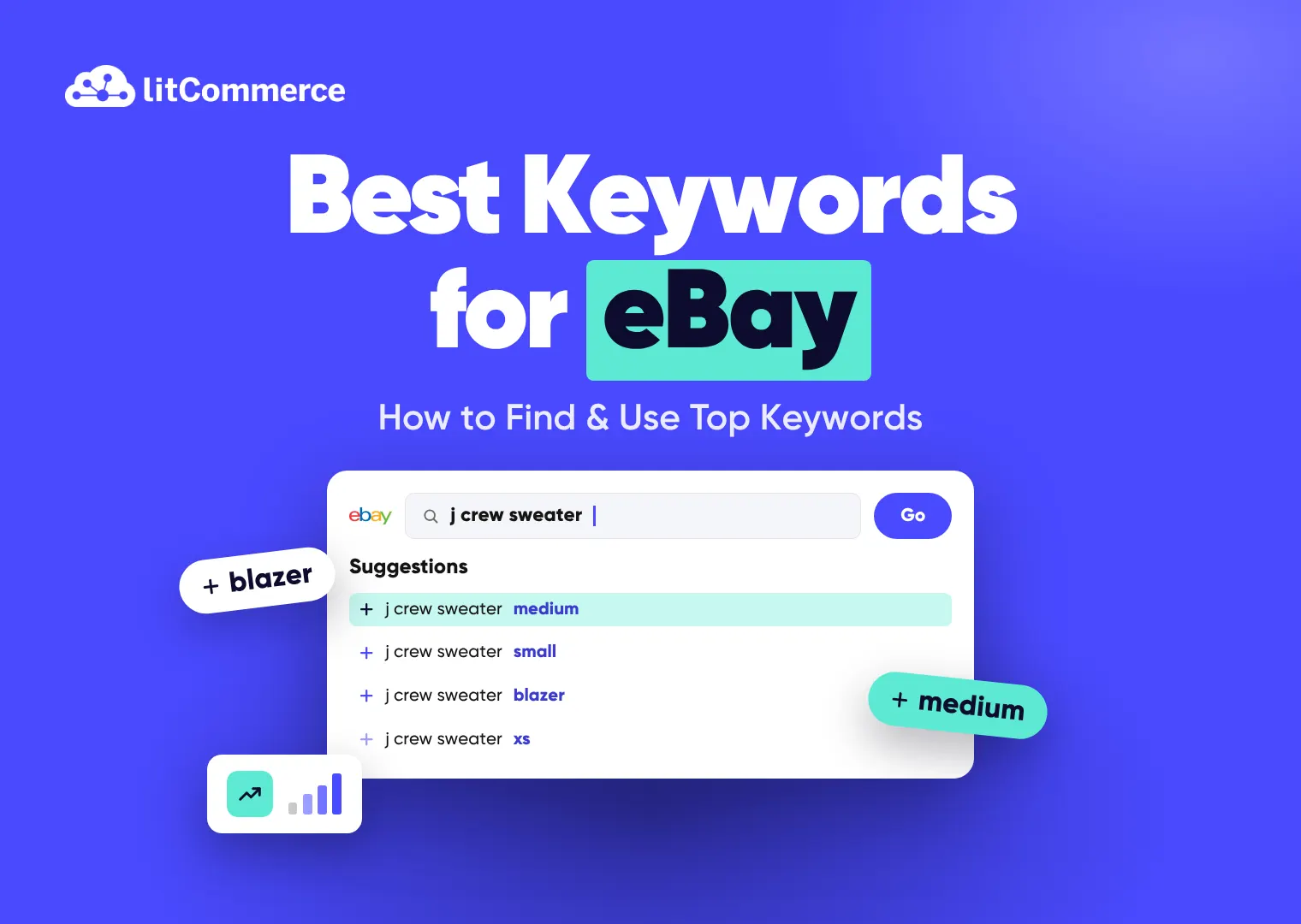
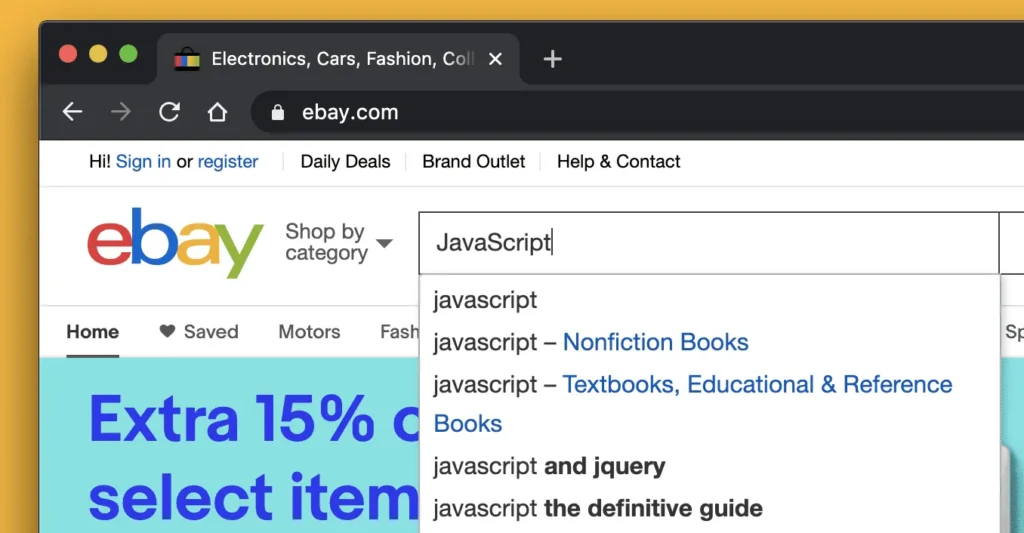
Type the first two or three words of your item into the eBay search bar and note the suggestions. These reflect phrases buyers search often, in the word order they actually use. From there, try variations: brand first, then product type first, then a model number.
Keep one limit in mind, though. Autocomplete shows popularity, not search volume, and it doesn’t tell you whether those searches end in a sale. Treat it as a list of candidates rather than a final verdict.
2. Filter by sold items
Sold listings show which titles convert, not just which ones exist. Here’s the routine we recommend:
- Search your product the way a buyer would.
- In the left-hand filters, tick Sold items under “Show only”.
- Open the titles of 10 to 20 recent sold listings that match your item.
- Write down words that repeat: brand, model, size, material, condition terms.
- Note the word order top sellers use, since buyers often search in that order.
If most sold titles include “tested” or “working”, buyers are clearly looking for proof of function, so add those words if they’re true for your item. Our guide on how to see sold items on eBay walks through the filters on desktop and mobile.
One caution here: don’t copy a competitor title word for word. Sold titles can contain errors, and besides, an exact copy gives you no edge.
3. Use Product Research (formerly Terapeak) in Seller Hub
Product Research is eBay’s free sales research tool inside Seller Hub, although many sellers still call it Terapeak. According to eBay’s Product Research help page, it shows:
- Average sold price and sold price range
- Sell-through rate (only for searches covering the last 90 days)
- Total sold and total sellers
- Average shipping cost and share of listings with free shipping
- Selling format split (auction vs fixed price)
- Up to three years of eBay sales data
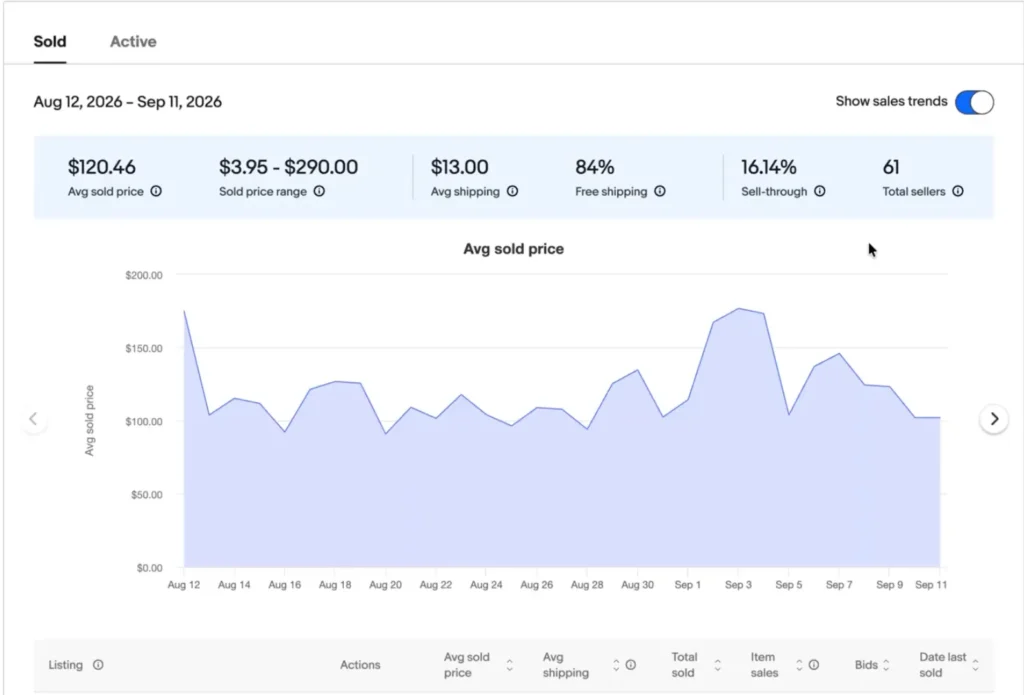
Notice what it doesn’t show: search volume. Product Research tells you how often a phrase leads to sales, not how often buyers type it. Even so, that’s the more useful number when you’re choosing keywords for eBay titles.
Sell-through rate is the share of listings that sold, so compare it across your candidate phrases. For example, if “Nikon FM2 body” sells through far better than “vintage camera”, the specific phrase deserves your title space. Our full walkthrough of eBay Terapeak research shows how to set up these searches.
4. Read the filters down the left-hand side
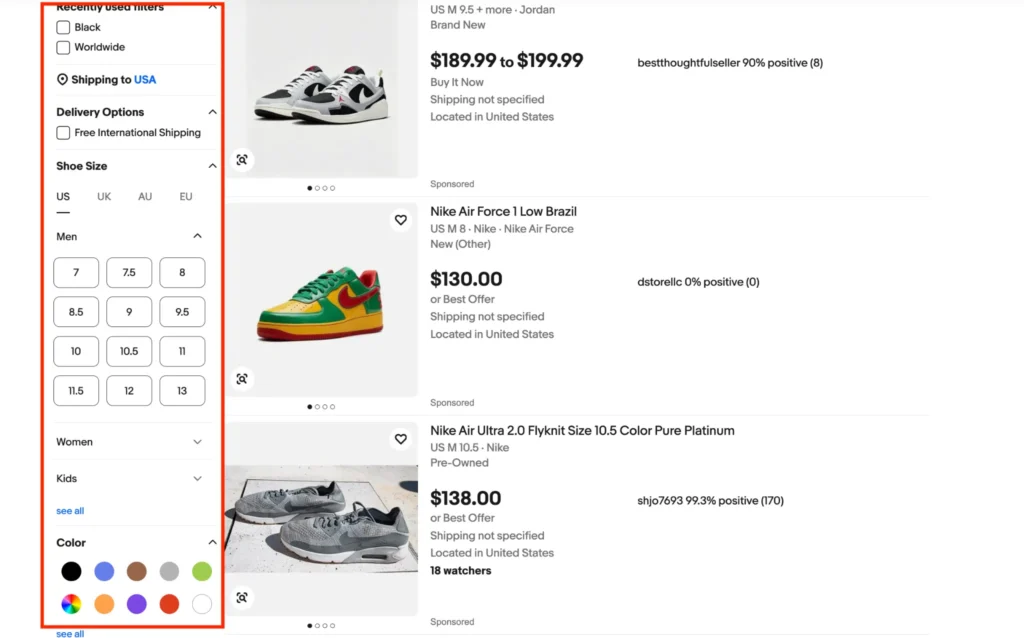
The filter panel on any eBay search results page is, in effect, a free list of the Item Specifics buyers use. If Lens Mount, Color, or Size appears near the top, buyers filter by it often. In short, every filter you see there is a field you should fill on your listing.
5. Listen to your buyers
Buyer messages and Best Offer notes are an underused keyword source. If several buyers ask “Does this fit the Canon EOS R6?”, that phrase belongs in your title or Item Specifics. Return reasons help too, since “not as described” returns often point to a misleading keyword.
How to Read Keyword Metrics to Choose Keywords List
Before any phrase earns title space, read four metrics together: demand, competition, sell-through rate, and sold price. Because eBay doesn’t publish search volume, demand comes from sold counts in Product Research rather than a monthly search number. No single metric decides on its own. For instance, a phrase with strong sales but thousands of competing listings can still be a poor pick for a newer seller.
| Metric | Where to find it | How to read it |
|---|---|---|
| Demand (total sold) | Product Research, Sold tab | How many units sold for that phrase in the period. Higher totals mean proven buyers, but check the date range you selected. |
| Competition (active listings) | Product Research, Active tab, or the result count on an eBay search | How many listings you’d compete with right now. Fewer active listings for a phrase with steady sales is the gap you want |
| Sell-through rate | Product Research, Sold tab (last 90 days only) | Units sold divided by listings in the period. Many resellers treat 50% or more as healthy demand and under 20% as a crowded field. Use this as a rule of thumb, not an eBay benchmark |
| Average sold price | Product Research, Sold tab | Shows what buyers actually pay for that phrase. A keyword that pulls lower-priced versions of your item can bring clicks that never convert at your price. |
Here’s how the metrics work together in practice:
- High sold count, low sell-through: demand is real, but supply is higher. In that case, win with a more specific long-tail phrase rather than the broad one.
- Low sold count, high sell-through: this is a small but underserved niche, which suits newer sellers since few listings compete.
- Sold price far below yours: the phrase attracts a cheaper version of the item. To fix it, add the attribute that justifies your price, like “tested” or “original box”.
- Strong numbers, wrong intent: if the phrase doesn’t describe your exact item, skip it. After all, mismatched keywords bring returns, not sales.
Here’s a quick worked example. Say 15 of the 20 sold FM2 titles you reviewed include “35mm” and “SLR”. Meanwhile, Product Research shows “Nikon FM2 body” with steady sales, a higher sell-through rate than the broad “vintage film camera”, and fewer active listings. Autocomplete also suggests “nikon fm2 body”. Put together, those signals point to a title that starts “Nikon FM2 35mm SLR Film Camera Body”.
Tired of finding keywords & rewriting titles one by one
With LitCommerce’s Bulk AI Optimize, you select multiple eBay listings and let AI rewrite their titles and descriptions with buyer-friendly keywords in one run – Save 80% of listing time.
eBay Keyword Tools Comparison: Free & Paid
For most sellers, eBay’s free tools cover keyword research well: autocomplete, the sold filter, and Product Research. Paid tools pay off only if you research many products a week or need to apply keywords across a large catalog.
The table below compares each eBay keyword tool by the data it gives and the job it suits.
| Tool | Main features | Pricing | Best for |
|---|---|---|---|
| eBay Search Autocomplete | Real-time keyword suggestions, long-tail search phrases, and buyer search wording | Free | Building a first candidate list |
| Sold Items Filter | Recently sold listings (up to 90 days), successful listing titles, sold prices, and sales dates | Free | Confirming which words convert |
| Product Research (formerly Terapeak) | Up to 3 years of sales data, average sold prices, sales trends, sell-through rates, and competitor insights | Free with Seller Hub | Validating demand before you commit title space |
| Seller Hub Traffic Report | Listing impressions, organic vs. promoted traffic, click-through rates, page views, and sales conversion rates | Free | Measuring whether keyword changes worked |
| ZIK Analytics | eBay keyword research, title optimization, competitor sales analysis, product research, and title builder | Paid plans; check vendor site | High-volume product research and dropshipping |
| Keyword Tool Dominator | Bulk eBay autocomplete keywords, keyword popularity scores, trending keyword signals, filtering, and keyword exports | Free (2 searches/day); paid plans | Expanding long-tail keyword lists fast |
| LitCommerce | Bulk title and description, bulk editing, AI-powered listing creation and optimization, reusable listing templates, and automated multichannel inventory and price sync | From $29/month; 7-day free trial | Applying keywords across 50+ listings and several channels |
How we chose these tools: each one either gives eBay-specific data or applies keywords on eBay at scale. We left out general SEO tools like Google keyword planners because Google search volume doesn’t reflect what eBay buyers type. Prices come from each vendor’s public page and change often, so confirm before you buy.
Our take: if you list a handful of new items a week, the four free eBay tools are enough. Research tools like ZIK pay off for sellers sourcing new products daily. But once your problem shifts from finding keywords to applying them across hundreds of listings, a bulk editing tool saves more time than more research.
For a wider list, see our roundup of the best eBay research tools.
How to Add Keywords to eBay Listing
When learning how to use keywords on eBay, you should place them in four main areas, in strict order of search priority:
- Title (Highest priority): Places your primary target keywords directly in front of buyers within the 80-character limit.
- Item Specifics & Product Identifiers: Feeds eBay’s structured filter data (like Brand, Size, MPN, UPC) to ensure your listing appears when buyers refine search results.
- Category: Determines which search results and category-specific filters your product qualifies for.
- Description: Supports overall relevance and buyer trust, driving conversion rather than direct search ranking.
Build the title with a fixed formula
Use this order as your starting point: Brand + Model + Product type + Key attribute + Size or color + Condition. Front-load the words buyers type first, because shoppers scanning results on a phone mostly read the first few words.
| Niche | Before | After | Length |
|---|---|---|---|
| Vintage camera | Lovely Vintage Item Nice Condition | Nikon FM2 35mm SLR Film Camera Body Black Tested Working Excellent | 66 characters |
| Handmade wallet | Leather Wallet Nice Great Quality Best Seller | Handmade Tan Leather Bifold Wallet RFID Blocking Mens Slim New | 62 characters |
| Clothing | Men’s jeans great fit | Levi’s 501 Original Fit Jeans Men’s 34×32 Dark Wash Blue Cotton | 62 characters |
| Auto parts | Brake pads car | Front Ceramic Brake Pads Set fits Toyota Camry 2018-2023 | 56 characters |
A few title rules hold across every niche:
- Cut filler adjectives. “Nice”, “great”, “best seller”, and “L@@K” use space without matching any search.
- Don’t repeat words. “Nikon Nikon FM2 FM2” wastes characters, and repetition doesn’t lift your ranking anyway.
- Skip ALL CAPS. It reads as shouting and makes titles harder to scan on mobile.
- Use “fits” or “compatible with” only for parts and accessories. Put the phrase before the compatible item, as in the brake pad example. For vehicle parts, also fill eBay’s parts compatibility table.
- Check spelling. A misspelled brand or model misses the exact searches you wanted.
You don’t need to hit all 80 characters, either. Fill the space with accurate, searchable words, and stop when you run out of true ones.
Fill item specifics and product identifiers completely
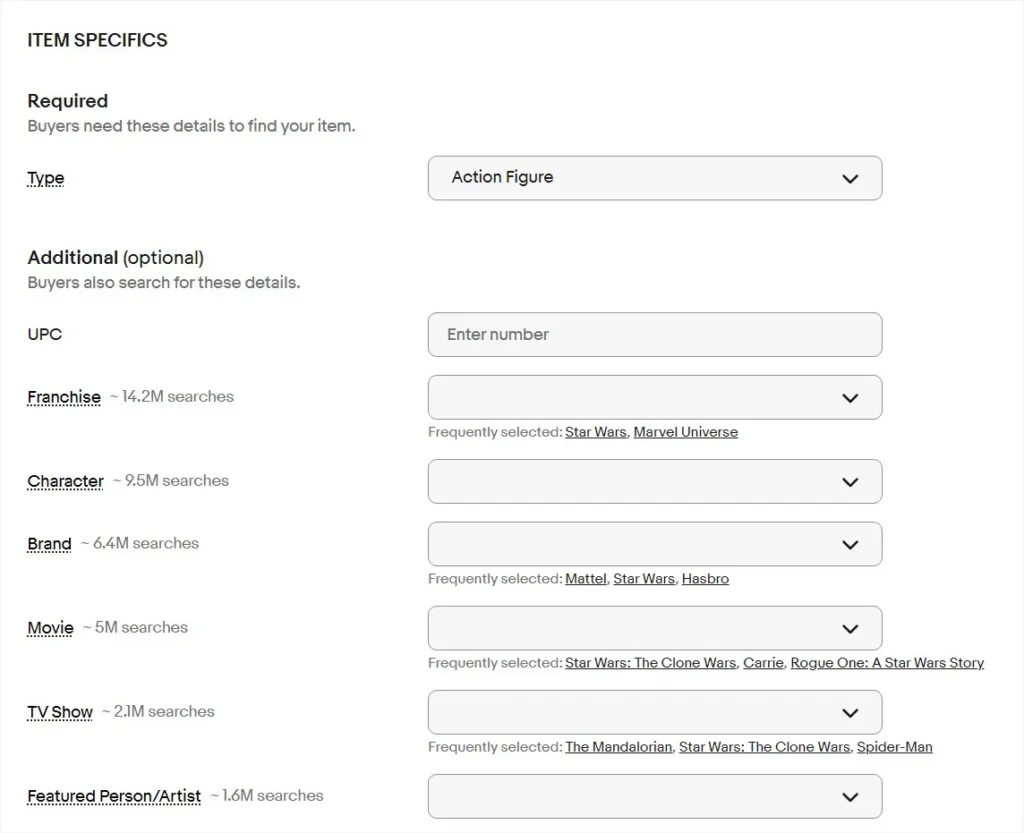
eBay’s listing form groups Item Specifics as required, recommended, and additional. Fill all three groups wherever a value applies, since each filled field is another filter your listing can appear in.
For most physical products, cover at least:
- Brand and model, or MPN
- Type and style
- Color, size, and material
- Condition, plus a condition description for used items
- UPC, EAN, or ISBN when the item has one; choose “Does not apply” only when it truly has none
In our experience reviewing seller catalogs, older listings are where gaps hide. Listings created years ago often miss fields eBay has added since, so audit those first.
Pick the most specific category
The category decides which filters a buyer sees. For example, a lens listed under the general “Cameras & Photo” category misses lens-specific filters like Mount and Focal Length. So choose the deepest leaf category that fits, and use a second category only if it adds real visibility.
Write the description for buyers, with natural keywords
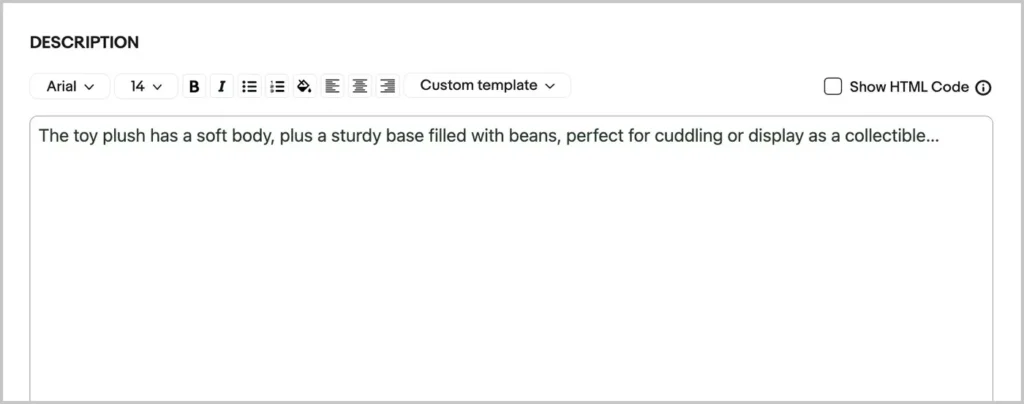
Open with one sentence that restates the item in plain words, then cover condition, what’s included, and key specs. For the camera, that might read: “Nikon FM2 35mm film SLR body in black, fully tested, shutter accurate at all speeds. Includes body cap and strap.”
Above all, write for a buyer reading on a phone. Short lines and honest flaws build more trust than copy stuffed with keywords for eBay’s search engine. For photos, pricing, and other listing factors, see our eBay listing optimization tips.
Rewriting titles across 50+ eBay listings?
LitCommerce’s eBay listing tool lets you bulk-list products on eBay in just a few clicks. Plus, AI-optimized listings and reusable listing templates help you create better listings with less manual work.
eBay Keyword Rules: What’s Allowed and What Gets Listings Removed
eBay allows any keyword that accurately describes the item for sale. Anything else can violate its Search and Browse Manipulation policy, the eBay VeRO program, or the duplicate listings policy, and lead to listing removal, a warning, selling restrictions, or account suspension.
Not allowed (can get listings removed):
- Unrelated keywords: “Samsung S24 Case iPhone Pixel” on a Samsung-only case
- Brand comparisons: “Rolex Style Mens Watch” on an unbranded watch
- Brand names on non-genuine items: an unbranded bag titled “Gucci Tote”
- “Fits” before a brand in jewelry, clothing, or accessories: “Charm Bead fits Pandora Bracelet”
- Question marks to hedge details: “Rolex? Vintage Watch”
- Several brands or models in one listing: an iPhone 6 and an iPhone 7 together
- Duplicate listings with different keyword titles: one “Vintage”, one “Retro” for the same item
- Wrong Item Specifics: a red jacket listed with Color: Blue
In practice, most of these violations are accidental. A seller adds a competitor brand to “catch” its searches, or writes “style” to describe a look. Either way, eBay reads both as manipulation, whatever the intent.
How to Update Keywords Across Many Listings at Once
For quick changes to a batch of live listings, use Seller Hub’s bulk edit; for large rewrites, a Seller Hub Reports CSV works better. Either way, eBay says its bulk tools can revise hundreds of live listings at a time. A multichannel listing tool only makes sense once the same products also sell on Etsy, Amazon, or other channels.
Bulk edit in Seller Hub
In Seller Hub, go to Listings, select the listings you want to change, then choose Edit. From there, you can update titles, Item Specifics, price, and quantity across the selection in one pass. It’s free and fast for edits that follow one pattern, like adding “Tested” to every working camera.
That said, watch for a few revision limits. You can’t change most details on an auction with bids or one ending within 12 hours. Listings with pending Best Offers also block some edits, so respond to offers first.
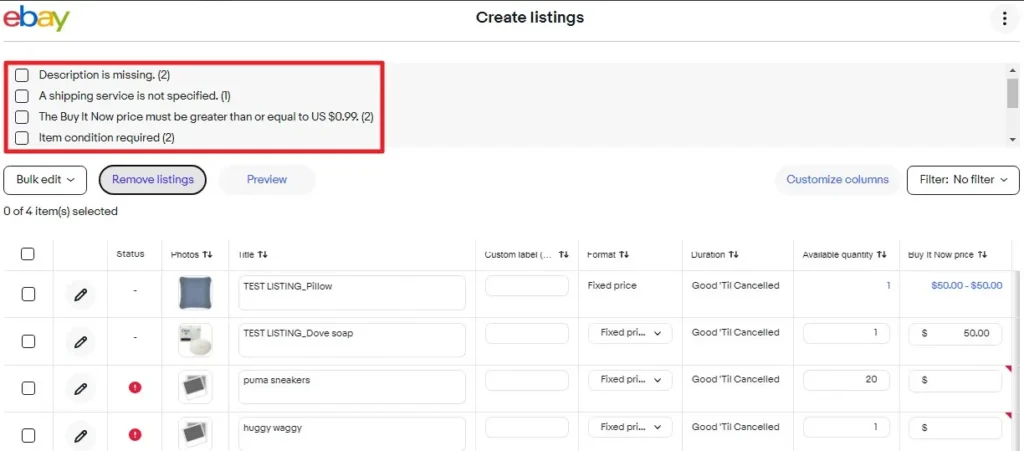
Seller Hub Reports (formerly File Exchange)
For bigger rewrites, download your active listings as a CSV from Seller Hub Reports. Next, edit titles and Item Specifics in a spreadsheet, then upload the file back. eBay’s bulk listing tools page explains the templates and column headers.
This route handles large volumes, but the format is strict. A misnamed column or a wrong category ID makes rows fail, so always keep a backup of the original file.
Use a multichannel tool when you sell beyond eBay
Keyword research doesn’t transfer one-to-one between marketplaces. If you sell across multiple marketplaces, you’ll also need to adjust your product information to meet each platform’s listing requirements.
That’s where LitCommerce comes in. Instead of manually updating every product, you can manage and optimize hundreds of eBay listings from one dashboard. Here’s how LitCommerce helps:
- Run Bulk AI Optimize on many eBay listings at once. Select multiple listings, then our AI improves product titles and descriptions, helping you create more complete, keyword-relevant listings with less manual effort.
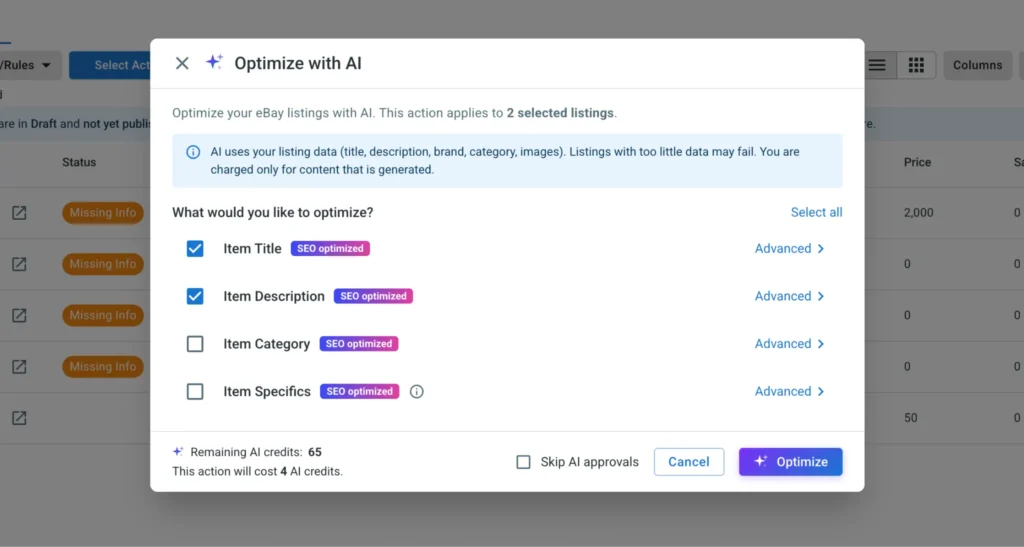
- Bulk edit listing details with Templates and Rules: Create reusable templates for titles, descriptions, categories, and pricing to keep listing information consistent and reduce repetitive edits.
- Manage multiple marketplaces in one place: List products on eBay, Etsy, Amazon, TikTok Shop, and other supported channels while automatically syncing inventory and prices to reduce the risk of overselling.
Try LitCommerce eBay integration today to spend less time on repetitive listing updates and more time researching keywords that help buyers discover your products.
How to Tell If Your eBay Keywords Are Working
To see whether your keywords for eBay are paying off, check the Traffic report in Seller Hub, under Performance. It shows impressions, click-through rate, page views, and sales conversion per listing. Impressions tell you whether keywords get you into search results, while click-through and conversion tell you whether the title, photo, and price win the buyer once there.
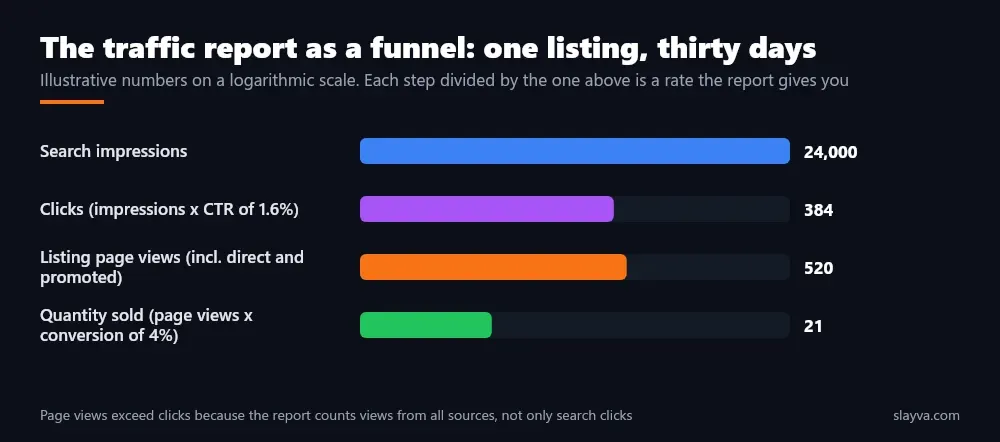
Read the numbers together to find the real problem:
| What you see | Likely cause | What to change |
|---|---|---|
| Low impressions | Keywords don’t match buyer searches, or Item Specifics are missing | Title wording, Item Specifics, category |
| High impressions, low click-through | Title or main photo doesn’t stand out, or price looks high | Title order, main photo, price |
| Good clicks, low conversion | Listing page doesn’t answer buyer questions | Description, shipping cost, return policy |
Change one thing at a time and wait two to four weeks before judging. Otherwise, if you rewrite the title and cut the price together, you won’t know which change worked.
Once organic placement is solid and you need more reach, paid placement is the natural next step. Our guide on how to promote your eBay listing covers Promoted Listings settings and budgets.
Best Keywords for eBay: FAQs
What are the best keywords for eBay?
The best keywords for eBay are the exact phrases buyers type for your item that also appear in sold listings. Usually, that means brand, model, product type, and a key attribute like size or condition. Confirm them with the sold filter and Product Research, not guesswork.
How many keywords should an eBay title have?
There’s no fixed count. Instead, fit as many accurate, searchable words as the 80-character limit allows, using the Brand + Model + Product type + Attribute + Condition order. Most strong titles land between 8 and 12 words, with no filler.
Do item specifics count as keywords on eBay?
Yes. eBay uses Item Specifics as structured search data, especially for filtered searches. So if a buyer filters by Brand or Size and your field is blank, your listing drops out of those results, even with a strong title.
Is there a free eBay keyword tool?
Yes, there is. eBay’s search autocomplete, the Sold items filter, and Product Research in Seller Hub are all free, and together they show what buyers search and what sells. Third-party tools like Keyword Tool Dominator also offer limited free tiers.
Can I use another brand’s name in my eBay title?
Only for genuine items of that brand, or to state real compatibility for parts and accessories. Phrases like “Rolex style”, or adding a brand you don’t sell, break eBay’s search manipulation rules. Also note that “fits” before a brand name isn’t allowed for jewelry, clothing, or accessories.
How often should I update my eBay keywords?
Review your keywords for eBay listings every quarter, and sooner if impressions drop for several weeks in a row. Check seasonal items before each peak, while evergreen listings that keep selling can stay unchanged longer.
Final Thoughts
Keywords for eBay work when they mirror what buyers type and what actually sells. To get there, research with autocomplete, sold listings, and Product Research. Then put the strongest phrases in your title, fill every relevant Item Specific, and stay inside eBay’s search manipulation rules. Finally, measure impressions and click-through before you make the next change.
Have a question about your eBay listings, or about applying this research across your catalog? Contact us, and our support team will walk you through it. For more guides on titles, fees, and listing strategy, browse our eBay blog.