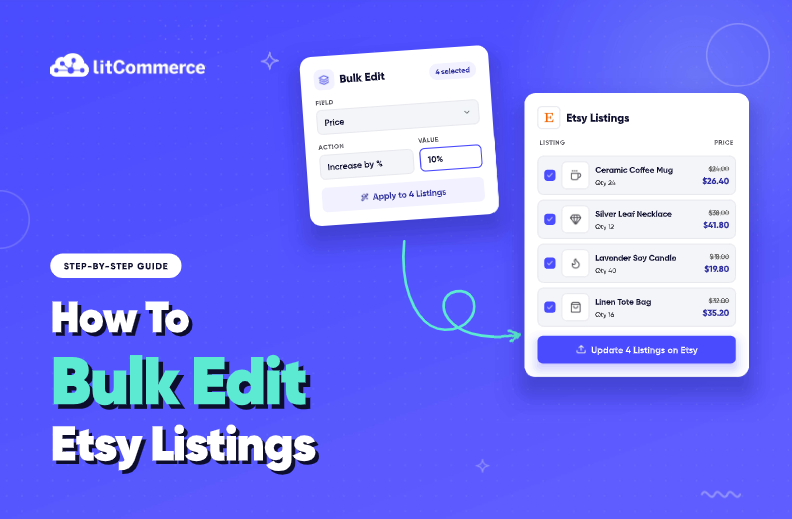
Editing listings one by one gets old fast once your shop has more than a handful, which is why so many sellers look for a way to bulk edit Etsy listings instead of editing each one by hand. Etsy’s Shop Manager does have a free native tool for exactly that, but it doesn’t cover every field, and it comes with real risks you should know before you touch a single listing. Here’s what to expect:
- Which fields you can bulk-edit natively, titles, tags, prices, shipping profiles, and more
- The character limits and format rules that can quietly break a bulk edit
- Step-by-step workflows for both Shop Manager and a third-party tool like LitCommerce
- The no-undo reality, plus an unconfirmed fee issue some sellers report
- When a multichannel tool becomes worth the monthly cost
If you just need the numbers, jump to the field limits table below. If you’re worried about making a costly mistake, skip ahead to the risk and safety checklist section. Otherwise, read on. We’ll walk through native Shop Manager bulk edit, common use cases, what you still can’t change, and when managing multiple shops or channels means it’s time to look past Etsy’s built-in tool.
Key takeaways:
- Single Etsy shop, under 100 listings: Etsy’s free native bulk editor (Shop Manager > Listings > Editing Options) handles titles, tags, prices, and shipping profiles in a few clicks.
- Shop with 100+ listings or frequent SEO refreshes: filter by section or tag before you bulk edit, so you don’t accidentally change listings you didn’t mean to touch.
- Selling on Shopify, eBay, or TikTok Shop too? Etsy’s native bulk editor only updates Etsy. A multichannel tool like LitCommerce pushes the same change to every connected channel automatically, keeping your entire inventory aligned across all marketplaces.
- Need to change photos or variations in bulk: neither Etsy’s native editor nor most third-party tools handle this. You’ll still need to edit those listing by listing.
What Fields Can You Bulk Edit Etsy Listings?
Bulk edit means selecting a group of listings and changing one field across all of them at once, instead of opening each listing individually. Etsy’s native version lives inside Shop Manager, costs nothing, and applies changes instantly the moment you hit save.
According to Etsy’s own documentation, the free bulk edit Etsy listings tool lets you modify titles, tags, descriptions, prices, custom options, production partners, renewal options, processing profiles, and shipping profiles across multiple listings from one screen. That covers most of what a seller touches day to day. What it doesn’t cover is just as important, and we’ll get to that in the limitations section.
Here’s how the fields break down:
Field | Bulk Edit Available? | Notes |
Title | Yes | Standard text field |
Tags | Yes | Overwrites existing tags unless handled carefully |
Description | Yes | Watch the character cap |
Price | Yes | Numeric, two decimals |
Personalization | Yes | Custom fields like engraving or monogram text |
Production Partners | Yes | If your shop uses them |
Renewal Options | Yes | Dropdown-limited setting |
Shipping Profile | Yes | Must match an existing profile name |
Section | Yes | Must match an existing section name |
Images | No | Must edit one listing at a time |
Variations (price only) | Yes | Only the price, not the attribute itself |
Variant attributes (size, color) | No | Requires editing each listing's variation panel |
Etsy’s Help Center is the source for this breakdown, and it’s worth a quick check in your own Shop Manager before you start, since field names and menu placement can vary slightly by account type or region. Images and most variant attributes sit outside what native bulk edit touches, which is exactly why a lot of sellers eventually look at the broader Etsy toolkit for photo or variant-heavy catalogs.
Editing hundreds of listings by hand gets old fast
Shop Manager’s bulk edit works fine for small batches on a single shop. Once you’re managing more listings or more than one channel, a spreadsheet-style editor with search and filters can save real hours each week.

How to Bulk Edit Etsy Listings (Step-by-Step Guide)
Once you know which fields are fair game and what Etsy’s limits are, the next question is how to actually make the change. There are two ways to bulk edit Etsy listings: Etsy’s own Shop Manager, free but limited to one shop and one channel, or a multichannel tool, worth it once you manage more than one Etsy shop or sell on more than one channel.
Option 1: Bulk edit using Etsy’s Native Shop Manager
It looks like a lot of clicks written out like this, but once you’ve done it the first time, bulk editing Etsy titles, tags, and prices this way takes well under a minute. Here’s exactly how it plays out inside Shop Manager, from login to the final click:
Step 1: Log in and go to Shop Manager.
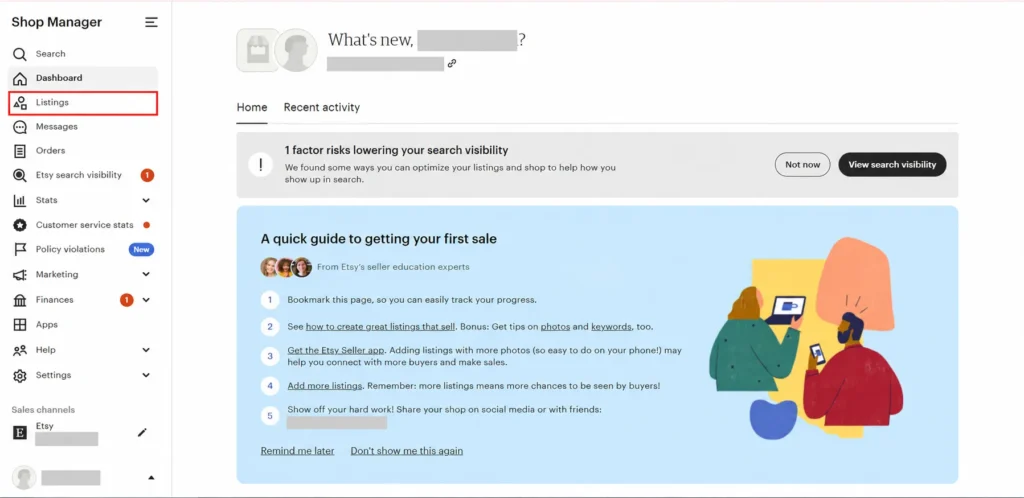
Step 2: Go to Listings, then filter by section or status if you want a narrower batch of listings
Step 3: Select the listings you want to change using the checkboxes.
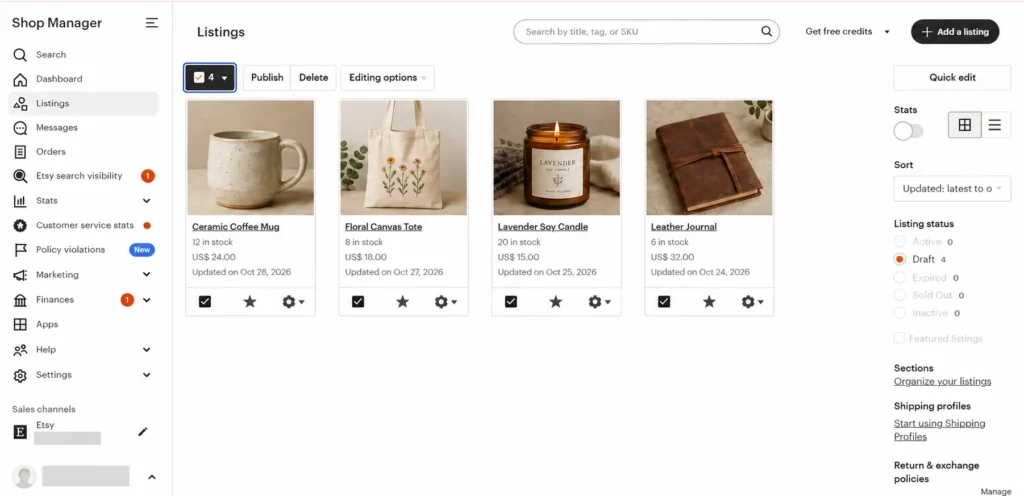
Step 4: Open Editing Options
Step 5: Choose the field you’re changing, such as Title, Tags, Description, or Shipping Profile
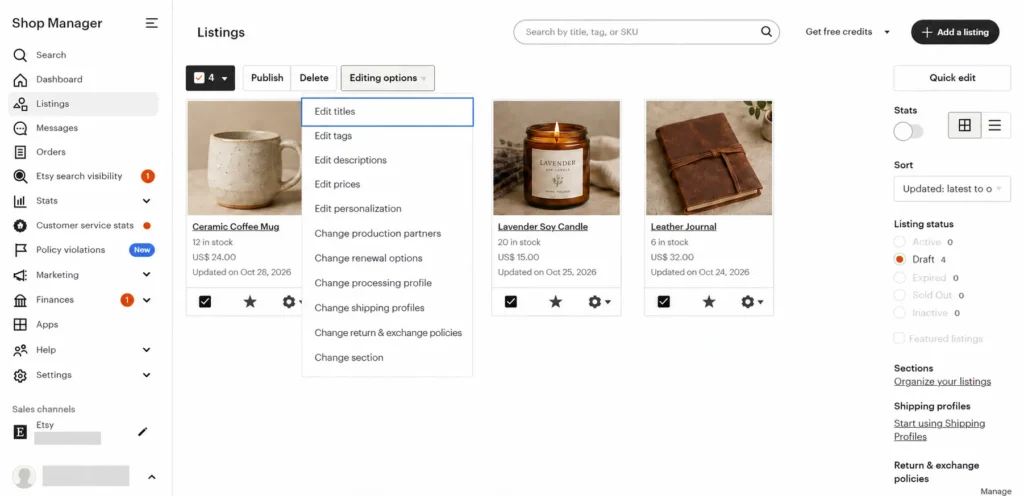
Step 6: Enter the new value, or pick it from a dropdown.
Step 7: Review the preview Etsy shows before you confirm.
Step 8: Click Apply to save to all chosen listings
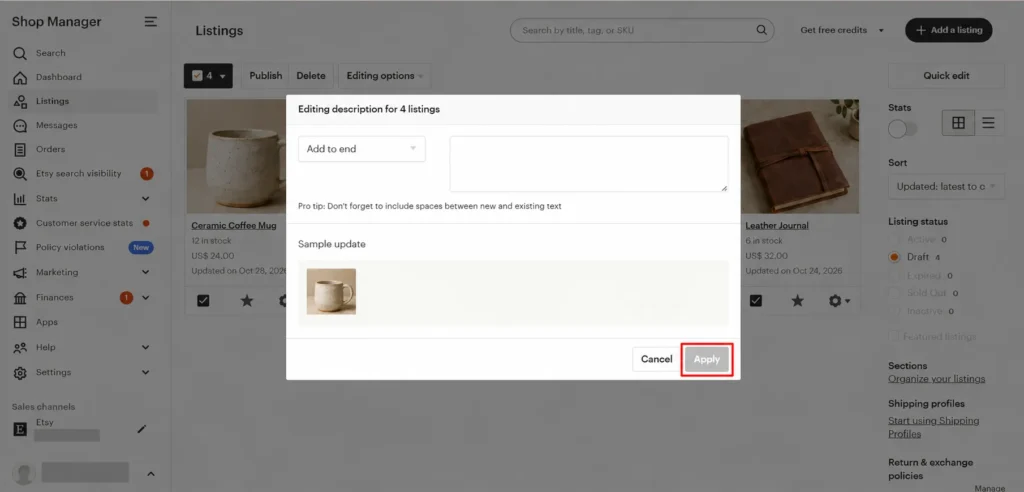
Tip: Nothing is sent to Etsy until you click Apply, and once you do, there’s no undo. The change takes effect instantly across every selected listing. That’s the appeal of native bulk edit: no waiting, no sync delay.
Before you scale up, run through these safety habits:
- Test on 3 to 5 listings first, not your whole catalog.
- Never select your entire shop on the first attempt, even if you’re confident.
- Screenshot the field before editing, so you have something to reference if you need to revert manually.
Option 2: Bulk edit using LitCommerce
LitCommerce connects to your Etsy shop and shows every listing in one spreadsheet-style table, instead of Shop Manager’s screen-by-screen view. From there, you can open Multi-edit mode and push one change out to as many listings as you’ve selected, all in a single pass.
Here’s what that looks like step by step:
Step 1: You connect your Etsy shop to LitCommerce, along with any other channels you sell on, such as Shopify, eBay, or TikTok Shop.
Step 2: Open the Listings dashboard and select the listings you want to bulk edit.
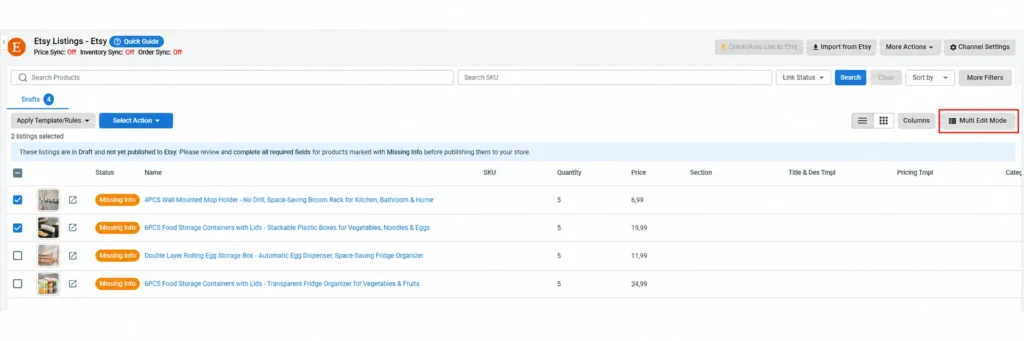
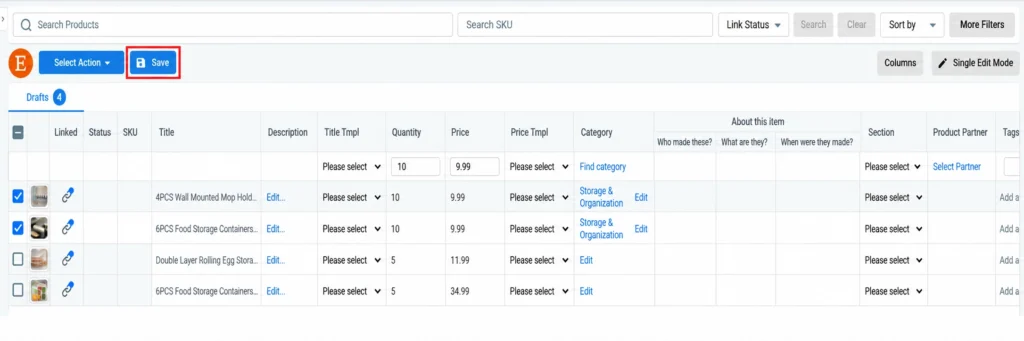
Step 3: Switch to Multi-edit mode to change title, price, or description across all of them at once.
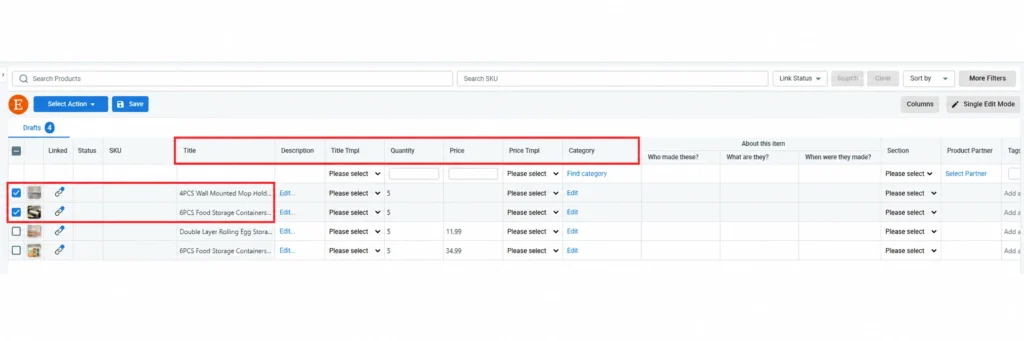
Tip: If you’re updating price or stock, Price & Inventory Rules can apply that logic for you right here, instead of entering each value by hand.
Step 4: Once done, click Save. Then LitCommerce applies the change once and pushes it to Etsy and every other connected channel from that single edit.
A few LitCommerce features built specifically around Etsy selling:
- Multi-edit mode gives you that spreadsheet-style view of your Etsy listings, so titles, tags, prices, or descriptions change across a batch in one pass, not one field at a time.
- Price & Inventory Rules apply the same pricing or inventory logic across every Etsy listing automatically, instead of repeating the same edit by hand.
- One dashboard handles multiple Etsy shops, or Etsy alongside Shopify, eBay, TikTok Shop, and other connected channels.
- AI Description Optimization can rewrite Etsy listing descriptions in Etsy’s own tone and SEO style, using your own keywords.
Etsy syncs happen automatically within about 60 minutes due to Etsy’s own API rate limit, so your update lands without any extra steps once you hit Apply.
If you’re running one Etsy shop with a manageable listing count, the native tool does the job and costs nothing. The calculus changes once you’re juggling hundreds of listings or more than one sales channel, which we’ll get into later in this article.
Juggling Multiple Etsy Shops or Multichannel Sales?
Streamline your multichannel sales with LitCommerce. Automate bulk edits, smart pricing rules, and inventory sync for Etsy and 10+ marketplaces. Plans from $29/mo + 7 days free!
4 Common Use Cases When Sellers Bulk Edit Etsy Listings
Knowing which fields you can edit is one thing. Knowing when to actually use bulk edit is another. These are the scenarios sellers run into most often, and the approach differs depending on whether you’re staying native or using a dedicated tool.
Increase prices by a percentage across listings
Say material costs jumped and you need to raise prices by 15% across 200 listings. Etsy’s native Editing Options don’t include a percentage calculator, so you’d have to work out each new price yourself and enter it manually. It’s tedious, but it’s free.
Run a store-wide sale
Etsy’s own Sales and Discounts tool already handles this well. You can apply a percentage off to your whole shop or specific listings, and Etsy automatically shows the sale price, so you don’t have to recalculate anything. For the exact setup, our guide to running a sale on Etsy walks through it step by step.
That said, this native tool only touches Etsy. The harder part comes in when you want the same sale running across every other channel you sell on at the same time.
Update shipping profiles in bulk
If you’ve moved warehouses or changed handling times, native Etsy handles this well. Select your listings, pick the new shipping profile from the dropdown, and apply. This is one case where the free tool is genuinely the better choice: the change is instant, and the field is built for exactly this.
Refresh tags for SEO across old listings
Adding a trending keyword tag to 50 listings without wiping out the ones already there is where native bulk edit gets risky. It’s not always clear whether Etsy’s tag field adds to your existing tags or replaces them, so test on one listing before running the change across the rest. Template-based tag additions in a third-party tool let you append a new tag without touching what’s already there. See best Etsy tags for what to put in them once you’re refreshing.
For shops juggling the same price or tag update across more than one channel, LitCommerce’s Price & Inventory Rules and Quick Publish apply the change everywhere at once, instead of repeating it channel by channel.
How to Bulk Edit Etsy Listings: What Fields Can’t You Change?
Native bulk editing or using a third-party tool can’t touch images, variant attributes, listing category, listing type, tax settings, or the underlying logic behind personalization options.
Here’s the full list of what stays off-limits:
- Images and photos, which must be changed one listing at a time
- Variation attributes such as size or color (only the price tied to a variation can be bulk edited)
- Listing category
- Listing type (physical, digital, or service)
- Tax settings
- Personalization option logic, beyond the field name itself
If your to-do list involves swapping out Etsy listing photos size or restructuring variant options across dozens of listings, native bulk edit won’t get you there. That’s usually the point where sellers start looking at other workflows or tools built for image and variant management at scale.
Bulk Edit Risks and the Safety Checklist Before You Apply Changes
Bulk edit saves time, but it also multiplies whatever you get wrong. Before you run one on a large batch, here are the three risks worth knowing about.
First, there’s no undo. Etsy Shop Manager bulk edit doesn’t have an undo button. Once a bulk edit applies, it’s live across every selected listing, and a mistake means fixing each one by hand or running another bulk edit with the right values. This is the biggest reason to test small before going big.
Second, there’s a possible renewal or relisting fee. Some sellers report in Etsy’s community forums that bulk editing, particularly changes to renewal settings or reactivating listings, has triggered unexpected fees. Etsy hasn’t officially confirmed this behavior, and it doesn’t appear in the Seller Handbook. Still, enough sellers have mentioned it that it’s worth a quick invoice check after any large batch edit.
Third, watch for truncation or format errors. Go over a character limit or feed in the wrong price format, and the edit can fail silently or cut off your text without warning. Testing on a handful of listings first catches this before it becomes a shop-wide problem.
Before you bulk edit anything beyond a handful of listings, run through this checklist:
- Test the edit on 3 to 5 listings first, never your whole shop
- Screenshot the field before editing, in case you need to reference the original
- Confirm your new values fit within the field limits table above
- Review Etsy’s preview screen before clicking Apply
- Check a small batch on your live shop to confirm the change worked as expected
- Review your invoice or billing page afterward for any unexpected charges
- Only then scale up to larger batches
This isn’t overcaution. It’s the sequence most experienced Etsy sellers settle into once they’ve been burned by a bulk edit gone sideways, usually a tag overwrite or a shipping profile name that didn’t quite match.
How to Bulk Edit Etsy Listings: When Native Tools Aren’t Enough
Etsy’s native tool handles a lot of this well, so the real question isn’t whether you can bulk edit Etsy listings for free, it’s when that stops being enough. There are three situations where it does.
- You manage more than one Etsy shop. Etsy’s bulk editor works shop by shop; there’s no way to apply one change across several shops at once. See our guide to manage Etsy multiple shops if you’re running more than one.
- You sell on Shopify, eBay, or TikTok Shop too. A price or stock change made in Etsy’s bulk editor only updates Etsy. Everywhere else still needs the same change made separately.
- You need to bulk edit Etsy listings across a large catalog, without doing it shop by shop. Past a few hundred listings or several channels, repeating the same bulk edit everywhere starts costing real time every week.
This is where a multichannel listing tool like LitCommerce earns its place. Instead of opening Etsy’s own editor every time, you bulk edit Etsy listings once from a single dashboard that also connects every other channel you sell on, 10+ in total.
From there, a single change, a price update, a new tag, an updated description, pushes out to every connected channel at once. Most fields sync every 15 minutes; Etsy syncs every 60 minutes, because of Etsy’s own API limits.
Order Sync pulls every Etsy order into that same dashboard with no limit on volume, and AI Description Optimization can rewrite descriptions in Etsy’s tone and SEO style using your own keywords. See how Etsy integration works with LitCommerce.
Verdict: Here’s a simple way to decide which path fits.
- Stick with native Etsy bulk editor if you run a single shop, sell only on Etsy, make under 100 edits a month, and don’t need advanced search or filtering.
- Consider LitCommerce if you manage multiple Etsy shops, sell across Etsy plus other channels, need real-time price and inventory sync, manage 500 or more listings, or update your catalog frequently for sales and seasonal changes.
How to Bulk Edit Etsy Listings – FAQs
Can I bulk edit images on Etsy?
No. Etsy’s Shop Manager doesn’t support bulk image editing. You’ll need to upload, swap, or remove photos one listing at a time.
What happens if a bulk edit fails to apply?
If your change breaks a field limit or format rule, Etsy usually shows an error. If it fails silently, which is rare, check a few listings afterward to confirm the edit actually took effect, then correct and retry if it didn’t.
How long does a bulk edit take to appear on my live Etsy shop?
Native Etsy bulk edit applies instantly. LitCommerce syncs changes to Etsy within 60 minutes, a limit set by Etsy’s API rate limits rather than anything LitCommerce controls.
Can I undo a bulk edit after applying it?
No. Shop Manager has no undo function. If something goes wrong, you’ll need to fix each listing manually or run another bulk edit with the correct values.
Does bulk editing trigger Etsy renewal or listing fees?
Etsy hasn’t officially confirmed this, but some sellers report unexpected fees after bulk editing in Etsy’s community forums. Check your invoice after a large batch edit, and contact Etsy Support with details if you see a charge you didn’t expect
Can LitCommerce bulk edit listings across multiple Etsy shops at once?
Yes. LitCommerce connects multiple Etsy shops to one dashboard, letting you bulk edit across all of them or filter down to a single shop. Changes sync back to each shop within 60 minutes.
Final Thoughts
Most Etsy shops don’t need anything beyond Shop Manager’s own bulk editor to start with. It’s free, and for a single shop with a modest catalog, it covers enough of what you’ll actually touch.
What changes the math is scale. Once you’re running more than one Etsy shop, selling on other channels too, or watching the same manual edit eat your week instead of your afternoon, a multichannel tool like LitCommerce stops being a nice-to-have and starts paying for itself.
If you want more Etsy-specific guides like this one, our Etsy Blog covers everything from listing strategy to shop management. And if you’re not sure which path fits your shop, reach out to our team, we’re happy to walk through it with you.