You searched for an etsy api key, but there’s a good chance you don’t need to generate one. Etsy’s own guidance points sellers toward adding approved apps through Shop Manager instead of creating credentials by hand.
This guide clarifies who actually needs a key in 2026, walks through the current step-by-step process, and explains the mandatory keystring:shared_secret header format, approval timelines by app type, and the most common 403/429 errors.
Key takeaways:
- Most sellers syncing Etsy with another store don’t need to generate an API key at all.
- A new header format,
keystring:shared_secret, became mandatory and breaks any integration still using the old single-key format. - Approval timelines vary a lot by app type, from minutes to over two weeks.
- HTTP 403 errors are usually a missing
shared_secret, not a broken account. - A ready-made integration tool is often the simpler, faster path for multichannel sellers.
What is the Etsy API Key?
You probably already do this by hand. When a price changes in your store, you open Shop Manager and update it again on Etsy. After that, you repeat the whole thing for stock levels. Then you start over on the next listing.
The Etsy API key lets software take that second job off your hands. More precisely, Etsy’s own API documentation describes it as “a REST API that extends support for inventory, sales orders, and shop management on the Etsy platform.”
The current version is Open API v3, and anyone can read the documentation without an account. Using it, however, is different. Before you can pull your own orders or push a listing, Etsy asks for two things: credentials that you register for, and permission from the shop whose data you want.
Key string vs shared secret vs access token
Despite the name, there is no single value called an “Etsy API key”. Instead, you get three separate credentials, and sellers and developers alike use the term loosely to mean all three. The table below shows which value does what, where to find it, and which one expires.
| Credential | What it does | Where you get it | Expires | Safe to expose |
| 1. Keystring | Identifies your app to Etsy | Developer Portal, Your Apps page | No | Treat as semi-public |
| 2. Shared secret | Proves the request really comes from your app | Same Your Apps page | No | Never |
| 3. Access token | Lets your app touch one specific shop’s data | Generated through the OAuth flow | Yes, after 1 hour | Never |
Each of the three fails in its own way, so it pays to know what each one is actually for.
- Keystring: Etsy reads this value through Etsy API key to work out which application is calling, so treat it as your app’s public name. It never changes or expires, and by itself it cannot open any shop.
- Shared secret: Anyone could copy a keystring, which is why Etsy also wants a value that only your app knows. Every call has needed it since 9 February 2026, so store it on your server rather than in frontend code.
- Access token: Unlike the first two, this one belongs to a shop instead of to your app. A seller creates it by approving access through OAuth, and it lasts an hour before your code has to trade the refresh token for a new one.
What you can do with the Etsy API Key?
The useful question is not what the Etsy API Key can do in theory. It is which of your weekly chores it can quietly take over.
Etsy’s own summary covers the sides of selling you already deal with: inventory, sales orders, and shop management. Broken into the work you actually do each week, that comes to four tasks you are probably handling by hand right now. Each one needs a matching scope when you connect through OAuth, and you will meet those scopes later in this guide.
- Listings: You can push a product from your own store into Etsy, then edit titles, tags, descriptions, photos, and variations without ever opening Shop Manager. If you already know how to list an item on Etsy by hand, this is the same work done in bulk, and it pays off most when your product data already lives in your main store.
- Inventory and prices: Stock levels and prices can move on a schedule instead of listing by listing. This is the job most sellers are really trying to solve when they go looking for a key. It is also where Etsy inventory management gets difficult once you sell in more than one place.
- Orders and fulfillment: New Etsy orders land in your warehouse, accounting, or shipping system, and the tracking number travels back to Etsy once the parcel ships.
- Shop data for reporting: You can read sales and transaction records into your own dashboard, rather than exporting a CSV from Shop Manager every month.
3 Ways to Connect Etsy with Your Other Systems
Most sellers arrive at this question knowing only one route: register an app, collect a key, hand it to a developer. That is the route the documentation describes, so it is a fair assumption to make.
The reality is that there are three. Only the first needs an Etsy API key of your own, and the table below compares all three on the points that usually decide the choice:
| Method | Needs your own API key | Setup time | What you maintain | Best for |
| Build it with Open API v3 | Yes | Weeks to months | OAuth, token refresh, 429 handling, API changes | Teams with a developer and custom logic |
| Zapier, Make, or n8n | Usually no | A few hours | Scenarios, field mapping, error handling | Automating a few single actions |
| Ready-made integration tool | No | Under an hour | Almost nothing | Sellers with many listings or several channels |
1. Build it yourself with the Etsy API Key
This is the one you have probably already read about, and the one Etsy’s own documentation walks you through.
You own every piece of this one. You register an app in the Developer Portal, collect its keystring and shared secret, and write the code that calls Etsy. A shop owner then approves access through OAuth, and your code stores the tokens that come back.
From there the work does not stop. Tokens expire every hour and need refreshing. Rate limit errors need catching and retrying. A header change like the one in February 2026 needs spotting before your orders quietly stop arriving.
That is why this option typically suits people with a developer already on hand, whether that is an agency building for a client, an in-house team, or a seller whose workflow no tool happens to cover.
2. Connecting Etsy with Zapier, Make or n8n
With this approach, the credentials are not yours at all. Zapier, Make, and n8n each connect through their own Etsy app rather than one you register, so you don’t need to submit an application or store a keystring.
Getting in takes about a minute. You pick Etsy from the platform’s list of apps, sign in to your shop when Etsy asks, and approve the permission screen. The platform keeps the tokens and refreshes them for you.
A typical build looks like this. A new paid order on Etsy starts the scenario, and the action writes a row into your spreadsheet or raises a task for whoever packs it. Add one more step and it emails you as well.
What it will not do is go back and check. These platforms fire once per event, so a run that fails or arrives late is simply missed. That makes them a fit for a few tidy tasks rather than for keeping stock accurate across a catalog.
3. Use a ready-made Etsy integration tool
And if neither of those two suits you, yet you still want Etsy talking to your other systems, this is the third way.
You never touch a credential in this one. The tool has already passed Etsy’s commercial access review, so it holds the keys itself. You approve access to your shop, map your fields once, and let the sync run.
Compare that with building it yourself. You do not write an application, you do not refresh tokens, you do not handle rate limit errors, and you do not have to watch for header changes. When most sellers say they want to use the Etsy API, this third option is what they actually need. So it is worth seeing what that looks like in practice.
LitCommerce is one of these tools. It connects your Etsy shop to your main store and to 10+ other marketplaces from one dashboard, and because it holds commercial access of its own, you never register an app or handle a keystring.
With Etsy integration, your listings, inventory, prices, and orders sync on a 60 minute cycle. Pricing starts at $29 a month for 1,000 listings across 3 channels, with unlimited order sync on every plan.
How to Get an Etsy API Key?
If you still need your own credentials, the process has five steps and starts in the Etsy Developer Portal. The process changed in July 2026, so instructions written before then will send you down the wrong path.
Before you start
Before you open the portal, have four things ready. Each one is also a reason applications get rejected or blocked.
- Your Etsy shop is active and in good standing. If your Etsy account is suspended, or you have listed something on Etsy’s prohibited items list, sort that out before you apply.
- You have not registered an app before. Sellers who already hold a personal key are not eligible for the newer Seller App option, because the existing key already grants comparable access.
- You know whether the app is for your own shop or for other sellers. These are two different application types.
- You can describe the app specifically. A vague description is the single most common rejection reason.
Step 1: Open the Etsy Developer Portal and choose your app type
Your first decision is the app type, and it changes everything that follows. Get it right before you type anything else.
- Go to the Etsy Developer Portal.
- Sign in with the Etsy account that owns your shop.
- Choose between the two kinds of app Etsy offers, described just below.
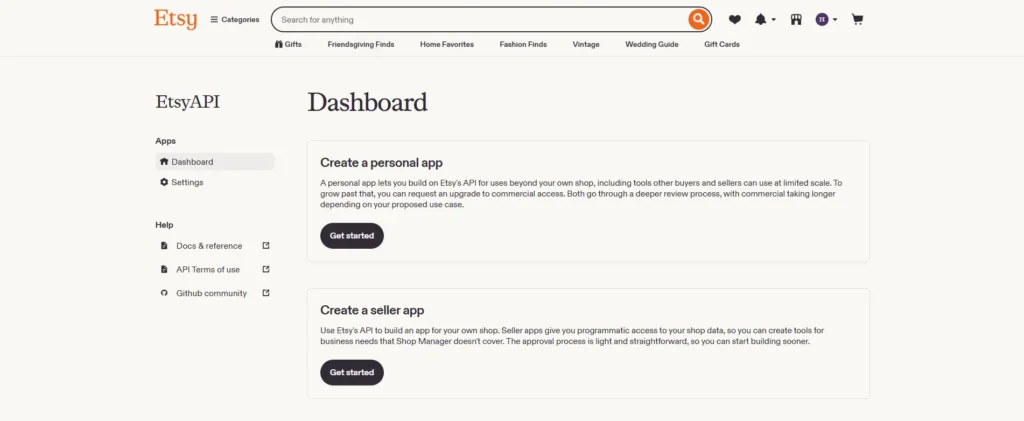
- Seller App is for sellers connecting their own shop. Access is read and write to your own shop data through OAuth.
- Personal app and commercial access is the path for developers building something other sellers will use.
Because you are selling from your own shop, the option you want is Create a seller app.
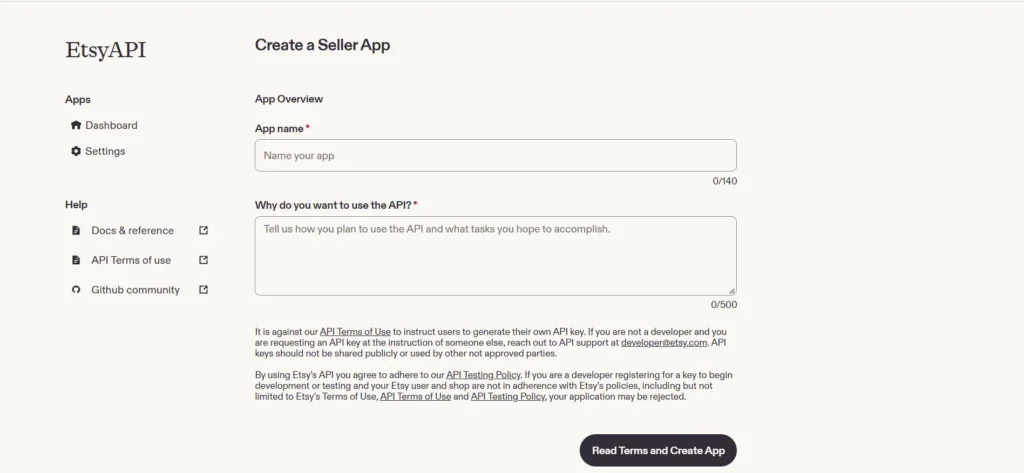
Step 2: Name and describe your app
Now you describe your app to Etsy.
- Enter a name for your app, usually your shop or business name.
- Explain your reason for using the API, covering what the app does, which shop data it touches, and who will use it.
- Select Read Terms and Create App.
Step 3: Wait for approval and check the status
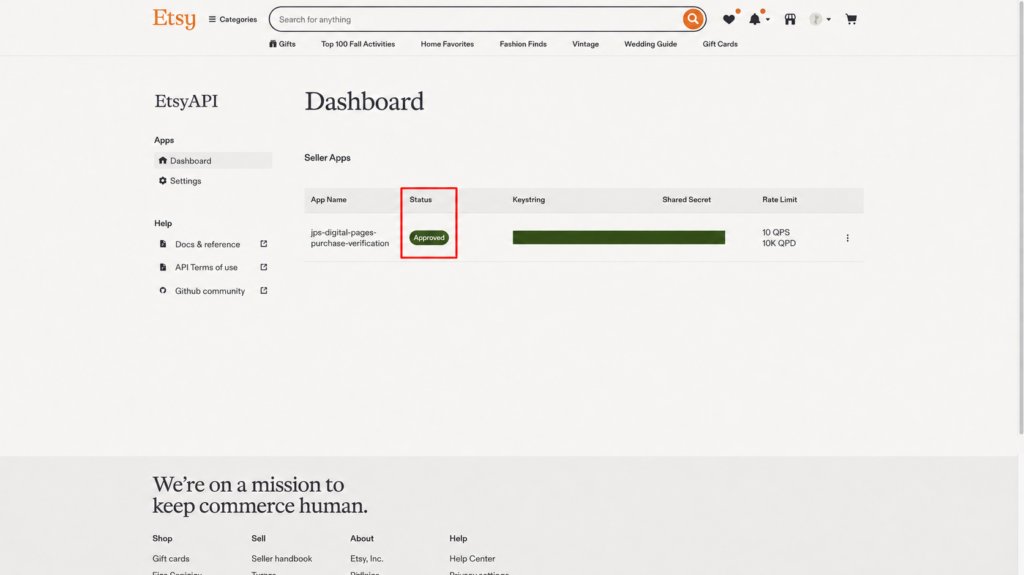
This is the part you cannot speed up. How long you wait for Etsy API Key result depends entirely on which app type you chose.
Etsy does not publish an official target for commercial access. Developers in the Etsy Open API discussions report waits from about two weeks up to a month, so plan your launch around that rather than assuming days.
The figures below are what we gathered from Etsy’s own announcement and from developers reporting their own waits. Treat them as a guide rather than a promise:
| App type | Approval time | Conditions |
| Seller App | Automated, usually minutes, no review queue | Active shop, no app registered before |
| Commercial access | Manual review, no published timeline | Clear app description, serves other sellers |
Once the app is approved, it shows up under Your Apps with its keystring and shared secret listed alongside it. Etsy asks you to agree to its API Terms of Use at that point. Those two values are exactly what the next step needs.
Step 4: Copy your keystring and shared secret
This is the part to get right. Both values sit on the same page, and you need both of them from here on.
- All approved Etsy apps appear under Seller Apps on your Etsy API Dashboard. Find the app you created, then locate its Keystring and Shared Secret in the same row.
- Copy the keystring from your app
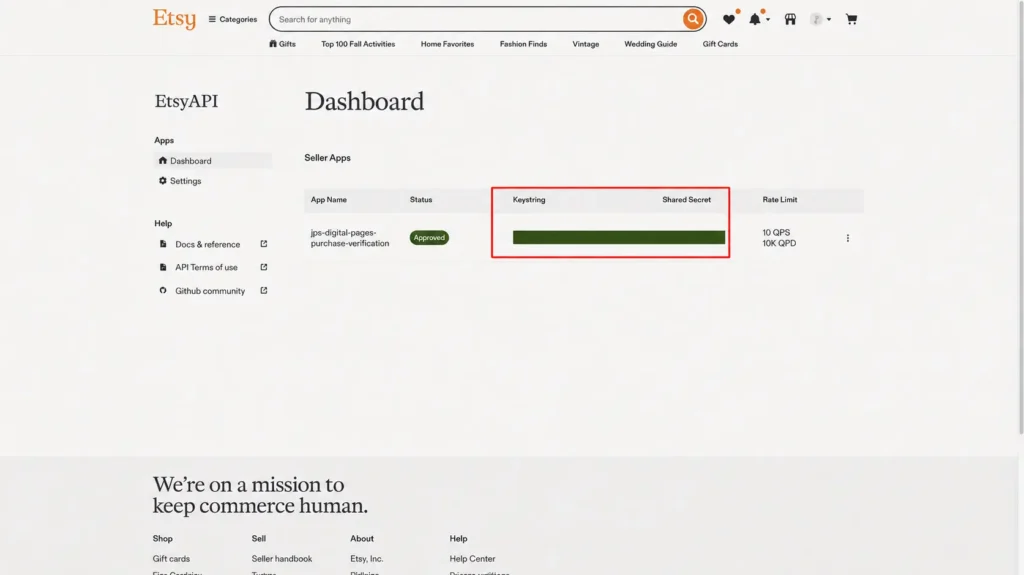
- Copy the shared secret
- Join the two with a colon in your request header.
This is the change that catches most people. Since 9 February 2026, Etsy rejects requests that send the keystring alone. The header must carry both values separated by a colon:
x-api-key: keystring:shared_secret
The old x-api-key: keystring format no longer works. If you are updating an integration built before 2026, this one line is probably the whole fix.
Note:
- Treat the shared secret like a password. Keep it somewhere you control, such as your own server or a password manager, and never put it in frontend code where a visitor could read it.
- Both values stay visible under Your Apps whenever you need them again, so there is no reason to paste them into a note, an email, or a chat.
Step 5: Test your Etsy API key with the ping endpoint
Before you build anything on top of your key, check that it works. Etsy gives you an address that does nothing except confirm your key is valid. It touches none of your shop data, so you need nobody’s approval to call it, and that is what makes it a clean test. If it turns you away, your key is the only thing it can be.
Your quickest option is one line in Terminal on a Mac, or PowerShell on Windows. You install nothing.
curl -H “x-api-key: keystring:shared_secret” https://api.etsy.com/v3/application/openapi-ping
Replace keystring and shared_secret with your own two values. Keep the colon between them, with no space on either side. If you prefer clicking to typing, an API client like Postman does the same thing: a GET request to that address, with x-api-key as the header.
- Call https://api.etsy.com/v3/application/openapi-ping.
- Send your keystring and shared secret together in the x-api-key header, joined by a colon.
- Look at the reply.
If your key is good, Etsy answers you with your application id and nothing more:
{
“application_id”: 1234
}
Seeing that number means Etsy accepted both halves of your key, and you are done here. If you get a 403 instead, your shared secret is missing or in the wrong format, so go back to Step 4. If you get a 401, you probably copied your keystring with a character missing.
How to Use Your Etsy API Key?
At this point, your key works, but it only gets you to the door. To read or change anything inside a shop, you need one more layer not only just Etsy API Key, and that is OAuth.
How Etsy OAuth works
Think of it as two separate proofs you have to show. Your Etsy API key proves which app is calling. Your access token proves a shop has let that app in.
Etsy uses the OAuth 2.0 Authorization Code flow, and you must include PKCE on every authorization request, using the S256 challenge method. The shop owner approves the scopes you asked for, and you get two tokens back.
Those two tokens are where integrations quietly break on you:
- Access token: 1 hour. You have to refresh it before it expires, or every call you make starts returning 401.
- Refresh token: 90 days. Use it and you get a fresh access token without asking the seller again. Leave it unused for 90 days and you have to ask them to authorise your app from scratch.
If you run a seasonal shop that goes quiet for three months, that second rule will catch you out. It is one reason a hosted tool keeps working while a side project stops.
Etsy API scopes and what each one allows
Etsy has 12 OAuth scopes, arranged as read and write pairs. You ask for only the ones your app needs, and the shop owner sees your list when they approve it.
- address_r reads a member’s shipping addresses.
- address_w updates and deletes a member’s shipping address.
- email_r reads a user profile.
- listings_r reads inactive and expired listings that are not public.
- listings_w creates and edits listings.
- listings_d deletes listings.
- profile_r reads private profile information.
- profile_w updates private profile information.
- shops_r views shop description, messages, and sections, including non-public ones.
- shops_w updates shop description, messages, and sections.
- transactions_r reads purchase and sales data.
- transactions_w updates sales data.
Two details are worth pulling out, because they catch people. First, you only need listings_r for listings that are not public, such as inactive or expired ones, and public listings do not require it. Second, listings_d sits apart from listings_w, so giving you edit rights does not hand over delete rights.
Your practical rule is to ask for the smallest set that does the job. Shop owners read that approval screen, and a sync tool asking for profile_w looks wrong to them. You can find full endpoint details in the Etsy API documentation.
Etsy API Key Limits and Rules to Know
Plenty of integrations work fine on day one and fall over a few weeks later. The cause is usually one of three things nobody thinks about while registering: how often you may call Etsy, whether Etsy can call you back, and what it will never let you near.
Rate limits
Etsy counts your requests per Etsy API Key, not per shop, and you face two caps at once, per second and per day. Your daily allowance rolls across a 24 hour window rather than resetting at midnight. Cross either cap and you get a 429 back, with a retry-after header telling you how long to wait.
Etsy publishes no single number for everyone, so check your own limits in the Developer Portal and email [email protected] if you need more. Ignore figures quoted elsewhere, since several articles repeat sample values from the docs as if they were official caps.
Webhooks
Those caps are part of why webhooks exist. Instead of you asking Etsy for updates, Etsy pushes them to you, and Open API v3 gives you 11 events across three groups:
- Order: order.paid, order.canceled, order.shipped, order.delivered
- Listing: listing.created, listing.updated, listing.deleted
- Inventory: inventory.created, inventory.updated, inventory.deleted, inventory.out_of_stock
That list comes with one catch the docs leave implicit. Etsy says webhooks work for personal apps too, but the portal instructions only cover commercial ones, so your Seller App may not show you the Webhook portal.
What the Etsy API won’t let you do
Even with webhooks running, the API stays narrower than Shop Manager, so it pays to know the gaps before you build.
- Not every field you see in Shop Manager has an endpoint.
- Etsy Ads data is not exposed in the detail an advertiser wants.
- The Etsy API only knows about Etsy, so it has no idea what stock you have left on your other marketplace integrations.
The third gap is the one that decides things. A Etsy API Key gets you Etsy, not one set of stock numbers every channel respects, and that is what makes most sellers choose buying over building.
Common Etsy API Problems & How to Fix Them
The problems below are the ones that come up most, gathered from Etsy’s own documentation and from developers posting about them in Etsy’s API discussions. For each one you get the symptom you would actually see, the cause behind it, and what to do about it.
| Symptom | Cause | Fix |
| 403 saying the shared secret is required | Still sending the old keystring-only header | Switch to x-api-key: keystring:shared_secret, mandatory since 9 February 2026 |
| 429 Too Many Requests | Over your per second or daily limit | Read the retry-after header, apply exponential backoff, request a higher quota if you need it |
| 401 after exactly an hour of working fine | Access token expired | Refresh it with your refresh token before the hour is up |
| New orders never reach your system | No webhook registered, or an app type with no Webhook portal | Check your app type. On a Seller App, poll on a schedule instead |
| Application rejected | Description too vague, or the wrong tier | Apply for the right tier and describe the exact data and function |
When something breaks and you cannot tell which layer is at fault, you should work from the outside in.
Your first move is the ping call from Step 5. It tests your key on its own and needs no token, so it answers one question cleanly before you go looking at anything else.
If your ping passes, your credentials are fine. That puts the problem in your token or your scopes, and you have halved what you need to check.
If you are still stuck after that, Etsy keeps its API discussions on GitHub, and both other developers and Etsy itself reply there. You should keep [email protected] for the things only Etsy can change. Those are a higher rate limit, or an application that has sat unreviewed for weeks.
Tired of Updating Etsy Stock by Hand?
Sync your store’s inventory, listings, and orders across 10+ marketplaces seamlessly. Enjoy unlimited order sync starting at $29/mo with a 7-day free trial.
Etsy API Key: FAQs
Does Etsy have a public API?
Etsy has a public API called Open API v3, and anyone can read the documentation. There is no shared Etsy public API key though. Every app registers for its own credentials, and access to shop data always requires that shop’s permission through OAuth.
Is the Etsy API free to use?
The API itself costs nothing. The real cost is development and upkeep: building the integration, hosting it, and fixing it when Etsy changes something. That bill is why many sellers end up paying for a tool instead.
How long does it take to get an Etsy API key approved?
A Seller App is approved automatically, usually within minutes, with no review queue. Commercial access goes through manual review and Etsy publishes no target time. Developers report waits of roughly two weeks to a month.
Do I need to be a developer to use the Etsy API?
To call the API directly, yes. You need to handle OAuth, token refresh, and error handling. If you only want your listings, stock, and orders in sync, no. Add an approved app through Shop Manager and skip the code entirely.
Can the Etsy API sync inventory with my other sales channels?
Not on its own. The Etsy API only reads and writes Etsy data, so it cannot see your Shopify or eBay stock. Multichannel sync needs a layer in between that talks to every channel and holds one inventory record.
The Bottom Line
Etsy is blunt with developers on this point: “You shouldn’t direct end users to create an API key to use your app.” Carry that as a test. If a tool asks you to generate your own Etsy API key before it will work, it has not been approved for commercial access.
So your decision comes down to three cases. If you want listings, inventory, and orders to stay in line across your channels, you don’t need a key at all. If you need custom logic and have someone to maintain it, apply for a Seller App and follow the five steps above. If you are building for other sellers, go through commercial access and budget two weeks or more.
If you are not sure which case you are in, reach to our team, or browse our Etsy guides for the selling side of things.