


When mentioning about eBay SEO, most sellers know that keywords matter. Fewer realize that eBay SEO in 2026 goes well beyond title keywords. Whether you are just getting started or you have been selling on eBay for years, this eBay SEO guide gives you a practical, signal-by-signal approach to ranking higher on both platforms.
Key takeaways:
Without further ado, let’s get right into it!
What is eBay SEO?
eBay SEO (Search Engine Optimization) is structuring your listings so eBay’s search algorithm, Cassini, ranks them higher when buyers search for products. Higher rankings mean more impressions, more clicks, and more sales.
Unlike Google, which ranks websites based on authority and content relevance, Cassini has one goal: show buyers the listing most likely to lead to a completed, satisfying purchase.
Cassini evaluates every listing across four dimensions: relevance, value, trust, and convenience. These are not equal in weight. Conversion signals carry more influence than keyword matches. A listing with a slightly imperfect title but a strong sales history will outrank a keyword-perfect listing with no transaction record.
In 2026, eBay SEO also covers a second search engine. Google indexes eBay listings as product pages and pulls them into Google Shopping and organic results. For many sellers, a meaningful share of listing traffic comes from buyers who searched on Google first. Optimizing for Cassini and optimizing for Google are not the same task, but most of the underlying work overlaps, as you will see throughout this guide.
What Cassini actually measures
Understanding the specific signals Cassini tracks helps you focus on what moves the needle.
| Signal | What sellers can do |
|---|---|
| Title keyword match | Use buyer-language terms, brand name, model number |
| Item specifics completeness | Complete every available field, including optional ones |
| Click-through rate (CTR) | Stronger main image, cleaner title, competitive price shown |
| Conversion rate | Fix price, description, photos, and trust signals |
| Sales history and velocity | Build sales momentum before raising price |
| Seller performance metrics | Ship fast, respond quickly, avoid cancellations |
| Price competitiveness | Price-check against eBay Product Research (formerly Terapeak) sold data weekly |
| Shipping speed and cost | Offer free shipping and the shortest handling time you can sustain |
Cassini treats a completed sale as the strongest possible ranking signal. Every tactic in this guide is really about increasing your listing’s chances of converting.
eBay Best Match: the default sort order
When a buyer searches on eBay without changing the sort, they see results in Best Match order. This is Cassini’s curated ranking, not a chronological or price-ranked list. Best Match is dynamic. It refreshes based on real-time engagement, so a listing that gets a sudden wave of purchases can rise significantly within 24 to 48 hours. Equally, a well-ranked listing that stops converting will gradually slip.
Tried-and-True eBay SEO Tips to Rank Higher in 2026
Now that you understand how eBay’s SEO algorithm works, let’s look at how to create an eBay listing that ranks at the top when buyers search.
SEO and listing quality go hand in hand, so it helps to pair these tips with our broader eBay listing optimization guide, which covers titles, images, and item specifics in more depth. While optimizing your eBay listings for search is crucial, efficiency in creating those listings is equally important for scaling your business.
eBay title optimization: the 80-character formula
Your listing title is the single most important element for Cassini keyword matching. Cassini reads the title first and applies the heaviest weight to it. If the words a buyer searches for are not in your title, your listing will not appear in that search, regardless of how well-optimized everything else is.
eBay allows 80 characters. Most sellers waste 20 to 30 of them.
The title formula: Brand + Product type + Key descriptor + Variant (size, color, model) + Condition + Key feature
Example:
– Nike Air Max 270 Men’s Trainers UK Size 10 Black White Excellent Condition
– Canon EOS 90D Camera Lens 18-135mm f/3.5-5.6 IS USM Kit Lens
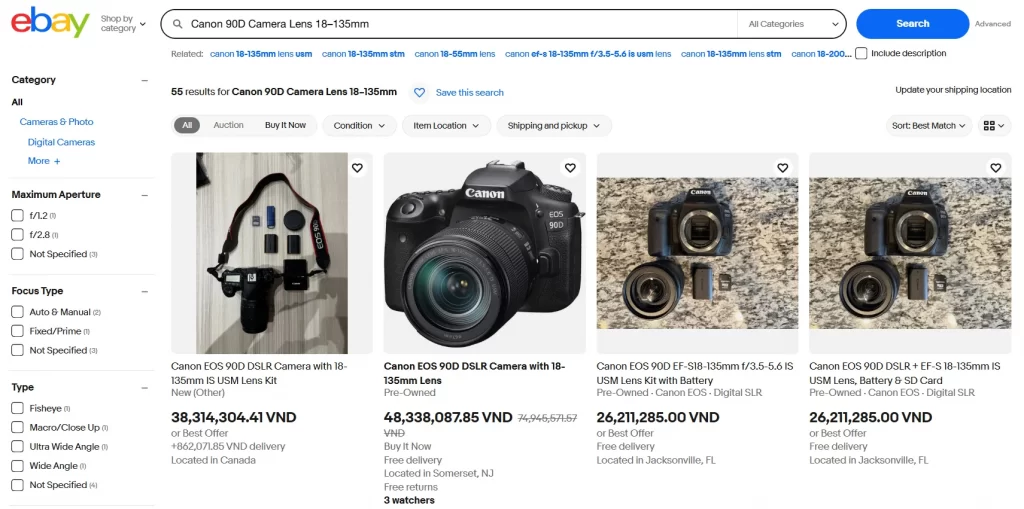
Follow these best practices when writing your title:
- Include the brand and model number when relevant to the product.
- Add important product details such as size, color, capacity, style, or compatibility.
- Use relevant keywords that accurately describe what you’re selling.
- Make the most of the 80-character limit by adding useful product information rather than filler words.
- Keep your title clear and easy to read. Avoid unnecessary symbols, excessive capitalization, or decorative punctuation.
- Avoid keyword stuffing and irrelevant keywords. Only include terms that accurately describe the product.
- Don’t waste title space on promotional phrases like “WOW” or “Must See” when they don’t help buyers understand the product.
- Avoid unnecessary repetition. Use the available space for additional relevant product details instead.
Here are three common places where you can find keywords for eBay listings.
- Utilizing eBay’s search bar: The easiest way to look for product terms is to see how users search for each product. You can do it by simply typing your product name in basic forms (i.e., women’s sweaters, phone cases, etc.) in the search bar. Then, you refer to all of the popular eBay search terms that appear under the search bar.
- Using eBay SEO tools: This is the most accurate and advanced way to determine search terms for product titles. Popular SEO tools like Ahrefs, Keyword Tool, eBay Product Research (formerly Terapeak), etc., can provide you with a data-driven list of keywords that have search volume and other details like CPC (cost-per-click) and potential traffic of such keywords.
- Sold listings research: Search your product, filter to “Sold Listings,” and study the titles of items that sold. The patterns in winning titles show you the language buyers actually use.
Fill in item specifics
Item specifics are the structured data fields eBay provides for each category: Brand, Size, Color, Material, MPN, EAN/UPC, Compatible Model, and dozens of category-specific fields. They power the filter panel on the left side of search results. When a buyer filters by “Nike” and “Size 10,” Cassini shows only listings with those specifics filled in correctly.
Incomplete item specifics do not just reduce visibility. They make listings invisible to filter-using buyers. Buyers who use filters are often the most ready to purchase. Skipping specifics means losing those buyers entirely.
The table below ranks common item specifics by their impact on search visibility, buyer filtering, and purchase decisions.
| Item specific | Example | Priority |
|---|---|---|
| Brand | Nike, Apple, Bosch | Critical |
| MPN (Manufacturer Part Number) | WH-1000XM5, CF244A | High |
| UPC / EAN / ISBN | UPC: 012345678905; ISBN: 9780131103627 | High |
| Size / Dimensions | Clothing Size: M; Item Width: 20 cm | Critical for size-sensitive products |
| Color | Black, Navy Blue, Rose Gold | High |
| Compatible Model | iPhone 16 Pro, Samsung Galaxy S25 | Critical for parts and accessories |
| Material | Cotton, Stainless Steel, Leather | Medium |
| Type / Style | Running Shoes, Casual, Modern | High |
| Item conditions | Used – minor scratches on the back panel | High |
Fix Missing eBay Item Specifics in One Click
With eBay integration, LitCommerce’s built-in AI Generates Specifics feature automatically fills in category-specific item specifics for your eBay listings, with no manual field-by-field editing.
Focus on product images
Keyword optimization is not the only aspect of eBay SEO. Image search optimization is also important. Your product images should only present what you are selling, without including watermarks, borders, nudity, text, logos, or any other information you can cover in the product description. When adding photos for your eBay listings, provide 5-7 high-quality photos of your product from different angles to stay competitive.
Below are the other key factors to improve your eBay image search:
- Use high-resolution photos: Low-quality photos, blurry or pixelated, can drive buyers away and hurt your eBay search engine optimization. eBay’s search engine, Cassini, prefers clean, sharp visuals. Make sure your images are high resolution, with at least 800 pixels on the longest side (1600px is ideal).
- eBay currently allows up to 24 photos per listing. Use 5 to 10 of them to show every angle, every detail, every potential concern.
- Keep your product photos clean: Avoid borders, text, logos, or promo graphics like “SALE” or “Free Shipping.” Show the real product clearly, without distractions. You can mention deals or extras in the title or description instead.
- Don’t use watermarks: Watermarks, even for branding or copyright protection, are not allowed on eBay product images.
- Show exactly what you’re selling: Use actual photos of the item, not generic icons or stock images (unless it’s media like books or DVDs). Buyers want to see exactly what they’ll receive.
- Show multiple angles: Capture front, back, sides, close-ups of key features, and any wear if the item is used. This builds trust and reduces returns.
- Add lifestyle shots (if relevant): Show items in use, like a phone case on a phone or a lamp set up in a room. This helps buyers visualize how they’ll use it.
More than half of eBay views come from phones. Frame your main image so the product is clearly identifiable on a small screen with no pinching or zooming needed.
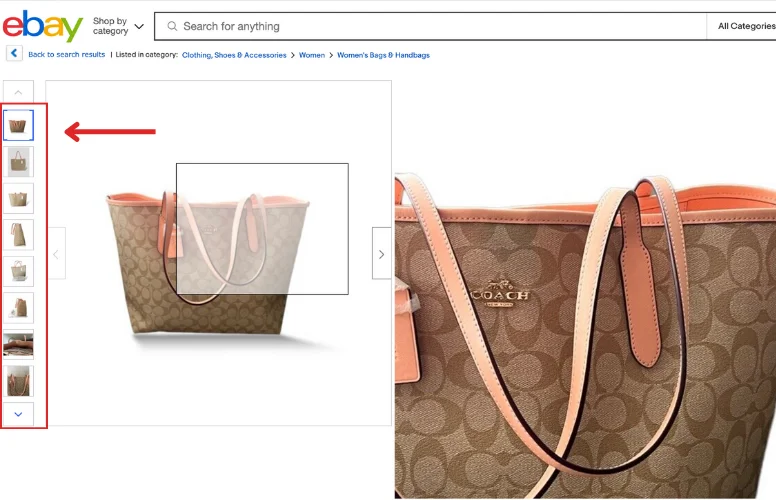
On a more technical note, using alt text helps search engines better understand your images, since they can’t read images. Alt text for the images should include eBay SEO keywords for the products. Such text will also be displayed to shoppers when they can’t load the images, which eventually benefits users’ experience.
Add unique identifiers by category
Another eBay SEO tip for sellers is to add unique eBay product identifiers to the listings. Beyond standard specifics, unique identifiers (GTINs, MPNs, OEM numbers) improve how Cassini matches your listing to buyer searches and help Google index your listing correctly for Shopping. Here is what matters by product type:
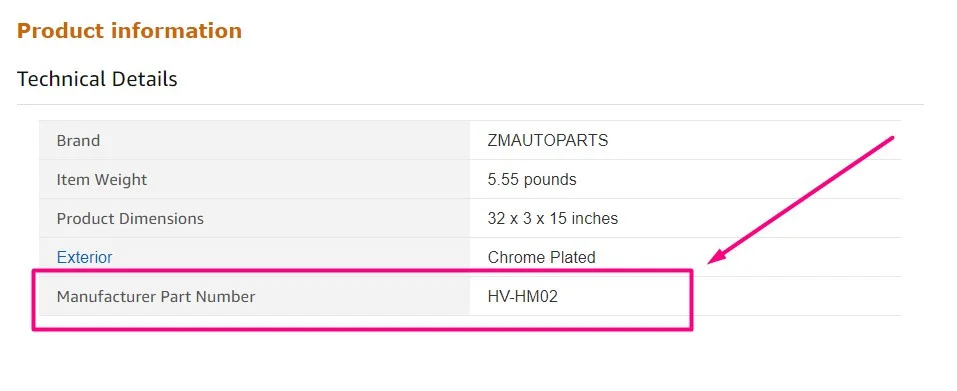
Here are some unique identifiers you can include, depending on your product type:
- Auto & moto parts: OEM numbers (for original parts), MPNs (for aftermarket). One OEM number can cover multiple brands.
- Phones & components: Model numbers (e.g., SM-G991B), part codes.
- Computer hardware: MPNs, SKUs, and chip IDs (e.g., Intel BX807…).
- Printer supplies: Cartridge or toner codes (e.g., CF244A, 302XL).
- Electronics: OEM codes, part numbers.
- Watches: Reference numbers – especially crucial for premium brands like Rolex.
- Industrial equipment: Manufacturer codes, series numbers (e.g., Siemens 6ES7…)
- Global trade item numbers (GTINs) such as Universal Product Codes (UPCs) and International Standard Book Numbers (ISBNs).
This is how you get an eBay listing on the first page when users search for any of those unique identifiers or use eBay’s advanced search features.
Identifiers matter even more in high-value categories like vehicles, where OEM and part numbers help the right buyers find you. If that is your niche, our guide to selling a car on eBay walks you through listing vehicles the right way. Optimizing your listings for search is crucial, but it’s equally important to avoid practices that can harm your eBay SEO. Learn about the pitfalls and policies around eBay duplicate listings.
Choose the right category
eBay’s search engine, Cassini, uses your product category to match it with what buyers are looking for. Even with the right keywords, putting your item in the wrong category can make it harder to find. That’s why, when choosing categories for your products, pick the most relevant ones.
Also, avoid overextending categories by placing them under too many subcategories if it doesn’t improve the user experience. It wastes time and confuses users when they search for items under too many subcategories. Also, always check whether eBay suggests a better option.
For example, if you sell men’s clothes (i.e., polo shirts), place them under Clothing, Shoes & Accessories > Men’s Clothing > Shirts > Polos.
Improve your seller performance and sell-through rate
Cassini evaluates seller accounts, not just individual listings. A high-performing seller account gives all your listings an inherent ranking advantage.
Seller level and its ranking effect
eBay operates a three-tier system. Your seller level directly affects search visibility:
- Below Standard sellers face active ranking suppression across their entire catalog.
- Top Rated sellers receive a ranking boost in Best Match results.
- Above Standard sellers have no boost or penalty — this is the baseline.
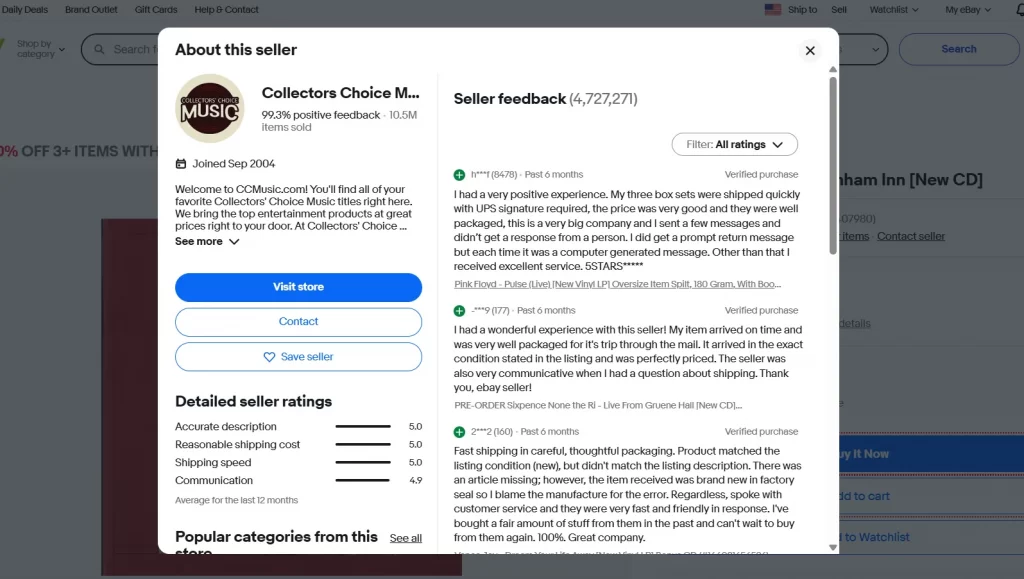
Therefore, here are several tips to improve your customer service and have a higher seller rating:
- Ship orders within one business day whenever possible.
- Always upload valid tracking information.
- Respond to buyer questions within 24 hours.
- Keep your defect rate below 2%.
- Aim for consistent 5-star reviews.
- Optimize for positive product reviews.
Moreover, one of the best ways to signal trust and quality to both Cassini and buyers is by achieving Top Rated Seller status. eBay rewards this status with more trust, better placement, and higher buyer confidence.
Sell-through rate (STR)
eBay’s Best Match algorithm considers listing sales performance and seller track records when ranking search results. Listings with strong sales history may gain better visibility, while sell-through rate (STR) helps sellers identify products with strong buyer demand.
| STR range | Signal to Cassini | Recommended action |
|---|---|---|
| 70%+ | Strong positive | Consider increasing inventory |
| 30–70% | Neutral to positive | Optimize conversion: photos, price, specifics |
| Under 30% | Ranking suppression risk | Diagnose the blocker: price, photos, title, or wrong category |
Make use of eBay shipping program
Free shipping is a positive Cassini ranking signal independent of its effect on buyer conversion. It also makes your listing eligible for shipping filter badges (“Free shipping” searches). eBay research confirms free shipping improves both ranking and click-through rate. If free shipping reduces your margin, build the shipping cost into the item price.
Therefore, it’s essential to learn how to ship on eBay properly and understand eBay’s shipping fees. This is especially true if you source rather than stock your products, since shipping speed can make or break your rankings.
On eBay, there is always a filter for shipping programs that buyers can use to search for sellers who have a free shipping policy. For sellers to appear on such search results, they need to be qualified for Free Shipping Message programs.
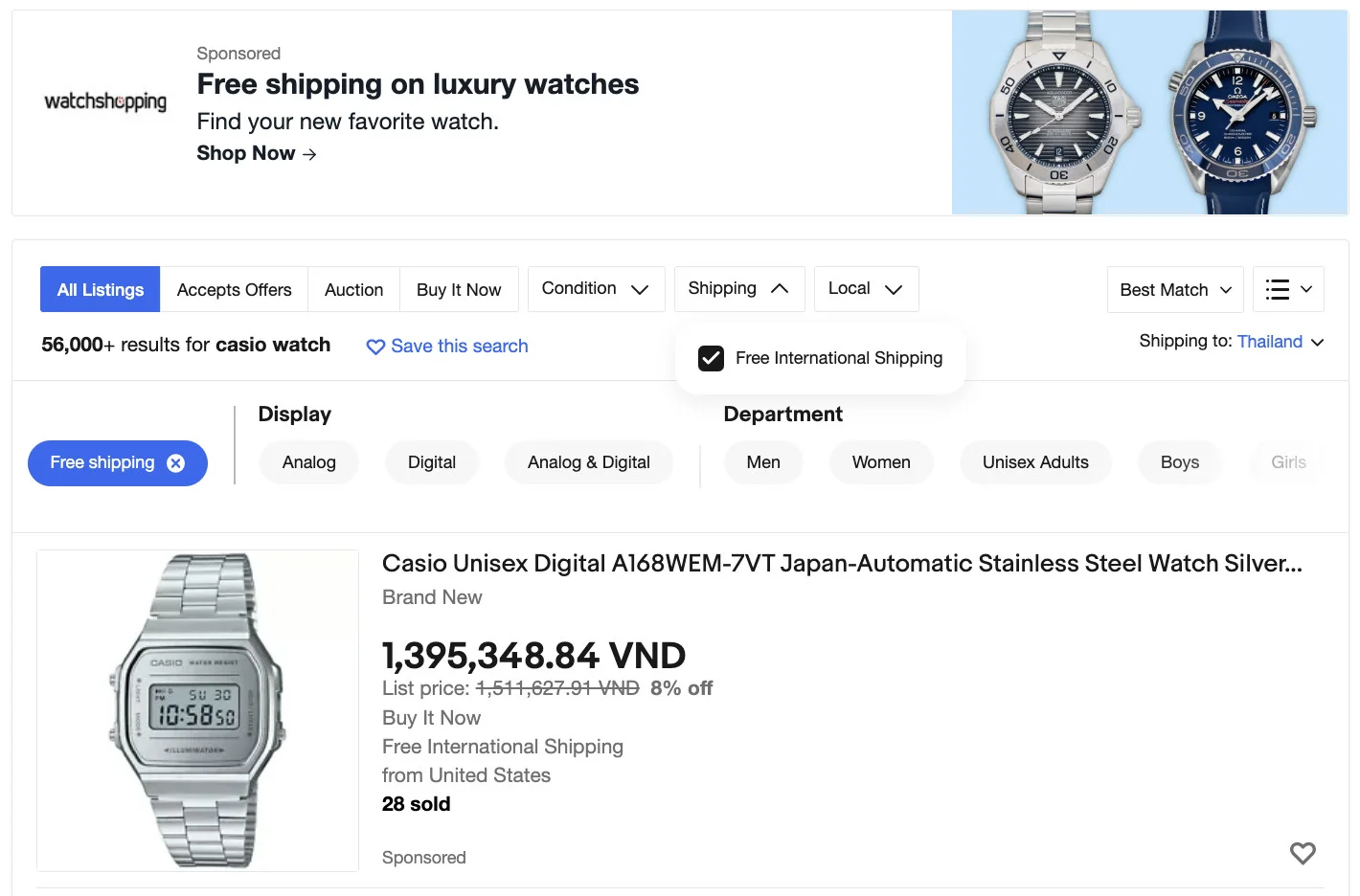
Below are a few requirements to qualify for a free shipping message, according to eBay policies:
- Offer free delivery that will arrive within 4 days.
- Offer same-day or 1-day handling.
- Upload tracking details of your products when using tracked shipping.
Even if shoppers don’t filter you out entirely, eBay Best Match will still push you down the rankings for not offering free shipping.
In addition to my practices to enhance your eBay listing visibility, I highly recommend using an eBay SEO tool for extra support. Some of the best eBay SEO tools are eBay Product Research (formerly Terapeak), Google Keyword Planner, and Keyword Tool.
Set a good pricing strategy
You do not need to be the cheapest seller. You need to be within a reasonable range of comparable recently sold listings. A listing priced significantly above recent sold prices will see ranking suppression even if title and specifics are perfect.
How to price-check: search your product on eBay, tick “Sold Listings” in the filter panel, and study the price distribution of recent sales. eBay Product Research (formerly Terapeak) in Seller Hub provides this data over the past 365 days. Price your listing inside the realistic sold range, then adjust as you gather your own conversion data.
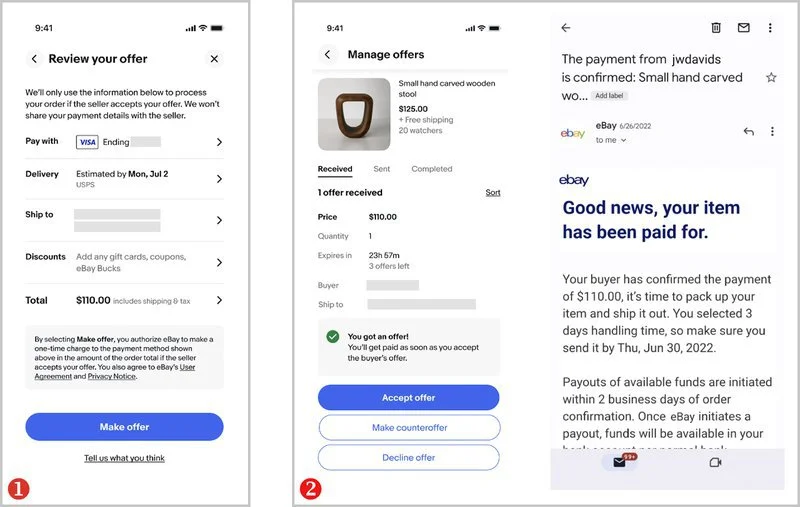
Also, enabling Best Offer on fixed-price listings is a frequently overlooked SEO tactic. When a buyer submits an offer, Cassini’s model registers that interaction as buyer engagement, even if you decline the offer. More engagement signals mean better ranking. For any listing where you have pricing flexibility, Best Offer is worth enabling from a pure SEO standpoint. Check out our Best Offer tips to optimize your sales.
Promoted listings for eBay SEO
eBay Promoted Listings Standard lets you pay a percentage of the sale price only when a buyer clicks your promoted listing and purchases within 30 days. The indirect SEO benefit: promoted listings appear in higher positions, which generates more clicks and views, which builds the engagement history that drives organic ranking.
The typical approach is to promote new listings for the first 30 to 90 days while they build a sales history, then sustain or reduce promotion as organic ranking improves. For more tactics, check out our eBay listing promotion guide.
eBay SEO on Google: How to Rank your Listings in Google Search
Your eBay listings aren’t limited to eBay’s own search results. They can also appear on Google, putting your products in front of shoppers who search by brand, model, or product type before visiting a marketplace.
The challenge is that an eBay-optimized listing isn’t automatically well-positioned for Google. You still need clear product information, accurate identifiers, and enough detail for shoppers to recognize exactly what you’re selling.
Google treats eBay listings as product pages and indexes them using the structured data that eBay provides. The signals Google cares about for eBay listings are different from what Cassini looks for.
How Google indexes eBay listings
Google looks at the information available on your listing page to understand the product. Your title helps identify what you’re selling, while descriptions, product details, and identifiers provide more context.
Product identifiers are particularly useful when multiple retailers sell the same item. A correct GTIN or MPN helps distinguish one model from another and connect it with matching product information.
That doesn’t mean adding every possible detail will improve your rankings. What matters is giving Google and potential buyers consistent, accurate product information.
What to optimize for Google visibility
- Title: Use clear, relevant keywords within eBay’s 80-character limit. Include the product name, brand, and model number where applicable.
- GTINs and MPNs: Add accurate product identifiers when available. They help identify your products, but not every product requires a GTIN.
- Item specifics: Complete relevant attributes such as brand, size, color, and material. These help eBay match listings to buyer searches and provide clearer product information.
- Description: Describe the product accurately, including its features, condition, and model details. Use relevant keywords naturally without repeating them unnecessarily.
- Listing format: Consider fixed-price Good-Till-Cancelled listings for products you sell continuously. This keeps your offer active but does not guarantee higher Google rankings.
eBay’s own Google presence
eBay sends selected, eligible listings to Google for product listing opportunities. However, Google may not accept or display every listing.
Eligible sellers can check the Google Shopping section of eBay’s Listing Quality Report to identify rejected listings and the reasons behind those rejections.
Accurate product information, competitive offers, and compliance with Google’s requirements can improve eligibility, but they don’t guarantee higher Google rankings.
What to Avoid While Doing eBay SEO?
There are several things you should avoid when doing eBay SEO for your products.
Overstuffing with keywords in your titles and descriptions
It’s important to avoid stuffing eBay keywords in descriptions, especially when the keywords are out of context. Keyword stuffing is considered a manipulative method for all search engines, and if detected, it can have a severe impact on your product listing.
Keep in mind eBay’s suggestion to use a keyword density of 5-7%, and write your product content for humans first, not search engines.
Promotional language in titles
Words like “WOW,” “Bargain,” “Must See,” or “Amazing” take up valuable title space without telling buyers much about the product.
Use those characters for details that help buyers find the right item, such as brand, model, size, color, or condition. A specific title is usually more useful than an attention-grabbing one.
Duplicate listings
Listing the same item multiple times might seem like a way to get more exposure, but it can create unnecessary competition between your own listings and run against eBay’s duplicate listing policy.
For identical products, use a single multi-quantity listing. If the items differ by size or color, group them into a variation listing where supported. This keeps your inventory easier to manage and gives buyers one clear place to purchase.
Mismatched category or incomplete specifics
On the eBay SEO guide, a good title can only do so much if your product sits in the wrong category or lacks important item specifics.
Think about how buyers narrow their searches. Someone looking for size M, black running shoes may never see your listing in filtered results if those details are missing.
Start with the most accurate category, then fill in the specifics buyers are likely to filter by, especially brand, size, color, and model.
Ignoring the Listing Quality Report
It’s easy to focus on creating new listings while overlooking improvements you could make to products already live.
If you have access to the Listing Quality Report, use it to spot listings that could benefit from better product information or stronger presentation. Check it regularly, prioritize issues affecting important listings, and make improvements where the data points to a real opportunity.
eBay SEO – FAQs
When it comes to doing SEO for your eBay listing, filling in all the necessary information on eBay product listing and following eBay guidelines are the most important things. Make sure that you have done the following: To compete and earn a better ranking in the eBay algorithm, you need to increase your click-through rate and conversion rate. In other words, you have to make sure your product title, description, images, and other information address well the buyer’s search intent when it comes to that certain product. The better it is for the user search, the less likely they will exit your product page for other product pages of your competitors. You can increase organic traffic on eBay by doing the following: Certainly, YES! SEO works great for eBay and gains eBay sellers boosted visibility if conducted properly. In fact, you need to master eBay SEO and build a right strategy if you want to compete against millions of sellers and earn money from the marketplace. Here are 7 best eBay SEO tips to enhance your product rankings: You can use Google Analytics for eBay SEO once you have integrated them. This could be extremely helpful while you build an eBay SEO strategy and apply SEO for eBay listings.
Start Optimizing Your Product Listings for eBay Now!
With over 134 million users in its community, eBay is certainly a competitive platform. However, you can always reach more prospective buyers if you invest enough time in doing eBay SEO. For more strategies specific to this marketplace, explore our eBay guides hub.
Although you won’t see immediate results from eBay SEO in a few days, implementing an effective eBay SEO strategy today can improve your product ranking and eBay revenue in the long run. If you need help using LitCommerce to manage and optimize your eBay listings, Contact us today!