



“Can I cancel an order on eBay as a seller?” is the question you might ask when you start selling on eBay.
The answer is Yes. You can cancel order on eBay as seller any time before the item ships and generally within eBay’s 30-day window after purchase. This guide walks through exactly how to cancel order on eBay as seller, which reason to pick, and what happens to your money and your account afterward.
Here’s what you’ll walk away with:
- When cancellation is allowed, and when eBay blocks the Cancel button entirely
- The exact click path on how to cancel an order on eBay as a seller
- Which cancellation reason to choose for your specific situation
- What happens to the buyer’s refund and your final value fee
- How a cancellation (especially “out of stock”) affects your seller performance metrics
One quick note: this article is written for sellers. If you’re a buyer trying to back out of a purchase, the process and timing work differently.
Now, let’s get into it.
When Can You Cancel an eBay Order as a Seller?
The golden rule is simple: You can cancel an order any time as a seller before it’s marked shipped or picked up in person, and eBay allows this within 30 days of the purchase date. Once tracking is attached or a buyer picks up an in-person sale, the standard Cancel button disappears from Seller Hub, no exceptions.
Cancellation after payment is also possible; eBay processes the buyer’s refund automatically once you submit the request, so you don’t have to send money back yourself in most cases.
Here are some typical cases when you can cancel an order on eBay, as a seller:
- The buyer asks to cancel the order, and you haven’t shipped the item yet.
- The buyer hasn’t paid within the payment deadline.
- The buyer entered an incorrect address during checkout.
- Your item is out of stock.
However, there are four specific scenarios where you can’t cancel the orders from your buyers:
- The item has already shipped or been picked up in person.
- The buyer has reported that the item hasn’t arrived.
- The buyer has opened a return request.
- More than 30 days have passed since the order was placed.
According to eBay’s order cancellation policy, any of these conditions removes the standard cancellation path, and you’d need to handle the situation through a return or a manual refund instead.
If the cancellation request comes from the buyer rather than you, you have 3 calendar days to accept or decline it. If you miss that, eBay closes the request automatically. If the buyer hasn’t paid, the order is canceled for you; if the buyer has already paid, you’re responsible for fulfilling it.
How to Cancel an eBay Order as Seller: Step-by-Step Guide on eBay Seller Hub
Whether you’re on desktop Seller Hub or the mobile Seller app, the steps for canceling an order as a seller are the same.
To cancel an order on eBay as a seller, follow these steps:
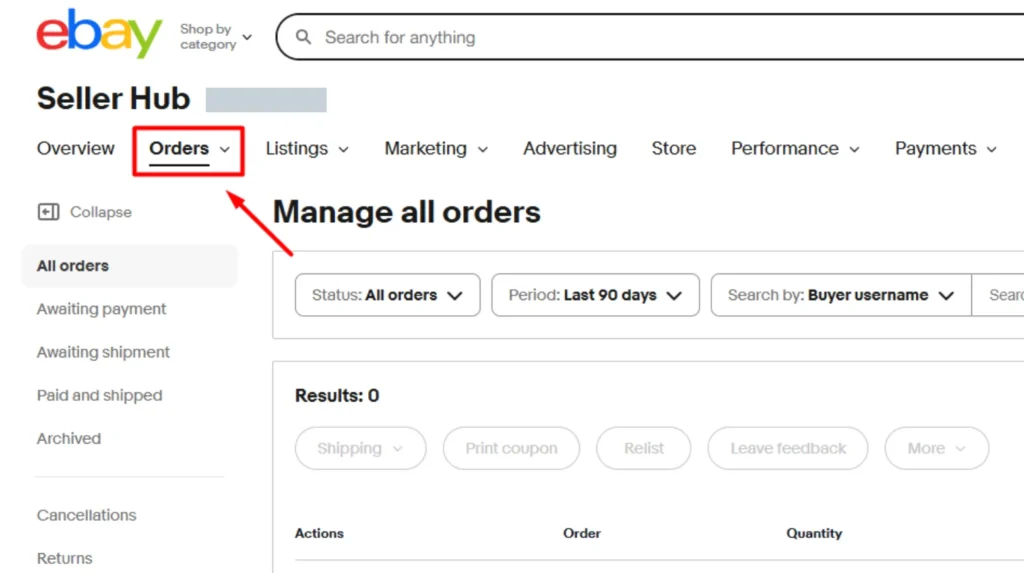
- Log in to Seller Hub, click Orders, and find the order you want to cancel.
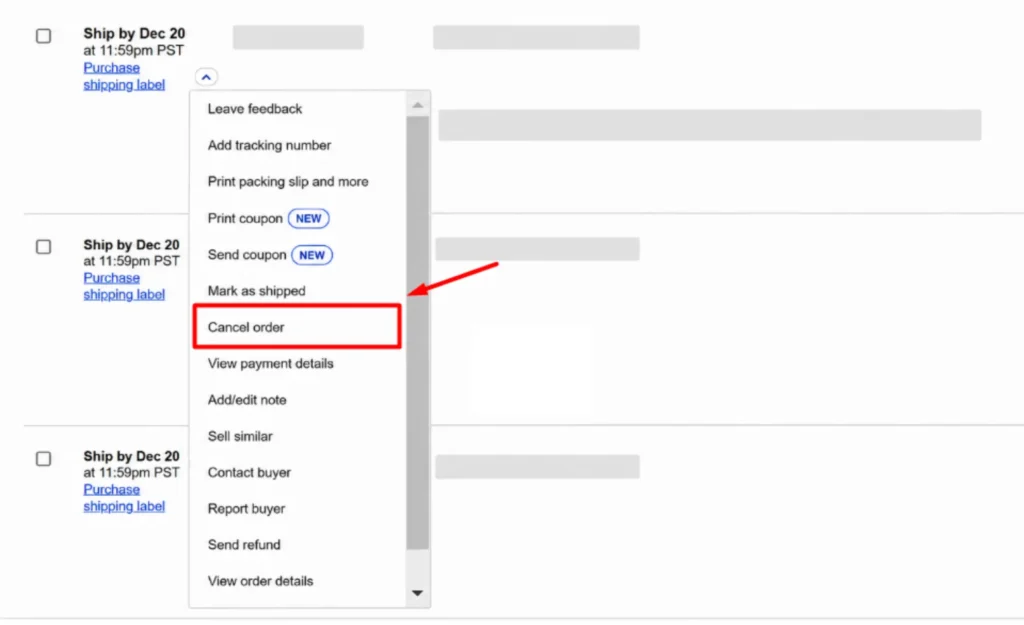
- Click More actions for your order, choose Cancel order.
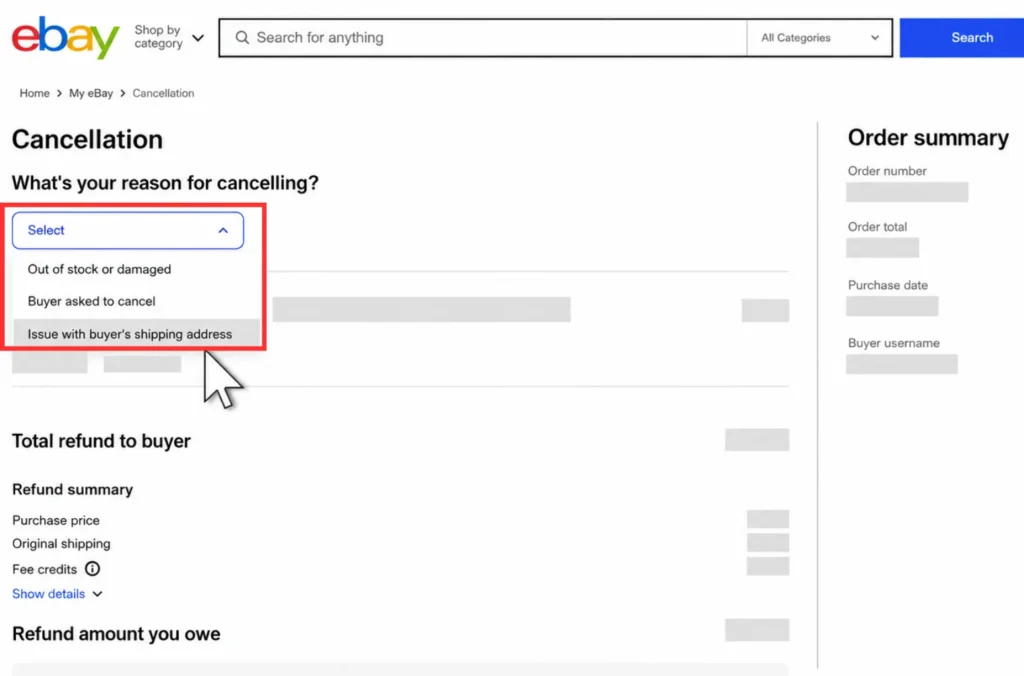
- Select a reason for your cancellation from the dropdown. Add an optional note to the buyer explaining the situation.
- Finally, click Submit to finish canceling your order.
Once you submit the cancellation, the order status updates and you’ll get a confirmation notice in your account. And this cancellation can’t be undone.
If the Cancel option isn’t there, the order has most likely already shipped or fallen outside the cancellation window described earlier. That’s normal, not a bug, so check the order status before assuming something’s broken.
Which Order Cancellation Reason Should You Choose?
So, the reason for cancelling an order you select is what eBay actually tracks, not the cancellation itself. Some reasons count as seller-caused defects against your account. Others carry no penalty at all. Choosing correctly here is the single highest-leverage decision in this entire process.
As for the reasons you can choose when you cancel orders on eBay as a seller, you have 3 options:
- Out of stock or damaged
- Buyer asked to cancel
- Issue with buyer’s shipping address
“Buyer asked to cancel” applies when the buyer contacted you directly and asked you to call off the order, whether through a message or after checkout. “Issue with buyer’s address” applies when the shipping address is incomplete or clearly undeliverable. Neither of these counts against your account, since eBay recognizes the cancellation wasn’t your operational failure.
However, “Out of stock or damaged” is where things get costly. This reason does count as a transaction defect because eBay treats it as a fulfillment failure on your end, whether you oversold the last unit on another marketplace or your supplier ran dry. It’s often the most honest reason to pick, but honesty here comes with a real account-level cost worth understanding before you click Submit.
Here’s how the main reasons stack up side by side:
| Cancellation reason | Counts as defect? | Seller responsibility | Recommended? |
|---|---|---|---|
| Buyer requested | No | None | Yes, when the buyer asks |
| Problem with address | No | Confirm with buyer first | Yes, when address is bad |
| Out of stock or damaged | Yes | High, oversold or untracked inventory | Last resort only |
The goal isn’t to game this table. It’s to choose the reason that truthfully matches what happened, then plan around the consequence if that reason happens to be “out of stock” more than once.
What Happens to Refunds and Fees After You Cancel
If the buyer paid through eBay checkout, their refund goes automatically to their original payment method once the cancellation is finalized. You don’t process anything manually here, eBay handles the transfer on its own timeline.
If payment wasn’t completed through eBay checkout, though, the responsibility for issuing that refund falls on you.
On the fee side, eBay refunds the entire final value fee once the cancellation is approved, including the per-order fee, which runs $0.30 for orders of $10 or under and $0.40 for orders over $10, according to eBay’s order cancellation policy. You don’t lose that money outright. If you want the full picture on how these fees stack up outside of cancellations, our guide on eBay fees for selling breaks down every fee type sellers actually pay.
If you sell across multiple channels, refund timing questions often come up alongside how eBay’s own managed payments system handles seller payouts, worth a look if you haven’t reviewed how your payout schedule interacts with cancellations and refunds.
How Cancellation Affects Your eBay Seller Performance Metrics
Cancellations classified as defects, like out-of-stock cancellations, get folded into your transaction defect rate. Buyer-requested and address-problem cancellations don’t touch this number at all, which is exactly why picking the right reason matters more than the act of canceling itself.
As your defect rate climbs, the consequences get real: you risk losing Top Rated Seller status, your listings can drop in search placement, and eBay may apply selling restrictions on your account. This isn’t a one-strike system.
One occasional cancellation rarely causes serious harm. What actually triggers consequences is a repeated pattern, week after week, of out-of-stock cancellations that signal an operational problem rather than a one-off mistake.
You can check where you currently stand by heading to Seller Hub’s account performance area, which shows your 12-month defect history and current standing. Worth checking this before you assume you’re fine, since sellers are sometimes surprised by how quickly a handful of cancellations add up on a smaller order volume.
For the full guide on what protections you still have as a seller, see our guide to eBay Seller Protection.
How to Avoid Canceling Orders on eBay as a Seller
Most out-of-stock cancellations don’t come from careless counting. They come from inventory going out of sync the moment you list the same product across more than one channel, which is more common than it sounds once you’re juggling eBay alongside a webstore or another marketplace.
For example, you sell the last unit on Shopify, but eBay still shows it as available. Another customer places an eBay order, leaving you with no stock to ship.
Moreover, manual inventory updates across multiple dashboards not only take time but also can easily lead to errors or missed updates.
The most effective way to prevent selling the same item twice is to connect all your sales channels. LitCommerce is one tool built specifically for this. . It helps you cross-list products and sync inventory, prices, and orders across connected channels, including eBay.
When you receive an order on eBay, or another sale channel, LitCommerce automatically updates the available quantity across your other channels within a 15-minute sync cycle. This keeps your stock levels accurate and helps you avoid cancellations caused by overselling. On the order side, LitCommerce’s eBay order management brings your eBay orders into the same dashboard as orders from your other channels, so you can catch issues like a wrong address or a buyer’s cancellation request before the item ships.

How to Cancel Order on eBay as Seller – FAQs
Can a seller cancel an eBay order after the buyer has already paid?
Yes, and eBay processes the refund automatically to the buyer’s original payment method when payment went through eBay checkout. You don’t need to send the money back manually in that case, eBay’s system handles the transfer once your cancellation is finalized.
What is the difference between canceling for “Out of stock” versus “Buyer asked to cancel”?
Out of stock counts as a seller transaction defect, while Buyer asked to cancel does not. This distinction matters long-term because defects accumulate into your transaction defect rate, which can eventually cost you Top Rated Seller status if it happens repeatedly.
Do you lose the final value fee when you cancel an eBay order?
No, eBay refunds the entire final value fee, including the per-order fee, once the cancellation is approved. That said, it appears as a credit toward your future selling fees rather than showing up as cash in your account.
Will canceling too many orders get your eBay account restricted?
Occasional cancellations rarely cause harm, but a repeated pattern of defect-counting cancellations can hurt your Top Rated status and trigger account restrictions. This ties directly back to the transaction defect rate mechanism covered earlier, since eBay watches the pattern over a rolling 12-month period.
Can you undo a cancellation once it has been submitted?
No, you can’t undo a finalized cancellation. If you want to salvage the sale, message the buyer and offer to relist the item or ask them to repurchase once you’ve restocked.
Cancel Orders on eBay Smart & Fix the Root Cause
Learning how to cancel order on eBay as seller is the easy part; you can do it in a few clicks through your eBay Seller Hub. What matters long-term is the reason you choose.
Non-defect reasons like “Buyer asked to cancel” and “Issue with buyer’s shipping address” leave your metrics untouched. However, “Out of stock” can affect your eBay seller account.
If out-of-stock cancellations happen repeatedly, manual stock management may be the real problem. LitCommerce connects eBay with your online store and other marketplaces, then automatically syncs inventory across them. When an item sells on one channel, it updates the available quantity on the others. This helps prevent overselling before another cancellation becomes necessary.
Want to grow your eBay business even more? Explore our complete collection of eBay selling guides for more tips on product research, listings, and increasing sales.