A banned TikTok account is stressful, especially if you’re running a TikTok Shop and your livelihood depends on the platform. If you’re searching how to get your TikTok account unbanned, the good news is that TikTok does provide a real appeal process, and many bans (particularly false positives and first-time violations) do get reversed.
At LitCommerce, we work with TikTok Shop sellers daily and have seen every type of ban scenario, from shadow bans on viral videos to permanent account terminations after a single copyright strike.
This guide walks you through what actually works in 2026: how to appeal a TikTok ban the right way, what to write in your appeal letter, the separate flow for TikTok Shop violations, and how the new US ownership structure affects (or doesn’t affect) your recovery.
Quick answer: To get your TikTok account unbanned, submit an appeal through the in-app ban notification, or via TikTok’s Report a Problem form on the web (Account and profile → Banned account → Appeal).
Be polite, specific, and request a manual review. Appeals typically take 3–14 business days. Temporary bans have high success rates; permanent bans for severe violations rarely reverse.
One banned account shouldn’t take down your whole business!
Smart TikTok Shop sellers protect themselves by listing across multiple channels like TikTok Shop, Amazon, eBay, Etsy, and 20+ more, from a single dashboard. See how LitCommerce makes multichannel selling effortless.

What Are the Types Of Banned TikTok Accounts?
TikTok employs different bans to enforce its guidelines and maintain a safe user environment. Thus, before exploring thoroughly how to get your TikTok account unbanned, we need to start with the types of banned TikTok accounts.
TikTok uses 5 main ban categories, and the difference between them matters: a TikTok shadow ban resolves with behavior changes alone, while a TikTok permanently banned account requires a formal appeal with very different odds.
Ban type | What triggers it | Duration | Can you appeal? | Typical recovery time | Realistic success rate |
Shadow ban | Spam-like behavior, low-quality content, suspected guideline edges | Days to weeks | No formal appeal | Self-resolves with behavior change | High if behavior is corrected |
Comment / Live ban | Comment spam, Live policy violations, harassment patterns | A few days to ~2 weeks | Limited | Auto-lifts after the restriction period | High |
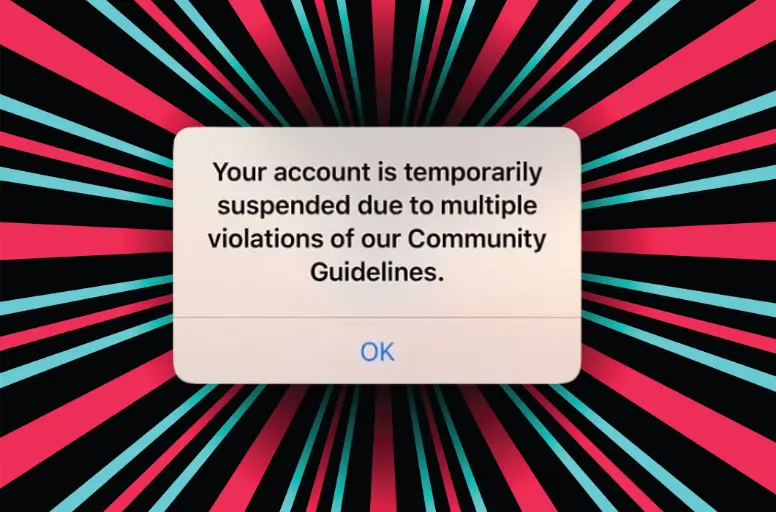
Temporary account ban | First-time or minor violations | 24 hours – 7 days | Yes, in-app | Auto-lift, or sooner via successful appeal | High |
Permanent account ban | Severe or repeated violations | Indefinite | Yes, in-app appeal | Rare reversal | Low But worth trying if it's a false positive |
TikTok Shop violation | Shop-specific policy breach (product, listing, fulfillment, affiliate) | Varies by violation severity | Yes, via Seller Center | 3–14 business days | Moderate Depends on violation type and evidence |
TikTok also uses an internal strike system behind these categories: minor violations add strikes to your account, and accumulated strikes escalate consequences, from feature restrictions, to a temporary ban to permanent termination.
A single severe violation (content depicting violence, sexual exploitation of minors, or illegal activity) can bypass the strike system entirely and trigger an immediate permanent ban with no prior warnings, which is the most common scenario behind a TikTok permanently banned account: how to recover searches we see from sellers.
If you sell on TikTok Shop, note that Shop violations follow their own escalation track through Seller Center, which is separate from the main TikTok app’s ban system. We cover that appeal flow in detail later in this guide.
Learn more about TikTok Business accounts through the article: TikTok Business Account vs Personal
How Does TikTok Ban Work?
Understanding how TikTok decides to ban an account makes your appeal stronger; you’ll know what evidence the reviewer is looking for and which arguments actually move the needle.
TikTok’s ban system has 3 working parts: a strike-based account-status framework, a hybrid moderation pipeline (automated systems plus human reviewers), and an AI flagging layer that’s expanded significantly since 2024.
The strike system
Most account-level bans don’t happen overnight. TikTok assigns strikes to your account for guideline violations, and strikes accumulate across two tracks
- One for the feature you violated (Posts, Live, Comments, etc.)
- One for your overall account standing.
Hit the threshold on either track, and the consequences escalate: feature restrictions (you lose access to Live or DMs for a period), then a temporary ban, then permanent termination.
Strikes generally expire after 90 days if no further violations occur, which means clean behavior can rehabilitate your account standing over time.
The exception is that severe violations, such as content involving violence, child sexual exploitation, terrorism, or illegal goods, can bypass the strike system and result in an immediate permanent ban without warning.
Automated vs human review
When content is uploaded or reported, TikTok’s automated systems screen it first against community guidelines. Most flagged content is removed automatically. More ambiguous cases, and any account-level enforcement decisions, are routed to human moderators for review.
When you submit an appeal, you’re requesting that a human reviewer re-examine the decision. This is why the wording of your appeal matters: the automated system already made its call, and a human is now reading your case to decide whether to overturn it.
The AI moderation false-positive problem
Since 2024, TikTok has leaned heavily into AI-driven moderation to handle the platform’s scale, and this has produced a documented rise in false positives. From what we see in seller communities, the most common false-flag patterns include:
- Awareness or educational content flagged as harmful (missing-person posts, mental health awareness, news coverage of violent events)
- Trending sounds are auto-flagged for copyright even when used within TikTok’s commercial library
- Mass-reporting campaigns by competitors or bad actors that overwhelm the automated system into temporary bans
- Lookalike avatar or username matches that trigger impersonation flags
- Account-linking detection — if your device, email, or payment method is associated with a previously banned account, your new account can be flagged automatically
If your TikTok account was banned for no reason that you can identify, an AI false positive is statistically the most likely explanation, and these are also the appeals most likely to succeed on manual review.
Why Was Your TikTok Account Banned?
If you’re trying to figure out why your account was hit, the answer falls into one of two buckets: a legitimate violation that TikTok’s system caught correctly, or a false positive where the system got it wrong.
Legitimate violations
These are the violations TikTok’s Community Guidelines explicitly enforce. If any of these describe your account activity, your appeal will need to acknowledge what happened and demonstrate that you understand the policy going forward.
1. Community guidelines violations
Hate speech, harassment, bullying, and content that targets people based on race, religion, gender, sexual orientation, disability, or other protected characteristics. TikTok enforces this category aggressively and rarely overturns appeals once a violation is confirmed by a human reviewer.
2. Copyright infringement
Using copyrighted music, video footage, or images without permission. This is the most common cause of strikes for sellers and creators, particularly when using trending sounds outside of TikTok’s Commercial Music Library, or reposting clips from movies, sports broadcasts, or other platforms. Repeated copyright strikes are one of the most common paths to a TikTok permanently banned account.
3. Harmful or illegal activities
Content promoting or depicting drug use, weapons, dangerous challenges, self-harm, eating disorders, or illegal goods and services. This category also covers Shop listings for prohibited products. Severe cases (such as content involving minors or weapons sales) can trigger an immediate permanent ban without a strike warning.
4. Spam and platform manipulation
Coordinated inauthentic behavior like mass-following or unfollowing, buying engagement, posting near-identical content from multiple accounts, using bots or third-party automation tools, or creating fake accounts. TikTok’s spam detection has become significantly more aggressive since 2024, and many sellers using legitimate scheduling tools have been caught in the same net.
5. Underage users
TikTok’s minimum age is 13 globally, with stricter limits in some regions.
If TikTok suspects an account belongs to someone younger, based on content style, voice, appearance, or user reports, the account can be banned and the user required to verify age before reinstatement. TikTok continues to remove millions of suspected underage accounts each quarter, so this remains one of the most common ban categories in their published transparency data.
6. Repeated minor violations
Individually small infractions that accumulate into strikes like repeatedly posting borderline content, breaking minor guidelines, or triggering soft flags. None of these would ban your account alone, but together they can push you past the strike threshold into a temporary or permanent ban.
“Banned for no reason” — actual false-positive scenarios
If your TikTok account got banned for no reason that you can identify, you’re not imagining it. False positives are real, and they’ve grown more common as TikTok’s AI moderation has expanded. Here are the 6 patterns we see most often when sellers tell us their TikTok account was banned for no reason.
1. Mass reporting by bad actors
Competitors, harassers, or coordinated groups can flood your account with reports. TikTok’s automated system can interpret high report volume as evidence of a violation and issue a ban before any human reviews the underlying content. This is especially common for accounts with sudden viral growth.
2. AI mis-flagging legitimate content
Awareness posts (missing persons, mental health, news commentary), educational content about sensitive topics, and creative work that uses provocative imagery in non-harmful ways are all frequently caught by AI moderation. The content didn’t actually violate guidelines, the AI just couldn’t read context correctly.
3. Copyright auto-flag errors
TikTok’s copyright detection sometimes flags licensed audio, royalty-free music, or sounds you legitimately own. The Commercial Music Library is also imperfect, sounds within it have occasionally been mis-flagged after a label dispute. These are among the most successful false-positive appeals because the evidence (license, purchase record, library membership) is concrete.
4. Lookalike or impersonation false matches
If your username, profile photo, or content style resembles another account, particularly a verified one, TikTok’s impersonation detection can flag your account in error. This is especially common for accounts that use a generic avatar or a name similar to a public figure.
5. Age verification false positives
TikTok occasionally restricts accounts based on perceived age signals such as voice pitch or content style rather than actual age. If your account remains active but features are limited, you may need to learn how to turn off age restriction on TikTok to restore full feature access.
6. Device or account-linking false matches
If your device, email, phone number, or payment method has ever been associated with a previously banned account, including someone else’s, like a family member’s, your account can be auto-flagged through linkage detection.
If one of these false-positive patterns matches your situation, this is good news for your appeal: TikTok’s manual reviewers do overturn these decisions when the evidence is clear. The trick is structuring your appeal to flag specifically why you believe it’s a false positive, which we cover in the next section.
Important: don’t create a new account during an active appeal.
Many sellers we work with try to start fresh while waiting on a review. TikTok’s account-linking detection can connect the new account to your appealing account, and if it does, both accounts can be permanently banned. Wait until your appeal is resolved before considering a new account.
How to Get Your TikTok Account Unbanned?
Here, we have the 4 responses to your question of “How to get your TikTok account unbanned”.
#1 Submit an in-app appeal
The in-app appeal is the fastest and highest-success path to TikTok unban. It routes your request directly through TikTok’s official moderation queue and is the path TikTok’s own help docs point users to first.
How to appeal a TikTok ban in-app:
- Open the TikTok app and attempt to log in to your banned account.
- You’ll see a ban notification, either as a full-screen message at login, an in-app banner, or a notification in your inbox tab. Tap it.
- Tap the Appeal button inside the notification.
- Follow the prompts. TikTok will ask you to confirm your understanding of the violation (or that you believe the ban was a mistake) and may request additional information.
- Submit the appeal. You’ll receive a confirmation in your TikTok inbox once it’s received.
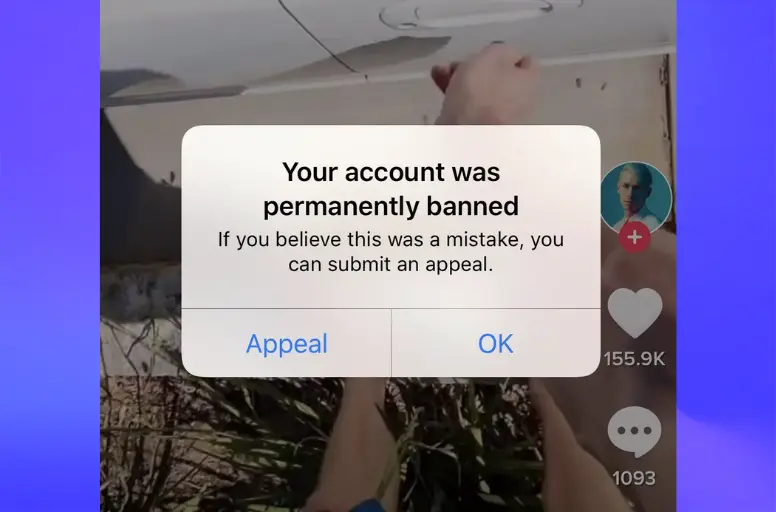
After submitting, TikTok’s review typically takes 3–14 business days. Don’t submit multiple appeals during this window; duplicate appeals can push your case to the back of the queue or be flagged as automated behavior.
From our experience: The single most common mistake we see sellers make is appealing emotionally, long explanations, frustration, or threats to leave the platform. TikTok reviewers process appeals at speed; the ones that succeed are short, polite, and specific about why the ban was an error.
#2 Submit a web-based appeal via Report a Problem
If you can’t access the in-app notification, the banner doesn’t appear, you’re locked out before login completes, or you’re on a desktop, TikTok provides a web-based path through its Report a Problem form. This is the official backup channel and is the right path for anyone trying to learn “How to get your TikTok account unbanned” when the app flow isn’t working.
Steps to submit a web-based appeal:
- Go to tiktok.com/legal/report/feedback
- Under category, select Account access / security
- Choose the Banned account
- Select Appeal
- Fill in the required fields: username, registered email or phone, date of the ban, and your appeal message
- Attach supporting evidence if you have it — screenshots showing your account in good standing, proof of content ownership, licensing documentation, or any other context that supports your case
- Submit
The web form goes to the same review queue as the in-app appeal, so don’t submit both for the same case. Pick the one that works for your situation.
What’s more, the strongest single factor in whether your appeal succeeds is what you actually write. A well-written appeal can recover a TikTok account that a poorly written one wouldn’t.
You need to include:
- Your username (with the @ symbol) and the date your account was banned
- A polite, one-sentence acknowledgment that you understand TikTok enforces its Community Guidelines
- Why do you believe the ban was a mistake? Be specific, factual, and short (one paragraph maximum)
- Concrete evidence if you have it, license records for music, screenshots of compliant content, proof that reported content was educational/awareness-based, etc.
- An explicit request for manual review by a human moderator
- A closing commitment to follow guidelines going forward
And you need to avoid:
- Multiple appeals for the same ban: submit one well-written appeal, then wait
- Aggressive, threatening, or guilt-tripping language: reviewers are trained to discount these
- Long personal stories: keep the appeal under 200 words; reviewers move fast
- Lying about the violation: if TikTok has evidence of the violation, denying it kills your credibility
- Creating a new account during the appeal window: this can permanently ban both accounts via linkage detection
- Asking specifically which guideline was violated as your only message: many reviewers won’t respond to vague queries
Here is a sample appeal letter template:
Hello TikTok Support team,
I am writing to appeal the ban on my account, @[your_username], which was issued on [date]. I respect TikTok’s Community Guidelines and believe this ban may have been issued in error.
[One short paragraph: explain why you believe the ban was a mistake. Be specific. If you suspect a false positive, mention which type — copyright auto-flag, mass reporting, AI mis-flag of awareness content, etc. If you have evidence, mention it briefly here.]
I would appreciate a manual review of my account by your team. I am fully committed to following all Community Guidelines going forward.
Thank you for your time.
[Your name or username]
#3 TikTok Shop sellers: appeal through Seller Center
If you sell on TikTok Shop and your ban is Shop-related, the in-app appeal flow is not the right path to learn how to recover banned TikTok account.
Shop violations are handled separately through TikTok Shop Seller Center, and using the consumer app appeal can actually delay your case.
How to appeal a TikTok Shop violation:
- Log in to seller-us.tiktok.com (or your regional Seller Center URL)
- Navigate to Help Center → Submit a ticket
- Select the violation category that matches your case
- Provide your evidence: order records, product compliance documentation, supplier invoices, shipping confirmations, or whatever is relevant to the specific violation
- Submit and monitor the ticket for follow-up requests from TikTok’s Shop team
Shop appeals typically resolve in 3–14 business days, but the timeline depends heavily on the violation type and how complete your evidence package is. Complex cases (counterfeit allegations, repeated violations, payment disputes) can take longer.
What happens to your inventory and orders during a Shop ban:
- Live orders are typically paused or refunded depending on the violation severity
- Inventory remains in your warehouse (TikTok doesn’t seize stock), but you can’t list or fulfill while suspended
- Payouts for completed orders may be held pending review
- Customer messages can usually still be viewed but not always responded to
This is one of the strongest arguments for not relying on a single sales channel. We work with TikTok Shop sellers daily, and the ones who weather Shop suspensions best are the ones who already have parallel listings on Amazon, eBay, Etsy, or their own store, so a Shop ban is a setback, not a shutdown.
Protect Your Revenue Streams
Avoid total business disruption during account reviews by integrating your TikTok Shop catalog with major sales channels instantly.
#4 Leverage third-party tools
If your banned account represents significant business value, for example a TikTok Shop with steady revenue, a creator account with a large following, or a brand presence you’ve spent years building, there’s a category of professional reputation management and account recovery services that handle appeals on your behalf.
These are not “magic unban tools.” What they actually do is submit a more rigorous version of the same appeal you could file yourself: tighter evidence packaging, identity verification, structured wording aligned with how TikTok’s review pipeline scores submissions, and follow-up handling across the appeal window.
Legitimate services in this space include reputation management agencies (RBS Reputation Management, Your Reputation Solution, StarSolutions, and similar firms) that offer TikTok account recovery as part of broader ORM offerings. Some operate on flat fees, others on success-only (“no recovery, no fee”) terms.
When this is worth considering:
- Your account drives meaningful revenue and the appeal window is critical
- You’ve already submitted one appeal and it was denied
- Your case involves complex evidence (impersonation, mass reporting, copyright disputes with documentation)
- You don’t have time to draft and manage the appeal yourself
When it’s not worth it:
- Your ban is for a clearly severe violation (CSAM, terrorism, sustained harassment, violent extremism) — no legitimate service can reverse these, and any that claims otherwise is lying
- Your account has minimal commercial value and a free in-app appeal is enough
- You haven’t tried the free appeal yet — start there first.
Besides, we’ve prepared a free checklist to help you avoid TikTok community violations and appeal banned videos faster. Just enter your email to get instant access.
Did the 2026 TikTok US Deal Affect Your Account?
If your account was banned, locked, or behaving strangely around January 2026, you might be wondering whether the big TikTok ownership change had something to do with it.
In short, the deal did not change how bans or appeals work, but it’s worth understanding what actually happened, because some US users mistook transition glitches for bans.
What changed
On January 22, 2026, TikTok’s US operations formally moved into a new entity, TikTok USDS Joint Venture LLC. American and global investors, led by Oracle, Silver Lake, and Abu Dhabi-based MGX, now control the majority of TikTok’s US business, while ByteDance retains a minority stake of roughly 19.9%.
The deal ended years of regulatory pressure stemming from the 2024 divestment law. As part of the transition, US users now contract with the new US entity under updated Terms of Service, and Oracle oversees US data security and the retraining of the recommendation algorithm on US user data.
Did it affect bans or the appeal process?
No. The moderation system, the strike framework, and the appeal channels are unchanged. A ban issued before the deal and a ban issued after it use the same in-app and web appeal flows described above. If you’re searching how to unban your TikTok account in the US right now, the steps are exactly the same as they were in 2025 — the ownership change didn’t add, remove, or alter any recovery path.
What it might have looked like
Around the January 2026 transition, some US users reported temporary login hiccups, brief access errors, and UI changes as the platform migrated to the new entity. These were transition artifacts, not bans — they resolved automatically and did not require an appeal.
If your access issue cleared on its own within a day or two and you never received a ban notification, it was almost certainly transition-related, not an enforcement action.
What it means for TikTok Shop sellers
For sellers with accounts in good standing, the deal required no action — your account, listings, and Shop carried over to the new entity automatically. The updated Terms of Service now govern your relationship with TikTok USDS Joint Venture LLC rather than the old ByteDance-controlled US entity.
The bigger takeaway for sellers isn’t the paperwork — it’s the reminder that TikTok’s US future has been politically volatile for years, and a platform that can change ownership (or face a ban deadline) under government pressure is a platform worth hedging against.
Sellers who already list across multiple channels treated the entire 2024–2026 saga as background noise rather than an existential threat.
How to Avoid Getting Banned on TikTok
While learning how to get unbanned on TikTok is vital, you must know how to avoid this situation. It can help you save more time and effort than dealing with your TikTok account. Furthermore, not all “how to get your tiktok account unbanned” methods are effective. If you violate TikTok’s policies, your account may be permanently locked, regardless of any attempts to reopen it. So, it would be better to avoid the TikTok account ban.
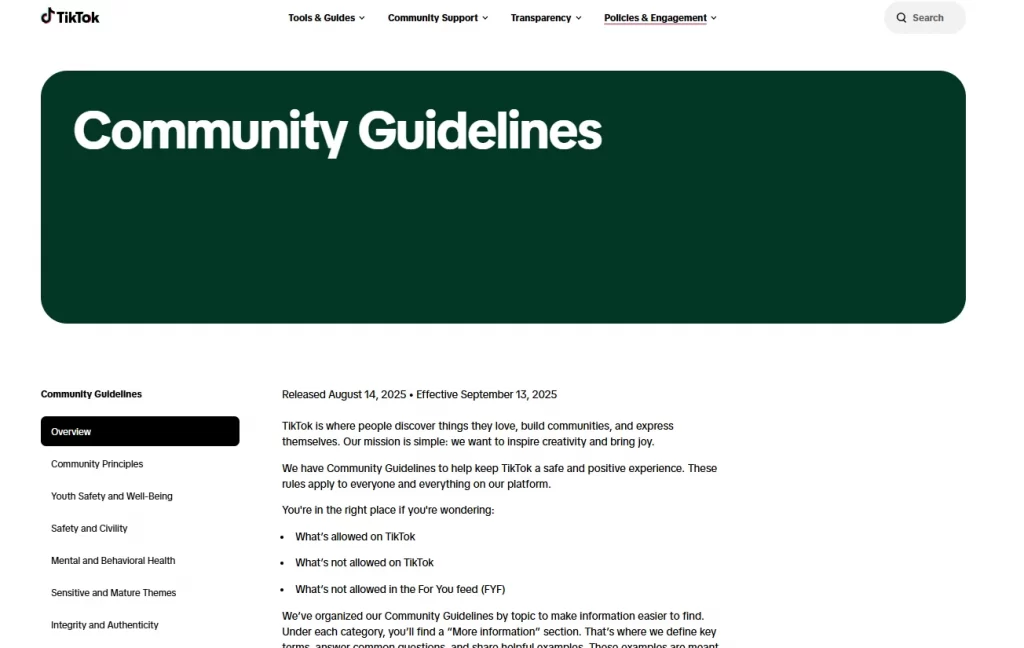
#1 Follow community guidelines
Think of TikTok’s community guidelines as the compass for your content creation. Violating the community guidelines can result in your account being flagged or banned. Thus, it is crucial to familiarize yourself with and adhere to these guidelines. Some common violations include:
- Promotes hate speech, bullying, or discrimination: Spreading negativity based on race, religion, gender, sexual orientation, or any other personal characteristic is a guaranteed way to get banned.
- Depicts violence or dangerous activities: Encouraging or glorifying violence, self-harm, or risky stunts puts you at risk.
- Involves nudity or sexually suggestive content: TikTok strictly prohibits such content, ensuring a safe and appropriate environment for users of all ages.
By respecting these guidelines, you won’t need to wonder, “How to get your TikTok account unbanned?”
#2 Respect copyright
One common reason you search for “How to get your TikTok account unbanned” is copyright infringement. Understanding and respecting intellectual property rights is essential when creating content on TikTok. Using copyrighted material without permission is against TikTok’s guidelines and unethical actions. Here are some recommendations for you:
- Music: TikTok provides a vast library of music and sounds you can use legally. Additionally, you can create your original content or collaborate with other creators to bring unique and copyright-free content to your audience.
- Videos and images: Downloading and using copyrighted video footage or images without permission can lead to copyright strikes and even account termination.
- Live streams: Streaming copyrighted content, like movies or sporting events, is prohibited.
The Commercial Music Library point is the single most overlooked rule among TikTok Shop sellers — trending sounds that are fine for personal accounts can trigger copyright flags on commercial content.
#3 Enable two-factor authentication
Protecting your TikTok account from unauthorized access is crucial in avoiding a ban. This feature requires you to enter a verification code sent to your registered phone number or email address and your password. By enabling two-factor authentication, you can:
- Adds an extra layer of security to your account.
- Reduce the risk of your account being hacked or misused.
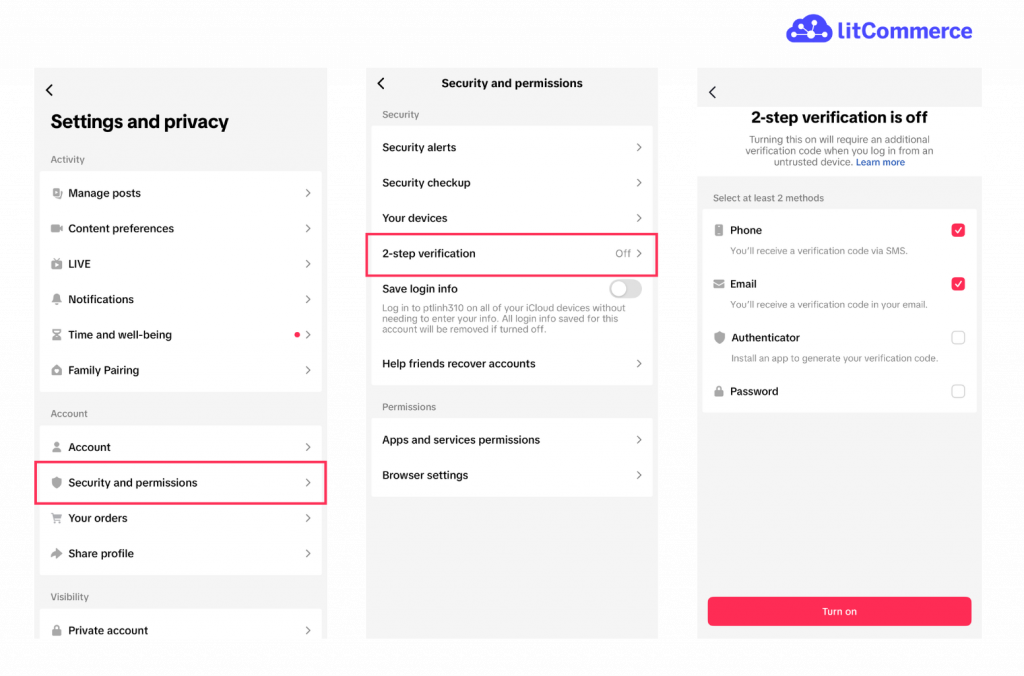
To enable two-factor authentication for your TikTok account, you can follow these steps:
- Step 1: Open Settings and privacy → Security and permissions
- Step 2: Tap 2-step verification
- Step 3: Select your verification methods (SMS, email, authenticator app, password)
- Step 4: Turn it on
What’s more, getting verified on TikTok can help build trust and make your account look more authentic. Learn the requirements and step-by-step process in our blog.
#4 Don’t trigger spam filters
While being active and engaging is key to growing your audience, spamming the platform with excessive or identical content can raise the ability of a banned TikTok account. This includes:
- Posting at an unnatural frequency: Avoid flooding the platform with too many videos in a short time frame.
- Repetitive content: Posting the same video repeatedly or slightly modified versions can be considered spam.
- Automated posting: Using bots or third-party apps to post content automatically is against TikTok’s guidelines. If you use a scheduling tool, make sure it’s one that posts through TikTok’s official API rather than automating the app directly.
Instead, to avoid having to find a solution to how to get your TikTok account unbanned, you need to:
- Focus on creating high-quality, original content that adds value to the community.
- Interact with your audience, respond to comments, and participate in trends authentically.
#5 For TikTok Shop sellers: stay on the right side of Shop policies
Shop sellers face an extra layer of rules beyond the standard Community Guidelines, and violating them can take down both your Shop and your main TikTok account. Key areas:
- Prohibited and restricted products: review TikTok Shop’s product policy before listing; categories like supplements, weapons-adjacent items, and certain electronics are heavily restricted
- Affiliate disclosure: clearly disclose paid partnerships and affiliate relationships
- Listing accuracy: misleading titles, images, or claims trigger Shop violations fast
- Fulfillment standards: late shipments, high cancellation rates, and poor order metrics can lead to Shop suspension
Treat your Shop metrics the way you’d treat a marketplace seller rating on Amazon or eBay — consistent compliance is what keeps your account healthy long-term.
Don’t let one ban sink your sales!
With LitCommerce, you can list and sync your products across TikTok Shop, Amazon, eBay, Etsy, Walmart, and 20+ more channels from a single dashboard. So whether you get unbanned quickly or not at all, your business keeps selling.
You may also like: TikTok Business Account vs Personal: Which Is Right for You in 2026?
How to Get Your TikTok Account Unbanned: FAQs
Why is my TikTok account permanently banned?
Banned TikTok accounts may have been permanent for several reasons, including:
– Harmful content
– Copyright infringement
– Age violations
– Serious misconduct.
To understand the specific reason for your account ban, you can refer to the notification you received when opening the app or reach out to TikTok for further clarification.
How long does a TikTok ban last?
It depends on the ban type. Temporary bans last 24 hours to 7 days and often lift automatically. Comment and Live bans typically clear within a few days to two weeks. A TikTok permanently banned account has no set duration — it stays banned indefinitely unless a successful appeal reverses it. If you’ve submitted an appeal, TikTok’s review usually takes 3–14 business days, though complex cases can take longer.
Can I create a new TikTok account if mine is permanently banned?
Not during an active appeal. TikTok’s account-linking detection can connect a new account to your banned one through your device, email, phone number, or payment method, and getting both permanently banned is a real risk.
After your appeal is fully closed and unsuccessful, you can create a new account, but use a different email, phone number, and payment method, and avoid reproducing your old username and content style. This is the safest path for TikTok banned account recovery when an appeal can’t reverse the original ban.
What to do if my appeal is denied?
If your first appeal comes back denied, you still have options, but each one has a narrowing window of opportunity, so choose carefully.
Option 1: Submit one more carefully-revised appeal
You typically get one good follow-up shot. Don’t repeat your first appeal verbatim. Instead:
– Address the specific reason given for the denial (if TikTok provided one)
– Add new evidence you didn’t include the first time
– Refine your wording to be even more concise and specific
– Wait at least 48 hours between appeals to avoid being flagged as spam
Option 2: Escalate via additional channels
If both in-app appeals are denied, the practical options narrow:
– T-ikTok’s @TikTokSupport on X (Twitter): slow but occasionally surfaces high-profile cases for re-review
– For TikTok Shop sellers: contact your assigned account manager if you have one
– For verified accounts or large creators: TikTok’s creator support has separate channels
There is no general TikTok customer service phone line, and email channels to ByteDance addresses are for legal/press matters, not ban appeals. Anyone selling “unban services” or claiming to have TikTok insider contacts is almost certainly a scam.
Option 3: Accept the outcome and rebuild
After exhausted appeals on a TikTok permanently banned account: how to recover scenario, the honest answer is sometimes: you can’t. If your account was banned for a severe violation that TikTok has documented evidence of, no amount of appealing will reverse it. At that point:
– Wait until your appeal is fully closed before creating a new account
– Use a different email, phone number, and payment method to avoid linkage detection
– Don’t try to reproduce your old account — same username, same content style, same niche all increase the chance of linkage-based ban
– Diversify your sales channels so a single platform decision can’t take down your business again
What happens to my TikTok Shop products and orders if my account is banned?
During a Shop suspension, your inventory stays in your warehouse (TikTok doesn’t seize stock), but you can’t list or fulfill while suspended. Live orders are typically paused or refunded depending on the violation, and payouts for completed orders may be held pending review.
You can usually still view customer messages but not always respond. This is why sellers who list across multiple channels recover fastest, a Shop ban becomes a setback rather than a shutdown.
Be Patient When Getting TikTok Banned Account Recovery!
In short, being banned TikTok account is not fun. So, it would be better to follow the platform’s regulations and policies, so you don’t waste time figuring out how to get your TikTok account unbanned. On the other hand, if, unfortunately, your account has been banned, stay calm because we have many ways to solve it. However, this process will take some time. So, being patient is critical.
In addition, if you are looking for tools to support your online business, contact us for advice on eCommerce tools developed by LitCommerce.
Moreover, to remain well-informed about the most recent developments and valuable insights in the eCommerce industry, we invite you to subscribe to our blog and become an active member of our thriving Facebook community. We hope you’ll enjoy it!