




eBay isn’t just one of the world’s largest online marketplaces; it’s also a popular auction platform where anyone can easily sell their old stuff, including books. Whether you’re looking to declutter a bookshelf full of dusty novels or kickstart a business selling rare or secondhand books, this how to sell books on eBay guide is made for you.
In this guide, I’ll walk you through exactly how to sell books on eBay in 7 steps: starting with which books are worth listing, then building a listing that converts, setting your store policies, pricing right, and getting the book out the door profitably.
Key takeaways:
How to Sell Books on eBay in 7 Steps – Beginners’ Guide
Selling books successfully on eBay comes down to choosing the right titles, creating clear listings, and protecting your margin from fees and shipping costs. Follow these seven steps to move from market research to a completed order.
Step 1: Do your market research
Everything else in this guide, your photos, your listing copy, your pricing, only works if you go in knowing what the market will actually pay. Skip this step and you will either underprice books that are worth real money, or waste time listing titles nobody wants.
Start by checking what buyers actually paid, not what sellers are asking.
- Search the title, author name, or ISBN of your book on eBay.
- Then go to the left-hand filter panel and tick “Sold Items” under “Show Only” to see sold items on eBay.
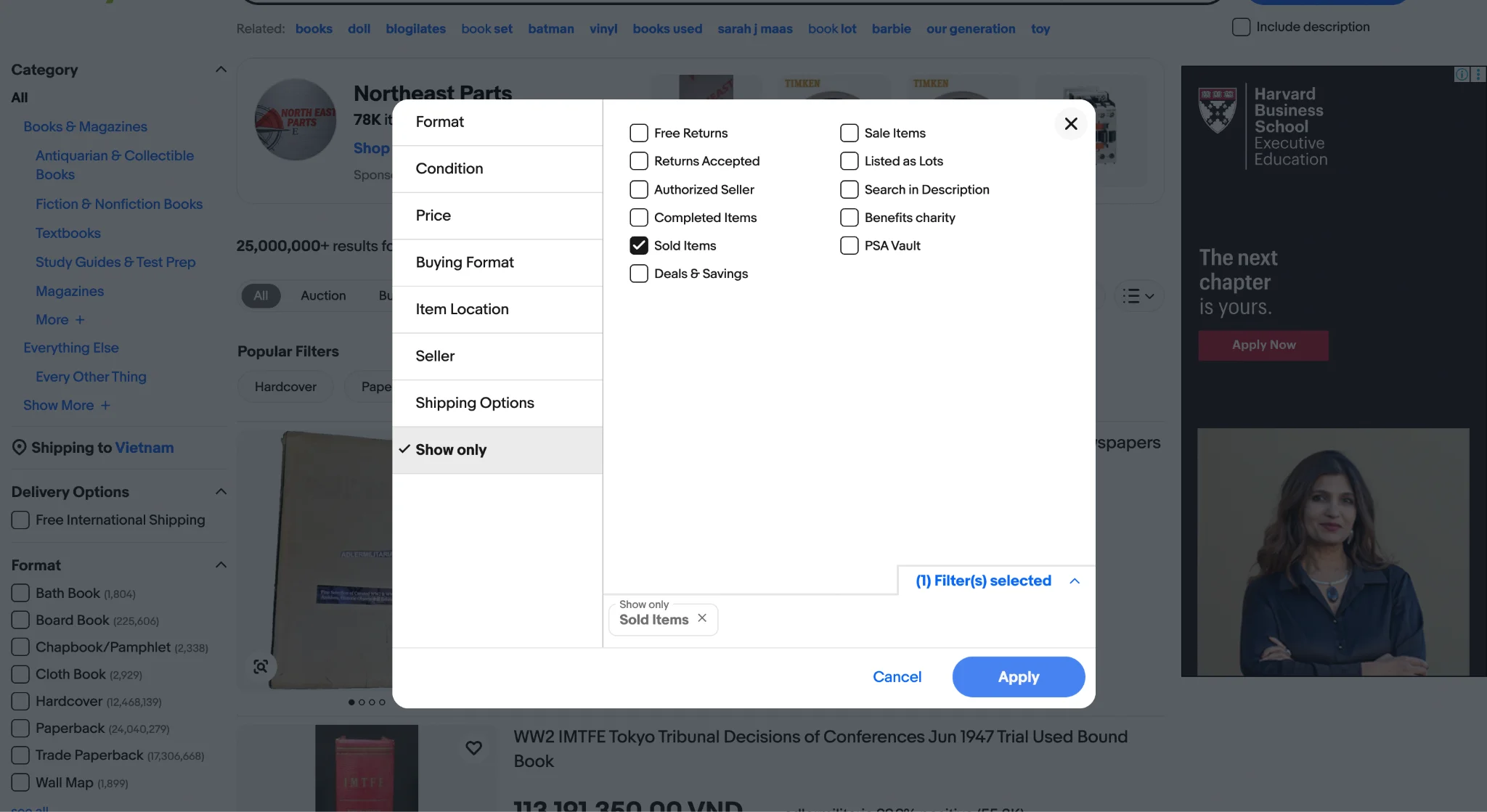
If the same book shows dozens of unsold listings at $8 but sold results sitting at $3, the market has already given you the answer: demand is low, or supply is overwhelming.
Record three numbers from each search: the average sold price for your specific edition and condition, the number of active listings competing with you right now, and whether the sold results are from the last 30 to 90 days (older sold data means slower demand).
Or, go deeper with eBay Product Research (previously called Terapeak). The Sold Items filter only shows 90 days of history. For books that sell slowly, a rare out-of-print title, a niche vintage manual, that window might show zero results even when the book has real value.
For a fuller picture, use eBay’s Product Research tool, available free to all sellers under the Research tab in Seller Hub. You can read more in our eBay Terapeak guide if you want to use the tool beyond basic book research.
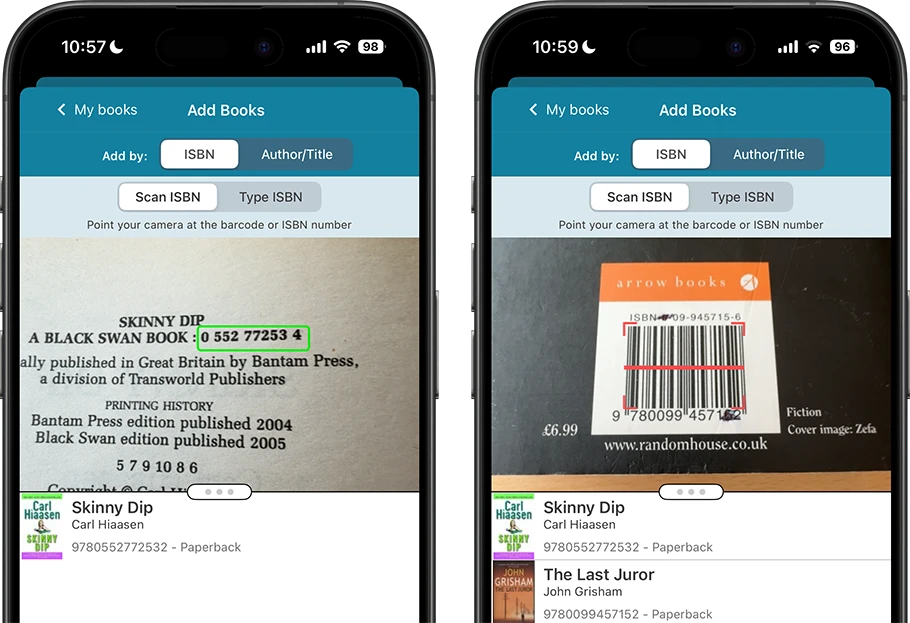
Pro tips: If you are sourcing books from thrift stores, estate sales, or library sales, typing titles manually into eBay slows you to a crawl. The eBay mobile app has a built-in barcode scanner, open the Sell flow, tap the camera icon in the search bar, and point it at the ISBN on the back cover. eBay pre-fills the product data instantly.
Step 2: Sourcing your books
Most profitable book sellers buy inventory for under $2 a copy.Here are the best places to find inventory worth listing:
- Thrift stores (Goodwill, Salvation Army, charity shops) — books typically priced $0.50 to $2 regardless of value. Head to non-fiction, reference, and textbook sections first.
- Library sales — often $0.25 to $1 per book. Use BookSaleFinder.com to find sales near you.
- Estate sales and auctions — retired professionals’ collections are regularly priced far below resale value. Full libraries sometimes sell as a single lot.
- Garage and moving sales — sellers rarely know book values. Offer a flat rate for the whole table.
- Facebook Marketplace and Craigslist — search “book lot” or “book collection.” The free section yields entire boxes at no cost.
- Second-hand bookstores — clearance shelves at Half Price Books or Powell’s often hide $1 titles worth multiples on eBay.
- Online arbitrage — mispriced Buy It Now listings on eBay, or books listed locally below their eBay market value.
- Liquidation platforms (GovDeals, Liquidation.com) — bulk lots from closed libraries and school districts. Cross-reference a few ISBNs before bidding.
Step 3: Take photos of your book
Clear photos do more than show the book; anyone researching how to sell books on eBay should use them to help buyers judge condition before they click. A listing with clear, honest photos gets the click. A listing with a single stock image or a blurry shot of the cover loses it to the next result.
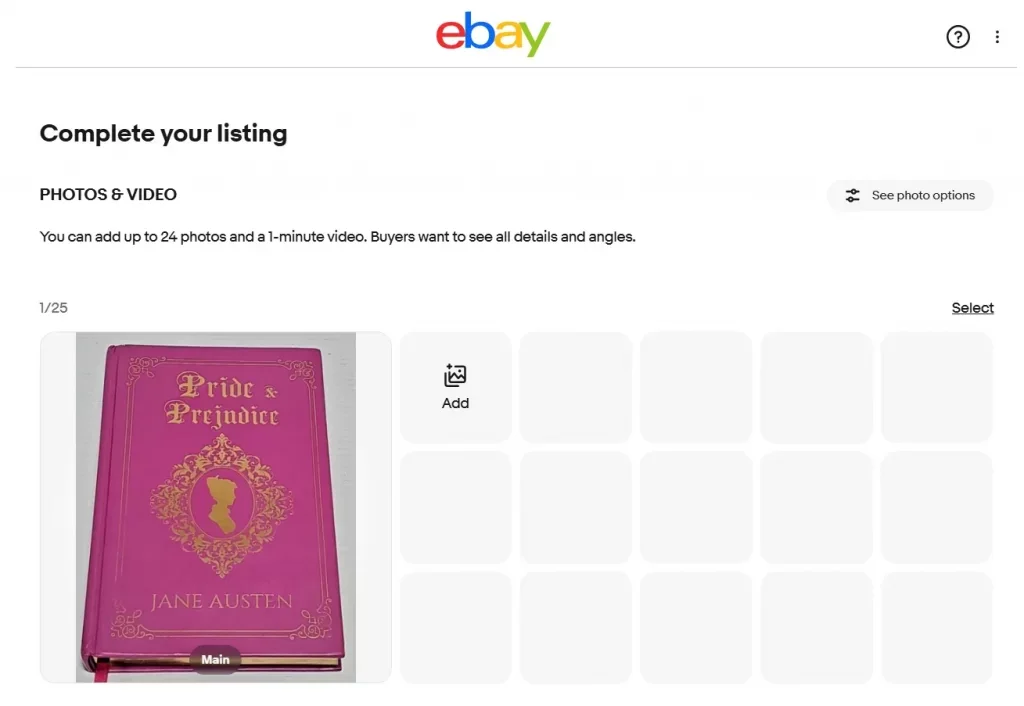
eBay allows up to 24 photos per listing. For a standard used book, 4 to 6 photos are typically enough. For rare or collectible titles, use as many angles as needed. Buyers spending $50 or more want to see the evidence before they commit.
Never hide a flaw. A close-up photo of a worn spine or a previous owner’s name on the title page actually builds confidence rather than killing the sale. It removes the buyer’s fear of receiving something worse than described. Hidden damage is the primary cause of return requests and negative feedback.
Pro tips: Rather than photographing one book end-to-end before moving to the next, batch the entire photo session first. Photograph all your books in one go on a mobile phone, then switch to a desktop computer for the listing work. Typing, filling in Item Specifics, and writing descriptions are all faster on a full keyboard with multiple tabs open.
With photos ready, you can move into building the listing itself.
Step 4: List your books on your eBay store
To begin listing your books on eBay, go to the eBay homepage or open the eBay mobile app. Follow these simple steps:
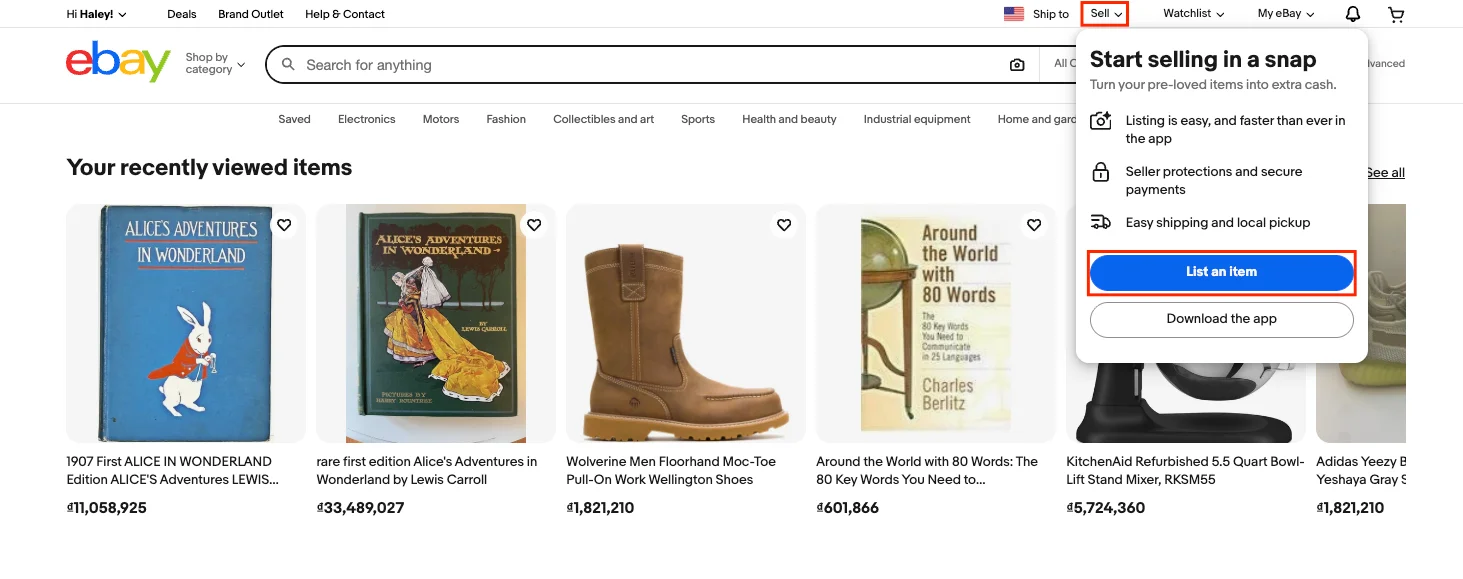
1. Click on Sell in the top right corner of the homepage, then click “List an item”
2. In the search bar, type in your book’s title, author, or ISBN.
eBay gives you 80 characters. Use them. A strong book listing title includes the book title, author, edition, format, and condition (or another key attribute), because buyers search for all of these terms.
Pro tip: Using the ISBN (International Standard Book Number) is the quickest way to list a book. Scan it in the app or enter it manually, and eBay will often autofill details like the title, author, publisher, and even genre based on the ISBN.
ISBN catalog entries contain errors more often than you would expect: wrong edition year, incorrect format, missing publication details. Check every pre-filled field manually before you continue.
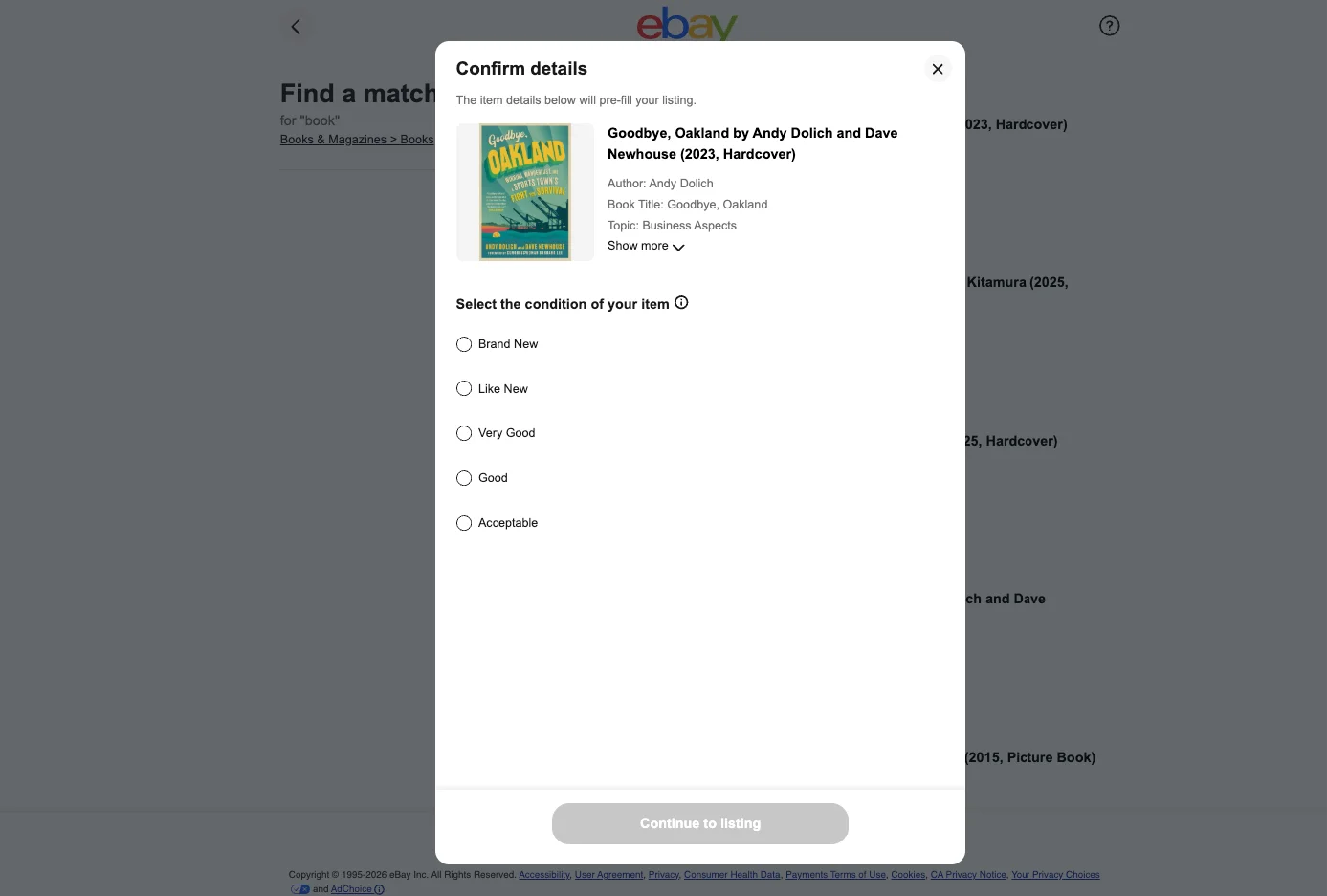
3. Select the most relevant Books & Magazines category suggested by eBay, or search for the appropriate category manually. eBay uses five condition grades for books: New, Like new, Very Good, Good, and Acceptable.
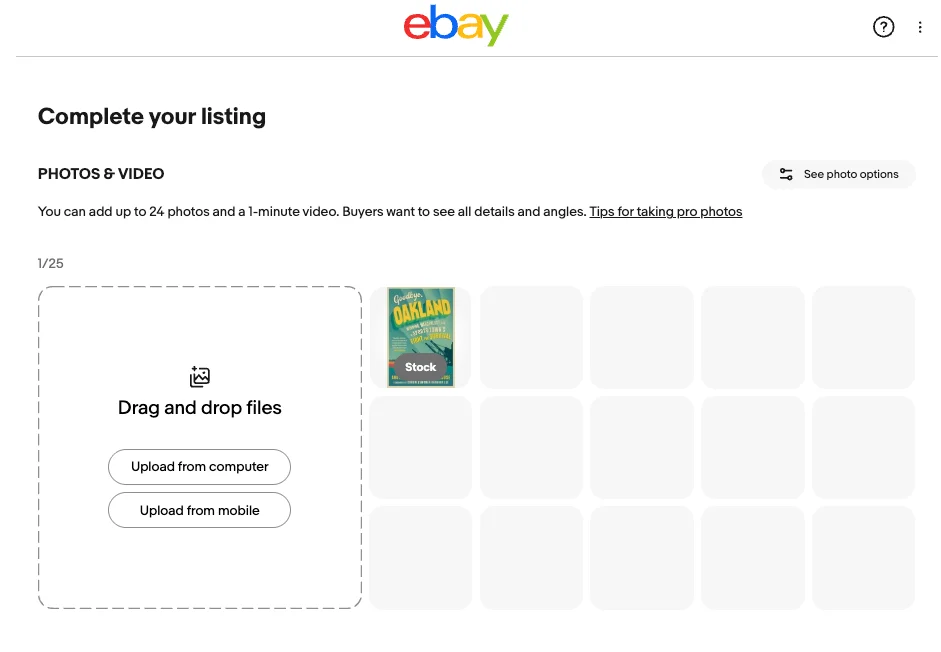
4. Upload clear photos of the book, including the cover, back, spine, and any noticeable damage. eBay requires at least one photo and allows up to 24.
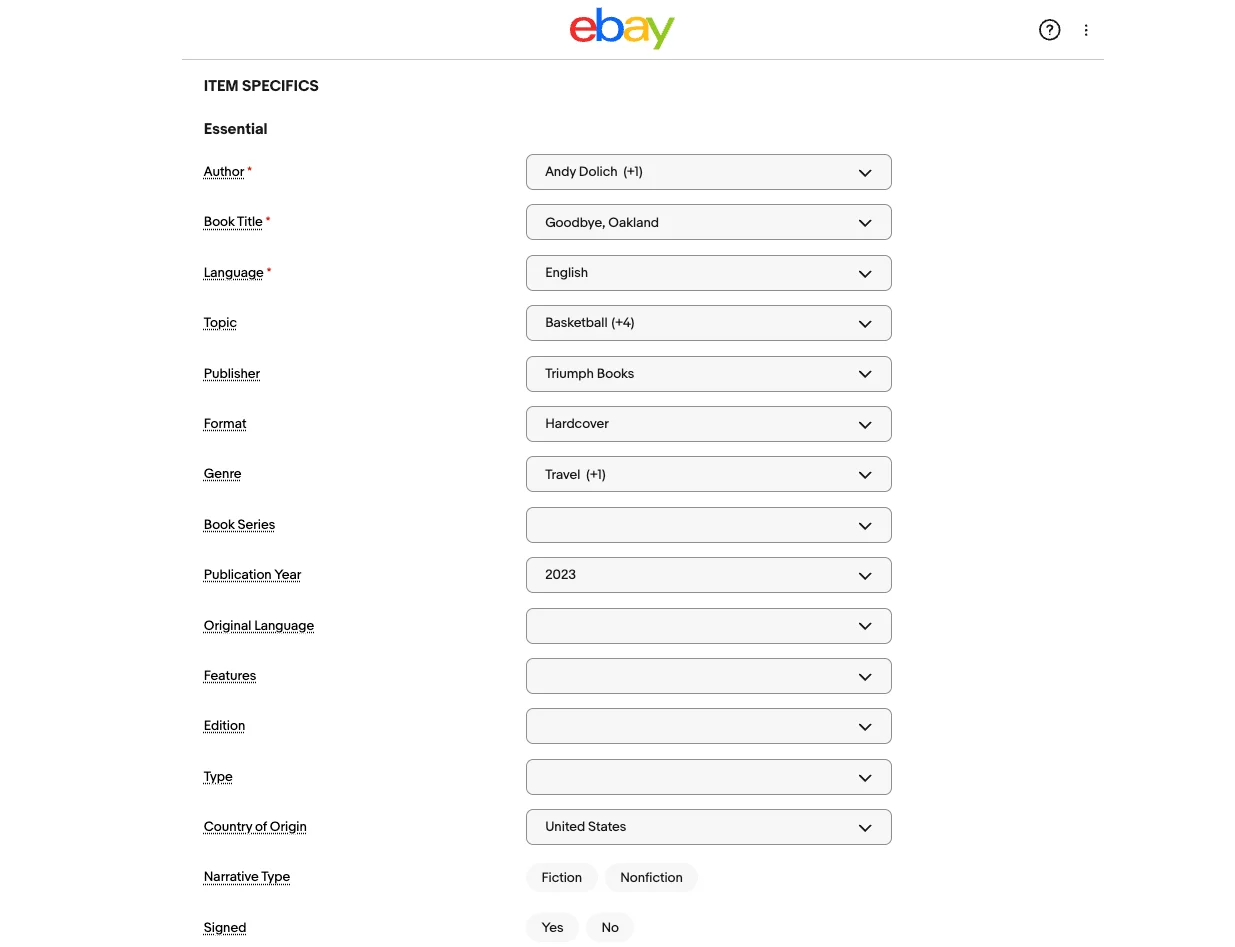
5. Fill in the item specifics such as ISBN, Author, Publisher, Publication Year, Format, Language, and Condition where applicable. eBay recommends completing as many relevant specifics as possible to improve visibility.
For sellers who use LitCommerce to list on eBay and multiple channels, our AI-generated specifics feature takes the tedious work out of filling in listing details. It helps you auto-fill Item Specifics in one click.
Along with the AI Description Generator, eBay sellers can create clear, relevant product descriptions in seconds, turning existing product information into ready-to-use copy.
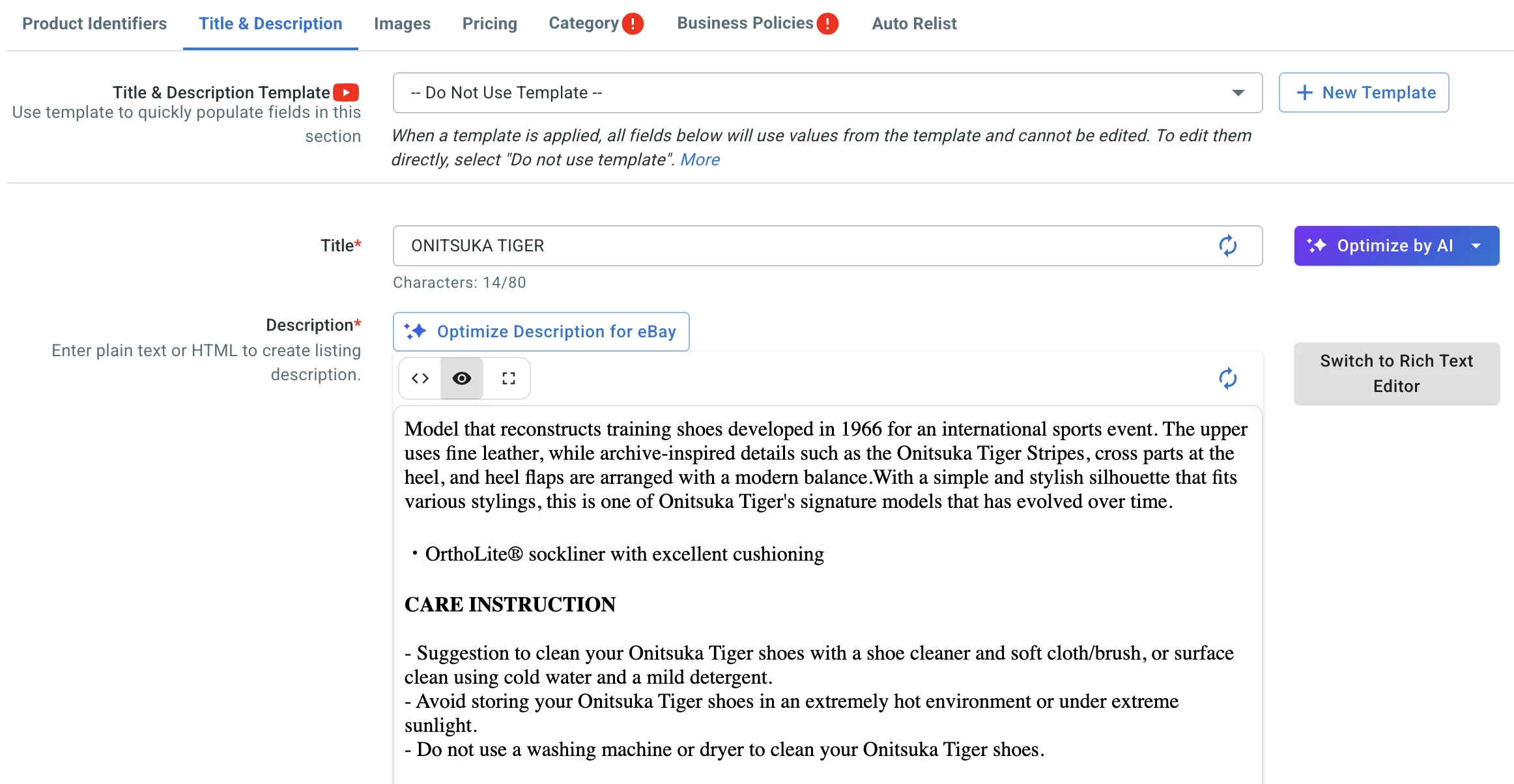
6. Write the description. Your description is where you can sell the book beyond what the title says. Include condition details, edition information (first edition, signed copy, etc), and any flaws.
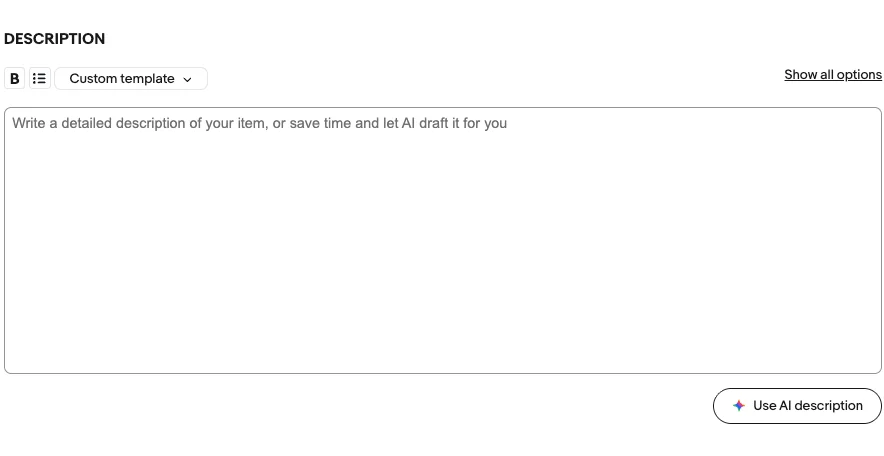
Being honest and detailed helps you avoid returns and keeps your seller ratings high in the long term. A thorough upfront description also reduces buyer messages asking the same questions before purchase, saving time for both sides.
Selling books in lots
If a book’s sold price is under $6 to $8 after fees, listing it alone usually is not worth the time. Group 10 to 20 books by a narrow subject (for example, “lot of 15 WWII history paperbacks”) and list them as a single item. In the Listing Specifics section, set “Bundle Listing” to Yes and fill out the Bundle Description field.
To list books faster, LitCommerce’s eBay listing tool lets you create and push listings in bulk from one dashboard using Templates & Rules, so you can build several lot listings at once instead of repeating the same fields for each book.
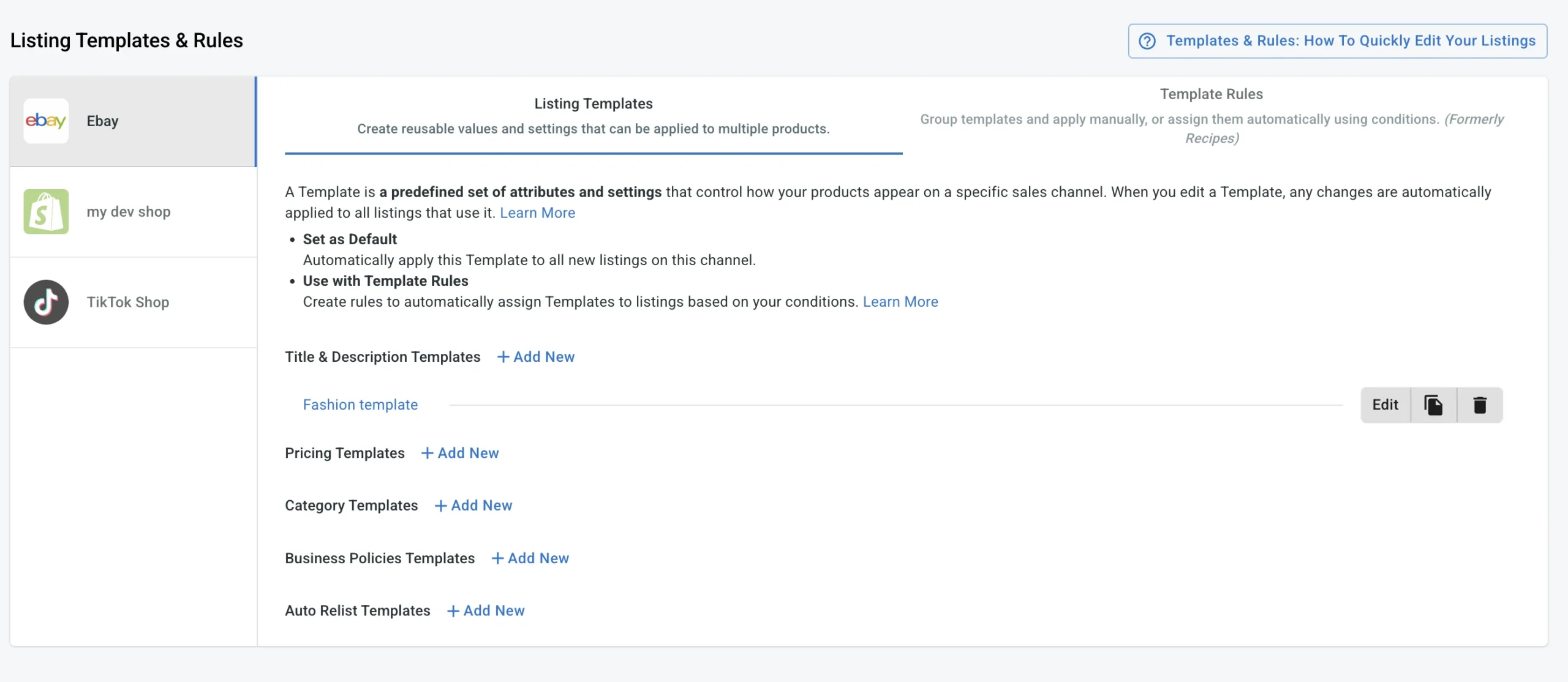
Once your listing is ready, complete one setup step before you finalize pricing: your eBay business policies.
Speed up listing creation with LitCommerce
Our AI Generate Specifics and Description Generator helps you auto-fill item details like ISBN, author, and condition in one click, and turn basic product info into clear, buyer-ready descriptions in seconds
Step 5: Set up your eBay business policies
Defining shipping costs, return terms, and payment rules is an often-overlooked part of selling books on eBay efficiently. eBay Business Policies are reusable templates that handle exactly this.
According to eBay, once you create a policy, it applies automatically to every new listing you create, and updating a policy updates every active listing using it at once, without editing them individually.
- Go to the Account section and open the Business Policies dashboard.
- Select “Create policy,” choose the policy type, give it a descriptive name for example, “Books – Media Mail Calculated”, fill in your details, and save. The policy is then available as a dropdown whenever you create a new listing, and you can apply it to multiple existing listings in bulk.
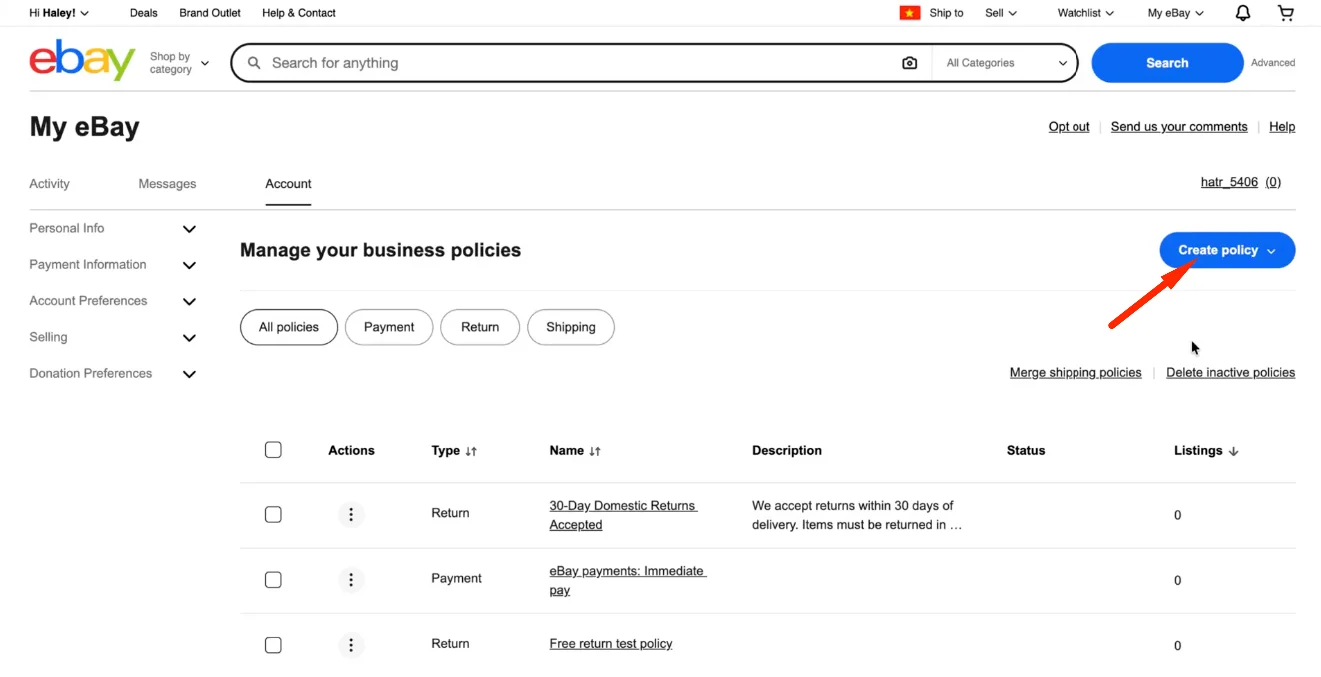
There are 3 policy types every book seller needs:
Shipping policy
Your shipping policy specifies handling time, the carriers you use, and whether postage is calculated or flat-rate.
For selling books on eBay, the most important setting is Calculated Media Mail: rather than guessing a flat rate and building it into your price, eBay calculates the exact postage based on your book’s actual weight and the buyer’s zip code.
Set up at least two shipping policies:
- “Standard Books – Calculated Media Mail” for typical used books and paperbacks
- “Heavy Books or Art Books – Ground Advantage” for oversized or heavy titles where Media Mail still applies but a box is needed
Return policy
Your return policy specifies the return window (14, 30, or 60 days) and who pays return shipping. A 30-day return window increases buyer confidence on higher-priced books.
For low-value books where the cost of accepting a return exceeds the sale price, “no returns” is a reasonable stance, but your listing description needs to be more detailed to compensate, since buyers cannot fall back on a return as easily.
Payment policy
eBay’s Managed Payments system handles all transactions. The main setting worth checking here is requiring immediate payment on Buy It Now listings, which prevents buyers from committing and then never completing the purchase.
With your policies in place, the shipping cost piece of your pricing math is now accurate, which means you are ready to price.
Step 6: Price your books and include shipping and returns
Your pricing should start with sold data for the same condition and edition, followed by the shipping cost confirmed in your policies.
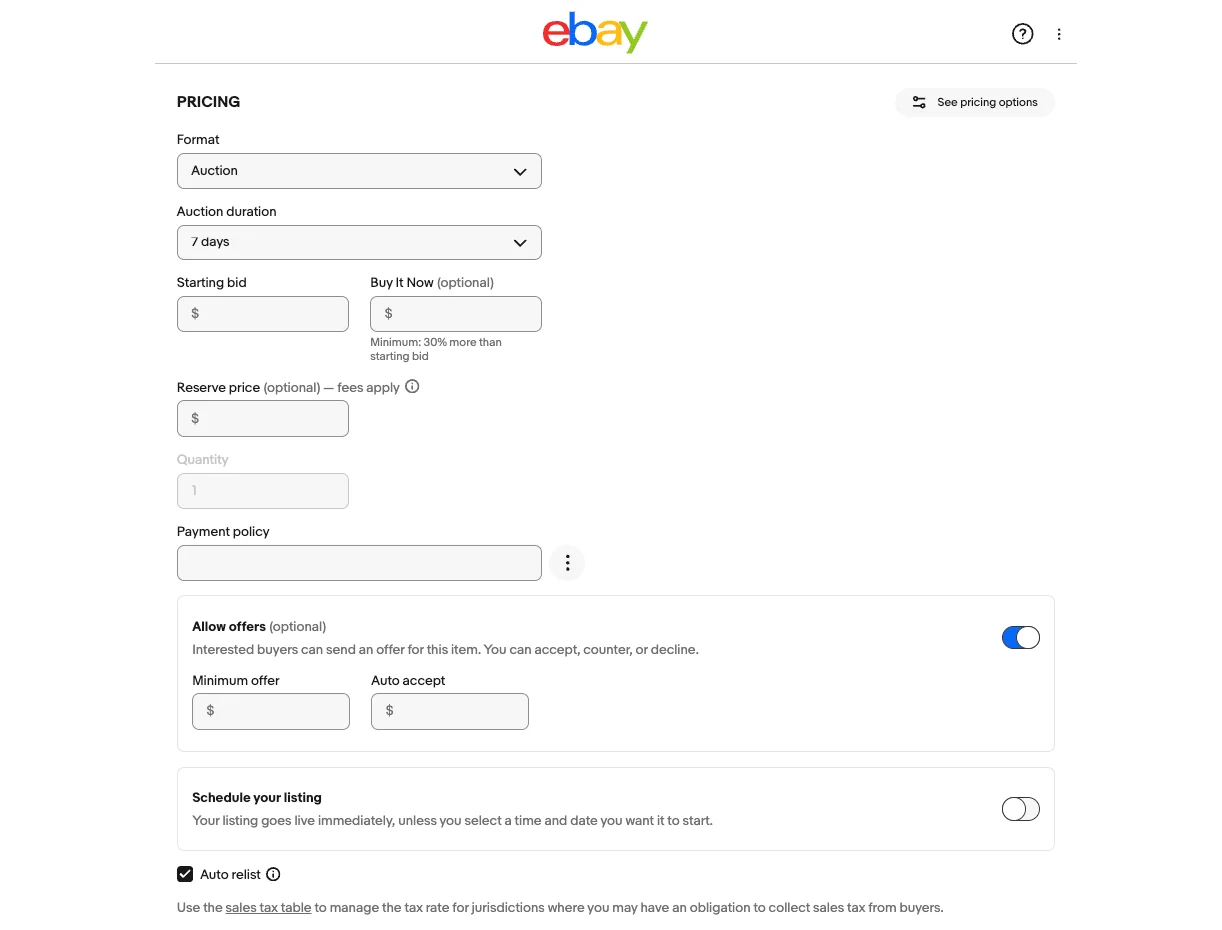
eBay offers two main pricing options: Buy It Now and Auction. Each has its own benefits depending on what kind of book you’re selling and how quickly you want to make a sale.
- Buy It Now: With this listing method, you set a fixed price for your book. It’s best suited for commonly sold titles like used textbooks, popular novels, or books with a well-established resale value. Buyers can make a decision instantly, leading to faster sales without the wait of an auction.
- Auction: This is great for rare, collectible, or high-demand books with fluctuating or unknown market value. You can start with a low but fair minimum bid to spark interest and let buyers compete. This method is useful when the market is active and buyers are willing to pay more for sought-after titles.
If a book has been sitting for 30 or more days without views, Promoted eBay Listing can push it higher in eBay search results. You set an ad rate (typically 2% to 5%) and only pay when someone buys through the promoted listing within 30 days of clicking. For books with slim margins, keep the ad rate at 2% to 3% and apply it selectively to your higher-value titles rather than across your entire store.
Now that pricing is confirmed, the last step before the book goes live is making sure you have the right shipping option chosen, because that number feeds directly back into your price.
Step 7: Pack and ship your book
It may take a while, but when you get your eBay order, let’s pack and ship your book.
Once your book sells and payment comes through, eBay will email you with a link to print your shipping label. Click the button, fill in a few quick details, and print the label at home.
To keep your book safe during shipping, use a bubble-padded envelope for small or regular books. For bigger or more valuable books, use a sturdy box with padding like bubble wrap or crumpled paper. Afterward, tape everything up tightly, and you’re good to go.

Media Mail is usually the cheapest way to ship books, but it is slower and has strict content rules. The table below compares it with USPS Ground Advantage and Priority Mail so you can choose the right service for each order.
| USPS Media Mail | USPS Ground Advantage | USPS Priority Mail | |
|---|---|---|---|
| Eligible items | Qualifying media, including books of at least 8 printed pages, CDs, DVDs, printed music, and certain educational or recorded media | Most mailable parcels, including books, subject to USPS restrictions | Mailable packages and other eligible matter, subject to USPS restrictions |
| Starting price | Varies by weight; check current USPS Media Mail rates | Varies by weight and zone; check current USPS rates | From $11.00 at the Post Office; online commercial rates may be lower |
| Tracking | Yes | Yes; $100 insurance included | Yes; up to $100 insurance included with most shipments |
| Delivery time | Typically 2–8 business days; not guaranteed | Expected 2–5 business days | Expected 2–3 days |
| Weight limit | 70 lbs | 70 lbs | 70 lbs |
| Best for | Books and other qualifying media when keeping shipping costs low matters more than speed | Books, mixed-item packages, or shipments where faster ground delivery is preferred | Time-sensitive book orders or bundles where faster delivery is worth the higher cost |
| Key restriction | Contents must meet USPS Media Mail eligibility rules. Advertising is generally prohibited, except limited incidental announcements allowed by USPS. Packages may be inspected. | USPS mailing restrictions still apply | USPS prohibited and restricted-item rules still apply; 2–3 day delivery is not a guaranteed delivery commitment |
For most single book sales, Media Mail is the right choice. The delivery window of 2 to 8 business days is acceptable to buyers purchasing used books, and the savings compared to Ground Advantage are significant, particularly on heavier textbooks.
Once your book sells and payment clears, print your shipping label directly from eBay’s Seller Hub. The label automatically populates tracking to the order. Ship within your stated handling time, if you set 1 to 3 business days, aim for day one or two. Consistent, fast dispatch improves your feedback score and supports Top Rated Seller status.
How Much Does It Cost to Sell Books on eBay?
Understanding the eBay selling fee is central to how to sell books on eBay profitably, because it prevents a thin margin from becoming an after-sale surprise.
| Fee type | Amount | Notes |
|---|---|---|
| Insertion fee | Free for the first 250 listings per month | $0.35 per listing above the monthly free allowance |
| Final value fee (Books and Magazines) | ~15.3% of total sale amount (item price + shipping) | Applies to the first $7,500 in sales; rate may be lower above that threshold |
| Per-order fee | $0.30 for orders of $10 or less; $0.40 for orders over $10 | Charged once per order, on top of the final value fee |
| Promoted Listings Standard | Seller-set ad rate × sale price; only charged on completed sales | Optional; increases listing visibility in search results |
Fees verified as of September 2026
Worked example: You sell a textbook for $40 and charge $6 for calculated Media Mail, so the order total is $46. The final value fee is 15.3% of $46, which comes to $7.04. Because the order is over $10, eBay adds a $0.40 per-order fee, bringing total eBay fees to $7.44. If the actual Media Mail label for a 2 lb book costs you $5.50, you net about $33.06 before subtracting what you paid for the book.
For more on what eBay charges and how to factor it into your pricing strategy, see our full breakdown of eBay fees for selling.
What Types of Books Sell Best on eBay?
Not every book category sells at the same pace. The segments below compare average sold prices, monthly volume, and sell-through rates, based on Zik Analytics data:
| Book segment | Est. units/month | Avg price | Sell-through | Opportunity |
|---|---|---|---|---|
| Textbooks | 1,206 | $91.94 | 18.6% | High |
| Religion books | 11,916 | $69.58 | 19.8% | Medium |
| History books | 9,118 | $52.00 | 13.7% | Low |
| Children books | 4,531 | $44.96 | 16.7% | High |
| Fantasy books | 1,549 | $42.11 | 11.7% | Medium |
| Fiction books | 1,324 | $37.47 | 10.1% | Low |
| Cookbooks books | 6,709 | $35.49 | 18% | Medium |
| Comics books | 619 | $64.53 | 7.4% | Low |
Fees verified as of September 2026
Sell books on multiple eBay accounts in 1 place
If you run separate eBay stores for different niches, LitCommerce lets you manage them all from the same dashboard, copy listings between accounts, and keep each store’s inventory and seller performance metrics separate.
Common Mistakes of Selling Books on eBay to Avoid
Even experienced sellers lose money on avoidable errors. Avoiding these pitfalls matters just as much as listing correctly when you are figuring out how to sell books on eBay:
- Using stock photos instead of real ones. Buyers want to see the actual condition of your book: spine creases, page yellowing, cover wear. Original photos build trust and reduce return requests.
- Hiding flaws or damage. Not disclosing highlighting, water stains, or missing dust jackets leads to negative feedback and eBay cases. Always photograph and describe every defect.
- Overpricing without research. A book that looks valuable to you might have 500 identical copies listed. Always check completed sales (not just active listings) to set realistic prices.
- Writing vague or keyword-stuffed titles. Include the book title, author, edition, ISBN, and condition, clearly and naturally. Buyers search for specifics, not clickbait.
- Skipping Item Specifics. eBay’s algorithm favors listings with complete Item Specifics (format, language, topic, publication year). Incomplete listings get buried in search results.
- Not selling internationally. Rare and out-of-print titles have global demand. Limiting yourself to domestic shipping means leaving money on the table.
How to Sell Books on eBay: FAQs
Is selling books on eBay worth it?
Yes, for the right books. Rare editions, signed copies, textbooks, and out-of-print titles regularly sell for meaningful amounts, and eBay’s 130+ million buyer base gives your listings broad exposure. For mass-market paperbacks priced under $6 to $8, the math often does not work after fees and shipping; sellers learning how to sell books on eBay should consider lot sales or donation instead.
What is the cheapest way to ship books on eBay?
USPS Media Mail is the cheapest option for qualifying book shipments. It is only eligible for books and other educational media, items containing advertising do not qualify. Check the current rate at usps.com/ship/media-mail.htm before setting your shipping price, as USPS adjusts rates periodically. Setting up Calculated Media Mail in your eBay business policy ensures buyers see an accurate weight-based cost for their location, rather than a flat estimate that may be off.
How do I sell a large collection of books on eBay?
Group books by narrow subject matter and list them as lots rather than individually. A lot of 15 to 20 books on a focused topic attracts buyers who are passionate about that subject and pay for the convenience of a curated collection. Use eBay’s Product Research tool to check completed lot sales for comparable subjects to set your opening price. For managing large inventories across eBay and other platforms at the same time, a multichannel tool like LitCommerce removes the bottleneck of handling each listing one by one.
What are the best books to sell on eBay?
The highest-performing categories are first editions and signed copies, out-of-print niche non-fiction, current textbooks especially in STEM and medical, vintage specialty manuals, and complete graphic novel or manga series. Books with active collector communities behind them consistently command better prices than generic mass-market titles.
Can you sell used books on eBay?
Yes. Used books are the most common type sold on eBay. Be accurate about condition using eBay’s five condition grades (New, Like New, Very Good, Good, Acceptable), photograph any flaws clearly, and describe the condition honestly in your listing. Transparency reduces return requests and builds your seller feedback score over time.
Final Thoughts
Follow the steps in this how to sell books on eBay guide to sell books on eBay successfully. The sellers who make consistent money selling books on eBay are not the ones with the most books; they are the ones who research before they list, set up their policies before they price, and know the difference between a title that deserves its own listing and one that belongs in a lot.
If you’re looking for more ways to attract buyers and grow your online book business? Explore our eBay selling guides for practical tips on listings, pricing, and store growth. Reach out to us if you have any questions.
« I confirm the subscription of this blog to the Paperblog service under the username duongvlm »