

Shoppers today don’t stick to just one platform before clicking “Buy.” They scroll through social media, compare prices on marketplaces, and move across multiple channels before making a decision. That means if you’re selling on only one platform, you’re missing valuable touchpoints along the customer journey.
And as you’re searching for how to connect Etsy to Shopify, you’re already taking the first step into multichannel selling, a key strategy for modern sellers who want to scale efficiently.
In this guide, you’ll learn exactly how to integrate Etsy with Shopify with ease. We’ll walk you through what to prepare before integrating the two platforms and show you how to complete the setup in just a few simple steps. Let’s get started.
Simplify Your Multi-Channel Selling with LitCommerce
LitCommerce works and aligns smoothly to integrate Shopify and Etsy, from inventory, pricing, and order syncs to listing management on both channels

Benefits of Connecting Etsy with Shopify
Selling on both Shopify and Etsy can be a strategic move to maximize reach and revenue.
Etsy is home to a large and highly engaged audience, with around 90.2 million active buyers who actively search for handmade, vintage, and unique products. Thanks to its strong marketplace visibility, Etsy helps sellers quickly reach a wide pool of ready-to-buy customers without needing to build traffic from scratch.
Shopify, on the other hand, gives you full control over your brand. You can customize your store’s design, manage customer relationships directly, and build a long-term brand identity without marketplace restrictions.
With Shopify Etsy integration, businesses can:
- Reach different types of shoppers, from casual browsers on Etsy to loyal customers on Shopify
- Protect revenue by selling on multiple platforms, not just one
- Expand your product visibility across two top-selling platforms
- Reduce dependency on a single platform’s algorithm or traffic changes
In fact, according to LitCommerce multichannel selling tool report, Etsy is the #2 marketplace that Shopify sellers choose to expand to.
What to Prepare to Connect Etsy to Shopify?
Before digging deeper into how to connect Etsy to Shopify, it’s important to get a few basics in place.
First, of course you need active accounts on both platforms. Make sure your Shopify store is live and your Etsy seller account is fully set up. If you don’t have an Etsy account yet, you can follow this step-by-step selling on Etsy guide to create one before moving forward.
Next, take time to review Etsy’s selling policies. Etsy has strict guidelines around product listings, prohibited items, intellectual property, and shipping practices. Understanding these rules in advance helps you prevent listing rejections or account issues after syncing products from Shopify.
One major difference between Etsy and other marketplaces is that Etsy requires sellers to clearly explain how each product is made. When creating a listing, Etsy asks sellers to specify “Who made it?”, “What is it?”, and “When was it made?”.
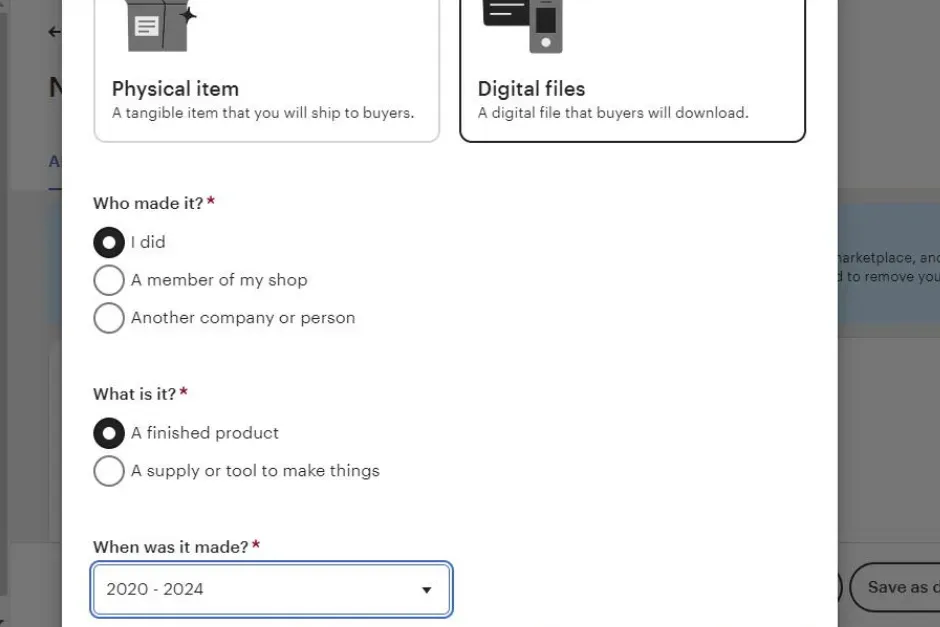
Because of this, products synced from Shopify may need additional customization. Vintage items must be at least 20 years old, and craft supplies must be accurately categorized. If these details are missing or incorrect, Etsy may block the listing from going live.
So if you’re well-prepared for these essentials in advance, you’re in a strong position to connect Shopify to Etsy efficiently and start selling across both channels with confidence.
3 Methods to Connect Etsy to Shopify
There are 3 common ways to learn how to connect Etsy with Shopify. The right method depends on how many products you have and how much automation you need.
Method 1: Manual connecting
If you’re just getting started and have fewer than 20 products, manual syncing can work. This method is 100% free, but it requires more time and ongoing effort.
To manually connect Etsy and Shopify, you need to:
- Export products from Shopify as a CSV file
- Adjust the CSV to match Etsy’s listing requirements
- Upload the file to Etsy
However, this method has clear limits. You must repeat the process every time you add, update, or remove products. Inventory and orders do not sync automatically, which increases the risk of overselling or outdated listings.
Best for: Small shops with a limited number of products that don’t update inventory often and want a free, basic solution.
Method 2: Using a third-party app
Shopify offers many third-party apps that help you connect Etsy to Shopify without needing technical skills. These apps are designed to automate most of the work and make multichannel selling easier.
Most third-party apps allow you to:
- Import products between Etsy and Shopify
- Sync inventory to prevent overselling
- Sync orders so you can manage them in one place
- Update product details across both platforms
While these apps save time, they often come with monthly fees and feature limits based on your plan. Some apps may also charge extra as your product catalog grows or when you need advanced syncing options.
Best for: Growing stores that want automation and convenience but don’t mind paying a monthly subscription for basic Etsy Shopify syncing.
Method 3: Using APIs (custom coding)
If you want full control over how Etsy and Shopify work together, you can connect them using APIs and custom code. So that you can build a custom Shopify Etsy integration that fits your exact business needs.
However, this approach requires strong technical skills. You need to work with Etsy and Shopify APIs, handle data mapping, and maintain the connection when platforms update their systems.
Because of this, custom API integration can be time-consuming, costly, and hard to maintain. Any errors or platform changes may require ongoing developer support.
Only use this method if you have an in-house development team or enough budget to hire a professional coding agency.
Best for: Large businesses with complex workflows that need a fully customized solution and have the resources to support long-term development.
How to Connect Etsy to Shopify Using LitCommerce
Deciding to integrate Shopify with Etsy means that you must have considered all important factors, including the fees involved for a tool.
In this guide, we’ll walk you through how to connect Etsy to Shopify using LitCommerce, a powerful multichannel selling tool designed to help you connect, sync, and manage both platforms in just a few steps thanks to its advanced features, while keeping ongoing management easy and efficient.
Rated 4.8 out of 5 on Shopify and trusted by 50,000+ sellers worldwide, LitCommerce absolutely provides the reliability and features needed to manage multichannel selling with confidence.
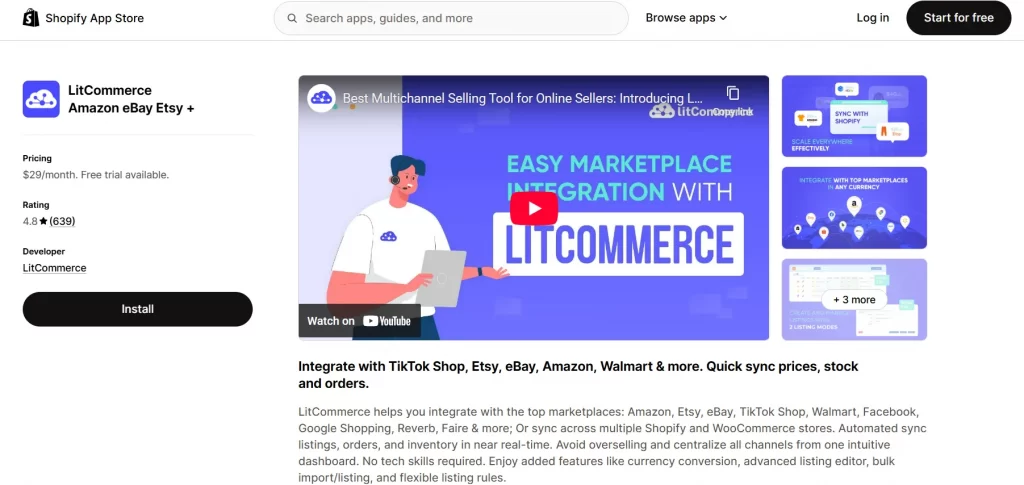
For an in-depth visual guide, check out our video:
Now, let’s start how to connect Etsy with Shopify in only 4 steps using LitCommerce below:
Step 1: Connect Etsy to Shopify
1. Install the LitCommerce app on Shopify App Store
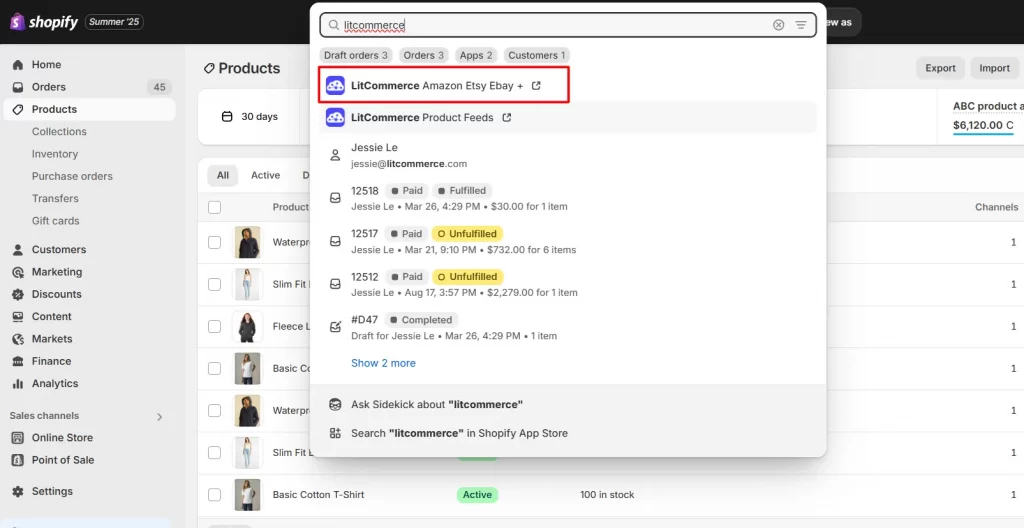
Once installed, LitCommerce will ask for access permission. After granting access, you’ll be redirected to the LitCommerce platform.
2. Connect your Etsy store
Now, you’ll land on the “Setup First Channel” page, where you can begin connecting your sales channels.
– To integrate Etsy with Shopify, simply select Etsy from the list.
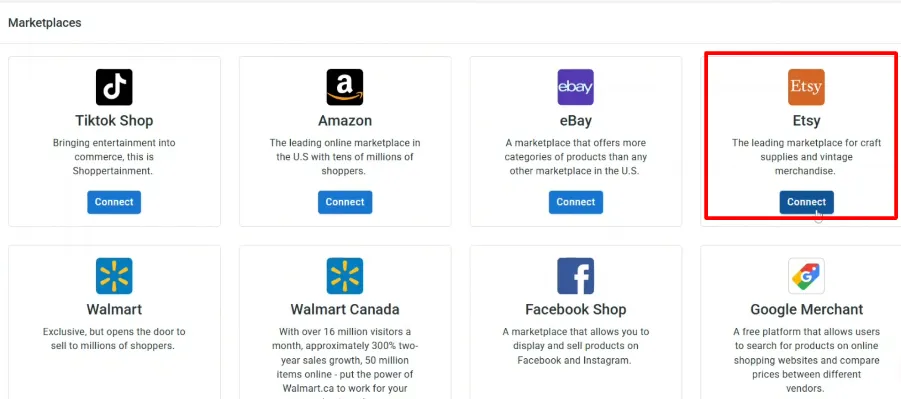
– Give your Etsy channel a name.
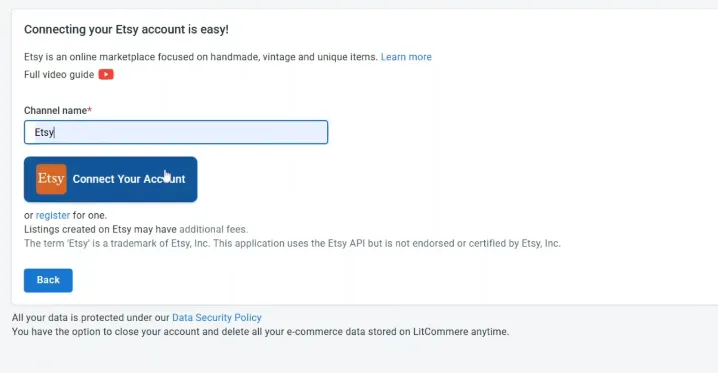
– Click on “Connect Your Account”
Then, you need to log in to your Etsy account.
Once you successfully sign in and grant access, your Etsy store will be connected to the LitCommerce app.
Step 2: Import and List products on Etsy
In this step of the Shopify Etsy integration, your preferences can be divided into 3 cases:
- You haven’t sold anything on Etsy and now you want to list Shopify products on Etsy.
- You’re currently selling on Etsy and you want to import Etsy products to start selling on Shopify either.
- You’ve been selling on both Shopify and Etsy for a while and now you want to link the same products on both channels to sync inventory and orders.
We’ll give you all the details for every situation, so getting your desired settings just right will be super smooth.
Case 1: List Shopify products on Etsy
After successfully connecting Shopify with Etsy, all your Shopify products will be automatically imported to the LitCommerce app.
From here, you can start listing products on Etsy right away.
1.1. Manual Publish
If you want to adjust each product in more detail before listing on Etsy, follow these steps below.
Step 1: Select the products you want to list on Etsy:
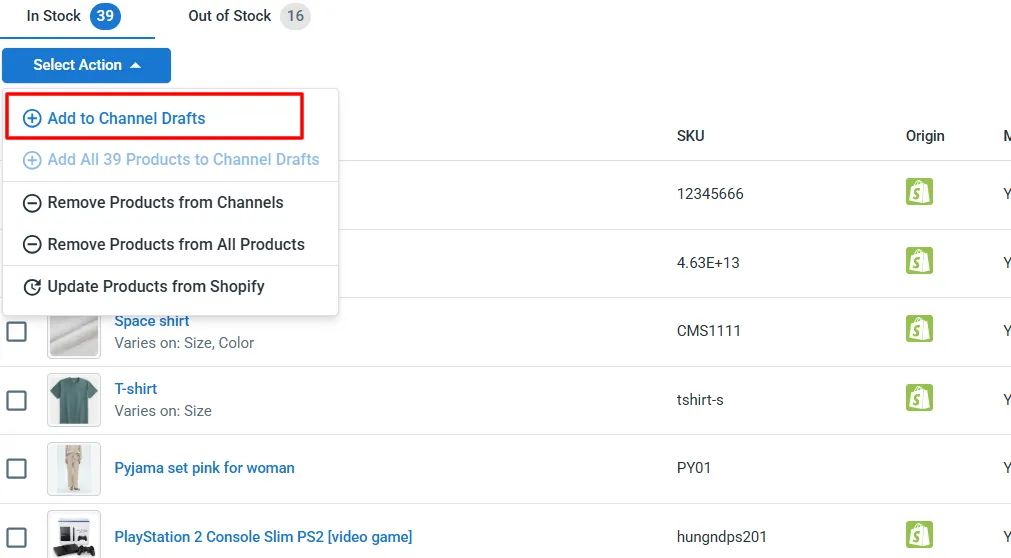
- From the left-sidebar menu, go to “All products”
- Choose the certain products you wish to list on Etsy
- Click “Select Action” then choose “Add to Channel Drafts”
- Select Etsy, and click “Add a draft now”
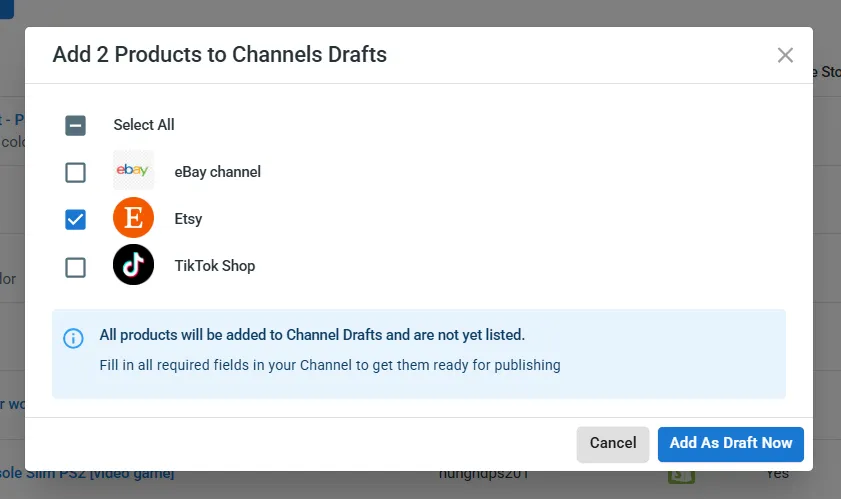
From now on, your Etsy draft listings are separate from your Shopify store.
Step 2: Edit draft listings
Etsy requires additional information that may not be available in Shopify, such as specific product attributes like “Who made it?”, “What is it?”, “When was it made?”, or listing settings. So, before publishing products to Etsy, you must fill in the product’s information:
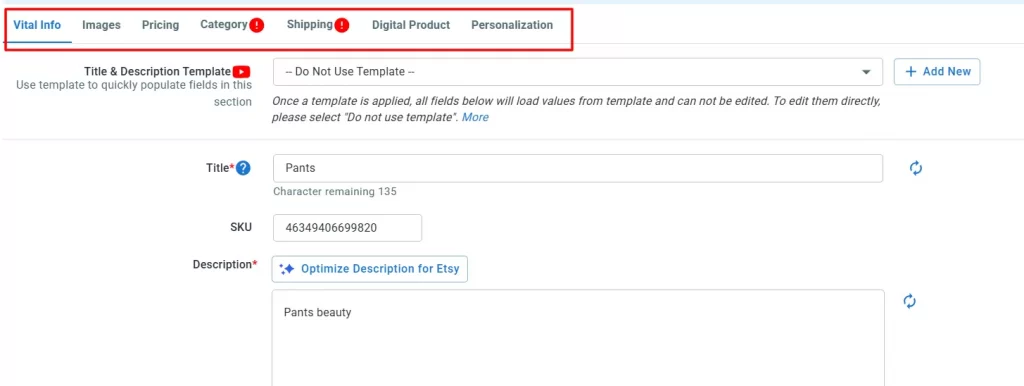
- Vital info like description: LitCommerce uses AI to help optimize your product description. It adjusts content to match Etsy ’s standards while still letting you add your own keywords and details.
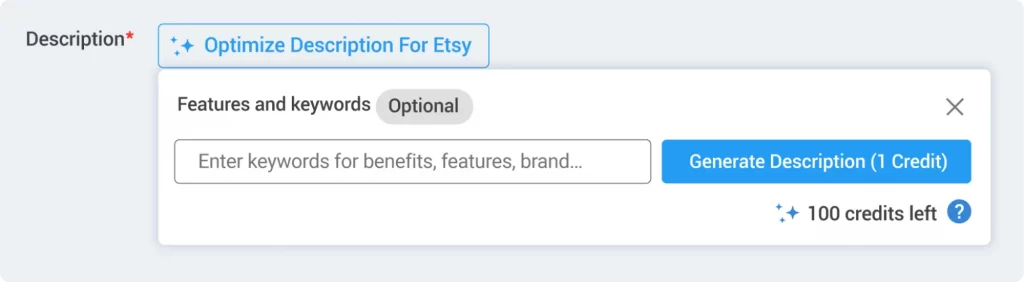
- Category: In the Category tab, LitCommerce suggests categories pulled directly from Etsy to match your products. This saves you the trouble of finding them manually.
- Shipping & Return: In this section, you’ll need to complete the Shipping Profile and Return Policy. LitCommerce pulls this info straight from your Etsy shop, so it’s quick and easy to set up.
- Digital product: If you’re selling digital items, LitCommerce lets you upload your digital product file easily so buyers can download it after purchase.
- Personalization: On Etsy, personalization lets buyers customize items with details like text, images, or notes. Instead of creating separate listings, sellers can offer variations easily. Hence, in case you offer product customization, LitCommerce supports personalization options so you can deliver exactly what your buyers want.
Alternatively, you can apply Templates and Recipes to fill in this information quickly and accurately.
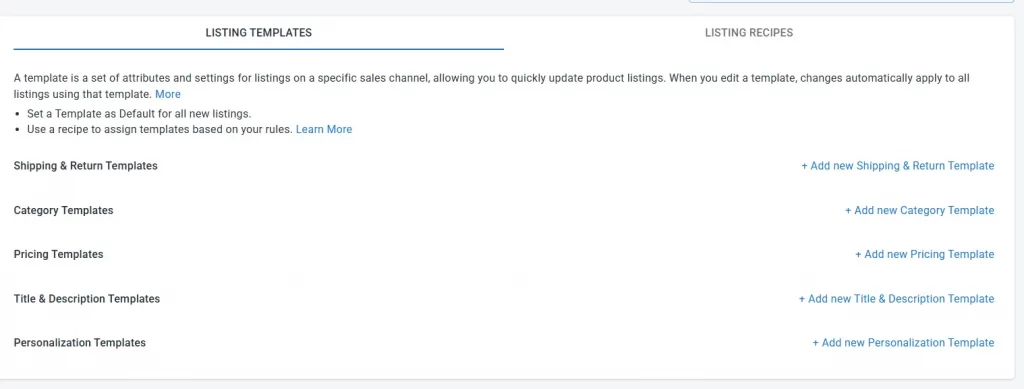
When you apply a template, any future changes made to that template will automatically update all linked listings. This helps you save time and avoid repeated manual edits across individual products.
LitCommerce offers several templates based on Etsy policies, including:
- Required templates: Category and Shipping & Return
- Optional templates such as Pricing, Title & Description, and Personalization for listings that allow custom input from buyers.
By combining multiple templates, you create a structured “recipe” that makes product publishing faster, more consistent, and easier to manage at scale.
To learn more about templates and recipes and move quickly through the Etsy-Shopify sync process, you can also watch the detailed video guide provided.
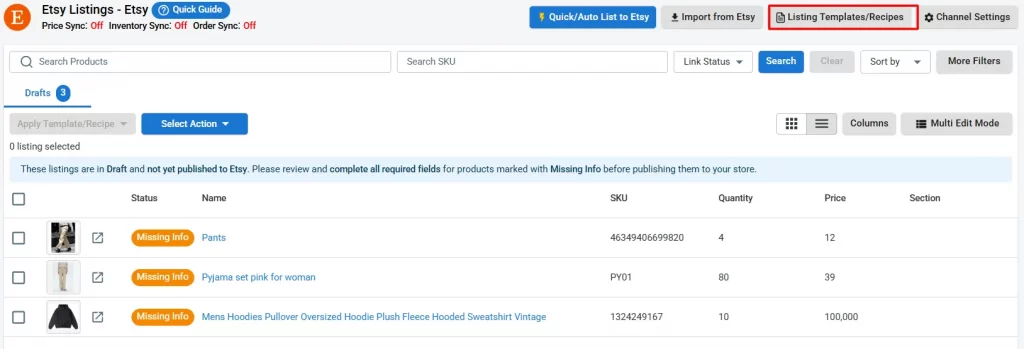
To create or edit templates and recipes, click ‘Listing templates/recipe’ in the top right corner.
Start by giving your template a clear nickname so it’s easy to recognize. You can also set it as the default, and it’ll automatically apply to any new Etsy listing you create.
Step 3: Save & Publish to Etsy
Once done, click “Save & Publish Live to Etsy” and the listing will be moved to the Active tab.
Please be aware that any item you offer for sale on Etsy.com or one of its mobile applications will incur a $0.20 listing fee. LitCommerce will show you estimated Etsy selling fees when listing your products on.
1.2. Quick Publish to Etsy & Automated Listings
For a quick and efficient way to list multiple Shopify products on Etsy, we recommend using Quick/Auto Publish to Etsy. This feature lets you list multiple products at once from a single screen.
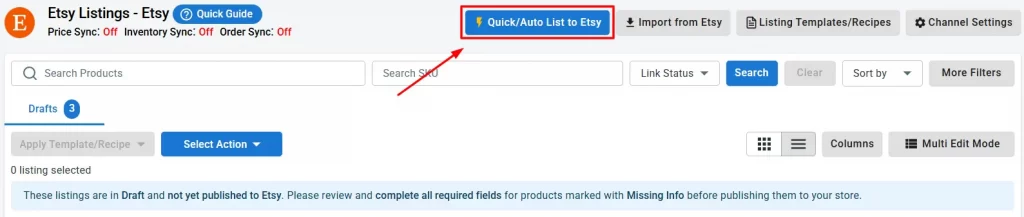
To get started, go to Add / Manage Sale Channels in the left menu. Select Etsy, then click Quick/Auto List to Etsy at the top.
Step 1: Select Products
You can choose to publish all products from your Shopify store to Etsy, or selectively publish only the products that meet specific conditions based on product type, vendor, tags, or product status, allowing you to control exactly which products are synced to Etsy without manual selection.
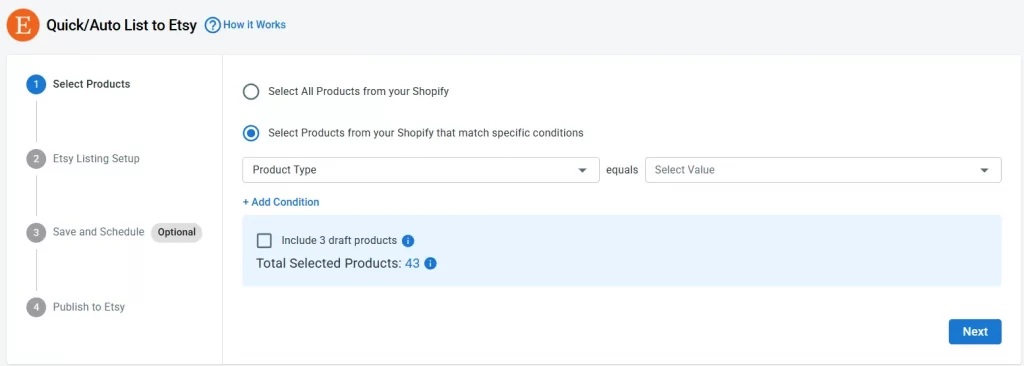
For example, if you want to list only products from a particular vendor, you can select Product vendor and set the condition to equals “[vendor name]”
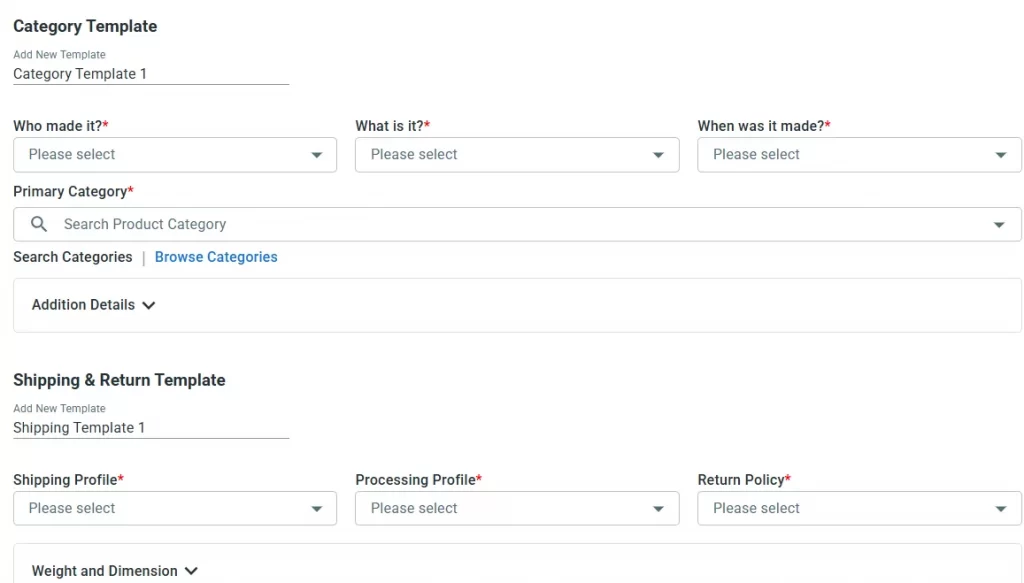
Step 2: Etsy Listing Setup
Next, you’ll need to apply templates to your Shopify products to adjust product information to ensure they meet Etsy’s listing requirements.
Step 3: Save and Schedule (Optional)
If you want to save your current setup and automate future product publishing, you can use this Automated Listings feature.
It’s especially helpful if you regularly add new products to your Shopify store and don’t want to publish them to Etsy manually each time.
You can:
- Enable Save this setup for future use to reuse the same settings later
- Assign a custom name to your setup for easy identification
- Turn on Activate automatic publishing to run listings on a schedule
- Select the timing and frequency that best match your workflow
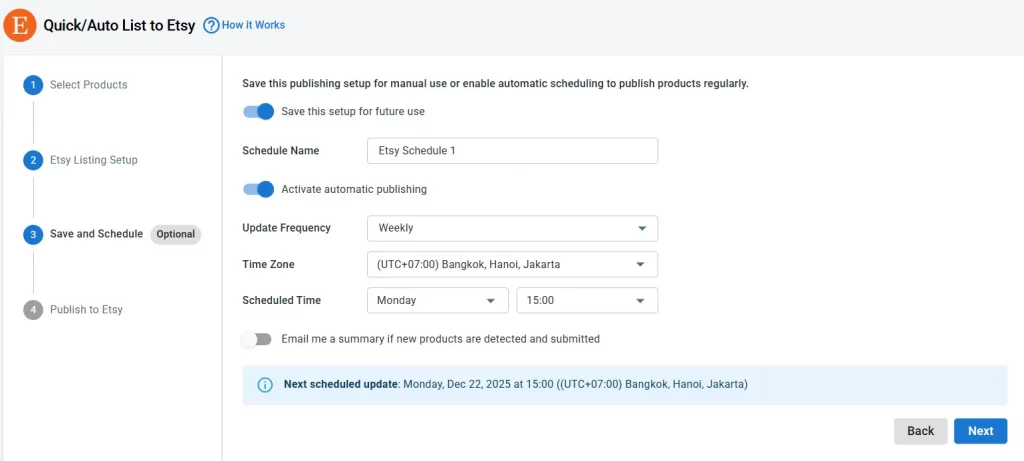
LitCommerce will then automatically list new Shopify products on Etsy based on your chosen settings, saving time and ensuring your catalog stays up to date.
Step 4: Publish to Etsy
You’ll now see a summary of how many products will be listed.
Check the box to confirm you’re aware of Etsy listing fees.
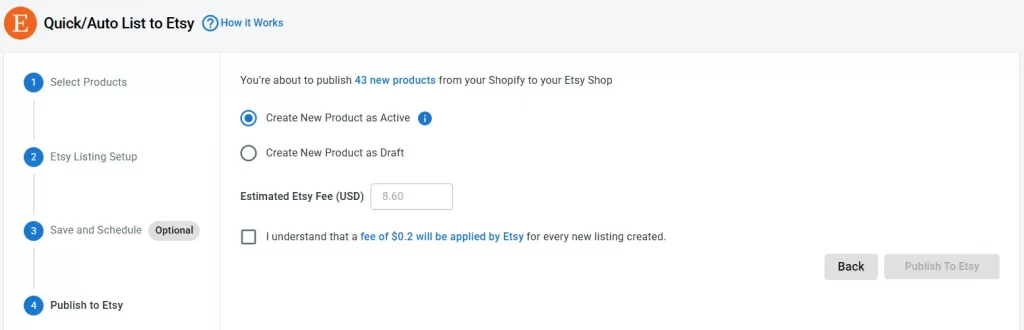
When you’re ready, click Publish to Etsy and LitCommerce will start listing your Shopify products on Etsy automatically.
Case 2: Import Etsy listings and create them on Shopify
In this case, you might already sell on Etsy and some live listings, now you want to import to Shopify for streamline inventory management.
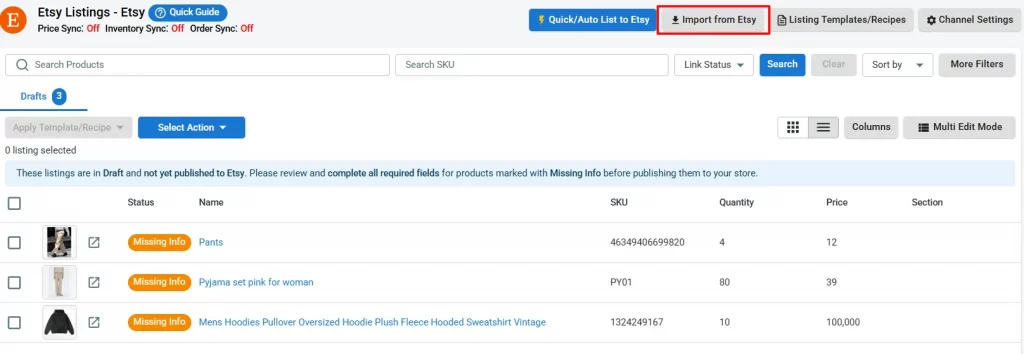
You can re-import your Etsy listings, link products, or apply any specific filters. Once you’re done, click Begin Import. Etsy listings are now imported to LitCommerce. As a result, you are no longer required to worry about product linkage.
– On the top right in Etsy sales channel page, click on “Import from Etsy”
There are a few more questions to answer before the import begins. You can re-import your Etsy listings, link products, or apply any specific filters.
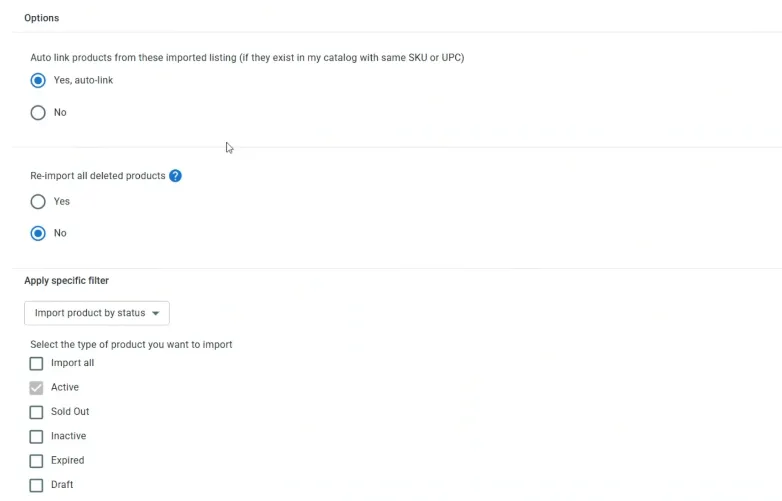
– Once you’re done, click Begin Import.
Friendly note: If you want to import Etsy reviews to Shopify, check out this article for more details.
After the import finishes, return to your Etsy store in LitCommerce. All your Etsy listings should now be visible.
To create them on Shopify, select the products you want to list on Shopify, click “Select Action”, then choose “Create on Shopify”.
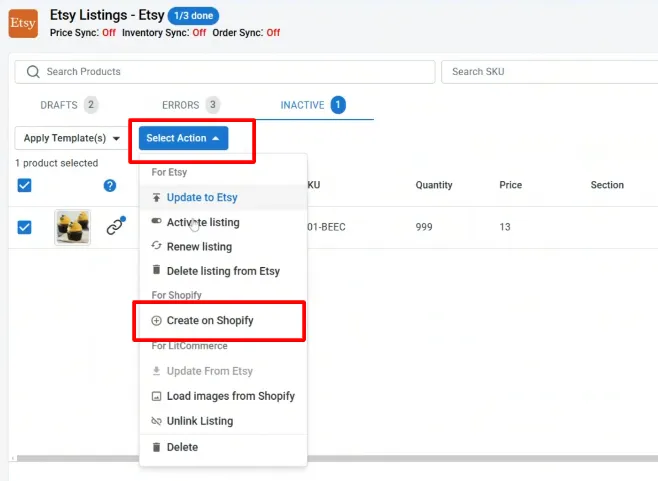
You’ve successfully imported products from Etsy.
LitCommerce will now automatically update all your Etsy listings, making the data the same in both places.
Case 3: Integrate Etsy with Shopify when having products on both Etsy and Shopify
In this situation, you have the same products on Shopify and Etsy. You must link them to enable sales and inventory sync.
LitCommerce offers 2 methods for linking listings.
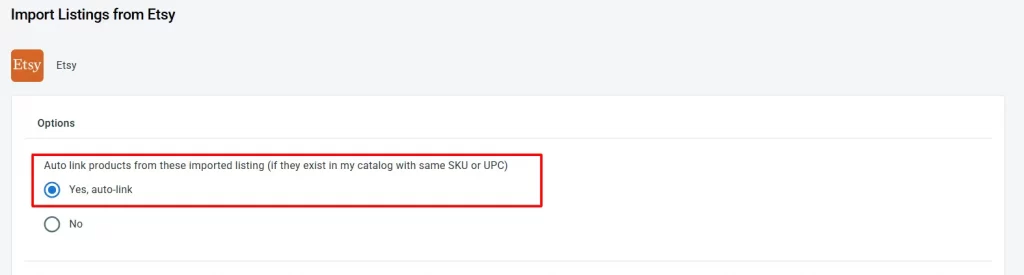
1. Auto-link your listings
The first way is when you go to “Import Etsy listings”. We have the option to auto-link listings, which you can select, and from there, the listings between Etsy and Shopify will be linked based on matching SKUs.
2. Manually link your listings
However, the items must be linked manually if your SKU numbers don’t line up across your channels or if the listing is missing an SKU.
The potential two reasons for this problem include the following:
- Some SKUs are missing from your product listing.
- The product SKU numbers between channels are inconsistent.
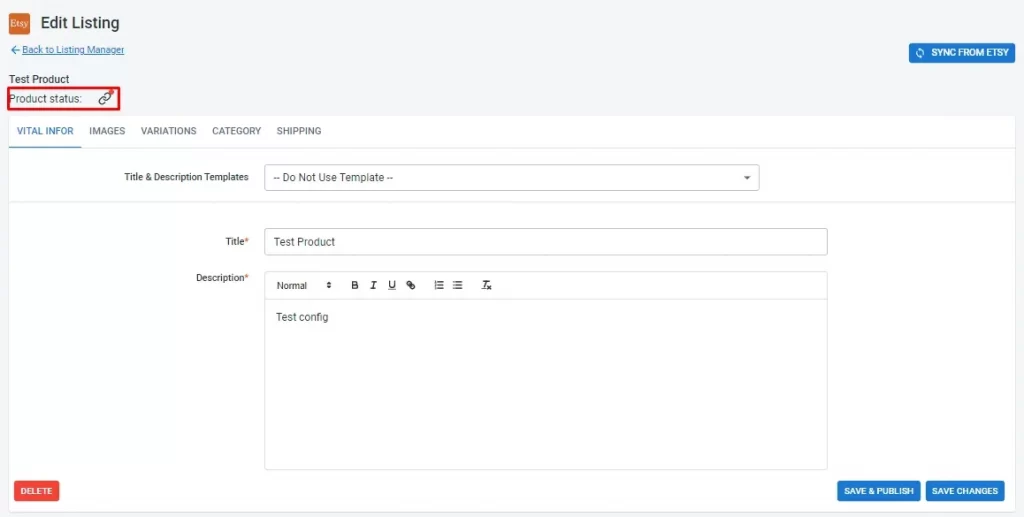
If so, you will need to link those products manually:
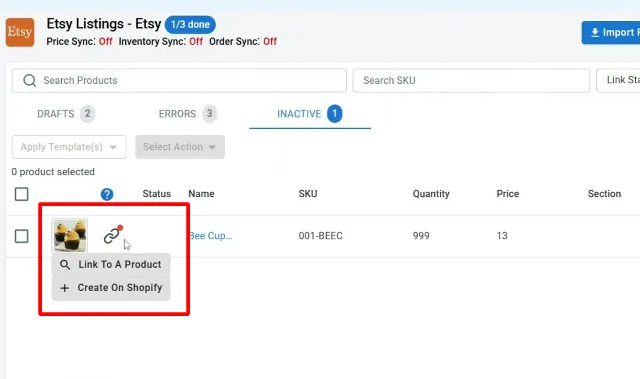
– Simply select “Link to a Product” by hovering your cursor over the red unlinked icon.
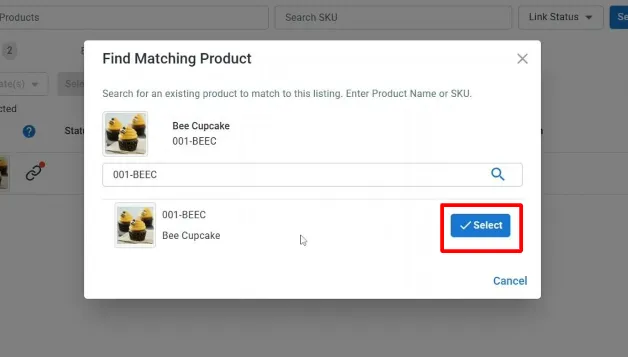
LitCommerce will help you find matching items. Just look for products that match, then connect them. If not, enter the SKU of the product you want to connect to.
– Then, click the “Select” button beside the item showing up. As soon as your product linking is complete, you can see the red icon change to blue and get a notification from LitCommerce.
All Shopify listings will be matched to Etsy items when you complete this step for improved inventory control.
If you’re looking for How to Integrate Shopify with eBay, check out this dedicated guide.
Step 3: Enable Shopify Etsy sync
LitCommerce allows you to sync Shopify and Etsy inventory, price, and order.
When you enable the Shopify Etsy sync function, all changes in these sections made in your Shopify store will be reflected on Etsy. That’s how LitCommerce can help simplify your multichannel journey.
To enable sync features, choose Etsy from the main dashboard and click “Channel Settings” in the top right corner.
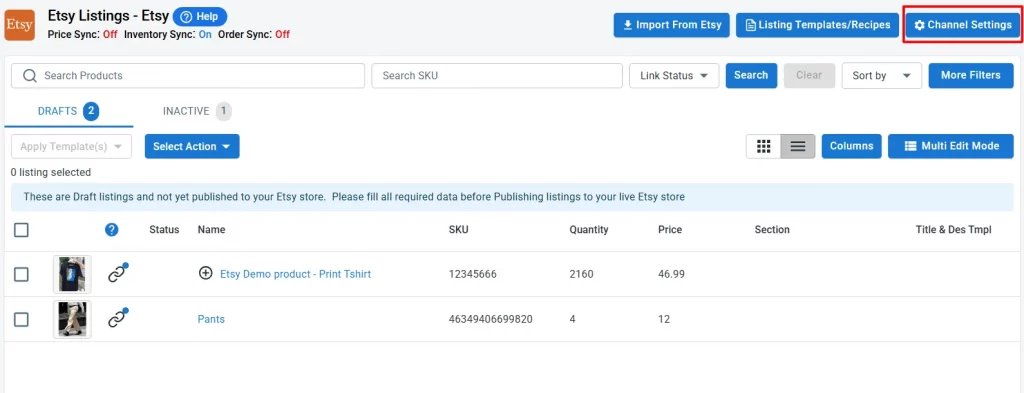
You will arrive at 3 sections: Pricing, Inventory, and Order. Click on the switches beside all the Sync options and confirm to activate Etsy Shopify integration.
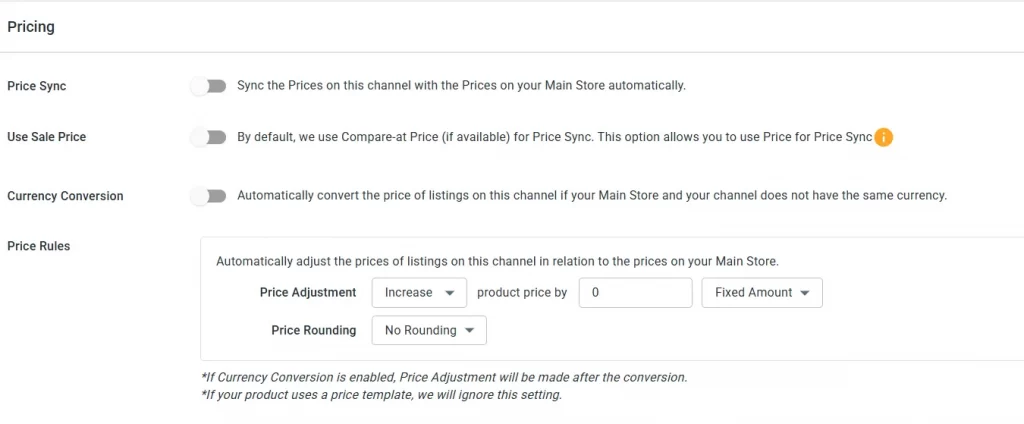
Pricing synchronization
In the Pricing section, you can customize how your prices are displayed on the Etsy store. By enabling the Price Sync option, LitCommerce will automatically sync product prices across your sales channels. Also, you can:
- Enable Use Sale Price and LitCommerce will prioritize the sale price during synchronization.
- Utilize Currency Conversion feature, prices will automatically convert when your Shopify store and Etsy store use different currencies.
- Create Price Rules for each channel. These rules apply a custom formula to your base catalog price, adjusting it by a fixed amount or percentage before syncing to your listings. For example, you can increase the price of all products on Etsy by $6 or decrease the price for all products by 10%. After you set the rule, it will apply to all listings on Etsy.
Shopify Etsy inventory sync
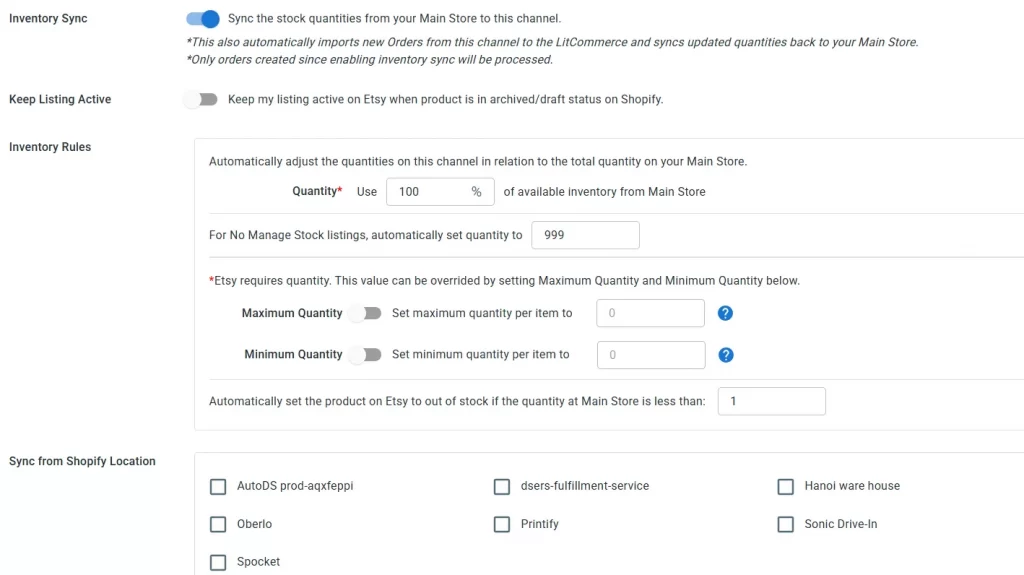
With inventory sync turned on, LitCommerce will automatically update the inventory quantity on your Etsy to match the quantity in your Shopify. Every time there is a new order on your Etsy store, the inventory quantity will decrease according to the amount ordered.
This is a great example of how multichannel inventory management works in practice, giving you full control and visibility over your stock across multiple sales channels.
And, with Keep Listings Active, your products will remain live and available on Etsy, even if they’re moved to archive or draft status in your Shopify store.
What’s more, each sales channel may have different inventory display requirements, and with LitCommerce, you can easily set custom Inventory Rules for each one:
- Quantity Percentage: Choose what portion of your available stock to display. If you have 400 items, you can sync just 25% (100 units) to Etsy.
- Minimum Quantity: Set a minimum number of units to always display on Etsy, even if stock runs low. For example, if your rule is 10 and the actual stock hits 0, LitCommerce will still show 10 on Etsy to keep the listing active.
- Maximum Quantity: Set an upper limit for how many units are shown on Etsy, regardless of how many are in your Shopify store.
These rules help you control visibility and avoid overselling across platforms.
Finally, as Shopify lets you manage inventory across multiple locations, like warehouses, retail stores, or apps, LitCommerce allows you to choose which Shopify location to sync with each sales channel. Simply select the preferred location in “Sync from Shopify Location” section, and LitCommerce will sync product data from that specific location to your connected channel.
Order synchronization
This feature also helps prevent overselling when you integrate Etsy with Shopify, allowing you to manage and fulfill orders from both channels directly within your Shopify order page.
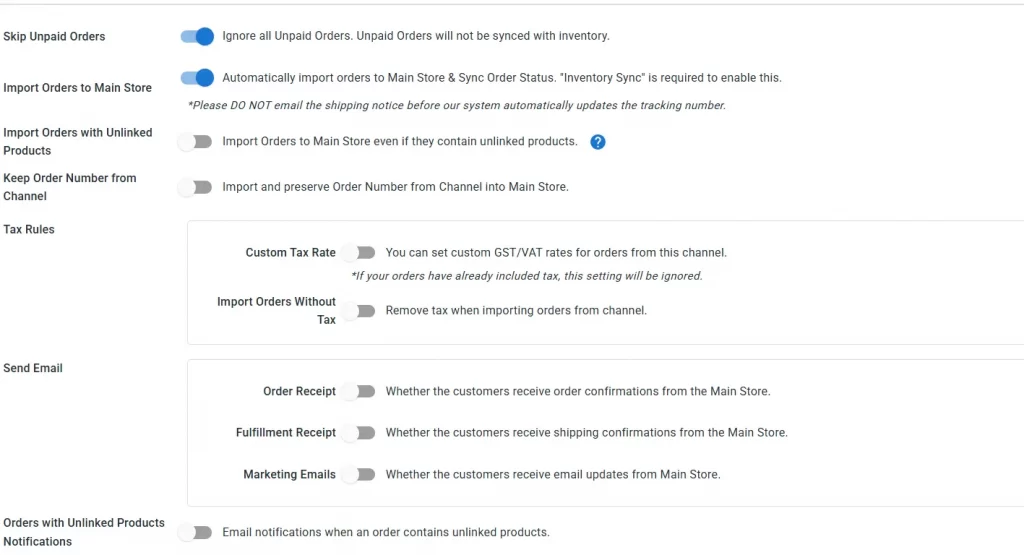
- Skip Unpaid Orders feature ensures that unpaid orders from your Etsy store are not imported into LitCommerce by default. When this option is enabled, any unpaid orders will be skipped automatically.
- To enable Import Orders to Main Store (Shopify), you’ll need to turn on Inventory Sync first. Once Inventory Sync is active, LitCommerce will start pulling orders from your Etsy store into the app. Then, by enabling the Import Orders to Main Store option, LitCommerce will begin importing those orders into your Shopify store.
- Import Orders with Unlinked Products option allows even unlinked products from Etsy to be imported into Shopify. However, keep in mind that only linked products will have their stock update, unlinked products will not.
- Order with Unlinked Products Notifications setting lets you receive email alerts whenever there’s an unlinked order in LitCommerce that cannot be imported to Shopify.
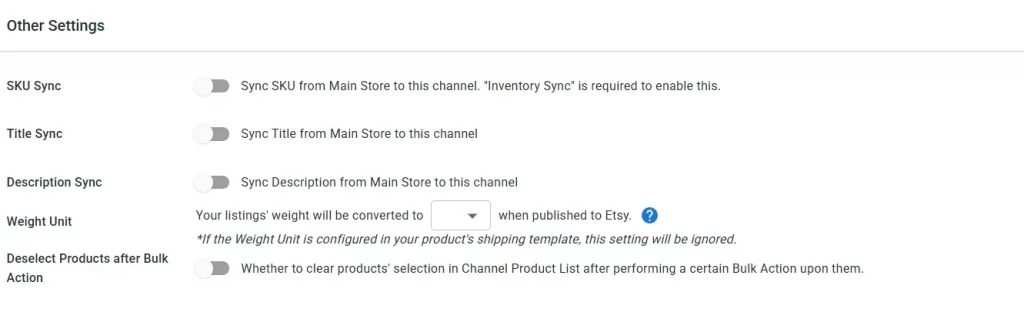
Additionally, there are some other settings for further streamlining your Etsy and Shopify integration: Description sync, Title sync, etc.
Carrier service mapping
Carrier service mapping lets you map your Shopify carrier to an Etsy carrier, so any order fulfilled through Shopify will show the correct tracking carrier on Etsy.
Important note: Etsy has restricted third-party apps from importing certain order details for new integrations in the US, Canada and Türkiye. Disconnecting your Etsy channel will result in the loss of existing API access. Reconnecting via any third-party app will be subject to the new restrictions.
When you’re finished, click on “Save Setting” at the bottom of the page to save any changes you’ve just made.
Read more about How to Create Etsy Shipping Profile in this quick and easy guide!
Easily Connect Etsy with Shopify Using LitCommerce
Integrate Etsy with Shopify and 20+ other channels, without switching platforms. With LitCommerce, you can manage everything right from your Shopify dashboard and start multichannel selling right away.
Step 4: Manage Etsy Orders
Incoming orders from Etsy that occurred will be pulled into your Shopify dashboard. Afterward, Litcommerce Shopify and Etsy integration allows you to choose whether to review orders before the fulfillment process or have LitCommerce import them into your existing order flow for centralized multichannel fulfillment.

LitCommerce stands out from other multichannel competitors because all the importing processes will be 100% automatic. You can manage and import Etsy orders from Shopify with updated and accurate data flow.
To manage your orders from both Shopify and Etsy, go to “Orders” on the left side menu.
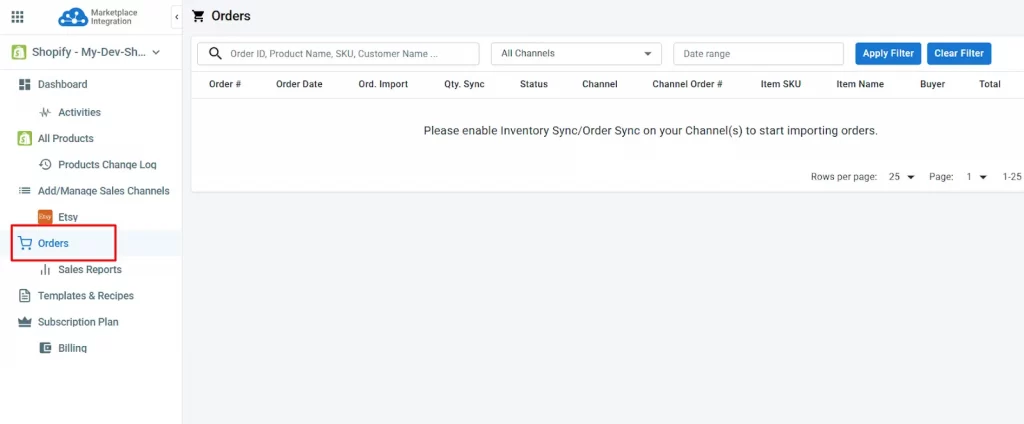
From here, you can track:
- Order #: The unique ID assigned to the order in LitCommerce.
- Order Date: The date and time the order was placed on the sales channel.
- Qty. Sync: Shows if the order quantity has been synced and stock updated.
- Status: The current status of the order
- Channel: The platform the order came from (e.g., Etsy, eBay).
- #Channel Order: The original order ID from the connected sales channel.
- and more…
Last but not least, if you still struggle with any step when learning how to integrate Etsy with Shopify, you can check out LitCommerce in-app guide during the onboarding process.
You might also be interested in:
Why Choose LitCommerce to Integrate Etsy with Shopify
LitCommerce team always strives for a simplified process, together with a scalable and cost-effective integration solution. Consequently, it is our mission to guarantee the greatest user experience.
LitCommerce Pricing
You can integrate Etsy with Shopify using LitCommerce for free for 7 days. We provide a variety of pricing options to meet the needs of customers.
- New to LitCommerce? Enjoy a 7-day FREE trial with zero hidden fees and full access to all features.
- For businesses with 3 channels and at least 1,000 listings, we provide Pay-As-You-Go plan which is a flexible billing model where you only pay for the resources or services you actually use.
- For those with unique needs beyond our standard plans, we offer custom solutions. If you need a custom plan, don’t hesitate to contact us to discuss pricing more and how to integrate Etsy and Shopify appropriately.
Plus, the plan requires no credit card or other setup costs. For more information, please refer to our Pricing Plan and Comparison.
Customer Reviews
Very happy so far. It’s a powerful system that will save my team a lot of time. We’ve been manually pulling orders from our website, Etsy, eBay, and Reverb for years and putting them into a spreadsheet…and without any stock sync! A nightmare that is over now thanks to Shopify and LitCommerce.
Excellent support too. It’s like having another member of the team on-hand to keep me right as I get going with the platform.
– From Siam Modular in the UK
I’ve been using LitCommerce for 3 years, and it has transformed my multi-channel selling experience. The platform is incredibly user-friendly, with seamless integration for all my sales channels. Its robust features, like bulk listing and inventory synchronization, have saved me countless hours.
However, what truly sets LitCommerce apart is their exceptional support team. They are always responsive, knowledgeable, and dedicated to helping with any issues. Their support has been a game-changer, making my eCommerce operations smooth and efficient. Highly recommended!
– From My Store in the US
Excellent customer service and great app. Firstly have to start with the excellent customer service provided to me by Hanah which was 10/10 – absolutely brilliant! She was very helpful, knowledgeable and very, very patient which trying to resolve my issue.
The app has a very clean, easy to navigate user interface and is quite straightforward and easy to use. I has many time-saving functions, like being able to create listing templates to enable you to export and sync with your chosen sales channel quickly and efficiently. After getting to know the export and sync settings things are pretty easy if you are looking to sync your entire Shopify store with eBay or Etsy. The sync itself works flawlessly.
Help is at hand almost instantly if you have any questions or issues. Like I said, the customer service is excellent.
– From Conrad Pascal, Store Owner –
You can also spare some time to visit Trustpilot for a better look at LitCommerce services before reaching your final decision on Etsy Integration with Shopify.
“A Seamless Experience with LitCommerce!” – From DripX Streetwear,
We are confident that LitCommerce is a powered multichannel selling tool with “exceptional customer service”.
How to Connect Etsy to Shopify – FAQs
Can I connect my Shopify store to Etsy
Yes, you can connect your Shopify store to Etsy.
Shopify is a comprehensive platform for businesses of all sizes. It aims to help a company’s online store grow and develop with their business by providing a wide range of eCommerce selling features.
Meanwhile, Etsy is notably an online marketplace for independent sellers such as artists, craftsmen, antique dealers, and other small companies. Their easy-to-use web-based platform makes it simple for a retailer to set up a viable online store.
If you are interested in the utmost Shopify and Etsy comparison, don’t forget to check this out.
Should you use Etsy and Shopify together?
Etsy and Shopify are both popular eCommerce platforms. While Shopify suits a wide range of businesses, from small startups to large enterprises, Etsy is a better choice for creative entrepreneurs looking to sell their handmade goods quickly and efficiently. If your items fit the needs of different customers, you could choose to sell on both platforms.
Thanks to Shopify apps, you can now integrate Shopify with Etsy quite easily, in just a few clicks.
Does Etsy integrate with Shopify?
Yes, it does. You can integrate Etsy with Shopify by using Shopify apps that can help with the integration process. These apps can help you sync your product listings and orders between the two platforms, track inventory, and manage orders.
Some of the most popular Shopify apps for Etsy integration include
1. LitCommerce
2. Sellbrite
3. CedCommerce
4. Ecwid
These apps offer a variety of features and pricing plans, so you can choose the one that suits your needs.
How to connect Etsy to Shopify?
With LitCommerce’s help, you can successfully integrate Etsy with Shopify through these 4 steps:
1. Connect Etsy to Shopify
2. Import and List products on Etsy
3. Enable Shopify Etsy sync
4. Manage Etsy Orders
Should you have any specific requirements for your Shopify Etsy integration project, feel free to consult our support team for detailed instructions.
How to integrate Etsy to Shopify?
To sync your Shopify inventory with Etsy, you’ll need to connect both channels first. Simply follow our guide to integrate them using LitCommerce. Once connected, head to Channel Settings and enable Inventory Sync. From there, any time a new order is placed on Etsy, the inventory in your Shopify store will automatically update to reflect the quantity sold.
How much does it cost to integrate Shopify with Etsy?
Integrating Shopify with Etsy can vary in cost depending on the tool you use.
With LitCommerce, you can start a free trial, and paid plans begin at $29/month, offering full features like inventory sync, order sync, and bulk listing management between Shopify and Etsy.
Start Connecting Etsy with Shopify Today!
To sum up, setting up and managing an eCommerce website takes a lot of time and effort. In addition, integrating all essential external platforms to attract customers and grow your business can be challenging.
Check out LitCommerce if you are planning to expand your business and want to manage everything in one place. LitCommerce is the easiest way for store owners to list and sell their products on the top global online marketplaces, not only Etsy but also Amazon, Facebook Shops, eBay, or multiple eCommerce platforms like WooCommerce, BigCommerce,…
For more information, please contact the support team; we are always happy to assist!