Learning how to sell on Amazon and eBay comes down to three things: one seller account on each marketplace, one inventory source that feeds both, and listings built to each platform’s own rules. Get those right, and the same product can sell on two of the largest marketplaces without double-selling stock.
This guide covers how the two platforms differ, what each one charges, which policy lines get accounts suspended, and two setup guides: one done by hand, one with LitCommerce.
Key takeaways:
- You can sell the same product on Amazon and eBay.
- Amazon matches you to a shared catalog (ASINs). eBay lets you build each listing yourself.
- Fees land close on a typical $50 item, but the gap widens in some categories.
- eBay bans buying an item from another retailer, including Amazon, to ship to your eBay buyer. Disclosure does not make it allowed.
- Overselling comes from the delay between a sale on one channel and a stock update on the other. Safety stock and SKU mapping close most of that gap.
Can You Sell on Amazon and eBay at the Same Time?
Yes, you can. The first thing to know about how to sell on Amazon and eBay is that they are separate companies with separate seller agreements, and neither one restricts you from listing the same product elsewhere. What each platform does police is how you behave inside its own marketplace.
Selling on eBay and Amazon is also worth the effort. eBay reported 147 million active buyers for the quarter ending September 30, 2026, up 10% year over year. Amazon brings the high-intent shoppers who expect fast delivery.
Sellers on forums often worry that syncing stock between the two sites “links” their accounts. It does not. Using the same email, bank account, or business details on Amazon and eBay is normal, because the two companies don’t share account data.
The practical challenge is keeping one stock count accurate across two marketplaces. Tools like LitCommerce’s eBay Amazon integration handle this by listing both channels from one catalog and syncing inventory every 15 minutes, and the step-by-step guide below shows how.
Amazon vs eBay: What Changes When You List the Same Product
Part of how to sell on Amazon and eBay well is knowing that the same product behaves differently on each site. Amazon ties you to a shared catalog page, while eBay lets you build your own listing from scratch. For a full platform breakdown, see our Amazon vs eBay comparison.
| Aspect | Amazon | eBay |
|---|---|---|
| Listing creation | Match an existing ASIN or create a new one | Build a listing with category item specifics |
| Product ID (UPC/GTIN) | Required in most categories; GTIN exemption available | Recommended; required in some categories |
| Variations | Parent ASIN with child ASINs | Variations grouped inside one listing |
| Images | Up to 9 (7 shown on the page) | Up to 24, with a 40-photo limit in testing since April 2026 |
| Listing format | Fixed price only | Fixed price or auction |
| How buyers find you | Buy Box decides which seller gets the sale on a shared ASIN | Search ranking based on relevance, price, shipping, and seller performance |
| Products that fit best | New, branded, fast-moving items | Used, refurbished, vintage, collectible, and hard-to-find items |
In practice, you play two different games with the same stock. On Amazon, you compete with every other seller on the same ASIN for the Buy Box. On eBay, your listing stands alone, so photos, title, and item specifics do more of the selling.
So, which platform should you start on? If you are starting from zero, pick the one that fits your product first:
- Start on Amazon if you sell new, branded products with a UPC and can compete on price and delivery speed.
- Start on eBay if you sell used, one-of-a-kind, or collectible items, or want to test demand without building a catalog page.
Add the second marketplace once orders on the first run smoothly for a few weeks. Launching both on day one doubles the number of things that can go wrong while you are still learning either one.
What Selling on Amazon and eBay Costs in 2026
On a typical $50 item, Amazon and eBay take roughly the same cut, about $7. The difference shows up by category and in the extras, like FBA fees or promoted listings. Working out how to sell on Amazon and eBay profitably starts with these numbers:
| Fee | Amazon | eBay |
|---|---|---|
| Account | Individual: $0.99 per item sold. Professional: $39.99/month | Free to open |
| Listing | No per-listing fee | 250 free listings/month, then $0.35 each |
| Sale fee | Referral fee of 8% to 45% by category (some tiers lower); $0.30 minimum in most categories | Final value fee of 13.6% up to $7,500 in most categories, 2.35% above that |
| Per-order fee | $1.80 closing fee on media items only | $0.30 on orders of $10 or less, $0.40 above $10 |
| What the fee is calculated on | Total sales price, including shipping | Item price, shipping, and sales tax |
| Fulfillment | FBA fees if Amazon ships; none if you ship yourself | None; you ship, or use Amazon MCF for a fee |
Worked example: Assume a $50 item with free shipping in a category with a 15% Amazon referral fee:
- Amazon: 15% × $50 = $7.50 in fees. You keep $42.50 before FBA or shipping costs.
- eBay: 13.6% × $50 = $6.80, plus a $0.40 order fee = $7.20. You keep $42.80 before shipping, and slightly less where sales tax is added to the fee base.
In a category where Amazon charges 8%, the same item costs only $4.00 in Amazon fees. That is why it pays to check your own category rate before you copy one price across both sites.
Read more: eBay Fees for Selling: How Much and How to Calculate? and Amazon Seller Taxes: The Compulsory Fees Sellers Must Look At
Should you price the same on both? Start from what you want to keep, not from the list price. Say a product costs you $20 and you list it at $33.33:
- Amazon at 15%: $5.00 in fees, $28.33 left.
- eBay at 13.6% + $0.40: $4.93 in fees, $28.40 left.
A 7-cent gap is not worth managing. Our rule of thumb, from working with sellers on both channels: if the fee gap on a SKU passes 2% to 3% of the price, adjust one channel’s price. Below that, keep prices aligned and save yourself the extra bookkeeping. A price rule that adds a set amount or percentage per channel does this automatically.
How to Sell on Amazon and eBay Manually in 3 Steps
The manual route costs nothing extra and suits sellers testing a second channel with a handful of SKUs. This is how to sell on Amazon and eBay with no extra software: you set up each marketplace on its own, then keep stock aligned by hand.
Step 1: Set up selling on Amazon
Amazon suits new, branded, or private-label products that sell in volume.
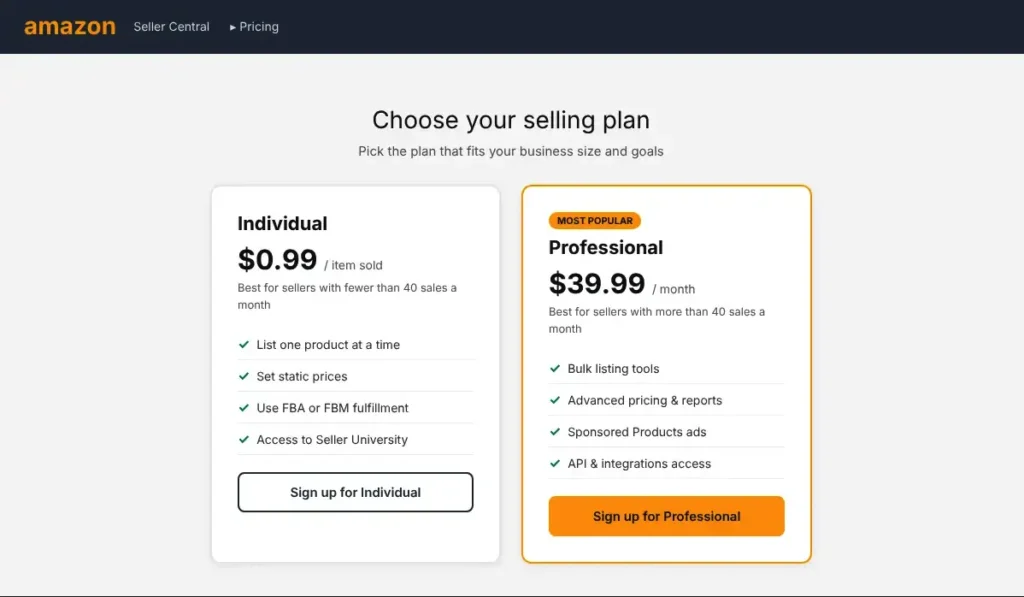
- First, choose a selling plan. The Individual plan costs $0.99 per item sold, so it fits sellers with fewer than 40 sales a month. The Professional plan costs $39.99 per month, and it adds bulk listing tools and access to Sponsored Products ads.
- Next, register in Seller Central. Sign-up asks for a government-issued ID, tax information, a bank account, a chargeable credit card, and a phone number. Amazon may also schedule a short video call to verify your identity.
- After that, pick a fulfillment method. Amazon offers two options:
- FBM (Fulfilled by Merchant): Stock stays with you, and every order ships from your own space.
- FBA (Fulfilled by Amazon): Amazon stores your stock in its fulfillment centers and handles packing, shipping, and customer service. On top of that, FBA items become Prime-eligible.
- Then, go to the Seller Central account, choose Catalog > Add Products.
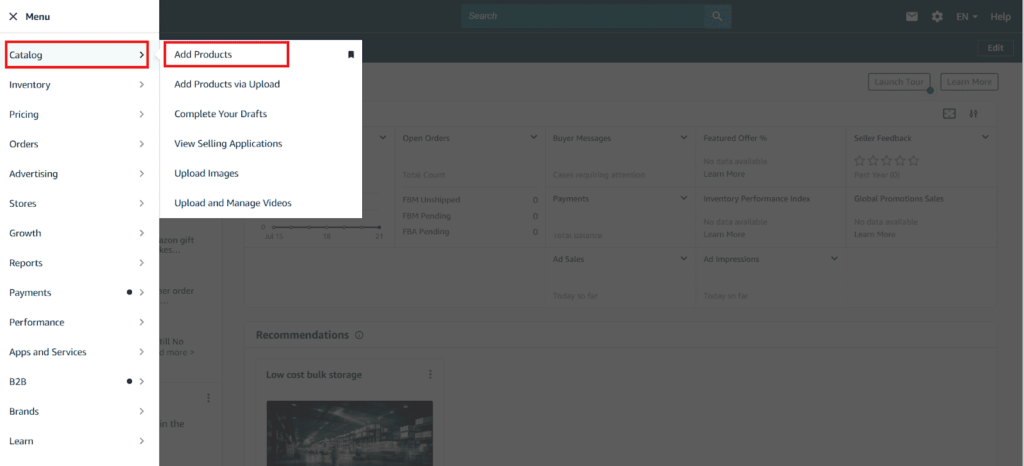
- In the search bar add your product title, image, or ASIN, or link. A quick UPC or title search shows whether a matching ASIN already exists. If nothing matches, the next move is a new product page, or a GTIN exemption when the product has no barcode. Variations such as size or color belong under one parent ASIN.
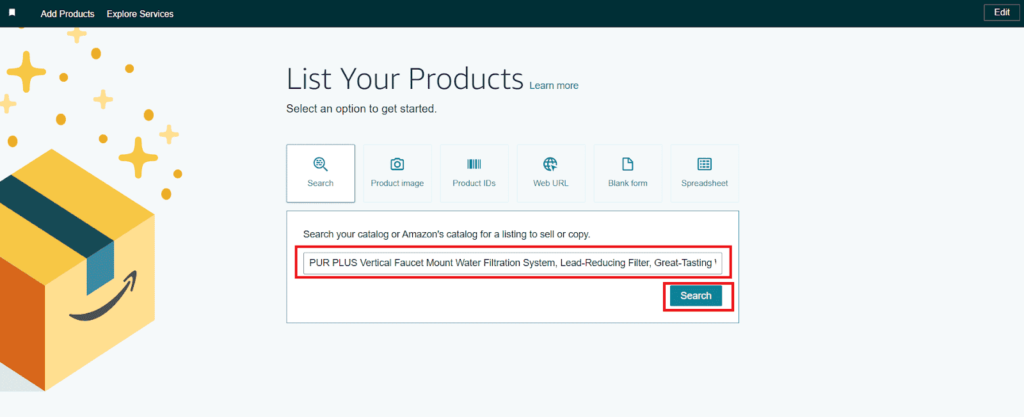
Note: Some brands and categories need Amazon’s approval first, even if you already sell them on eBay. If Seller Central shows “Apply to sell” for a product, get approved before you plan stock.
For more details guide, check out this best guide on How to List Products on Amazon
Step 2: Set up selling on eBay
eBay suits used, vintage, collectible, and one-of-a-kind items, and it has no monthly plan to start.
- Create an account. A Personal account works for most individual sellers, while a Business account suits anyone selling under a registered company name.

2. Next, set up payouts. Seller Hub is where the payout bank account goes, so eBay knows where to send your earnings.
3. Then, create a listing by choosing “Create listing” and fill in all the details such as title, product photos, description, condition, and more.
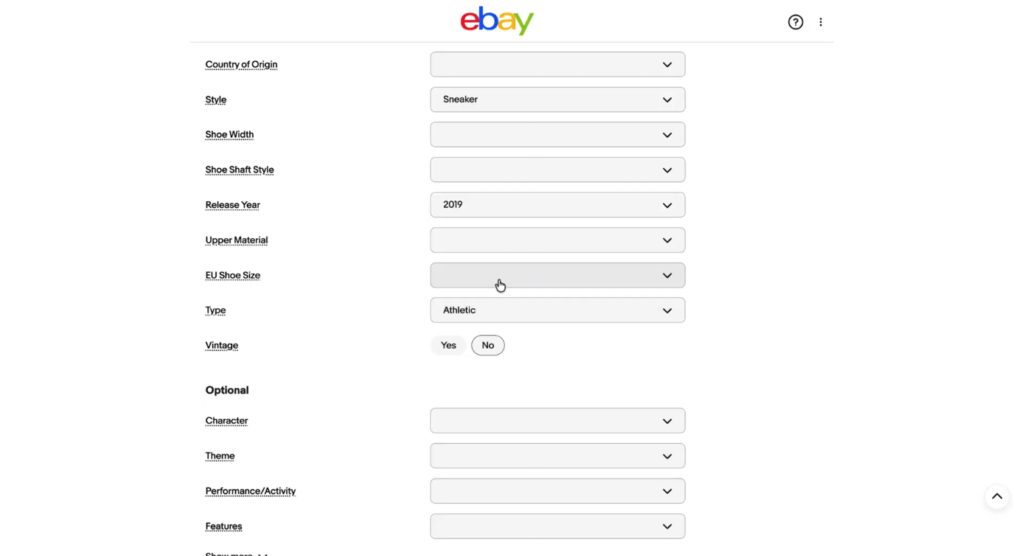
4. Set shipping and check your fees. eBay orders ship from your own stock unless Amazon MCF handles them. On the fee side, the first 250 listings each month are free, and each extra listing costs $0.35. The final value fee is 13.6% in most categories, plus $0.30 or $0.40 per order.
Note: According to eBay dropshipping policy, eBay allows dropshipping only from a wholesale supplier. Buying an item from Amazon or another retailer to ship straight to your eBay buyer is banned, with or without disclosure. Shipping your own FBA stock through Amazon MCF is fine.
Step 3: Keep both channels in sync by hand
Amazon and eBay don’t connect to each other, so manual Amazon-eBay inventory management means every sale on one needs a stock update on the other.
- First, give each product one internal SKU. Keep a sheet with three columns: internal SKU, Amazon ASIN, and eBay item number. Matching by UPC or MPN also catches duplicates that titles miss.
- Next, update the other channel after every sale. Lower the quantity on eBay when Amazon makes a sale, and do the reverse when eBay sells.
- Then, hold back safety stock. You show slightly less stock than you own on each site, so a slow update doesn’t turn into a canceled order.
Start with 10 to 20 SKUs. From what we see with sellers expanding for the first time, that batch is small enough to catch mapping errors before they spread.
Tired of updating two dashboards after every sale?
LitCommerce is an accessible, powerful multichannel selling tool used by 80,000+ sellers. List on eBay and Amazon from one catalog, and let inventory, price, and orders sync every 15 minutes, no overselling!

How to Sell on Amazon and eBay Using LitCommerce
Once manual updates take more than a few minutes a day, a sync tool pays for itself. LitCommerce sits between your channels as a hub: products live in one catalog, so you can list on eBay and Amazon at the same time and let both pull stock from one place. This is how to sell on Amazon and eBay from one dashboard. The steps below start from eBay and add Amazon, but the same flow works the other way round.
Step 1: Create your Amazon and eBay seller accounts
- Open an Amazon seller account in Seller Central, pick the Individual or Professional plan, and finish identity verification.
- Open a Personal or Business eBay account and add your payout bank account in Seller Hub.
- Decide which Main Store will hold your catalog: an existing Shopify, WooCommerce, Wix, or BigCommerce store, or LitCommerce itself if you don’t run a website. Shopify sellers can follow our Shopify Amazon eBay integration guide.
Step 2: Connect Amazon and add your first products
- Sign up for LitCommerce and click Connect under the Amazon logo.
- Enter your store name and marketplace country, then authorize access to your Amazon Seller Central account.
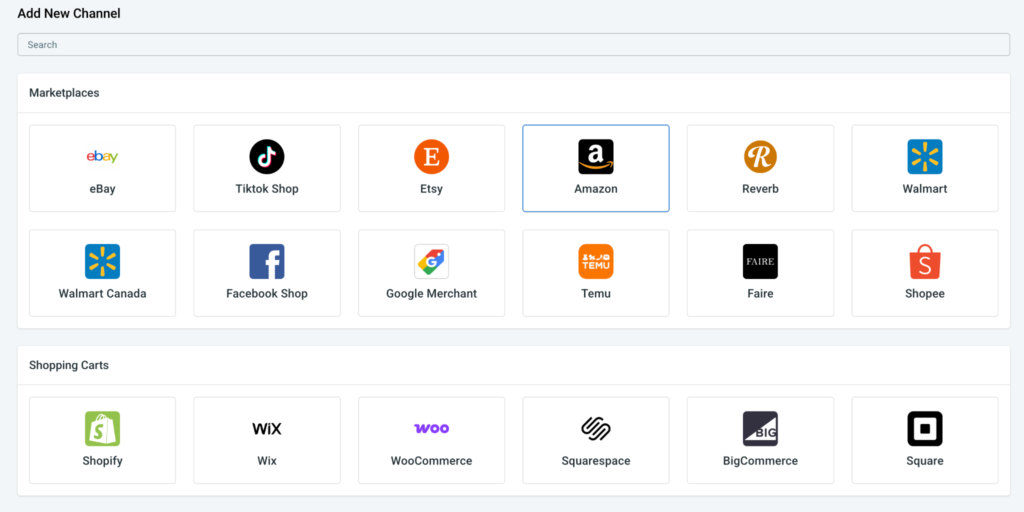
3. When LitCommerce asks for a Main Store, click “Skip, I don’t have any of these.” LitCommerce then becomes your Main Store, the central catalog that every channel pulls from.
4. Add your products to LitCommerce. Since a new seller has no listings to import yet, products are created inside LitCommerce in one of two ways:
- One by one with AI: Upload product images, enter the key details and any custom instructions, and the AI listing generator builds a complete product listing.
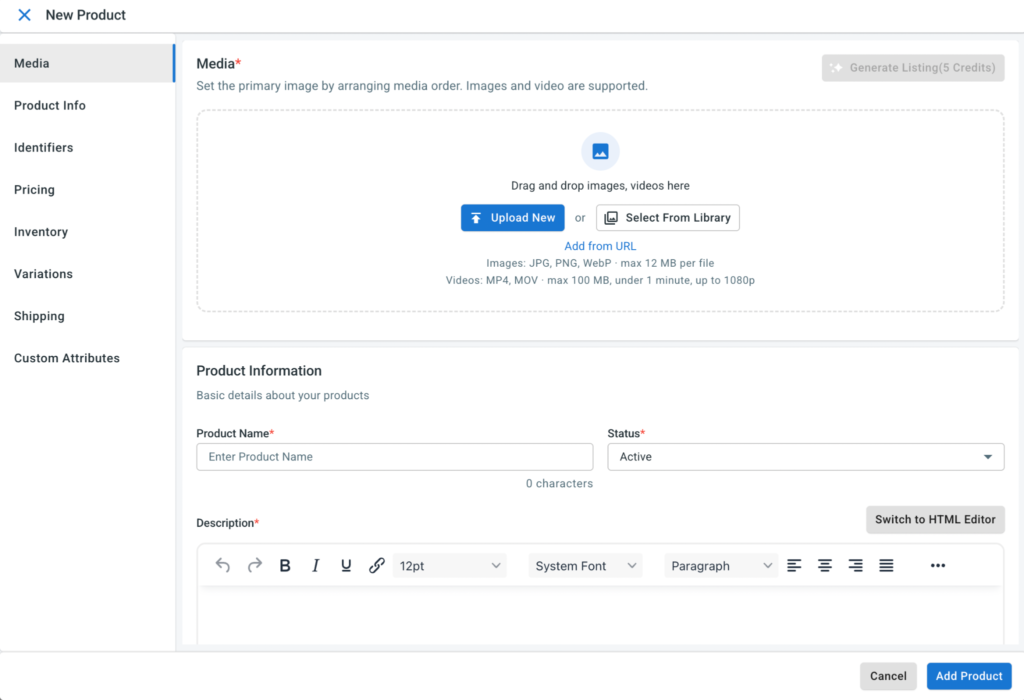
- In bulk from a file: Upload your catalog as a CSV or Excel file, and AI maps your column headers to LitCommerce’s product fields.
5. Next, open All Products, select the items you want on Amazon, open Select Action, and choose List Products to Channels. Tick your Amazon store, and the products appear as drafts in your Amazon channel.
6. Open the Amazon channel, review each draft, and fill in any required fields.
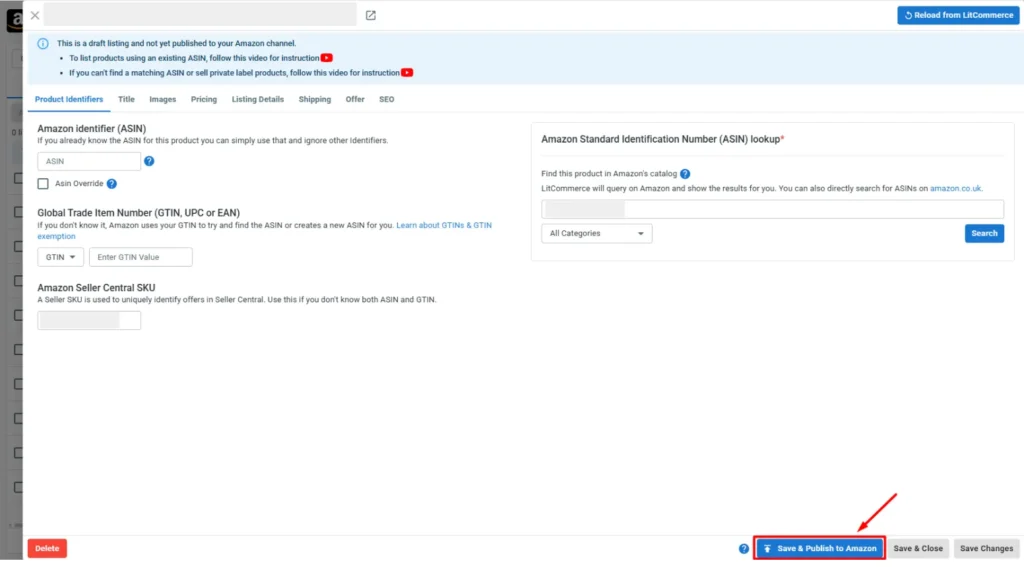
On Amazon, the slow part is getting every product onto the right catalog page with complete data. LitCommerce handles this with two main listing features:
- List without an ASIN: A product with no existing ASIN can still go live on Amazon. Once you obtain a GTIN exemption, LitCommerce guides you through the rest of the listing process.
- Efficient bulk editing: Import, create, and edit Amazon listings in bulk from one interface. Rules fill in repeated data automatically, so offer, shipping, and pricing details go onto many listings at once instead of one by one.
Additionally, the SEO function helps you optimize your listing to rank better in Amazon search. Sellers with more than one Amazon store can also adjust pricing, shipping, taxes, and descriptions for each country.
Click “Save and Publish to Amazon” to make the listings live.
Step 3: Connect eBay and list the same products
- From the LitCommerce dashboard, go to Add/Manage Sales Channels and click Add New Channel. Initial setup connects only one channel, so eBay is added here.
- Choose eBay, enter your store name and country, and authorize your eBay seller account.
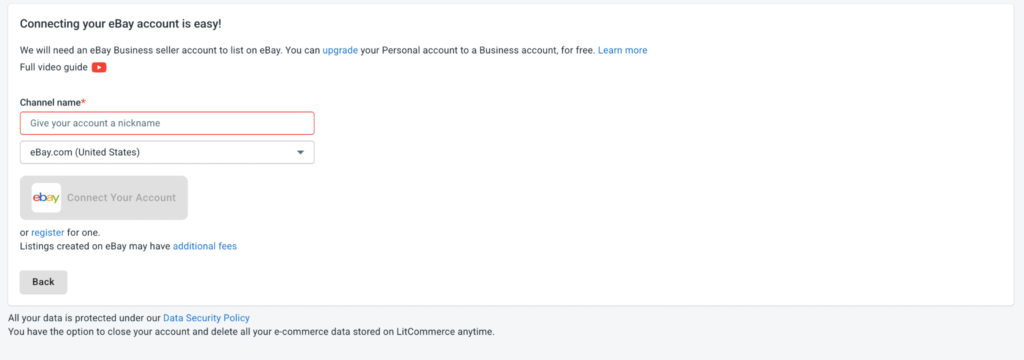
3. Go back to All Products and select the same products you listed on Amazon. Open Select Action, choose List Products to Channels, tick your eBay store, and click “Add As Draft Now.”
4. Open the eBay channel and review each draft, filling in any required fields such as category and item specifics.
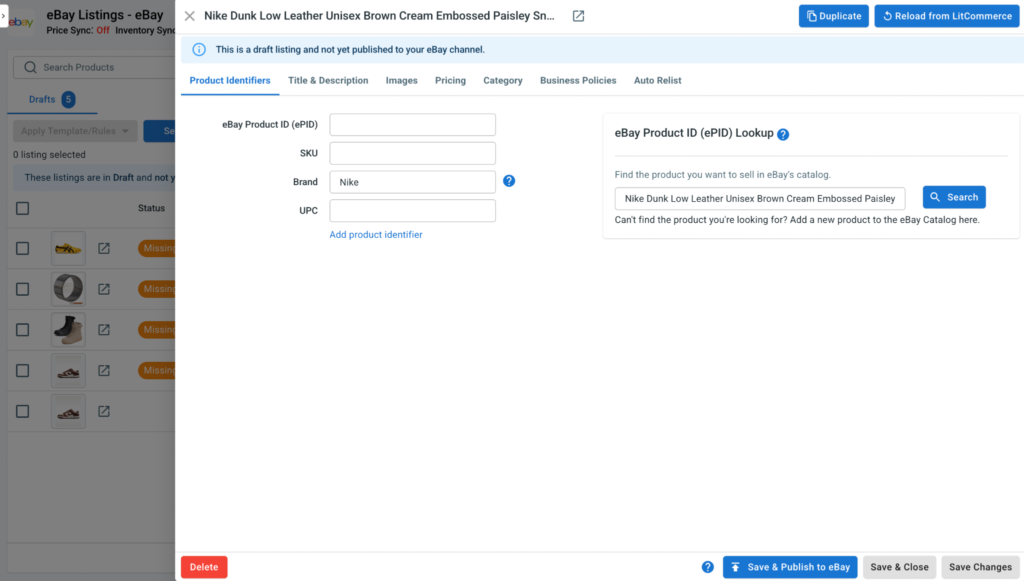
To help you create and optimize eBay listings faster, LitCommerce offers two AI-powered features:
- AI Listing Generation: Create a complete eBay listing in under 60 seconds using a product photo, URL, or title/keyword. AI generates keyword-rich titles, descriptions, suggests the right eBay category, and fills in item specifics and condition details. You can review and edit everything before publishing.
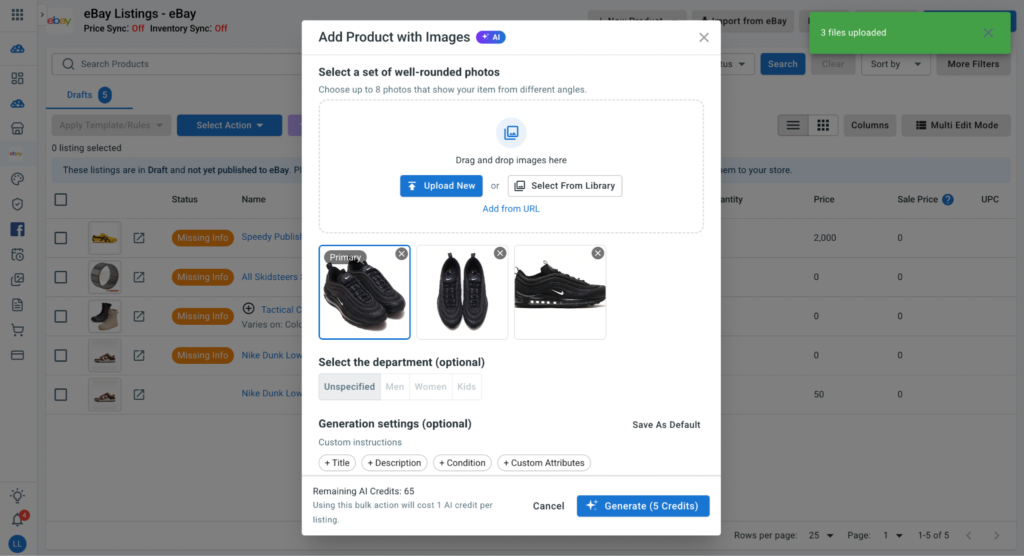
- AI Description Optimization: Improve existing eBay listings without rewriting descriptions from scratch. Simply enter a few product keywords or details, and AI generates a clearer, more relevant description to help attract buyers.
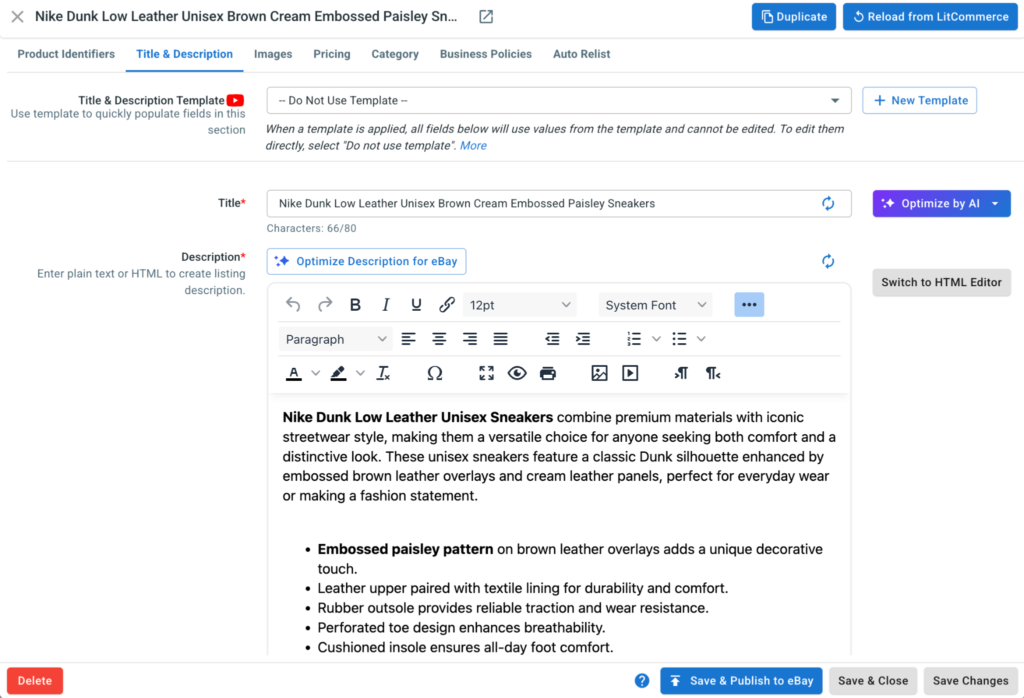
Beyond AI, this app simplifies bulk eBay listing with Templates & Rules. You can apply shipping, payment, and return policies across multiple listings and use mobile-responsive design templates to create consistent product descriptions.
When your drafts are ready, Quick/Auto List lets you publish multiple eBay listings at once, or automates publishing based on your settings. For eBay sellers, LitCommerce also supports Auto Relist, GTC Watchdog, Selling Limit Alerts, and Multiple eBay Accounts in one dashboard.
- Choose Save & Publish to eBay to make the listing live on eBay.
Ready to list on eBay and Amazon at the same time?
Create your first listings with AI, cross-list them to both marketplaces, and keep one stock count with per-channel price and inventory rules. Plans start at $29/month, and every feature is included in the 7-day free trial.
For a practical guide, watch this video to see how to import your existing listings into LitCommerce and cross-list them between Amazon and eBay in one flow:
Step 4: Customize sync settings for Amazon and eBay
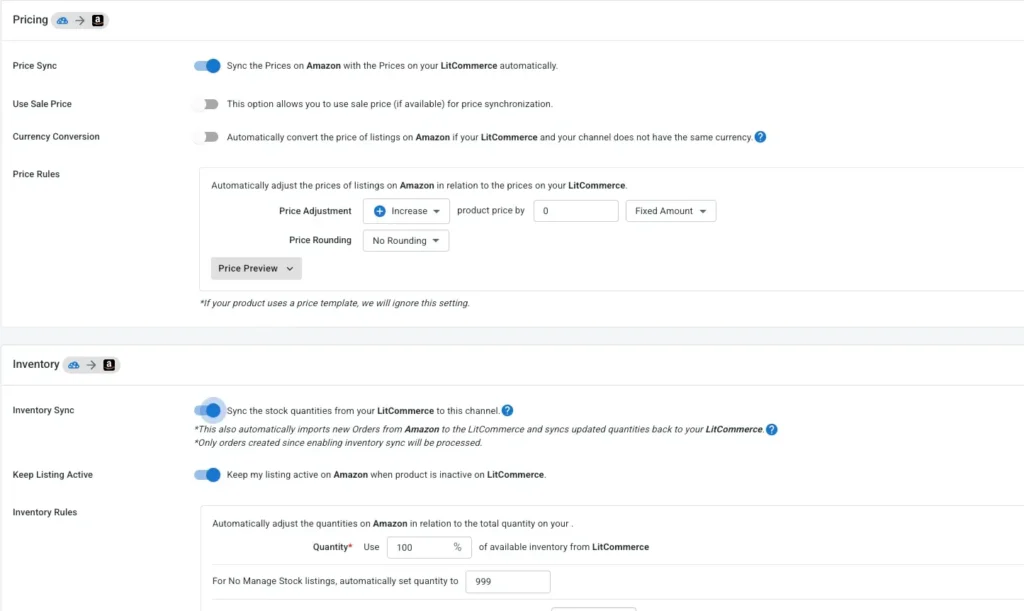
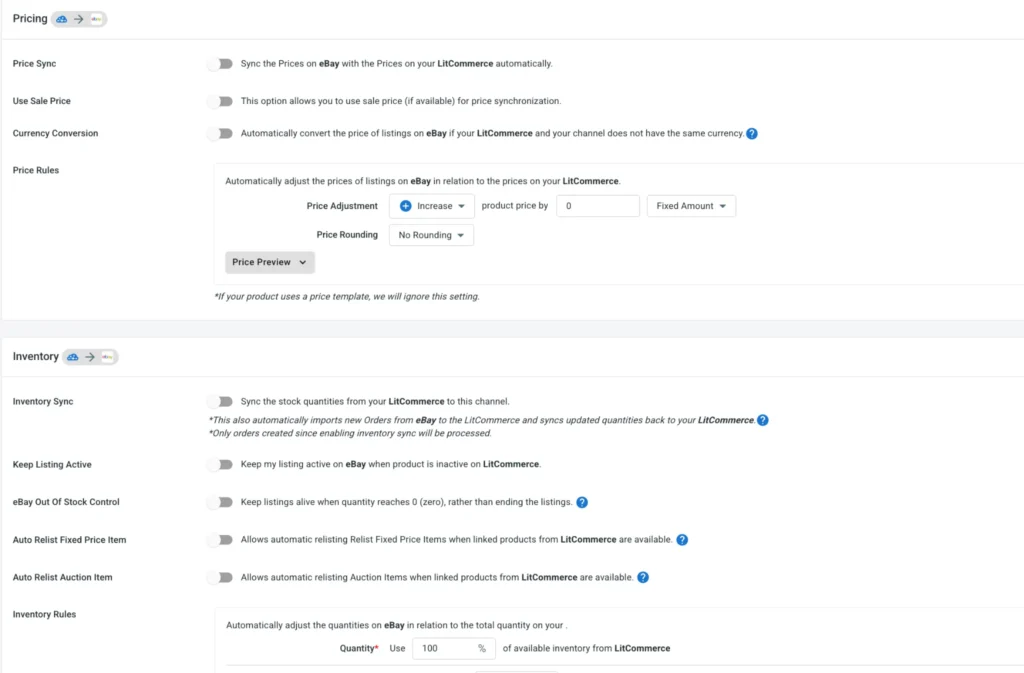
Each channel has its own Channel Settings, so Amazon and eBay can follow different rules while pulling from the same catalog. On both, price and inventory sync run every 15 minutes, and turning on Inventory Sync also starts order import.
Amazon settings
- Open Channel Settings for your Amazon store in the top right corner.
- Turn on Inventory Sync and Price Sync.
- Set a price rule to raise or lower Amazon prices by a percentage or a fixed amount. If you sell in more than one Amazon country, add regional pricing rules so each store carries its own price.
- Set an inventory rule to show only part of your stock on Amazon. FBA stock stays outside this count, so track it separately.
- Click Save Settings.
eBay settings
- Open Channel Settings for your eBay store.
- Turn on Inventory Sync and Price Sync.
- You can also set a price rule. Raise or lower eBay prices by a percentage or a fixed amount, add rounding or currency conversion, and check the result with Price Preview. If you’re enrolled in eBay’s Strike-through Pricing program, LitCommerce also syncs your discounted prices.
- Or, set an inventory rule. Show a percentage or a fixed amount of your Main Store stock on eBay to keep a safety buffer. Sold-out listings stay visible at zero stock for up to 30 days instead of ending.
- Turn on the extra eBay options you need: SKU, title, and description sync, Unlinked Product Order Alerts, and the Messages page for eBay buyer messages.
- Click Save Settings.
Step 5: Manage orders and track sales
- Open the Orders tab to see eBay and Amazon orders together.
- Click Sales Reports on the left sidebar to compare channel performance and decide which SKUs deserve a spot on both.
Fulfillment, Returns, and Orders Across Both Marketplaces
Shipping is where how to sell on Amazon and eBay gets hands-on. You have two ways to ship: pack eBay and Amazon orders yourself, or let Amazon ship both from your FBA stock. If you’re still deciding how to ship Amazon orders, our Amazon FBA vs FBM guide compares the two.
Using Amazon MCF to ship eBay orders
With Multi-Channel Fulfillment, an eBay order is shipped from your own FBA inventory. You create the fulfillment order in Seller Central, or let a connected tool send it, and Amazon picks, packs, and ships it.
Three details matter:
- Packaging. Orders from non-Amazon channels ship in unbranded packaging by default, at no extra fee.
- Size limits. In the US, items over 56 inches on the longest side or over 49.9 lb aren’t eligible for unbranded MCF.
- Cost. MCF has its own fee schedule, separate from FBA. Run your eBay order volume through Amazon’s MCF calculator before you commit.
At low eBay volume, shipping eBay orders yourself is often simpler. You keep packaging, inserts, and returns in your own hands.
Returns on two platforms
Amazon’s standard return window is 30 days, and sellers who ship their own Amazon orders must match or exceed Amazon’s return policy. On eBay, you set your own policy. The simplest setup is to offer 30-day returns on eBay too, so one SKU follows one rule on both sites, and your team never has to check which channel an order came from.
Messages and order management
Amazon buyer messages live in Seller Central, and eBay’s live in Seller Hub. Neither shows up in the other. Done by hand, that means two inboxes, two order queues, and tracking numbers uploaded twice. An order dashboard that pulls in both channels removes most of that double handling once volume grows.
Common Mistakes When Selling on Amazon and eBay
These are the slips we see most often from sellers learning how to sell on Amazon and eBay for the first time.
- Listing the full catalog on day one. One wrong ASIN or SKU match repeats across hundreds of listings before you spot it. Start with 10 to 20 SKUs and scale once they run cleanly.
- Showing full stock on both channels. If 100 units show as 100 on each site, two buyers can buy the same unit. LitCommerce’s inventory rules show only part of your stock per channel, so a buffer stays in place.
- Forgetting FBA stock isn’t in your shared count. Units in Amazon’s warehouses sit outside any sync tool, LitCommerce included. Keep FBA quantities separate from the stock you show on eBay.
- Splitting variations into separate ASINs. Separate pages scatter reviews and Buy Box eligibility. Group sizes and colors under one parent ASIN.
- Reselling Amazon purchases on eBay. eBay bans this retail arbitrage outright, with or without disclosure, and can suspend accounts for it.
- Copying Amazon copy into eBay. eBay buyers rely on item specifics and photos, not bullet points. LitCommerce’s AI drafts eBay-ready titles and descriptions and fills in required item specifics, so each listing fits its channel.
How to Sell on Amazon and eBay: FAQs
How do I start selling on Amazon and eBay?
The short version of how to sell on Amazon and eBay: open one seller account on each marketplace, build a product catalog with an internal SKU for every item, then list a small batch on both. Match products to ASINs on Amazon and fill in item specifics on eBay. Sync stock from one source so a sale on either site updates the other.
Can I sell the same item on Amazon and eBay at the same time?
Yes, you can. Both platforms let you list on eBay and Amazon at the same time, and neither asks where else you sell. The real risk is overselling when one unit sells on both sites before your stock updates. LitCommerce solves this by listing both channels from one catalog and syncing inventory, price, and orders every 15 minutes, with inventory rules that hold back safety stock on each channel.
Is it better to sell on Amazon or eBay?
It depends on the product. Amazon fits new, branded items with a barcode and buyers who want fast delivery. eBay fits used, vintage, collectible, and one-of-a-kind items. Many sellers end up on both because each reaches buyers the other misses.
Can I use Amazon FBA to fulfill eBay orders?
Yes, through Amazon Multi-Channel Fulfillment, as long as the stock is yours. MCF orders for non-Amazon channels ship in unbranded packaging by default. Check MCF fees against your eBay volume before you rely on it.
Can I dropship from Amazon to eBay?
No, you can’t. eBay doesn’t allow you to buy an item from another retailer or marketplace and ship it directly to your eBay buyer. Dropshipping is allowed only from a wholesale supplier.
Start Small, Then Scale to Both Marketplaces
How to sell on Amazon and eBay comes down to separate accounts, one synced inventory source, and listings that follow each platform’s rules. The three risks that trip sellers up each have a direct fix: safety stock and SKU mapping for overselling, eBay’s sourcing rules for policy, and per-channel pricing for fee gaps.
Your next step: list 10 to 20 SKUs on the second marketplace, run them for two weeks, and reconcile stock against your catalog. If manual updates start eating into your week, try LitCommerce free for 7 days and connect both channels in one dashboard.
Not sure which setup fits your catalog? Contact us and our support team will walk you through it. For more guides on growing past two channels, visit the Blog.