



Selling on Shopify, Amazon, eBay, and want to connect them together? Yes, you can connect Shopify to Amazon and eBay to cross-list products, avoid overselling items across channels, and manage all three platforms more easily. Ultimately, you can reduce your workflow and daily operations.
Fast forward to 2021 and 2022: Shopify did offer native sales channels for Amazon and eBay. However, they were shutting down. Since then, to set up Shopify Amazon eBay integration, you can either do it manually or use a third-party tool, which allows you to list, sync, and manage all three from one place.
In this article, we will cover:
- 3 ways to integrate Shopify, Amazon, and eBay
- An easy way to set up Shopify Amazon eBay integration with LitCommerce
- How to stop overselling, prevent listing rejection, and keep pricing consistent
This applies whether you’re launching on Amazon and eBay for the first time or you’re already selling there and want to centralize everything around Shopify.

3 Ways to Integrate Shopify, Amazon, and eBay for Multichannel Selling
You have three paths for a Shopify Amazon eBay integration: manage everything by hand, connect each marketplace through its own separate app, or run all three channels through one centralized tool. Each one fits a different stage of business, and each one fails at a different point. Let’s break them down!
1. Manual management (do it yourself)
Most basically: You can manage Shopify, Amazon, and eBay by yourself. Manual management means uploading products to Shopify, then hand-creating matching listings on Amazon Seller Central and eBay’s Seller Hub, and updating inventory and prices across all three by hand whenever something changes.
This works fine if you’re running a small catalog, fewer than 30 SKUs, with under 5 orders a day across all channels, and inventory that doesn’t move fast. If you’re testing the waters with a handful of products before committing to a bigger setup, this is a reasonable starting point.
However, it breaks the moment volume picks up. You have 50 more products to list on these 3 platforms, which means you create and copy listings at least 150 times. On top of that, if you sell your last item on Amazon at 2 PM and don’t update Shopify and eBay until later in the day, you create a window where the same item sells twice.
Thus, managing Shopify, Amazon, and eBay manually is fine (not yet excellent) if you have a small catalog.
2. Piecemeal apps for each channel pair
A piecemeal setup means using two separate apps: one connects Shopify to Amazon, while the other connects Shopify to eBay. Each app has its own settings, sync schedule, pricing rules, and notifications.
But the core flaw: Amazon and eBay never talk to each other directly. Each app only syncs with Shopify, on its own timing, which means you end up with three separate inventory states instead of one shared source of truth.
Picture this: a customer buys your last unit on Amazon. The Amazon app updates Shopify right away. But the eBay app runs on a different schedule and doesn’t reflect that sale for a longer stretch, sometimes over an hour. In that window, someone else buys the same item on eBay, and now you have two orders for that last unit in stock.
On top of the overselling risk, piecemeal apps can also lead to:
- Different pricing rules across channels.
- Separate listing errors and notifications.
- More time spent managing and troubleshooting two apps.
3. Centralized multichannel selling tool
The fix for both problems above is one tool that manages all Shopify, Amazon, and eBay together. This gives you a single place to sync listings, prices, and inventory, and manage orders across all three platforms instead of juggling separate dashboards.
Shopify does have a first-party option here, Shopify Marketplace Connect. However, if you just start selling on eBay and Amazon, a third-party tool that provides features customized per marketplace rather than one generic setup gives you more benefits. LitCommerce thus comes with a few things that stand out:
- Connecting Shopify, Amazon, and eBay in a few clicks
- Syncing listings, prices, and inventory across all three platforms
- Centralizing all your orders in one place
- Most importantly, offering customized listing features for eBay and Amazon separately.
For eBay integration, LitCommerce offers these key customized features:
- A template designer for eBay descriptions
- AI tools for eBay title & description optimization
- Category suggestions and item specifics
- Clone eBay listings
- eBay multiple account connection
For Amazon integration, LitCommerce offers these features:
- ASIN look-up tool
- GTIN Exemption for Amazon.
- SEO function for Amazon
- Category and attribute mapping
Beyond Amazon and eBay, as a multichannel selling tool, LitCommerce also supports other Shopify integrations, such as Shopify Etsy and Shopify TikTok Shop, and more.
How to Set Up Shopify Amazon eBay Integration with LitCommerce: 5-Step Guide
So now let’s discover how to set up Shopify Amazon eBay integration using LitCommerce:
- Step 1: Connect Shopify, Amazon, and eBay together.
- Step 2: List & import products on Amazon and eBay
- Step 3: Set up pricing & inventory rules across Shopify, Amazon, & eBay
- Step 4: Manage all your orders in one place
Step 1: Connect Shopify, Amazon, and eBay together
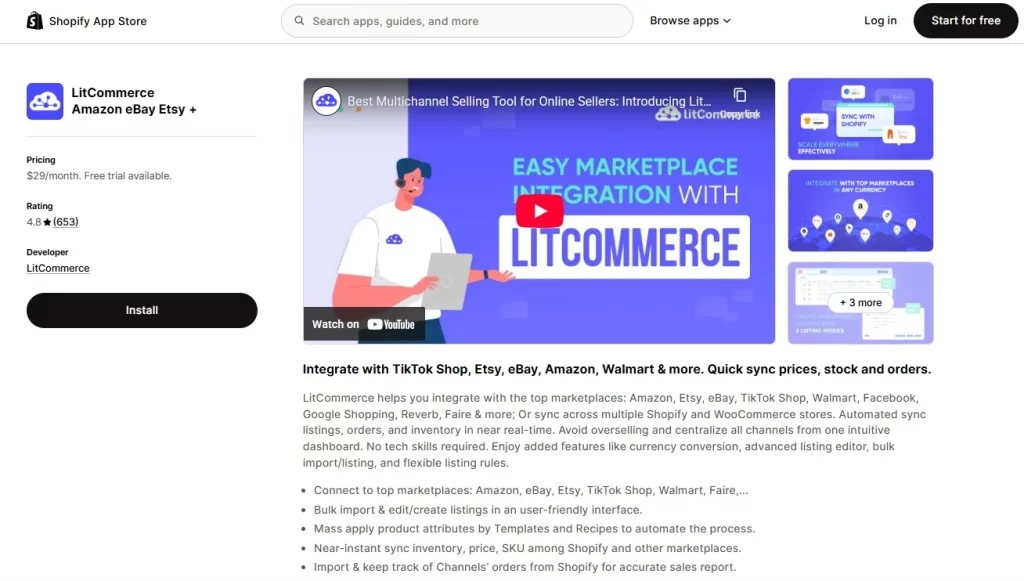
First, from your Shopify store, search for LitCommerce and install the app. Shopify will then become your Main Store – the central place to manage your orders and sync your data.
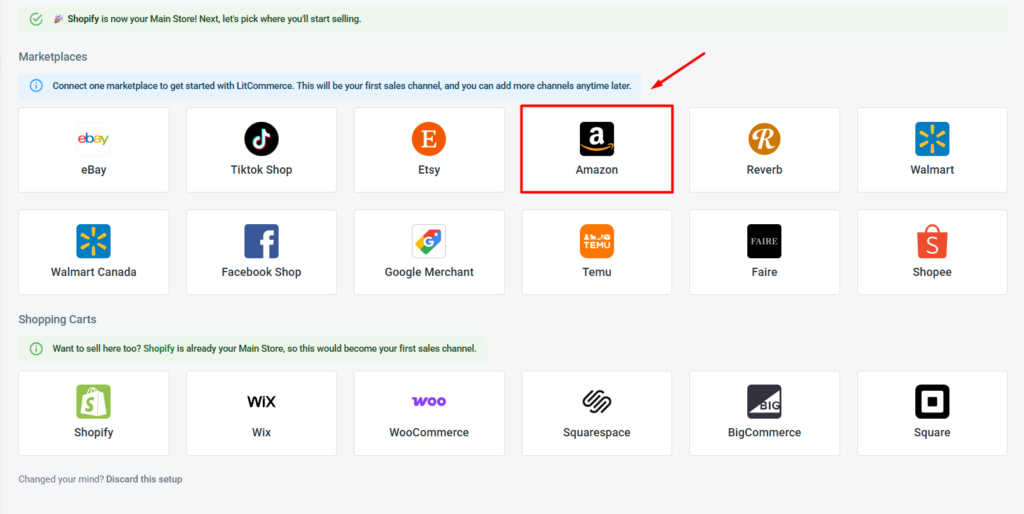
Then, from the supported marketplaces:
- Find the Amazon logo, click on it, and follow the prompts to authorize LitCommerce to access your Amazon Seller account.
- After that, click Add/Manage Sales Channels, then Add New Channel. Find eBay, click on it, and follow the on-screen steps to finish connecting eBay to LitCommerce.
Once finished, you have successfully linked Shopify to both Amazon and eBay. LitCommerce automatically imports your Shopify products into the All Products tab. You’re ready to publish new listings or import existing ones from one to the other.
Step 2: List & import products on Amazon and eBay
Next, in our Shopify Amazon eBay integration, you have 3 paths here, depending on where you’re starting from: publish new listings from Shopify to the marketplace, import existing Amazon and eBay listings to Shopify, or link them across 3 platforms. Let’s walk through each one:
Case 1: You want to list Shopify products on Amazon or eBay.
First, to list Shopify products on Amazon with LitCommerce, follow these steps:
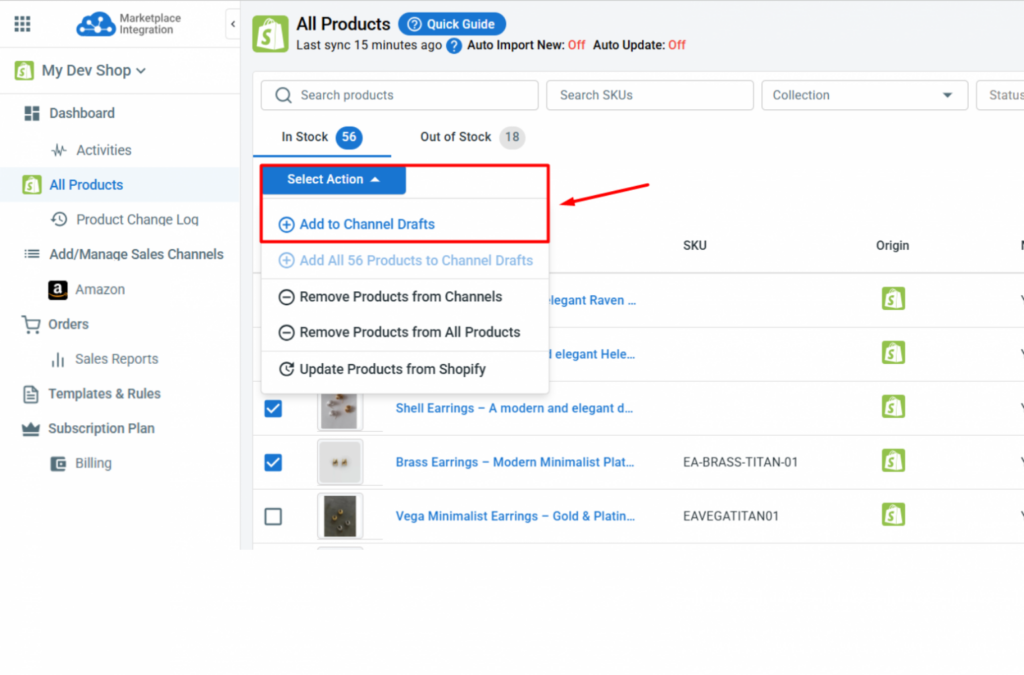
- Go to All Products, select the Shopify items you want to list.
- Click Select Action, then Add to Channel Drafts, check the box next to your Amazon store, and click Add As Draft Now.
- Go to the Amazon tab, review and edit each listing draft. Amazon often requires more product details than Shopify, such as an ASIN or a GTIN exemption, category, and product attributes.
- Once ready, click Save and Publish to Amazon.
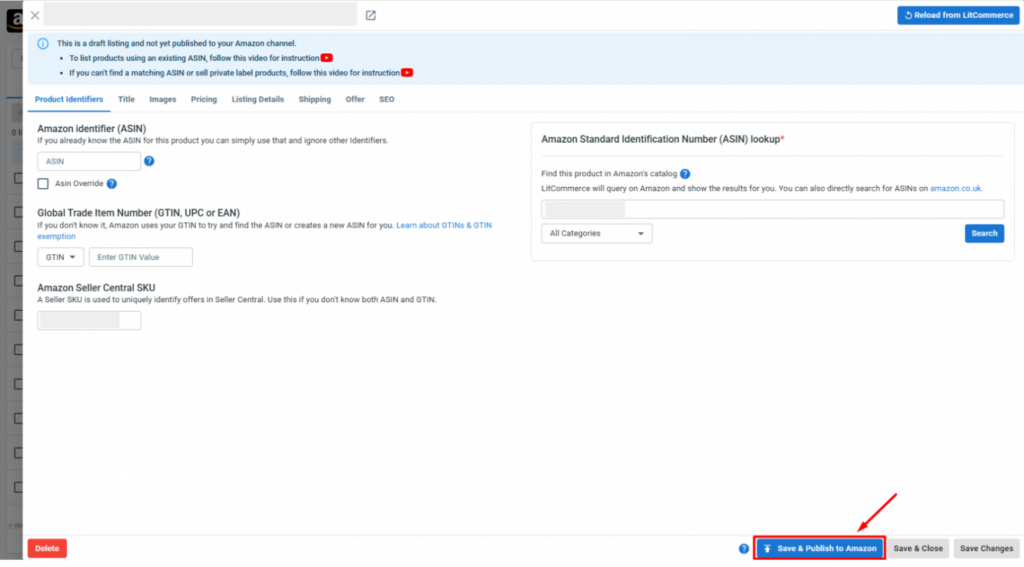
Similarly, follow the same steps as above to list your Shopify products on eBay. For eBay, you will need to customize your listings to meet the marketplace’s requirements.
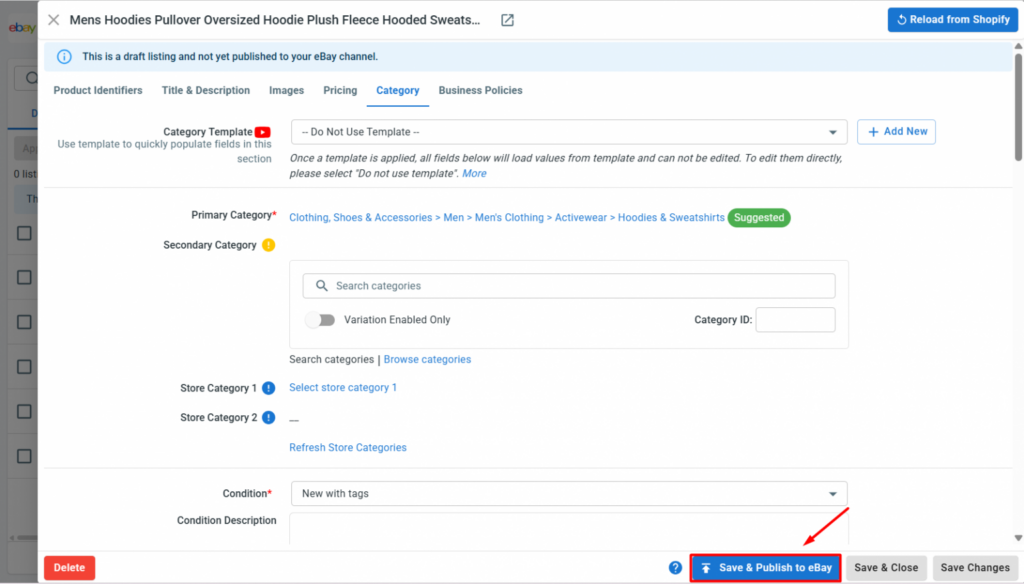
When listing products on eBay and Amazon, Templates & Rules let you apply the same settings, such as category, shipping, or product attributes, across multiple listings at once, instead of editing each one individually. For example, you can set your Business Policies for eBay shipping and returns, so every listing using that template automatically inherits the same setup.
Case 2: You want to import Amazon and eBay products to Shopify
Otherwise, if your products are currently on Amazon or eBay, you can import them into Shopify with LitCommerce.
For example, here is how to import products from Amazon to Shopify:
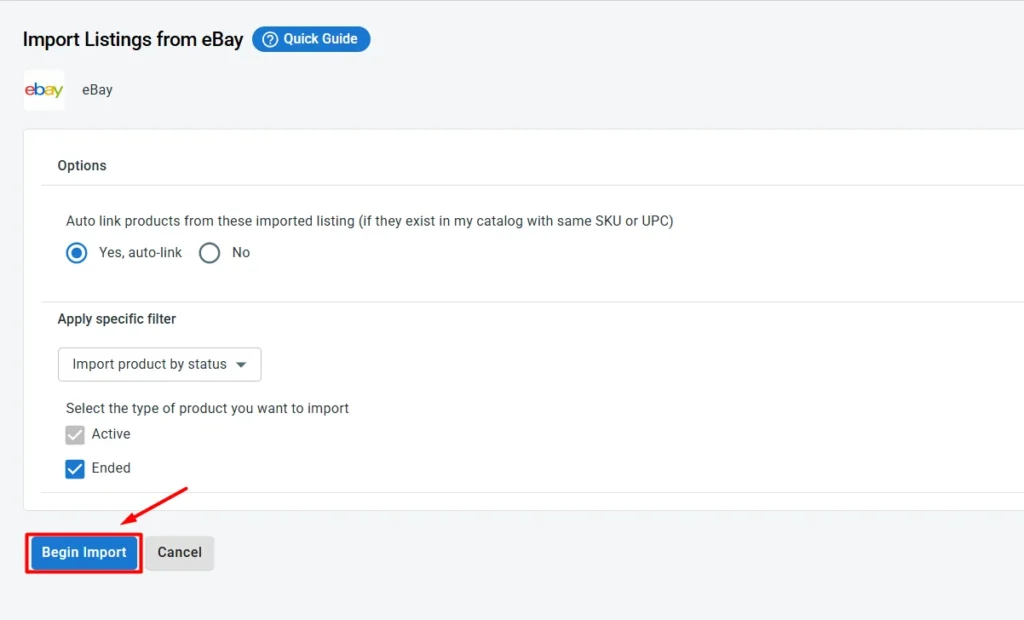
- On the Amazon channel tab, click Import from Amazon.
- Filter which products to import, and select your preferences, like letting LitCommerce auto-link products on Shopify and Amazon.
- Once finished, click Begin Import.
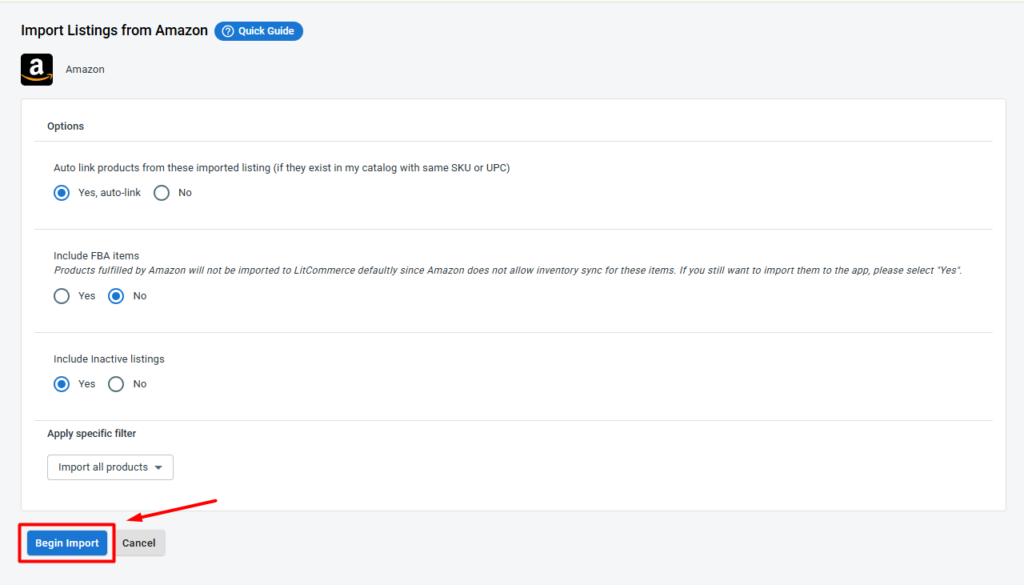
- Your Amazon listings will then be imported into LitCommerce. Select the listings, click Select Action, then click Create on Shopify.
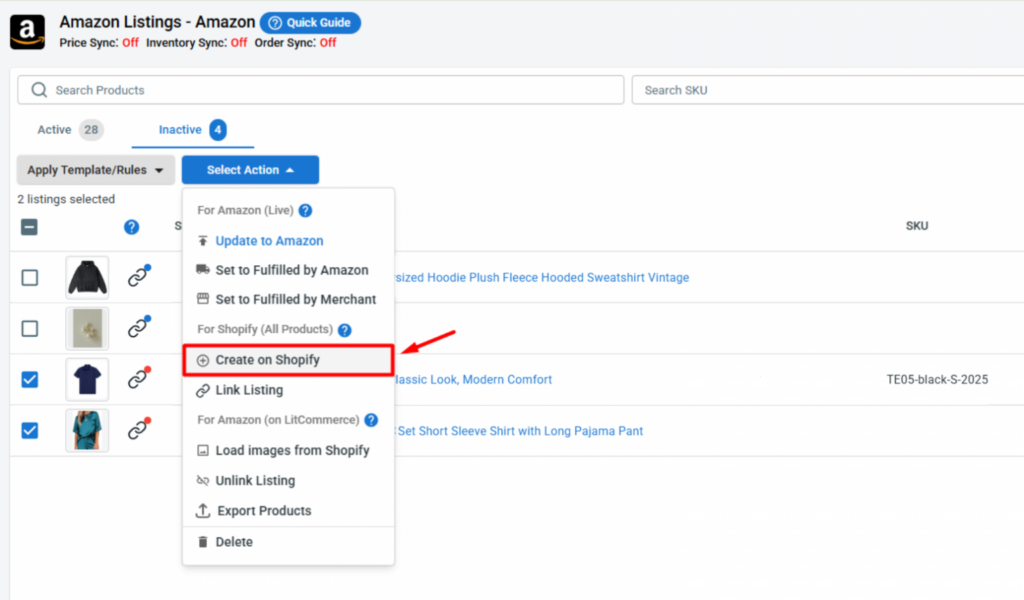
To import products from eBay to Shopify, follow the same steps as when you import products from Amazon to Shopify.
Case 3: Link products on Amazon, eBay, and Shopify
When importing products from Amazon or eBay to Shopify, if you have allowed auto-linking, linked products will show a blue dot. Unlinked products will show a red dot.
To link the unlinked products between Amazon and Shopify or between eBay and Shopify, follow these steps:
- Hover over the red dot of the unlinked products.
- Choose Link To A Product.
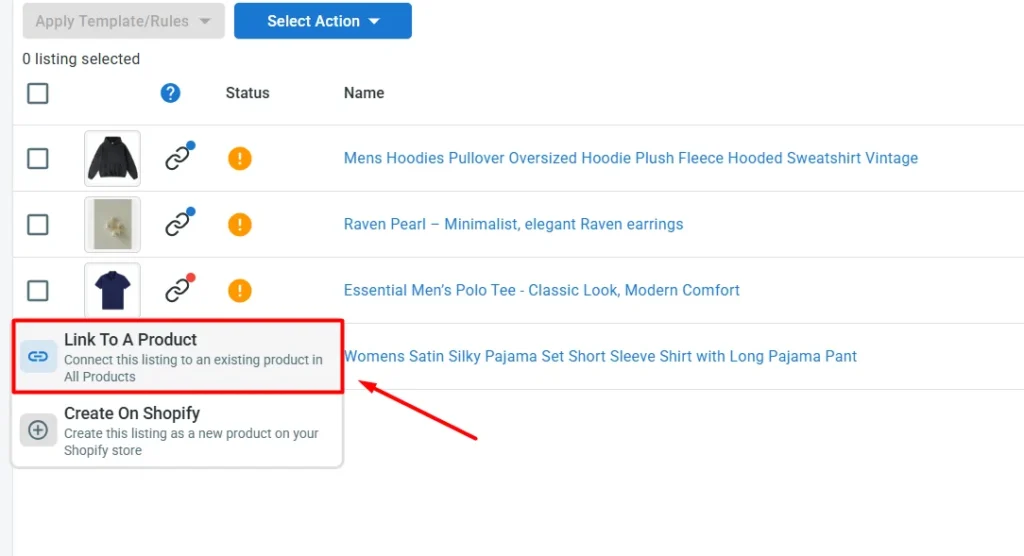
- Find a matching item and click Select next to that product.
Once finished, your products are now linked across Shopify, Amazon, and eBay. Linked products are now ready for sync.
Step 3: Set up sync across Shopify, Amazon, and eBay
LitCommerce keeps your Shopify, Amazon, and eBay stores in sync automatically, so pricing and inventory stay consistent across every channel without manual work.
To access these settings, first, in the All Products tab, click Settings and turn on Automatic Update to automatically update product changes from Shopify to the All Products tab.
After that, click Channel Settings inside the Amazon and eBay channel in LitCommerce. Here are the main sync settings you can configure:
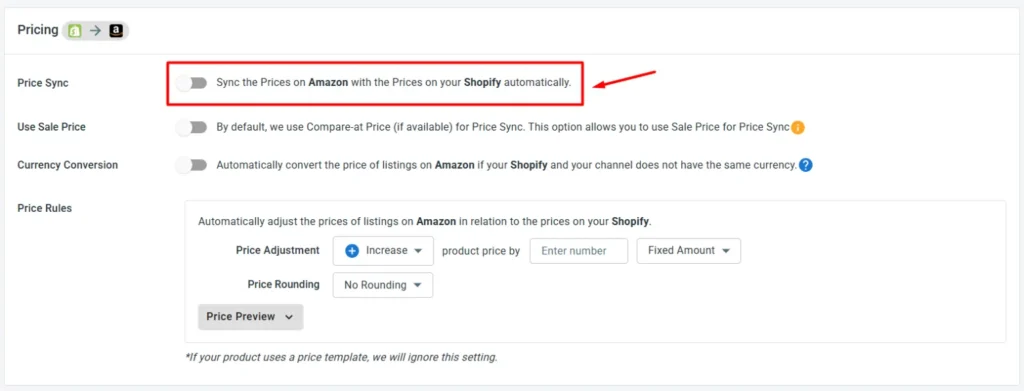
- Price Sync: Turn on this feature to automatically update your Amazon and eBay prices to match your Shopify store. Or, apply Price Rules to increase or decrease each channel’s price by a set amount or percentage, useful for covering referral fees on Amazon or final value fees on eBay.
- Inventory sync: LitCommerce runs inventory sync for Amazon, eBay, and Shopify on a 15-minute cycle. This is extremely helpful for your multichannel inventory management. Using this feature, you can keep your stock quantities aligned across all three platforms, preventing overselling. Additionally, you can use Inventory Rules to sync only a percentage of your available Shopify stock to each channel as a buffer. Or, set minimum and maximum stock thresholds and enable out-of-stock control to keep listings active when inventory hits zero.
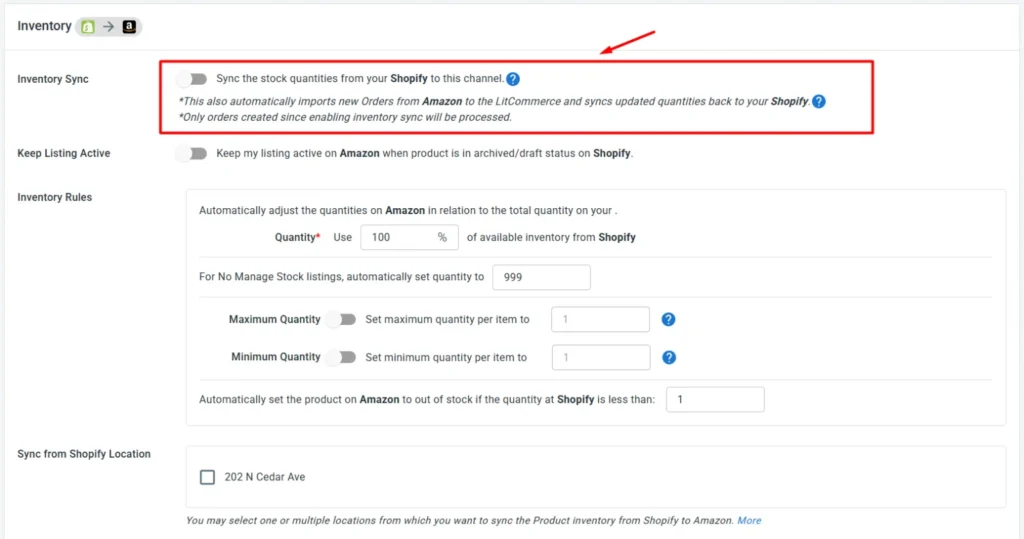
Note for Amazon inventory sync: LitCommerce can’t manage inventory for FBA products, since Amazon holds and manages FBA stock separately from your store’s warehouse.
Additionally, there are some other settings for further streamlining your Shopify Amazon eBay integration, such as: Description sync, Title sync, etc.
Step 4: Manage all orders in one dashboard
Finally, once Import Orders to Main Store is enabled for both Amazon and eBay, every order from both channels automatically appears in your Shopify dashboard, right alongside your Shopify orders. So you can manage all orders from Shopify, eBay, and Amazon from one place – no more switching between three platforms to stay on top of your sales.
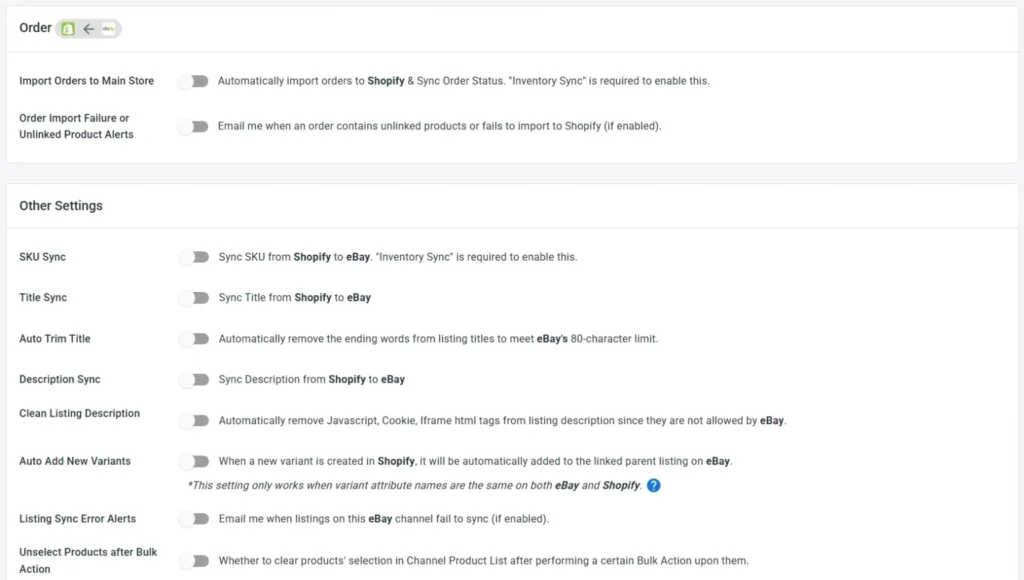
Please note that, due to Amazon’s API limitations, orders imported from Amazon won’t include shipping and customer information (name, address, etc.). Only purchased product details, such as title, SKU, and price, are imported.
Moreover, LitCommerce also offers some other settings for your orders, including:
- Skip Unpaid Orders: unpaid orders from Amazon or eBay aren’t imported into LitCommerce by default. Turn this on, and any unpaid order gets skipped automatically.
- Import Orders with Unlinked Products: lets orders for unlinked Amazon or eBay products still come through to Shopify. Keep in mind only linked products get their stock updated automatically; unlinked ones won’t.
- Order with Unlinked Products Notifications: sends an email alert whenever an unlinked order shows up in LitCommerce that can’t be imported to Shopify, so nothing slips through unnoticed.
Common Challenges When Selling on Shopify, Amazon, and eBay
When selling on multiple channels like Shopify, Amazon, and eBay, a few operational issues come up often enough that it’s worth knowing the fix ahead of time.
- Overselling from inventory mismatch: This happens when a sale on one channel hasn’t reflected on the others yet, so the same item gets sold twice before your stock count catches up. Inventory Sync narrows this window and reduces overselling to a rare exception instead of a daily headache.
- Listing rejection and mismatched requirements: Amazon and eBay have different rules, so one listing rarely fits both. Missing details, like ASIN or GTIN on Amazon, or Item Specifics on eBay, can get a listing rejected. Even when a listing goes live, content built for one channel often underperforms on the other, since Amazon favors backend keywords while eBay favors a clear public description.
- Price inconsistency: Manually updating three platforms means someone eventually forgets one, and customers buy heavily at the lower price while your margin erodes quietly. Automated price sync rules, tied to your Shopify base price, remove the manual step entirely.
- Order management fragmentation: Checking Shopify, Seller Central, and eBay’s Seller Hub separately is how orders get missed or tracking updates fall through the cracks. Centralized order sync solves this by pulling everything into one dashboard, so you’re not toggling between three logins to find one order.
Shopify Amazon eBay Integration – FAQs
Does Shopify have a direct integration with Amazon and eBay anymore?
No. Shopify discontinued its native Amazon and eBay channels,then they replaced with Shopify Marketplace Connect. To set up Amazon eBay Shopify integration, you can also use other tools like LitCommerce, which offers plenty of customized features for eBay and Amazon listings.
What’s the best app to sync Shopify with Amazon and eBay?
LitCommerce stands out as one of the best app to sync Shopify with Amazon and eBay.This tool starts at an affordable price with $29/month for 1,000 listings and 3 channels, with unlimited orders. It also offers customized features for eBay and Amazon listings.
Can I sync listings I already have on Amazon and eBay back into Shopify?
Yes. Using LitCommerce, you can easily import existing listings from your current Amazon and eBay stores to Shopify without having to copy each listing one by one.
How much does it cost to integrate Shopify with Amazon and eBay?
LitCommerce starts at $29/month for 1,000 listings and 3 channels, with unlimited orders and a 7-day free trial. Fulfillment costs and payment processing fees are separate and depend on your shipping setup and payment provider.
Shopify Amazon eBay Integration: Which Path Fits Your Business?
Shopify Amazon eBay integration comes down to three options: manage everything by hand, patch together separate apps for each marketplace, or run all three through one centralized tool.
Piecemeal apps look like a shortcut, but since Amazon and eBay never sync directly, you end up with three inventory states instead of one, and the overselling risk actually goes up, not down.
A centralized multichannel selling tool like LitCommerce solves that by putting one sync engine in charge of all three platforms. The 15-minute sync cycle, channel-specific templates, and a centralized order dashboard together.
Ready to explore more ways to sell across channels beyond Shopify, Amazon, and eBay? Check out our Multichannel Selling hub for guides on connecting more marketplaces and scaling your store.