


Are you new to selling on TikTok and wondering how to add products to TikTok Shop? You are in the right place. Adding products to TikTok Shop is the most important step to get your products live. That way, you can showcase your items to shoppers while they watch your videos or join your live streams. Listing products correctly also helps your buyers find you more easily.
So, in this guide, we will walk you through everything you need to know to add a product to your TikTok Shop, including:
- Four ways to add products to TikTok Shop
- How to create individual listings on TikTok
- How to list a product if it already exists on TikTok Shop
- How to batch add products to TikTok Shop
- How to sync products from Shopify and other platforms
Let’s walk through each method.
Having products on another platform? Use LitCommerce to add these products to TikTok Shop fast – without rebuilding from scratch.

How to Add Products to TikTok Shop: 4 Ways to Get Started
After setting up your TikTok Shop, sign in to TikTok Seller Center. Go to Products and click Add Products. You will see four ways to add products to TikTok Shop:
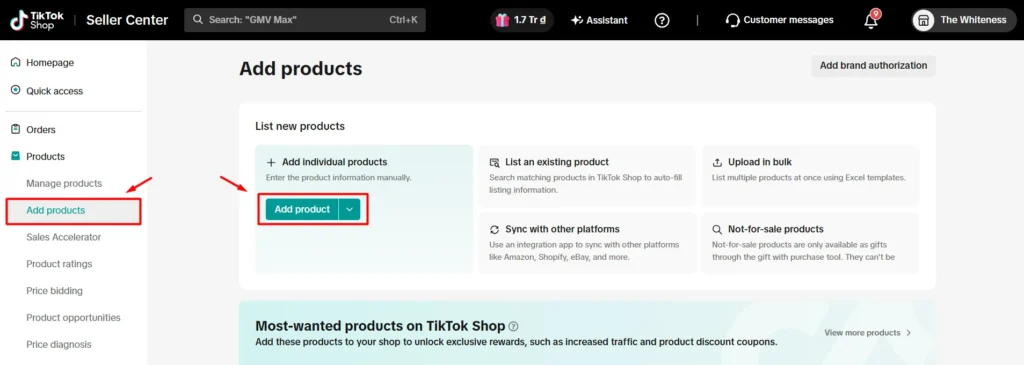
- Add individual products: Create each product listing manually by entering its details, images, price, and inventory. This method is best if you have a small catalog from 1 to 20 listings, or you’re new to TikTok Shop and want to see how the process works.
- List an existing product: Find an existing product in TikTok Shop’s catalog and let TikTok auto-fill listing information for you. This method saves you time by letting you use the product information already available in their catalog.
- Upload in bulk: Use a spreadsheet template to upload multiple products at once. This way, you download an Excel spreadsheet based on the category you selected, fill it out, and upload it to TikTok Shop. This way is convenient if you have a bigger catalog and your data already lives in a spreadsheet.
- Sync with other platforms: If your catalog already lives on Shopify, WooCommerce, or a marketplace, you can use an app to import products from your existing stores to TikTok Shop, so you don’t need to recreate each listing one-by-one.
Now that you understand the four methods for adding products to TikTok Shop, let’s walk through each one step by step.
Method 1: How to Add Products to TikTok Shop Manually
Adding individual products is the most fundamental and simplest way when you search for how to add products to TikTok Shop. It gives you full control over every field, which matters while you’re still learning how to start selling on TikTok Shop before scaling.
Here is how to add products to TikTok Shop one by one:
- Log in to the TikTok Shop Seller Center.
- Go to Products > Add products.
- Click Add product.
- From there, you will see the listing form, and you’ll need to fill in four key sections:
- Basic information
- Product details
- Sales information
- Shipping
Let’s walk through each section:
1. Enter basic product information
In this section, you need to upload your product images, enter a product title, and choose the best category for your product. This section helps TikTok understand your product and show it in relevant searches.
Product images: Upload clear images that accurately represent the product. Your main image should display the entire item without distracting elements. Then, other images can show different angles, features, and important details.
TikTok Shop’s current image requirements include:
- Upload at least one image and up to 9 images.
- Use JPG, JPEG, or PNG files.
- Use images measuring at least 600 × 600 pixels.
- Keep each file under 10 MB.
- Avoid watermarks, promotional text, and unrelated graphics.
You can also select AI Optimize to adjust the image background.
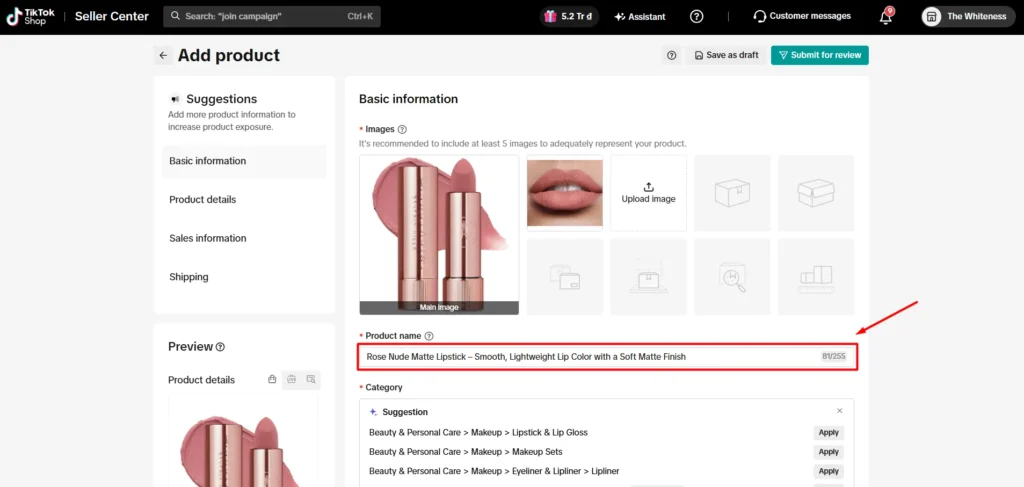
Product name: Write a clear title that helps shoppers understand what you sell. TikTok Shop currently accepts product names between 25 and 200 characters. You can include relevant details such as: brand, product type, main features, material/color/size, or intended use.
Avoid adding URLs, seller names, promotional claims, or irrelevant keywords. If you include a protected brand name, TikTok Shop may require brand authorization.
Product category: Then pick a category. TikTok will suggest some categories for your product based on your images and title. However, make sure to check it carefully and choose the right product category. An incorrect category can make your product harder to find. It may also cause listing rejection or enforcement action.
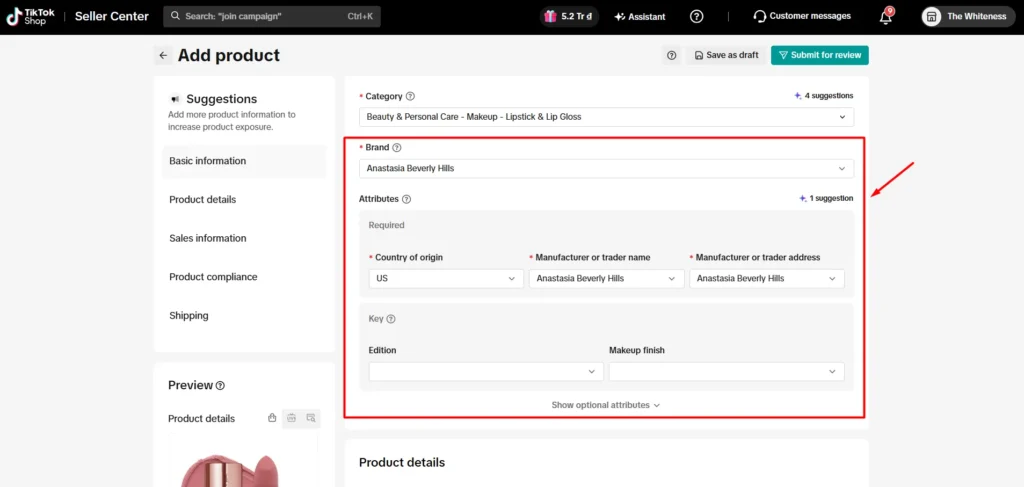
Once you select a category, you will see the Brand and Attributes.
- Brand: Search for and select the correct brand. Choose No brand only if the product is genuinely unbranded.
- Attributes: The fields shown vary by category. Complete attributes such as color, material, pattern, size, or target audience. Some attributes may appear optional. However, completing them can help TikTok match your product with relevant searches and help shoppers make informed decisions.
2. Add more product details
In this section you can add your product description and product video. This gives you a large space to explain the product’s features, benefits, and intended use.
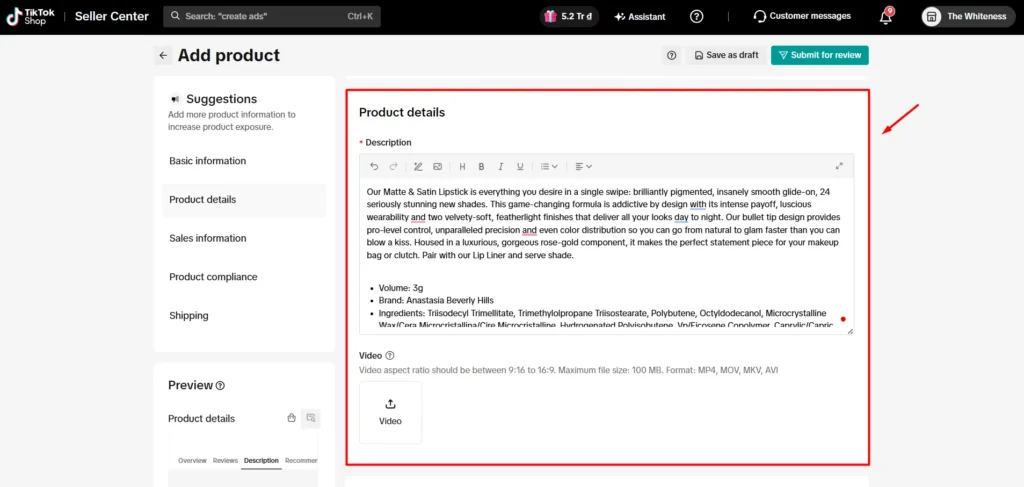
Product description
Write an accurate description covering the information shoppers need before purchasing. You can enter the content manually or use TikTok Shop’s description generator.
Consider including these product details, which can help optimize your listing for TikTok SEO.
- Main features and benefits
- Materials or ingredients
- Dimensions and specifications
- Package contents
- Care or usage instructions
- Important warnings or limitations
Separate key selling points into short paragraphs or bullet points. Avoid unsupported claims, irrelevant keywords, external links, or information that conflicts with other listing fields.
Product video
You can upload a video demonstrating the product and highlighting one or two key selling points. Although optional for many products, a video can help shoppers understand how the item looks or works.
The video must:
- Use MP4, MOV, MKV, or AVI format.
- Have an aspect ratio between 9:16 and 16:9.
- Be no larger than 100 MB.
- Accurately represent the listed product.
If you upload more than four product images, TikTok Shop may offer an option to generate a product video with AI.
3. Give sales information
This section defines the versions available for purchase and the selling information for each one.
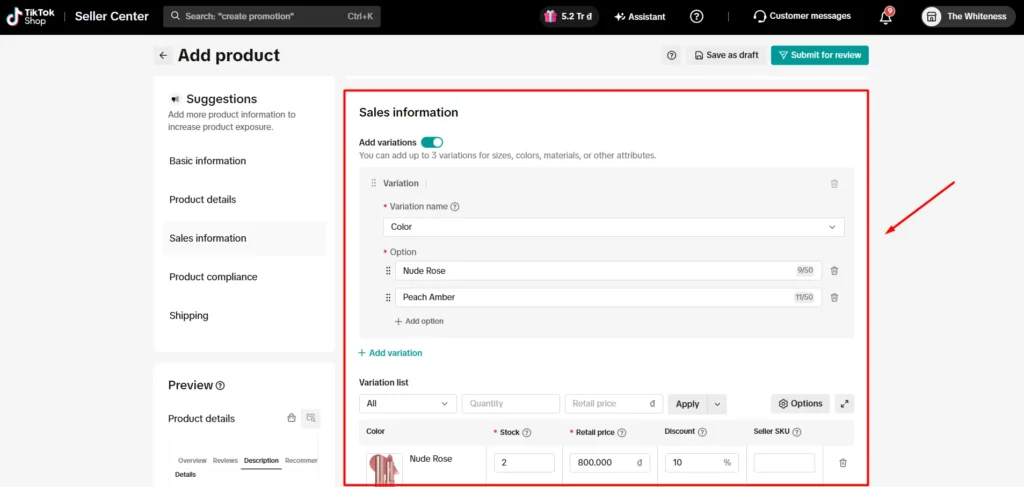
Variations: Add variations if your product comes in different options, such as size, color, style, or quantity.
For example:
- Color: Rose Nude, Classic Red, Soft Pink
- Size: S, M, L, XL, XXL.
Upload the correct image for each variation when possible. This helps shoppers confirm which option they are selecting.
Product identifier code
Enter the applicable product identifier for each SKU, such as a UPC, EAN, GTIN, ISBN, or JAN.
Use a valid identifier assigned to the exact product variation. TikTok Shop states that product identifiers should be registered with GS1. Requirements may differ by product category.
Seller SKU
Add a unique Seller SKU to identify and manage each variation internally. Use a consistent SKU structure, especially if you also sell the product on other platforms.
For example: LIP-ROSE-NUDE-01
Retail price: Enter the price customers will pay before any TikTok discount or promotion is applied. Check your product costs, TikTok Shop fees, and expected margin before setting the price. Avoid using an artificially inflated price to create a misleading discount.
List price: Enter the product’s reference price where applicable. The list price must be equal to or higher than the retail price. Make sure you can support any price comparison or discount claim shown to customers.
Quantity: Enter the available stock for each variation. Only include inventory that is ready for sale to reduce the risk of overselling or order cancellation.
Size chart: For products with size variations, add a size chart with accurate measurements. You can create one in Seller Center or upload an existing size-chart image. This field is especially helpful for clothing, footwear, and other size-dependent products.
4. Add product compliance
TikTok Shop may ask for additional compliance details based on your product and category.
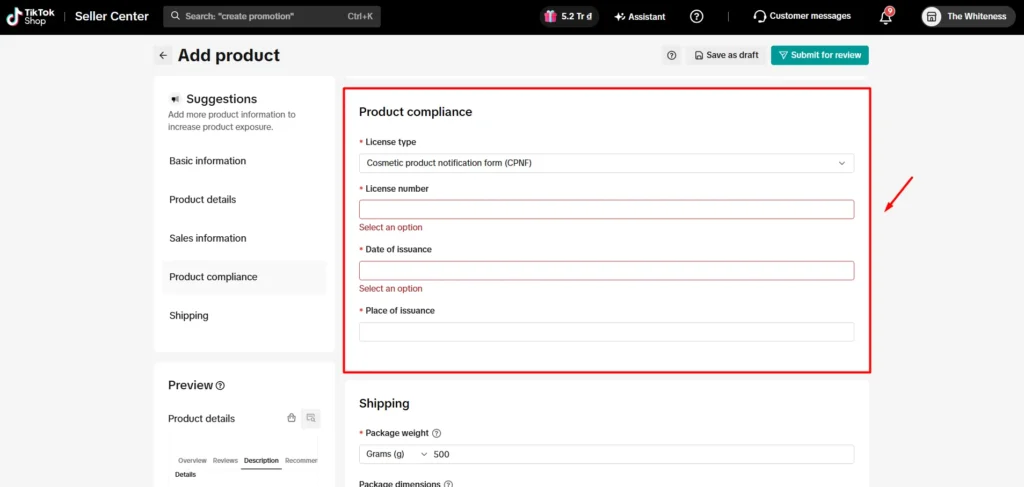
These fields can cover:
- Product materials or chemicals
- Safety warnings
- Certifications
- Manufacturer information
- Dangerous goods information
- Category-specific supporting documents
Complete every required field accurately. Do not select a random value to bypass the requirement, as missing or incorrect compliance details may cause rejection or account enforcement.
5. Set shipping for TikTok Shop listing
Enter the product’s packaged weight and dimensions. Measure the item after adding its box, wrapping, or other packing materials.
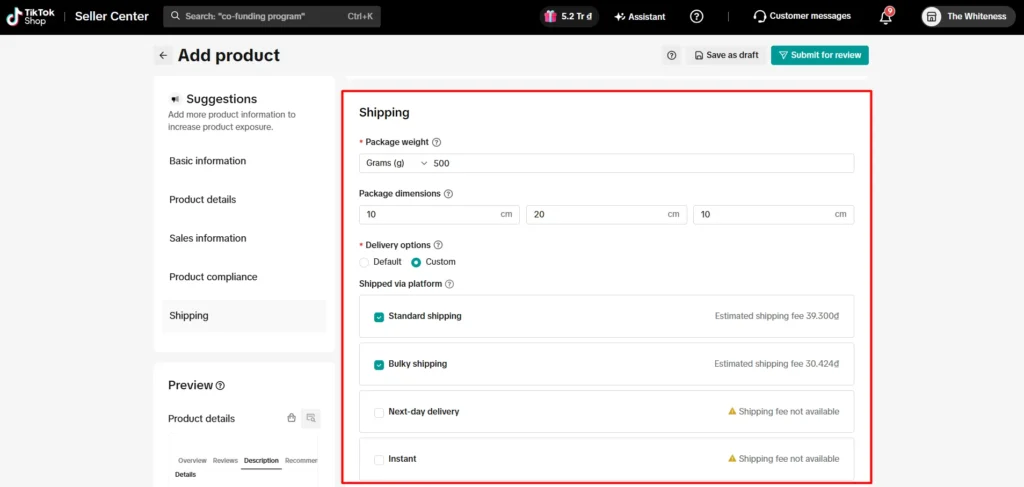
- Package weight: Enter the total shipping weight, including the product and its packaging. TikTok Shop uses this information to estimate shipping charges and determine available shipping methods.
- Package dimensions: Enter the package’s, including Length, Width, Height
TikTok Shop may pre-fill estimated measurements based on similar products. Check and replace them with your product’s actual packaged measurements.
Where available, you can also select Default free shipping to offer free shipping for the product.
6. Review, preview, and submit for approval
Before submitting, check the Listing Quality panel. TikTok Shop groups its feedback into:
- Critical Issues: Problems you must resolve before submission.
- Needs Attention: High-risk issues that may affect listing approval or availability.
- Suggestions: Optional improvements for listing quality and search relevance.
Next, preview how your product will appear in TikTok Shop and search results. Confirm that the title, images, price, variations, and shipping details are consistent.
Finally, choose one of these options:
- Click Save as draft to complete or submit the listing later.
- Click Submit for review to send the product to TikTok Shop.
After submission, go to Products > Manage Products to monitor its status. Your listing may appear as Pending review before becoming Live.
Have hundreds of products to list?
Move them to TikTok Shop in bulk using LitCommerce instead of recreating each listing.
Method 2: List an Existing TikTok Shop Product
The List an existing product method lets you copy information from a matching product in TikTok Shop’s catalog. It can save time and keep product details consistent.
Here is how to list an existing product on TikTok Shop:
- Go to TikTok Shop Seller Center.
- Select Products > Add Products.
- Find List an existing product and click Search now.
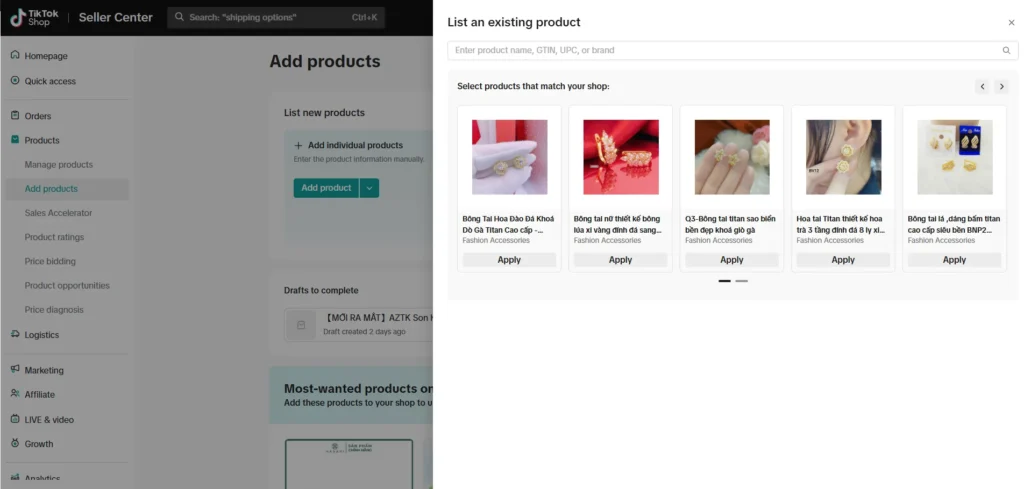
- Search using a product name, brand name, GTIN, or UPC.
- Review the results and choose the product that matches yours exactly.
- Click Apply to copy its information into a new listing.
TikTok Shop will pre-fill available details, including product images in the US market. Review this information carefully and correct anything that doesn’t match your product.
You must also complete any missing required fields, which may include:
- Size or variation information
- Price and available quantity
- Product attributes
- Compliance details or certifications
Once everything is accurate, click Submit for review. You can track the listing under Products > Manage.
Method 3: Bulk Upload Products to TikTok Shop Using an Excel Template
Bulk upload makes sense once you’re adding 20 or more products at a time, especially if the data already lives in a spreadsheet or you’re migrating a catalog from another platform. TikTok Shop supports both single and batch uploads, and Seller Center can display up to 1,000 products online at once.
For a quicker guide, check out this video on how to add multiple products to TikTok Shop at once:
- Download the Excel template from Seller Center’s bulk listing section.
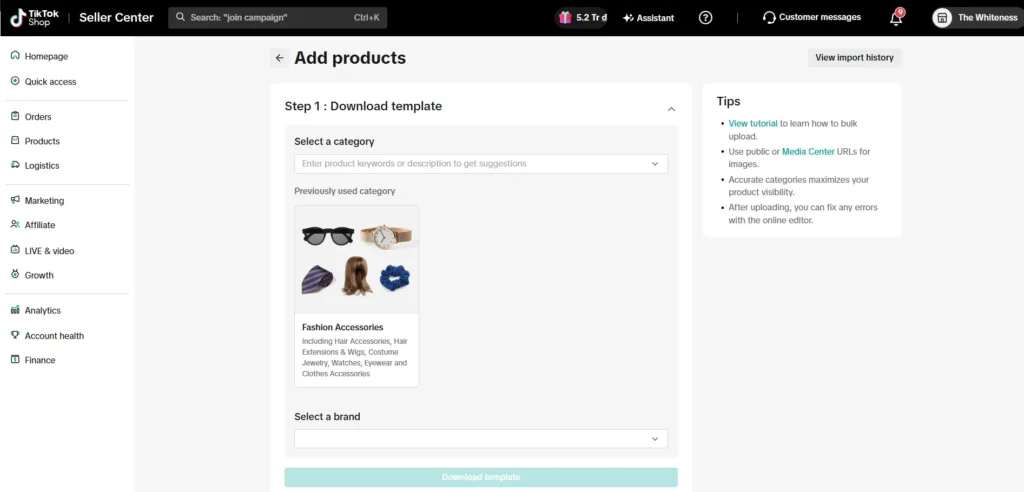
- Fill in required fields: title, description, price, SKU, image URLs, and variants.
- Run the file through TikTok’s built-in validator and fix anything flagged.
- Upload the validated file and submit the batch for review.
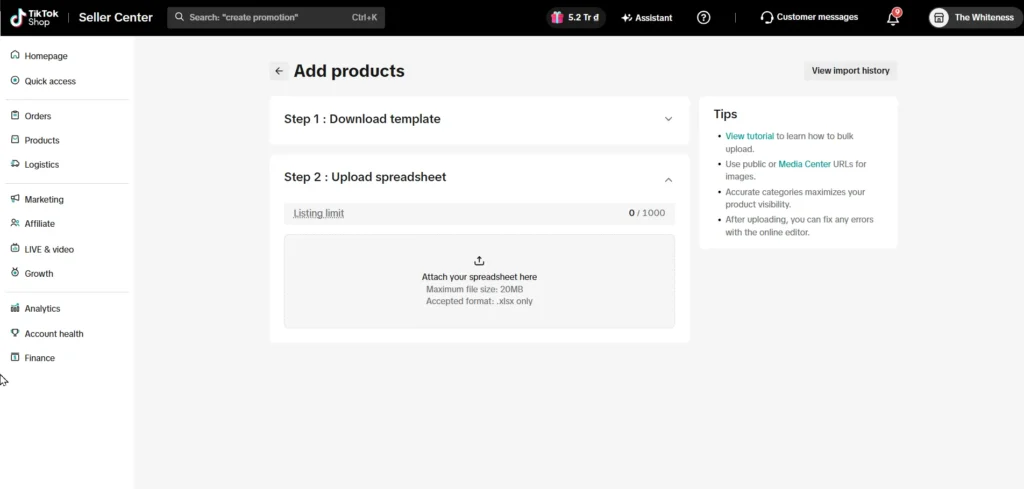
Image URLs need to be publicly accessible, or TikTok simply can’t pull them into the listing. This is where sellers moving files from a private cloud folder tend to get stuck: the link works fine in a browser but not for TikTok’s importer. If you’re trying to solve how to add products to my TikTok Shop catalog in one pass instead of one item at a time, this is the method built for that job.
Error | Fix |
Broken image URLs | Host images somewhere publicly accessible, not behind a login |
Missing required fields | Fill in title, description, price, category, and at least one image for every row |
Incorrect price format | Use plain numbers like 19.99, not currency symbols or text |
Duplicate SKUs | Give every variant its own unique SKU |
Mismatched category names | Copy category names exactly from TikTok’s taxonomy |
Method 4: Sync Products from Another Platform to TikTok Shop
If you already run a store on Shopify, WooCommerce, or sell on Amazon, eBay, Etsy, or another marketplace, and now you want to sell on TikTok Shop, and you’d rather not rebuild data you’ve already created once. Using a multichannel selling app, you can import current products from other channels to TikTok Shop, so you don’t need to recreate listings one by one.
Among plenty of tools out there, LitCommerce stands out as a tool that helps you add products to TikTok Shop easily.
Here is how to add products to TikTok Shop from another platform using LitCommerce:
- Connect your stores: Connect your existing store or marketplace and add TikTok Shop to LitCommerce.
- Import your products: Bring products from your current platform into the All Products section.
- Create TikTok Shop drafts: Select the products, click Select Action > Add to Channel Drafts, tick the box beside TikTok Shop, and click Add to Channel Draft again.
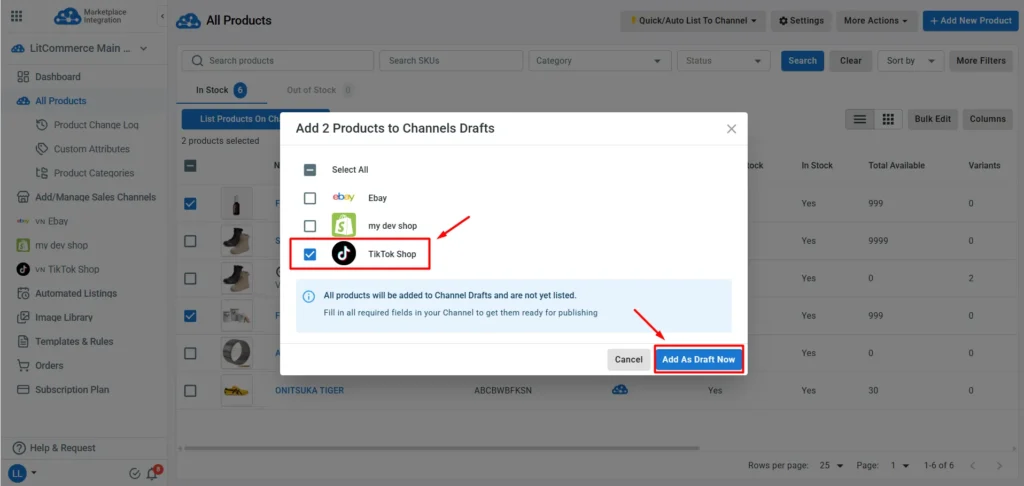
- Complete TikTok Shop listing details: Now, go to your TikTok Shop channel on LitCommerce. TikTok Shop may require more product info than your current store. This step lets you add the category, attributes, shipping, and compliance information TikTok Shop requires.
- Finally, publish your products: Once your listings are ready, review them and click Publish to TikTok Shop.
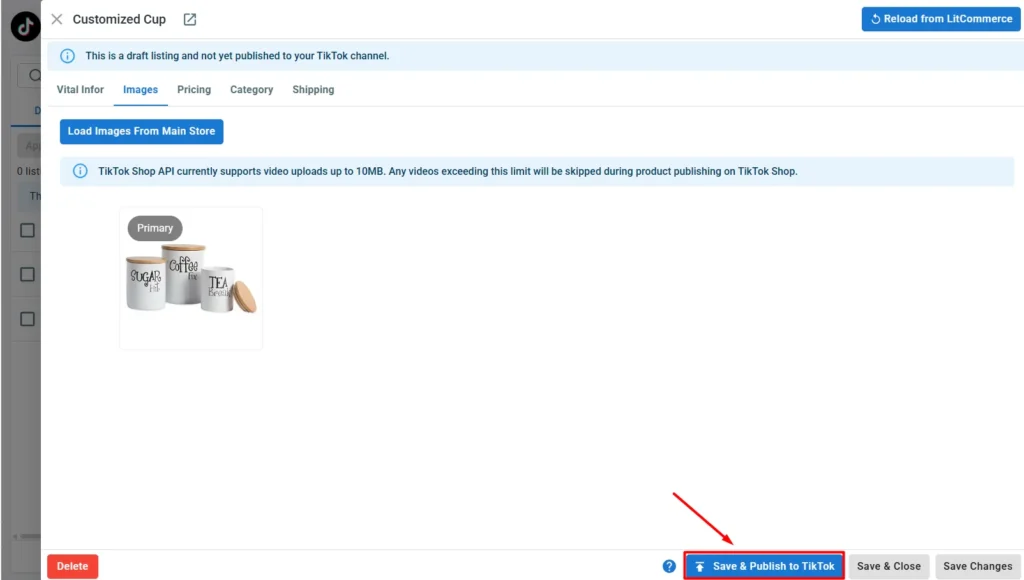
Like adding individual products, TikTok Shop will review listings before making them available to shoppers. Check their status in LitCommerce and correct any errors TikTok Shop returns.
When listing products on TikTok Shop, LitCommerce also offers Quick Publish to TikTok. This lets you select multiple products with the same category or with the same shipping. This lets you apply the same information to multiple products at once.
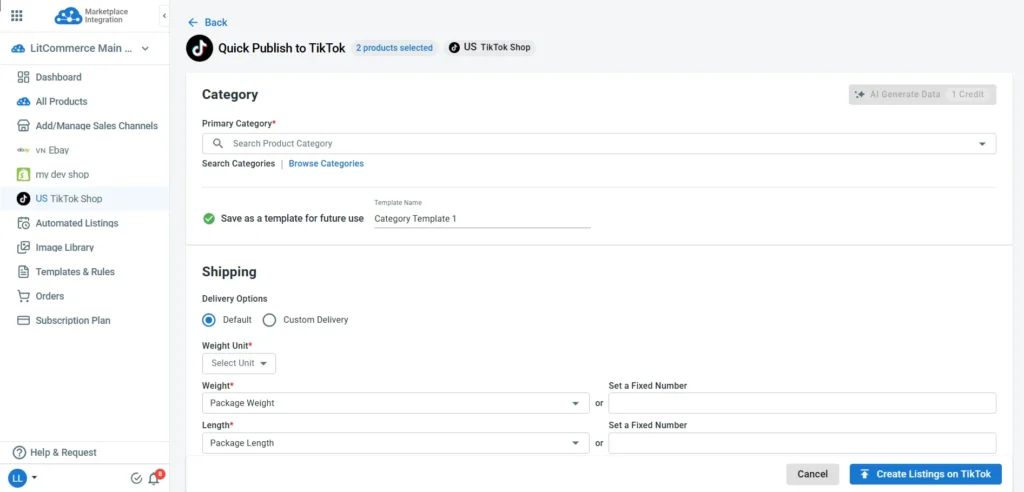
Once published, you can also enable inventory, price, and order sync to keep your connected channels updated automatically.
Connect your store to TikTok Shop
Connect your current store to TikTok Shop and import your products to TikTok Shop easily with LitCommerce. No need to recreate listings from scratch.
How to Fix a Rejected TikTok Shop Product Listing
Rejections are common, and most get resolved within a single resubmission once you understand why TikTok flagged the listing in the first place.
Common rejection reasons and fixes
Rejection reason | Fix |
Poor image quality | Re-upload sharp, well-lit images that meet the main-image background rule |
Incomplete description | Add detail on materials, dimensions, and intended use |
Prohibited item | Check TikTok’s prohibited products policy before resubmitting |
Misleading pricing | Align the price with comparable market listings |
Missing shipping info | Add a shipping template, or set cost and delivery time manually |
Variant mismatch | Make sure each variant’s image matches what’s listed |
Category mismatch | Recategorize the listing to match the actual product |
To resubmit, edit the flagged field, click Resubmit, and expect a faster second review since TikTok already has the product on file.
Other listing issues sellers run into
- Images failing to upload: check file size and format before retrying
- Inventory showing zero unexpectedly: likely synced down after a sale on another channel
- Variants displaying incorrectly: recheck names and SKUs, then resubmit
- Price changes not reflecting immediately: caching can delay updates by an hour or two
- New listings not appearing in search yet: this usually takes a day or two to index, so give it time before assuming something’s wrong
- Shipping cost jumping at checkout: check regional shipping rules against your template
For anything you can’t resolve on your own, TikTok Shop Help Center and Seller Support are the right next stop.
How to Add Products to TikTok Shop – FAQs
Can I put my own products on a TikTok Shop?
Yes, you can sell your own products on TikTok Shop by setting up a Seller Account in the TikTok Shop Seller Center. To register for a seller account, provide your business or personal identification, and set up your store profile.
Do I need 1000 followers to sell on TikTok?
No, you do not need 1,000 followers to sell your products on TikTok Shop as a merchant. You can open a TikTok Seller Center account, and register as a business to sell your products right away.
How long does it take for a product to be approved after I submit it?
Most products clear review within a short window, but higher-risk categories like electronics, supplements, or cosmetics can take longer and sometimes require extra documentation. Check Seller Center for your product’s status, and if it’s rejected, fix the flagged issue and resubmit; second reviews tend to move faster.
Can I import products directly from my Shopify or WooCommerce store?
There’s no one-click native import, but you have two practical routes. Export your products as a CSV, map them to TikTok’s bulk upload template, and submit in a batch, or connect a sync tool that reformats and publishes your catalog automatically. Manual entry still makes sense for a single product; bulk or sync fits 20-plus.
Do I need to set up product variants, or can I list each size or color separately?
You can do either, but variants are usually the better call. One listing with size and color options is cleaner for buyers and tends to rank better than a set of near-identical separate listings. Separate listings give you more individual control, but they’re more work to maintain over time.
Can I add a product to TikTok Shop without any images?
No. At least one image is required, and TikTok Shop allows up to 9 per product. Uploading several angles, not just the minimum, builds buyer trust and tends to reduce returns, since shoppers know what they’re getting before they buy.
Start Adding Products on TikTok Shop Today
No matter how you add products to TikTok Shop, the method should match your catalog size, not the other way around. Manual entry suits testers and small catalogs, duplicating a listing saves time on similar items, bulk upload handles 20-plus products in a single pass, and syncing fits sellers already running a store or marketplace elsewhere.
Rejections are a normal part of the process, not a dead end, and most get fixed with one edit and a resubmission. Start with whichever method matches where your catalog stands today, and revisit this guide once it grows. If you’re still deciding what to list in the first place, these trending TikTok product ideas are a reasonable next stop. For more guidance on selling on TikTok Shop, visit our TikTok Shop guide hub.