

Is your current TikTok username no longer aligned with your channel’s focus or your interests? And you might wonder, “Can you change your username on TikTok?”. The answer is yes! In fact, it’s quick and easy to do it.
In this article, we will show you how to change your TikTok username in 5 simple steps on both your TikTok app and your PC. Overall, we also cover:
- How to change your TikTok username?
- How to change your TikTok nickname?
- What are the tips when changing a TikTok username?
Let’s discover thoroughly with us now!
Build a Consistent Brand Across Every Channel
After updating your TikTok name, connect your shop with LitCommerce TikTok Integration to sync your products and keep your brand unified across platforms.

How to Change Your TikTok Username?
A TikTok username is a unique identifier for your account, starting with @ (e.g, @username). This tag is displayed on your profile and forms your profile link. Since it is used to identify you on the platform, your TikTok username must be unique.
To change your TikTok username, follow these steps:
- Open TikTok and go to Profile.
- Tap Edit profile.
- Select the Username field.
- Enter a new username.
- Tap Save to confirm your changes.
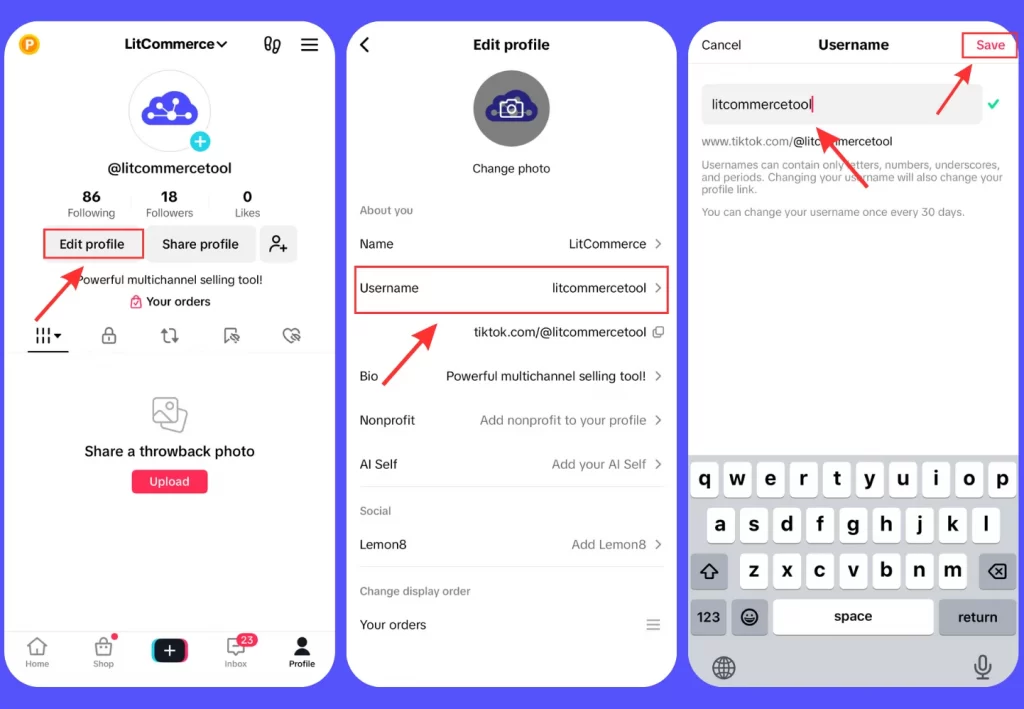
Before saving, TikTok will quickly check its extensive database to verify if the username is currently in use. If it’s already taken, you will need to choose an alternative option. However, if it’s still available, you are good to go!
Plus, keep these 4 important things in mind before making changes to your TikTok username:
- You can only change your username once every 30 days.
- If you give up your username, it won’t be available to use again for a short time.
- Changing your username will also update your profile link.
- Usernames can include letters, numbers, underscores, and periods, but periods can’t be used at the end.
Although TikTok is primarily used on mobile devices, many people still use it on computers or laptops, especially for work-related purposes. To change your TikTok username on a PC or laptop, simply go to your profile and follow the same steps as you would on your phone.
You might also be interested in: How to turn off age restrictions on TikTok?
How to Change TikTok Nickname?
You may be confused about the TikTok username and TikTok name. However, these two concepts are not the same.
While the TikTok username is used to identify you on the platform, the TikTok name or TikTok nickname is your display name on TikTok. Others can see it on TikTok, including in the For You feed, comments, and direct messages. TikTok names do not need to be unique. Thus, if you are wondering, “Can you change your TikTok name?” the answer is clear: yes.
How to change your TikTok nickname? Follow these steps:
- Open the TikTok app on your phone.
- Pick the Profile icon at the bottom right corner of the screen.
- Tap on Edit profile.
- In the Name field, enter your desired new name.
- Tap the checkmark icon or Save to save your changes.
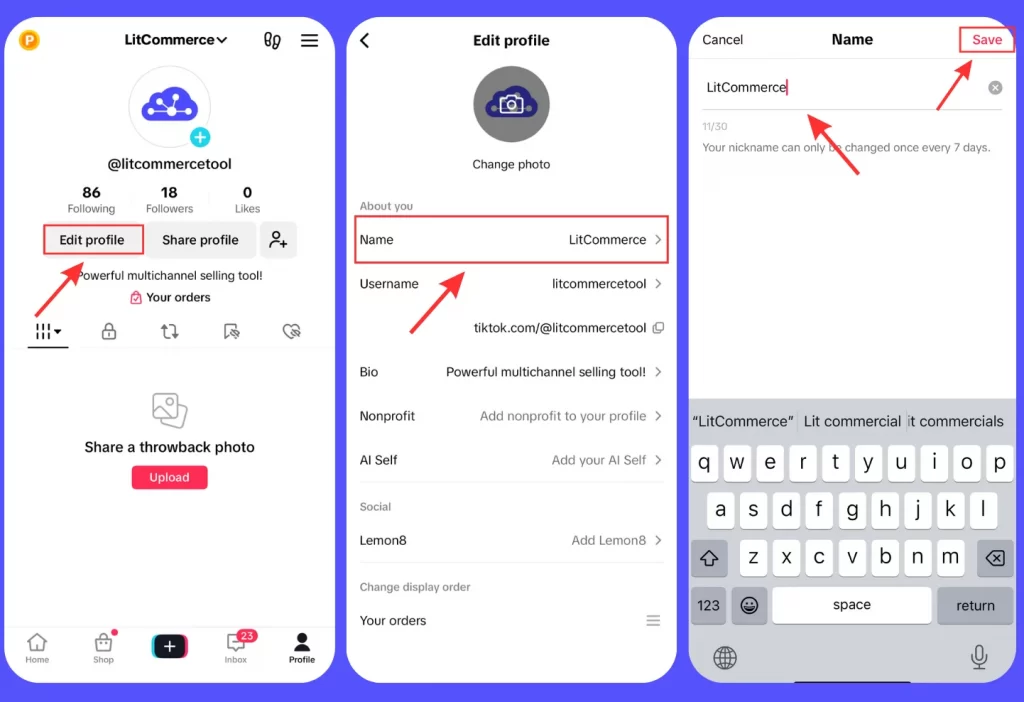
Please note that your TikTok display name can be up to 30 characters long. It must comply with TikTok’s Community Guidelines and can be changed only once every 7 days.
Want to get more out of your TikTok profile? Learn how to add a link to a TikTok bio and turn your profile into a powerful traffic source.
5 Best Tips to Change TikTok Username
After learning how to change your TikTok username, it’s important to pick a username that truly fits you. Many people change their username because their old one no longer matches their content or brand. Here are some simple tips to help you choose the right one.
- Reflect on your content and brand: Whether you specialize in dance routines, comedic skits, or lip-syncing challenges, or run a brand with a specific message, your username should reflect that. For example, if you create cat videos, you can use words like meow, kitty, or purr. Or, if you are an eco-friendly brand promoting sustainable living, consider words like “green,” “eco,” or “sustainability” in your username.

- Choose a memorable TikTok name: In a sea of usernames, it’s essential to stand out. Choose a username that is catchy, short, and easy to remember. Long, complicated usernames can be challenging for others to remember, and you risk losing potential followers. For example, “GlamGuru” or “BeautyByBella” are both catchy and memorable if you specialize in makeup tutorials.
- Avoid unnecessary characters: It’s best to keep your TikTok name simple. Too many symbols can confuse your audience and can make your username harder to read and remember. So, stick to letters and, if needed, relevant numbers to your brand or content. For example, “FashionGuru” is much clearer than “F@shionGuru”.
- Use a TikTok username generator: If you’re searching for how to change your TikTok username, consider also using a username generator. These tools can offer creative TikTok username ideas based on your interests, niche, or brand. Simply input some keywords or a brief description, and you’ll get a list of potential usernames. Some popular generators include Hootsuite, Ahrefs, Namechk, SpinXO, and Randommer.

- Be consistent across all channels: In today’s digital age, it’s common to have a presence across multiple social media platforms. However, try to use the same username across TikTok, Instagram, YouTube, etc. This makes it easier for people to find you and recognize your brand. Consistency also builds trust and helps your audience stay connected with your content everywhere.
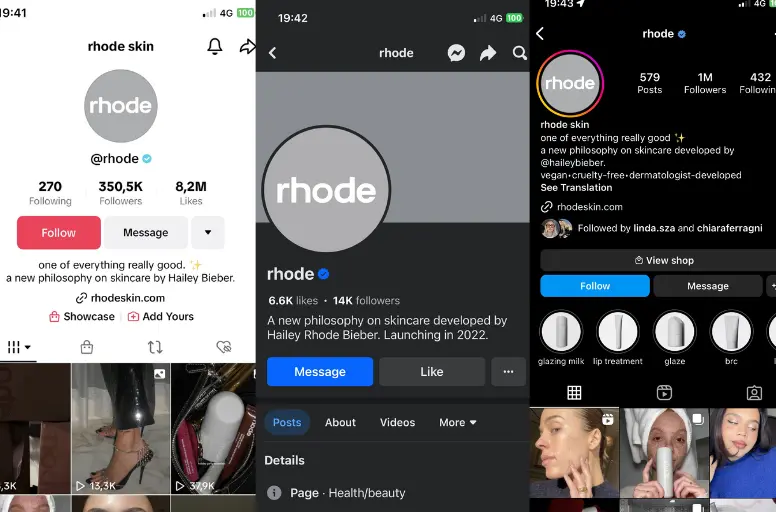
An easy to remember handle also strengthens your visibility when running a TikTok influencer marketing campaign.
In addition, if your brand sells on TikTok and other platforms, we highly recommend using the TikTok Integration tool. This powerful tool is designed to streamline your selling efforts by syncing your inventory, saving you valuable time and energy.
Sell Across Channels Under One Name
Got your TikTok name sorted? LitCommerce helps you list products from your store to TikTok Shop and sync them with Etsy, Amazon, eBay, and more from one dashboard.
How to Change Your TikTok Username: FAQs
To change your TikTok username on PC, follow these steps: Yes, you can change your TikTok username more than once. However, there are certain limitations. TikTok lets users change their username once every 30 days. So, if you want to change your username again, you will have to wait for a month before making another change. To change your TikTok shop name, you can follow these steps: Changing the store name on TikTok Shop via desktop: Changing TikTok username does not affect your account in any significant way. Your followers, likes, and videos remain intact, and you can continue using the app normally. However, it’s important to note that changing your username might confuse your followers momentarily, as they might have trouble recognizing your new handle. To avoid any confusion, you can inform your followers about the username change through a video or post. Indeed, TikTok has a policy that restricts users from changing their TikTok username more than once every 30 days. However, if you’re eager to modify your TikTok username without enduring the 30-day waiting period, we have a solution. To change your TikTok username before 30 days, follow these steps: That’s it! Remember to set your device’s date and time back to the correct settings after making the change. However, please keep in mind that this method for changing your TikTok username without waiting 30 days may no longer work, as TikTok has likely identified and fixed this workaround with its own patch. If this method doesn’t work for you, you will have to wait for 30 days before you can change your TikTok username again. To change your TikTok display name before the 7-day limit, you can submit a “Report a Problem” request in the settings and ask TikTok for help, since there’s no direct way to bypass it. If this doesn’t work, you’ll need to wait 7 days to update your display name. Usernames, however, can only be changed once every 30 days.
Wrap Up
In short, if you still doubt “Can you change your TikTok username?” the answer is yes. How to change your TikTok username is a straightforward process. By following the steps we provide, you can quickly complete it within a few minutes.
While it is possible to change your TikTok username, we strongly advise you to carefully consider your choice to minimize the need for multiple changes.
By the way, if you’re selling on TikTok and want to expand to more marketplaces, you might want to check out LitCommerce. It acts as a comprehensive multichannel selling tool powered by an intuitive multichannel listing tool to help you manage stores across Amazon, eBay, Etsy, and Shopify seamlessly. You can easily list products in bulk and sync your inventory automatically across channels. Contact us right away for more information.
Want more guides on selling on TikTok Shop? Check out our TikTok Shop selling hub for tips, tutorials, and strategies.