


What happens when your products are ready to sell on more channels, but your daily workflow is not? Creating listings for each marketplace takes time. Keeping prices and stock accurate gets harder as orders come in.
LitCommerce and QuickSync both help you list products across multiple channels, but they solve different problems. If you need a tool that handles listing, syncing, and order management in one place, LitCommerce is the stronger fit. If your only priority is keeping product data in sync with POS and accounting needs, QuickSync may do the job.
In this guide, we compare their features, integrations, and pricing to help you find the right fit.
Key takeaways:
- LitCommerce and QuickSync suit different selling setups.
- LitCommerce is a better fit for sellers scaling across marketplaces, delivering tailored capabilities to build and refine listings per sales channel.
- QuickSync works best for sellers who balance physical stores with digital shops, offering POS integrations alongside fast stock updates to keep shared inventory aligned.
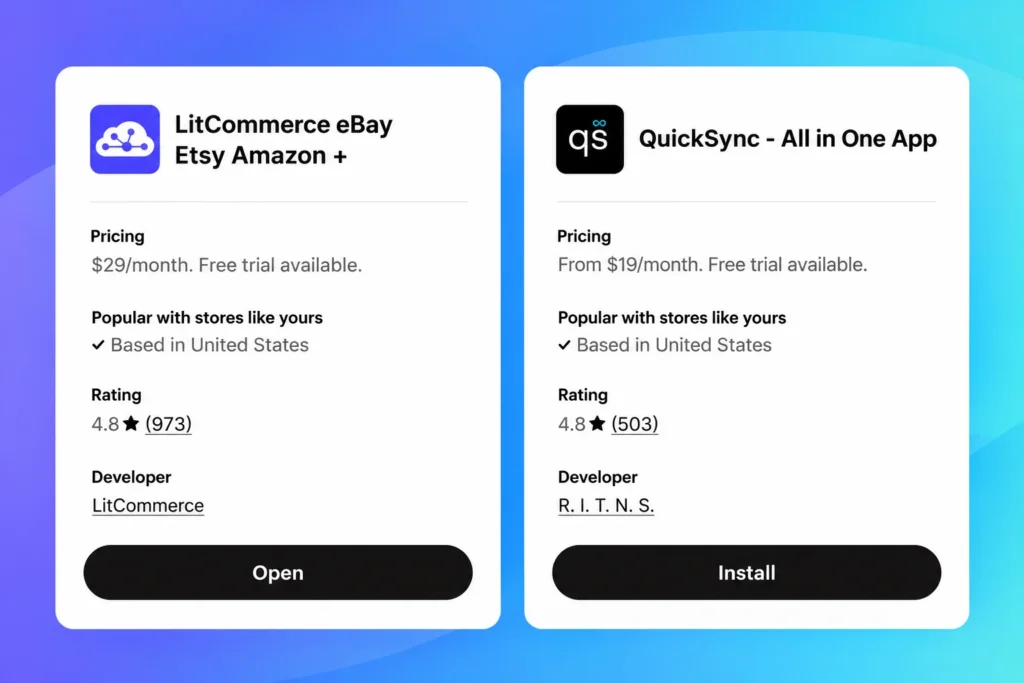
- LitCommerce plans start at $29 per month. For QuickSync, it charges $19 per month for baseline inventory updates between two storefronts, while product and order features require the $29 per month tier.
How We Compared LitCommerce vs QuickSync
A multichannel selling software comparison built on feature lists alone can miss how a tool behaves day to day. So we started with the documentation. We read both help centers to see how each tool handles existing products and connects sales channels. For pricing, QuickSync’s entry plan covers inventory sync only, and product and order sync start on the next plan. We kept that in mind when comparing prices.
Next, we also tested both tools on five areas: supported channels, listing workflow, inventory and order sync, automation depth, and real monthly cost.
We also checked seller reviews on the Shopify App Store, Trustpilot, and G2. Some problems only surface after weeks of daily use, not in a three-week test. Since we build LitCommerce, we held our own product to the same scoring as QuickSync. Where reviews disagreed with our results, we noted both sides.
LitCommerce vs QuickSync: Quick Comparison
Here’s how LitCommerce and QuickSync compare across the features that affect your daily workflow the most.
Criteria | LitCommerce | QuickSync |
Built for | Sellers expanding a catalog across marketplaces and managing listings from one place | Sellers keeping stock aligned across online stores, marketplaces, and POS |
eCommerce platforms | Shopify, WooCommerce, BigCommerce, Wix, Squarespace, and Square; you can also start from files or LitCommerce itself | Connects platforms including Shopify, WooCommerce, Wix, and Squarespace; a connected store can be the source for product updates |
Marketplaces | Amazon, eBay, Etsy, TikTok Shop, Walmart, Temu, Reverb, Faire, Shopee, Google Merchant & Facebook Shops | Amazon, eBay, Etsy, and TikTok Shop |
POS integration | Supports Square as a Main Store or sales channel | Connects Square, Clover, and Lightspeed with online channels |
Listing depth | Bulk editing, Templates & Rules, and fields tailored to individual marketplaces | Creates and syncs products across supported channels, with some channel-specific export assistance |
Inventory sync | Scheduled sync, generally every 15 minutes; 60 minutes for Etsy | One master stock count; most channels update within seconds, while eBay, Etsy, and Squarespace are checked periodically |
AI tools | AI support for descriptions, item specifics, product attributes, and listing creation from images on selected channels | AI suggests required product attributes when exporting to eBay and TikTok Shop |
Order management | View orders in LitCommerce or import supported orders into the Main Store | Collect orders and route them to a supported fulfillment store |
Accounting sync | No native QuickBooks or Xero integration in the marketplace listing workflow | Connects with QuickBooks and Xero |
Starting price | $29/month, starting at 1,000 channel listings and 3 integrated channels | $19/month for 1,000 items and 2 shops; this Lite plan covers inventory sync. Product and order sync start at $29/month. |
LitCommerce: A Marketplace Listing and Sync Tool for Multichannel Sellers
LitCommerce is a multichannel selling tool that connects your store to more than 10+ sales channels, including Amazon, eBay, Etsy, Walmart, and TikTok Shop. You can tailor listings to each marketplace, then edit multiple products at once.
From one dashboard, you track orders and manage stock and prices across every channel. Each integration follows its own marketplace’s rules. No matter how many stores you run, everything comes back to one place.
Below, we look at where this approach works well and where you may need to plan.
Pros and cons
Pros | Cons |
- Connects to your existing store. No need to switch platforms. - Inventory and orders sync every 15 minutes (every 60 minutes for Etsy due to API limits). - Each channel integration is purpose-built, not one generic setup stretched across platforms. - You can upload products from your store, directly in the app, or through CSV import. - AI tools on selected channels help you create and optimize listings faster - Templates and recipes make listing management and optimization more powerful. - Unlimited order sync on every plan. Your cost doesn't increase with order volume. - Live chat and email support with fast response times, based on what customers consistently confirm. | - Doesn't support resale-focused marketplaces like Poshmark, Mercari, or Grailed. No sharing or bumping tools either. - Expect some setup time. The dashboard has many options, and first-time users say it takes a few days to feel comfortable. - Shipping and fulfillment features are not fully covered, still a beta version. |
Supported channels
LitCommerce supports multichannel sellers in a flexible way. You can connect your ecommerce platform (Shopify, WooCommerce, Wix, BigCommerce, Square or Squarespace), upload a product file, or use LitCommerce as your central hub to cross-list on multiple marketplaces. From there, you can connect 10+ sales channels:
- Major marketplaces: Amazon, eBay, Etsy, Walmart, Walmart CA
- Niche and regional: Temu, Reverb, Faire, Shopee
- Social and shopping: Facebook Shops, Google Shopping, TikTok Shop
Each integration is built around the channel’s own native features, as deeply as that channel allows, so you get the tools that match how you actually sell there. On eBay, you work with eBay-specific features, including cross-listing across multiple channels without rebuilding each listing from scratch; creating eBay listings that are ready to sell, with eBay-specific fields filled in before you publish; and more.
Want to manage listings from one dashboard?
LitCommerce connects your store to 10+ marketplaces with channel-specific listing tools, 15-minute sync, and unlimited order management. Try it free for 7 days, full features, no limitations.
Key features
Flexible ways to manage your catalog
LitCommerce lets you run your catalog in two ways, depending on how you sell.
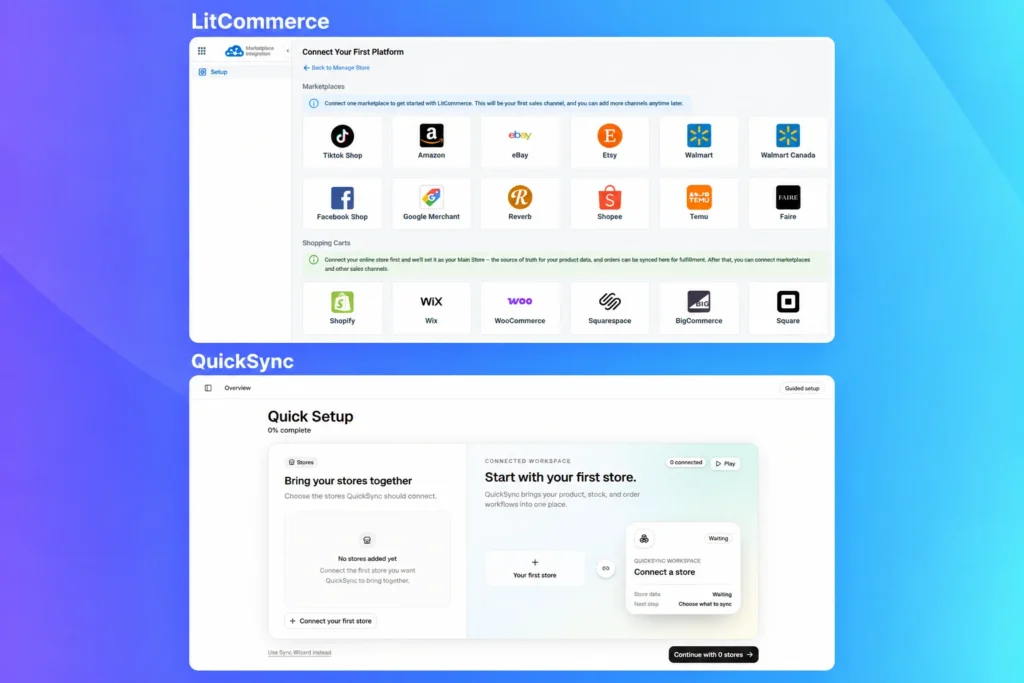
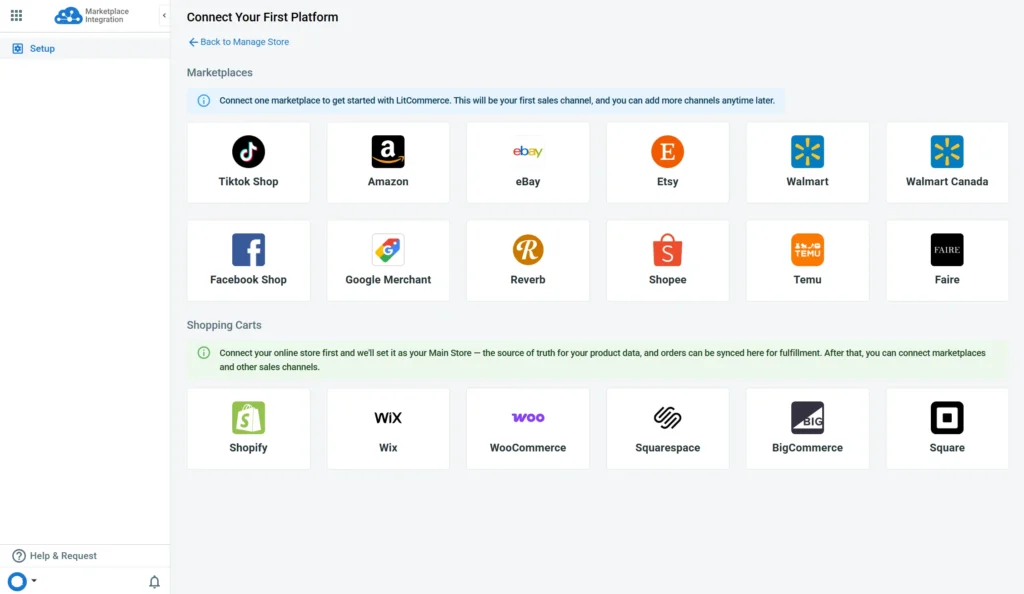
If you already sell somewhere, connect that marketplace or shopping cart first, on the Connect Your First Platform screen. Either make the marketplace your sales channel and a shopping cart your Main Store, or skip the cart and make LitCommerce itself the Main Store. Either way, LitCommerce becomes the source of truth for syncing products and orders across channels.
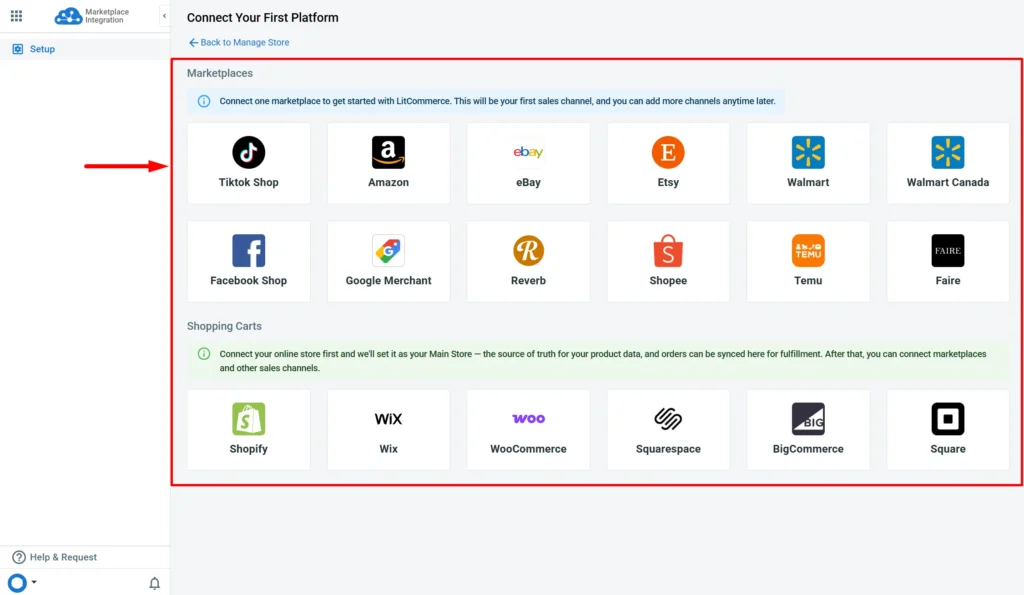
From there, you can connect more sales channels, up to your plan’s limit. LitCommerce currently connects with eCommerce platforms such as Shopify, WooCommerce, Wix, BigCommerce, Square, and Squarespace, plus 10+ marketplace integrations, including Amazon, eBay, Etsy, TikTok Shop, Walmart, and Shopee.
If you are not selling anywhere yet and still manage your catalog in spreadsheets, start with LitCommerce as your Main Store. Import your product file, and your whole catalog lives in one place instead of scattered across sheets. Then connect your first sales channel when you are ready to sell.
After you complete the setup, your LitCommerce account is ready for the next steps. You can start importing products, creating listings, or setting up sync between your Main Store and sales channels.
You might also like: Vendoo vs LitCommerce: Full Comparison for Multichannel Sellers
Bulk editing with Templates & Rules
The bulk editor is the feature that saved us the most time. New listings start in a Draft tab, so you can review them before they go live. You can edit listings one at a time or in filtered groups.
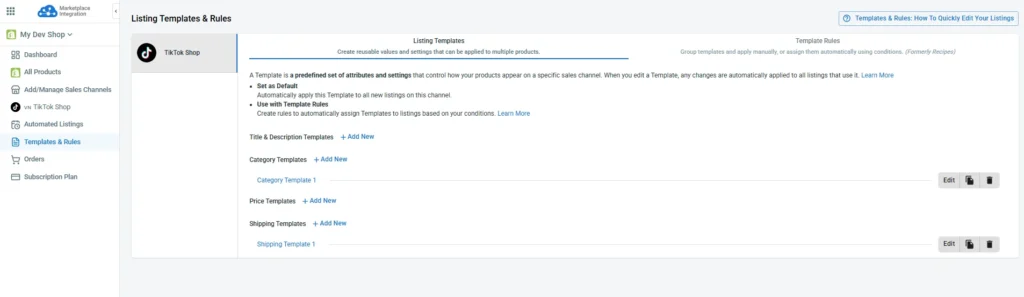
Templates and rules do the repetitive work. A template stores the settings for one channel, such as title and description, pricing, category, and shipping. A rule sets the conditions for applying a group of templates, so new listings pick them up automatically. Pricing templates can also adjust and round prices, with a preview of the result. Set it up once, and you won’t have to retype titles, categories, and attributes for each channel.
The templates also match each channel’s requirements. Here are two examples:
- eBay: A custom description template controls your listing’s layout, fonts, colors, and styling through HTML and CSS. You prepare the template file on eBay first, then edit it in LitCommerce’s HTML editor. A Business Policies template covers shipping, payment, and return policies in one place. You create those policies on eBay first, then pick them in LitCommerce instead of filling them in on every listing.
- Etsy: A Personalization template lets you add instructions for buyers, set a character limit for their answers, and mark personalization as required. That suits made-to-order sellers. Etsy strips HTML from descriptions, so Etsy descriptions stay plain text.
Quick Publish and scheduled publishing
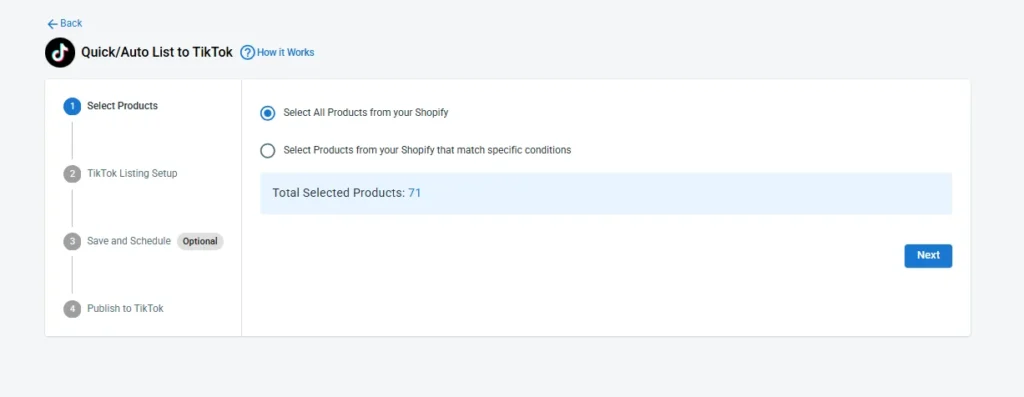
Say you have a batch of products ready for Etsy and eBay. With LitCommerce Quick Publish, you can select those products and publish them without opening every listing to fill in the same settings again. The feature is available on supported channels, including Etsy, eBay, TikTok Shop, and Reverb.
You can also set up a schedule for eligible listings, so new products that meet your chosen conditions are published automatically. Amazon and Walmart use the standard listing flow.
AI description and listing tools
Listing the same product on several marketplaces usually means writing, filling in, and re-checking the same details repeatedly. LitCommerce’s built-in AI listing generator takes over the repetitive parts. You can upload a photo, and it can build the full listing. Or if you already have a listing? It can help you a lot and you just review the result and publish.
Here is what sellers can do with LitCommerce’s AI features:
- Refine your descriptions: You paste in your current description and add any highlights or keywords you want. AI rewrites it into a cleaner version that follows the channel’s best practices, and you can apply it with one click.
- Build listings from photos: You upload your raw product images, and AI builds the full listing from scratch. This helps most when you don’t have a catalog yet, because you can go from a photo to a draft without typing every field.
- Fill in item specifics: After you pick an eBay category, you choose one or more item specifics. AI then suggests values based on the product information in your listing. You review the suggestions before you publish.
- Pick the right category: AI suggests a category based on your product, so you don’t have to browse long category lists on each marketplace. On eBay, draft listings get category suggestions automatically.
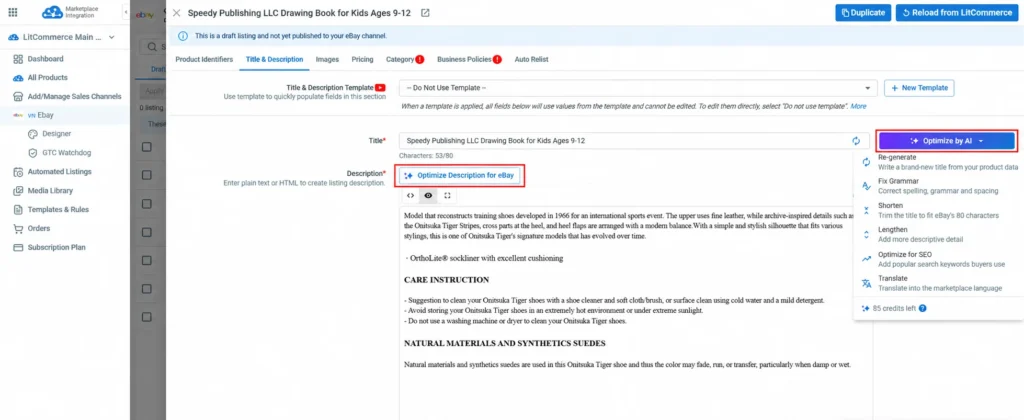
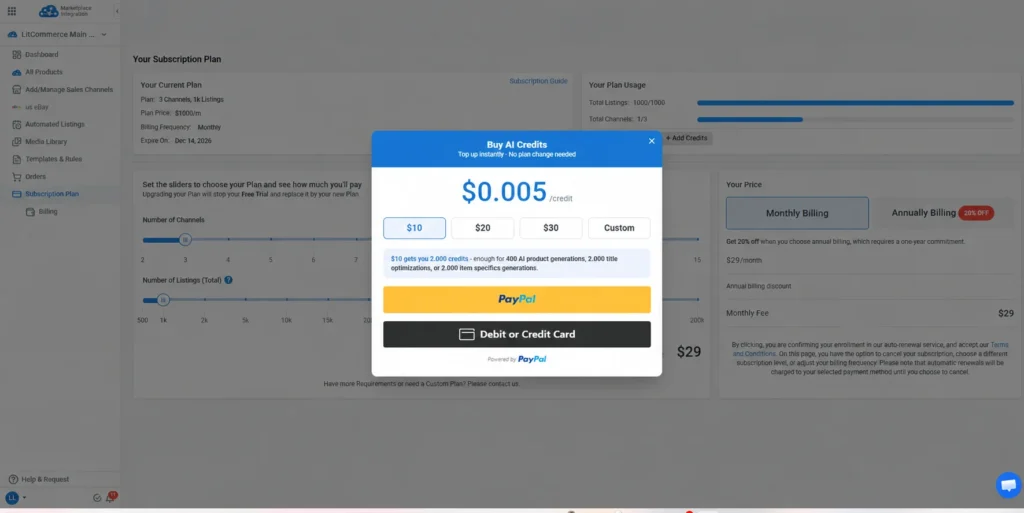
Each time you use AI, it costs 1 credit. For item specifics, one generation costs 1 credit, even when you fill several fields at once. You get free credits to start so that you can try the tools first. When you run out, you can top up anytime to buy more.
One thing you should remember: not every channel supports every AI feature yet. If you are not sure what is available for the channel you sell on, just reach out to our support team, and they will help.
Inventory and price sync
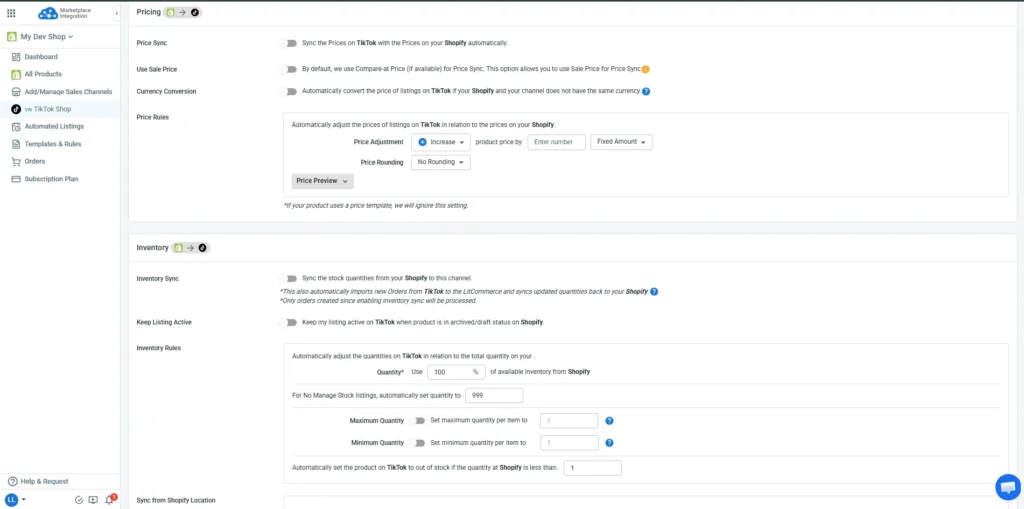
LitCommerce checks your store’s inventory every 15 minutes and pushes any stock changes to each connected channel.
Price sync works the same way. Turn it on for each channel, and LitCommerce updates the channel price whenever your Main Store price changes. By default, it syncs your compare-at price, though you can change that. You can also:
- Set a price rule to increase or decrease prices by a percentage or fixed amount for each channel.
- Convert currencies automatically for channels in other markets.
- Show a strikethrough price on channels that support it.
Note: Sync time depends on the channel you connect. Most channels sync every 15 minutes, but Etsy syncs every 60 minutes because of its limited API rate.
Centralized, integrated order flow
An Etsy order can appear alongside your eBay, Amazon, and TikTok Shop orders in LitCommerce.
To use this flow, you need to turn on Inventory Sync, then Import Orders to Main Store in Channel Settings. LitCommerce checks for new orders every 15 minutes. By default, it imports an order to the Main Store when all its listings are linked to products there.
Order import works channel by channel, and some channels have their own options. For example, Walmart has separate settings for WFS and 3PL orders, while other channels don’t. Check the setup guide for each marketplace you plan to connect to see the exact options.
Tracking updates and restocking after a cancellation or refund depend on the channel and your setup. If you want to see how the full process works, you can read our guide to multichannel order management.
Pricing
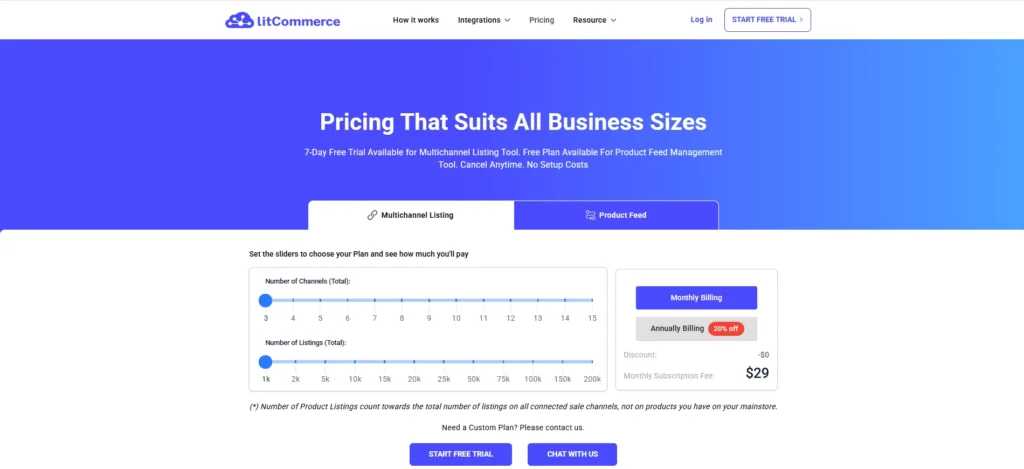
As for pricing, LitCommerce sellers offers a pay-as-you-go plan. That means your bill grows with the number of listings and connected channels that you use. LitCommerce starts at $29/month, covering 1,000 product listings and 3 total connected channels, then scales up as you add more of either.
There’s also a 7-day free trial with full access, no setup fees, and you can cancel a monthly plan anytime. Paying annually gets you 20% off but locks you into a full year. Need more than the standard scale covers? LitCommerce offers a custom plan on request.
Best for
LitCommerce is a good fit if you already run a Shopify, WooCommerce, BigCommerce, Wix, Squarespace, or Square and want to start selling on marketplaces from that catalog.
It’s also worth a look if your listings need more than basic product details. Etsy sellers can work with personalization and digital downloads, while eBay sellers can use HTML descriptions, Business Policies templates, and bulk edits.
Customer review
We checked ratings on the Shopify App Store and Trustpilot, separate from anything LitCommerce publishes on its own site.
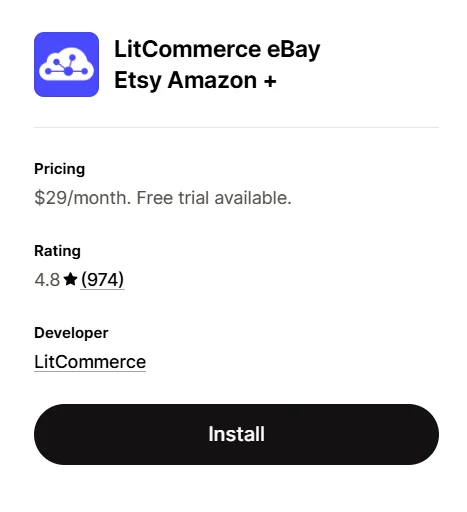
960 reviews on Shopify give LitCommerce a 4.8/5. Most of that is five stars, 882 of them, and only 39 sit at one or two stars. Support keeps coming up in the positive ones, more than any other feature.
What users like most
Most reviews highlight LitCommerce’s customer support. Sellers said the customer service team steps in fast when they get stuck using the tool. A few also mention that support helped them move their catalog over and get a new channel running within a few hours.
What users like least
The most common complaint from sellers is the setup process, since you configure each store separately. Some sellers say the settings feel confusing and it takes a few days to get used to the dashboard. Shipping and fulfillment are also not supported by LitCommerce yet because of current limitations, so you still handle those outside the tool.

If you need shipping and fulfillment in the same place as your orders, our roundup of multiorders alternatives includes shipping-focused tools like ShipStation and Shiptheory.
QuickSync: An Inventory Sync Tool for Online Stores and POS
QuickSync is the inventory sync tool built for keeping stock counts aligned across your stores. You choose where the inventory comes from, and it sends updates to the other connected shops.
Apart from other tools, QuickSync connects your physical shop with your online stores. You can track orders and manage stock in both places. A sale at the counter updates your online inventory, while an online order adjusts in-store stock. Most of that sync happens within seconds, not on a delay.
QuickSync also covers the back office. It works with Square, Clover, and Lightspeed for POS and QuickBooks for accounting, so orders flow into your books without a separate connector.
That matters most for sellers running a physical shop alongside online channels, the kind of gap a purely online sync tool usually leaves open.
Pros and cons
Pros | Cons |
- Stock syncs in seconds for most channels. - Supports Square, Clover, and Lightspeed POS. An in-store sale updates your online stock without manual adjustment. - QuickBooks sync is built in. No third-party accounting connector needed. - Pricing is based on connected shops and item variants, not listing count. Useful if you have a large catalog on fewer channels. - Overselling protection handles the edge case where two channels sell the last unit at the same time. - Safety stock settings help cover the gap when two channels sell the last unit at the same time. | - eBay and Etsy don't sync in seconds like other channels. They're polled every few minutes instead. - Listing control is basic. Product sync copies listings between shops, with little per-channel customization. - Tracking numbers don't go back to Amazon, Square, or Clover. You need to add them in each platform yourself. |
Supported channels
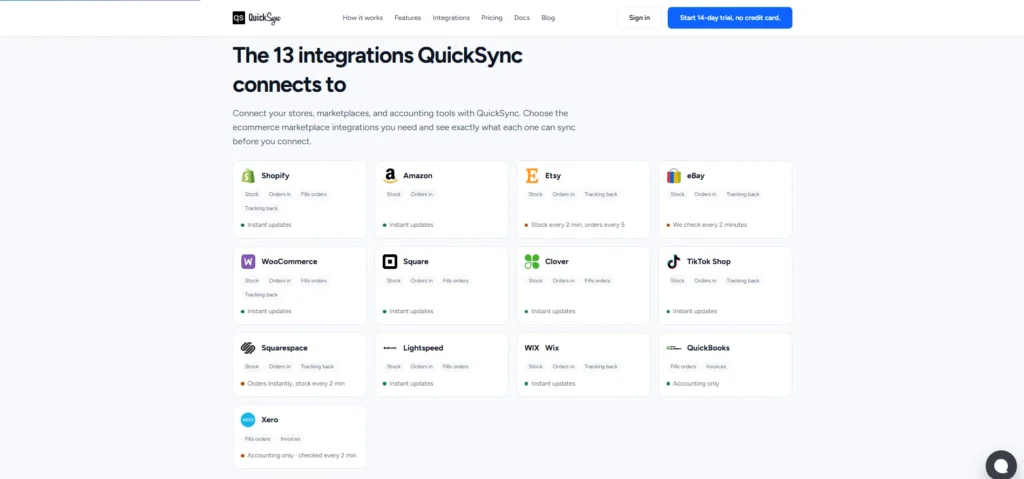
QuickSync connects three types of systems around one master stock count: your online store, your marketplaces, and, unlike LitCommerce, your physical POS and accounting tools.
- Store platforms: Shopify, WooCommerce, Squarespace, Wix
- Marketplaces: Amazon, eBay, Etsy, TikTok Shop
- POS: Square, Clover, and Lightspeed, so an in-store sale updates your online stock too
- Accounting: QuickBooks, Xero
That’s 13 integrations in total. Every plan connects up to 8 shops from any of their 13 integrations that matter most to your business. Shopify, Amazon, Etsy, Square, WooCommerce, and TikTok Shop are the ones most sellers already have, so they are usually connected first.
Key features
Automated channel matching
With QuickSync, setting up starts with connecting stores. If you install QuickSync through an app marketplace, such as the Shopify App Store or Clover App Marketplace, your first store connects automatically. Sign up directly on quicksync.pro, and you can choose your first store from the dashboard list.
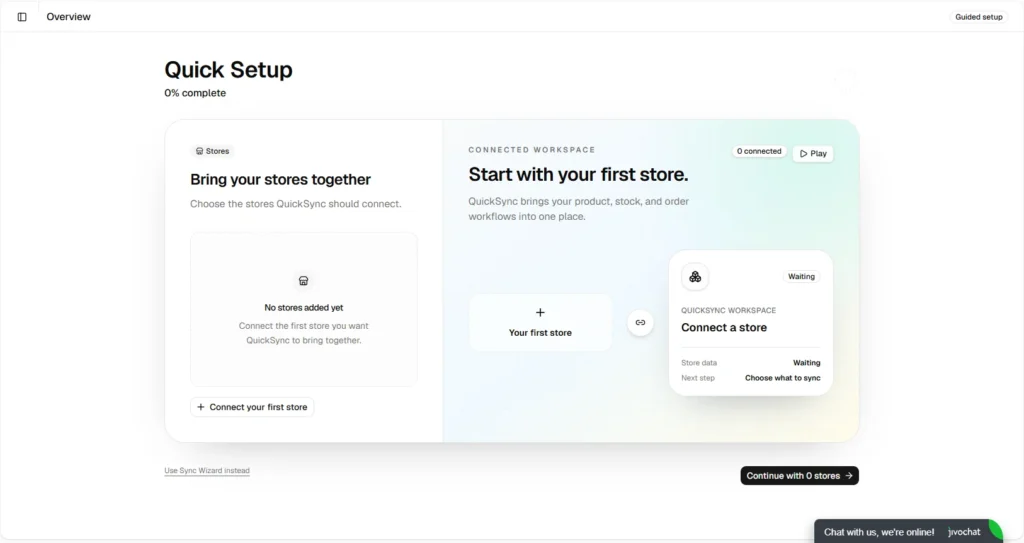
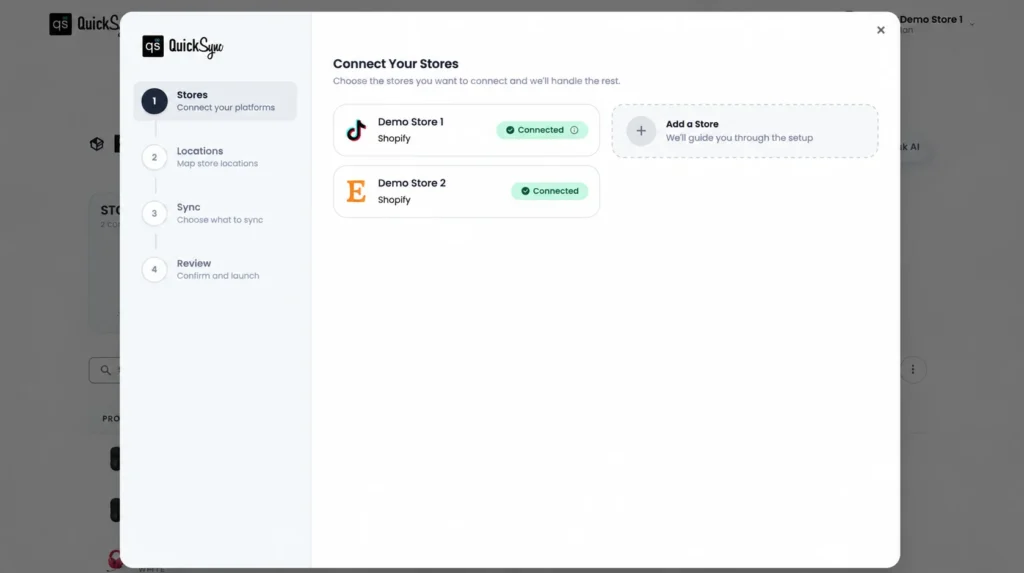
Once you connect your first store, you need a second connected store before QuickSync can sync anything. Once it’s there, three things switch on: product data syncs between the two, inventory updates automatically, and orders route to whichever store you set as your fulfillment store.
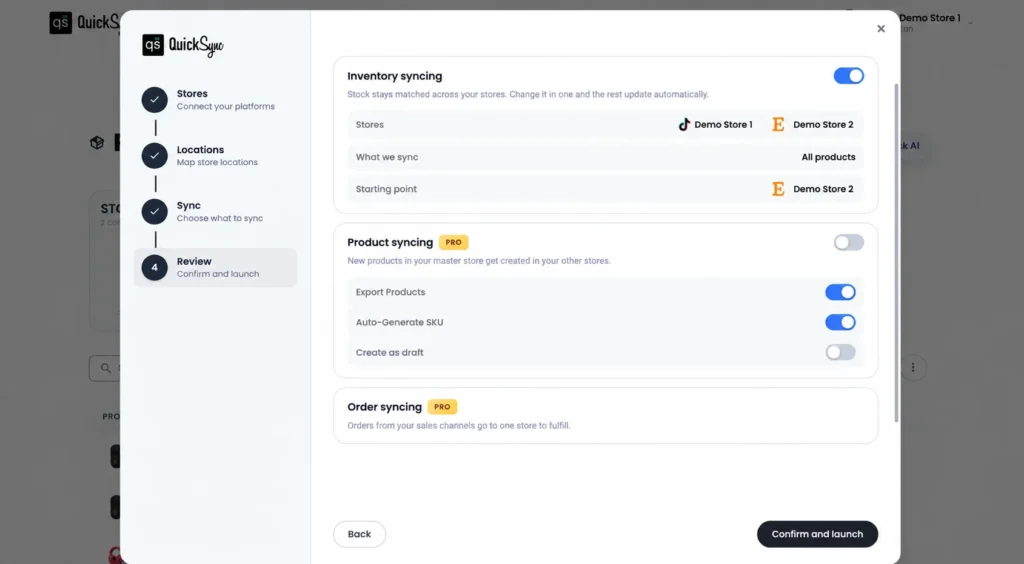
From there, you choose how syncing runs, either automatically across every product or selectively, for only the ones you pick
One master stock count
Everything with QuickSync shows up in one dashboard: every connected product, which channel it’s on, and how much stock is left there.
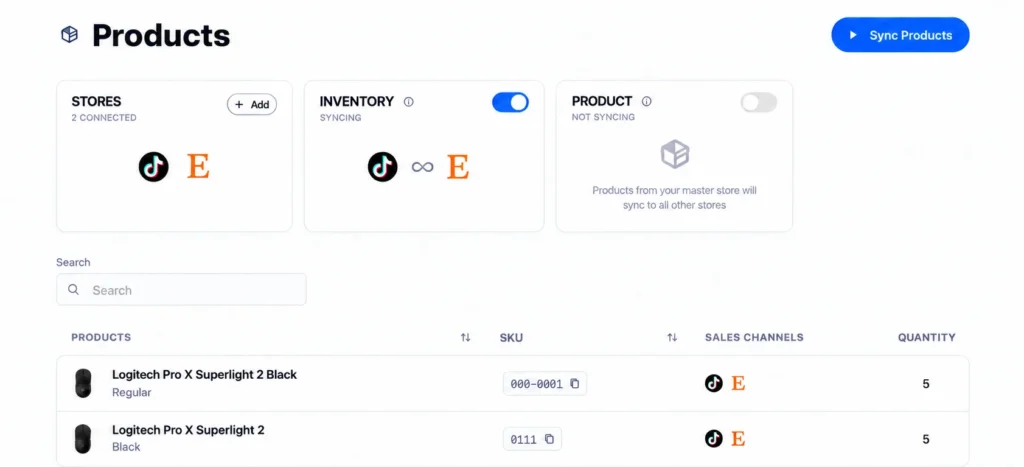
Behind that view is one number, the real stock count. Every channel is just a copy of it, rather than a separate count you’d have to check platform by platform.
Each stock change comes with some context too: which order caused it, which channel reported it, and what the count was right before. That’s more detail than a plain “new number” most sync tools show.
POS and accounting sync
QuickSync connects to Square, Clover, and Lightspeed. Sell something at your register, and your online stock drops right away. You don’t check two systems to see what’s left.
It also syncs with QuickBooks and Xero. Sales from your connected channels show up in your books automatically instead of someone entering them manually at the end of the day. For sellers who run both a physical store and online channels, this saves a step that most listing tools don’t cover.
Order sync and fulfillment
Turn on order sync, and orders from each channel route into whichever store you’ve designated for fulfillment. This setting doesn’t require product or inventory sync to be on first.
QuickSync does recommend pairing it with product sync, though. Without that, orders still come through, but items may land as unmatched “custom items” instead of linking to the right product in your catalog.
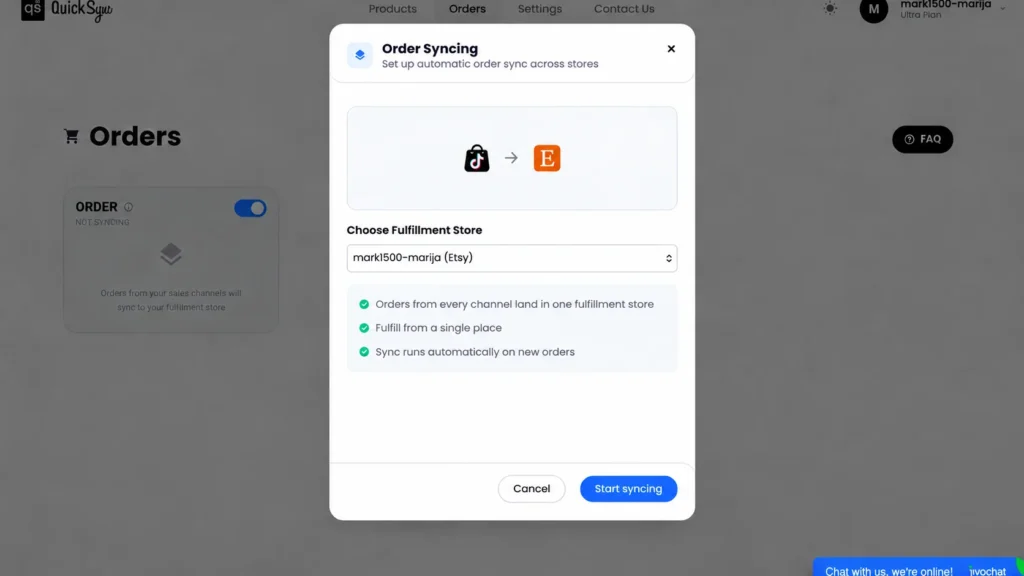
Not every channel can receive orders, though:
- Shopify, WooCommerce, Square, Clover, Lightspeed, and QuickBooks can receive orders
- Amazon, Etsy, eBay, TikTok Shop, and Squarespace send orders out but can’t take them in from elsewhere.
Tracking works the same way, with its own limits. Amazon, Square, Clover, and QuickBooks don’t receive tracking updates once an order ships, and Lightspeed marks an order shipped without passing along the tracking number. The rest sync it automatically.
If you cancel an order on one channel, stock goes back up everywhere else. You don’t have to restock each marketplace after a cancellation manually.
Pricing
QuickSync charges based on the number of item variations you sync. Orders don’t affect your bill. Every plan includes two shops, but here’s the catch: from the 3rd and above shop costs the full plan price on top. So do shops four, five, and every one after that.
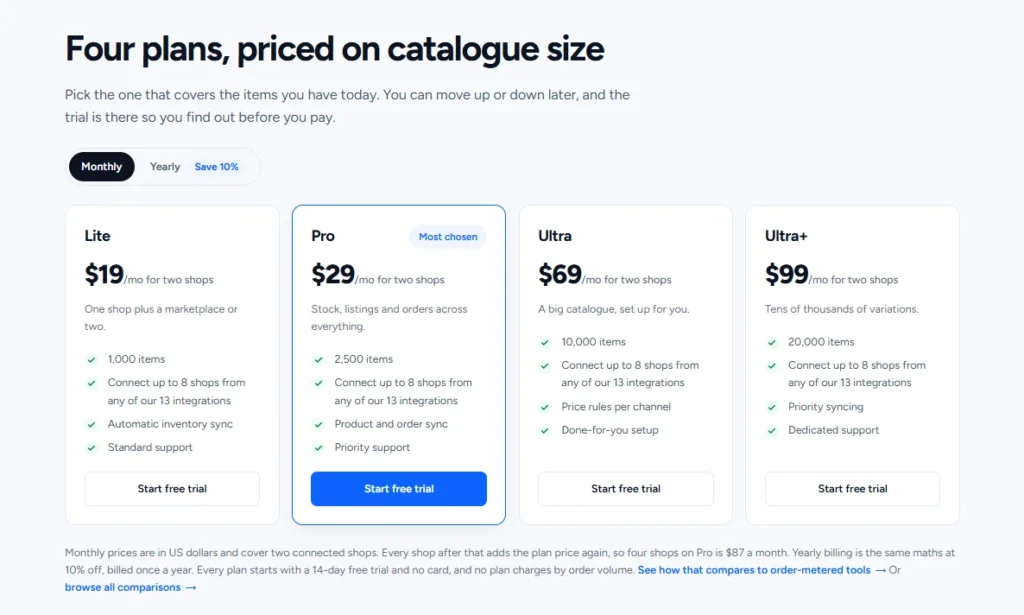
The four plans break down like this:
- Lite at $19/month gives you inventory sync for up to 1,000 items. Product import/export available; no product or order sync on this tier.
- Pro at $29/month adds product and order sync, covering up to 2,500 items. This is the first plan most multichannel sellers actually need.
- Ultra at $69/month adds price rules and a done-for-you setup, up to 10,000 items.
- Ultra+ at $99/month is the same feature set with dedicated support and room for up to 20,000 items.
Catalogs above 20,000 items need a custom quote. Every plan has a 14-day trial with no card required. Annual billing costs 10% less than paying monthly.
Best for
From all mentioned above, QuickSync fits sellers who:
- Run a physical store alongside an online one and need the two to reflect the same stock, without checking each system separately.
- Want a tool that reaches past listing and order management, into POS and accounting.
- Already have listings live on their channels and mainly need them kept accurate, rather than built from scratch.
- Keep books in QuickBooks or Xero and want sales to flow there without manual entry.
Customer review
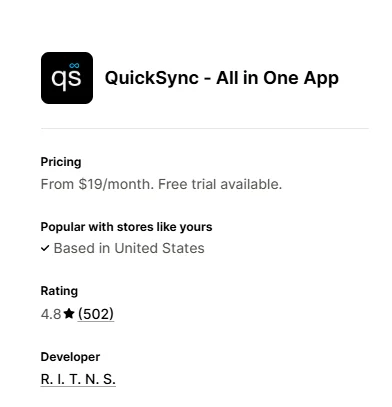
QuickSync’s All in One app has a 4.8/5 rating from 502 reviews on the Shopify App Store. Many recent reviews focus on the help merchants received during setup.
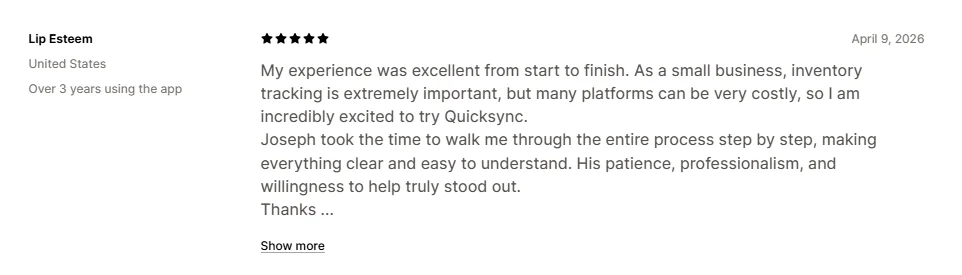
What users like most: Support is the theme that comes up again and again. Merchants describe getting help with setup and sync issues, often mentioning a support agent by name. Reviews also praise how well QuickSync connects their POS and online store.
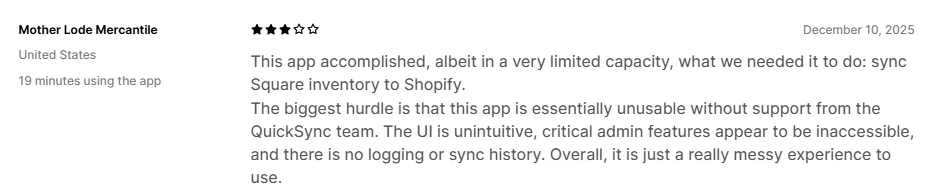
What users like least: The critical reviews raise questions about what happens when a sync goes wrong. Sellers have reported incorrect stock counts and trouble using the same SKU across several Etsy listings.
LitCommerce vs QuickSync: Final Verdict
After testing both tools, here’s the truth: there’s no single winner in the LitCommerce vs QuickSync match-up because the two tools solve different problems.
So instead of forcing one verdict, we scored them across two cases
Case 1: You’re expanding across marketplaces
You already have a store on Shopify, WooCommerce, BigCommerce, Wix, or Squarespace. Maybe you sell on one or two marketplaces as well. Now you want to add more, and you need a way to adjust each listing for where it will appear.
Factor | LitCommerce | QuickSync | Winner |
Marketplace coverage | ● 10+ channels | ◐ 4 marketplaces | LitCommerce |
Channel-specific listing tools | ● Templates, Etsy Personalization, digital downloads | ○ Not built for this | LitCommerce |
Inventory sync speed | ◐ 15-minute cycle (60 for Etsy) | ● Most channels in seconds | QuickSync |
POS integration | ◐ Square only | ● Square, Clover, Lightspeed | QuickSync |
Order synchronization | ● Every connected channel | ◐ Support on Pro Plan and above | LitCommerce |
AI features support | ● Varies by channel | ◐ TikTok, eBay, Etsy attribute-filling | Tie |
Flexible hubs (store, app, or file) | ● Three ways to start | ◐ Store or app only | LitCommerce |
Verdict for marketplace sellers: LitCommerce wins on breadth and listing depth, but not on every count. If speed or a physical POS matters to you even here, that’s a real trade-off, not a rounding error. If that’s the case, LitCommerce works well as a QuickSync alternative for sellers who need both.
Need to be in more places than QuickSync can reach?
If your channel list is longer than Square, Clover, and Lightspeed, LitCommerce covers 10+ platforms and marketplaces from one dashboard
Case 2: You’re syncing a physical store with your online business
This is the seller running a POS system alongside an online store, or several marketplaces with listings already live, mainly needing stock to stay accurate everywhere.
Factor | LitCommerce | QuickSync | Winner |
POS integration | ◐ Square only | ● Square, Clover, Lightspeed | QuickSync |
Accounting sync | ○ Not offered | ● QuickBooks and Xero | QuickSync |
Inventory sync speed | ◐ 15-minute cycle | ● Most channels in seconds | QuickSync |
Overselling protection | ● Min/max thresholds, out-of-stock rules | ● Safety stock up | Tie |
Marketplace listing depth | ● Strong, channel-specific | ○ Sync only, no listing tools | LitCommerce |
Where orders can land | ◐ Your Main Store, including Square | ● Online stores, Square, Clover, Lightspeed, or QuickBooks | QuickSync |
Pricing for a small setup | ◐ $29/mo minimum | ● $19/mo for two shops | QuickSync |
Verdict for POS and stock-accuracy sellers: QuickSync wins where it matters most for this seller, speed and physical retail, but LitCommerce still holds an edge if listings are part of the job too.
LitCommerce vs QuickSync: FAQs
Is LitCommerce better than QuickSync?
That depends on what you need it to do. If you sell from a physical store and an online store, QuickSync’s POS integrations may be the deciding factor. If your main task is getting products onto several marketplaces and adjusting listings for each one, LitCommerce is likely a better fit.
Does LitCommerce sync inventory in real time?
No. LitCommerce’s standard sync interval is 15 minutes, or 60 minutes for Etsy. QuickSync says it updates most channels within seconds, while eBay, Etsy, and Squarespace are checked every few minutes. If a few minutes could affect your stock accuracy during a busy sale, check the timing for your specific channels before choosing a tool.
Can QuickSync connect to Etsy, eBay, and other marketplaces?
Yes, but only four: Amazon, eBay, Etsy, and TikTok Shop. If you sell on Walmart, Temu, Reverb, Faire, or Shopee, QuickSync won’t cover those; LitCommerce connects to 10+ channels, including all of them.
Does LitCommerce integrate with POS systems as QuickSync does?
Only partially. LitCommerce supports Square as a connected channel, but not Clover or Lightspeed. QuickSync goes further here, syncing all three alongside your online stores.
Final Thoughts
If you have a physical shop, start with the part of your business that takes the most work and keep checking whether the stock shown online matches what’s at the counter; then take a closer look at QuickSync and its POS integrations.
LitCommerce makes more sense when the work happens on marketplace listings. A product that sells on eBay may need different details from the same product on Etsy or TikTok Shop. LitCommerce lets you prepare those listings, edit them in bulk, and handle orders in one place.
If you’re still weighing the two, reach out to our team, and we’ll help you figure out which fits. And if you want to keep exploring, there’s more on multichannel selling on our blog.