Looking for a multichannel selling tool and keep running into LitCommerce and Shopify Marketplace Connect (formerly Codisto)? Or are you already using Shopify Marketplace Connect but facing recent eBay sync issues and wondering whether LitCommerce is worth switching to?
Both tools let you list and sync products across marketplaces from one place, but they take very different approaches, and that difference decides which one actually fits your business.
So, to give you a proper answer for this LitCommerce vs Shopify Marketplace Connect comparison, I tested both. I connected each tool to a live Shopify store, pushed 2000 listings across Amazon, eBay, and Etsy, and ran them side by side for 2 months, looking at pricing, supported marketplaces, sync speed, ease of use, and the day-to-day details that only show up once you’re in the dashboard.
Here’s the short answer.
LitCommerce is the better fit if you want to sell on multiple marketplaces, need reliable inventory and price sync, or want hands-on support and greater customization.
Shopify Marketplace Connect makes more sense if you’re all-in on Shopify and selling on just a few major channels at low volume.
Below, I break down how they compare across key factors, so you can see exactly which one wins for your setup.
Learning the Basic: LitCommerce and Shopify Marketplace Connect
Before getting into the LitCommerce vs Shopify Marketplace Connect comparison, here’s a quick look at what each tool is and who it’s built for.
LitCommerce
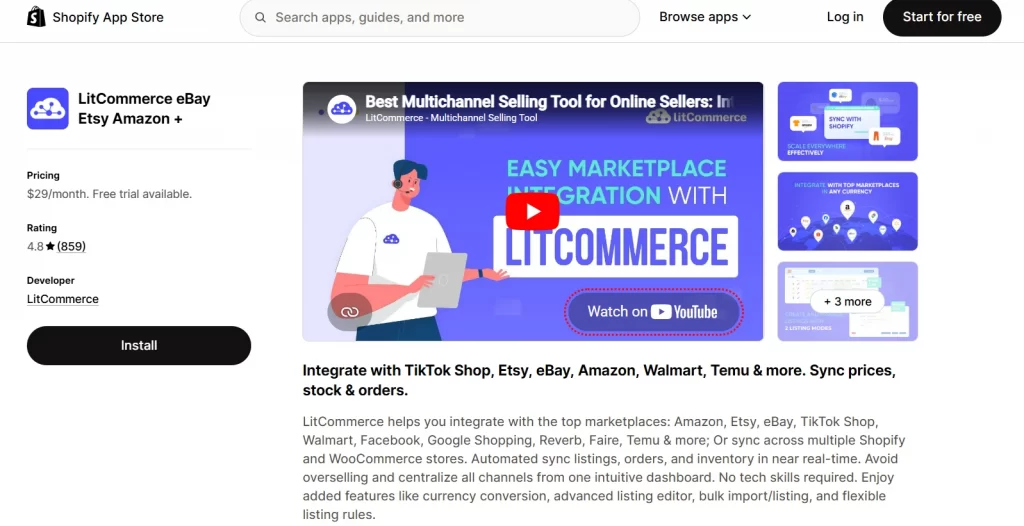
LitCommerce is a specialized multichannel selling tool that lets you list, sync, and manage products across marketplaces and eCommerce platforms from one dashboard.
Founded in 2020 and based in Vietnam, it’s built as a specialized listing tool with tailored features for marketplace sellers, whether you’re selling on Amazon, eBay, Etsy, TikTok Shop, Walmart, or several at once.
Rather than being locked to one platform, it adapts to how marketplace sellers actually work, which is why it holds a 4.8-star rating (you can see its user reviews on the Shopify app marketplace, Trustpilot). The estimated number of monthly active users for LitCommerce is around 15,000.
What stood out when I used it is that LitCommerce doesn’t tie you to any single platform, you can run your main store directly on Shopify, and other eCommerce platforms like Wix, WooCommerce, BigCommerce, etc., then sync everything to your channels from there.
Ready to see LitCommerce in action?
LitCommerce is a specialized multichannel selling tool built for Shopiy sellers. You can connect your channels, sync your catalog, and start selling from one dashboard

Shopify Marketplace Connect
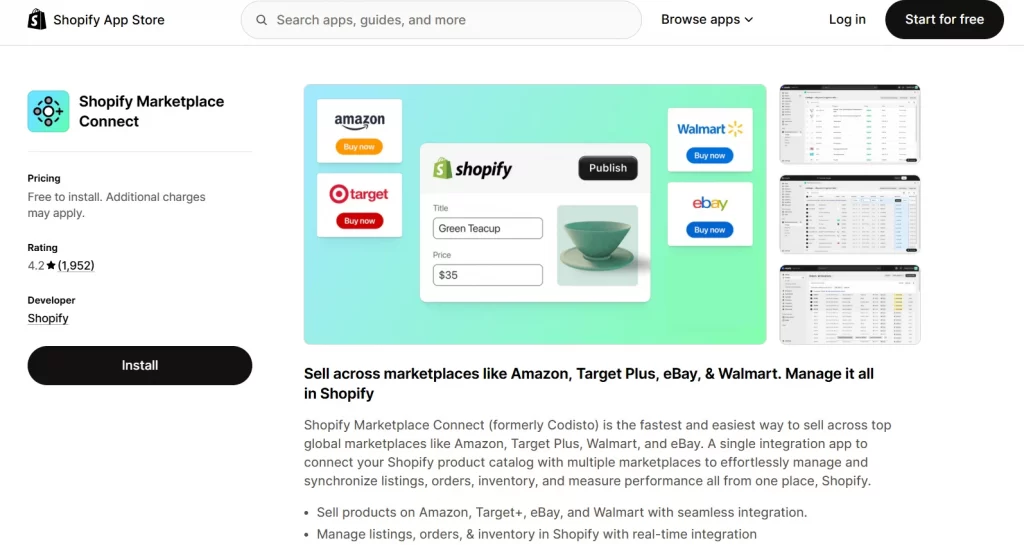
Shopify Marketplace Connect (formerly Codisto) is Shopify’s official marketplace integration app. It connects your Shopify store to major marketplaces, Amazon, Walmart, eBay, and Target Plus, and lets you manage those listings, inventory, and orders centrally from your Shopify Admin. It currently holds a 4.1-star rating on Shopify app store.
One thing to know upfront is that Shopify Marketplace Connect is not a standalone tool. It runs as a sales channel app inside Shopify, so you need an active paid Shopify plan to use it at all. That single requirement shapes a lot of this comparison, since your real cost and setup depend on already being a Shopify merchant.
In my testing, that made it feel seamless if you’re already on Shopify, and a non-starter if you’re not.
LitCommerce vs Shopify Marketplace Connect: Quick Comparison
Here’s a side-by-side snapshot before the detailed breakdown.
Criteria | LitCommerce | Shopify Marketplace Connect |
Best for | Sellers on any platform who want broad marketplace reach, flexibility, and hands-on support | Shopify sellers with low-to-moderate volume on a few major marketplaces |
Overall rating | 4.8/5 | 4.1/5 |
Supported marketplaces | 11 (Amazon, eBay, Etsy, TikTok Shop, Walmart, Google, Facebook, Temu, Faire, Reverb, Shopee) | 4 (Amazon, Target Plus, Walmart (United States only), eBay) |
Supported eCommerce platforms | Shopify, Wix, WooCommerce, BigCommerce, Squarespace, Square | Shopify only |
Pricing model | Per marketplace + per listing (from $29/month) | Per order (50 free/month, then 1% per order, $99/month cap) |
Free trial | 7 days | 50 free synced orders/month |
Sync frequency | Every 15 minutes | 2–30 minutes |
Bulk editing | Yes, with channel-specific templates and recipes | Yes, with three listing modes (single, bulk, attribute mapping) |
Listing templates | Yes, built-in per channel (eBay, Etsy, etc.) | No ready-made templates; uses attribute mapping and saved defaults |
Scheduled auto-listing | Yes | No |
Order management | Centralized dashboard across all channels + built-in shipping carrier support | Centralized inside Shopify Admin |
Location-based inventory | Per-channel location mapping with min/max stock controls | Basic location assignment via Shopify's settings |
Currency conversion | Auto conversion + manual rate override + post-conversion price rules and rounding | Auto conversion; limited post-conversion controls |
Sales reports | Sales by channel, by product, over time, with CSV export | Via Shopify's native reporting; no channel-level breakdown in-app |
Customer support | Live chat, email, docs, Academy tutorials; near 24/7 availability | 24/7 via Shopify's general support channels |
Customization service | Yes, paid custom features and API modifications available | No; recommends third-party apps or Shopify Experts |
Standalone (no platform required) | Yes | No, requires active Shopify subscription |
LitCommerce vs Shopify Marketplace Connect: Detailed Comparison
The table above gives you the snapshot. Now let’s get into what each difference actually looks like in practice. I tested both tools across 10 factors and picked a winner for each based on real usage, not spec sheets.
Scalability & supported marketplaces
LitCommerce
LitCommerce supports a large pool of:
- eCommerce platforms: Shopify, Wix, BigCommerce, WooCommerce, Squarespace, Square
- 10+ marketplaces: Amazon, eBay, Etsy, TikTok Shop, Walmart, Google, Facebook, Reverb, Shopee, Temu, Faire
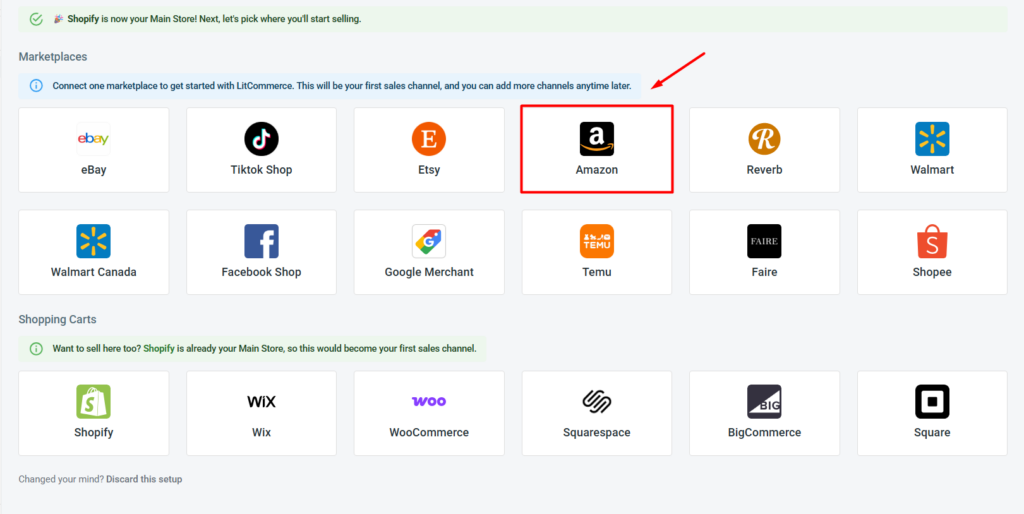
The bigger difference for scaling isn’t just the number, it’s the flexibility.
Your main store doesn’t have to be Shopify, or any host platform at all. You can run your catalog from Wix, WooCommerce, or BigCommerce, but you can also use LitCommerce itself as your source of truth, managing products directly in the app, or simply import your catalog via file.
That makes it a fit even for sellers who only sell on marketplaces and don’t run a separate online store.
When I tested it, I could manage Etsy, Amazon, and eBay listings side by side from a single dashboard without funneling everything through Shopify Admin.
Shopify Marketplace Connect
Shopify Marketplace Connect supports 4 marketplaces:
- Amazon
- Target Plus (United States only)
- Walmart (United States only)
- eBay
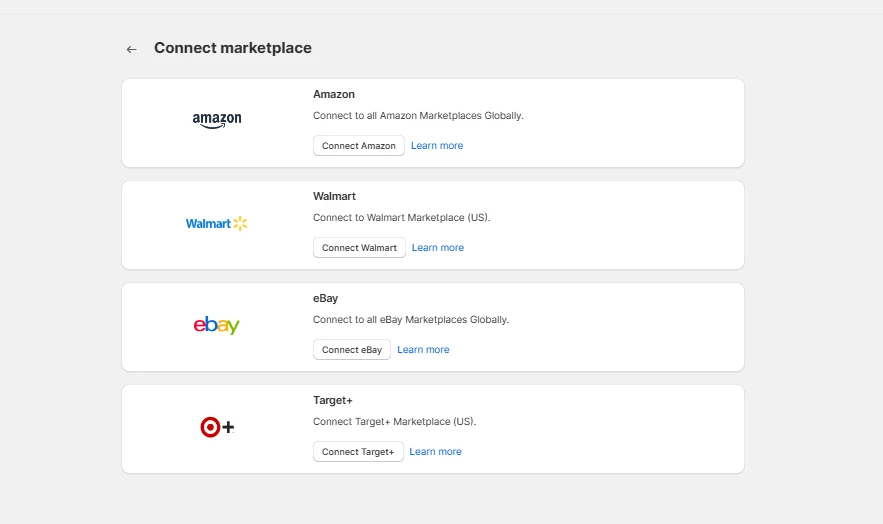
It works on a paired model, each marketplace connects to your Shopify store individually, for example, Shopify–eBay, Shopify–Amazon.
That’s fine if you sell on one or two major channels, but everything routes through Shopify, and channels like BigCommerce or WooCommerce aren’t supported at all. As a result, your ability to scale is tied to staying within the Shopify ecosystem.
Winner: LitCommerce, for broader marketplace support and the freedom to scale beyond the Shopify ecosystem.
⚠️ Recent eBay sync concerns
Recent Shopify Marketplace Connect reviews have raised concerns about its eBay integration. During August and September 2026, multiple users reported issues with image, pricing, and inventory synchronization. Some sellers said delayed inventory updates caused overselling on eBay.
These reports may not reflect every user’s experience. However, if you currently sell on eBay or plan to expand there, LitCommerce is a safer option for managing and syncing your eBay listings.
Pricing
Pricing is usually the first question in any LitCommerce vs Shopify Marketplace Connect comparison, but it’s also the most misleading if you only compare sticker prices. The two tools charge differently, so the real cost depends on your volume and setup.
LitCommerce
LitCommerce charges based on the number of marketplaces you connect and the number of listings you manage, not on order volume.
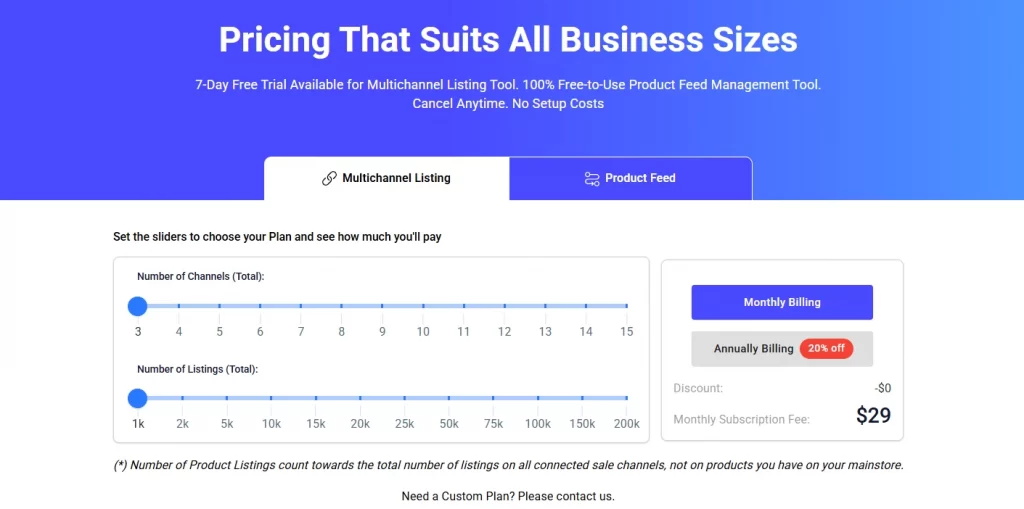
- Free trial: 7 days with access to multi-channel connection, listing, price/inventory sync, and centralized order management.
- Paid plans: tiered by channels and listings. For example, up to 3 channels and 1,000 listings start at $29/month; up to 3 channels and 2,000 listings at $44/month.
- Annual discount: 20% off on yearly billing.
The advantage of this model is predictability. Your cost scales with how many products and channels you run, not how many orders you get, so a strong sales month doesn’t push your bill up. And because LitCommerce is a standalone tool, there’s no underlying platform subscription required. You can use it on Shopify, Wix, WooCommerce, or even without a host platform at all.
Predictable pricing, no hidden platform fees
LitCommerce charges per channel and listing, not by order volume, so a strong sales month doesn’t increase your bill. See which plan fits your business
Shopify Marketplace Connect
Shopify Marketplace Connect uses an order-based pricing model
- Free tier: 50 marketplace-synced orders per month at no extra charge.
- After that: 1% fee per additional synced order, capped at $99/month.
That looks affordable on the surface, but there’s a hidden baseline cost: Shopify Marketplace Connect only works inside Shopify, so you need an active Shopify subscription to use it at all:
- Basic: $39/month
- Shopify: $105/month
- Advanced: $399/month
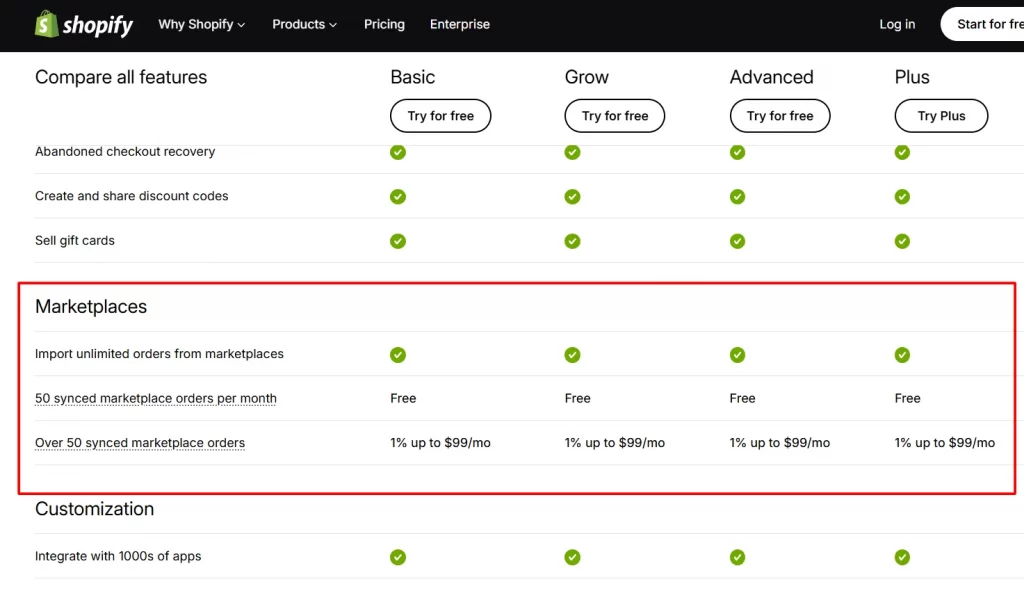
That means your real minimum cost isn’t $0, it’s $39/month (Basic plan) before a single marketplace order syncs. At higher volumes, the $99 cap is reasonable, but at lower volumes, you’re paying for a Shopify subscription plus an app fee for functionality that LitCommerce includes as a standalone product.
Ease of use
Both tools are clean and modern, so in this LitCommerce vs Shopify Marketplace Connect round, it comes down to setup and how quickly you can actually get listing.
LitCommerce
From the dashboard, LitCommerce walks you through a starter guide and suggests relevant use cases. Setting up my first channels, I didn’t have to hunt for what to do next, the flow pointed me there.
What helped most is that LitCommerce uses marketplace-specific terms instead of generic app language.
If you already sell on Etsy or eBay, the fields map to what you know, so there’s almost no new vocabulary to learn. That made onboarding smooth whether you’re a first-time seller or already managing several channels.
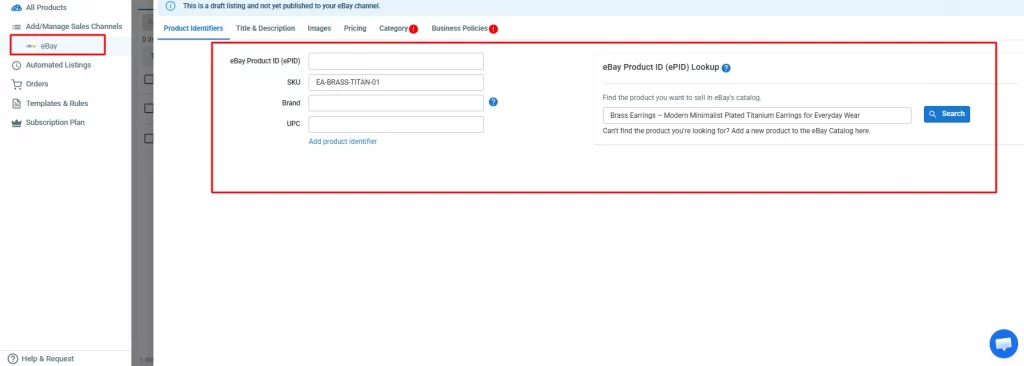
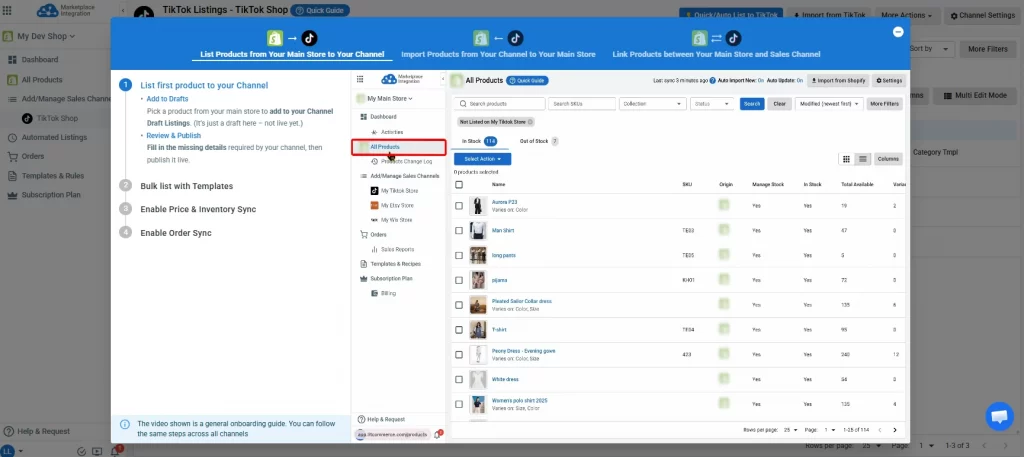
What’s more, the app includes quick-guide videos at every step, which helped me navigate the setup process and significantly shortened my learning curve.
Shopify Marketplace Connect
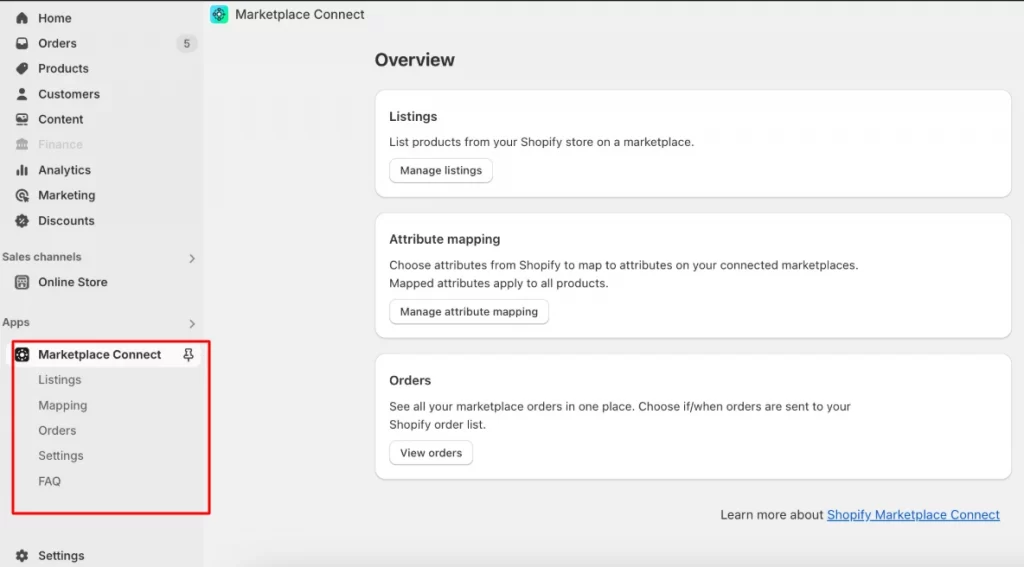
If you’re already comfortable with Shopify, Shopify Marketplace Connect will feel familiar. It lives right inside your Shopify Admin, with a left-side navigation menu that organizes the app into four main views:
- Listings: where you create and manage marketplace listings across three modes
- Mapping: for linking Shopify product attributes to marketplace fields
- Orders: for reviewing and managing inbound marketplace orders before they transfer to Shopify
- Settings: for sync configuration, order import rules, and channel-specific options
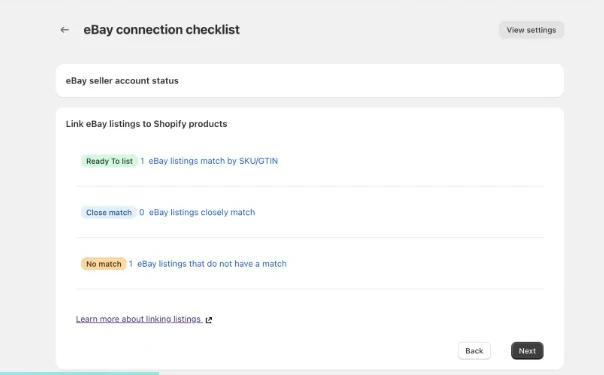
After I connected my eBay channel, the app moved me to a dashboard that sorts products into three buckets based on how confidently it can match each eBay listing to a product already in my Shopify catalog, mostly by SKU:
- Ready to list: a confident match. Select the suggested listings, then click Approve all to link them.
- Close match: a likely but uncertain match. You can approve the suggestion as-is, or swap in a different Shopify product from the SKU drop-down before confirming.
- No match: no product could be tied to the listing. You pick a Shopify product manually from the SKU drop-down and confirm the match.
However, once I started connecting multiple marketplaces, the initial configuration was the least intuitive part. Each channel has its own settings and product-mapping rules, and the app’s terminology doesn’t always match what you see natively on Amazon and eBay.
For example, the Mapping view is powerful for Amazon attribute mapping, but figuring out how fields translate between Shopify and each marketplace took more trial and error than I expected.
Reviews echo this: sellers often need a few support interactions just to get categories and product details mapped correctly.
Winner: Shopify Marketplace Connect wins on familiarity if you live in Shopify already, but LitCommerce is the easier start overall, thanks to guided onboarding, in-app videos, and marketplace-native terms that shorten the learning curve.
Listing management
Listing is the core job of any multichannel tool, so in this LitCommerce vs Shopify Marketplace Connect matchup, how flexibly you can create, edit, and standardize listings matters a lot day-to-day.
LitCommerce
The bulk editor saved me the most time. You can edit listings one by one or in groups, then apply templates and rules to automatically fill marketplace-specific fields. Instead of retyping titles, categories, and attributes for each channel, you set a rule once and let it run.
What impressed me more was the channel-specific templates. Depending on where you expand, LitCommerce provides templates tailored to that channel’s exact requirements. A few I used:
- eBay: A custom description template lets you control the layout, fonts, colors, and styling of your listings with HTML and CSS. There’s also a Business Policies template that handles your shipping, payment, and return policies in one place, so you don’t fill them in on every listing.
- Etsy: A Personalization template lets you add buyer customization instructions, set a character limit for responses, and mark whether personalization is required, exactly what made-to-order Etsy sellers need.
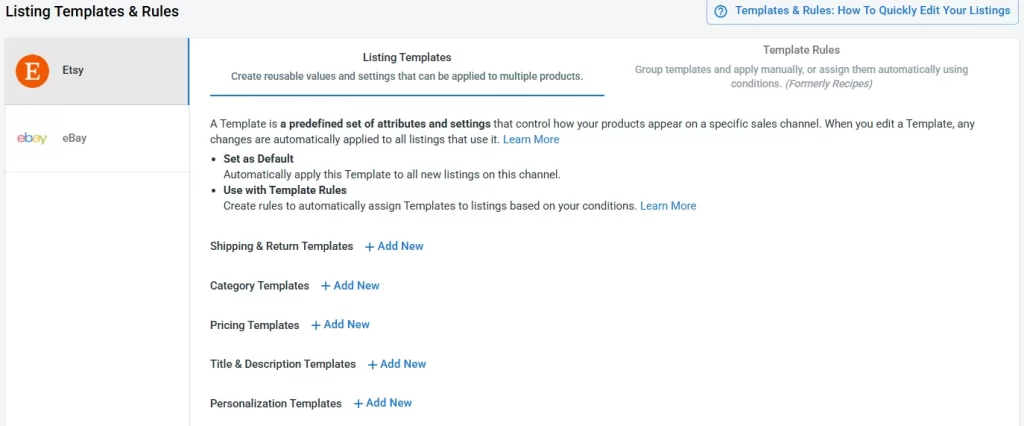
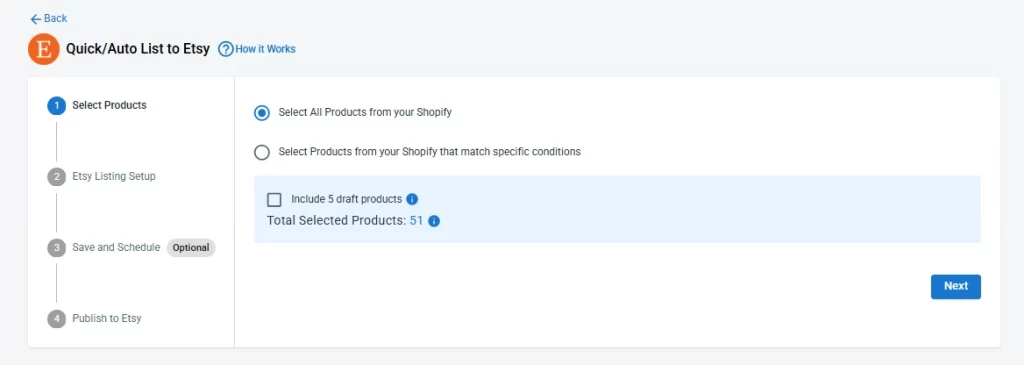
LitCommerce also supports automated listings. Ready-to-use templates and rules let you publish to a channel in a few clicks, and you can schedule listings to go live on their own. I set up a batch to publish overnight, and it ran while I was offline.
Ready to make the switch? Start your free trial today.
If you’ve read through all five steps, you’re closer than you think. The support team has helped a lot of sellers through this exact transition, most are fully switched and syncing within a day.
Shopify Marketplace Connect
Shopify Marketplace Connect takes a more technical approach. Instead of ready-made templates, it relies on attribute mapping and Shopify metafields to control how product data appears on each marketplace.
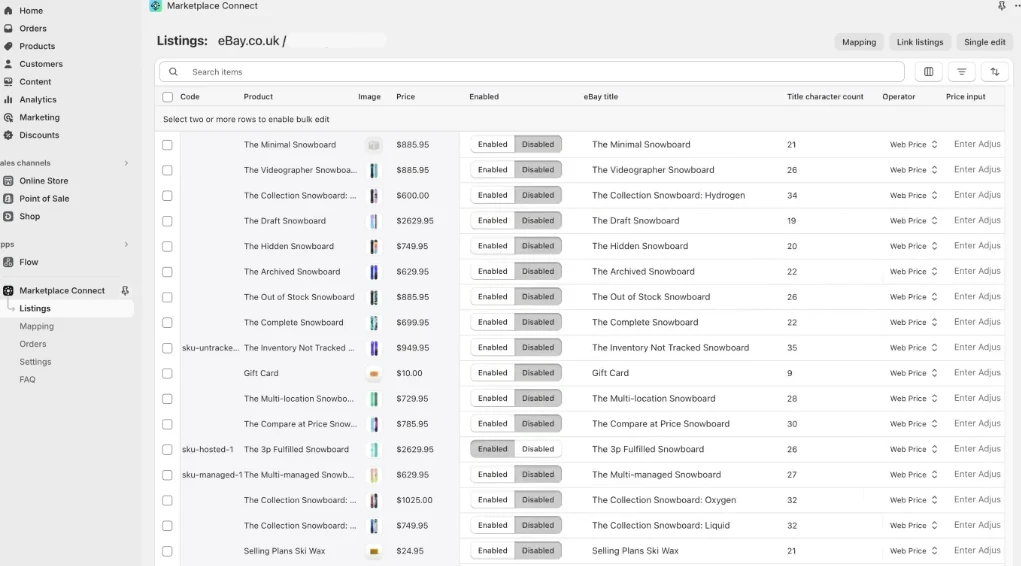
You can manage listings individually or in bulk. In the bulk-edit mode, your Shopify catalog displays in rows with marketplace fields as columns, so you can create, edit, and manage listings for groups of products or your entire catalog at once.
You can filter by product or marketplace values, apply rules and operators in bulk, and start selling on a new channel faster than listing one by one.
For marketplaces like eBay, you can also save default settings, price adjustments, shipping policies, and return terms that apply to future listings. These defaults add a basic layer of automation, though they’re not as plug-and-play as true templates.
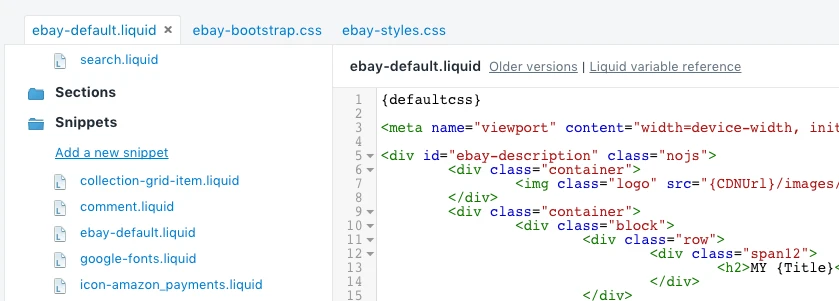
Besides, it does include a built-in eBay listing template, but instead of a visual, no-code editor, the template is edited through Liquid snippets and CSS in your Shopify theme. The tool itself recommends that merchants not edit templates directly and doesn’t offer HTML or CSS support, so meaningful customization typically means involving a web developer.
Winner: LitCommerce, for in-app editing plus built-in templates and recipes that make bulk listing faster and easier to standardize. Shopify Marketplace Connect is powerful but leans more technical to set up.
Sync features
In an ideal world, stock and price updates would hit every marketplace instantly.
In reality, both tools push updates quickly, but marketplaces like Amazon and Etsy take their own time to process them on their end. What you can control is how often your tool sends those updates, and how well it protects you from overselling in the gap.
LitCommerce
This is where LitCommerce pulls ahead. Stock and pricing sync across every connected channel every 15 minutes, all managed directly from your store.
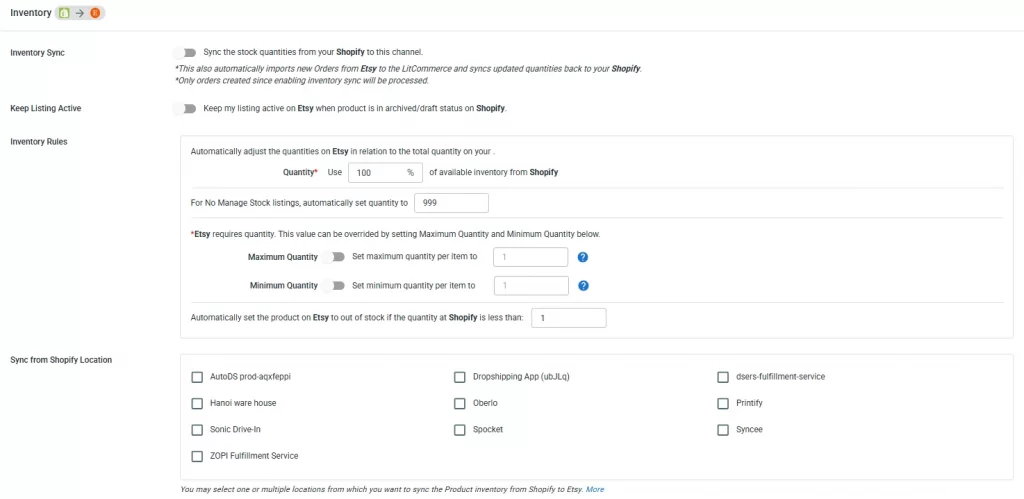
You can also set minimum and maximum stock levels per channel, map inventory across multiple warehouses, and get alerts before items run low.
In practice, that oversell protection is what prevents the canceled orders that quietly damage your seller ratings, which matters more than raw sync speed on most marketplaces.
Shopify Marketplace Connect
Shopify Marketplace Connect publishes updates immediately too, but confirms that marketplaces typically take between 2 and 30 minutes to process them (Etsy, eBay, Amazon, and so on). That covers inventory edits pushed from Shopify out to each marketplace.
It handles the core job reliably, but it doesn’t offer the same per-channel stock controls and low-stock safeguards, so you’re leaning more on Shopify’s own inventory settings to avoid overselling.
Winner: LitCommerce, for a tighter, consistent 15-minute sync plus per-channel min/max stock levels and low-stock alerts that actively guard against overselling.
You might also like: Multichannel Inventory Management: What It Is & How to Manage Stock Effectively
Order management
Once sales start coming in across channels, the question is whether you can manage them in one place or have to bounce between marketplace dashboards.
LitCommerce
LitCommerce pulls orders from every connected channel into a single dashboard, or back into your store, and adjusts inventory on each sale automatically.
In my testing, I managed orders from several marketplaces without logging into any of them separately. For a growing business, that centralized flow is what keeps fulfillment from turning into chaos.
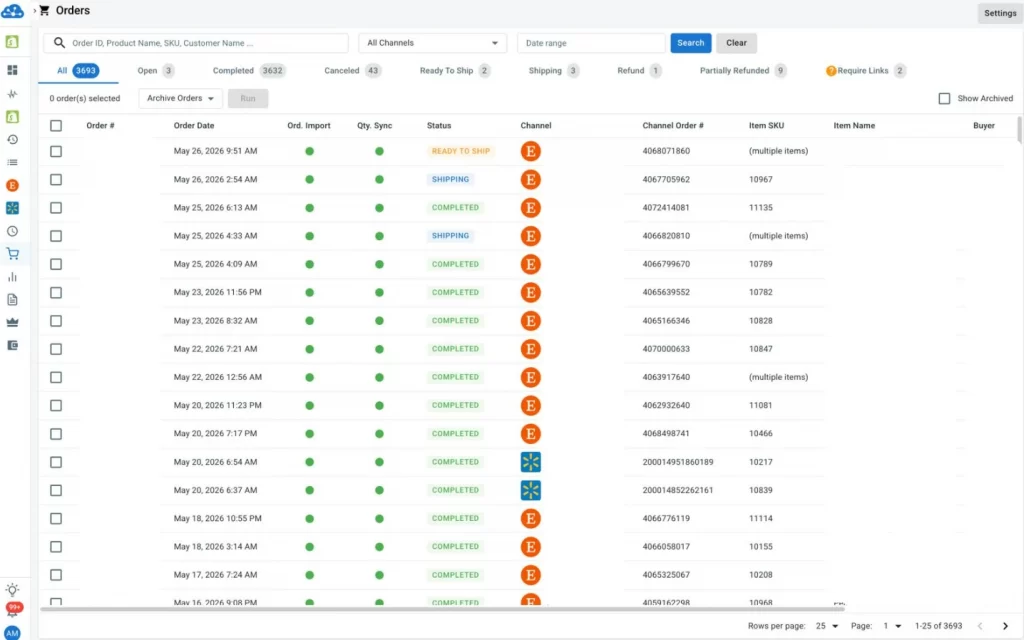
It also has shipping carrier support built in (available when you run LitCommerce as your main store). Instead of jumping to a separate shipping tool, you can handle labels and carriers right alongside your orders in LitCommerce, so the order goes from sale to shipped without leaving the app.
Shopify Marketplace Connect
Shopify Marketplace Connect centralizes marketplace orders inside your Shopify Admin, so they land in the same place as your Shopify orders and draw down inventory automatically. If Shopify is already your operations hub, that’s convenient; everything sits in one familiar dashboard.
The trade-off is that it’s tied to Shopify. Order management lives within Shopify’s environment rather than a dedicated multichannel view, and there’s no built-in marketplace shipping layer beyond what Shopify and its apps provide.
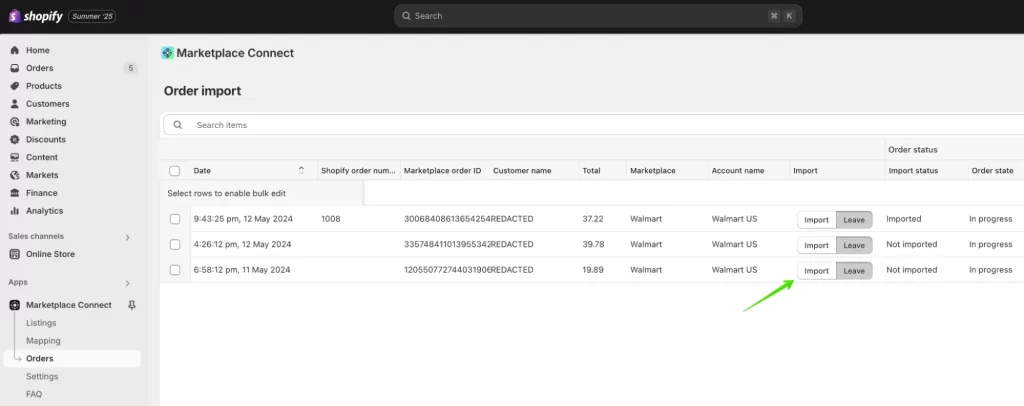
Winner: Both tools effectively centralize order management within Shopify. However, LitCommerce offers greater versatility by providing a dedicated dashboard that functions independently, even if you are not using Shopify.
Location-based inventory management
If you hold stock in more than one warehouse or location, this LitCommerce vs Shopify Marketplace Connect factor matters: how a tool decides where to fulfill from can make the difference between a smooth ship and an oversell.
LitCommerce
LitCommerce works directly with Shopify’s multi-location setup. In each channel’s settings, you choose which Shopify location syncs to that sales channel, so its stock numbers flow to the right marketplace.
When channel orders are imported back into your store, they’re created at the location you specified, and you can reassign that location afterward if needed.
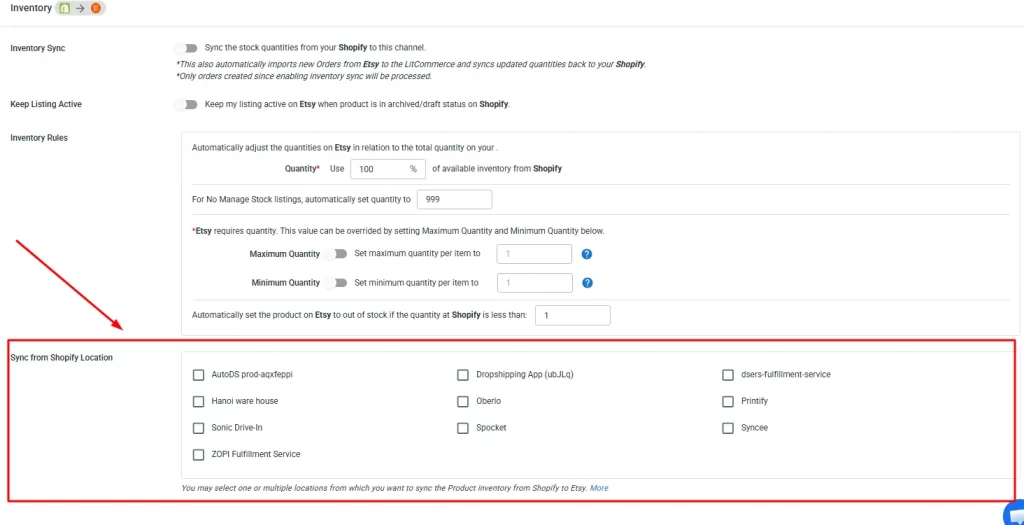
Because marketplaces don’t support multiple locations themselves, this control lies on the store side: you pick the source location for each channel rather than leaving it to chance.
In my testing, mapping a specific location to each channel made it much easier to keep regional stock accurate (for example, syncing US inventory to one channel and UK inventory to another).
Shopify Marketplace Connect
Shopify Marketplace Connect does offer location-based inventory, but it’s relatively basic. You can choose which Shopify location to use for each listing, individually or in bulk, and set a default location per regional marketplace.
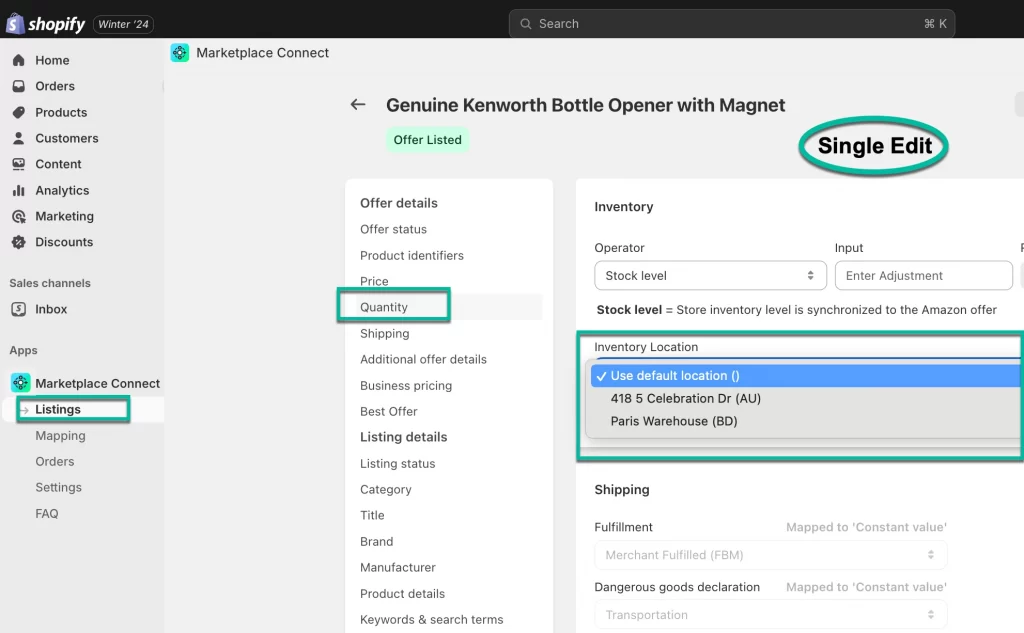
The catch is that these settings rely entirely on Shopify’s own inventory configuration.
Shopify can track stock across multiple locations and assign fulfillment priorities, but the app doesn’t add advanced automation, such as selecting the best location based on the buyer’s geography or automatically fulfilling parts of an order from different warehouses.
Winner: LitCommerce, for clearer per-channel location mapping and tighter control over which location feeds each marketplace, where Shopify Marketplace Connect simply inherits Shopify’s default routing.
Currency conversion & international selling
If you sell into other countries, say your store is in USD, but you’re listing on Amazon Canada, you’ll want pricing that converts cleanly for each market.
LitCommerce
LitCommerce automatically converts prices for products listed on channels that use a different currency from your main store. When enabled, it applies a real-time conversion rate between your store’s base currency and the target channel’s currency.
You can also set the rate manually if you’d rather lock it, and it stays fixed until you change it.
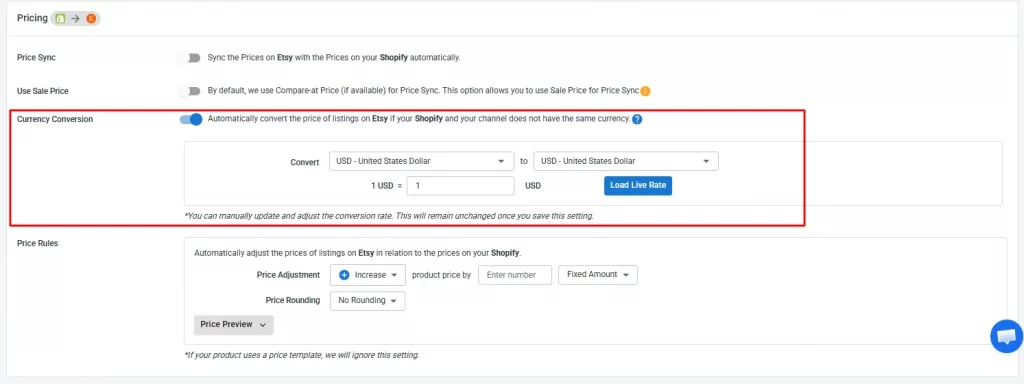
What I found most useful is the control after conversion. You can apply price rules that raise or lower the converted price by a set amount or percentage, and add rounding options for cleaner pricing (so you’re not listing something at $19.47).
That meant I could keep prices accurate and consistent across markets without editing each channel by hand.
Shopify Marketplace Connect
Shopify Marketplace Connect includes a foreign-currency management tool that lets you list on overseas marketplaces where the local currency differs from your Shopify store’s currency. It covers the core need, converting prices so you can sell internationally.
Where it’s lighter is the fine-tuning: there’s less in the way of manual rate control and post-conversion price rules, so you have less say over exactly how the final localized price lands.
Winner: LitCommerce, for more flexible international pricing, manual rate adjustments plus post-conversion price rules and rounding give you tighter control over how products are priced in each market.
Sales reports & analytics
Reporting is one area where the usual winner flips, so it’s worth being straight about the trade-off.
LitCommerce
LitCommerce includes a Sales Reports section that gives a centralized view of performance based on the order data synced through the app. In my testing, three views did most of the work:
- Total Data Over Time: an interactive line chart for total sales, orders, and products sold, with a comparison line for a previous period, viewable by day, week, or month.
- Total Sales by Product: a bar graph showing revenue per product against the comparison period.
- Total Sales by Channel: a pie chart breaking down sales by channel, so you can see at a glance which marketplace is pulling its weight.
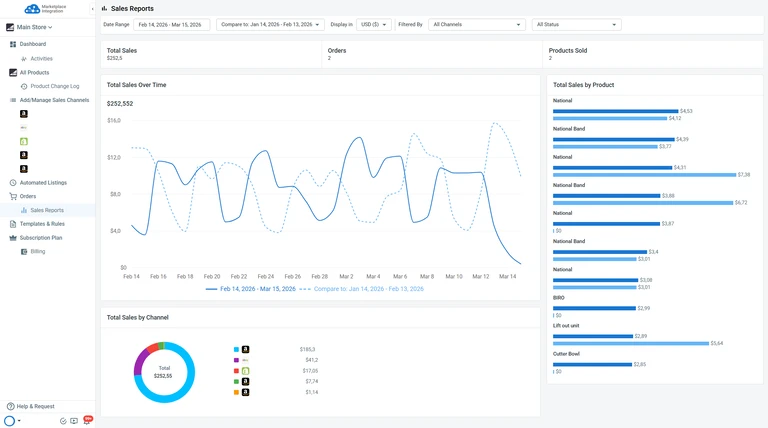
The reports update as new orders are imported (including unlinked and archived orders), and you can export the data table to CSV for deeper analysis.
For a multichannel seller, having sales-by-channel in one place, without stitching together each marketplace’s own reports, is a useful part.
Shopify Marketplace Connect
Because Shopify Marketplace Connect lives within Shopify, it taps directly into Shopify’s native reporting tools, real-time data, customizable metrics, and standard reports such as total sales, sessions by device, and customer behavior. You can filter, customize visualizations, and run deeper explorations with ShopifyQL.
The one gap is that it doesn’t provide dedicated marketplace-level reporting inside the app, so you won’t get segmented analytics for, say, Amazon versus eBay without leaning on broader Shopify metrics or external tools. Even so, for sellers already in the Shopify ecosystem, the depth of reporting is the stronger offering here.
Customer service
When something goes wrong mid-sync or you’re stuck during setup, how fast and how helpfully a tool’s team responds matters more than most feature comparisons.
LitCommerce
LitCommerce has a dedicated support team reachable through live chat, email, detailed usage documentation, and LitCommerce Academy tutorials. In my experience, responses were fast, and the team walked me through issues step by step rather than sending canned articles.
Reviews on the Shopify App Store consistently highlight quick response times and hands-on guidance, especially during onboarding and sync troubleshooting. That matches what I saw: when I hit a mapping issue during setup, support jumped on a live chat and resolved it in one session.
LitCommerce also has a feature-request system, which I like because it gives sellers a real say in the roadmap. If a feature you need isn’t supported yet, you can submit it through their system, and other users can upvote it.
For sellers with niche marketplace needs or unusual catalog setups, it’s reassuring to know there’s a clear channel to push for what you actually need, rather than hoping it gets built.
Shopify Marketplace Connect
Shopify Marketplace Connect support runs through Shopify’s general customer service channels: 24/7 live chat and email, plus a comprehensive Help Center. The infrastructure is solid, and you benefit from Shopify’s large support organization.
The trade-off is specialization. In my testing, resolving Marketplace Connect–specific issues sometimes meant navigating multiple layers of support before reaching someone familiar with the app’s marketplace integrations. For general Shopify questions, it’s seamless; for complex channel-mapping or sync issues, response quality can vary.
There’s no equivalent customization service. For needs beyond the app’s default capabilities, Shopify recommends third-party apps, hiring a Shopify Expert, or building via the API, which adds cost and coordination overhead.
How to Switch from Shopify Marketplace Connect to LitCommerce
So, have you decided to use LitCommerce? You can move from Shopify Marketplace Connect to LitCommerce while keeping your listings live and your data intact, without recreating your marketplace listings.
Step 1: Connect Shopify to LitCommerce
You can either install LitCommerce from the Shopify App Store or create a LitCommerce account and connect Shopify. Once connected, Shopify becomes your Main Store and primary source of product data.
Step 2: Connect other sales channels
Next, connect your existing Amazon, eBay, Etsy, TikTok Shop, or other marketplace accounts to LitCommerce.
Step 3: Import and link existing listings
Import your active marketplace listings into LitCommerce. During this process, enable Auto Link to match them with the corresponding Shopify products.
This lets you keep your existing listings instead of recreating them. You can also create and publish new listings on your selected channels.
Step 4: Stop Shopify Marketplace Connect sync
Once your listings are linked, disable the corresponding sync features in Shopify Marketplace Connect. This prevents both tools from updating the same listings and causing data conflicts.
Step 5: Set up LitCommerce sync
Finally, choose which data LitCommerce should sync between Shopify and your sales channels:
- Inventory and inventory rules
- Prices and pricing rules
- Titles and descriptions
You can enable Import Orders to Main Store to bring marketplace orders into Shopify. This lets you manage Shopify and marketplace orders through one central dashboard.
Once everything works correctly, you can manage your listings, sync settings, and marketplace orders through LitCommerce.
Still need help with the transition? Contact the LitCommerce team for step-by-step guidance for your setup.
How I Compared LitCommerce vs Shopify Marketplace Connect
I set up both tools on a live Shopify store, connected them to real marketplaces, and used them side by side to see how they actually perform day to day.
What I tested on
- Store: a live Shopify store with 2000 products
- Test period: 2 months, long enough to go through listing, syncing, order fulfillment, and at least one pricing update cycle on each channel.
What I evaluated
I compared the two tools across 10 factors that matter most to multichannel sellers:
- Scalability and supported marketplaces
- Ease of use and onboarding
- Listing management
- Sync features
- Order management
- Location-based inventory management
- Currency conversion and international selling
- Sales reports and analytics
- Pricing
- Customer service
For each factor, I used the tool hands-on, noted what worked and what created friction, and checked whether the experience matched what the documentation and user reviews promised (on Shopify App Marketplace, Trustpilot)
How I judged each round
Each factor gets a winner based on three questions:
- Does it solve the problem well? Not just whether the feature exists, but whether it works smoothly in practice.
- How much setup or workaround does it need? A feature that takes an hour to configure isn’t the same as one that works in two clicks.
- Does it scale? What works for 50 listings may break down at 500 or 5,000.
Where one tool clearly outperforms, I say so. Where the better choice depends on your setup (Shopify-only vs. multi-platform, low-volume vs. high-volume), I explain the split rather than forcing a winner.
You might also like: 10 Best Multichannel Listing Tool for eCommerce Sellers: Detailed Comparison
LitCommerce vs Shopify Marketplace Connect – FAQs
Is Shopify Marketplace Connect free?
Not entirely. You get 50 marketplace-synced orders per month at no extra charge. After that, you pay a 1% fee per additional synced order, capped at $99/month. However, the app only works inside Shopify, so you also need an active Shopify subscription (starting at $39/month for Basic).
Can I use LitCommerce without Shopify?
Yes. LitCommerce works with multiple base platforms, including Wix, WooCommerce, BigCommerce, Squarespace, and Square. You can also use LitCommerce itself as your source of truth or import your catalog via file, so you don’t need any host platform at all.
Which tool supports more marketplaces?
LitCommerce supports 20+ marketplaces and eCommerce platforms. Shopify Marketplace Connect supports 4 (Amazon, eBay, Walmart, and Target Plus).
Can I switch from Shopify Marketplace Connect to LitCommerce?
Yes. Since both tools connect to Shopify, you can install LitCommerce, connect your marketplaces, import &l ink your existing catalog, unisntall Shopify Marketplace Connect, and set up sync with LitCommerce. LitCommerce’s support team can also assist with the transition.
Final Verdict
After testing both tools on a live store across the same marketplaces, here’s how I’d summarize the LitCommerce vs Shopify Marketplace Connect decision.
Choose Shopify Marketplace Connect if:
- You’re fully committed to Shopify and don’t plan to sell from any other base platform.
- You sell on a small number of major marketplaces (Amazon, eBay, Etsy, Walmart).
- Your marketplace order volume is low to moderate, keeping your costs within the free tier or under the $99 cap.
- You prefer everything managed inside Shopify Admin with no additional tools.
Choose LitCommerce if:
- You sell across many marketplaces or plan to scale to new channels as you grow.
- Your base store isn’t Shopify, or you don’t use a host platform at all.
- You want built-in listing templates, scheduled auto-listing, and channel-specific tools that save setup time.
- You need hands-on customer support with the option to request custom features.
- You want predictable, listing-based pricing that doesn’t fluctuate with order volume.
Overall, LitCommerce multichannel listing tool offers more flexibility and advanced features, while Shopify Marketplace Connect is better suited for simplicity within the Shopify environment. We hope this comparison helps you decide which solution best fits your multichannel selling needs. To further enhance your growth, explore our latest insights on multichannel selling on our blog.