Amazon A+ Content is a free feature for brand-registered sellers that transforms a plain-text product description into a rich visual page. It can increase conversion rates by 3–10% for Basic A+ and up to 20% for Premium A+.
But to make the most of it, you need more than a simple definition. That’s why this guide covers everything you need to know, including how much A+ content Amazon costs, step-by-step creation, real-world examples, and best practices that separate top performers from the rest.
Key takeaway:
Wait no more. Scroll down to get inspired!
Power Up Your Amazon Brand Story
Once your A+ Content is ready, make sure your store runs just as smoothly. Connect with LitCommerce Amazon Integration to sync products, automate updates, and grow across marketplaces.

What is A+ Content on Amazon?
Amazon A+ Content is additional, visually rich content that appears on a product’s detail page below the main product description.
It uses pre-designed modules that combine images, text, comparison charts, and media to give shoppers a deeper understanding of your product and brand before they buy. A+ Amazon content helps build brand identity, highlights unique features, and is proven to increase conversion rates by up to 20%.
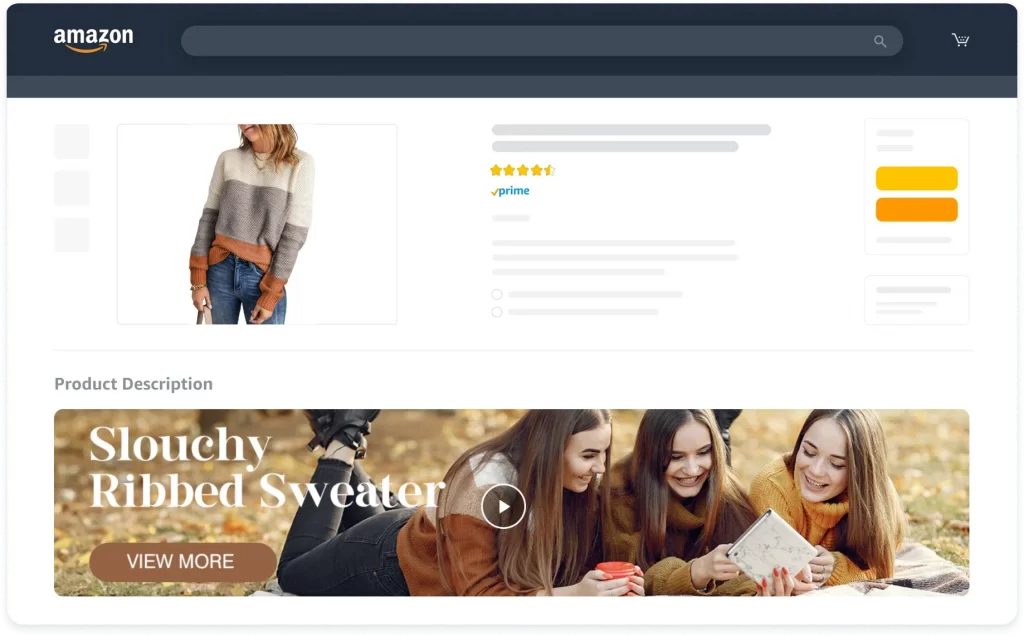
Where does A+ content appear?
A+ Content appears on product detail pages, specifically under the product description section. It essentially replaces the standard text description with a more visually engaging format. This can be found on Amazon, both on Kindle Direct Publishing (KDP) and Seller Central.
For KDP, you’ll find it under the “From the Publisher” section on the product detail page. For Seller Central, it appears directly in the product description area. In both cases, depending on the overall content length, viewers might need to scroll down a bit to see it.
What does A+ content replace?
Standard Amazon product descriptions are limited to 2,000 characters of plain text. You can add line breaks and bullet points, but no images, no visual structure, no color.
A+ Content goes beyond the standard plain-text product description by giving brands more flexibility to showcase product benefits through structured modules, images, comparison charts, and branded visuals.
3 Types of Amazon A+ Content
Each A+ Content type serves a different purpose and has different eligibility requirements. Understanding the differences helps you choose the right one for your business stage and goals:
1. Basic A+ Content
Every Amazon seller with a Professional selling plan who is enrolled in the Brand Registry has access to Basic A+ Content. For each ASIN, you can incorporate up to five Basic Amazon A+ Content modules. Select from a range of templates to craft content tailored to your requirements, adding elements such as:
- Text
- Images
- Your brand logo
- Comparison charts
- Technical specification charts
Certain layouts feature multiple images and a single text block, or vice versa. For instance, you have the option to merge text-only templates and image-based templates, creating well-balanced combinations. This allows you to communicate both product features and benefits, providing customers with a comprehensive understanding of your offerings.
Best for: New Amazon sellers creating A+ Content, brands with simple product stories, and sellers managing many SKUs, or anyone testing A+ Content before upgrading to Premium.
2. Brand Story
Basic A+ Content is designed for sellers just starting their optimization journey. It uses pre-designed templates where sellers provide images and copy while Amazon handles layout and design. This tier allows up to five modules per product. Creation takes 1 to 2 weeks from conception to publication.
Brand Story can showcase:
- Images and text
- Carousel displays
- Links to your offerings and the Amazon storefront
Brand Story shifts focus from individual products to the company narrative. Rather than product-specific content, Brand Story tells the company’s history, mission, values, and brand personality.
Brand Story also helps connect shoppers to your broader brand presence on Amazon. Pair it with an Amazon Storefront so customers can explore your full product catalog and learn more about your brand.
Best for: Sellers building brand awareness and emotional connection, cross-selling related products, and establishing trust through the company’s mission and values.
3. Premium A+ Content
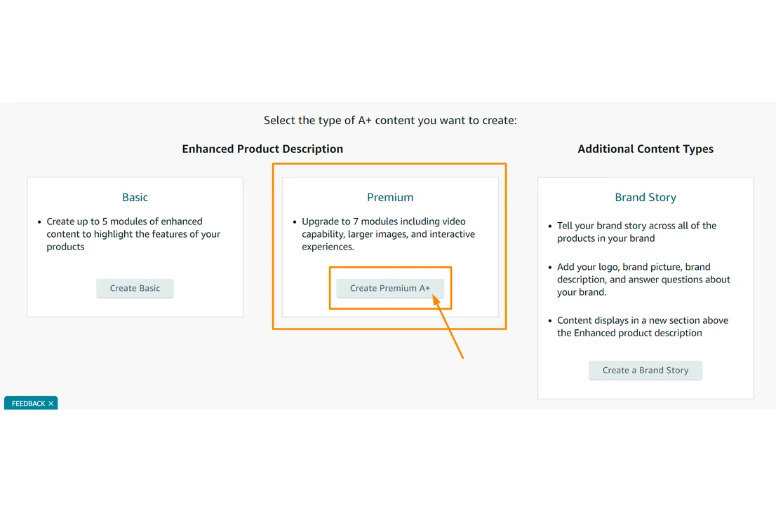
If you’re a registered brand that meets certain criteria, such as being enrolled in Amazon Brand Registry and maintaining an approved history of A+ Content submissions, you can get access to Amazon Premium A+ Content. It represents the most advanced tier with sophisticated features previously reserved for enterprise brands.
Amazon Premium A+ Content offers greater control over your product page. It leads to the creation of a superior customer experience. It allows the use of up to seven modules per ASIN and occupies more space on the listing page than Basic A+ Content.
Premium Amazon A+ Content opens up various module choices. Here are some typical Amazon A+ Content examples:
- Larger images – Display visuals that stretch across the entire width of the page.
- Videos – Integrate 720p videos to capture customer interest.
- Interactive hotspots – Overlay descriptive text on different areas of an image. Customers can hover over these hotspots to see pop-up text highlighting key product benefits.
- Navigation carousels – Provide an interactive presentation where customers can scroll or click through multiple images to explore different product features.
- Q&A sections – Address frequently asked questions with detailed answers, assisting customers in making informed decisions.
- Enhanced comparison charts and tables – Offer customers a comprehensive view of product attributes for better understanding.
Companies that leverage Amazon Premium A+ Content might experience a sales boost of up to 20%.
Best for: High volume sellers with 100-plus ASINs, premium luxury brands where storytelling justifies investment, and products with complex features that need detailed explanation.
Who Can Use Amazon A+ Content?
Amazon A+ Content can be used by Professional sellers who are enrolled in Brand Registry as brand representatives or authorized resellers for the relevant brand ASINs. It is described as available to brand owners/brand representatives and authorized resellers for enhancing the product detail page.
So, sellers without Brand Registry access or the required role for the brand’s ASINs usually cannot use A+ Content. That means the limitation is not just “brand owner vs. non-owner,” but whether the seller has the correct Brand Registry permissions tied to the brand.
For Premium A+ Content, the bar is higher. Amazon says eligible brands need a Brand Story published on all brand-owned listings and five approved A+ Content projects in the last 12 months; eligibility is then re-evaluated automatically in A+ Content Manager.
How Much Does Amazon A+ Content Cost?
All kinds of A+ Content (basic, brand story, and premium) are free to all sellers enrolled in the Amazon Brand Registry. However, there might be other costs for:
- Professional photography and videography: High-quality visuals are crucial for effective A+ Content. If you cannot take good product photos or videos, you might need to hire a professional photographer or videographer.
- Content creation: If you don’t specialize in creating A+ Content, you can hire a content creation service to help you write the copy and design the layout.
How to Create A+ Content in 6 Steps with Timeline
Creating Amazon A+ Content may seem overwhelming at first, but the process is actually straightforward when broken into clear steps.
Below, we’ll walk you through how to create A+ Content on Amazon in 6 simple steps, along with estimated timelines to help you plan and publish faster.
Step 1: Verify your brand registry enrollment
Before you can create A+ content on Amazon, Brand Registry enrollment is required. If you haven’t registered yet, visit the Brand Registry enrollment page in Seller Central and submit your registered trademark number (or pending application filed through Amazon IP Accelerator).
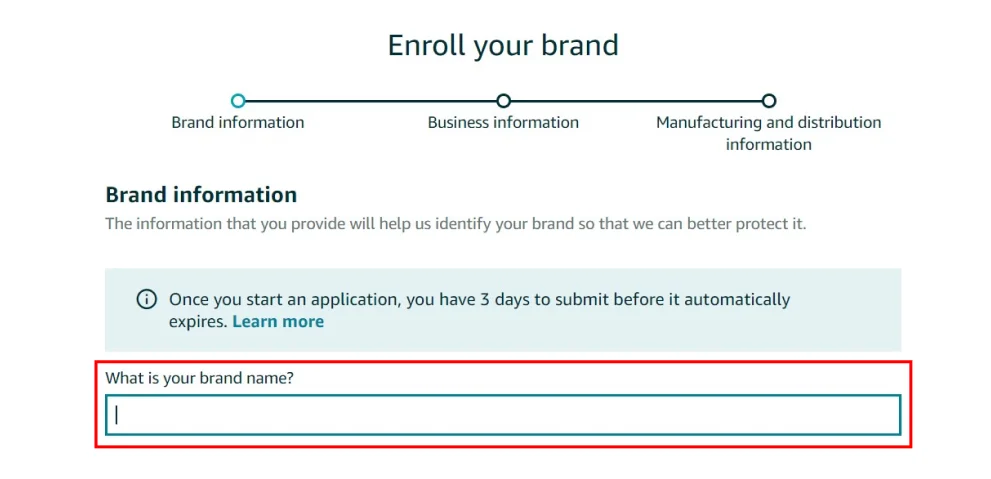
Amazon Brand Registry enrollment typically takes 2 to 4 weeks. Once approved, you’ll receive a confirmation email and access to the A+ Content Manager where you’ll create A+ content Amazon features.
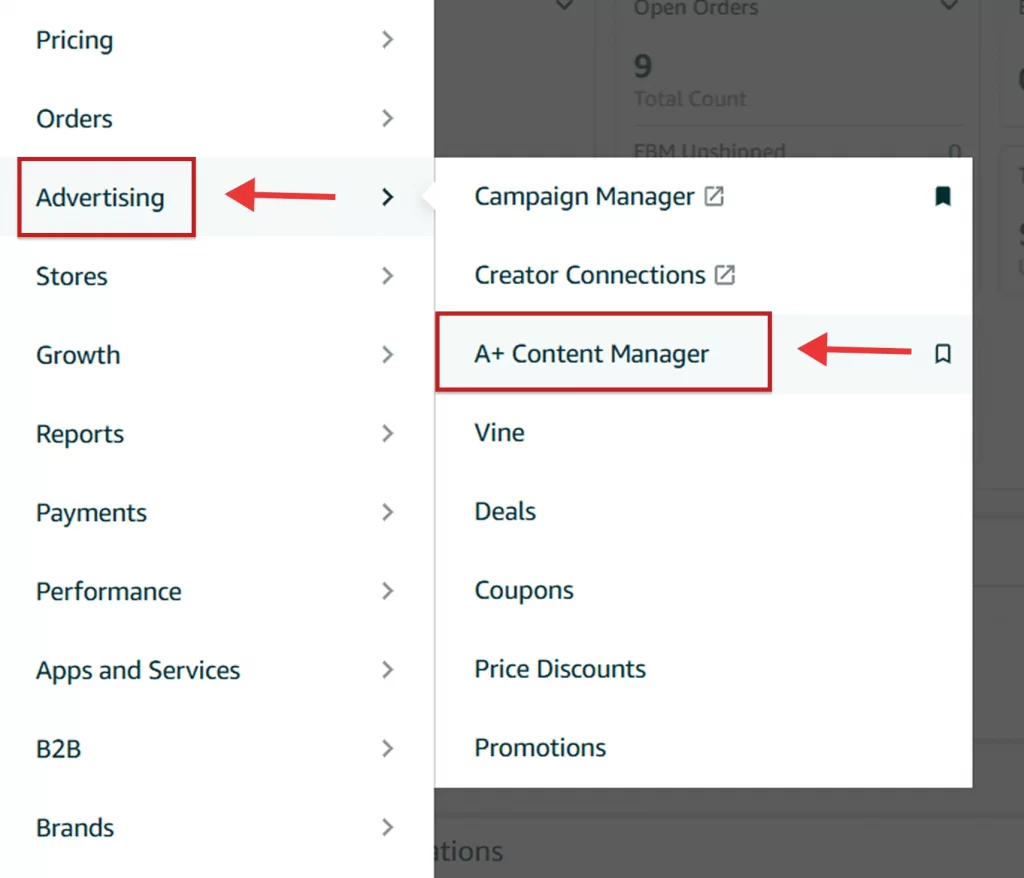
Step 2: Access the A+ content manager
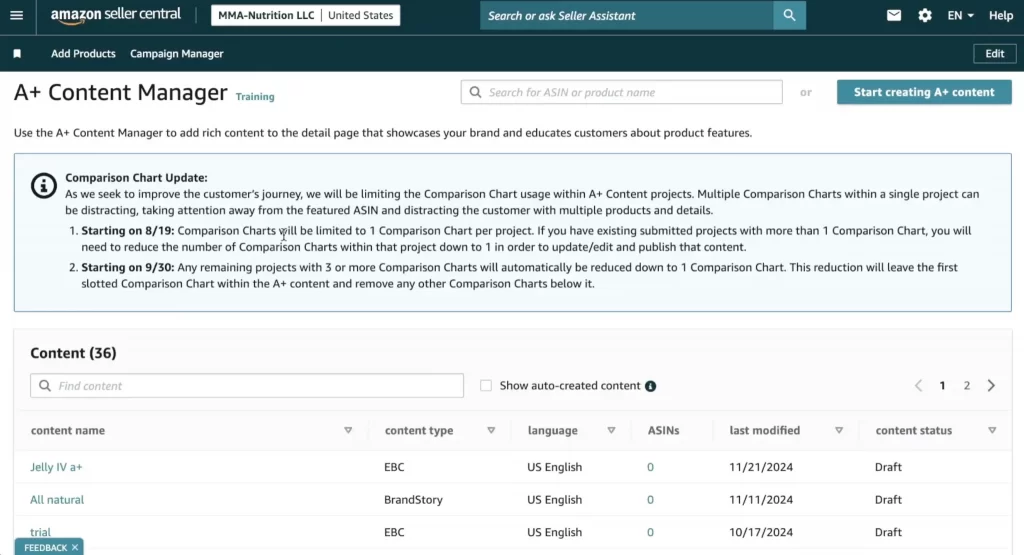
Log in to Seller Central and navigate to Advertising then A+ Content Manager.
The dashboard displays all previous A+ projects with their current status, including approved, pending, or revision needed.
Step 3: Choose a content type and name your project
On the right corner, click the Start creating A+ content button
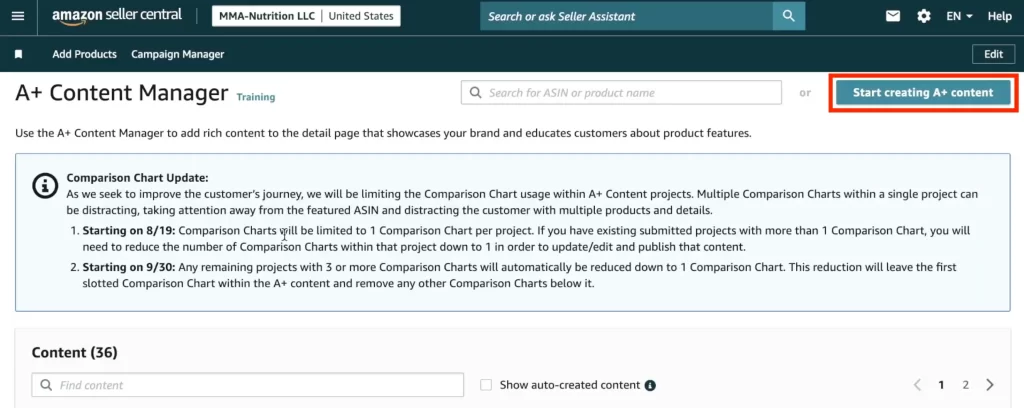
Then, choose one of the content type.
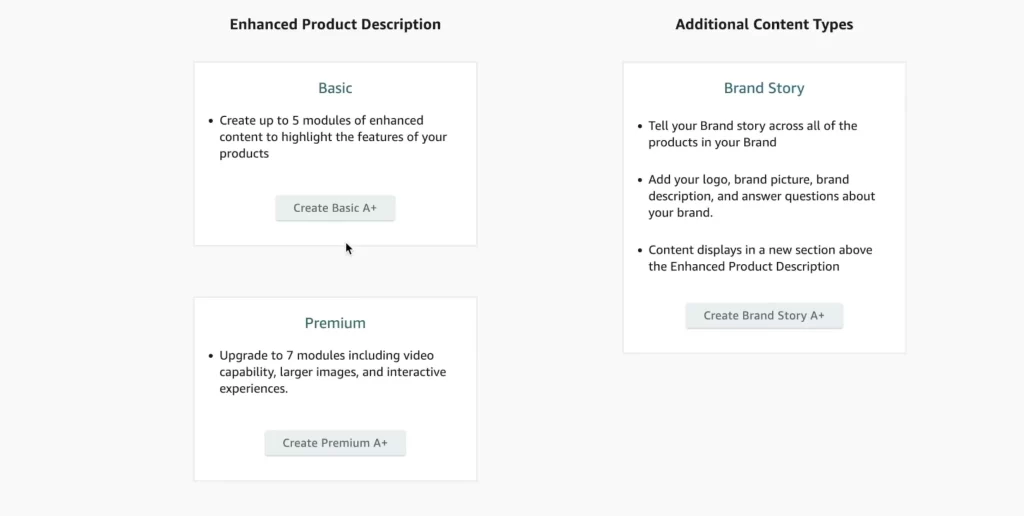
Next, name your project to track different versions and purposes across your catalog.
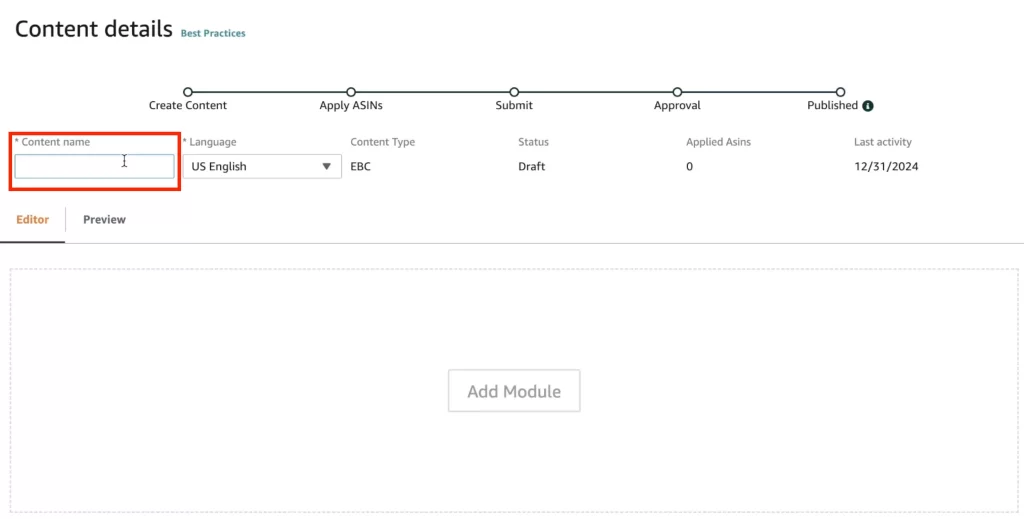
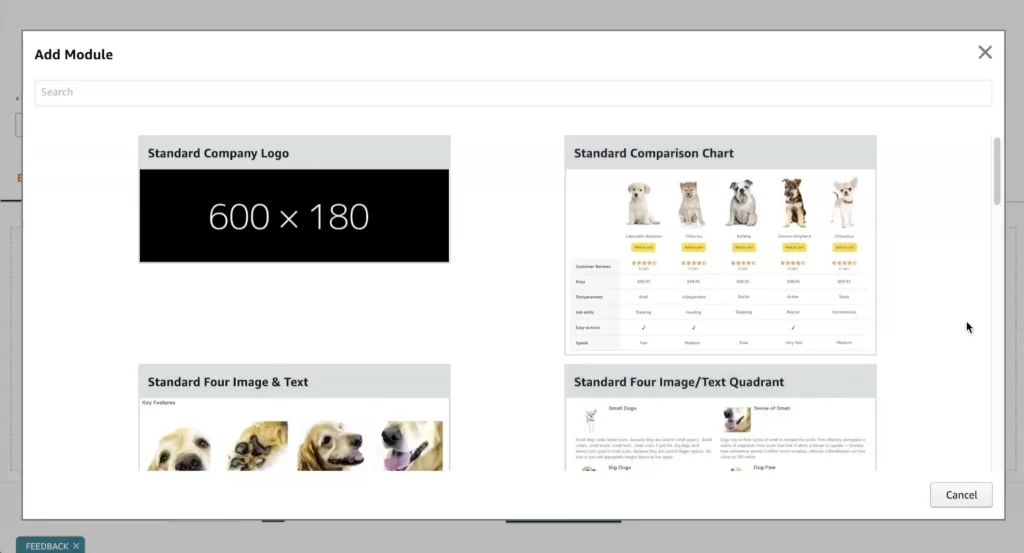
Step 4: Select and customize modules
Click Add Module, then select your preferred layout (e.g., Image Header with Text, Four-Image Column, or Comparison Chart).
Then, upload your high-resolution images and type in your benefit-focused copy.
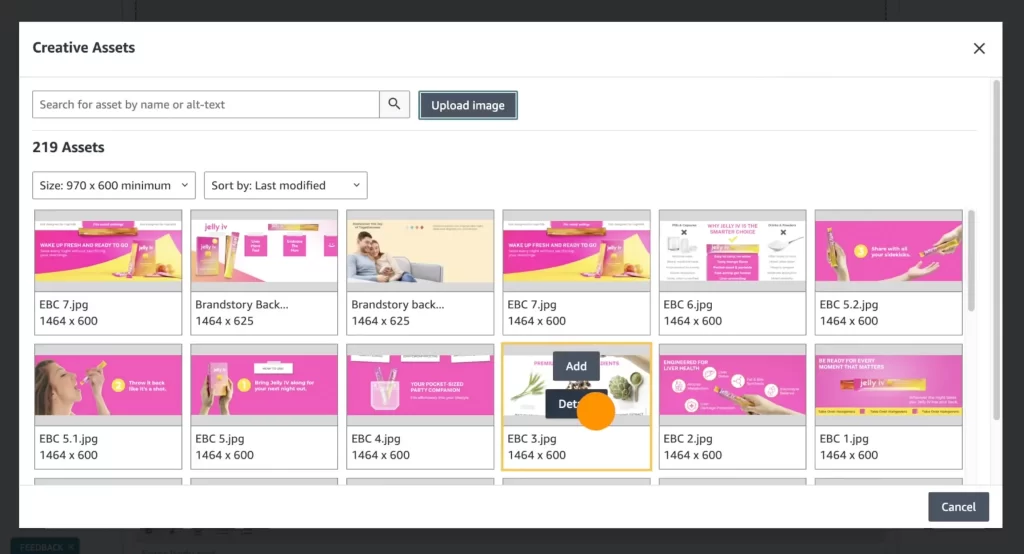
Pro tip: Always add Alt Text to your images. This improves your back-end SEO by letting Amazon index your descriptive keywords.
Step 5: Apply to ASINs and review
After completing module creation, hit “Next Apply ASINs” and search for products receiving this A+ Content.
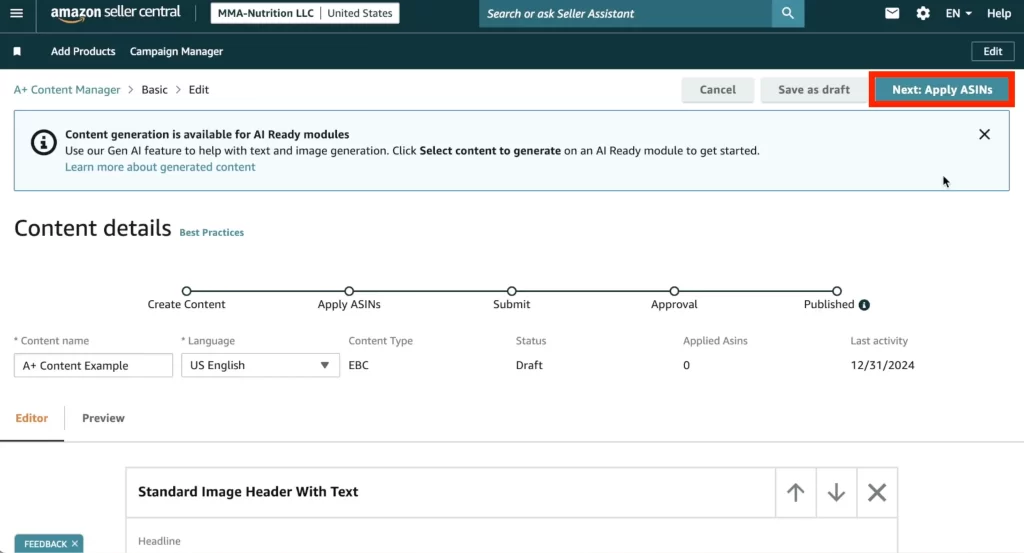
Click through the preview checking for typos, broken image links, and layout issues. Examine how everything appears on both desktop and mobile views. It’s better to fix any problems before submission.
Need ASINs for A+ Content? Start with Product Listing
To apply A+ Content, your products must first be listed on Amazon and connected to valid ASINs. With LitCommerce, you can list products on Amazon without existing ASINs, then sync pricing, inventory, and product details from one central dashboard.
Step 6: Submit for approval
Click “Submit for approval” to send your A+ Content to Amazon’s review team.
For first-time submissions, Amazon typically completes the review within 7 business days. If revisions are required, resubmissions are usually reviewed faster, often within 24 to 48 hours.
You’ll receive an email notification once your content is approved or if additional changes are needed.
Pro tip: Submit your A+ Content early in the week, ideally on Monday morning, to avoid delays caused by weekend review slowdowns. Friday afternoon submissions often take longer to process.
Once approved, your A+ Content will appear live on your product pages within 24 hours after approval.
Top 7 Amazon A+ Content Examples
If you need inspiration for creating standout product listings, check out this selection of typical 7 Amazon A+ Content examples.
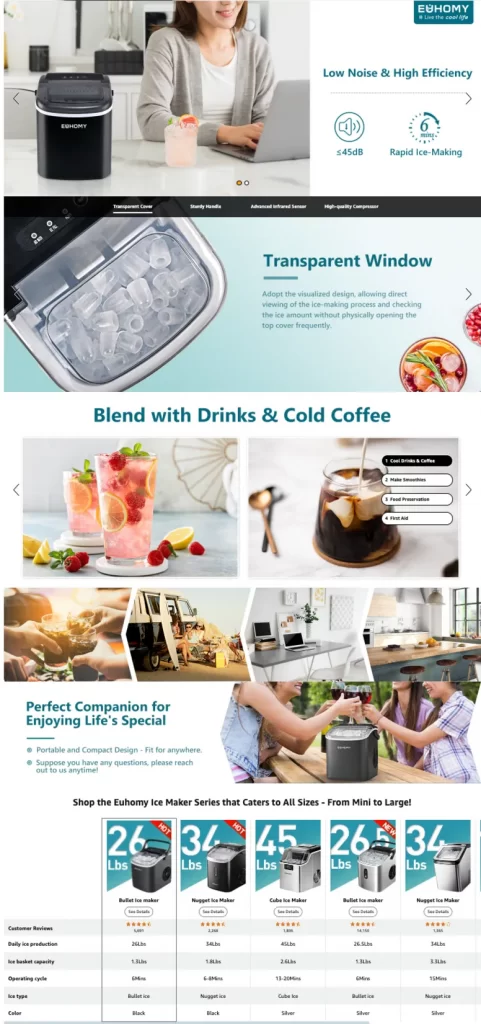
1. EUHOMY Ice Maker Machine
EUHOMY is a brand known for producing a variety of home appliances, including ice makers, refrigerators, and other small kitchen and household devices. They focus on offering affordable and efficient products designed to enhance everyday living.
In this product A+ Content, EUHOMY keeps things consistent with its branding color across its product pages. Bold headlines showcase key features, while multiple carousels (special features offered by Premium A+ Content) visually emphasize their benefits. They even include comparison tables featuring different EUHOMY models, making it easy to find the perfect fit for your needs.
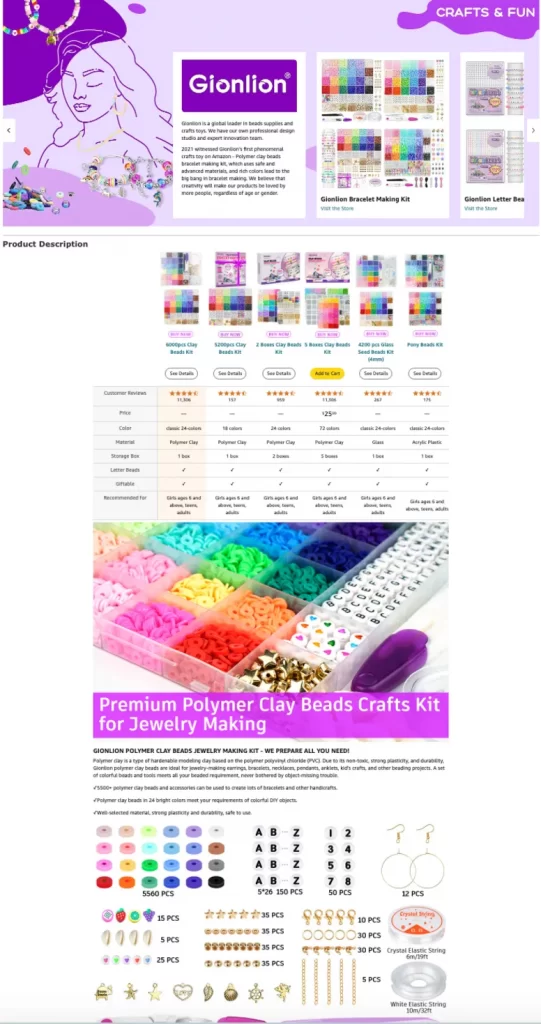
2. Gionlion Clay Beads Making Kit
Gionlion is a famous Amazon store that supplies bead and craft toys for crafters of all ages and skill levels. Gionlion uses A+ Content to share the story of its founding and mission to support creativity in others. Detailed, large images showcase the contents of each kit they offer. A comparison table of different products helps customers choose the right kit box for their specific needs.
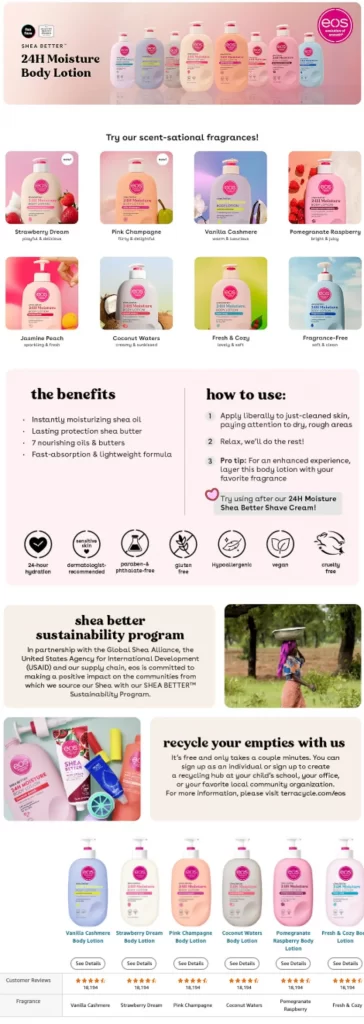
3. eos Shea Better Body Lotion
Eos (Evolution of Smooth) is a beauty and skincare company based in New York City known for its all-natural products. The brand focuses on natural ingredients and innovative design, offering a range of body and lip care products to provide effective and enjoyable self-care experiences.
The eos Shea Better Body Lotion uses A+ Content to showcase its wide range of fragrances and key product benefits to customers. Additionally, it employs graphics to highlight the lotion’s nourishing properties further, ensuring customers fully understand their competitive advantages before selecting.
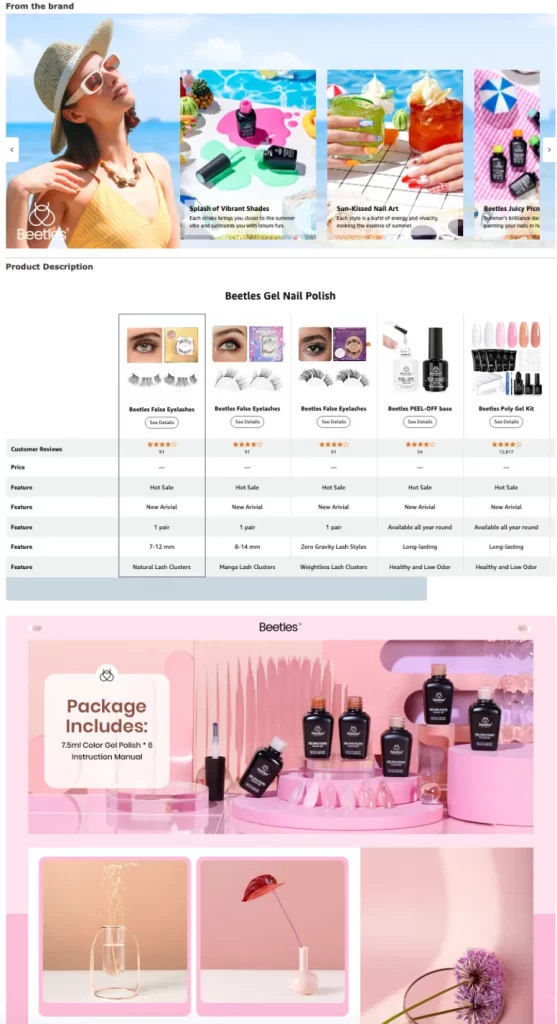
4. Beetles Gel Nail Polish
Beetles Gel Polish is a popular nail care brand known for its high-quality, vibrant gel nail polishes. The brand offers a wide range of nail care products designed for both professional and at-home manicures.
Beetles Gel Polish presents a Brand Story module that vividly showcases the stunning results achieved with its products and highlights its achievements over the years. High-quality images visualize how the gel polishes work in customers’ hands, displaying vibrant colors and flawless finishes. A comparison table is included to introduce more Beetles Gel Polish brand items.
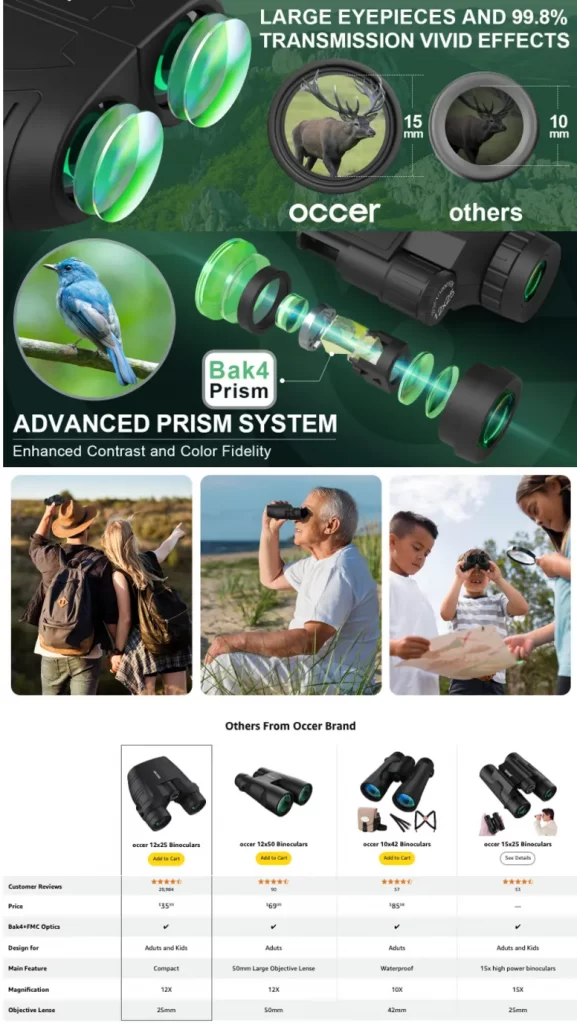
5. Occer Compact Binoculars
Occer is a brand specializing in high-quality optical products, including binoculars and monoculars, designed for outdoor enthusiasts and nature observers. They focus on delivering durable, user-friendly gear that enhances the viewing experience.
The brand’s A+ content for Compact Binoculars effectively highlights the product’s key features. High-quality images and clear descriptions emphasize the binoculars’ superior brightness and 99.8% light transmission, showcasing their exceptional performance and vivid viewing effects. Occur also inserts a clear comparison table that introduces other products for further reference.
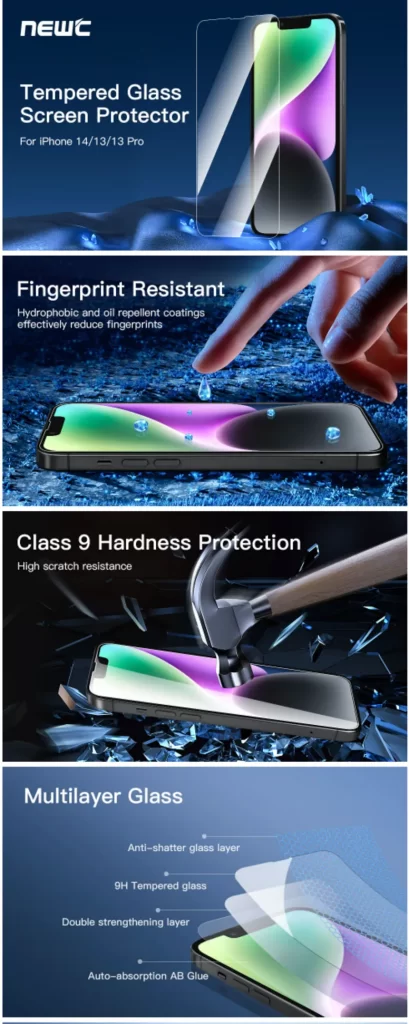
6. NEW’C Screen Protector
NEW’C offers high-quality screen protectors and phone accessories designed to enhance and protect mobile devices. They focus on offering durable, easy-to-apply products that provide reliable protection against scratches and damage.
For the screen protector product, NEW’C uses mostly large images with text overlays in A+ content to showcase the key features and benefits. This clear approach helps customers understand what they can benefit from the items.
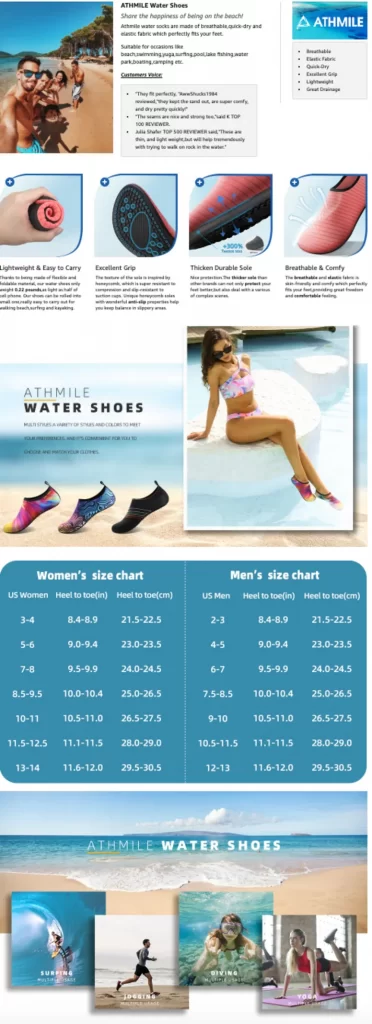
7. ATHMILE Water Shoes
Athmile is a brand targeting athletes with innovative training solutions and performance optimization tools. And water shoes are one of their notable products that gain high sales volume on Amazon
Athmile effectively combines the Brand Story and A+ content to showcase its brands and products. It uses multiple carousels featuring lifestyle images and descriptive text to highlight the water shoes’ key features and capabilities. Additionally, a size chart is included in the large image module for easy reference.
5 Best Practices for High-Converting A+ Content Amazon
After spending many days researching, we see that top sellers follow consistent practices when building A+ content. These five Amazon A+ content best practices generate most of the conversion lift difference between average and exceptional A+ pages.
Follow Amazon A+ content guidelines
Before designing your Amazon A+ content, make sure you understand Amazon’s A+ content rules. This is important because Amazon reviews your A+ Content before it goes live. If your content includes unsupported claims, pricing details, promotional language, or low-quality images, Amazon may reject it.
To avoid delays, you should keep your content clear, accurate, and product-focused. For example, avoid phrases like “best seller,” “cheapest,” “100% guaranteed,” or “limited-time offer” unless Amazon allows them in that context. You should also avoid adding external links, contact information, or customer reviews inside your A+ modules.
Instead, focus on approved product details. You can talk about materials, features, use cases, care instructions, size, compatibility, and brand values. This helps your content stay useful while reducing the risk of rejection.
Start with the buyer’s biggest questions
After making sure your content meets Amazon’s requirements, the next step is to build it around your buyer’s questions. This is where many sellers make a mistake. They use A+ Content only to repeat product bullets rather than give shoppers new and useful information.
Think about what buyers usually ask before purchasing your product. For example:
- What problem does this product solve?
- What makes it different from similar products?
- What size, material, or model should I choose?
- How do I use it?
- Is it suitable for my specific needs?
Once you know these questions, build your A+ Content around them. You can use image-and-text modules to explain key benefits, comparison charts to show product differences, and lifestyle images to show the product in real situations.
This approach works well because shoppers do not want to read long blocks of text. They want quick answers that help them decide with confidence.
Use high-quality lifestyle Images
Since Amazon shoppers often scan before they read, strong visuals can make your A+ Content much more effective. While your main product images usually show the product clearly, A+ Content gives you more room to show the product in context.
For example, if you sell kitchen appliances, you can show the product being used in a real kitchen. If you sell beauty products, you can show texture, application, and results. If you sell outdoor gear, you can show the product in an outdoor setting.
Good lifestyle images help shoppers imagine owning the product. They also make your product feel more practical and trustworthy.
However, your images should still be clean and easy to understand. Avoid cluttered designs, tiny text, or too many messages in one image. Each visual should focus on one clear idea, such as a product benefit, feature, use case, or size detail.
Build comparison charts to increase average order value
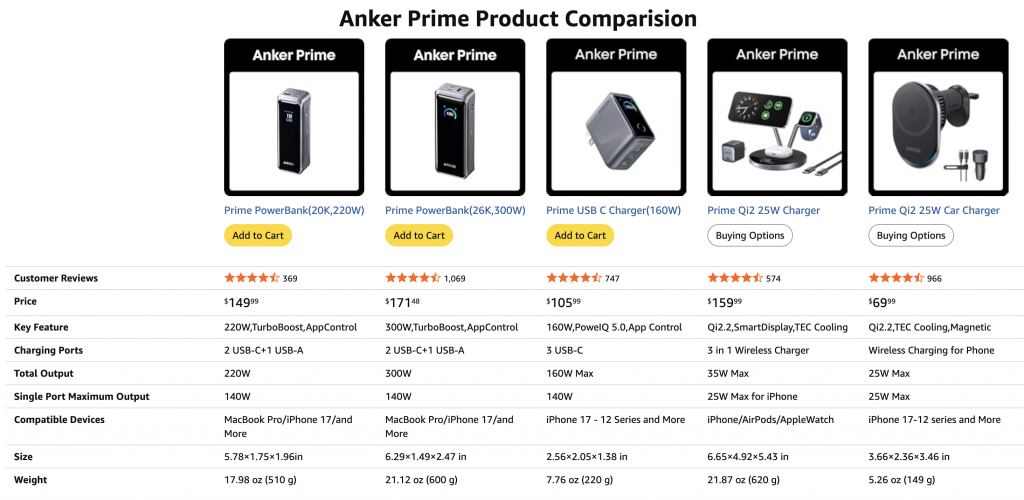
Comparison charts are one of the most useful modules in Amazon A+ content. They help shoppers compare different products from your catalog without leaving the listing.
This is especially helpful if you sell similar items, product bundles, different sizes, or upgraded versions. Instead of letting shoppers search elsewhere, you can guide them to the best option within your own brand.
For example, a comparison chart can show:
- Product size
- Key features
- Best use case
- Material
- Color options
- Compatible accessories
- Price range or product tier
A clear comparison chart can also support cross-selling and upselling. If a shopper realizes that another version better fits their needs, they may choose a higher-value product from your catalog.
To make the chart effective, keep it simple. Compare only the most important points and make sure each product difference is easy to scan.
Keep the copy short and easy to scan
Even with strong images and comparison charts, your A+ Content can still lose impact if the copy is too long or difficult to read. Amazon shoppers usually compare products quickly, so your message needs to be clear at first glance.
Instead of writing long paragraphs, use short sections with clear headings. Each module should focus on one main message. For example, one module can explain durability, another can explain comfort, and another can explain what is included in the package.
A good rule is to write for scanning first. Use simple words, benefit-driven phrases, and clear product details. Avoid overloading shoppers with technical terms unless they are truly important for the product.
Finally, do not treat A+ Content as a one-time task. Amazon’s Manage Your Experiments tool allows eligible brands to A/B test product images, titles, bullet points, descriptions, and A+ Content to see what resonates with customers and drives more sales.
Ready to Grow Beyond Amazon?
Once your Amazon listings and A+ Content are ready, LitCommerce helps you sell across multiple channels without managing everything manually. Easily list products, sync inventory, and manage orders from one centralized dashboard.
Amazon A+ Content: FAQs
What is Amazon A+ content?
Amazon A+ content is a feature that allows brand-registered sellers to replace standard text product descriptions with enhanced visuals, comparison charts, and rich storytelling. It helps build brand identity, highlights unique features, and is proven to increase conversion rates by up to 8%.
How long does Amazon A+ content take to be visible?
Amazon A+ Content typically takes 7 business days for approval and publication will be complete within 24 hours after approval. You’ll receive an email if any changes are required.
Can I edit A+ content?
Certainly, you can edit Amazon A+ Content after it has been published through the A+ Content Manager dashboard in your Seller Central account. However, keep in mind that you must resubmit the updated A+ Content for approval. It might take up to seven business days for the changes to be reflected on your product detail page.
Does A+ content get indexed?
While Amazon officially states that its search engine does not index Amazon A+ Content and that it does not impact a product’s ranking or visibility. However, Amazon and Google might index keywords present in alt texts within A+ Content.
How much does Amazon A+ content cost?
Amazon A+ Content (both Basic and Premium) is currently free to create for Brand Registered sellers through Amazon Seller Central.
The only true mandatory cost is a Professional Selling Account, which is $39.99/month. However, if you choose to outsource the copywriting and graphic design to an agency or freelancer, you can expect to pay anywhere from $100 to $5,000+ per project depending on the complexity of the modules.
What are the A+ content standards for Amazon?
Amazon A+ Content allows registered brands to enrich product listings with unique brand stories and enhanced images. To ensure your content is approved quickly, you must follow strict guidelines regarding what you can include, formatting restrictions, and image requirements
Can anyone use A+ content on Amazon?
Not everyone can use Amazon A+ Content natively, but access has expanded. Basic A+ Content is free and available to registered brand owners and certain sellers with generic products, while higher-tier options require strict performance criteria.
Yes, Amazon A+ Content is worth it. It gives sellers a competitive advantage in a marketplace filled with numerous product listings. Plus, according to Amazon, A+ Content can boost sales by up to 8%, while effective Premium A+ Content can enhance sales by up to 20%. Amazon A+ Content typically takes 8 business days for approval. You’ll receive an email if any changes are required. Certainly, you can edit Amazon A+ Content after it has been published through the A+ Content Manager dashboard in your Seller Central account. However, keep in mind that you must resubmit the updated A+ Content for approval. It might take up to seven business days for the changes to be reflected on your product detail page. While Amazon officially states that its search engine does not index Amazon A+ Content and that it does not impact a product’s ranking or visibility. However, Amazon and Google might index keywords present in alt texts within A+ Content.
Conclusion
Amazon A+ Content is a valuable tool to enhance your product’s conversion rate. While it may demand an initial investment of time and money, the return on investment (ROI) makes it worthwhile for the long term. If you’re a brand-registered seller, leveraging A+ content can significantly contribute to multiplying your business.
For more tips and guides on selling on the Amazon marketplace, check our eCommerce blog now. If you need further support or have questions, don’t hesitate to contact us. LitCommerce offers 24/7 live chat support, providing real-time assistance from our dedicated team.