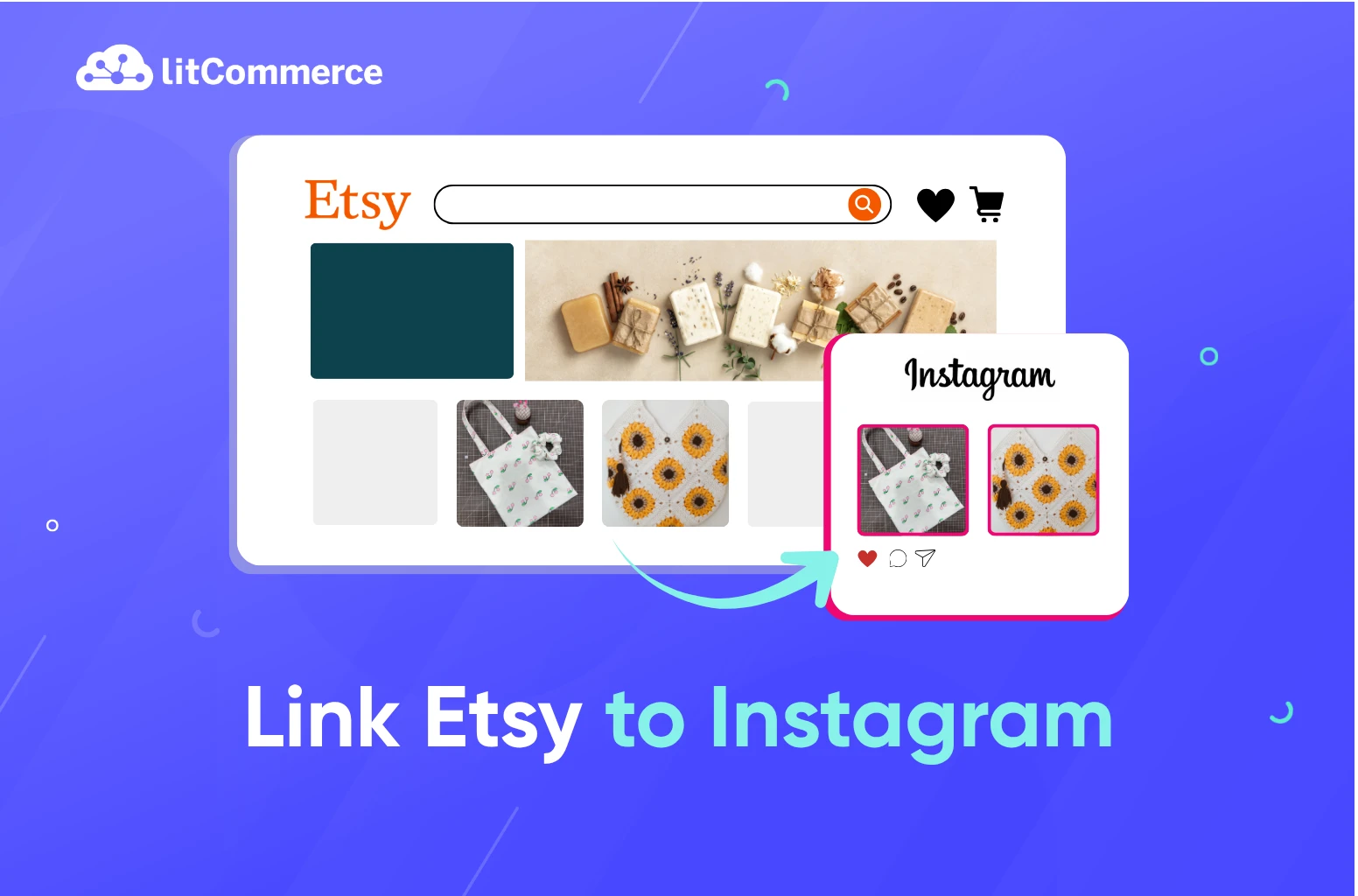
Instagram is one of the best platforms for Etsy sellers to showcase products and drive traffic to their shop. With about 3 billion monthly active users, Instagram puts your handmade goods, vintage finds, and creative work in front of a massive, visually driven audience, exactly the kind that shops on Etsy.
But if you’ve learned how to link Etsy to Instagram recently, you may have run into outdated guides, because Etsy is no longer a supported partner in Meta Commerce Manager, and the old Facebook Business Manager method no longer works.
So, can you still link Etsy to Instagram in 2026? Yes, just through different methods than before.
How to link Etsy to Instagram in 2 ways:
- Add your Etsy shop link to your Instagram bio using your Share & Save trackable link
- Share individual Etsy listings to Instagram using Etsy’s built-in Social Media tool in Shop Manager
This guide walks you through how to link Etsy Shop to Instagram using each method, so you can start driving Instagram traffic to your Etsy shop today.
Why connect Etsy to Instagram?
Before we get into the steps, here’s why it’s worth taking the time to link your Etsy shop to Instagram in the first place.
Reach a purchase-ready audience
Instagram is built for visual discovery, and that makes it a natural fit for Etsy’s most popular categories like handmade goods, jewelry, home décor, and vintage items.
Research commissioned by Meta shows that 83% of Instagram users discover new products and services via the platform. That’s a massive pool of buyers who are already in browsing mode when they open the app, exactly the kind of audience Etsy sellers want in front of their products.
Linking your Etsy shop to Instagram puts your products in front of this audience on a platform where they’re actively looking for things to buy, not just scrolling passively.
Drive traffic and save on Etsy fees with Share & Save
Here’s an incentive most Etsy sellers overlook: Etsy’s Share & Save program rewards you for driving your own traffic to your shop. Once you enroll in Share & Save, any buyer who clicks your shared link and places an order within 30 days earns you an instant 4% refund on that order total, posted directly to your Etsy Payment account.
For example, if a buyer places a $100 order through your Instagram bio link, Etsy refunds $4 back to your account immediately after the purchase is completed. Share enough and those savings add up fast.
That means promoting your Etsy shop on Instagram doesn’t just bring in more traffic, it actively reduces your selling costs every time it works.

Build your brand beyond the marketplace
Sellers who rely solely on Etsy search traffic are vulnerable whenever Etsy updates its algorithm or increases competition in their niche. An Instagram following is an audience you own, one that you can reach directly, regardless of what happens on Etsy’s platform. The same logic applies to sales channels: marketplace integration spreads your products across Amazon, eBay, and more so you don’t depend on Etsy alone.
Over time, a consistent Instagram presence builds brand recognition, repeat customers, and a community around your shop that no marketplace ranking can take away.
Your email list is another audience you own; here’s how to collect emails on Etsy.
Ever thought about linking Etsy to Facebook Shops?
Instagram is already driving traffic to your Etsy shop, Facebook Shops puts your products in front of an even wider audience, and LitCommerce lets you manage both from one dashboard.

How to Add Etsy Link to Instagram Bio
Adding your Etsy shop link to your Instagram bio is the simplest way to learn how to link Etsy to Instagram. It works for every seller, requires no special setup, and takes less than two minutes.
Here’s how to do it.
Step 1: Set up Share & Save and copy your trackable shop link
Before copying your Etsy link, it’s worth taking one extra minute to set up Etsy’s Share & Save program if you haven’t already. Once enrolled, any sale that comes through your shared link within 30 days earns you an instant 4% refund on that order total, posted directly to your Etsy Payment account.
To set it up and get your trackable link:
- Go to Shop Manager → Marketing → Share & Save
- Select Join now to enroll
- Once enrolled, copy your trackable shop link from the same page
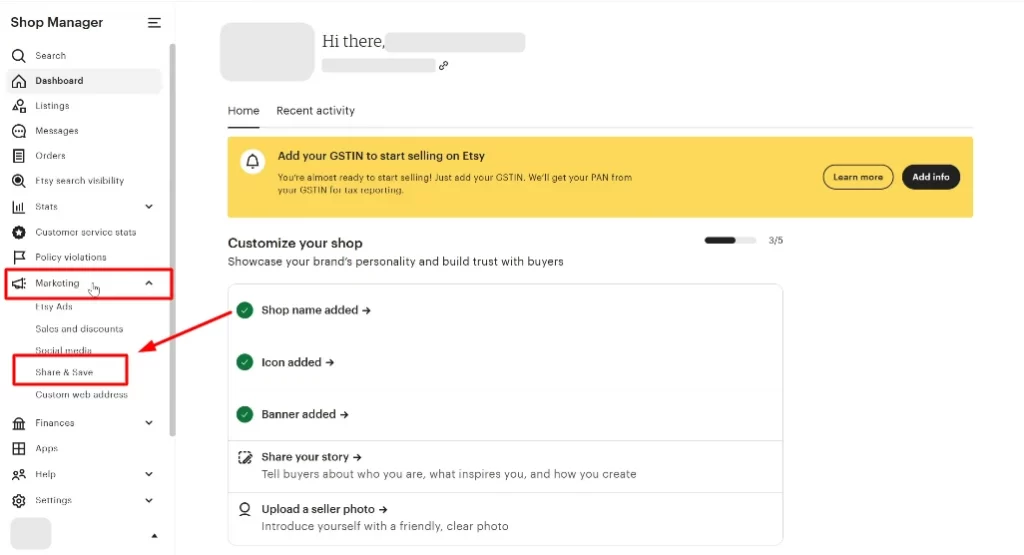
Your trackable link follows the format yourshopname.etsy.com. Use this link, not the plain URL from your browser address bar, whenever you share your shop on Instagram. Links placed in Etsy Messages or listing descriptions do not count toward Share & Save benefits, so always share externally.
Step 2: Open Instagram and go to Edit Profile
- Tap Edit Profile
- Open the Instagram app
- Tap your profile photo in the bottom right to go to your profile
Step 3: Paste your Etsy link in the Bio Links field
- Tap Links (or Website depending on your account type)
- Tap Add external link
- Paste your Share & Save link from Step 1
- Add a link title such as “My Etsy Shop” so followers know where they’re going
- Tap Done
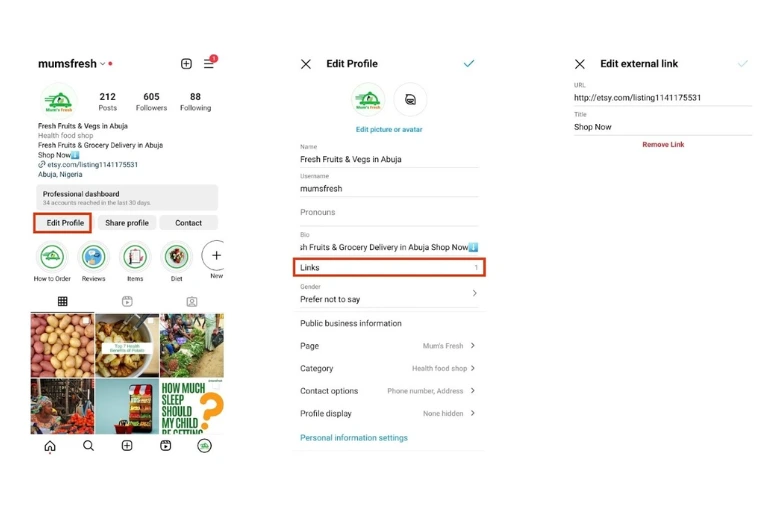
Instagram currently allows up to 5 external links in your bio, so if you sell across multiple platforms or want to link to a specific listing alongside your main shop, you have room to do so.
Step 4: Save and verify your link is live
- Tap Done or Submit to save your profile
- Go back to your profile page and tap the link to confirm it opens your Etsy shop correctly
If you want to link to multiple individual listings instead of just your shop homepage, consider using a link-in-bio tool such as Linktree or Later. These let you create a simple landing page with multiple clickable links, all accessible from the single bio link slot.
Pro tip: Once your Etsy link is in your bio, add a CTA in your post captions and Stories directing followers to it, something as simple as “Shop the link in bio” paired with a downward arrow emoji works well to drive clicks.
What’s more, if you have an Instagram Business account, you may also be eligible to display a View Shop button directly on your Instagram profile. This is a dedicated button that sits below your bio and links straight to your Etsy shop.
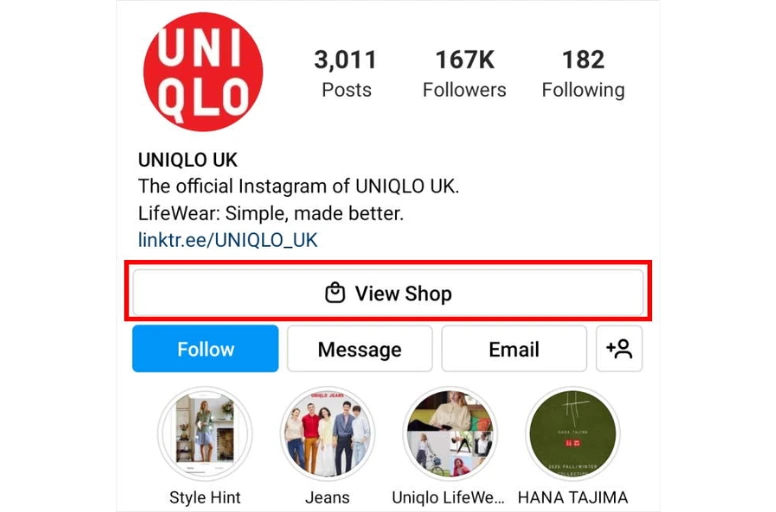
This gives your profile a more polished, storefront-like appearance and makes it easier for visitors to find your shop without looking for a bio link.
To proceed, simply send a request from your Etsy shop to link with your Instagram profile. You will receive a notification on your profile later on.
When your profile receives the request, tap “OK” to confirm it. If you choose “Not now,” you can still accept the request later by tapping “Link profile to shops” in Settings.
Once linked, your profile and Etsy shop are connected.
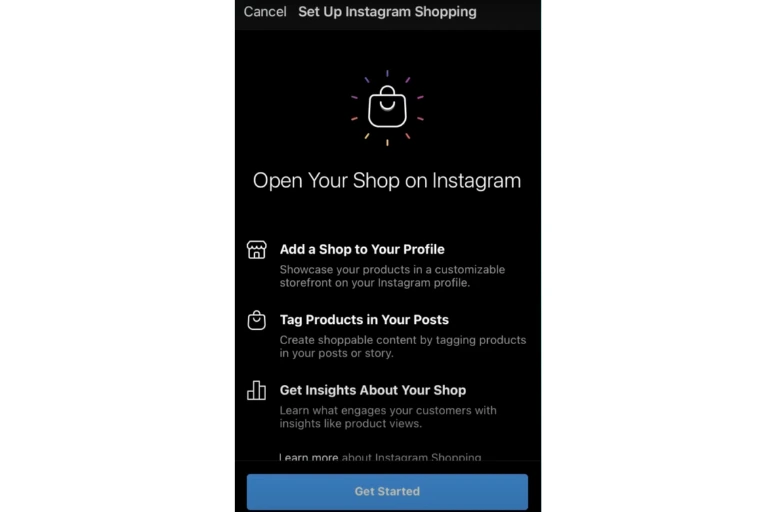
If needed, you can unlink a shop anytime, and the shop will be notified. However, remember that if another account accepts an invitation from your shop, you may lose the ability to link your profile to that shop.
You may also like: How to Sell on Etsy for Beginners in 2026: 8-Step Guide
How to Share Etsy Listings on Instagram
Once your bio link is set up, the next step is actively promoting individual listings on Instagram. If you’ve been wondering how to connect your Etsy Shop to Instagram for listing-level sharing, Etsy’s built-in Social Media tool in Shop Manager is the place to start.
Step 1: Go to Shop Manager and open the Social Media tab
- Log in to Etsy and go to Shop Manager
- Navigate to Marketing → Social Media
- Select Social accounts to connect your Instagram account if you haven’t already
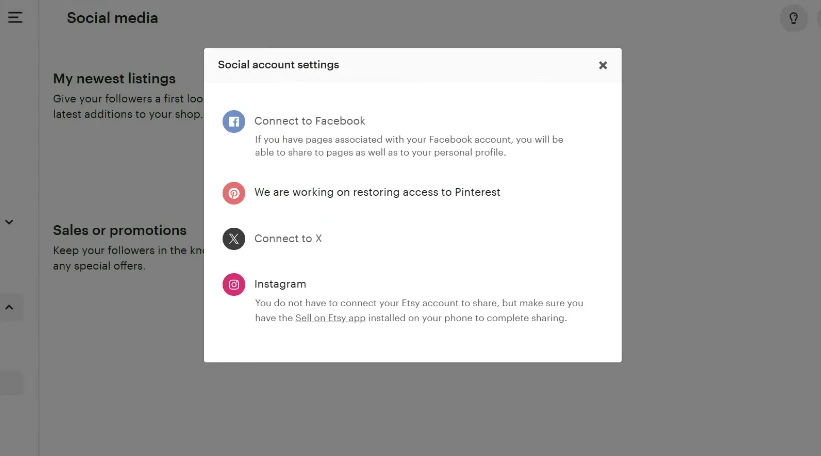
Note: Direct sharing from Etsy to Instagram has been reported as unreliable by many sellers, particularly on iOS. If it doesn’t push through automatically, don’t worry, the workaround is simple and takes no extra time: copy your listing’s Share & Save link from this page and post it to Instagram yourself. Most experienced Etsy sellers do this anyway since it gives them full control over their caption, image selection, and post format.
Step 2: Select the type of post and choose your listing
Etsy’s Social Media tool lets you create 5 types of posts:
- Latest listings: up to 25 of your most recent listings
- Milestones: shop anniversary, sales count, and other achievements
- Sales and coupons: current or upcoming promotions
- 5-star reviews: share positive feedback as social proof
- Favorited items: items you’ve saved
For driving traffic to specific products, select Latest listings, choose the listing you want to promote, and tap Next.
A few things to keep in mind when choosing which listing to share:
- Prioritize new listings early — sharing within the first 24–48 hours helps generate early momentum. An Etsy listing tool that publishes in bulk keeps a steady flow of new listings to share.
- Pick listings with strong product photos since image quality directly affects engagement on Instagram
- Seasonal or gift-relevant listings tend to perform better when tied to upcoming holidays or peak shopping periods
Step 3: Add your caption and Share & Save link
This step is where most sellers leave performance on the table. Don’t use a default caption — write something that speaks to your audience.
A strong Instagram caption for an Etsy listing:
- Opens with what makes the product special — the material, the story, or who it’s made for
- Includes your Share & Save trackable link so any resulting sale earns you the 4% fee refund
- Ends with a clear CTA: “Shop the link in my bio” or “Link in bio to grab yours”
- Adds 5–10 relevant hashtags to extend reach beyond your existing followers
To get your Share & Save link for a specific listing:
- Go to Shop Manager → Marketing → Share & Save
- Under Listings, find the listing you want to share
- Copy its individual trackable link
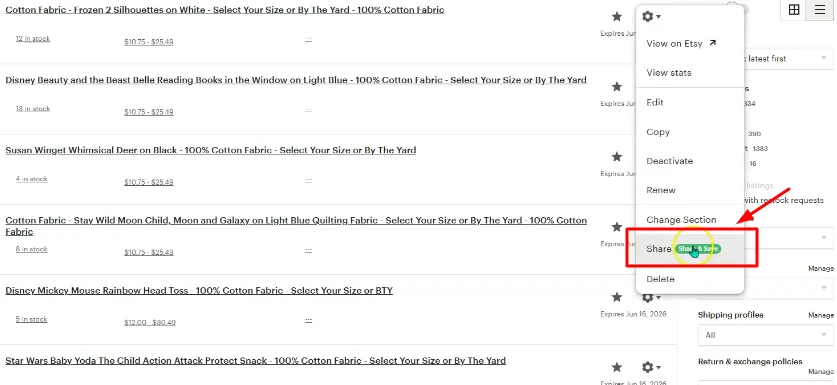
This listing-level link works the same way as your shop link — any sale within 30 days of a click earns you a 4% refund on that order.
Step 4: Post to Instagram or share via Story link sticker
Once your caption and link are ready, you have two options for how to post:
Feed post
- Open Instagram and create a new post
- Upload the listing image directly from your phone
- Paste your caption and Share & Save link
- Publish to your feed
Story with a link sticker
If you want to know how to add your Etsy link to an Instagram Story, this is the most direct method. Stories with a link sticker send followers straight to a specific listing, more targeted than a bio link, and available to all accounts regardless of follower count.
- Open Instagram and create a new Story
- Add your listing image or a short product video as the background
- Tap the sticker icon and select Link
- Paste your listing’s Share & Save link
- Add a text prompt such as “Tap to shop ?” or “Only 3 left — grab yours” to draw attention to the sticker
- Post your Story
Pro tip: You don’t have to choose between feed and Stories — use both for the same listing on the same day with different copy. A feed post builds permanent visibility on your grid; a Story creates urgency and a direct tap-through path. Together they reinforce the same message across multiple touchpoints without feeling repetitive.
You may also like: How to Get More Views on Etsy: 14 Proven Tips That Actually Work
How to Promote Your Etsy Shop Effectively on Instagram
Now that you know how to link Etsy to Instagram. To consistently drive traffic and sales, you need to show up on Instagram in a way that makes people want to click through to your shop. Here’s how to do that.
Optimize your Instagram bio for Etsy sellers
Your Instagram bio is the first thing a potential customer sees when they land on your profile — and it’s the one place where a clickable link actually lives. Make it count.
A well-optimized Etsy seller bio has three things:
- What you sell: be specific. “Handmade ceramic jewelry” is better than “artist.” “Vintage 90s clothing” is better than “vintage lover.”
- Who it’s for: optional but effective. “For the minimalist home” or “gifts for plant lovers” immediately helps the right people self-select.
- A CTA pointing to your link: something as simple as “? Shop my Etsy” or “New listings every week — link below” is enough to direct eyes to your bio link.
Here’s a realistic example of a strong Etsy seller bio:
Handmade silver & gemstone jewelry ✨ Small batch. Made to order. New pieces every Friday ? [yourshopname.etsy.com]
Keep it short, specific, and scannable. Instagram bios are limited to 150 characters as every word needs to earn its place.
Content types that drive Etsy traffic from Instagram
Not all Instagram content drives the same results for Etsy sellers. These are the formats that consistently perform:
- Product photos with context: Don’t just photograph the product on a white background. Show it in use, in a setting, or being made. A ceramic mug photographed on a morning coffee table tells a story. A piece of jewelry shown being worn gives buyers a sense of scale and feel. Context converts better than catalog shots. Product photos with context. Don’t just photograph the product on a white background –
- Behind-the-scenes and process content: Etsy’s core audience values handmade, craft, and the human story behind a product. Short videos or photo carousels showing your process, dyeing fabric, throwing pottery, packaging orders, consistently outperform straight product posts for engagement. Engaged followers become buyers.
- Reels: Reels get significantly more reach than static posts on Instagram’s current algorithm. A 15–30 second Reel showing a product being made, unboxed, or styled can reach thousands of people who don’t yet follow you. End every Reel with a CTA directing viewers to the link in your bio.
- Seasonal and event-driven posts: Etsy’s peak sales periods — Q4 gifting season, Valentine’s Day, Mother’s Day — are also Instagram’s highest-engagement shopping moments. Plan content around these dates in advance and share relevant listings 2–3 weeks before each peak.
Instagram works best as an organic discovery channel for most Etsy sellers, but if you want to accelerate results beyond organic reach, pairing your Instagram strategy with Etsy’s own advertising tools can help you drive targeted traffic to your listings at the same time.
Use Story link stickers to drive traffic to specific listings
When figuring out how to link Etsy to Instagram for individual listings, Instagram Stories with a link sticker are one of the most direct methods available, more targeted than a bio link, and available to all accounts regardless of follower count.
A few tips to get more taps on your link stickers:
- Place the sticker where it’s easy to tap, center or lower third of the screen
- Use urgency when it’s genuine: “Only 3 left in stock” or “Sale ends Sunday”
- Combine Stories with a matching feed post or Reel on the same day to reinforce the message across multiple touchpoints
- Share Stories consistently as accounts that post Stories daily or near-daily tend to stay at the front of followers’ Story queues, which means more visibility
Visit our blog How to Promote Etsy Shop – 7 Strategies for Increased Traffic to discover 7 additional techniques for promoting your Etsy Shop
Selling on Etsy & Facebook Shops Made Easy
Managing listings across multiple platforms manually takes time you could spend on your craft. LitCommerce lets you sync and manage your Etsy and Facebook Shops listings from one dashboard. No copy-pasting between channels.
How to Link Etsy to Instagram – FAQs
Can I sell directly on Instagram after I connect Etsy to Instagram in 2026?
Not through native integration. Etsy is no longer a supported partner in Meta Commerce Manager, which means Etsy sellers can’t tag individual products in Instagram posts with a direct in-app checkout link.
What you can do is drive Instagram traffic to your Etsy shop using your bio link, Story link stickers, and Etsy’s Share to Social Media tool, and with Share & Save active, any sale that comes through those links earns you a 4% fee refund.
Why isn’t my Etsy link working after I connect my Etsy shop to Instagram?
If you’re having trouble with your Etsy link after connecting your shop to Instagram, check these common issues:
– Make sure you’re using the correct link format — your Share & Save link should be yourshopname.etsy.com, not a long URL copied from your browser
– Confirm your Etsy shop is active and in good standing
– If you’re trying to use Etsy’s direct share to Instagram feature and it’s not pushing through, this is a known issue reported by many sellers — copy your link manually from Shop Manager and post it to Instagram yourself instead
– If your bio link isn’t clickable, make sure you’re on an Instagram Business or Creator account, not a personal account
Can I link Etsy to Instagram to promote multiple listings at once?
Yes. First, Instagram allows up to 5 links in your bio, so you can add individual listing links alongside your main shop link. Second, you can promote specific listings through Instagram Stories using the link sticker feature, which lets you attach a different listing link to each Story you post. For sellers with many listings or multiple product categories, a link-in-bio tool like Linktree lets you create a simple landing page with multiple clickable links, all accessible from one bio link slot.=
Conclusion
In short, once you know how to link Etsy to Instagram, you can effortlessly display your items on this social media platform directly from Etsy. What is more, there are many ways you can use Instagram to promote your Etsy shop. Try each approach to find the one that works best for your specific business. And when you’re ready to sell beyond Etsy, an Etsy integration lets you list the same products on your own store and other marketplaces from one dashboard.
Once your shop is linked, focus on building an Instagram presence that works for you over time: consistent product content, behind-the-scenes posts, and Story link stickers pointing followers directly to your listings. Instagram rewards sellers who show up regularly, and so does your Etsy Payment account every time a Share & Save link converts.
Leave us a message if you need any support from LitCommerce. Also, you can join our Facebook community for more helpful eCommerce tips and the latest news.