



Trading card singles alone generated $2.62 billion on eBay in 2025, according to eBay’s own data. The global trading card game market is estimated at $9.2 billion in 2026 and growing at a 6.9% CAGR. Whether you are selling a few pulls from a booster box or clearing out an entire collection, eBay gives you access to millions of buyers who are actively searching for cards.
In this guide, let’s discover how to sell cards on eBay in four simple steps, what grading costs in 2026, eBay’s fee structure for trading cards, and six tips to sell faster.
Key takeaways:
Let’s dive into it!
Is Selling Cards on eBay Worth It?
Yes, selling cards on eBay is worth it for cards valued at $5 or more. eBay is the largest marketplace for trading cards, and its buyer base actively searches for sports cards, Pokémon, Magic: The Gathering, and Yu-Gi-Oh! singles every day. But is it worth selling cards on eBay? Let’s discuss the pros and cons of selling below:
Pros:
- Large market: eBay offers a vast global market with 133 million active buyers, making it easier to find a buyer for almost any card.
- Quick sales: Cards in high demand or from newly released sets can sell within hours, especially during peak seasons like the NFL/NBA draft or Pokémon set launches.
- Flexible listing types: You can list cards at a fixed price with Buy It Now or run a 7-day auction. Auctions work well for rare cards where demand is hard to predict.
Cons:
- eBay high selling fees: Trading cards carry a final value fee of 13.25% on the total sale amount (item price + shipping + sales tax) up to $7,500 per item, plus 2.35% on the portion above $7,500. eBay also charges a per-order fee of $0.30 on orders of $10 or less, or $0.40 on orders over $10. Sellers with a Basic Store subscription or above pay a reduced rate of 12.35% up to $2,500.
- Buyer-friendly policies: eBay’s policies often favor buyers, such as return policies, buyer protection, eBay Money Back Guarantee, etc., which can lead to disputes and potential losses for sellers.
- Competition: The market is competitive, with 18.1 million active sellers and many sellers offering similar items, which can drive prices down.
Verdict: Selling cards on eBay can be profitable, but your results depend on what you are selling and how you price it. Rare, graded, and high-demand cards perform best. For bulk commons under $1 each, consider selling as lots of 50-100 cards rather than individually, since eBay fees and shipping costs eat into margins on low-value singles. Cards worth $5+ generally justify the listing effort.
Understand eBay Card Condition
Card condition directly affects price. A Near Mint card can sell for 3-10x more than the same card in Very Good condition, depending on rarity. Before listing, learn eBay’s condition categories so you can describe your cards accurately and avoid disputes.
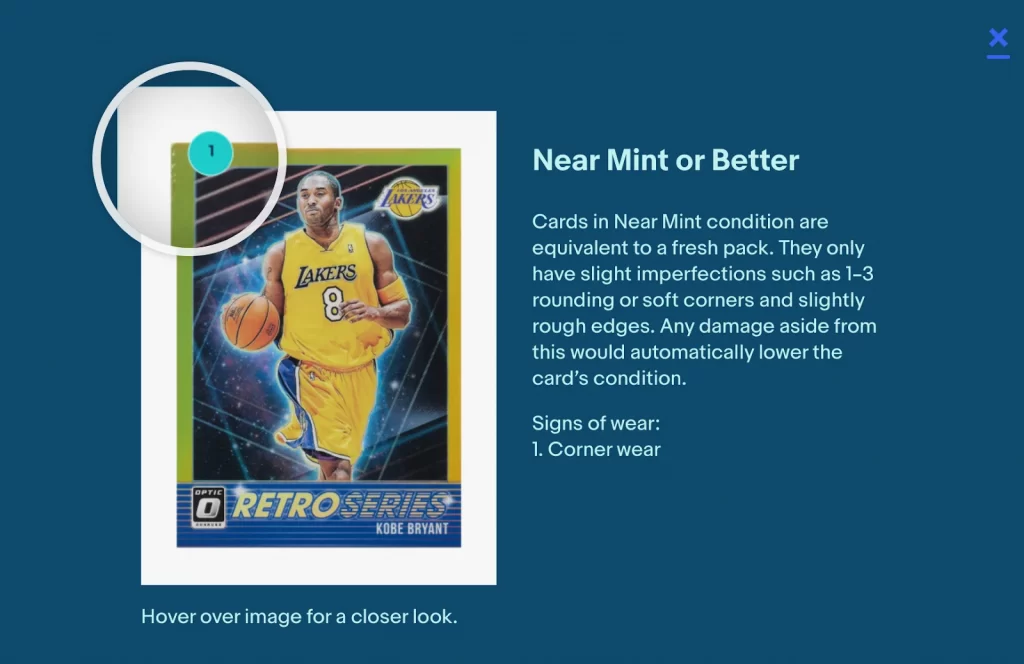
Sports and non-sports trading cards
| Condition | Description |
|---|---|
| Near Mint or better | Equivalent to a fresh pack. Only slight imperfections like 1-3 soft corners or slightly rough edges. Any damage beyond this lowers the condition grade. |
| Excellent | Visible signs of wear including rough edges, moderate chipping, minor discoloration, minor indentation, fuzzy corners, or noticeable scratches. |
| Very Good | Moderate-to-heavy damage across the card: discoloration, chipping, indentation, creases, or scratches. Slight paper loss may be present. |
| Poor | Extremely worn or missing corners. Torn edges, extreme discoloration, multiple major scratches, multiple creases, or stains. |
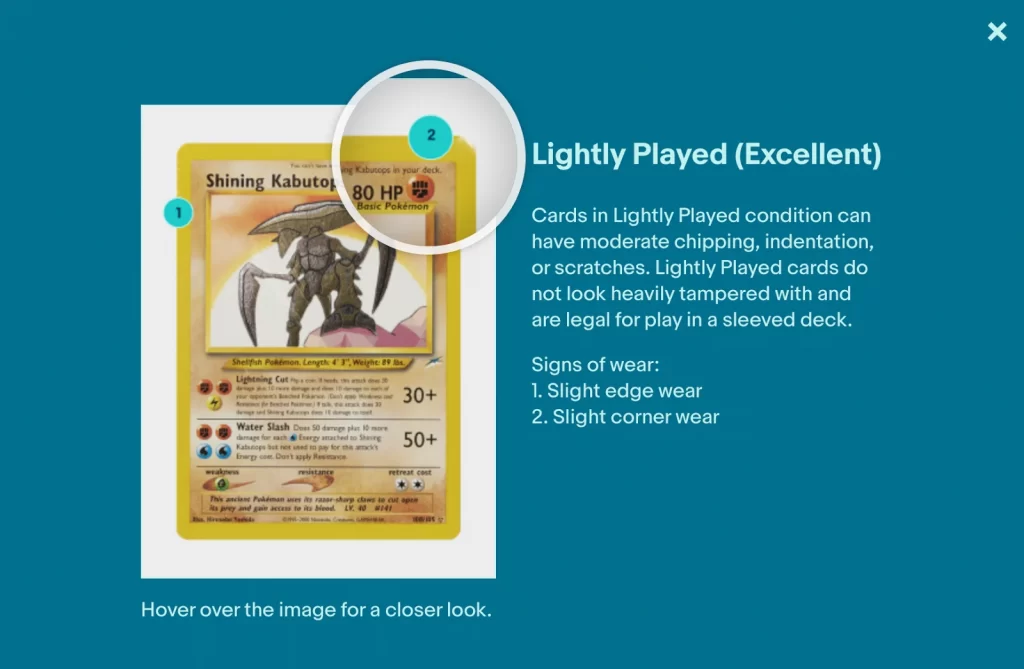
Collectible card games (Pokemon, Magic, Yu-Gi-Oh!)
| Condition | Description |
|---|---|
| Near Mint or better | Minimal or no wear. Appears fresh out of the pack. May have minor chipping, indentation, or scratches. May be “never played” or played with sleeves. |
| Lightly Played (Excellent) | Moderate chipping, indentation, or scratches. Does not look heavily tampered with and is legal for play in a sleeved deck. |
| Moderately Played (Very Good) | Discernible flaws: major chipping around edges and corners, moderate discoloration, indentation, creases, scratches, or stains. No liquid damage. |
| Heavily Played (Poor) | Massive wear and damage. Rounded, chipped, or fuzzy corners and edges. Major discoloration, layering, notching, creasing, and scratches. Less than 30% liquid damage. |
How to Sell Cards on eBay in 4 Steps
To sell cards on eBay, follow these steps:
- Step 1: Search for your card on eBay
- Step 2: List your cards on eBay
- Step 3: Choose your card condition and listing type
- Step 4: Set up price and card shipping
Now, let’s dig into each step!
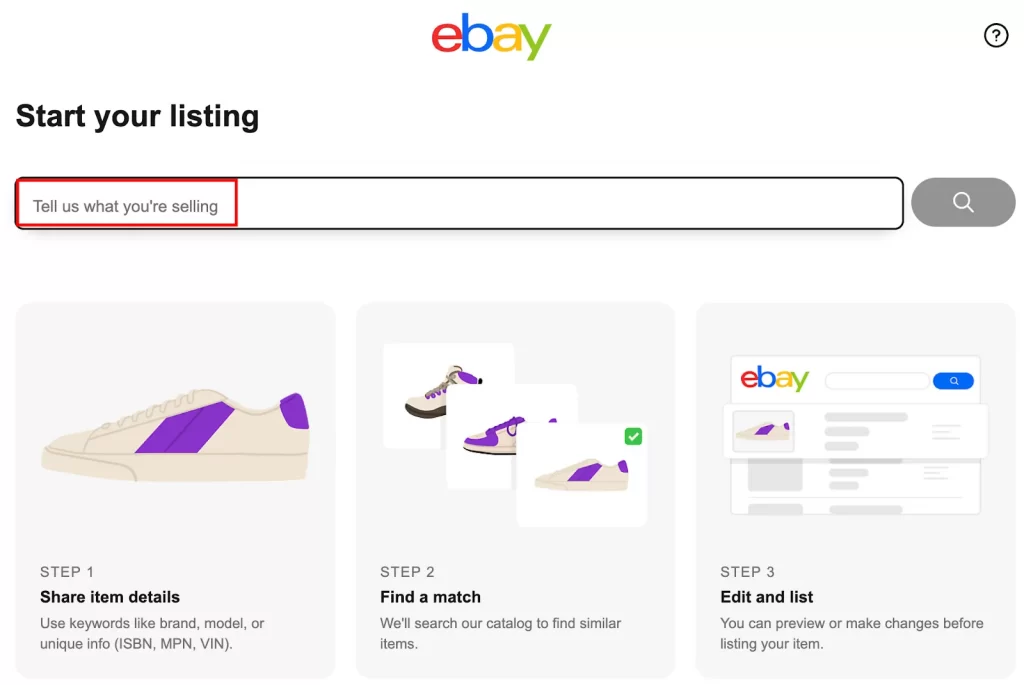
Step 1: Search for your card on eBay
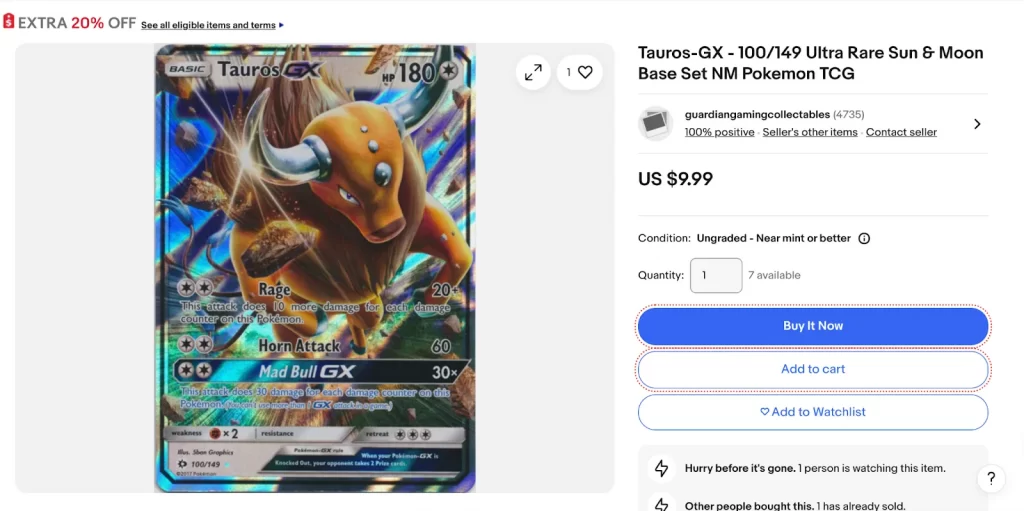
Go to eBay and search for your card by name or card number. For Japanese cards, include “Japanese” and the card number in your search (for example, “Japanese Pokemon 044-067”). This helps you find existing listings to reference for pricing and title format.
Step 2: List your cards on eBay
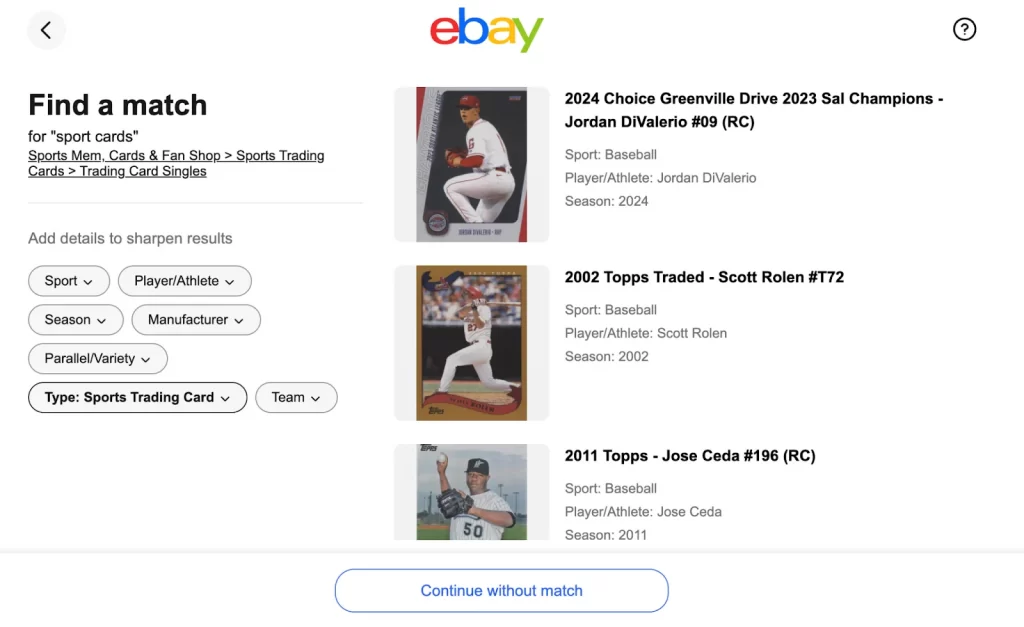
- Find a listing with a title and description you like, then click on the listing.
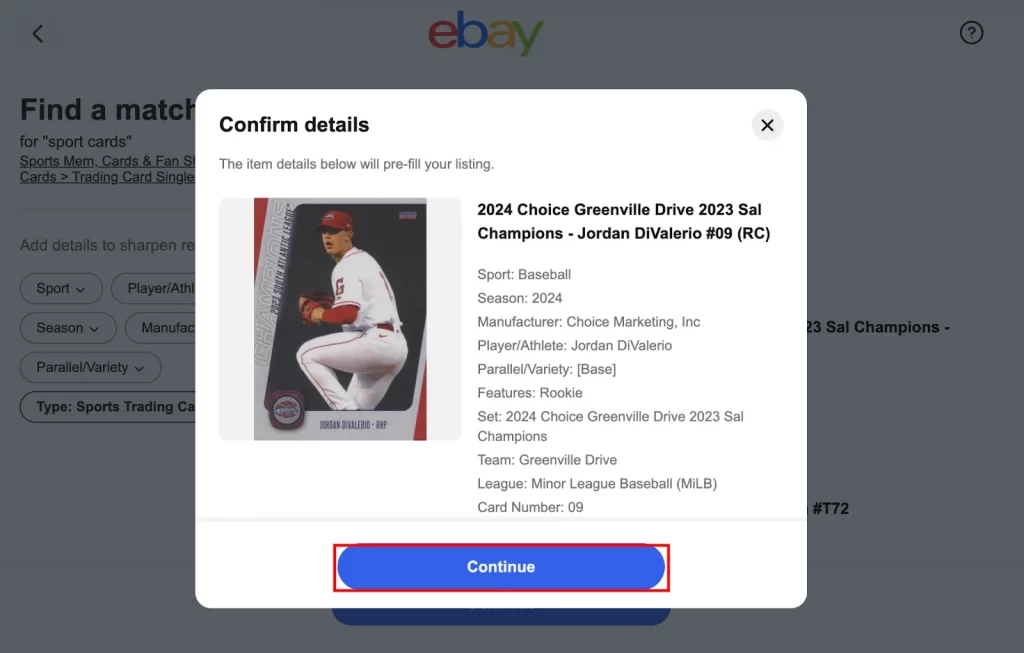
2. Click Continue, then choose between Graded or Ungraded:
- Choose Graded if your card has been professionally graded by PSA, BGS, SGC, or another grading company. Enter the grading company name and grade number.
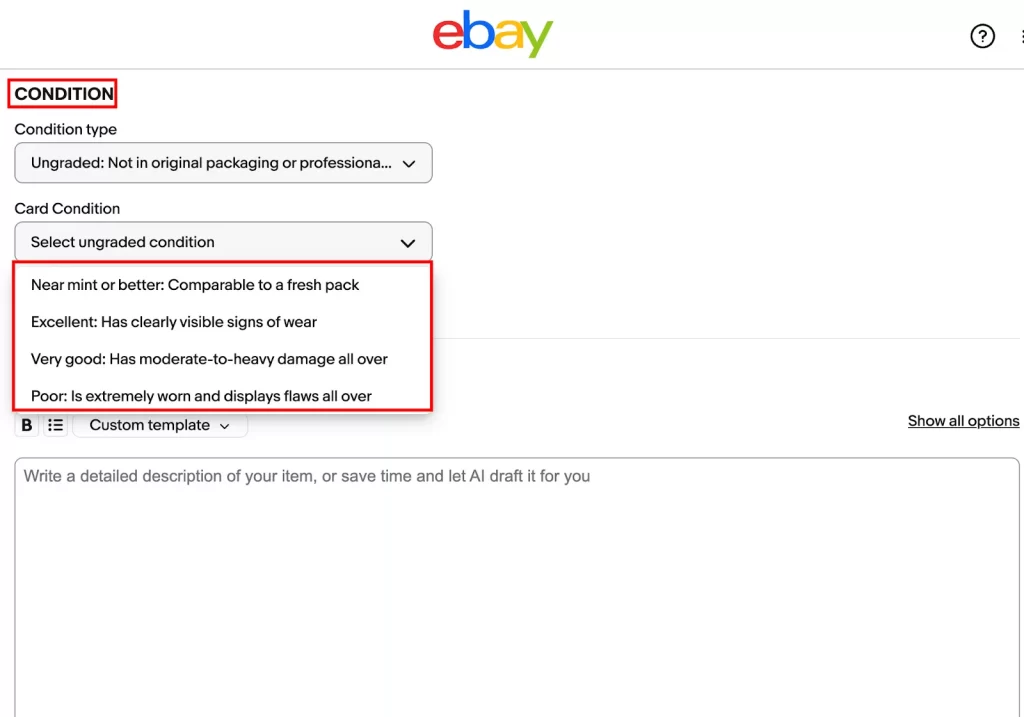
- Choose Ungraded for raw cards that have not been submitted to a grading service. Then, select the condition (Near Mint, Excellent, Very Good, or Poor).
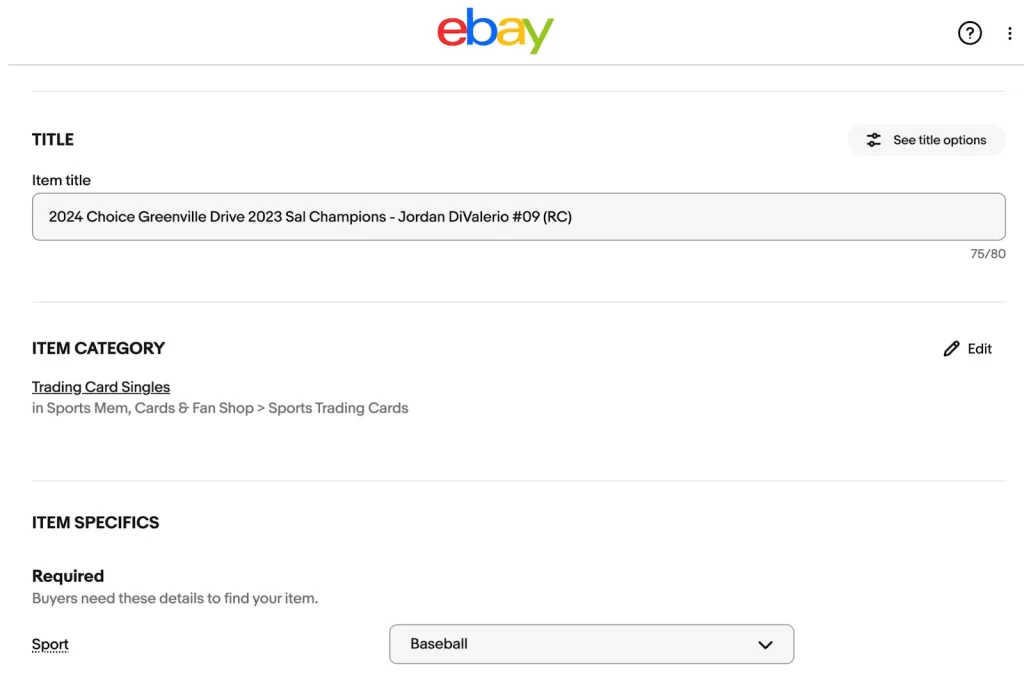
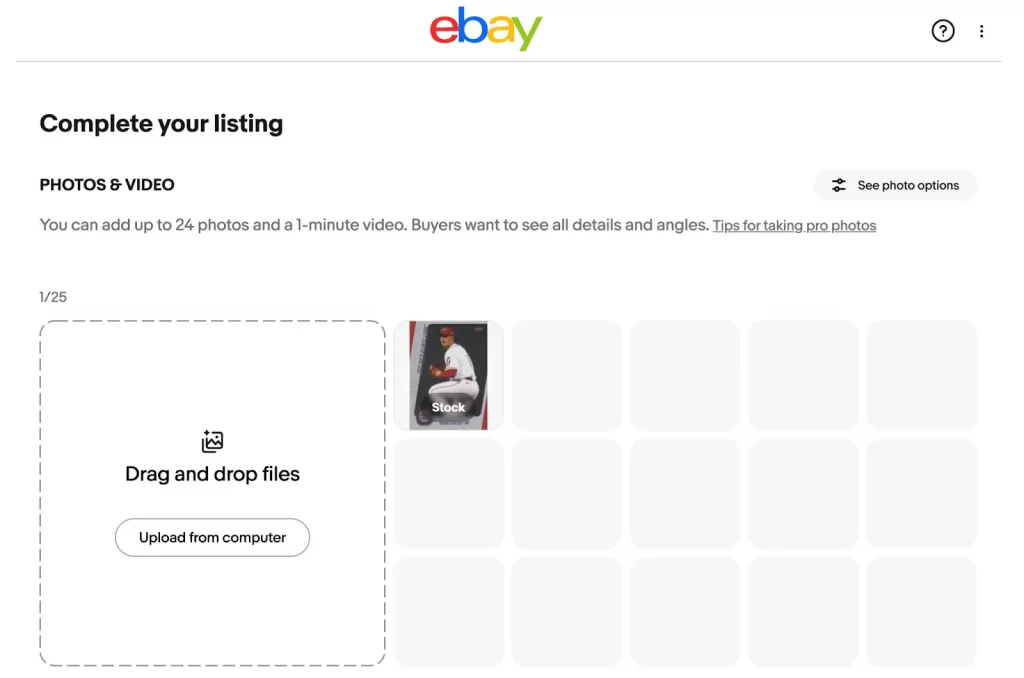
3. Upload high-quality images from multiple angles, including close-ups of any imperfections. Fill in all product information, including title, SKU, and item specifics.
Step 3: Choose your card condition and listing type
Accurately describe the card’s condition using standard terms: Near Mint, Excellent, Very Good, or Poor. Then add a description for the card. Be specific about any flaws like corner whitening, surface scratches, or off-center printing.
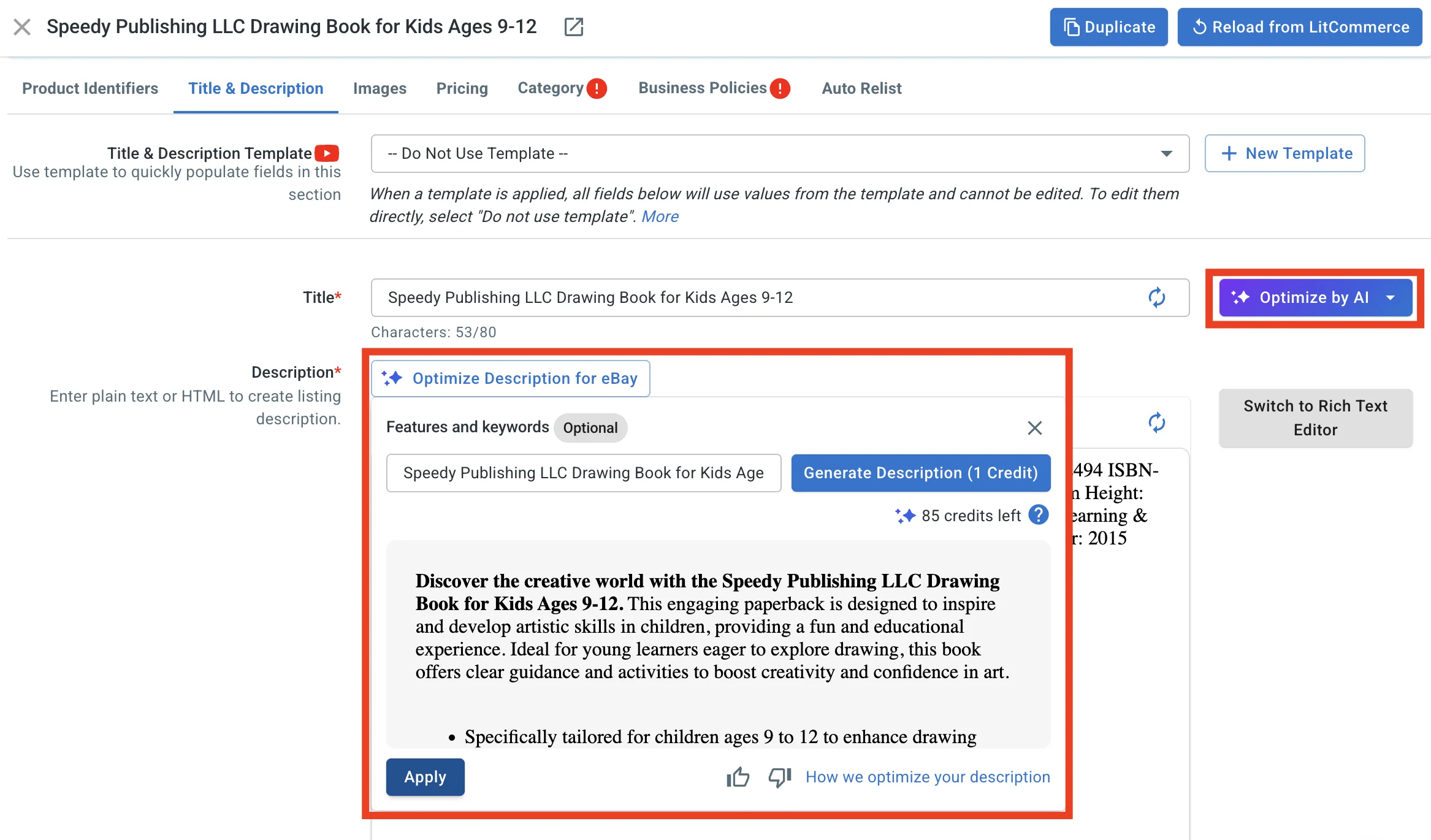
Writing a good description for every card takes time, especially when you are listing dozens of singles. If you use LitCommerce, the built-in AI description optimization can generate eBay-ready descriptions based on your card’s title, condition, and item specifics. It pulls in the right keywords buyers search for (card name, set, year, condition grade) and structures the text so eBay’s search algorithm picks it up.
You can review and edit every generated description before publishing, so you keep control over what goes live while saving the time it takes to write each one from scratch.
Write Better Card Descriptions in Seconds
LitCommerce’s AI generates optimized, keyword-rich descriptions for your eBay cards based on title, condition, and item specifics. Edit before you publish, always.

Step 4: Set up price and card shipping
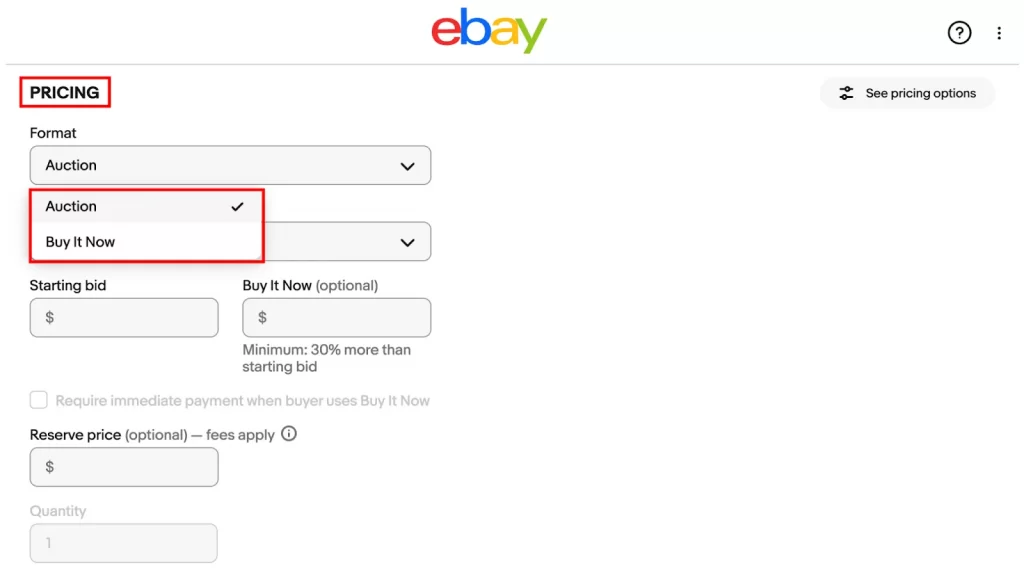
Choose the eBay listing type that fits your card:
- Auction (7-day) for rare cards where demand may drive up the price, or when you are unsure of the right price.
- Buy It Now for fixed-price sales when the card has a known market value.
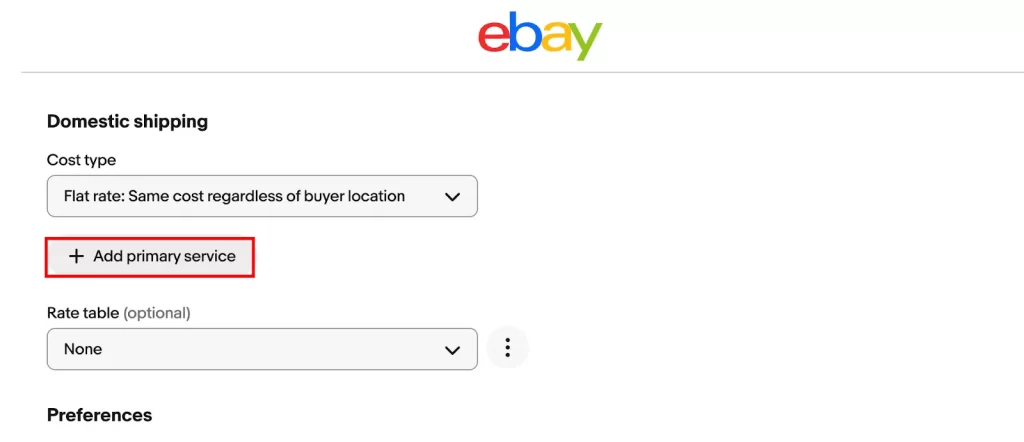
After that, set a competitive price based on eBay sold listings. Then click Standard shipping to set up your shipping method. For a full breakdown of shipping costs, see our guide on eBay shipping fees.
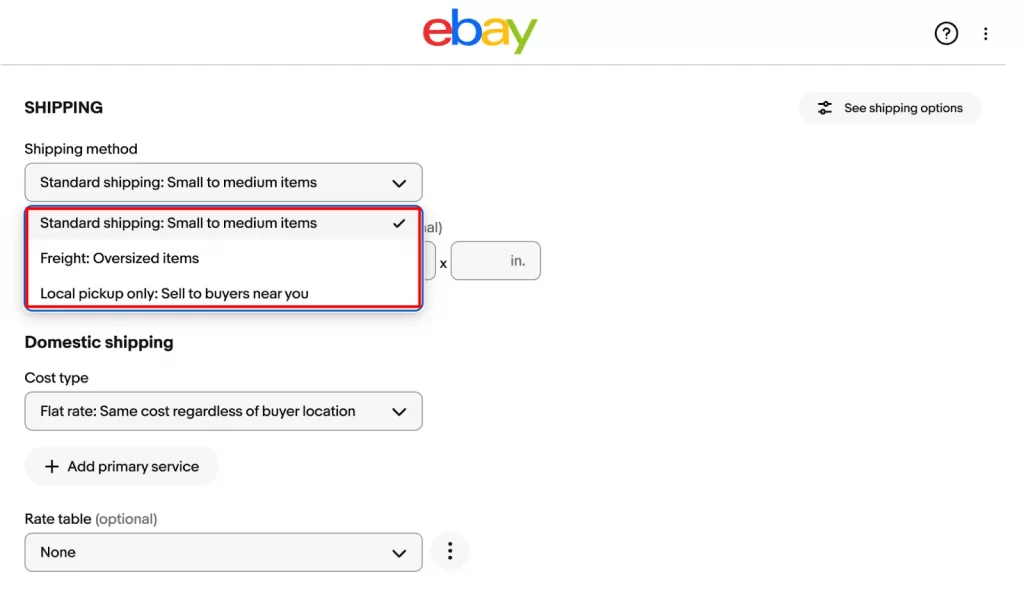
Next, click Add primary service
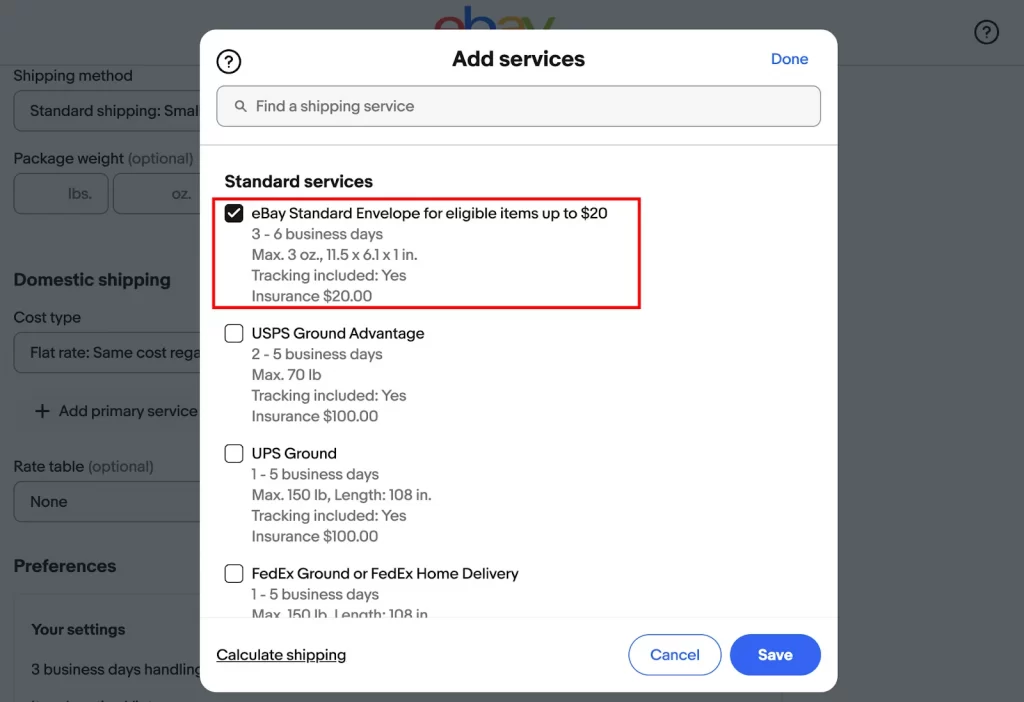
Then, choose eBay Standard Envelope to set up shipping. eBay Standard Envelope is for cards under $20. This is the most cost-effective tracked shipping option. eBay Standard Envelope packages automatically include protection for single cards valued up to $20 and multiple cards up to $50 in case of loss or damage.
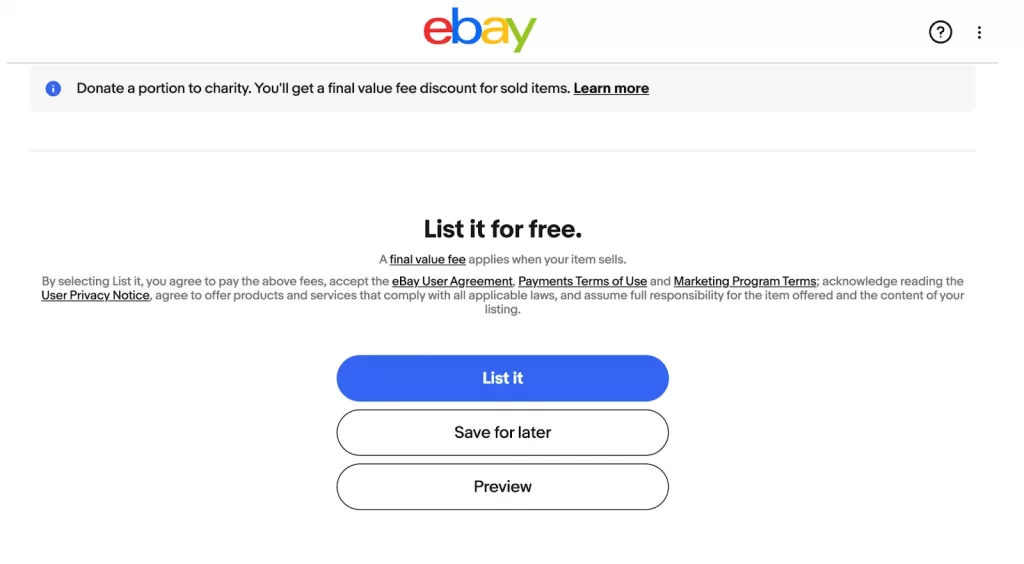
Once you have reviewed all the details, click List it to publish your card on eBay.
Bulk list your cards on eBay
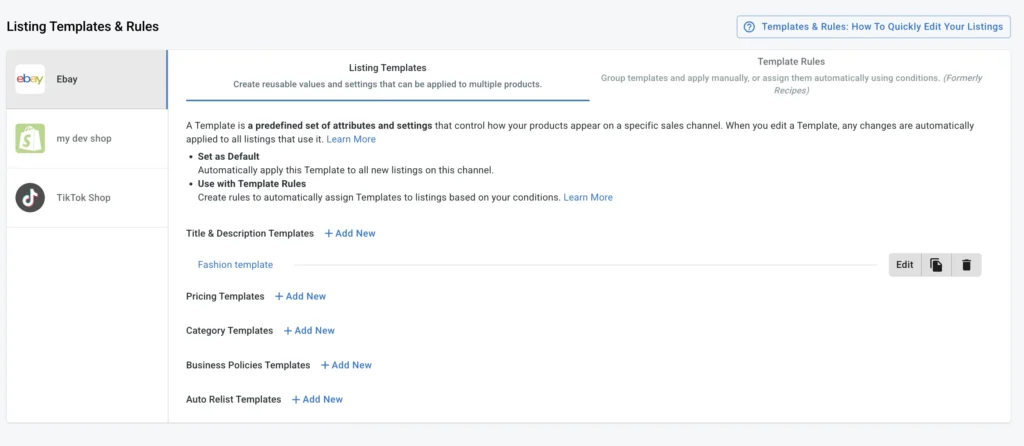
Listing cards one by one works fine when you have five or ten singles to move. But if you are sitting on a binder of 200+ cards, repeating that process for each one is not realistic. LitCommerce’s eBay listing tool lets you create and publish listings in bulk from one dashboard using Template & Rules, edit titles & descriptions, price, and business policies across multiple cards at once, and keep inventory synced every 15 minutes so you do not oversell if you are listing the same cards on Etsy or your Shopify store at the same time.
Got a Full Binder to Sell?
Create eBay listings in bulk, sync inventory every 15 minutes across eBay, Etsy, and Shopify, and manage orders from one screen. 80,000+ sellers already use LitCommerce to save time on multichannel listings.
How much does it cost to sell cards on eBay?
Two costs matter most when selling cards on eBay: eBay’s selling fees and, if you choose to grade your cards, the grading service fee. Understanding both helps you set prices that protect your margins.
eBay fees for trading cards
eBay charges a final value fee on every sale, calculated on the total amount the buyer pays (item price + shipping + sales tax). Here is the 2026 fee structure for the Trading Cards category:
| Fee type | Rate | Applies to |
|---|---|---|
| Final Value Fee (up to $7,500) | 13.25% | Item price + shipping + sales tax |
| Final Value Fee (above $7,500) | 2.35% | Portion above $7,500 |
| Per-order fee (orders $10 or less) | $0.30 | Per transaction |
| Per-order fee (orders over $10) | $0.40 | Per transaction |
| Basic Store subscriber (up to $2,500) | 12.35% | Item price + shipping + sales tax |
| Basic Store subscriber (above $2,500) | 2.35% | Portion above $2,500 |
| Promoted Listings (optional) | ~2-8% | Ad fee on sold items |
| International fee (if not using eBay Intl. Shipping) | 1.65% | International orders |
What this means in practice: For a $50 card sale with free shipping, eBay keeps about $7.03 (13.25% of $50 = $6.63 + $0.40 per-order fee). With a Basic Store subscription ($7.95/month), the fee drops to 12.35%, saving roughly $0.45 per $50 sale. For high-volume sellers moving 100+ cards per month, the store subscription pays for itself.
Is grading worth it? PSA vs. BGS vs. SGC costs
Grading adds a professional authentication label to your card, which can significantly increase its selling price. But grading costs money and takes time, so it only makes financial sense for certain cards.
Here is what the three major grading companies charge in 2026:
| Grading company | Tier | Price per card | Turnaround |
|---|---|---|---|
| PSA | Value Bulk (members only) | $24.99 | ~65 business days |
| PSA | Regular | $79.99 | ~20 business days |
| BGS (Beckett) | Economy | $20-22 | 65-100 business days |
| BGS (Beckett) | Standard | $35 | 45-60 business days |
| SGC | Economy | $25 | 20-30 business days |
| SGC | Standard | $40 | 10-20 business days |
| CGC | Bulk (25-card min) | $12-15 | 90+ business days |
If your raw card sells for $50+ and the graded version (PSA 9-10) sells for $150+, the grading fee pays for itself. Check eBay sold listings for your specific card in both raw and graded condition before submitting. For cards under $30 raw value, grading rarely makes financial sense because the fee eats most of the price premium.
Best 6 Tips to Sell Cards on eBay
With millions of card listings on eBay, the right pricing and presentation make the difference between a quick sale and a listing that sits for months. Here are six tips to help you sell faster. Here are six expert tips to help you sell faster and stand out:
Tip 1: Write a title that buyers can actually search for. Avoid vague titles or all caps. Include the specific details buyers search for:
- For sports trading cards: year, brand/edition, player name, special features (rookie, autograph, refractor), and grading details if applicable. Example: “2023 Topps Chrome Sapphire Victor Wembanyama Rookie RC PSA 10”
- For collectible card games: franchise name, edition, card name, grading details, and special features. Example: “Pokemon 151 Charizard ex 199/165 Special Art Rare Near Mint”
A specific title helps your card show up in search results and tells buyers exactly what they are getting. For more on writing effective titles and descriptions, see our guide to eBay listing optimization.
Tip 2: Take clear, honest photos. Use good lighting, a clean background, and shoot from multiple angles. Show the front, back, and any flaws in close-up. Hiding damage leads to returns and negative feedback. A penny sleeve on a dark background photographs better than a bare card on a cluttered desk.
Tip 3: Price using eBay’s Sold Listings filter. Do not guess your price. Go to eBay, search your card, click Filters, then toggle Sold Items. This shows what buyers actually paid, not what other sellers hope to get.
If your card is common, price it at the lower end of recent sales so it sells within days instead of sitting for weeks. For rare cards with few recent sales, starting with a 7-day auction at $0.99 can attract bidding wars and sometimes exceed Buy It Now prices. If 10 recent sold listings show your card selling between $12 and $18, price it at $13-14 with free shipping for the best shot at a quick sale.
Tip 4: Build positive feedback before selling high-value cards. Sell a few low-value cards ($1-5 range) first to build your seller rating. Buyers hesitate to purchase a $200 card from a seller with zero feedback. Once you reach 20-50 positive reviews, buyers will feel more confident spending more.
Tip 5: Choose the right shipping method for the card’s value. For cards under $20, use eBay’s Standard Envelope ($0.68-$1.16 with tracking). For cards over $20, use First-Class Package with tracking. For cards over $100, add signature confirmation and insurance. Always use a penny sleeve + toploader + team bag as minimum protection, and ship in a rigid mailer or small box. A card that arrives damaged is a guaranteed refund request.
Tip 6: Respond fast and ship on time. Answer buyer questions within a few hours. Ship within one business day of payment. Package cards carefully with rigid protection. These basics build your seller rating and lead to repeat buyers. eBay’s algorithm also favors sellers with fast handling times in search results.
How to Sell Cards on eBay: FAQs
How to safely sell cards on eBay?
Focus on clear, honest listings with high-quality photos that show any flaws. Use secure packaging: always protect cards with a penny sleeve inside a toploader, placed in a team bag, and shipped in a rigid mailer or bubble mailer. Ship promptly with tracking and respond to buyer questions quickly. Being upfront about condition avoids disputes and protects your seller rating.
How do I list my cards faster on eBay?
Follow these four steps:
1. Search for your card on eBay to find a reference listing.
2. Use that listing as a template for your title and item specifics.
3. Choose the correct condition and listing type.
4. Set your price based on sold listings and configure shipping. For bulk listings, a multichannel listing tool for eBay lets you create and manage hundreds of listings from one dashboard.
What is the best way to ship cards on eBay?
eBay Standard Envelope is the most cost-effective tracked shipping option for cards valued up to $20 (single cards) or $50 (multiple cards). It costs $0.68-$1.16 and includes loss/damage protection. For higher-value cards, use USPS First-Class Package with tracking and consider adding insurance for cards over $100.
What percent does eBay take on cards?
For trading cards, eBay charges a final value fee of 13.25% on the total sale amount (item price + shipping + sales tax) up to $7,500, plus 2.35% on any amount above $7,500. There is also a per-order fee of $0.30 for orders of $10 or less, or $0.40 for orders over $10. Sellers with a Basic Store subscription pay a reduced rate of 12.35% up to $2,500.
Should I get my cards graded before selling on eBay?
Grading makes financial sense when the raw card is worth $50 or more and the graded version (PSA 9-10) sells for at least double the raw price. For cards under $30 raw value, the grading fee ($20-80 per card depending on the service) usually exceeds the price increase you would get. Always check eBay sold listings for both raw and graded versions of your specific card before submitting to a grading company.
Wrap-up!
Selling cards on eBay can be a profitable and exciting way to make money, whether you’re a collector looking to downsize or a reseller flipping valuable finds. By understanding 4 steps to selling cards, eBay’s card conditions, choosing the right listing strategy, and setting competitive prices, you’ll improve your chances of making successful sales.
Now that you know how to sell cards on eBay, it’s time to start listing! If you are seeking the best eCommerce tool and solution to kickstart on eBay, LitCommerce is your go-to choice. Contact us anytime if you need any assistance. Enjoy reading the eCommerce tips to sell on eBay on our Blog!