



If you’re wondering how to sell on multiple marketplaces, the simplest answer is this: manage one central product catalog, then publish your listings to Etsy, eBay, Amazon, and other channels without rebuilding each listing from scratch.
In this blog, we’ll show you how to sell on multiple marketplaces the smart way, so you can reach more customers, increase sales, and manage everything from one streamlined workflow.
Key takeaways
How To Sell On Multiple Marketplaces: Why It Pays Off
Selling on multiple marketplaces isn’t simply about posting the same products in more places. Each platform attracts shoppers with different interests, expectations, and buying habits—giving you more opportunities to reach the right customers.
Here’s why a multichannel approach can pay off:
- Reach new audiences. eBay ended 2025 with 135 million active buyers, while Etsy reported 93.5 million active buyers across its group. By selling on more than one platform, you can connect with customer segments you may not reach through a single marketplace.
- Match different shopping habits. Someone searching eBay for a vintage find may be very different from a TikTok Shop shopper looking for the latest trending gadget. Expanding to two or three relevant marketplaces helps you grow your audience instead of repeatedly targeting the same group.
- Reduce your reliance on one platform. If one marketplace changes its algorithm, restricts your account, or experiences a temporary slowdown, your other sales channels can help keep revenue coming in.
- Adapt your pricing and positioning. Etsy shoppers may be willing to pay more for handmade or artisan products, while Amazon shoppers often prioritize competitive prices and fast delivery. A multichannel strategy lets you tailor your offer to each audience instead of using the same price and message everywhere.
One important tradeoff is the highest cost of multichannel selling: the extra manual work, not the marketplace fees. Creating the same listing, updating inventory, and managing orders across several dashboards can quickly eat into your gains.
The goal isn’t to sell everywhere. It’s to choose the right marketplaces and build a process that helps you expand without multiplying your workload.
Which Marketplaces Should You Sell On?
It’s better to sell where your product type already has buyers: Etsy for handmade, vintage, and craft; eBay for niche, used, and collectible; Amazon and Walmart for branded or general merchandise you can ship fast; TikTok Shop for trending impulse buys.
Your shipping capability matters as much as your category, and it is the part most sellers skip when they pick a second channel.
Here’s a quick comparison of the major marketplaces to help you choose where to sell first.
Marketplace | Best for | Barrier to entry | Primary or supporting |
Amazon | Branded and general merchandise with steady stock | High. Strict performance metrics | Primary |
eBay | Niche, vintage, used, collectible, parts | Low | Primary or strong secondary |
Etsy | Handmade, vintage, craft, digital, personalized | Low | Primary for makers |
Walmart Marketplace | General merchandise with consistent SKUs | Medium. Application and structured listing rules | Secondary that scales |
TikTok Shop | Trending consumer goods, younger buyers | Low | Supporting |
Facebook Marketplace | Local pickup, bulky items, casual sales | Very low | Supporting |
Reverb | Musical instruments, gear, parts | Low | Niche primary |
Large generalist marketplaces: Amazon, eBay, and Walmart
Amazon suits general or branded products sold to buyers who expect fast delivery and consistent stock. If you can maintain steady inventory and don’t mind Amazon’s stricter operational standards, it’s a strong reach channel.
eBay fits niche, vintage, and handmade-tolerant buyers better. Its listing format is more flexible, and the barrier to entry is lower than Amazon’s, which makes it a natural second channel for sellers who don’t yet have Amazon-level fulfillment infrastructure.
Walmart works well for general merchandise too, but with more structured listing requirements and, in most categories, less seller competition than Amazon.
A home-goods seller with consistent SKUs and steady stock fits Amazon or Walmart well. A seller moving vintage furniture or one-off collectibles usually does better on eBay, where buyers expect some variation and enjoy the hunt.
Handmade and niche marketplaces: Etsy
Etsy fits handmade, vintage, craft, and artisan sellers whose buyers expect premium, story-driven listings rather than bare-bones product specs. Soap makers, jewelry makers, and textile sellers frequently start here, or run it as a co-primary channel alongside their own store. With 80k customers worldwide, listing quality on Etsy matters more than listing volume.
Social and emerging marketplaces: TikTok Shop and Facebook Marketplace
TikTok Shop fits trending consumer goods aimed at younger, impulse-driven buyers, and it’s easy to sell on TikTok Shop with lower setup friction than the generalist marketplaces. Additionally, Facebook Marketplace works best for local pickup and casual sales; it’s free to list, and it pairs naturally with sellers already active on Meta’s other tools.
For most SMB sellers, both of these work better as supplementary channels than as a primary one. They’re excellent for testing demand or clearing seasonal stock, but less reliable as your main revenue engine.

Own-store platforms as your central hub: Shopify, WooCommerce, BigCommerce, Wix, Squarespace, and Square
These platforms aren’t marketplaces in the traditional sense. They’re where your product data should live as the single source of truth that feeds every connected channel. LitCommerce connects each of these as a Main Store option, so your choice of eCommerce platform doesn’t limit which marketplaces you can reach.
A quick way to think about combinations: handmade goods with slower, made-to-order shipping pair well with Etsy plus eBay. General merchandise with fast shipping capability pairs better with Amazon plus Walmart. Match the platform combination to your product’s shipping reality, not just its category.
How Much Does It Cost to Sell on Each Marketplace?
Every platform offers access to a distinct audience, but each comes with its own fee structure. Knowing these numbers is essential if you want to master how to sell on multiple marketplaces while keeping your profit margins intact.
Most marketplaces charge a commission on each sale rather than a listing fee. Expect roughly 6% on TikTok Shop, 6.5% plus payment processing on Etsy, 12.7% to 13.6% on eBay, and 5% to 20% on Amazon and Walmart depending on category.
Listing fees are small or zero almost everywhere. The number that determines your margin is the commission, not the listing fee, and it changes by category more than by platform.
Below is a detailed breakdown of what it actually costs to sell on each marketplace.
Marketplace | Listing fee | Commission/referral | Payment processing | Monthly fee |
Amazon | None | 5% to 45% referral; most categories 15%; $0.30 minimum | Bundled into referral fee | $39.99 Professional, or $0.99 per item on Individual |
eBay | 250 free listings a month, then $0.35 | Typically 3–15% (most categories around 12.9%), plus orders $10.00 or less the per-order fee is $0.30; orders over $10.00 the per-order fee is $0.40. | Bundled into final value fee | Free; store plans from $4.95/month |
Etsy | $0.20 per listing, renews every 4 months | 6.5% transaction fee | Varies based on the location | $0, or Etsy Plus at $10 |
Walmart Marketplace | None | 2.35% to 20% referral, most categories 8% to 15% | Bundled into referral fee | $0 |
TikTok Shop US | None | 6% referral, 5% for pre-owned and several jewelry categories | Not separately published | $0 |
Facebook Marketplace | None for local listings | Local pickup listings are free | Not applicable to local sales | $0 |
Reverb | None | 5% selling fee, $0.50 minimum and $500 maximum fee charged | 3.19% + $0.49 | $0 |
Marketplace fees directly affect your profit, so selling the same product at the same price will not earn you the same amount on every channel.
For example, if a $100 product costs you $60, a 6% marketplace fee leaves $34 before other expenses, while a 13.6% fee leaves $26.40. Review each channel’s fees and adjust your prices where needed.
However, fees are only part of the cost. You should also count the time spent creating listings, updating inventory, and managing orders. A marketplace with a lower commission may still cost you more overall if it adds several hours of manual work each week.
How to List Products on Multiple Marketplaces in 5 Steps
How to List Products on Multiple Marketplaces in 4 Steps
You list products across marketplaces by building one master record in a central store, then publishing it out with channel-specific templates instead of retyping each listing.
Step 1: Connect your first channel
Whichever you choose, the setup starts the same way: one master record has to control the product information and the stock count behind it.
That record lives in what LitCommerce calls your Main Store, a single source of truth for product data that feeds every connected channel. Shopify, WooCommerce, BigCommerce, Wix, Squarespace, Square, and LitCommerce (Native) can all play that role.
After you log in to LitCommerce, you land on the Connect Your First Platform screen, which lists Marketplaces and Shopping Carts side by side.
You can start from either one, because the flow adapts to whatever you pick first, and the finish line is the same either way: one Main Store and one sales channel connected.
Case 1: Start with a Shopping Cart
- If you already manage your products on an online store, select your shopping cart from the list.
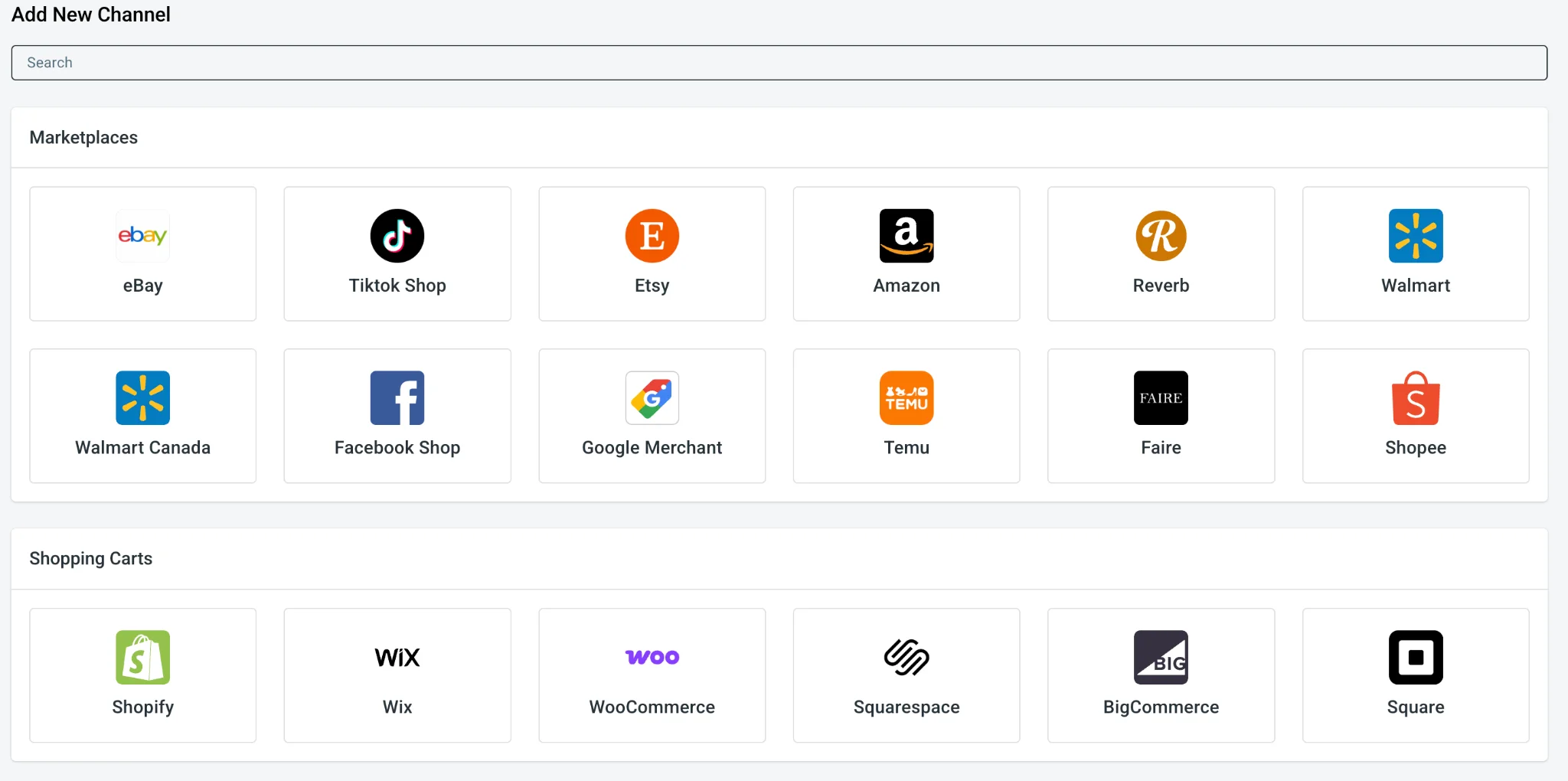
- Depending on the platform, you either click Connect Your Account and authorize LitCommerce from here, or install the LitCommerce app or plugin from that platform’s own app store, which sends you back to the LitCommerce dashboard to carry on.’

Once done, your existing products import automatically, and that shopping cart becomes your Main Store.
- Next, let’s connect a marketplace as your sales channel by clicking its logo. Enter your store name, then click Connect Your Account.
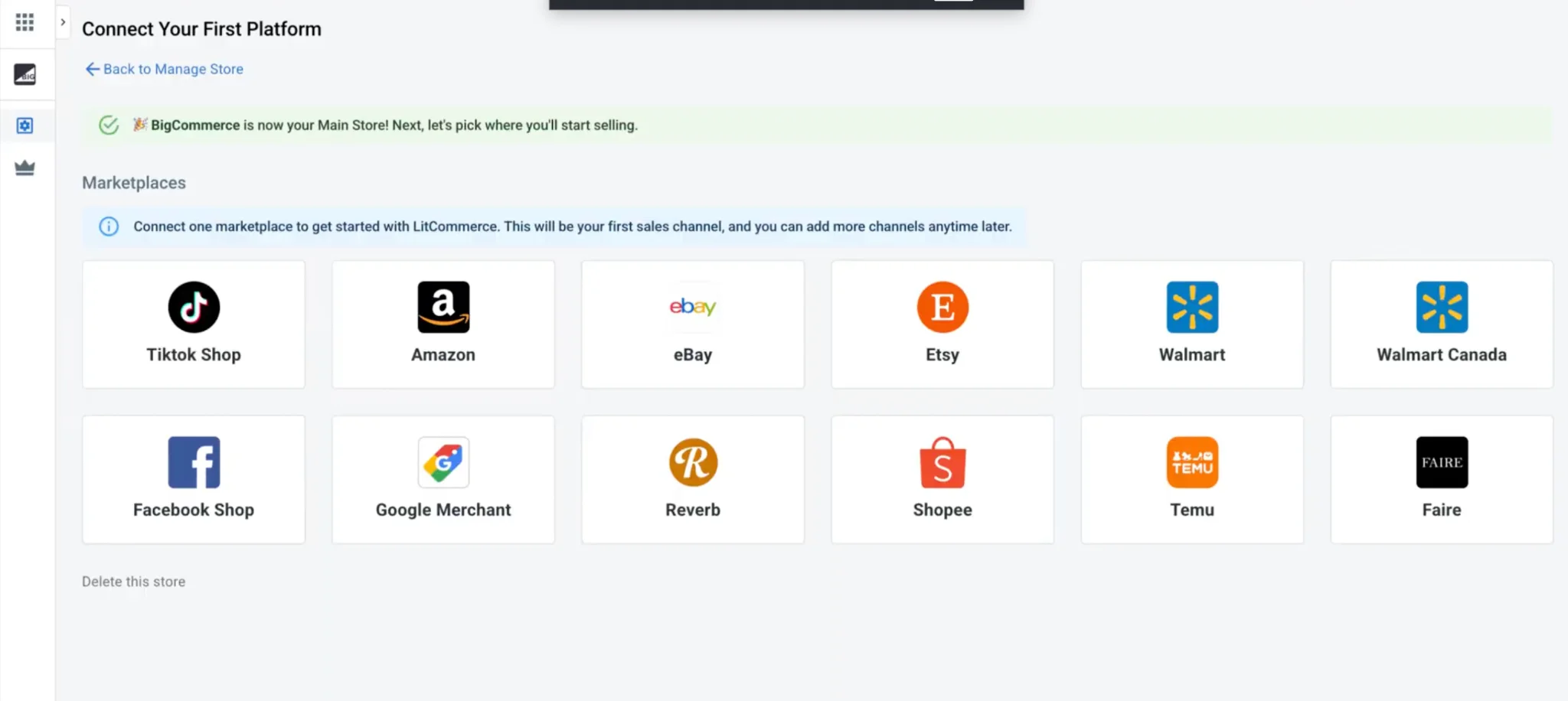
You’ve now completed the first step of the setup process.
Case 2: Start with a Marketplace
- If you sell mainly through marketplaces, select the marketplace you want to connect first.
- Add the channel name, then click Grant Access to authorize LitCommerce to read your store data.
- LitCommerce then asks whether you have an online store you want to use as your Main Store.
If you do, choose your shopping cart and follow the same steps as Case 1. If you don’t, click Skip – I Don’t Have Any Of These, and LitCommerce (Native) becomes your central hub instead, so your listings still sit behind a single Main Store.
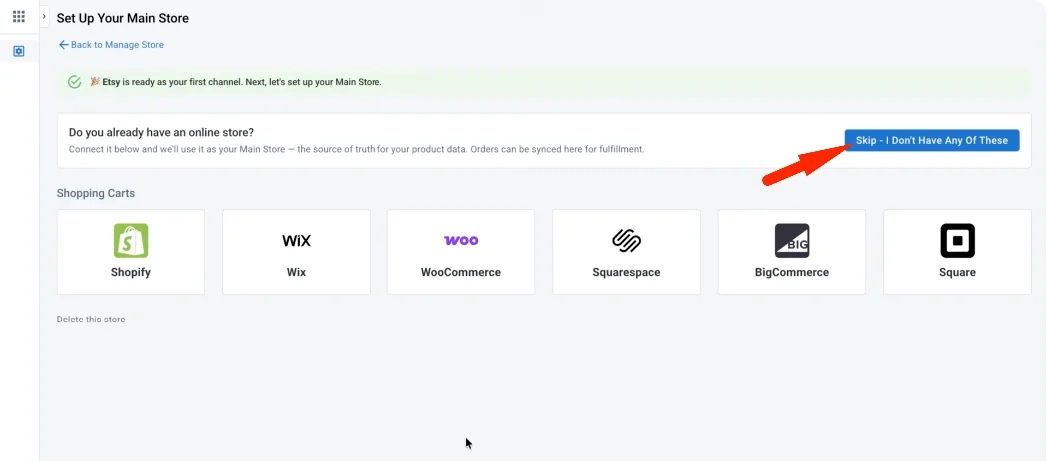
And that’s it. Either way, you now have one Main Store and one connected sales channel, which is all Step 1 asks for. From here, you can import products, create listings, and turn on sync, and you can add more channels later up to your plan’s limit.
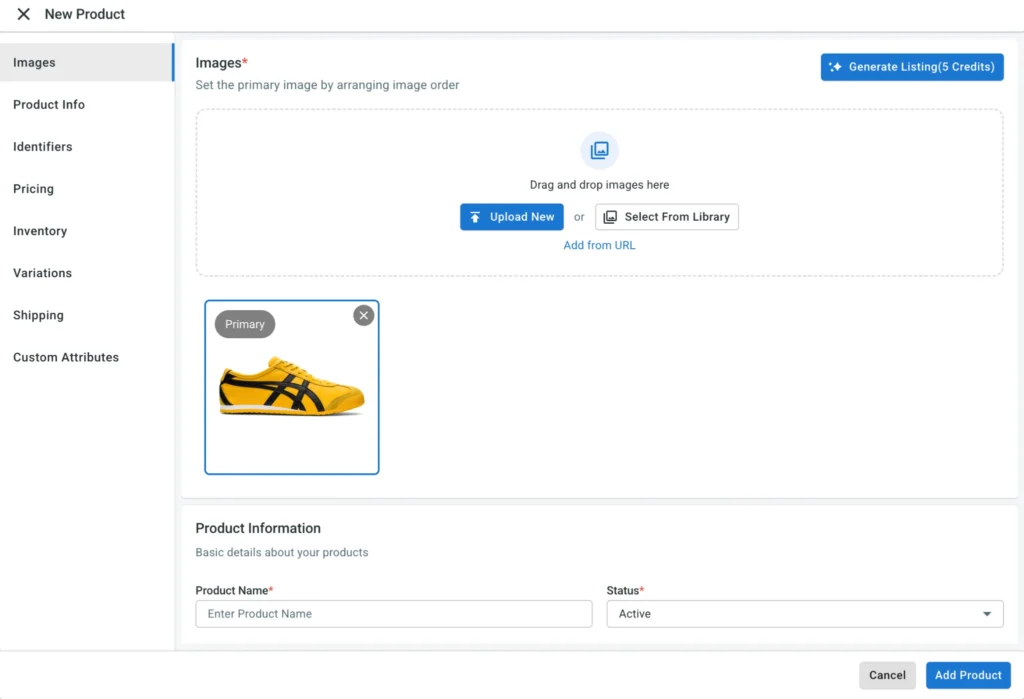
Step 2: List products to every connected channel
When selling on multiple platforms, there are three situations here, depending on where your products live right now.
Case 1: List products from your Main Store to a marketplace
- Go to All Products.
- Tick the checkbox next to each product you want to publish.
- Choose Select action, click Add to Channel Drafts, check the box for the target channel, and select Add as Draft now.
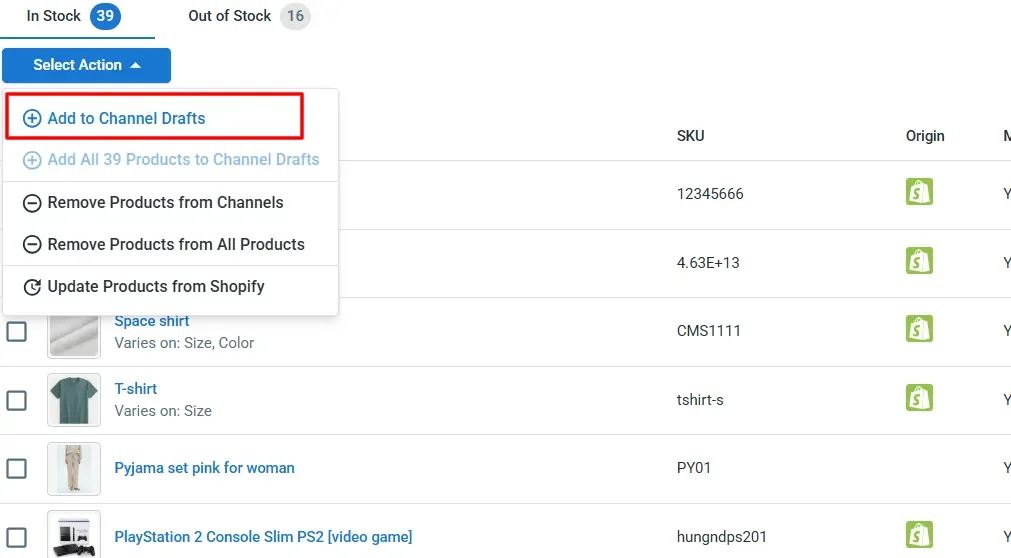
- Then, fill in the channel-specific fields in the draft.
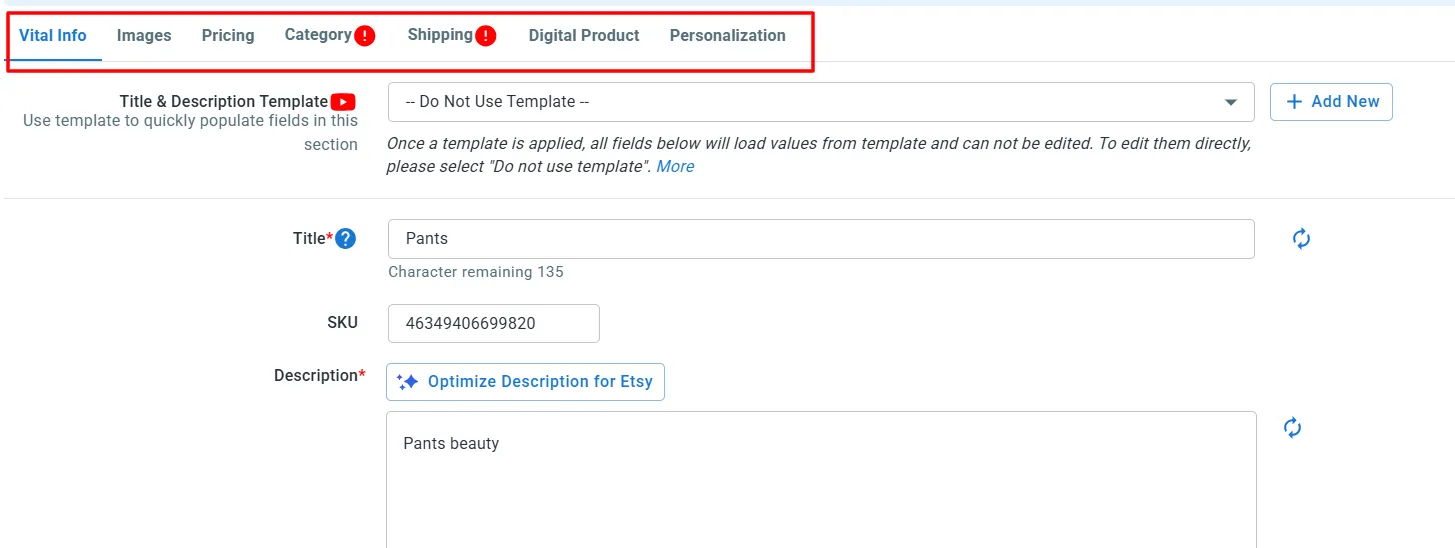
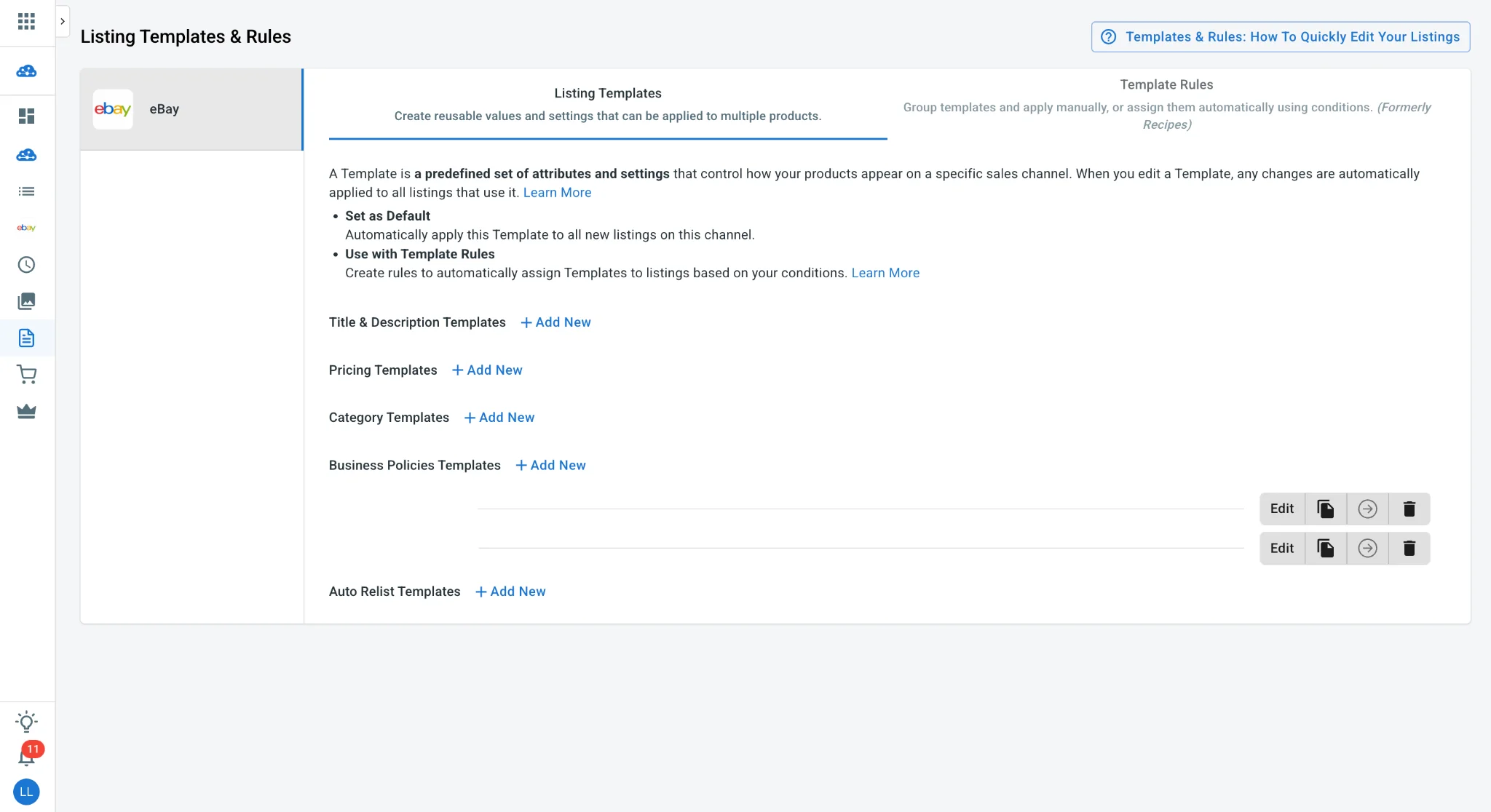
Editing those fields one listing at a time works for a handful of products but stops working after a few dozen SKUs. That is what Templates & Rules is for: it applies channel-specific formatting in bulk, so a pricing rule or a category template written once carries across every listing on that channel.
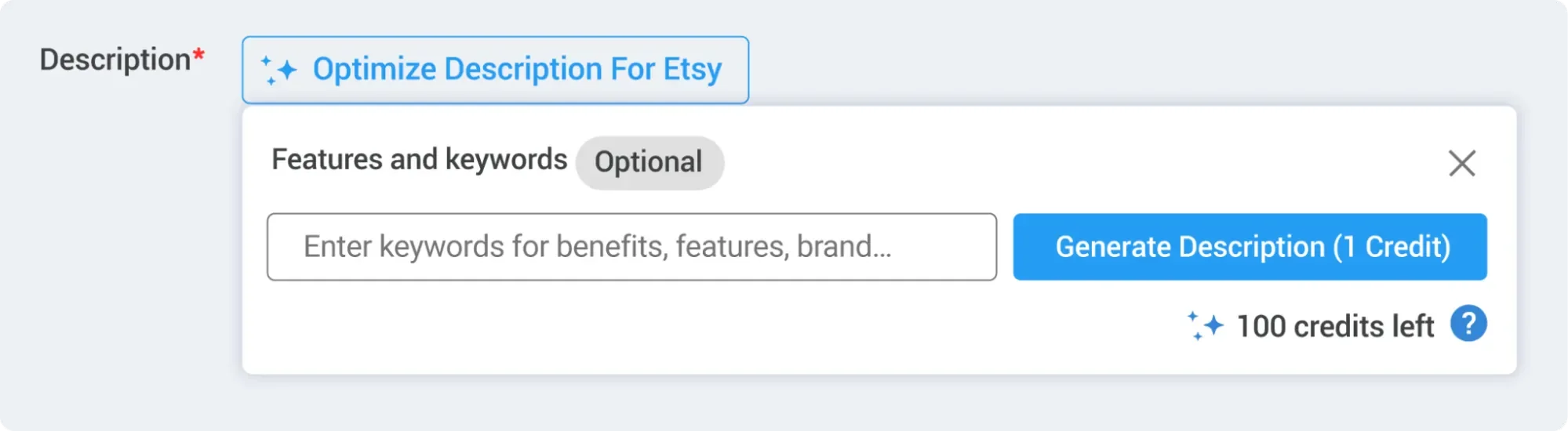
On top of that, AI-Powered Listing Optimization can refine existing descriptions for Etsy’s and eBay’s tone and search behavior. It is an editing aid rather than a one-click listing generator, so read the output before publishing.
- Click Save & Publish.
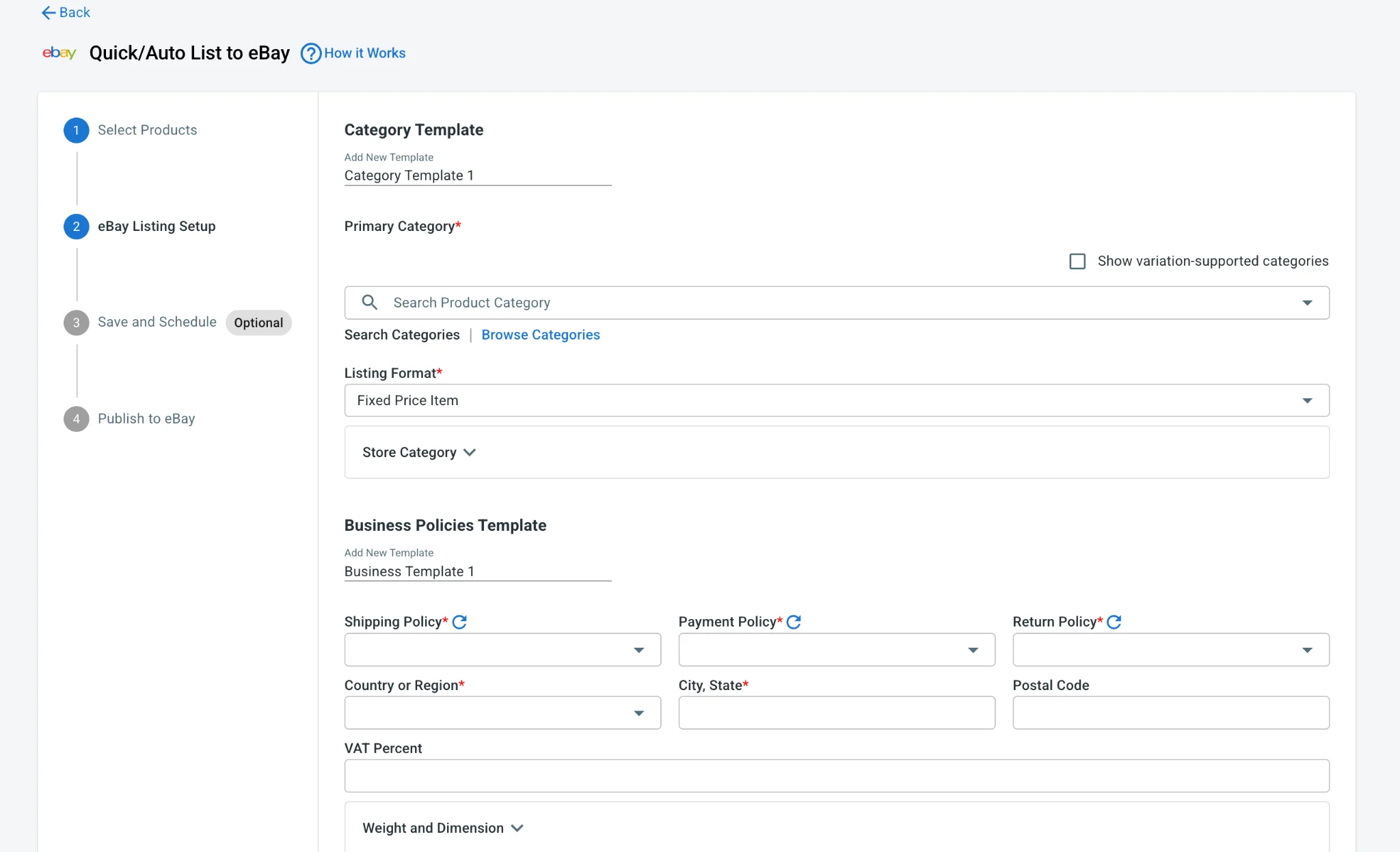
To save your time, you can publish and edit listings in filtered groups across every connected channel from one screen, and with Quick/Auto List, new products that match a filter you define go live on their own instead of queuing for manual review every time.
This is where scale actually shows up. Steve Wise of Optics Frames used LitCommerce to move a catalog of more than 9,000 active eBay listings, over 12,000 total managed, onto Shopify within days, saving hundreds of setup hours in the process.
Case 2: Import products from a marketplace to your Main Store
If your products already exist on Etsy, eBay, Amazon, or another marketplace, import those listings into LitCommerce first. You can then create the corresponding products in your Main Store and use that catalog as the central source for publishing to additional channels.
- Open the connected sales channel from the left sidebar.
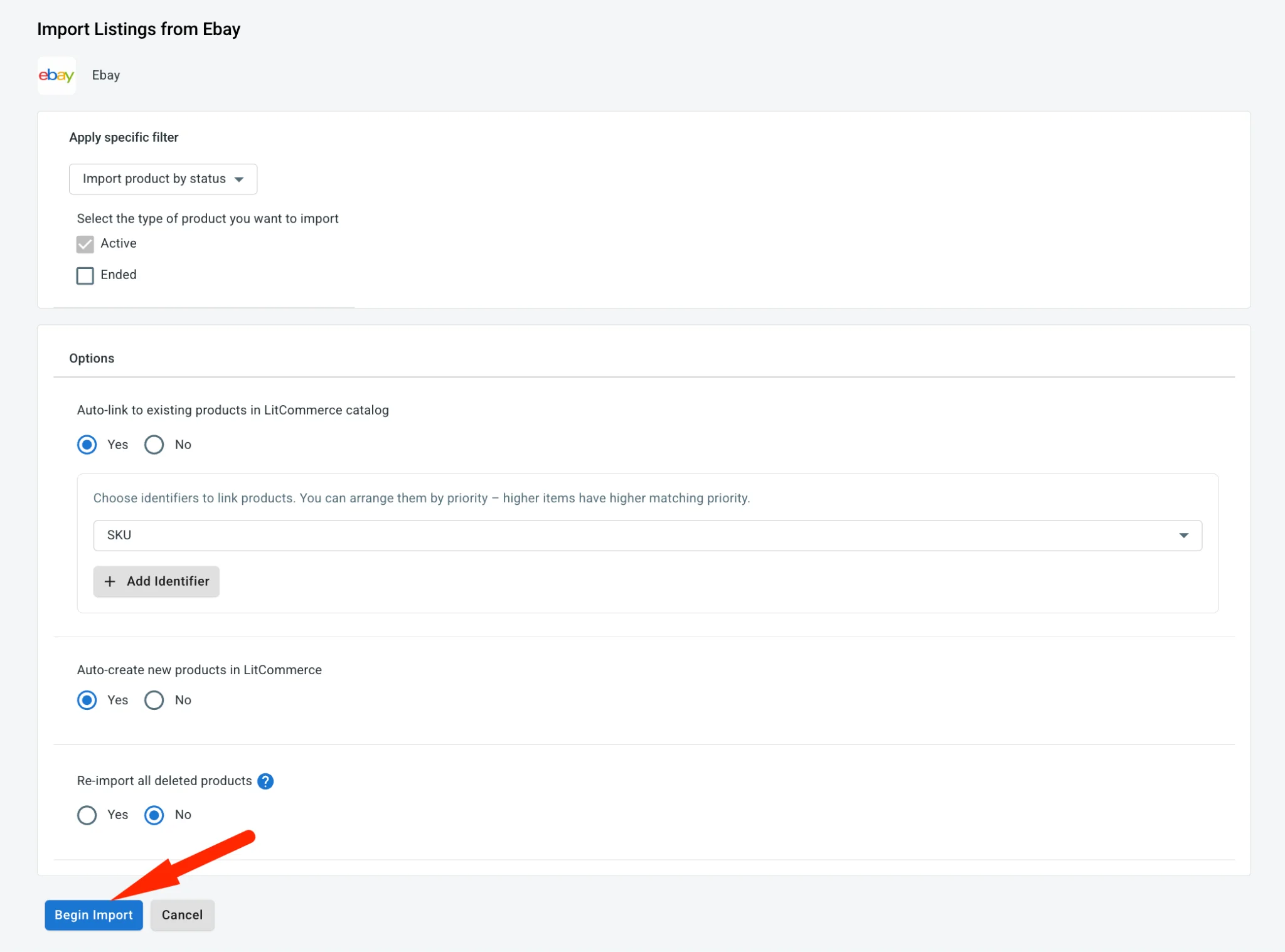
- Click Import from [Marketplace].

- Choose your import settings, such as auto-linking matching products, re-importing deleted listings, or filtering the listings to import.
- Click Begin Import.
- Once the listings appear in LitCommerce, select the ones you want to add to your Main Store.
- Choose Select action, then click Create on [Main Store].
Once they appear in All Products, publish them to your other connected marketplaces using the same workflow as Case 1.
Already selling the same product on your store and a marketplace? You can link each existing marketplace listing to the matching product in your Main Store, using the SKU or UPC where possible. Once everything is linked and inventory sync is enabled, a sale on one channel updates the shared stock count, helping prevent the same item from being sold twice.
Step 3: Turn on automatic data sync
Once your listings are live, the next task is keeping inventory, prices, and orders accurate across every channel. This matters because when shoppers find an item out of stock, only about 20% are willing to wait for it to return.
- Open Channel Settings for the connected channel.
- Toggle Price Sync on to keep the price of all listings in the Sales Channels aligned with the product prices in your Main Store.
You can also set a rule instead of a number: adjust each channel’s price by a fixed amount or a percentage off your Main Store price, or enable currency conversion to convert the price automatically.
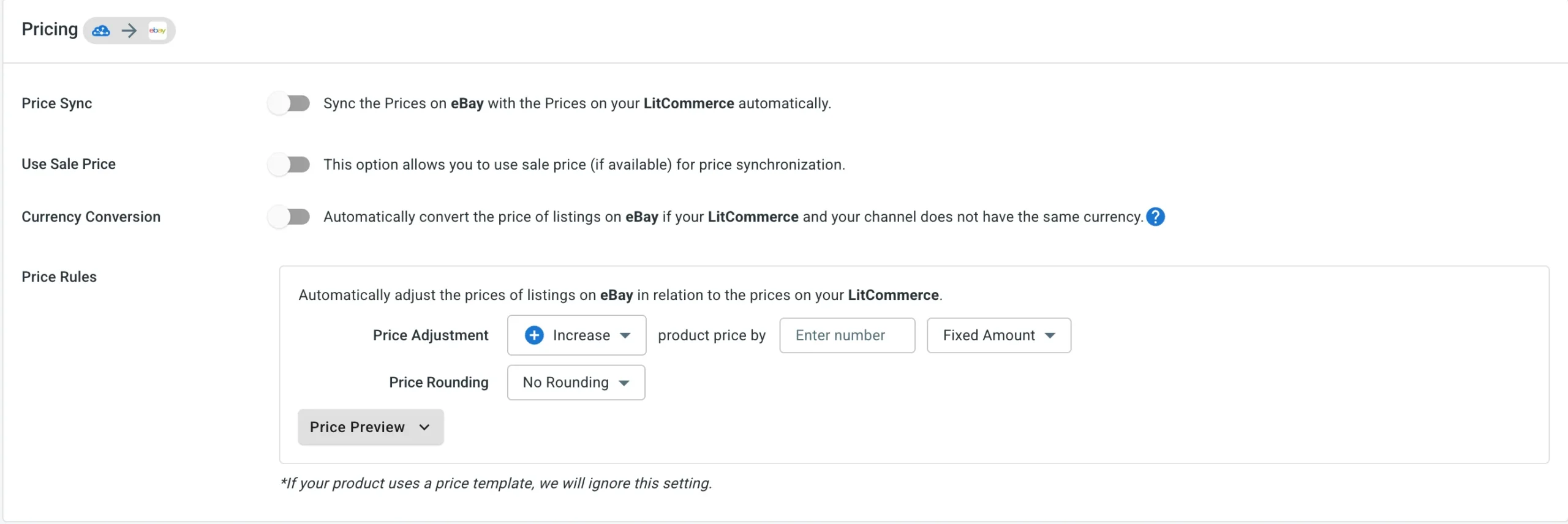
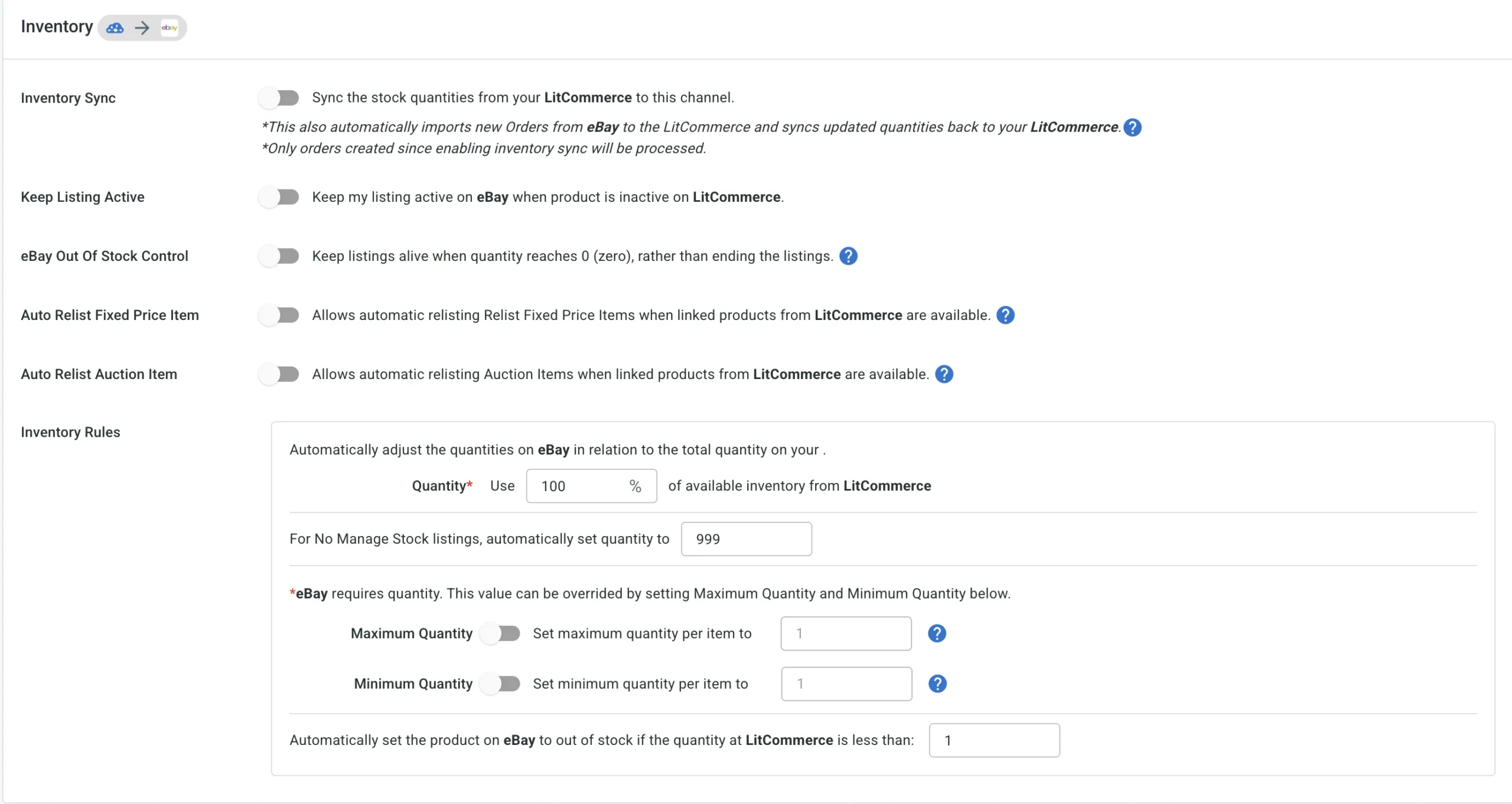
- In the Inventory section, toggle Inventory Sync on to keep the inventory on the sales channel in sync with the main store.
- Set your rules — a percentage of Main Store stock, a maximum quantity, or a minimum quantity per channel.
LitCommerce also provides many customized inventory sync features for each marketplace, such as: Keep listing active, eBay out-of-stock control, and more.
Note: LiveSync runs on a 15-minute cycle for price, inventory, and order data. Etsy is the one exception at 60 minutes because of Etsy’s own API rate limits, so if Etsy is one of your channels, keep a slightly larger stock buffer there.
Step 4: Manage orders on multiple channels
- In Channel Settings, toggle Import Orders to Main Store on.
- Orders from every connected marketplace now land in one dashboard, with unlimited order sync on every plan.
- Review and fulfill without logging into each seller account separately.
Erik Salamon of guitarrepairparts.com updates pricing once in Shopify and sees it reflected across eBay and Reverb. His eBay sales have grown since centralizing operations this way, turning what started as a backup channel into a leading revenue source. For a deeper walkthrough of that workflow, our multichannel order management guide covers it step by step.
Listings are not a one-and-done setup either. Each marketplace ranks them differently, so titles, images, and prices deserve a second look over time. Your per-channel sales reports show which listings perform best where, which tells you where a refresh will actually move the needle, and more.
What Goes Wrong When You Sell on Multiple Platforms?
Multichannel selling runs into a predictable set of problems, and most of them come from the same root cause: manual processes that can’t keep pace once you’re operating on more than one channel.
Knowing how to sell on multiple marketplaces effectively requires addressing these operational bottlenecks before they start draining your time and profits.
Challenge | Typical fix |
Inventory numbers don't match across channels | Flexible inventory rules, low-stock alerts, and treating the Main Store as the single source of truth |
Overselling during demand spikes | 15-minute sync cycle (60 minutes on Etsy) plus low-stock alerts, with a small safety buffer on best-sellers |
Shipping expectations differ by marketplace | Accurate per-channel handling times, plus ShipStation integration for labels and tracking across carriers |
Marketplace rules and algorithms change without warning | Templates that follow current channel requirements, reviewed periodically rather than set once and forgotten |
Pricing without doing the fee maths, so the same product earns very different margins per channel | Set per-channel price rules off your base price, using each marketplace's actual commission rather than one flat markup |
Listings left live after the item sold somewhere else | Automatic stock sync that pulls quantity to zero everywhere on the first sale, rather than manual delisting |
Tired of overselling and manual listing updates?
LitCommerce keeps your inventory synced every 15 minutes, pushes price rules per channel to protect your margins, and pulls every order into one dashboard. Connect your store, list to multiple marketplaces, and let LiveSync handle the rest.
What to Look For in a Multichannel Selling Tool
Judge a multichannel tool on six things: which channels it actually supports, how often it syncs, how it charges you, whether order volume is capped, whether it builds listings to each channel’s own fields, and how fast you can reach a human when a sync breaks on a Saturday. Everything else is a preference.
- Channel coverage that matches your plan, not just your present. Count the channels you want in twelve months, not the two you have now. Switching tools later means rebuilding every mapping.
- Sync frequency, stated as a number. “Real-time” is marketing language. Ask for the interval in minutes, and ask which channels are exceptions. Most tools have at least one, usually because of the marketplace’s own API limits.
- A pricing model that doesn’t punish a good month. Some tools price on order volume, which means your bill spikes exactly when Q4 does. Others price on listings and channels, which stays predictable.
- No cap on order sync. Orders are the part you cannot afford to have throttled.
- Channel-native listing fields, not a shared template. eBay has Item Specifics. Etsy has tags, materials, and personalization. Amazon has category-specific attributes. A tool that flattens all of these into one generic form will cost you visibility on every channel.
- Support hours that overlap yours. Sync problems surface at the worst times. Check whether support is a ticket queue or a person.
Sellbrite is a reasonable starting point if you’re already deep in the BigCommerce ecosystem and your catalog is small, and it’s free at low volume. The trade-off is that its pricing scales with order volume, so a strong season costs you more, and its channel list is narrower.
LitCommerce prices by listings and channels: $29 a month for 1,000 listings across 3 channels, with unlimited order sync on every tier, a 7-day trial with full features, and no setup fee. The 15-minute sync applies across channels, with Etsy at 60 minutes because of Etsy’s API limits. For a closer look, see [LINK: how LitCommerce compares to Sellbrite.
For a closer look, see LitCommerce vs Sellbrite Comparison: Which Is Better?
When Should You Add a Third or Fourth Marketplace?
Add a new marketplace only once your current setup can absorb it. Run through this checklist before you open the next channel:
- Your existing channels are stable and profitable. A channel that still needs daily fire drills will not get easier when you add another one next to it.
- Fulfillment runs without rescue. Orders go out on time without you checking stock by hand at the weekend.
- You have bandwidth for the extra order volume. A new channel adds orders before it adds profit, so you need room for them.
- Expand in phases, not all at once. Stabilize one primary channel plus one secondary channel first, then add a second secondary channel only when operations feel steady. Opening several at once and hoping automation catches up later is where sellers get buried.
- Let your per-channel sales reports choose the next channel. The channel performing best today tells you which buyers respond to your products, and that is the strongest signal for where expansion will pay off next.
- Centralize before you expand, not after. Rodrigo of Bien Hecho grew from a single Etsy shop into BigCommerce, Shopify, Amazon, eBay, and Walmart. Daniel of The Hosiery Company scaled to Etsy, Amazon, eBay, and Shopify while managing more than 2,000 product lines. Both centralized operations first, rather than bolting on channels and hoping for the best.
Rodrigo of Bien Hecho grew from a single Etsy shop into BigCommerce, Shopify, Amazon, eBay, and Walmart. Daniel of The Hosiery Company scaled to Etsy, Amazon, eBay, and Shopify while managing more than 2,000 product lines. Both expanded by centralizing operations first, not by bolting on channels and hoping for the best.
How to Sell on Multiple Marketplaces: FAQs
What is cross-listing?
Cross-listing is the practice of listing the same product for sale on multiple marketplaces at the same time, usually from a single source listing rather than typing it out again on each site. Resellers most often use the term for eBay, Poshmark, Mercari, and Depop. Store owners tend to call the same practice multichannel selling. The mechanic is identical: one master record, many published listings, one stock count behind them all.
What is the difference between selling on multiple marketplaces and using a multichannel tool?
Selling on multiple marketplaces just means your products are listed on more than one platform; however, that happens. A multichannel tool like LitCommerce makes it efficient: it connects your Main Store to each marketplace and automatically syncs inventory, pricing, and orders, so you don’t have to update each channel by hand.
Can I sell the same product on multiple marketplaces at once?
Yes, and it’s common practice. The main operational challenge is keeping inventory synced so the same unit doesn’t get sold twice across channels. Automatic stock sync is the standard fix. LitCommerce syncs on a 15-minute cycle, with Etsy at 60 minutes because of Etsy’s own API limits.
Can I get banned for listing the same item on two marketplaces?
No. Listing the same product on Amazon, eBay, Etsy, and your own store at once is normal and allowed. What gets sellers into trouble is canceling orders you can’t fulfill, because every marketplace measures cancellation and defect rates and will suppress your listings if they climb. That is an inventory sync problem, not a policy problem, and it is the single strongest argument for automating stock across channels before you open a third one.
How many marketplaces should I sell on?
It’s better to start with one, add a second only once the first is stable and profitable, and treat three as the point where manual management stops working. The right number is however many you can keep accurate, not however many you can open. If you are canceling orders or checking stock by hand at the weekend, you are already one channel past your limit.
Turning Multichannel Selling Into a System, Not a Second Job
Learning how to sell on multiple sites at once is about building a repeatable system, not repeating the same tasks across every sales channel. The goal isn’t to manage more dashboards. It’s to reach more customers while keeping your listings, inventory, prices, and orders organized in one place.
If you’re looking for more tips on how to sell on multiple marketplaces and grow your online business? Explore our multichannel selling blog for expert guides, marketplace insights, and integration tutorials. If you need help choosing the right setup or getting started, Contact us; we’re here to help you sell smarter across every channel.