


In 2026, TikTok is no longer just a place to discover trends. With TikTok Shop, shoppers can find a product, watch it in action, and buy it without leaving the app.
In 2025, TikTok Shop generated $64.3 billion in global GMV, up 94% year over year and nearly double its 2024 figure. In the US alone, GMV reached around $15 billion. This rapid growth shows why TikTok Shop has become an important sales channel for online sellers.
However, opening a TikTok Shop is only the beginning. To sell successfully, you need the right products, accurate listings, and engaging content to showcase them. In this guide, we will walk you through how to sell on TikTok Shop, from setting up your store to attracting customers and managing sales:
- What is a TikTok Shop?
- How much does it cost to sell on TikTok Shop?
- How to start selling on TikTok Shop?
- How to avoid common beginner mistakes?
Without further ado, let’s get started!
To start selling on TikTok Shop:
1. Create a Seller Account through TikTok Shop Seller Center and verify your account.
2. Set up your shop with branding, payment, warehouse, and shipping details.
3. Add your products with accurate images, prices, descriptions, and stock.
4. Link your TikTok Shop with your account.
5. Create content that converts.
6. Promote your products through LIVE Shopping, affiliates, or ads.
You can create an TikTok Shop Seller account and list products for free, but referral, shipping, and optional marketing costs may apply.
What Is TikTok Shop?
TikTok Shop is TikTok’s native commerce feature. It lets eligible sellers promote and sell products directly on TikTok, so users can buy your items in-app without leaving the platform.
Depending on your market and account eligibility, customers may discover your products through:
- Shoppable videos with product links.
- LIVE Shopping sessions.
- The Shop tab or shopping recommendations.
- TikTok Shop ads.
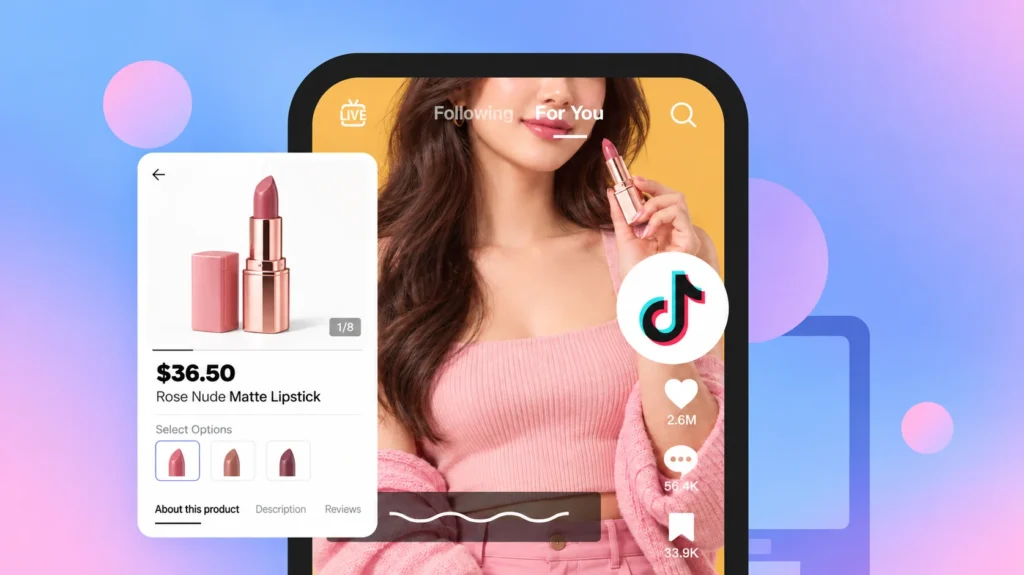
Unlike a traditional online store or marketplace, TikTok Shop combines entertainment, product discovery, and checkout. A customer can see your product in a video, open its listing, and place an order within the same app.
This model can work especially well for products that are easy to show in action, such as beauty items, home tools, fashion accessories, or hobby products. When deciding how to sell things on TikTok Shop, it’s worth checking out the top-selling products on TikTok Shop.
As I mentioned above, the GMV of TikTok in 2025 nearly doubled its sales in 2024. Moreover, LIVE Shopping also grew strongly in 2025. During 4 days of TikTok Shop’s US Black Friday and Cyber Monday campaign, shoppers watched more than 760,000 LIVE sessions, generating over 1.6 billion views and recording more than $500 million in total sales. This shows the real potential of this new trend platform.
However, TikTok Shop isn’t available everywhere, and requirements vary by country. Before applying, check whether TikTok Shop supports your market and business type.
Sell on TikTok Shop faster with LitCommerce
Already have products on other platforms? Import and bulk-list them on TikTok Shop with LitCommerce so you can start selling faster.
How Much Does It Cost to Sell on TikTok?
Creating a TikTok account is free, and TikTok Shop does not charge a standard product-listing fee. However, selling is not completely free.
Here are the core TikTok Shop fees when you sell on TikTok US:
- Referral fees: TikTok charges around 6% on most sales. Some jewelry products have a 5% rate.
- Withdrawal fee or transaction fee: Bank withdrawals cost $0.05 per transaction, while PayPal charges a 0.9% service fee.
- Order fulfillment: Every order must be packed and delivered. The cost depends on whether you ship it yourself or use a fulfillment service. Fulfilled by TikTok (FBT) fees usually start at $4.28 per unit. Free storage may be limited to 30-60 days.
Some other optional but common fees include:
- TikTok Shop Ads: Campaigns require at least $50 per day, while ad groups require at least $20 per day.
- Affiliate commissions: Set by you. But sellers typically offer creators 10%- 25% of each sale generated through their content or LIVE streams.
- Returns and refunds: Returned products, return shipping, and damaged stock can reduce your margin.
- Discounts and promotions: Seller-funded coupons and campaign discounts affect the amount you receive.
Plus, fees change over time and vary by market. Check the current rate card in your TikTok Shop Seller Center before calculating prices.
With the above fees, your total selling cost depends on the service you use. When pricing your TikTok Shop products, include all costs to protect your profit margin.
How to Sell on TikTok Shop: Easy Tutorial for Beginners
So if you want to learn how to sell on TikTok Shop for beginners, here are 6 steps to get started. I can create it easily, so can you. Just make sure you provide all required documents, and you will be good to go.
Step 1: Create a TikTok Shop Seller account
To start selling on TikTok, create a TikTok Shop Seller account.
Go to TikTok Shop Seller Center and select your region. Sign up with your phone number or email, create a new account, or connect an existing TikTok account. There is no requirement for follower count, so you can start even with zero followers.
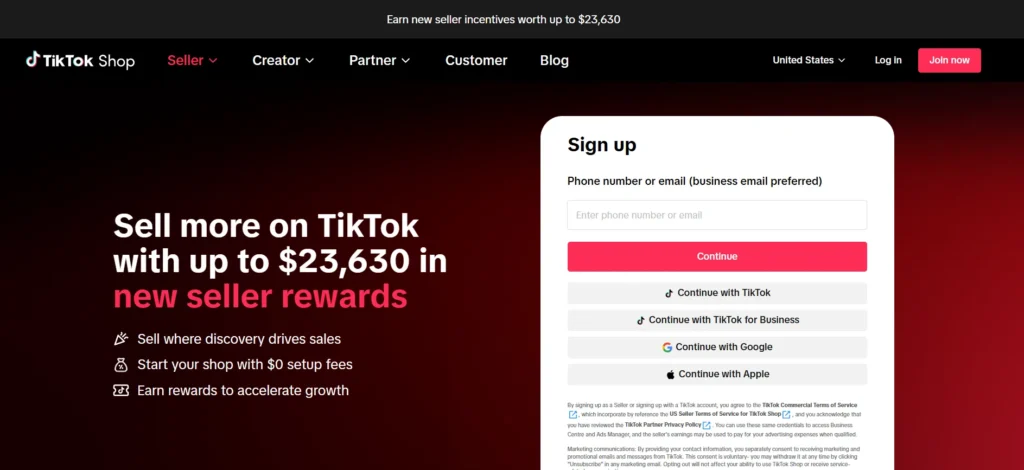
Next, choose your seller type and submit the required documents:
- Individual sellers: Provide a government-issued ID.
- Registered businesses: Submit your business registration documents.
- US sellers: Provide an Employer Identification Number (EIN) or Social Security Number, depending on your business type.
Once you finish the registration, your store will be under review for up to 48 hours. It may take longer if TikTok needs to review your documents manually.
Keep in mind that a TikTok Shop Seller Account is different from a TikTok Business Account. Learn more in our TikTok Business Account vs Personal Account guide.
Step 2: Set up your TikTok Shop
Now that you have created your account on TikTok Seller Center, let’s set up your TikTok Shop.
On the TikTok Shop Seller Center, select to register as an individual or business seller, depending on the options available in your country.
Then add your shop name, a clear description of what you sell, and your logo. Buyers will see these details when they visit your TikTok Shop.
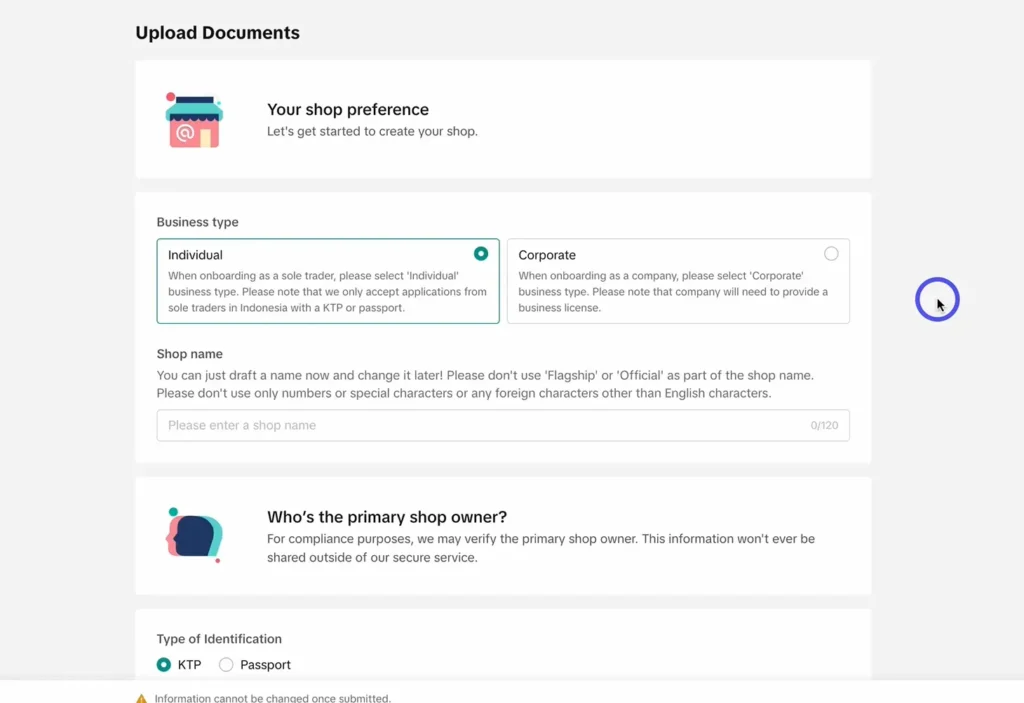
TikTok will also ask for:
- Your legal name or registered business name.
- Identity or business registration documents.
- A supported address and contact information.
- Bank account and tax details.
- Warehouse, pickup, and return addresses.
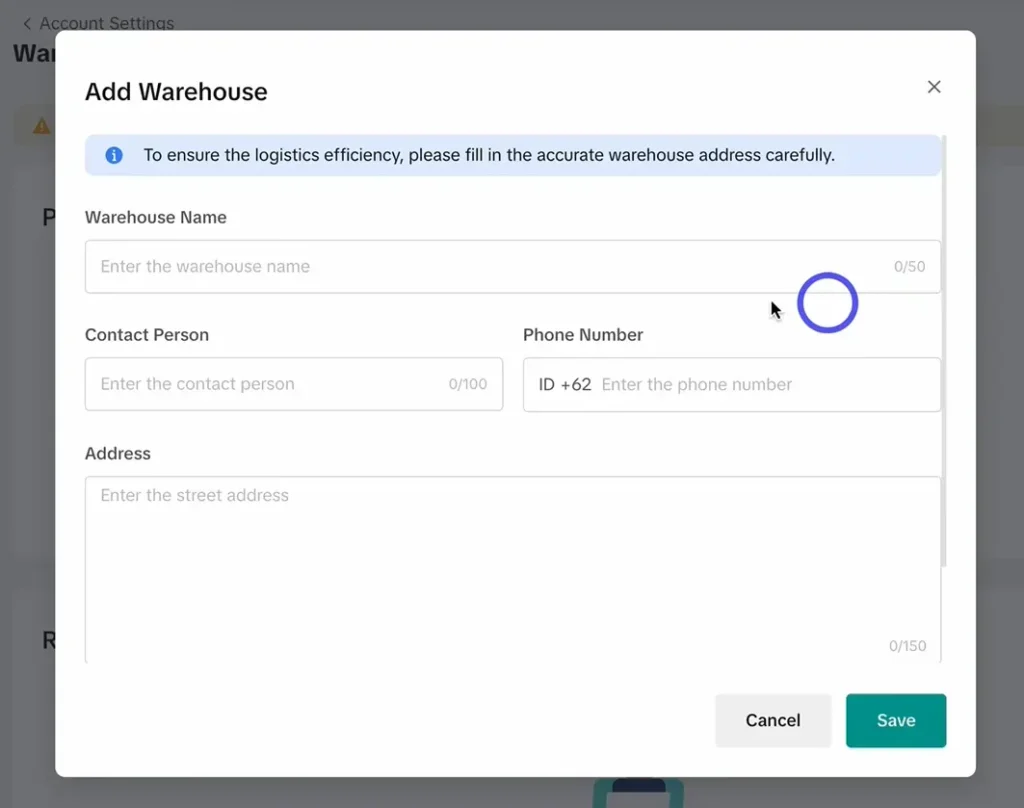
Make sure every document is valid and matches the details entered during registration. Differences in names, addresses, or document numbers can delay verification.
For shipping, you can choose between Seller Shipping, where you use your own carrier accounts to fulfill orders, and TikTok Shipping, which offers integrated shipping services with negotiated carrier rates.
Step 3: Add products to TikTok Shop
Next, create your product listings. In TikTok Shop Seller Center, you can add products individually, upload them in bulk, or connect a supported eCommerce platform.
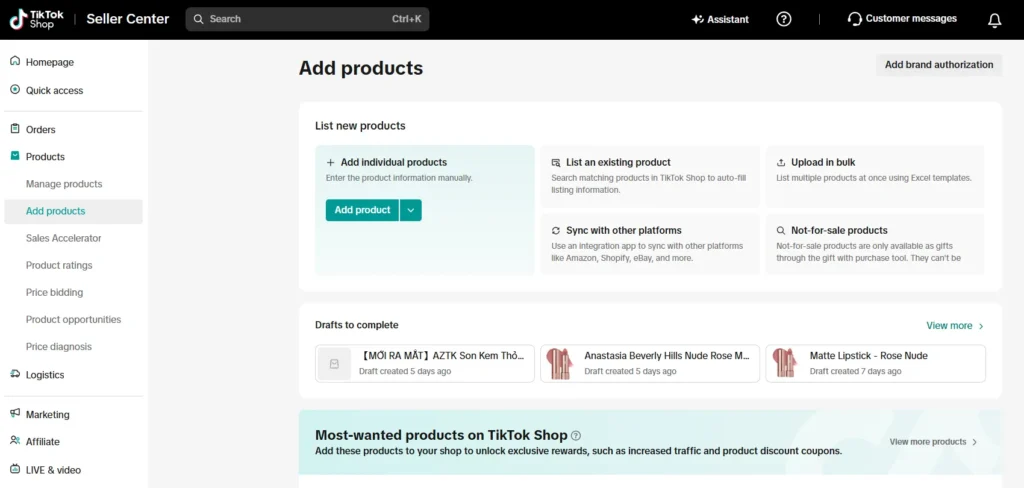
Each listing should include these product details, which can help optimize your listing for TikTok SEO:
- A clear and accurate product title.
- The correct TikTok Shop category.
- High-quality product images.
- An informative product description.
- Variations such as size, color, or material.
- Price and available quantity.
- Package weight and dimensions.
- Required brand, safety, or compliance information.
Avoid exaggerated claims, misleading images, copied content, and prohibited products. Your listing must meet TikTok Shop’s category and product policies before it can go live. If you want field-by-field instructions, see our complete guide on how to add products to TikTok Shop.
Already selling on Shopify, WooCommerce, Amazon, eBay, or Etsy? Recreating every product manually can take hours and increase the risk of inconsistent data. With LitCommerce TikTok Shop integration, you can import your products from your current store to TikTok Shop faster. For example, you can import products from eBay or Etsy, then prepare and publish them on TikTok Shop.
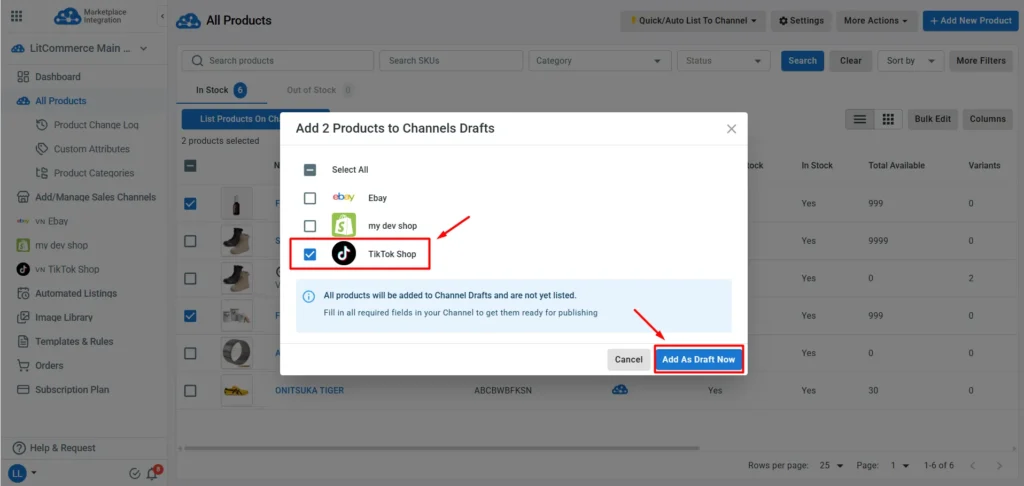
Using LitCommerce, you can also:
- Bulk-edit TikTok Shop product information.
- Apply Templates and Rules to multiple listings.
- Use smart category suggestions and AI-assisted listing features.
- Keep inventory and prices updated automatically.
- Import supported TikTok Shop orders into your current store.
Already have products on another platform?
Use LitCommerce to bulk list them on TikTok Shop without rebuilding every listing manually.
Step 4: Link your Shop to your TikTok account
Once you have created your TikTok Shop, connect it to the TikTok account (if you haven’t use your TikTok account to create your shop) you will use to promote your products. You can then add product links to videos and LIVE streams. Viewers can select these links and purchase the products without leaving TikTok.
Step 5: Create shoppable content that converts
Creating your TikTok Shop is nice; listings give customers the information they need to buy. But content gives them a reason to care. Next, on how to sell on items TikTok Shop, create content that goes viral and drives native engagement, which can then generate sales.

Focus each video on one product, problem, or benefit. Show how the product works instead of only displaying it against a plain background. In 2026, here are some content formats sellers are actually posting and you can test:
- A quick product demonstration.
- A problem-and-solution video.
- A before-and-after result, where appropriate and compliant.
- An unboxing or first-impression video.
- A short tutorial.
- Answers to common customer questions.
- A comparison between product options.
- Behind-the-scenes content from your business.
- Customer reviews or user-generated content used with permission.
When creating TikTok content, start with a clear hook that encourages viewers to keep watching. Show the product naturally and end with a simple call to action are also the best tips on how to sell on TikTok Shop.
Post consistently, but choose a schedule you can maintain. Test different formats, video lengths, and hooks. You should also experiment with the best times to post on TikTok for your audience. Use a small number of relevant hashtags instead of adding unrelated popular terms. Explore these TikTok Shop hashtag ideas to get started.
Finally, avoid making every video feel like an advertisement. Helpful and entertaining content builds trust, while constant hard-selling can push viewers away.
Step 6: Promote your TikTok Shop
Organic content may take time to gain traction. You can expand your reach through creators, LIVE Shopping, and paid ads.
Work with TikTok creators
The TikTok Shop Affiliate Program lets eligible sellers collaborate with creators. You can offer commissions and provide product samples where appropriate. Choose creators whose audience, style, and typical content fit your product. A smaller, relevant creator can generate better results than a larger account with an unrelated audience.
Host LIVE Shopping sessions
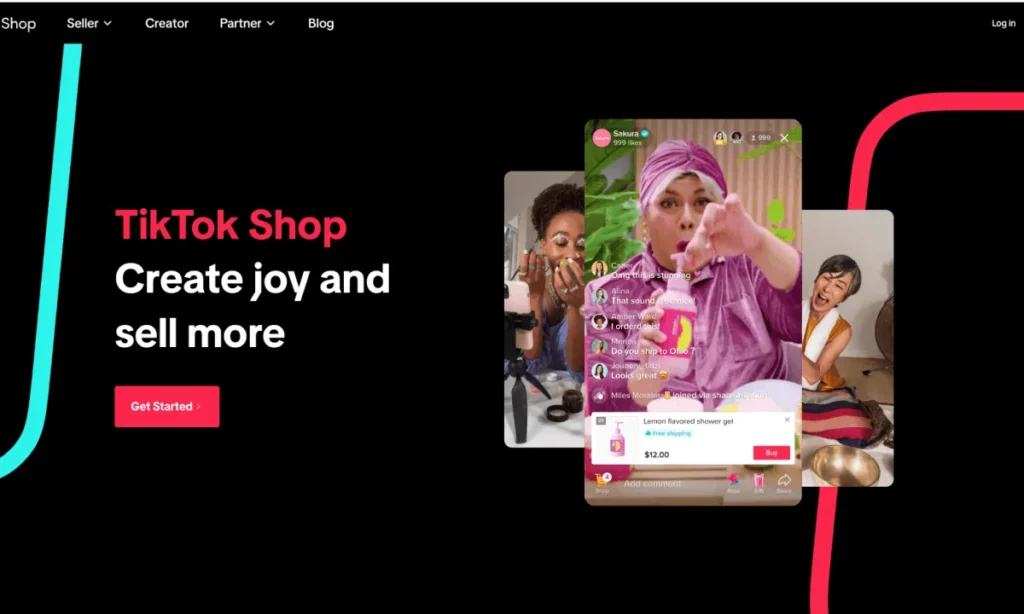
LIVE Shopping lets you demonstrate products, answer questions, and create real-time urgency. Prepare your product order, talking points, offers, and responses to common objections before going live.
Use TikTok Shop Ads
Paid campaigns can increase reach, but start with content that has already shown organic engagement or conversions. Track cost per purchase and return on ad spend rather than optimizing only for views.
Grow the right audience
Follower count alone does not guarantee sales. Aim to attract people who are genuinely interested in your product category. For practical ideas, read our guide on how to get more followers on TikTok.
Common Mistakes New TikTok Shop Sellers Make
Learning how to sell products on TikTok Shop is easier when you know which mistakes to avoid. Here are some common mistakes new TikTok Shop sellers make that you can avoid:
- Choosing products without checking TikTok policies: A product may be legal to sell elsewhere but prohibited or restricted on TikTok Shop. Check the latest product policy for your market before buying inventory or creating content.
- Selecting the wrong category: The wrong category can create missing-field errors or cause a listing to fail review. Choose the closest accurate category and complete all required attributes.
- Copying product data without reviewing it: Information from your website may not meet TikTok Shop’s title, image, category, or compliance requirements. Review every listing before publishing, even when using automation.
- Ignoring inventory synchronization: If you sell the same item on several channels, disconnected stock levels can cause overselling. Use a central inventory source and keep SKUs consistent across platforms.
- Focusing on views instead of sales: A video with high reach is not always profitable. Track product clicks, conversion rate, order value, cancellations, returns, and profit.
- Posting only promotional content: TikTok users open the app for useful or entertaining content. Mix product promotions with tutorials, demonstrations, stories, and answers to customer questions.
- Scaling discounts before calculating margin: Referral fees, shipping, affiliate commissions, advertising, and returns can quickly reduce profit. Calculate the full cost of each order before joining large campaigns.
- Neglecting fulfillment and customer service: Late dispatch, cancellations, poor communication, and policy violations can affect your Shop Health. Set realistic handling times and respond to buyers promptly.
How to Sell on TikTok Shop – FAQs
How to start selling on TikTok Shop?
To start selling on TikTok Shop, create a TikTok Shop Seller account, verify your identity or business, set up your TikTok Shop and add products. Once your products are approved, promote products through videos, LIVE Shopping, affiliates, and ads.
Do I need followers to sell on TikTok Shop?
No, you can start selling on TikTok Shop with zero followers as a seller. However, you need at least 1,000 followers to join in the TikTok Shop Affiliate Creator in the US.
How can you sell on TikTok Shop without inventory?
To sell products on TikTok Shop without inventory, you can use dropshipping, print-on-demand, or a third-party fulfillment service. However, you must still follow TikTok Shop’s fulfillment policies and ensure products ship within the required timeframe.
Can I sell on TikTok Shop without making videos?
You can create product listings, but video and LIVE content are central to product discovery on TikTok. You can create content yourself or work with eligible affiliate creators.
How can I sell items on TikTok Shop from Shopify?
You can use an app to transfer your products from your Shopify store to TikTok Shop. LitCommerce lets you bulk list Shopify products on TikTok Shop and sync inventory, prices, and supported orders.
How long does TikTok Shop product approval take?
Review time varies by product, category, market, and whether TikTok requests additional documents. Accurate categories, complete attributes, and compliant images can help prevent avoidable delays.
Start Selling on TikTok Shop Today!
Knowing how to sell on TikTok Shop involves more than opening an account. You need compliant listings, content that shows real product value, dependable fulfillment, and careful performance tracking.
Start small and learn from actual results. Improve the products, videos, and offers that convert, then scale them without losing control of your inventory or margins.
If you already sell elsewhere, LitCommerce can help you add multiple products at once and connect TikTok Shop with your existing channels. That means less repetitive listing work and one place to manage your multichannel workflow. For more guide on selling on TikTok Shop, visit our TikTok Shop guide hub.