WooCommerce TikTok Shop Integration
Connect WooCommerce with TikTok Shop and automatically sync products, inventory, and orders from one centralized dashboard. No coding or manual updates required.
Challenges of Managing WooCommerce and TikTok Shop
Managing WooCommerce and TikTok Shop separately can quickly become difficult as your business grows. Viral product spikes, fast-moving inventory, and increasing order volumes often create operational bottlenecks that are hard to manage manually.
Manual Listing Updates
Creating, editing, and optimizing TikTok Shop listings one by one becomes difficult for stores managing large product catalogs. Manual workflows slow down product launches and consume valuable time.
Inventory Mismatches
TikTok trends can drive sudden spikes in product demand overnight. Manually updating stock across WooCommerce and TikTok Shop increases the risk of overselling and inaccurate inventory levels.
Disconnected Order Management
Switching between WooCommerce and TikTok Shop to track and process orders creates unnecessary operational complexity and increases the chance of fulfillment errors.
Powerful Features for WooCommerce TikTok Shop Integration
Our WooCommerce TikTok Shop Integration provides the tools you need to simplify product management and improve your selling workflow.

Bulk Product Listing
Publish WooCommerce products to TikTok Shop in bulk and manage listings more efficiently from one centralized dashboard.
Bulk Listing Editor
Bulk edit titles, descriptions, attributes, and pricing to optimize TikTok Shop listings more efficiently.
Smart Pricing Rules
Create flexible pricing rules for TikTok Shop listings to stay competitive while protecting profit margins.
Automated Category Mapping
Automatically match WooCommerce products with relevant TikTok Shop categories using smart category suggestions.
Centralized Order Management
Automatically import TikTok Shop orders into WooCommerce and manage everything from one familiar dashboard.
Real-Time Inventory Sync
Keep inventory levels synced between WooCommerce and TikTok Shop in real time to prevent overselling and maintain accurate stock counts.
Before Connecting WooCommerce with TikTok Shop
Understanding the necessary steps before integrating your WooCommerce with TikTok Shop is crucial to avoid any potential errors and ensure a smooth process.
Create & build a TikTok business account
Choose “Shipped by Seller” shipping method
Set up Warehouse and Delivery option
How to Connect WooCommerce to TikTok Shop
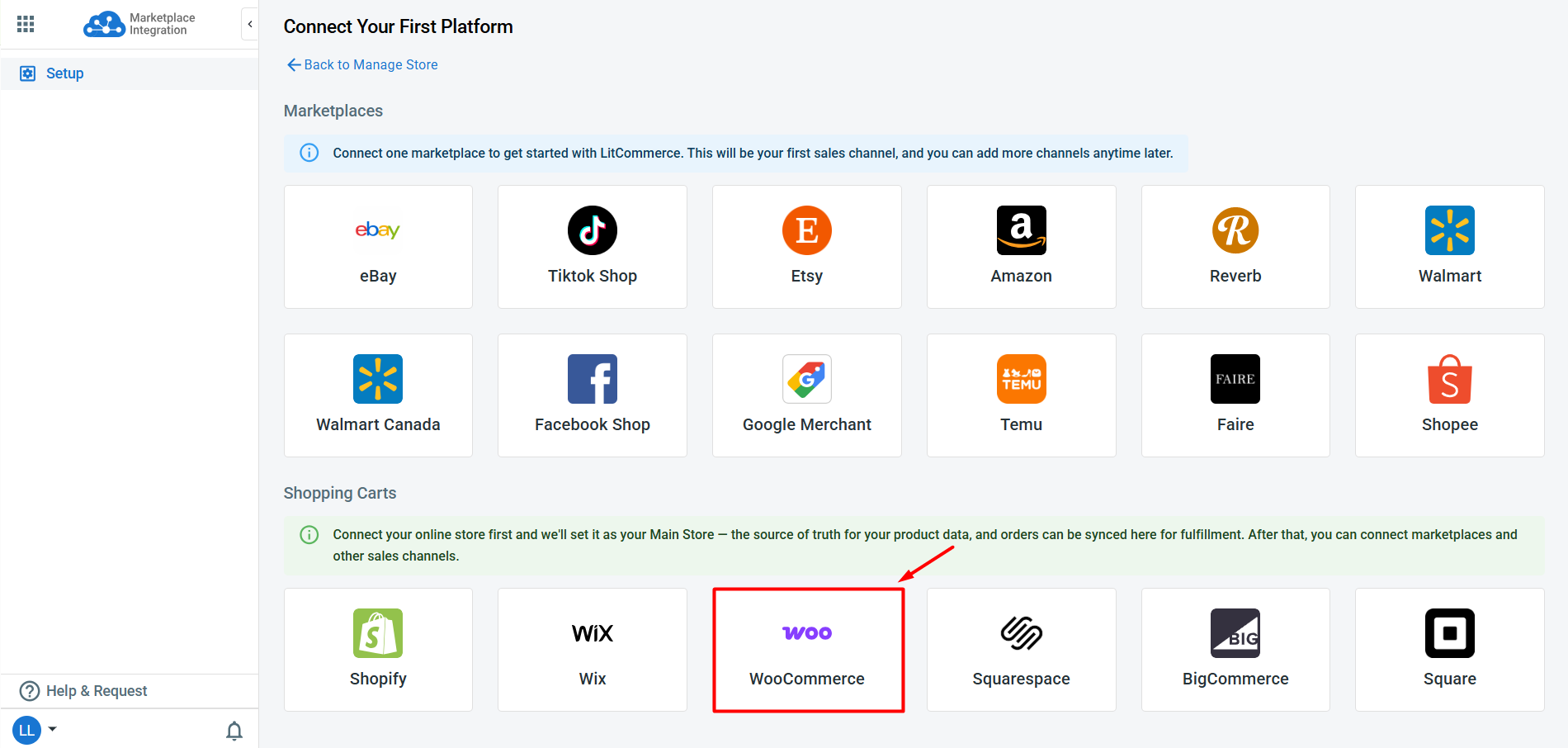
First, install LitCommerce plugin on your WooCommerce or directly set up your WooCommerce store on LitCommerce app. Your WooCommerce store then will act as a headquarter – where you manage all your listings, inventory, and orders.
After that, connect your TikTok Shop on LitCommerce. LitCommerce also enables integration with other channels including Amazon, eBay, Etsy and over 20 additional platforms.
LitCommerce handles product listings in all cases:
- Case 1: You have products on your WooCommerce store and want to list them on TikTok Shop
- Case 2: You have products on TikTok Shop and want to import these listings to your WooCommerce store.
- Case 3: You have products on both WooCommerce and TikTok and want to link them together.
That way, you can sync your product details such as product name, description, price, and image across TikTok and WooCommerce store.
Our TikTok Shop WooCommerce sync ensures your inventory levels are up to date on both channels. Once your customer places an order on WooCommerce or TikTok, your inventory on both platforms will be automatically updated.
See the big picture of all your orders across different channels. When you integrate WooCommerce with TikTok Shop, your WooCommerce store will receive all order details from TikTok Shop. You can review and fulfill them alongside orders from your Wix store, conveniently in one place.
Selling on WooCommerce and want to expand to TikTok Shop? With short videos and live streams turning viewers into buyers on the spot, TikTok Shop puts your products in front of a huge, ready-to-shop audience – so it’s one of the smartest moves you can make to grow your store in 2026.
The trouble is that WooCommerce and TikTok Shop run separately, each with its own listings, stock, and orders, and neither updates the other. LitCommerce links the two stores and keeps them in sync, so you manage everything from one place.
In this guide, we’ll show you how to set up your WooCommerce TikTok Shop integration using LitCommerce, covering:
- Step 1: Connect WooCommerce to TikTok Shop
- Step 2: List and import products on TikTok Shop
- Step 3: Turn on WooCommerce TikTok Shop sync
- Step 4: Manage your TikTok Shop order flow
No technical skills are needed, so anyone can follow along. Let’s get into it!
Step 1: Connect WooCommerce to TikTok Shop
The first step is to set up WooCommerce as your Main Store inside LitCommerce. Your Main Store acts as the central hub that holds your full product catalog and inventory, and every channel you add syncs to and from it.
You can install the LitCommerce plugin on your WooCommerce site, or connect your WooCommerce store from inside the LitCommerce app.

Once WooCommerce is set as your Main Store, follow these steps to connect TikTok Shop:
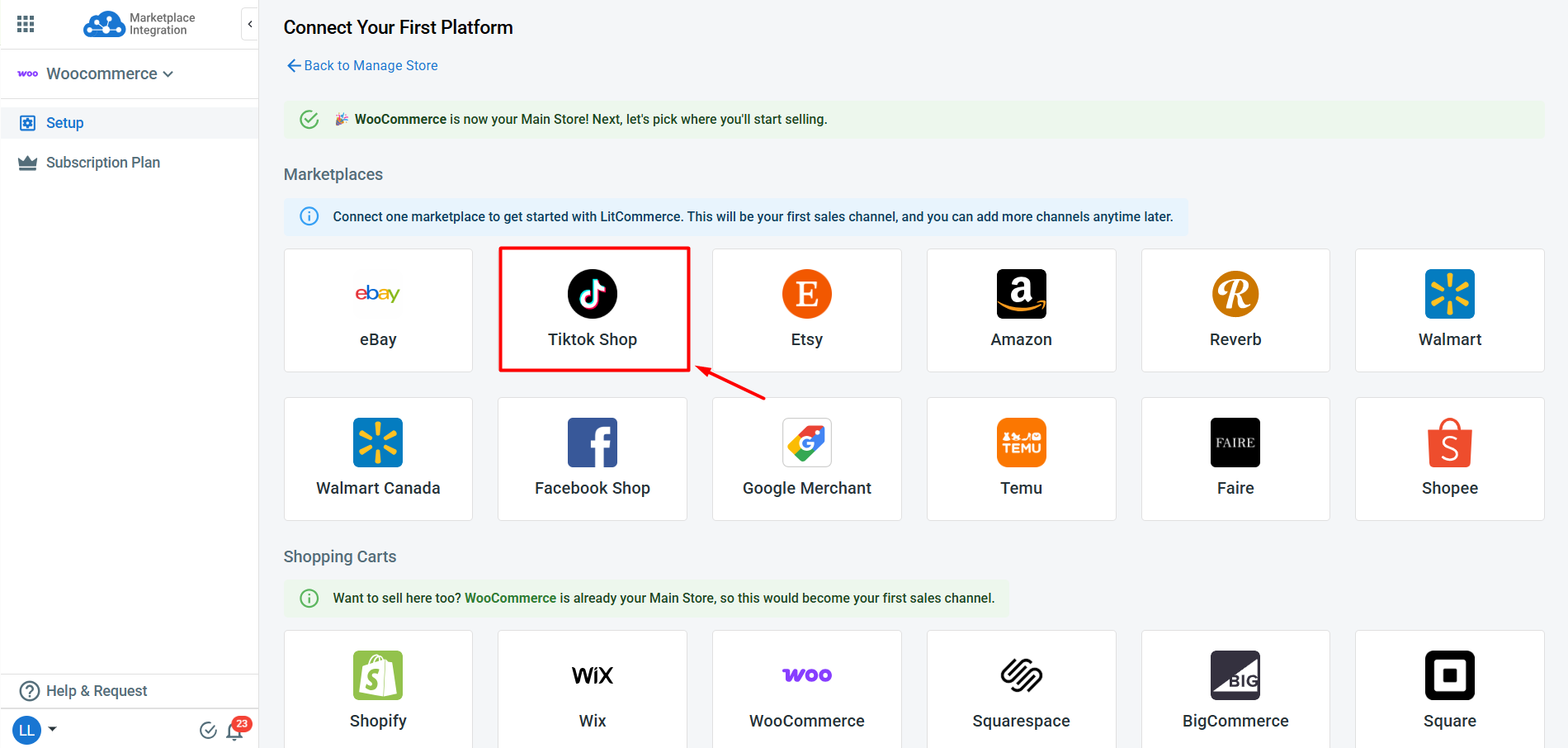
1. From the list of supported marketplaces, find TikTok Shop and click Connect under the TikTok Shop logo.
2. Enter your TikTok Shop store name, then hit Connect Your Account.
3. Allow LitCommerce to access your existing TikTok Shop seller account.

After you confirm, your WooCommerce and TikTok Shop stores sit side by side on your dashboard. You’ve now linked WooCommerce to TikTok Shop and you’re ready for the next step.
Pro tip: Beyond TikTok Shop, LitCommerce supports plenty of other WooCommerce integrations, including WooCommerce Amazon, WooCommerce eBay, WooCommerce Etsy, etc. You can add as many channels as you like to the same Main Store and run them all from one screen.
Step 2: List and Import Products on TikTok Shop
Now that you’ve linked WooCommerce to TikTok Shop, what you do next depends on where your listings currently live. You can list your WooCommerce products on TikTok Shop, import from
TikTok Shop to WooCommerce, or simply link products across both platforms. Let’s walk through each option.
Case 1: List your WooCommerce products on TikTok Shop
Once your WooCommerce store is connected, LitCommerce automatically pulls in your WooCommerce products so they’re ready to list on TikTok Shop.
If you’re selling on WooCommerce and want to expand to TikTok Shop, here’s how to get your products live:
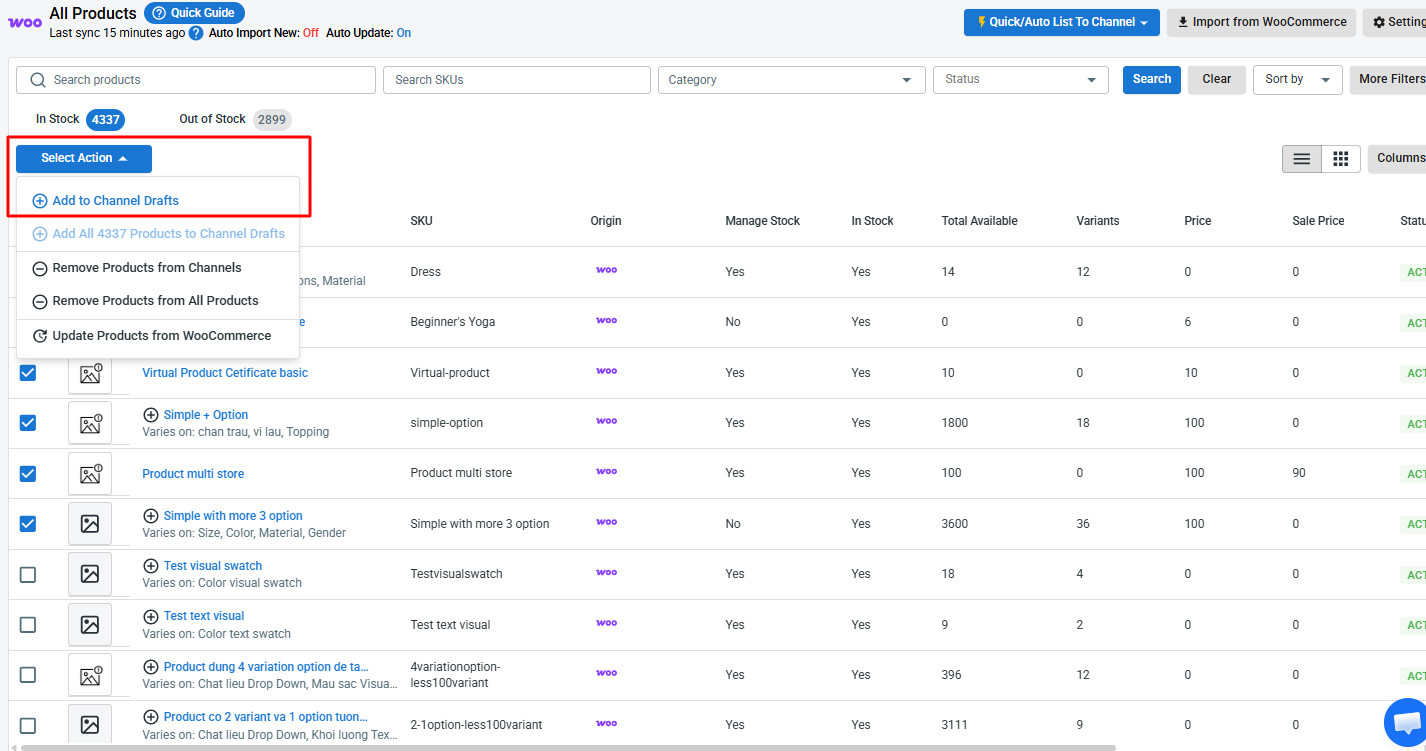
1. Go to All Products and select the WooCommerce items you want to list on TikTok Shop.
2. Click Select Action, then choose Add to Channel Drafts.

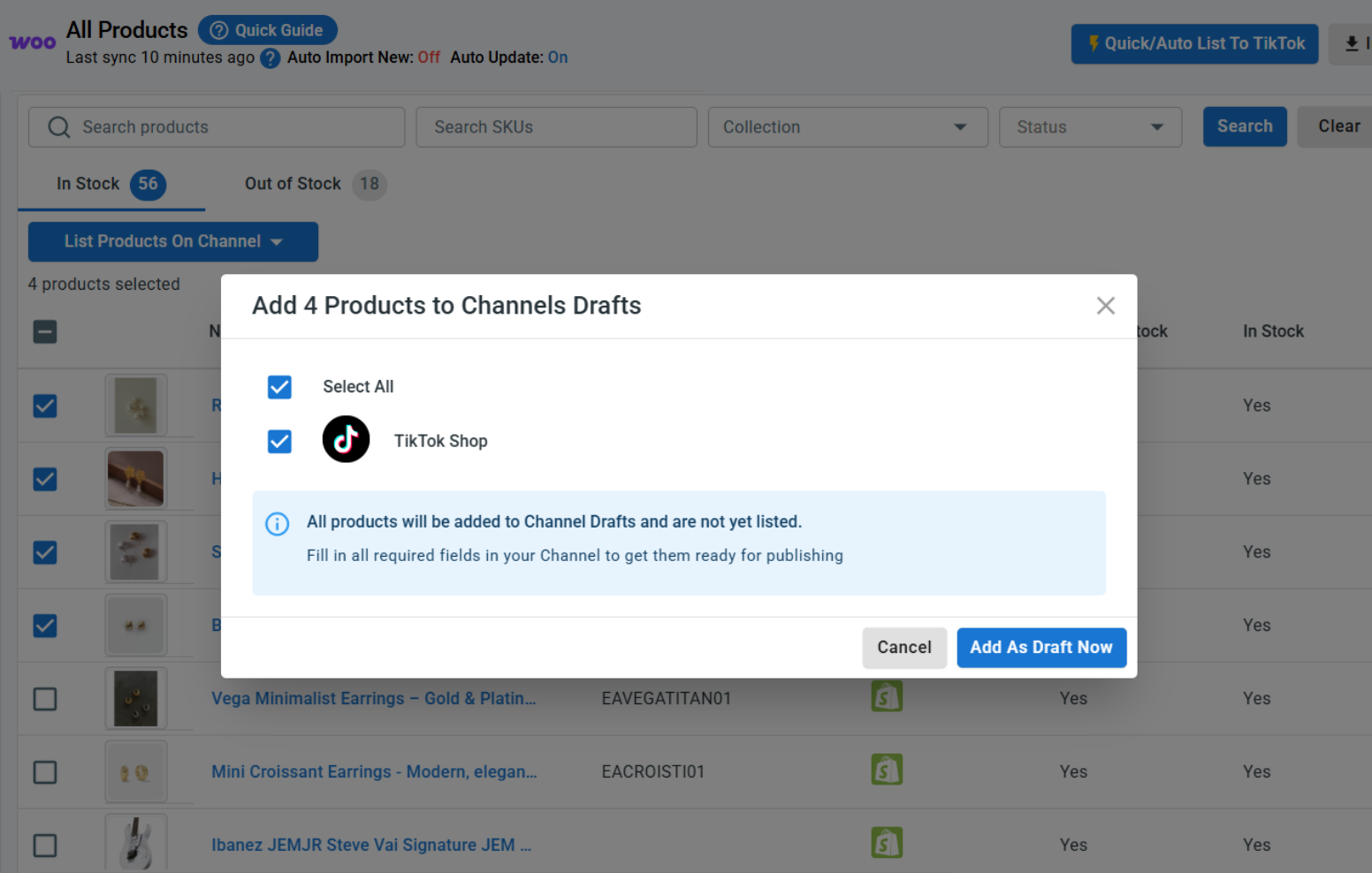
3. Check the box next to your TikTok Shop store, then click Add As Draft Now.

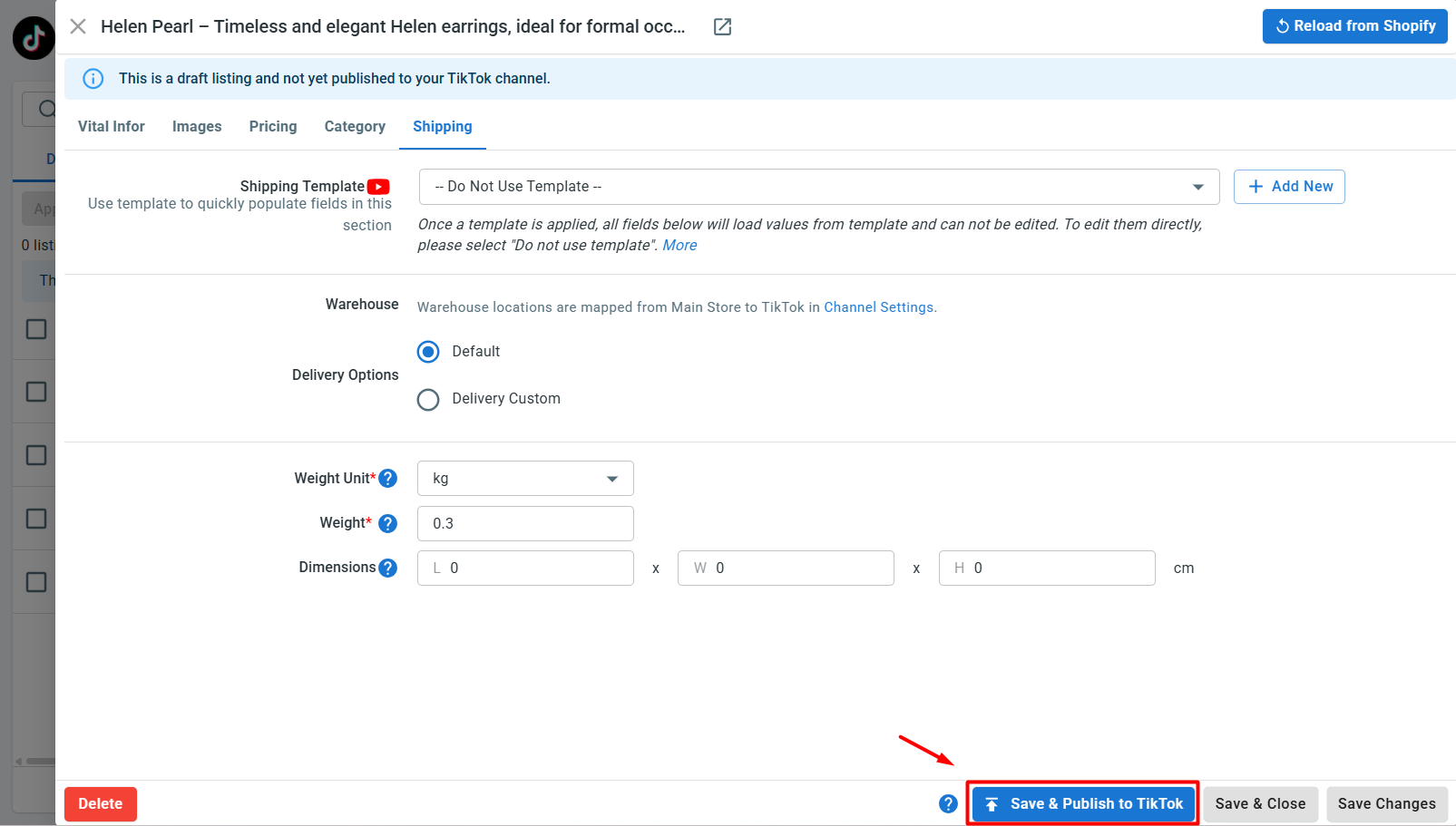
4. Open the TikTok Shop tab and review each draft listing. TikTok Shop often asks for details WooCommerce doesn’t, such as category, shipping options, and warranty information.
5. Fill in the required details for each listing.
6. Once a listing looks good, click Save and Publish to TikTok Shop.

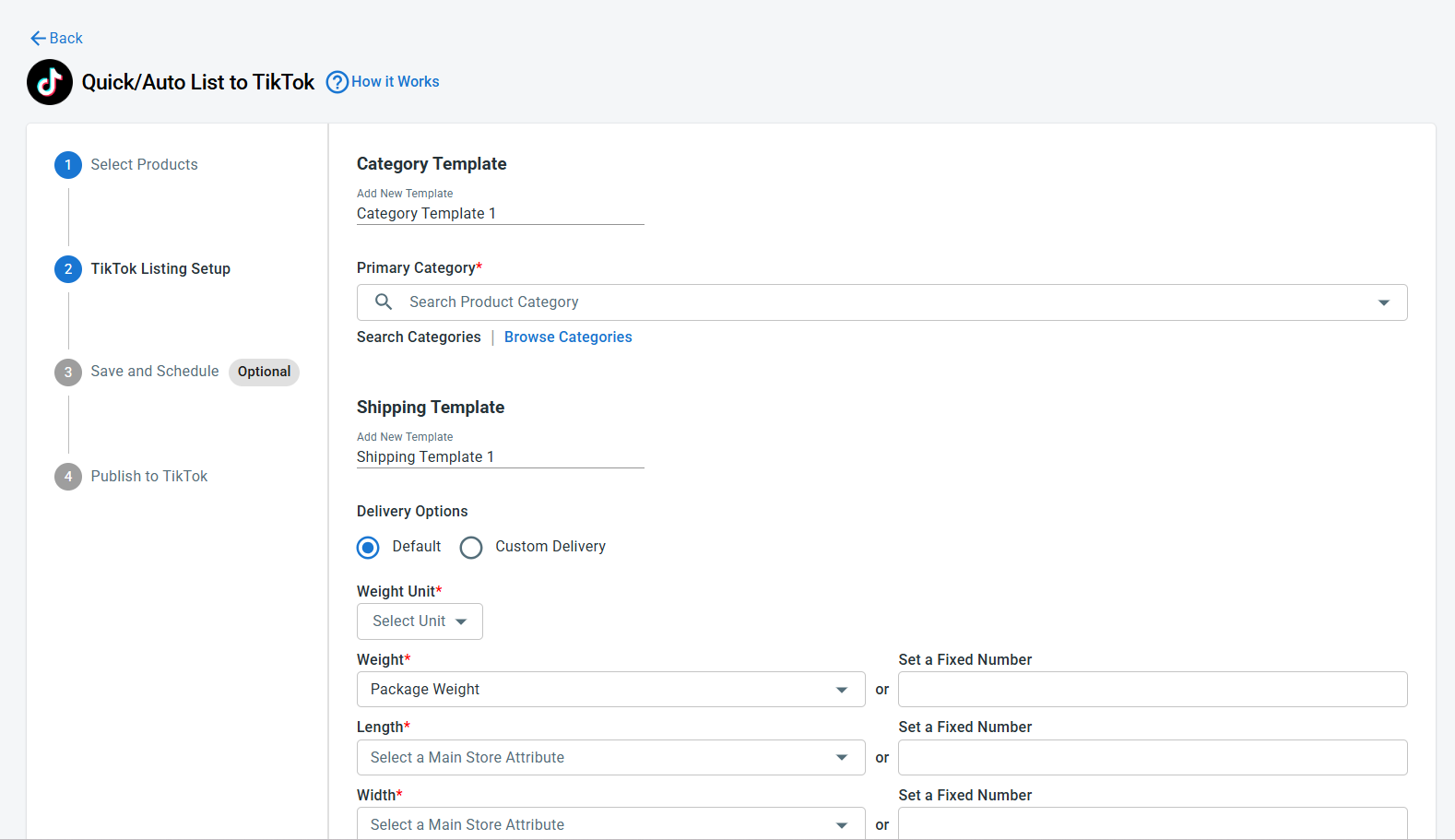
Pro tip: Instead of listing products one by one, use Quick/Auto List to TikTok Shop to bulk edit and upload your WooCommerce products to TikTok Shop. This lets you create templates and apply the same settings – like category, shipping, or pricing – across many TikTok Shop listings at once, a huge time-saver if you have a large catalog.

Case 2: Import your TikTok Shop products into WooCommerce
Selling on TikTok Shop already and want to bring those listings into WooCommerce? LitCommerce pulls your existing TikTok Shop listings directly into your store. Here’s how to do it:
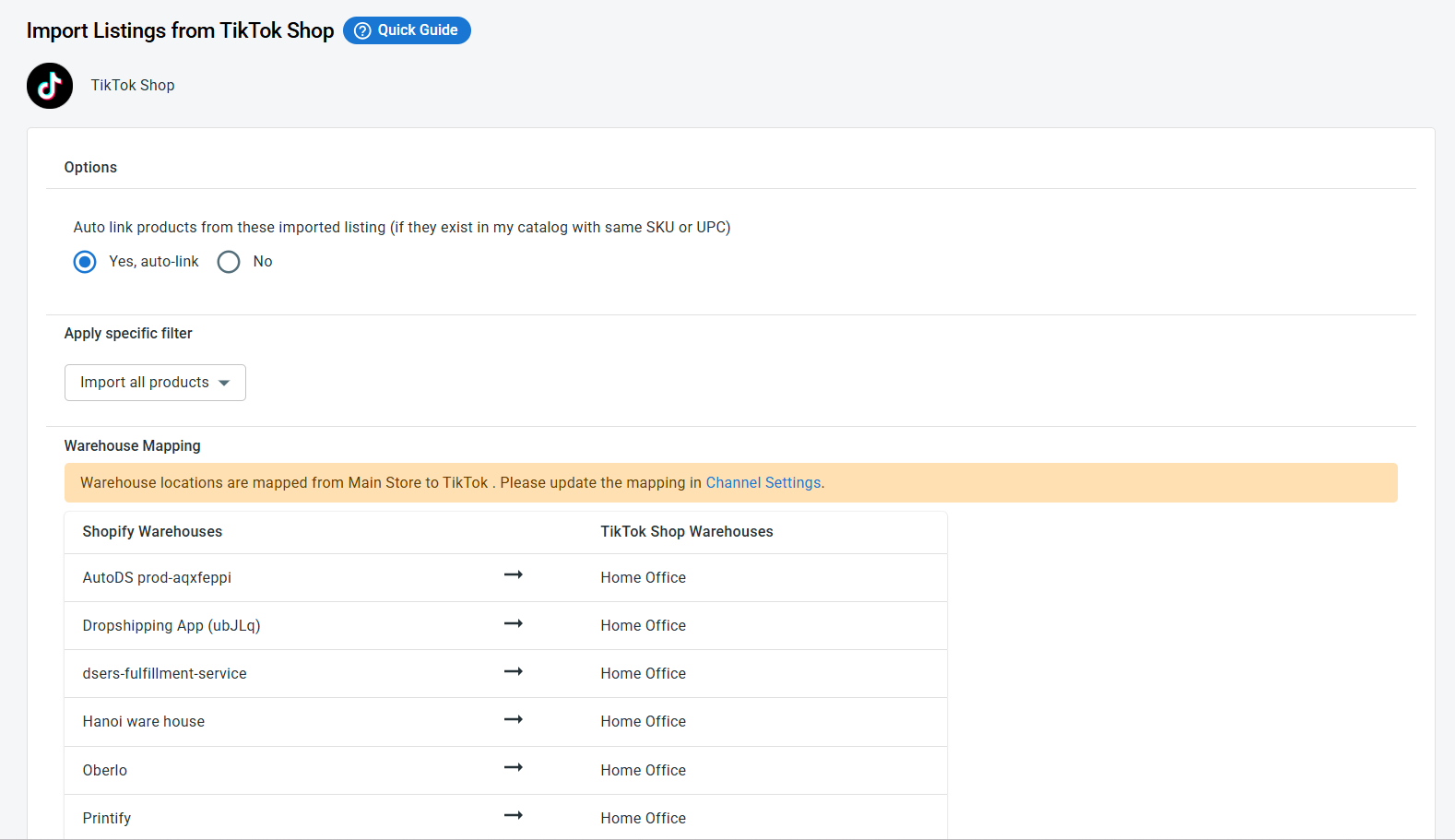
1. On the TikTok Shop channel tab, click Import from TikTok Shop.
2. Let LitCommerce auto-link your items across WooCommerce and TikTok Shop, filter which products you want to bring in, and map your warehouses.
3. Click Begin Import to start.

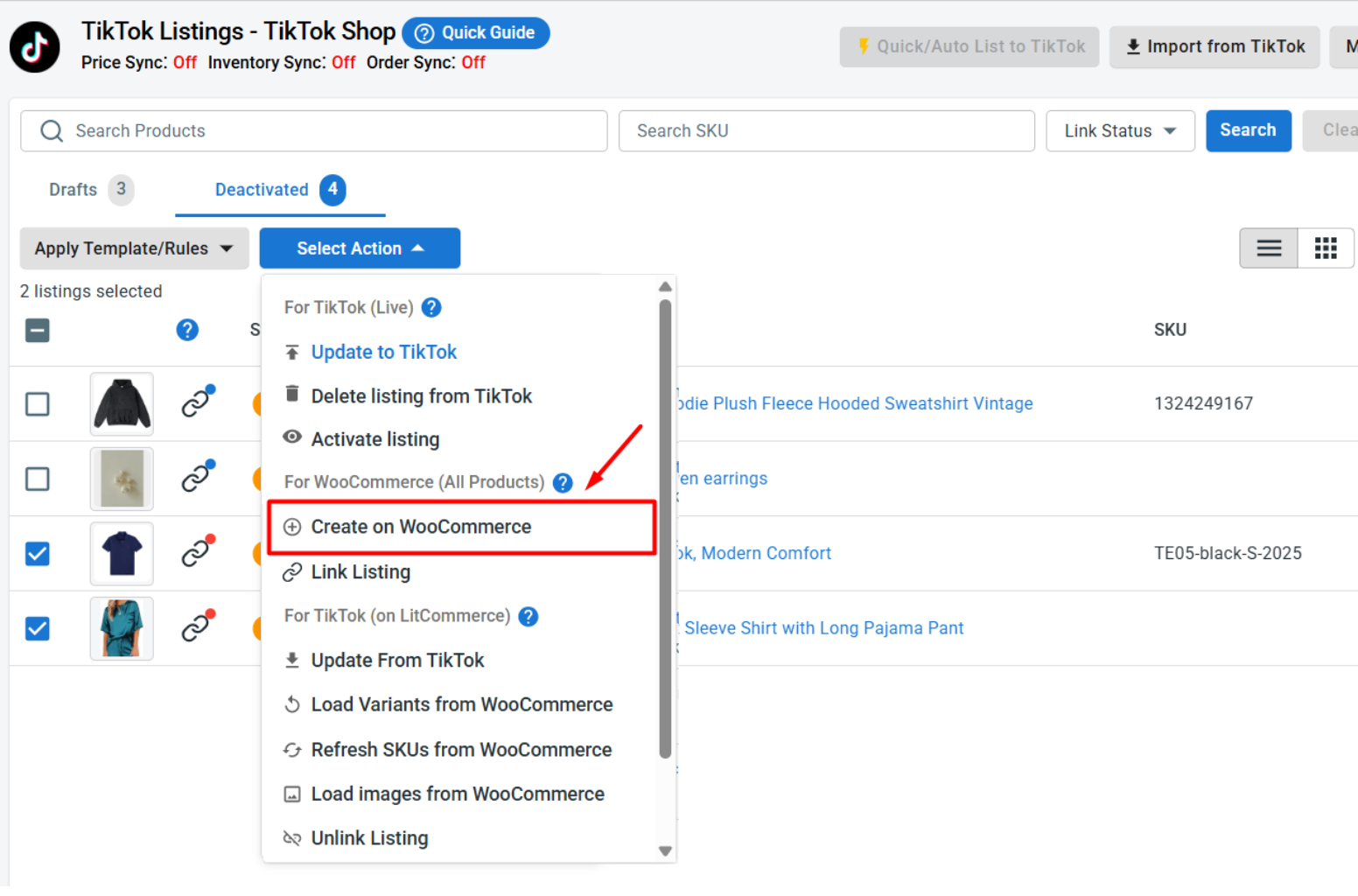
4. Your TikTok Shop listings load into LitCommerce. From there, select them, click Select Action, then choose Create on WooCommerce.

That’s it. Your listings now live on both stores, linked together and ready for syncing.
Case 3: Link products across WooCommerce and TikTok Shop
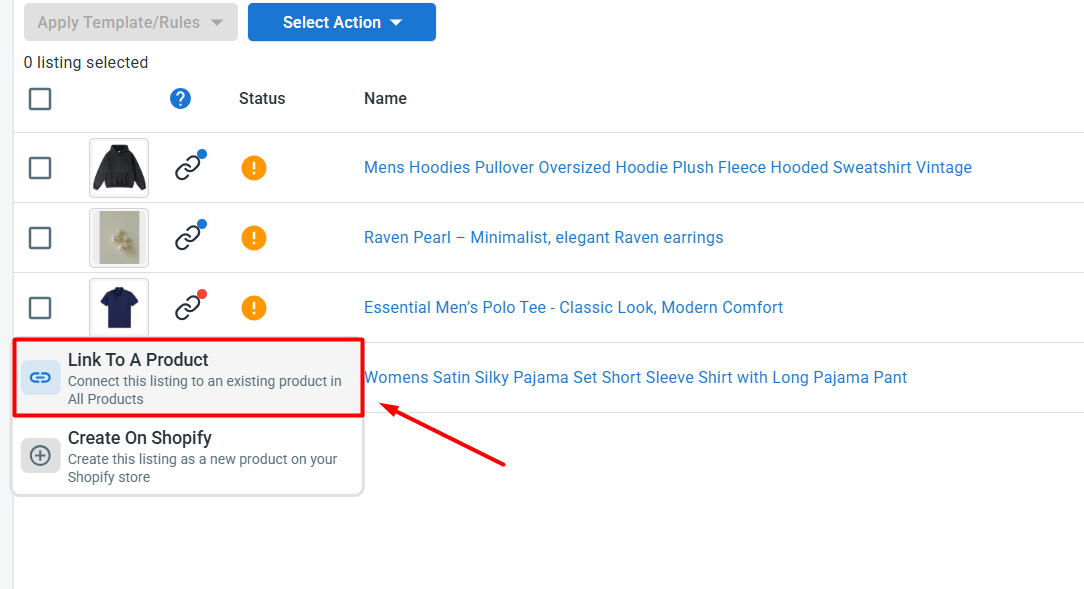
When you import products, any items LitCommerce links automatically appear with a blue dot, while items that still need linking show a red dot. To link the unmatched products yourself, follow these steps:
1. Hover over the red dot on an unlinked product.
2. Choose Link To A Product.
3. Find the matching item and click Select next to it.

Once you’re done, your products are linked in both directions, from WooCommerce to TikTok Shop and back, and they’re ready to sync.
Step 3: Turn On WooCommerce TikTok Shop Sync
With your products linked, you can now set up WooCommerce TikTok Shop sync to keep your inventory, pricing, and orders consistent across both channels without any manual work.
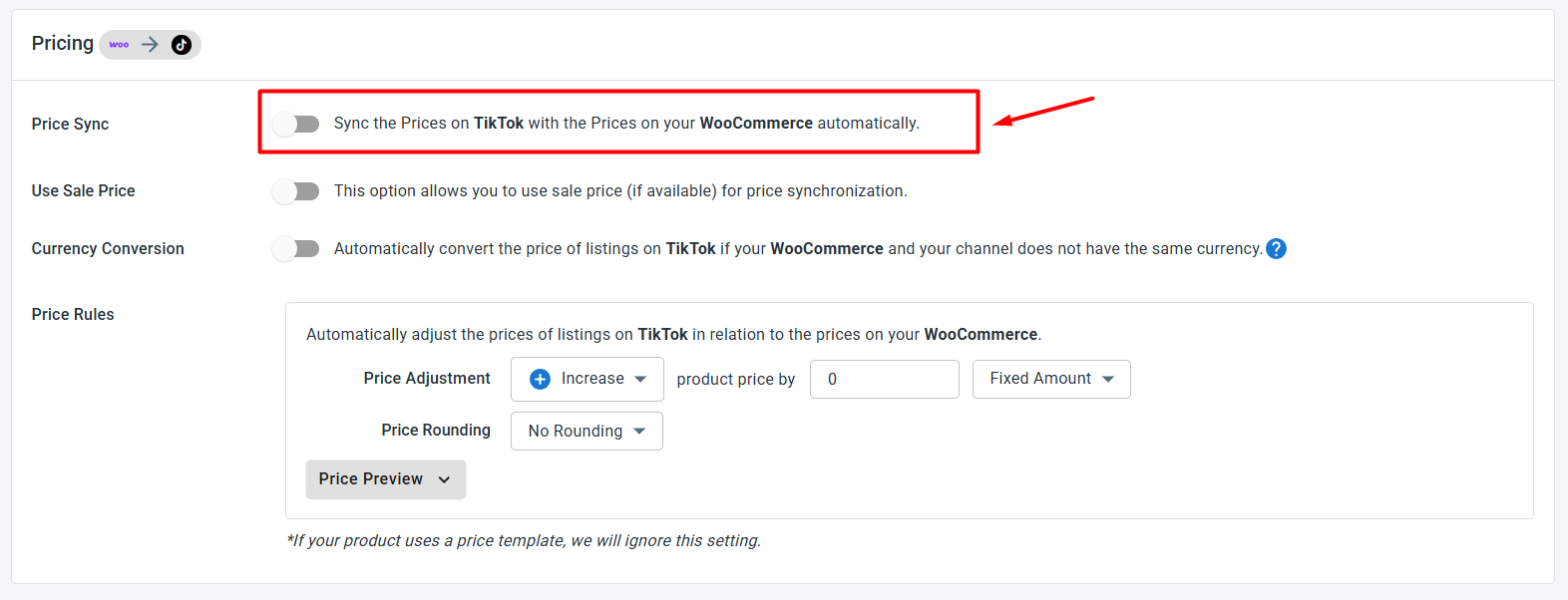
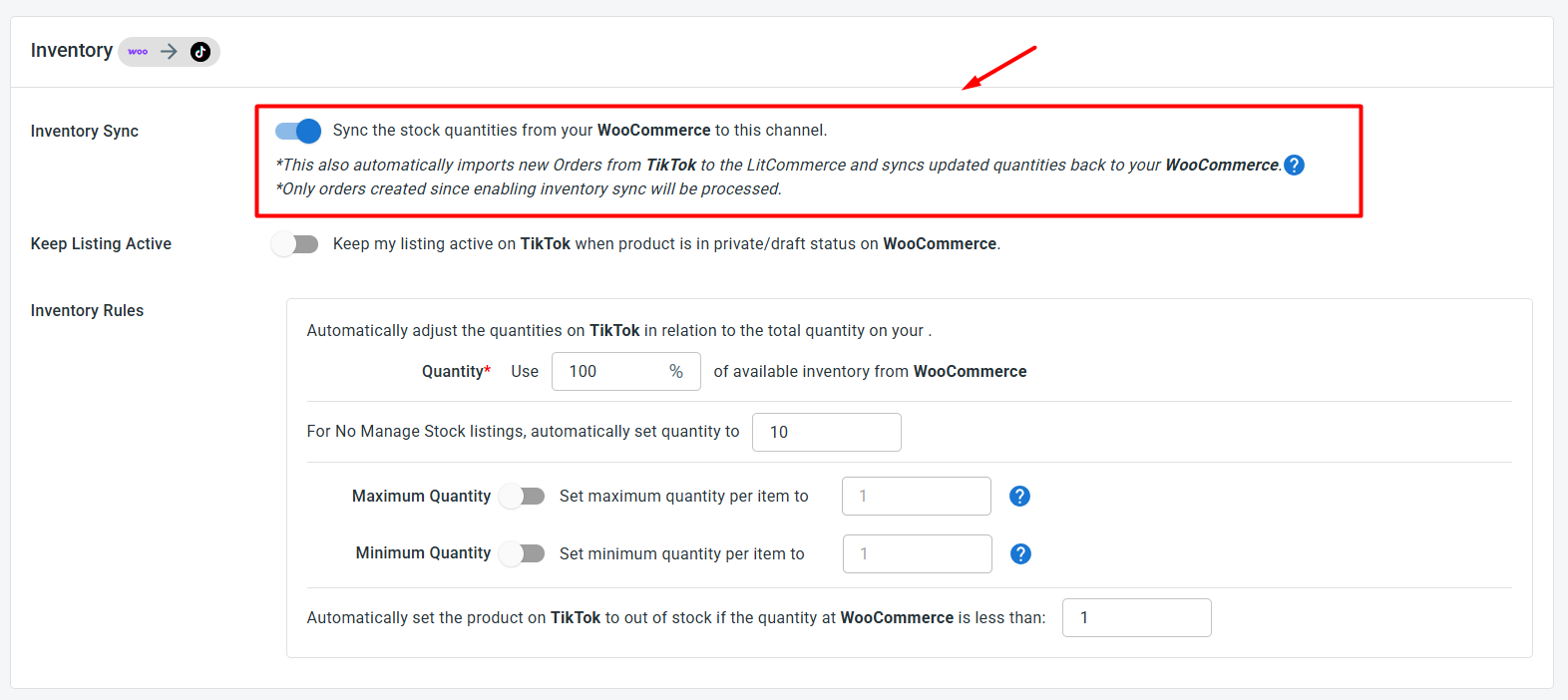
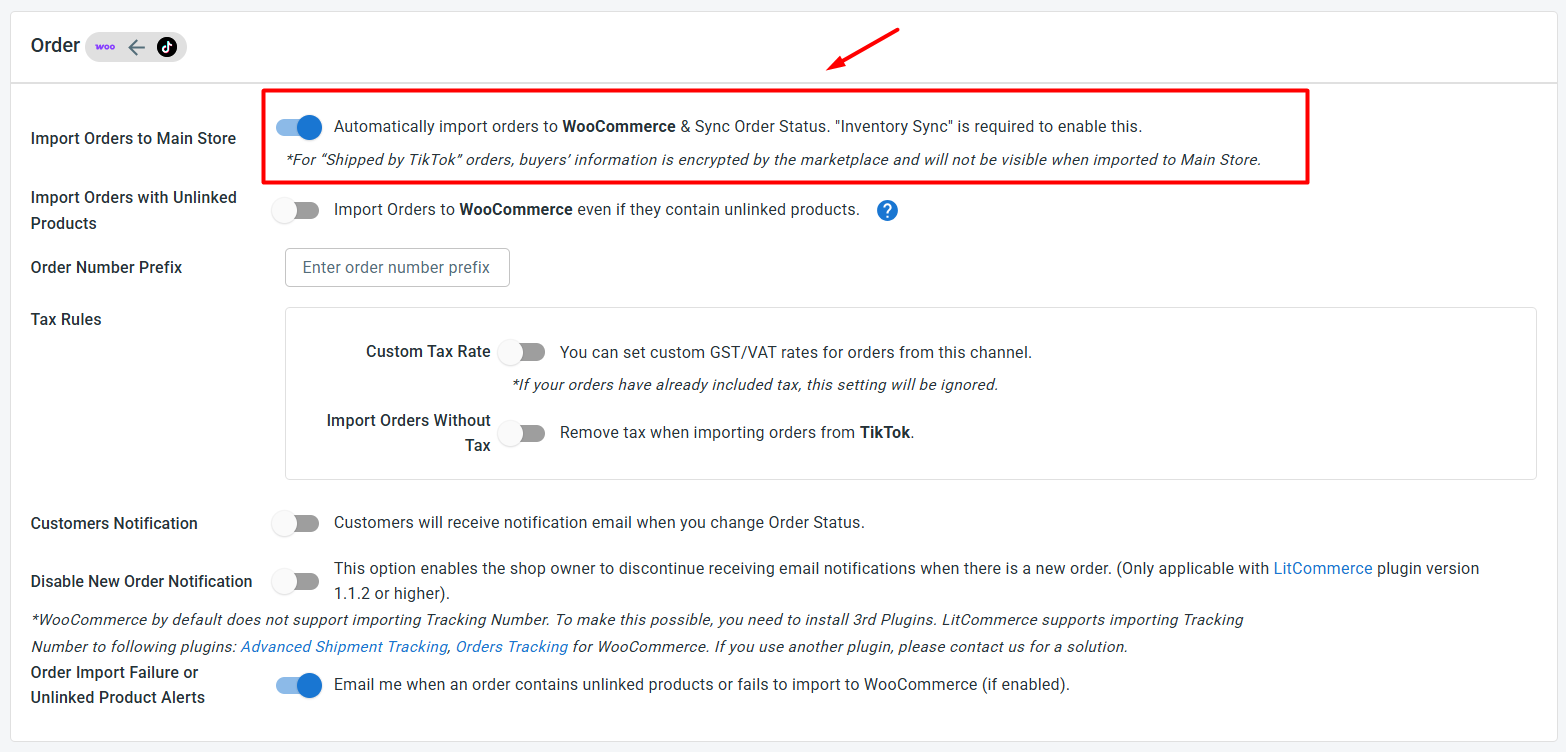
To access these settings, click Channel Settings in your TikTok Shop store inside LitCommerce. Here are the 3 main sync settings you can configure for your WooCommerce TikTok Shop integration:
- Price sync: Turn this on and any price you adjust in LitCommerce updates automatically on TikTok Shop. You can also apply price rules to raise or lower your TikTok Shop prices by a set amount or percentage.

- Inventory sync: Keep your stock counts aligned across WooCommerce, TikTok Shop, and LitCommerce so you never oversell. You can set minimum and maximum thresholds, keep listings active when stock hits zero, and use inventory rules to sync only a percentage of your WooCommerce stock to TikTok Shop.

- Order sync: Choose Import Orders to Main Store to bring all your TikTok Shop orders into your WooCommerce dashboard, so you handle everything in one place.

Once your settings look right, click Save Settings at the bottom of the page.
Step 4: Manage Your Order Flow
With Import Orders to Main Store switched on, every TikTok Shop order lands in your WooCommerce dashboard right next to your WooCommerce orders. That means no more jumping between two seller accounts to see what sold and what’s waiting to ship.
From your WooCommerce store, you can:
- Review both your WooCommerce and TikTok Shop orders in one place
- Track shipments across both channels at the same time
- See which channel brings in more sales and what’s working, so you can sharpen your selling strategy.
And that’s your WooCommerce TikTok Shop integration, set up end to end. Once it’s running, your catalog reaches a brand-new audience on TikTok Shop while your prices, stock, and orders keep themselves in step, leaving you free to focus on growing the business.
Our Integration Pricing
(*) Number of Product Listings count towards the total number of listings on all connected sale channels, not on products you have on your mainstore.
Need a Custom Plan? Please contact us.
Popular Questions About WooCommerce TikTok Shop Integration

Definitely YES. You can connect WooCommerce to TikTok Shop manually or use LitCommerce – a multichannel selling tool to help add a TikTok Shop store to the WooCommerce website.
With LitCommerce, you only need 6 detailed steps to integrate WooCommerce with TikTok Shop:
#Step 1. Add LitCommerce app on WooCommerce
#Step 2. Connect WooCommerce to TikTok Shop
#Step 3. Upload WooCommerce products into TikTok Shop
#Step 4. Edit TikTok Shop listings
#Step 5. Enable WooCommerce TikTok Shop sync
#Step 6. Integrate WooCommerce TikTok Shop order flow
If you have any specific requirements, feel free to contact our support team for more consultation.
One of LitCommerce’s advanced features is to make it simple to synchronize your inventory between WooCommerce and TikTok Shop.
On the sidebar menu of your LitCommerce dashboard, select Channel Settings to access TikTok Shop.
You can use the Inventory Sync feature there to set the Inventory Rules.
LitCommerce will automatically sync WooCommerce and TikTok Shop inventory on your behalf.
- WooCommerce Compatibility: The LitCommerce plugin has been tested up to WooCommerce version 6.4.5. This means it is officially compatible with WooCommerce versions 5.0 and higher, up to and including 6.4.5.
- WordPress Compatibility: The plugin requires WordPress version 5.0 or higher.
You can confidently use the LitCommerce plugin with WooCommerce version 6.4.5 as long as your WordPress and PHP versions meet the specified requirements.
No matter how big your company is, WooCommerce is always a worthy choice to take into account. One of the elements that contribute to user trust and reputation-building is its scalability. The eCommerce platform offers maximum satisfaction even for huge stores with an astonishing number of add-ons and integrated functionalities.
LitCommerce offers a 7-day free trial with full feature access, including: 15-minute sync for price, inventory and product information, also advanced order management across all channels. You can cancel at any time if you want.
You can also get a 20% discount for yearly payments. Don’t forget to check out as soon as possible to get this opportunity right now.
See Why Sellers Choose LitCommerce
Discover why sellers choose LitCommerce to simplify selling across TikTok Shop and other marketplaces.
“LitCommerce allows us to set up and install quickly with just a couple of clicks…”
Very minimal configuration. LitCommerce allowed us to import our Etsy listings into LitCommerce and the freedom to modify and sync all those listings to multiple marketplaces, including BigCommerce, Shopify, Amazon, eBay, and Etsy…
Mr. Rodrigo, CEO of Bien Hecho
- Courtdale CrossingsUnited States
Litcommerce is GREAT!
Excellent platform to use for my new business and it just so happens to come with amazing customer service! A+++++++
- AnthonyUnited Kingdom
LitCommerce is a very powerful tool
LitCommerce is a very powerful tool. There are a lot of moving parts, but support is extremely helpful. As I was working on some drafts I was contacted by Evelyn and she was extremely helpful in making sure I was using all the tools that LitCommerce offers. She showed me how I could apply certain templates to all my drafts at once instead of one by one. Saving me a bunch of time! Highly recommend LitCommerce!
- Lovely ThinkingsPortugal
Friendly and helpful
Friendly, quick and helpful customer service. Wide enough range of connection options to meet my needs.
- Adam RogersUnited States
I am really impressed with the level of support.
Both times I had several questions and a small issue and both times two different people responded instantly....
- Castle Rocks CornwallUnited Kingdom
Near perfect - excellent customer service
LitCommerce is close to perfect. It could have some extra tools to help edit content/descriptions etc - what we use on Etsy...
- Flippin GoodiesUnited States
I have tried a few apps for cross listing
And the team at LitCommerce are by far the best out there. They have already added a few functions to the app that we need in order to use it...
- Botan SaydaUnited Kingdom
Solves all my problems on one platform
Solves all my problems on one platform, easy to use and incredible support team which are responsive almost instantly and very helpful...
- LubnaSyria
Start Multichannel Selling with LitCommerce Today!
Go selling on multiple channels with a single solution – LitCommerce!